Healthie.NET.Dashboard
4.1.3
Prefix Reserved
See the version list below for details.
dotnet add package Healthie.NET.Dashboard --version 4.1.3
NuGet\Install-Package Healthie.NET.Dashboard -Version 4.1.3
<PackageReference Include="Healthie.NET.Dashboard" Version="4.1.3" />
<PackageVersion Include="Healthie.NET.Dashboard" Version="4.1.3" />
<PackageReference Include="Healthie.NET.Dashboard" />
paket add Healthie.NET.Dashboard --version 4.1.3
#r "nuget: Healthie.NET.Dashboard, 4.1.3"
#:package Healthie.NET.Dashboard@4.1.3
#addin nuget:?package=Healthie.NET.Dashboard&version=4.1.3
#tool nuget:?package=Healthie.NET.Dashboard&version=4.1.3

Healthie.NET.Dashboard

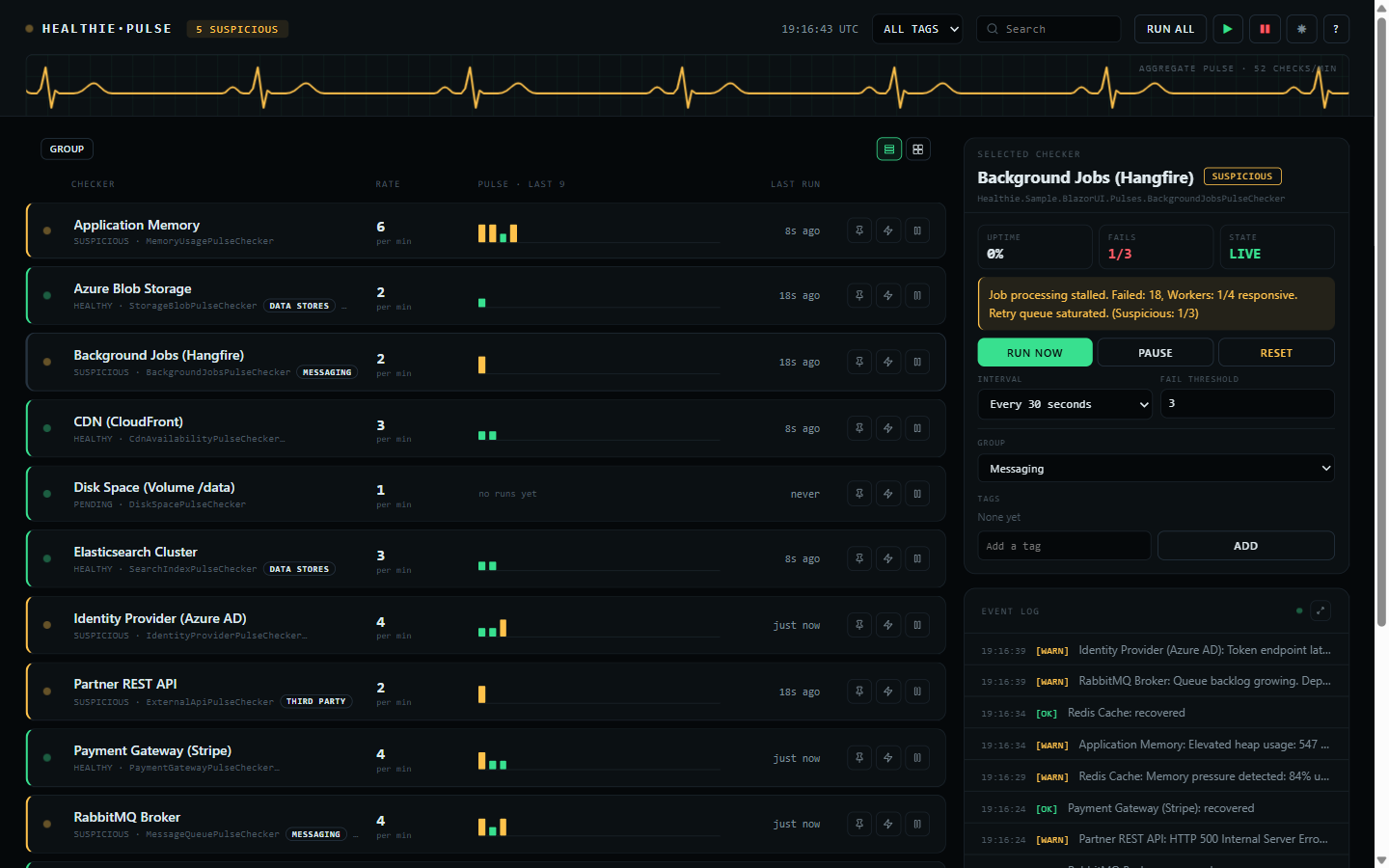
Zero-dependency Blazor Server dashboard for monitoring Healthie.NET pulse checkers in real time. Delivered as a Razor Class Library with pure HTML/CSS -- no third-party UI frameworks required.
▶ Live demo — board.healthie-dotnet.dev — this dashboard, read-only, watching the real status pages of Anthropic, OpenAI, Cursor, GitHub, Cloudflare, and more. Full documentation at healthie-dotnet.dev.
Installation
dotnet add package Healthie.NET.Dashboard
Setup
1. Register services in Program.cs:
using Healthie.Dashboard;

builder.Services.AddHealthieUI(options =>
{
    options.DashboardTitle = "System Health";
    options.EnableDarkModeToggle = true;
});
2. Add static file middleware (if not already present):
app.UseStaticFiles();
3a. Standalone endpoint (non-Blazor apps) -- map the dashboard route:
app.MapHealthieUI();                                   // Serves at /healthie/dashboard
app.MapHealthieUI().RequireAuthorization("AdminPolicy"); // With auth
3b. Embedded component (Blazor apps) -- render directly in a Razor page:
@page "/healthie/dashboard"
@using Healthie.Dashboard.Components

<HealthieDashboard />
For interactive components, the host
Routesmust have@rendermode="InteractiveServer"inApp.razor.
Features
- Event-driven real-time updates via
IPulseChecker.StateChanged(no polling) - Per-checker management: start, stop, trigger, reset, retime by interval or cron expression, change threshold
- Bulk actions: Start All, Stop All, Trigger All
- A read-only mode that reports everything and changes nothing — see below
- Panels for what you register — uptime, alerts, metrics, leadership, AI — see below
- Groups and tags, both editable here and seeded from code — see below
- A collapsible left menu: overview, a section per group with its tally, and the alerts, log and about views
- Pin a checker to the top of the list
- Rows or cards, sectioned by group when it opens or flat on request, with per-group tallies
- Live event log, with a full-size view behind the expand icon
- Legend and about behind the
?in the header - Dark/light theme toggle
- Search and filter by name
- Mobile responsive (375px+)
- CSS-only animations, and no JavaScript of its own
- Every time shown is UTC
Read-only mode
By default the dashboard can change what it shows: run a check, pause one, reset it, retime it, retag it. That is what it is for, and it is also more than you want to hand to everyone who can reach the URL.
builder.Services.AddHealthieUI(options => options.AllowMutations = false);
That leaves a board that only reports. Every state, sparkline, group, tag, and event stays exactly
where it was; the controls that would change any of it are not rendered. Nothing is lost to the
reader, because the values behind the editors are on the board already — the schedule is the row's
rate, or its cron expression where it runs on one; the threshold is the denominator in FAILS; and
the group and tags are the chips under each name. The side menu, searching, filtering, grouping,
switching to cards, opening the event log, and the theme toggle all still work: they change your
view, not the checker.
This is not authorization. It is one setting for the whole application, applied to every viewer alike, so it cannot hand the controls to an admin and withhold them from everyone else. It answers what can this board do, never who is looking — for that, gate the endpoint, which composes with it:
// Nobody unauthenticated gets in, and nobody at all gets the buttons.
builder.Services.AddHealthieUI(options => options.AllowMutations = false);
app.MapHealthieUI().RequireAuthorization();
Panels for what you register
The board grows a panel for each capability the application registers, and shows none of them otherwise. There is nothing to switch on: it renders the panel when the container can resolve the contract, so the registration is the whole configuration.
Uptime, leader election and metrics live in the core package, so those three need no extra install — just the call. Alerting and AI are separate packages, because each carries a dependency of its own.
| Register | What appears |
|---|---|
AddHealthieUptime() |
24H on the selected checker — uptime measured over real time — and WORST, the longest unbroken outage inside that window |
Healthie.NET.Alerting |
An ALERTS view: the paged alert history, where each alert is delivered, and the settings a running dispatcher honours — see below |
AddHealthieMetrics() |
A METRICS view: checks run, the share that reported healthy, transitions, overlapped triggers, and mean and slowest check duration |
AddHealthieLeaderElection() |
A LEADER or FOLLOWER badge, hover-naming the replica — on a follower every checker sits still, which is otherwise indistinguishable from a broken board |
Healthie.NET.AI |
An EXPLAIN button on a failing checker, which asks your IChatClient why it has been failing |
The alerts view
Three things, in the order you need them.
Where alerts go. Every registered IAlertSink, listed from startup rather than from its first
delivery, with its delivered and failed counts and its last error. With none configured it says so
outright — alerts raised and sent nowhere reads identically to alerts being delivered, and those are
opposite situations. A sink that recovers stops being shown as failing.
What has fired. The history, newest first, a page at a time, with a filter for the ones that did
not reach every sink. It is written through your application's own IStateProvider, so on CosmosDB,
PostgreSQL, SQL Server, SQLite or Redis it survives a redeploy; on the in-memory provider it does
not. The header names the provider it went to and the cap it is kept at, so neither is a guess.
What alerting is doing. Minimum severity, deduplication window, delivery timeout and whether
recoveries alert, all editable and applied from the next alert. Only those four: the dispatcher reads
them on every alert, whereas its queue capacity and history length are fixed when it is built, and a
control that quietly did nothing would be worse than no control. SEND TEST ALERT puts one through
the real sinks — the only way to find out a webhook URL is wrong is to use it.
Settings and the test button are gated by AllowMutations; everything else in the view is a read and
stays under read-only mode.
The metrics view
AddHealthieMetrics() attaches a MeterListener to the Healthie.NET meter, which is where this
library already emits healthie.check.duration, .results, .transitions and .overlaps. It reads
what is being published rather than instrumenting anything again, so it runs alongside an
OpenTelemetry exporter on the same meter, not instead of one.
It is a live count and not a time series: nothing survives a restart, and an exporter is still the way to keep history. Opt-in for that reason — a listener costs a callback on every measurement, and an application with an APM in front of it has somewhere better to look.
OVERLAPS is the figure worth watching. A checker whose check takes longer than its own interval
returns immediately, looks healthy, and is quietly running at a fraction of the rate it was asked to;
this is the only place it shows.
24H sits beside the board's own UPTIME, which is the share of the runs still in the rolling
history — a hundred results, so at a one-second interval, the last hundred seconds. They answer
different questions and disagree for good reasons, which is why both are shown.
All of it reads and none of it writes, so it all stays under AllowMutations = false. The exception
is EXPLAIN: still a read, but it spends money on your account, so it is gated with the controls
that change things.
Groups and tags
The two look similar and answer different questions.
A checker belongs to one group at most. Groups are what the sectioned view splits on, so every checker appears exactly once and a section's tallies add up to what is under it.
A checker carries any number of tags. Tags describe it and filter the list, and are free to
cut across groups — a tier-1 tag can sit on checkers in three different groups.
Declare the defaults in code:
public class RedisCachePulseChecker(IStateProvider stateProvider) : PulseChecker(stateProvider)
{
    public override string DisplayName => "Redis Cache";

    public override string DefaultGroup => "Data Stores";

    public override IReadOnlyList<string> DefaultTags => ["tier-1", "cache"];

    public override Task<PulseCheckerResult> CheckAsync(CancellationToken cancellationToken = default)
        => /* ... */;
}
Both can then be changed from the dashboard's side panel, and the change is stored through the
IStateProvider like an interval or a threshold — so it outlives a restart. The defaults only
seed a checker with no stored state; they never overwrite a change made here.
Tags are trimmed, de-duplicated case-insensitively, and ordered, so " Tier-1 " and "tier-1"
are one tag. A blank group means no group, and those checkers gather under UNGROUPED.
Configuration Options
| Option | Type | Default | Description |
|---|---|---|---|
DashboardTitle |
string |
"System Health" |
Title displayed at the top of the dashboard. |
EnableDarkModeToggle |
bool |
true |
Whether the dark/light mode toggle is visible. |
AllowMutations |
bool |
true |
Whether the controls that change a checker are rendered. false leaves a board that only reports. |
See Also
| Product | Versions Compatible and additional computed target framework versions. |
|---|---|
| .NET | net8.0 is compatible. net8.0-android was computed. net8.0-browser was computed. net8.0-ios was computed. net8.0-maccatalyst was computed. net8.0-macos was computed. net8.0-tvos was computed. net8.0-windows was computed. net9.0 was computed. net9.0-android was computed. net9.0-browser was computed. net9.0-ios was computed. net9.0-maccatalyst was computed. net9.0-macos was computed. net9.0-tvos was computed. net9.0-windows was computed. net10.0 is compatible. net10.0-android was computed. net10.0-browser was computed. net10.0-ios was computed. net10.0-maccatalyst was computed. net10.0-macos was computed. net10.0-tvos was computed. net10.0-windows was computed. |
-
net10.0
- Healthie.NET.Abstractions (>= 4.1.3)
-
net8.0
- Healthie.NET.Abstractions (>= 4.1.3)
NuGet packages
This package is not used by any NuGet packages.
GitHub repositories
This package is not used by any popular GitHub repositories.
| Version | Downloads | Last Updated |
|---|---|---|
| 4.1.4 | 118 | 9/30/2026 |
| 4.1.3 | 105 | 9/29/2026 |
| 4.1.2 | 127 | 9/12/2026 |
| 4.1.1 | 151 | 8/14/2026 |
| 4.1.0 | 146 | 7/30/2026 |
| 4.0.0 | 119 | 7/30/2026 |
| 3.1.4 | 128 | 7/19/2026 |
| 3.1.3 | 108 | 7/18/2026 |
| 3.1.2 | 120 | 7/18/2026 |
| 3.1.1 | 117 | 7/18/2026 |
| 3.1.0 | 132 | 7/17/2026 |
| 3.0.0 | 127 | 7/15/2026 |
| 2.3.0 | 821 | 2/24/2026 |
| 2.1.1-beta | 126 | 2/24/2026 |
| 2.0.0-beta | 127 | 2/22/2026 |
### Fixed
- Compatible runtime and test dependencies now track their current releases, including the latest
Quartz 3 line for the existing `net8.0` and `net10.0` provider. Dependabot now leaves the
incompatible Quartz 4 migration for a future Healthie.NET major release.
- The test projects now run on xUnit 4 through Microsoft Testing Platform, so .NET 10 executes the
unit and browser suites instead of rejecting their legacy VSTest target.
- The Aspire sample now uses the matching 13.5.4 AppHost SDK and its recommended CLI bundle, and the
redundant direct SSH.NET test pin was removed after Testcontainers adopted the patched release.
- The Scorecard upload action is pinned to the current immutable CodeQL Action 4.38.2 commit.
Full changelog: https://github.com/ivanvyd/Healthie.NET/blob/v4.1.3/CHANGELOG.md