Healthie.NET.Dashboard
4.0.0
Prefix Reserved
See the version list below for details.
dotnet add package Healthie.NET.Dashboard --version 4.0.0
NuGet\Install-Package Healthie.NET.Dashboard -Version 4.0.0
<PackageReference Include="Healthie.NET.Dashboard" Version="4.0.0" />
<PackageVersion Include="Healthie.NET.Dashboard" Version="4.0.0" />
<PackageReference Include="Healthie.NET.Dashboard" />
paket add Healthie.NET.Dashboard --version 4.0.0
#r "nuget: Healthie.NET.Dashboard, 4.0.0"
#:package Healthie.NET.Dashboard@4.0.0
#addin nuget:?package=Healthie.NET.Dashboard&version=4.0.0
#tool nuget:?package=Healthie.NET.Dashboard&version=4.0.0

Healthie.NET.Dashboard

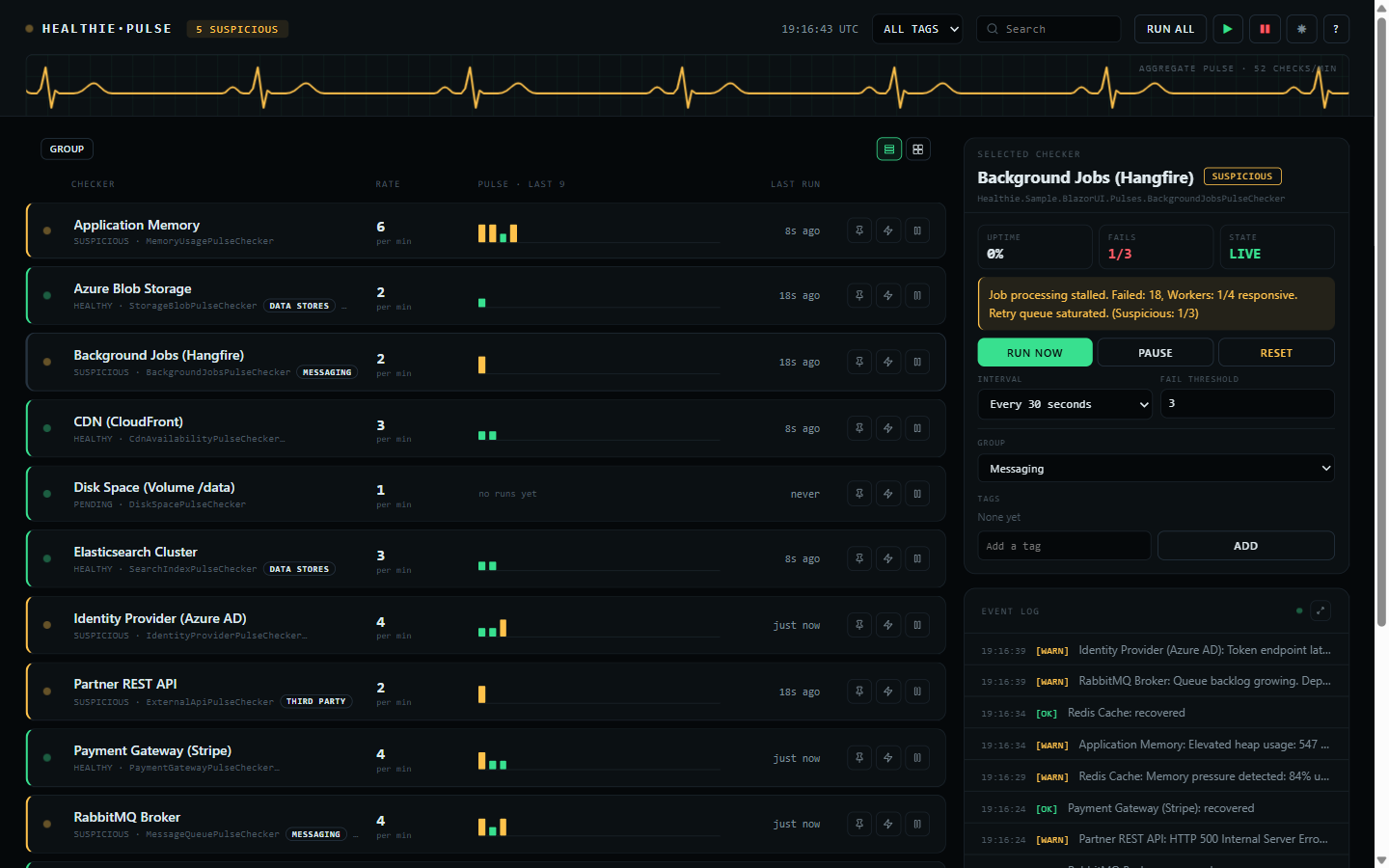
Zero-dependency Blazor Server dashboard for monitoring Healthie.NET pulse checkers in real time. Delivered as a Razor Class Library with pure HTML/CSS -- no third-party UI frameworks required.
▶ Live demo — healthie.compiletheory.com — this dashboard, read-only, watching the real status pages of Anthropic, OpenAI, Cursor, GitHub, Cloudflare, and more.
Installation
dotnet add package Healthie.NET.Dashboard
Setup
1. Register services in Program.cs:
using Healthie.Dashboard;

builder.Services.AddHealthieUI(options =>
{
    options.DashboardTitle = "System Health";
    options.EnableDarkModeToggle = true;
});
2. Add static file middleware (if not already present):
app.UseStaticFiles();
3a. Standalone endpoint (non-Blazor apps) -- map the dashboard route:
app.MapHealthieUI();                                   // Serves at /healthie/dashboard
app.MapHealthieUI().RequireAuthorization("AdminPolicy"); // With auth
3b. Embedded component (Blazor apps) -- render directly in a Razor page:
@page "/healthie/dashboard"
@using Healthie.Dashboard.Components

<HealthieDashboard />
For interactive components, the host
Routesmust have@rendermode="InteractiveServer"inApp.razor.
Features
- Event-driven real-time updates via
IPulseChecker.StateChanged(no polling) - Per-checker management: start, stop, trigger, reset, retime by interval or cron expression, change threshold
- Bulk actions: Start All, Stop All, Trigger All
- A read-only mode that reports everything and changes nothing — see below
- Panels for the feature packages you install — uptime, alerts, leadership, AI — see below
- Groups and tags, both editable here and seeded from code — see below
- A collapsible left menu: overview, a section per group with its tally, and the alerts, log and about views
- Pin a checker to the top of the list
- Rows or cards, sectioned by group when it opens or flat on request, with per-group tallies
- Live event log, with a full-size view behind the expand icon
- Legend and about behind the
?in the header - Dark/light theme toggle
- Search and filter by name
- Mobile responsive (375px+)
- CSS-only animations, and no JavaScript of its own
- Every time shown is UTC
Read-only mode
By default the dashboard can change what it shows: run a check, pause one, reset it, retime it, retag it. That is what it is for, and it is also more than you want to hand to everyone who can reach the URL.
builder.Services.AddHealthieUI(options => options.AllowMutations = false);
That leaves a board that only reports. Every state, sparkline, group, tag, and event stays exactly
where it was; the controls that would change any of it are not rendered. Nothing is lost to the
reader, because the values behind the editors are on the board already — the schedule is the row's
rate, or its cron expression where it runs on one; the threshold is the denominator in FAILS; and
the group and tags are the chips under each name. The side menu, searching, filtering, grouping,
switching to cards, opening the event log, and the theme toggle all still work: they change your
view, not the checker.
This is not authorization. It is one setting for the whole application, applied to every viewer alike, so it cannot hand the controls to an admin and withhold them from everyone else. It answers what can this board do, never who is looking — for that, gate the endpoint, which composes with it:
// Nobody unauthenticated gets in, and nobody at all gets the buttons.
builder.Services.AddHealthieUI(options => options.AllowMutations = false);
app.MapHealthieUI().RequireAuthorization();
Panels for the packages you install
The board grows a panel for each feature package the application registers, and shows none of them otherwise. There is nothing to switch on: it renders the panel when the container can resolve the contract, so installing the package is the whole configuration.
| Install | What appears |
|---|---|
Healthie.NET.Uptime |
24H on the selected checker — uptime measured over real time — and WORST, the longest unbroken outage inside that window |
Healthie.NET.Alerting |
An ALERTS view: the paged alert history, where each alert is delivered, and the settings a running dispatcher honours — see below |
AddHealthieMetrics() |
A METRICS view: checks run, the share that reported healthy, transitions, overlapped triggers, and mean and slowest check duration |
Healthie.NET.LeaderElection |
A LEADER or FOLLOWER badge, hover-naming the replica — on a follower every checker sits still, which is otherwise indistinguishable from a broken board |
Healthie.NET.AI |
An EXPLAIN button on a failing checker, which asks your IChatClient why it has been failing |
The alerts view
Three things, in the order you need them.
Where alerts go. Every registered IAlertSink, listed from startup rather than from its first
delivery, with its delivered and failed counts and its last error. With none configured it says so
outright — alerts raised and sent nowhere reads identically to alerts being delivered, and those are
opposite situations. A sink that recovers stops being shown as failing.
What has fired. The history, newest first, a page at a time, with a filter for the ones that did
not reach every sink. It is written through your application's own IStateProvider, so on CosmosDB,
PostgreSQL, SQL Server, SQLite or Redis it survives a redeploy; on the in-memory provider it does
not. The header names the provider it went to and the cap it is kept at, so neither is a guess.
What alerting is doing. Minimum severity, deduplication window, delivery timeout and whether
recoveries alert, all editable and applied from the next alert. Only those four: the dispatcher reads
them on every alert, whereas its queue capacity and history length are fixed when it is built, and a
control that quietly did nothing would be worse than no control. SEND TEST ALERT puts one through
the real sinks — the only way to find out a webhook URL is wrong is to use it.
Settings and the test button are gated by AllowMutations; everything else in the view is a read and
stays under read-only mode.
The metrics view
AddHealthieMetrics() attaches a MeterListener to the Healthie.NET meter, which is where this
library already emits healthie.check.duration, .results, .transitions and .overlaps. It reads
what is being published rather than instrumenting anything again, so it runs alongside an
OpenTelemetry exporter on the same meter, not instead of one.
It is a live count and not a time series: nothing survives a restart, and an exporter is still the way to keep history. Opt-in for that reason — a listener costs a callback on every measurement, and an application with an APM in front of it has somewhere better to look.
OVERLAPS is the figure worth watching. A checker whose check takes longer than its own interval
returns immediately, looks healthy, and is quietly running at a fraction of the rate it was asked to;
this is the only place it shows.
24H sits beside the board's own UPTIME, which is the share of the runs still in the rolling
history — a hundred results, so at a one-second interval, the last hundred seconds. They answer
different questions and disagree for good reasons, which is why both are shown.
All of it reads and none of it writes, so it all stays under AllowMutations = false. The exception
is EXPLAIN: still a read, but it spends money on your account, so it is gated with the controls
that change things.
Groups and tags
The two look similar and answer different questions.
A checker belongs to one group at most. Groups are what the sectioned view splits on, so every checker appears exactly once and a section's tallies add up to what is under it.
A checker carries any number of tags. Tags describe it and filter the list, and are free to
cut across groups — a tier-1 tag can sit on checkers in three different groups.
Declare the defaults in code:
public class RedisCachePulseChecker(IStateProvider stateProvider) : PulseChecker(stateProvider)
{
    public override string DisplayName => "Redis Cache";

    public override string DefaultGroup => "Data Stores";

    public override IReadOnlyList<string> DefaultTags => ["tier-1", "cache"];

    public override Task<PulseCheckerResult> CheckAsync(CancellationToken cancellationToken = default)
        => /* ... */;
}
Both can then be changed from the dashboard's side panel, and the change is stored through the
IStateProvider like an interval or a threshold — so it outlives a restart. The defaults only
seed a checker with no stored state; they never overwrite a change made here.
Tags are trimmed, de-duplicated case-insensitively, and ordered, so " Tier-1 " and "tier-1"
are one tag. A blank group means no group, and those checkers gather under UNGROUPED.
Configuration Options
| Option | Type | Default | Description |
|---|---|---|---|
DashboardTitle |
string |
"System Health" |
Title displayed at the top of the dashboard. |
EnableDarkModeToggle |
bool |
true |
Whether the dark/light mode toggle is visible. |
AllowMutations |
bool |
true |
Whether the controls that change a checker are rendered. false leaves a board that only reports. |
See Also
| Product | Versions Compatible and additional computed target framework versions. |
|---|---|
| .NET | net8.0 is compatible. net8.0-android was computed. net8.0-browser was computed. net8.0-ios was computed. net8.0-maccatalyst was computed. net8.0-macos was computed. net8.0-tvos was computed. net8.0-windows was computed. net9.0 was computed. net9.0-android was computed. net9.0-browser was computed. net9.0-ios was computed. net9.0-maccatalyst was computed. net9.0-macos was computed. net9.0-tvos was computed. net9.0-windows was computed. net10.0 is compatible. net10.0-android was computed. net10.0-browser was computed. net10.0-ios was computed. net10.0-maccatalyst was computed. net10.0-macos was computed. net10.0-tvos was computed. net10.0-windows was computed. |
-
net10.0
- Healthie.NET.Abstractions (>= 4.0.0)
-
net8.0
- Healthie.NET.Abstractions (>= 4.0.0)
NuGet packages
This package is not used by any NuGet packages.
GitHub repositories
This package is not used by any popular GitHub repositories.
| Version | Downloads | Last Updated |
|---|---|---|
| 4.1.4 | 122 | 9/30/2026 |
| 4.1.3 | 107 | 9/29/2026 |
| 4.1.2 | 130 | 9/12/2026 |
| 4.1.1 | 153 | 8/14/2026 |
| 4.1.0 | 148 | 7/30/2026 |
| 4.0.0 | 121 | 7/30/2026 |
| 3.1.4 | 132 | 7/19/2026 |
| 3.1.3 | 110 | 7/18/2026 |
| 3.1.2 | 121 | 7/18/2026 |
| 3.1.1 | 119 | 7/18/2026 |
| 3.1.0 | 134 | 7/17/2026 |
| 3.0.0 | 129 | 7/15/2026 |
| 2.3.0 | 823 | 2/24/2026 |
| 2.1.1-beta | 128 | 2/24/2026 |
| 2.0.0-beta | 129 | 2/22/2026 |
Twelve new packages, the schedule model several of them needed, and optimistic concurrency on the
state contract.
**Source-compatible: an application that upgrades without touching its code still compiles and still
behaves as it did.** Nothing public was removed or renamed, and every new interface member is a
defaulted one, so a provider or scheduler written against 3.x keeps working. Two things to know
before upgrading:
- **One binary break.** `HealthieTools`, the MCP read-only tool class, gained a defaulted
`HealthieMcpOptions?` parameter on its constructor so it could read the page-size option it had
been ignoring. Calling code still compiles unchanged; an assembly compiled against 3.1.4 and not
rebuilt does not. Recompiling is enough, and that break is why this is a major rather than a minor.
- **The relational providers alter an existing table on startup** to add the version column
optimistic concurrency needs. See *Optimistic concurrency* below.
### Added
- **Optimistic concurrency on `IStateProvider`.** A state write can now be made conditional on the
state not having changed since it was read, closing the lost update that has been documented on
`CosmosDbStateProvider` since the beginning: a setting changed from the dashboard could be
overwritten by a check that had read the state first. `GetStateEntryAsync` returns the state with
the version it was read at, and `TrySetStateAsync` writes only if that version is still current,
reporting a refused write rather than throwing -- under contention a conflict is expected, not
exceptional. `UpdateStateAsync` is the read-modify-write retry loop over the pair, and every
setting on `PulseChecker` goes through it -- as does a check storing its own result, which reads
and writes the whole state and so used to put every other field back to what it was when the
check started. Within one process a semaphore hid that; across two replicas sharing one store
nothing did, and that is the direction the dashboard actually loses to.
This was expected to need a major release and did not. The new members are defaulted interface
methods: a provider written against the old two-method interface still compiles, still works, and
reports `SupportsOptimisticConcurrency == false` rather than pretending. CosmosDB uses ETags,
the relational providers a version column added to existing tables on startup, and the in-memory
provider a compare-and-swap.
- **`HealthChanged` on `PulseCheckerStateChangedEventArgs`**, with `PreviousHealth` and
`CurrentHealth` beside it. `StateChanged` fires on every check -- a stored result always moves the
execution time -- which was listed as a known issue and is not one: the dashboard redraws from
exactly those events. What was missing was a way to ask the narrower question, so every handler
that only cared about a component going down reached into `OldState`/`NewState.LastResult?.Health`
and worked it out again. The alerting and uptime packages were doing that identically; both now
read `PreviousHealth` and `CurrentHealth` from the event instead of digging for them.
- **Slack, Microsoft Teams and PagerDuty alert sinks**, in `Healthie.NET.Alerting` beside the
webhook. Each of those three rejects arbitrary JSON and wants its own shape, so the generic
webhook never actually reached them without something in between to reshape it -- which its own
remarks admitted, in the phrase "Teams through a Power Automate flow". They need no dependency the
package did not already have, so they are sinks rather than a package each. Teams targets the
Workflows URL and an Adaptive Card, because the Office 365 connectors and the `MessageCard`
payload they took are retired. PagerDuty resolves the incident it opened rather than raising a
second one: `Alert.DeduplicationKey` and `Alert.IsRecovery` already existed for exactly that.
- **`Healthie.NET.Redis`.** State is written on every tick of every checker, and Redis is the store
that does not mind: a relational provider does a round trip to a disk-backed engine for each of
those writes, and this does one to memory. One hash per checker holding the state, the type it was
written as, and a version, so the compare and the write are a single Lua script -- Redis runs one
to completion without interleaving anything else, which is the guarantee a read-then-write cannot
give. Durability is whatever the Redis is configured for, and the package README says so rather
than implying more.
- **A startup warning when a surface that can change a checker is reachable without
authenticating.** `AddHealthieController` still does not require authorization unless asked, and
the dashboard's `AllowMutations` still defaults to `true` -- both are deliberate and changing
either would break every application that maps them. What was missing was anyone being told: an
application that maps one and stops there lets whoever can reach it stop a checker or clear a
failing streak, which hides an incident rather than reporting one. Logged once, at `Warning`, on
application start.
Asked of the endpoints rather than of the flags that built them, so an application that applied
authorization its own way -- `RequireAuthorization()`, an endpoint group, its own attribute -- is
not warned at. A warning that fires on correctly secured applications gets filtered out, and then
it is not there for the one that needs it.
- **Schedules.** `PulseSchedule` says either "every this long" or "on this cron expression", and
sits alongside `PulseInterval` rather than replacing it. The enum stopped at five minutes, which
is short of what a certificate-expiry or disk-space check wants. Cron is standard Unix syntax and
is evaluated in UTC by every scheduler.
- **`Healthie.NET.Postgres`, `Healthie.NET.SqlServer`, `Healthie.NET.Sqlite`** and the
`Healthie.NET.Relational` engine behind them, which works against any database with an ADO.NET
driver. PostgreSQL also covers Databricks Lakebase, which is managed PostgreSQL.
- **`Healthie.NET.Hangfire`.** Schedules live in Hangfire's storage, so they survive a restart and
each occurrence runs on exactly one replica.
- **`Healthie.NET.Coravel`**, for applications already running Coravel. Coravel has no API for
removing a scheduled job, so Healthie owns the due times and Coravel supplies the tick; the
package README says so, and says to use the built-in timer if Coravel is not already there.
- **`Healthie.NET.Temporal`.** Schedules live in the Temporal cluster. It needs a cluster and the
SDK carries a native core, both of which the README weighs against Hangfire and the built-in timer.
- **`Healthie.NET.Checkers`.** HTTP endpoints, TCP ports, TLS certificate expiry, DNS resolution and
disk space, with no checker code to write. Certificate expiry and disk space report *suspicious*
before they report unhealthy, because both are gradual and the warning is the useful signal.
- **`Healthie.NET.Alerting`.** Health changes become alerts, delivered to a webhook or your own
`IAlertSink`, with transition-only firing, recovery notifications and flap suppression. A sink that
throws, hangs or backs up cannot delay a check, hold its semaphore, or mark anything unhealthy.
- **`Healthie.NET.Uptime`.** Records health transitions rather than checks, so uptime is exact over
any window and small enough to keep for a year -- the rolling history holds a hundred results,
which for a one-second checker is a hundred seconds. Time the application was not running is
reported as unknown rather than counted as either up or down.
- **`Healthie.NET.LeaderElection`.** Runs the checks on one replica at a time. Without it, three
replicas ask a database three times whether it is healthy and race to write the same state.
- **Metrics and traces.** A `Meter` and an `ActivitySource` named `Healthie.NET`, discovered by
OpenTelemetry by name with no package to install: check duration, results by health, health
transitions, and triggers skipped because the previous check had not finished. That last one is
the only place a checker outlasting its own interval shows up.
- **Bulk state reads.** `IStateProvider.GetStatesAsync` reads every checker in one call, which is
what a dashboard load and a list request do. Defaulted to the old one-read-per-name behaviour, so
existing providers are unaffected.
- **State removal.** `IStateProvider.DeleteStateAsync` cleans up after a checker that was renamed or
removed. Defaulted to refuse rather than to silently do nothing.
- **The dashboard shows what the feature packages know.** Installing one used to change what the
application did and nothing about the one screen an operator looks at, so uptime, alerts and
leadership were only visible to whatever the host wired up itself. Each now has a small read-only
contract in `Healthie.NET.Abstractions` that its package implements, and the board renders the
panel when the container can resolve it: uptime over the last day and the longest outage in it
beside the run-based percentage, a drawer of recent alerts saying which reached their sinks and
which did not, a badge saying whether this replica is the one running the checks, and a button
that asks the model why a checker has been failing. An application that installs none of them gets
the board exactly as it was.
Read-only throughout, so all of it shows under `HealthieUIOptions.AllowMutations = false` -- the
one exception is asking the model, which is still a read but spends money on the host's account,
and is gated with the controls that change things.
- **The alert history is persisted and paged.** It is written through the application's own
`IStateProvider`, so a deployment on CosmosDB, PostgreSQL, SQL Server, SQLite or Redis keeps its
alerts across a redeploy and one left on the in-memory provider does not. There is no second
storage contract to configure and no provider had to learn about alerts. `IAlertInsights` reads a
page at a time and reports the total, because the question asked most often is asked just after a
restart, about what happened before it -- which is exactly what a last-twenty list throws away.
Bounded at `HistoryLength`, and the view says how many are kept, of what cap, in which provider.
- **The dashboard shows where alerts are delivered**, with each sink's delivered and failed counts
and its last error. An application that installed alerting and never configured a sink raises
alerts that reach nobody, and a healthy-looking list of them was indistinguishable from one that
was notifying people; sinks are now listed from startup rather than from their first delivery, and
one that recovers stops being reported as failing.
- **Alerting is configurable from the dashboard**: minimum severity, deduplication window, delivery
timeout, and whether recoveries alert. Those four and no others, because they are the ones the
dispatcher reads on every alert -- its queue capacity and history length are fixed when it is
built, so they are shown as facts rather than offered as controls that would quietly do nothing.
There is also a test alert, which goes through the real sinks: the only way to find out that a
webhook URL is wrong is to use it.
- **`AddHealthieMetrics()`** collects the library's own instruments in-process behind
`IMetricsInsights`, and the dashboard grows a metrics view: checks run, the share that reported
healthy, transitions, mean and slowest check duration, and results by health. A `MeterListener` on
the `Healthie.NET` meter, so it reads what is already being emitted and runs alongside an
OpenTelemetry exporter rather than instead of one. Opt-in, because a listener costs a callback on
every measurement and an application with an APM has somewhere better to look.
Overlapped triggers get their own figure. A checker whose check outlasts its own interval looks
healthy and is quietly running at a fraction of the rate it was asked to, and this is the only
place that shows.
- **A side menu on the dashboard**, listing an overview, a section per group with its tally and worst
state, and the alerts, metrics, event-log and about views. Picking a group narrows the list and picking it
again is the way back; it combines with the search box and the tag filter rather than clearing
them, and the groups it lists come from the store rather than from the rows currently surviving
those filters -- a menu that dropped a group because a search had narrowed it away would take away
the means of getting back to it.
A rail rather than an overlay drawer, and collapsing to its icons rather than disappearing. This
package ships no JavaScript of its own, and an off-canvas drawer needs a focus trap to be honest
about keyboard use. Below 820px it becomes a scrolling strip above the list.
- **The dashboard opens sectioned by group** rather than as one flat list. A group is a partition, so
the sectioned view answers what is wrong and where at a glance; a flat list of forty checkers asks
the reader to do that grouping themselves. Checkers with no group collect under one heading, so the
default hides nothing. The `GROUP` button still switches to the flat list.
- **A cron expression can be set from the dashboard**, beside the interval picker, and through
`PUT /healthie/{checkerName}/schedule` on the REST API. The scheduler judges the expression before
anything is stored -- `IPulseScheduler.TryValidateSchedule`, defaulted to accept so an existing
scheduler is unaffected -- because Cronos, Quartz and Temporal do not agree on cron dialects and
the only answer worth having is from the implementation that will run it. A refusal carries that
implementation's own reason and leaves the stored schedule alone; storing first and failing on the
reschedule would leave a checker that no longer runs and a store that says it should.
`IPulseChecker.SetScheduleAsync` and `IPulsesScheduler.SetScheduleAsync` are the API behind it. A
schedule an interval can express exactly is stored as that interval, so only a genuinely custom
period or a cron expression occupies `PulseCheckerState.Schedule`.
### Fixed
- **The dashboard ignored `PulseSchedule` everywhere it showed a cadence.** It read
`PulseCheckerState.Interval` for the rate column, for the aggregate checks-per-minute, and for the
interval picker -- and that field is documented as ignored once `Schedule` is set. So a checker on
a cron expression advertised a rate it was not running at, was summed into the aggregate at that
rate, and offered a picker whose every change stored a field nothing reads. The board now reads
`EffectiveSchedule`, shows a cron expression as one, counts cron checkers separately rather than
inventing a rate for them, and disables the picker while an expression is in force.
- **`SetIntervalAsync` did nothing to a checker that had a schedule.** The schedule overrides the
interval, so choosing one left the checker at its old cadence with nothing to say so. It now clears
the schedule, which is what choosing an interval means.
- **The dashboard's own page did not encode its title.** `MapHealthieUI` builds that one page as a
string rather than through Razor, which encodes every interpolation for you, so a
`HealthieUIOptions.DashboardTitle` built from anything the host did not write itself could close
the title element and open a script one.
- **A dashboard component left its handler behind when it was disposed.** The service is scoped to a
circuit, so it was assumed the circuit ending released everything; that holds only while the
dashboard is mounted once per circuit, and a host that routes to it inside its own layout builds a
new one every time the user navigates back. `IHealthieDashboardService.UnsubscribeFromStateChangesAsync`
is the missing half, and the component calls it.
- **Two callers scheduling one checker at once could leave a timer nobody could stop.** Installing a
schedule was "cancel the old one, then start the new one", and only the last one stored was
reachable; the other kept triggering, could not be unscheduled, and held a linked
`CancellationTokenSource` that was never disposed.
- **`HealthieMcpOptions.MaxHistoryPageSize` was documented and never read.** `get_check_history`
clamped to a hard-coded 200 instead, so a host that lowered the option got no such thing.
- **The relational table-name guard admitted a name with a trailing newline.** In .NET `$` matches
immediately before one, so a table name ending in one passed a check whose own error message says
it does not. Nothing could be smuggled through it -- a lone trailing newline is whitespace to
every engine here -- but the guard now ends at `\z` and means what it says.
- **The release workflow granted `contents: write` to every job in it.** Only the one job that
creates the GitHub release needs it, and the top level now grants nothing but read, so a job added
later starts with no write access rather than inheriting it.
- **A checker name from a REST route reached the log with its control characters intact.** The
not-found branch logs a name precisely when it matches nothing, percent-encoded CR and LF arrive
decoded, and a log sink writing plain text writes them as line breaks.
- A cron schedule whose next occurrence was more than about fifty days out **stopped the checker
permanently and silently**. `Task.Delay` refuses a longer wait and throws, and that throw is not a
cancellation, so the scheduler's loop ended with nothing logged. An annual certificate check
reached it. Long waits are now taken in bounded steps.
- Quartz and the built-in scheduler read the same cron expression in **different timezones** --
Quartz defaults to the machine's local zone, the built-in scheduler evaluates in UTC. Both are
pinned to UTC now, matching what the dashboard renders.
- Quartz quietly accepted out-of-range cron fields: `99 99 * * *` produced a trigger firing every
minute, for ever. Ranges are checked before Quartz sees them.
- Cron expressions were compared as typed, so `0 0 * * MON-FRI` and `0 0 * * mon-fri` looked
like a change to the checker. They are normalized, as tags already were.
### Security
- CodeQL, OpenSSF Scorecard and dependency review run on every pull request, releases carry a
CycloneDX SBOM, every GitHub Action is pinned to a commit SHA, and every workflow drops to
deny-by-default permissions.
- Four high-severity advisories resolved: `SQLitePCLRaw.lib.e_sqlite3` (GHSA-2m69-gcr7-jv3q),
`Newtonsoft.Json` reached through Hangfire (GHSA-5crp-9r3c-p9vr), and `System.Text.Json` in the
console sample (CVE-2024-30105 and CVE-2024-43485). The solution reports no vulnerable packages.
Full changelog: https://github.com/ivanvyd/Healthie.NET/blob/v4.0.0/CHANGELOG.md