Healthie.NET.Dashboard
3.1.3
Prefix Reserved
See the version list below for details.
dotnet add package Healthie.NET.Dashboard --version 3.1.3
NuGet\Install-Package Healthie.NET.Dashboard -Version 3.1.3
<PackageReference Include="Healthie.NET.Dashboard" Version="3.1.3" />
<PackageVersion Include="Healthie.NET.Dashboard" Version="3.1.3" />
<PackageReference Include="Healthie.NET.Dashboard" />
paket add Healthie.NET.Dashboard --version 3.1.3
#r "nuget: Healthie.NET.Dashboard, 3.1.3"
#:package Healthie.NET.Dashboard@3.1.3
#addin nuget:?package=Healthie.NET.Dashboard&version=3.1.3
#tool nuget:?package=Healthie.NET.Dashboard&version=3.1.3
Healthie.NET.Dashboard

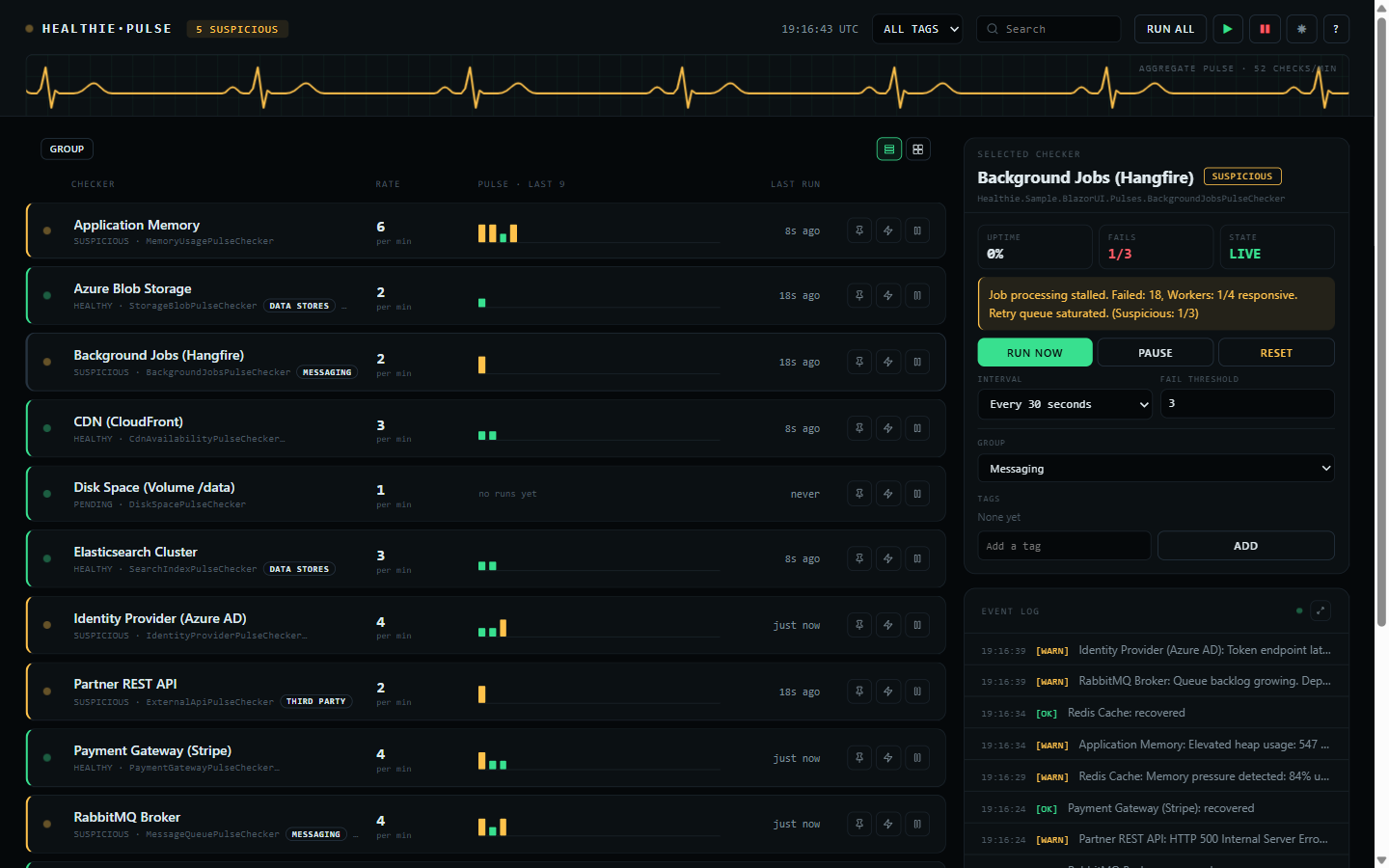
Zero-dependency Blazor Server dashboard for monitoring Healthie.NET pulse checkers in real time. Delivered as a Razor Class Library with pure HTML/CSS -- no third-party UI frameworks required.
▶ Live demo — healthie.compiletheory.com — this dashboard, read-only, watching the real status pages of Anthropic, OpenAI, Cursor, GitHub, Cloudflare, and more.
Installation
dotnet add package Healthie.NET.Dashboard
Setup
1. Register services in Program.cs:
using Healthie.Dashboard;

builder.Services.AddHealthieUI(options =>
{
    options.DashboardTitle = "System Health";
    options.EnableDarkModeToggle = true;
});
2. Add static file middleware (if not already present):
app.UseStaticFiles();
3a. Standalone endpoint (non-Blazor apps) -- map the dashboard route:
app.MapHealthieUI();                                   // Serves at /healthie/dashboard
app.MapHealthieUI().RequireAuthorization("AdminPolicy"); // With auth
3b. Embedded component (Blazor apps) -- render directly in a Razor page:
@page "/healthie/dashboard"
@using Healthie.Dashboard.Components

<HealthieDashboard />
For interactive components, the host
Routesmust have@rendermode="InteractiveServer"inApp.razor.
Features
- Event-driven real-time updates via
IPulseChecker.StateChanged(no polling) - Per-checker management: start, stop, trigger, reset, change interval, change threshold
- Bulk actions: Start All, Stop All, Trigger All
- A read-only mode that reports everything and changes nothing — see below
- Groups and tags, both editable here and seeded from code — see below
- Pin a checker to the top of the list
- Rows or cards, flat or sectioned by group with per-group tallies
- Live event log, with a full-size view behind the expand icon
- Legend and about behind the
?in the header - Dark/light theme toggle
- Search and filter by name
- Mobile responsive (375px+)
- CSS-only animations, and no JavaScript of its own
- Every time shown is UTC
Read-only mode
By default the dashboard can change what it shows: run a check, pause one, reset it, retime it, retag it. That is what it is for, and it is also more than you want to hand to everyone who can reach the URL.
builder.Services.AddHealthieUI(options => options.AllowMutations = false);
That leaves a board that only reports. Every state, sparkline, group, tag, and event stays exactly
where it was; the controls that would change any of it are not rendered. Nothing is lost to the
reader, because the values behind the editors are on the board already — the interval is the row's
rate, the threshold is the denominator in FAILS, and the group and tags are the chips under each
name. Searching, filtering, grouping, switching to cards, opening the event log, and the theme
toggle all still work: they change your view, not the checker.
This is not authorization. It is one setting for the whole application, applied to every viewer alike, so it cannot hand the controls to an admin and withhold them from everyone else. It answers what can this board do, never who is looking — for that, gate the endpoint, which composes with it:
// Nobody unauthenticated gets in, and nobody at all gets the buttons.
builder.Services.AddHealthieUI(options => options.AllowMutations = false);
app.MapHealthieUI().RequireAuthorization();
Groups and tags
The two look similar and answer different questions.
A checker belongs to one group at most. Groups are what the sectioned view splits on, so every checker appears exactly once and a section's tallies add up to what is under it.
A checker carries any number of tags. Tags describe it and filter the list, and are free to
cut across groups — a tier-1 tag can sit on checkers in three different groups.
Declare the defaults in code:
public class RedisCachePulseChecker(IStateProvider stateProvider) : PulseChecker(stateProvider)
{
    public override string DisplayName => "Redis Cache";

    public override string DefaultGroup => "Data Stores";

    public override IReadOnlyList<string> DefaultTags => ["tier-1", "cache"];

    public override Task<PulseCheckerResult> CheckAsync(CancellationToken cancellationToken = default)
        => /* ... */;
}
Both can then be changed from the dashboard's side panel, and the change is stored through the
IStateProvider like an interval or a threshold — so it outlives a restart. The defaults only
seed a checker with no stored state; they never overwrite a change made here.
Tags are trimmed, de-duplicated case-insensitively, and ordered, so " Tier-1 " and "tier-1"
are one tag. A blank group means no group, and those checkers gather under UNGROUPED.
Configuration Options
| Option | Type | Default | Description |
|---|---|---|---|
DashboardTitle |
string |
"System Health" |
Title displayed at the top of the dashboard. |
EnableDarkModeToggle |
bool |
true |
Whether the dark/light mode toggle is visible. |
AllowMutations |
bool |
true |
Whether the controls that change a checker are rendered. false leaves a board that only reports. |
See Also
| Product | Versions Compatible and additional computed target framework versions. |
|---|---|
| .NET | net8.0 is compatible. net8.0-android was computed. net8.0-browser was computed. net8.0-ios was computed. net8.0-maccatalyst was computed. net8.0-macos was computed. net8.0-tvos was computed. net8.0-windows was computed. net9.0 was computed. net9.0-android was computed. net9.0-browser was computed. net9.0-ios was computed. net9.0-maccatalyst was computed. net9.0-macos was computed. net9.0-tvos was computed. net9.0-windows was computed. net10.0 is compatible. net10.0-android was computed. net10.0-browser was computed. net10.0-ios was computed. net10.0-maccatalyst was computed. net10.0-macos was computed. net10.0-tvos was computed. net10.0-windows was computed. |
-
net10.0
- Healthie.NET.Abstractions (>= 3.1.3)
-
net8.0
- Healthie.NET.Abstractions (>= 3.1.3)
NuGet packages
This package is not used by any NuGet packages.
GitHub repositories
This package is not used by any popular GitHub repositories.
| Version | Downloads | Last Updated |
|---|---|---|
| 4.1.4 | 119 | 9/30/2026 |
| 4.1.3 | 105 | 9/29/2026 |
| 4.1.2 | 127 | 9/12/2026 |
| 4.1.1 | 152 | 8/14/2026 |
| 4.1.0 | 147 | 7/30/2026 |
| 4.0.0 | 120 | 7/30/2026 |
| 3.1.4 | 129 | 7/19/2026 |
| 3.1.3 | 109 | 7/18/2026 |
| 3.1.2 | 121 | 7/18/2026 |
| 3.1.1 | 118 | 7/18/2026 |
| 3.1.0 | 133 | 7/17/2026 |
| 3.0.0 | 128 | 7/15/2026 |
| 2.3.0 | 822 | 2/24/2026 |
| 2.1.1-beta | 127 | 2/24/2026 |
| 2.0.0-beta | 128 | 2/22/2026 |
### Changed
- The dashboard now scrolls within its own board rather than the page, so its scrollbar is themed to
match the board -- a thin, rounded bar in the board's own line colour, on both the dark and light
themes -- instead of the platform's wide light-grey default running down the side of a dark tool.
The board owns a full-viewport (`100dvh`) scroll region, and a scroll that reaches its end no
longer drags the page behind an embedded board.
### Fixed
- The prerendered dashboard no longer risks dropping its own circuit on a board with much state.
3.1.1 carried the states from prerender to the interactive render by persisting them into the
page, which put the whole board -- every checker and all its history -- on the SignalR circuit.
That payload grows with each checker, and past SignalR's default 32 KB message limit the hub
rejects it and the circuit never starts: the board freezes on the prerendered snapshot, styled but
not live. The states now stay on the server between the two renders (Blazor Server holds them there
already) and only a short-lived token travels to the browser and back, so the wire cost is constant
whatever the size of the board. A token that no longer resolves falls back to a fresh read. No
SignalR limit needs raising, so no extra memory or denial-of-service exposure comes with it.
### Fixed
- The dashboard no longer flickers on load when it is prerendered. Hosted the usual
way -- `<HealthieDashboard />` on an interactive-server page, which prerenders by
default -- the server rendered the full board, then the circuit connected a moment
later and the component started again from an empty state, read every checker afresh,
and briefly replaced the board already on screen. In that gap a status icon, which the
dashboard stylesheet sizes against its surroundings, painted for a frame before those
rules applied and filled the board as one large ring. The states the prerender reads
are now carried across to the interactive render through `PersistentComponentState`,
so the first interactive render matches the prerendered one: nothing is replaced, no
frame shows an unsized icon, and the redundant second read of every checker is gone.
Full changelog: https://github.com/ivanvyd/Healthie.NET/blob/v3.1.3/CHANGELOG.md