Healthie.NET.Dashboard
3.0.0
Prefix Reserved
See the version list below for details.
dotnet add package Healthie.NET.Dashboard --version 3.0.0
NuGet\Install-Package Healthie.NET.Dashboard -Version 3.0.0
<PackageReference Include="Healthie.NET.Dashboard" Version="3.0.0" />
<PackageVersion Include="Healthie.NET.Dashboard" Version="3.0.0" />
<PackageReference Include="Healthie.NET.Dashboard" />
paket add Healthie.NET.Dashboard --version 3.0.0
#r "nuget: Healthie.NET.Dashboard, 3.0.0"
#:package Healthie.NET.Dashboard@3.0.0
#addin nuget:?package=Healthie.NET.Dashboard&version=3.0.0
#tool nuget:?package=Healthie.NET.Dashboard&version=3.0.0
Healthie.NET.Dashboard

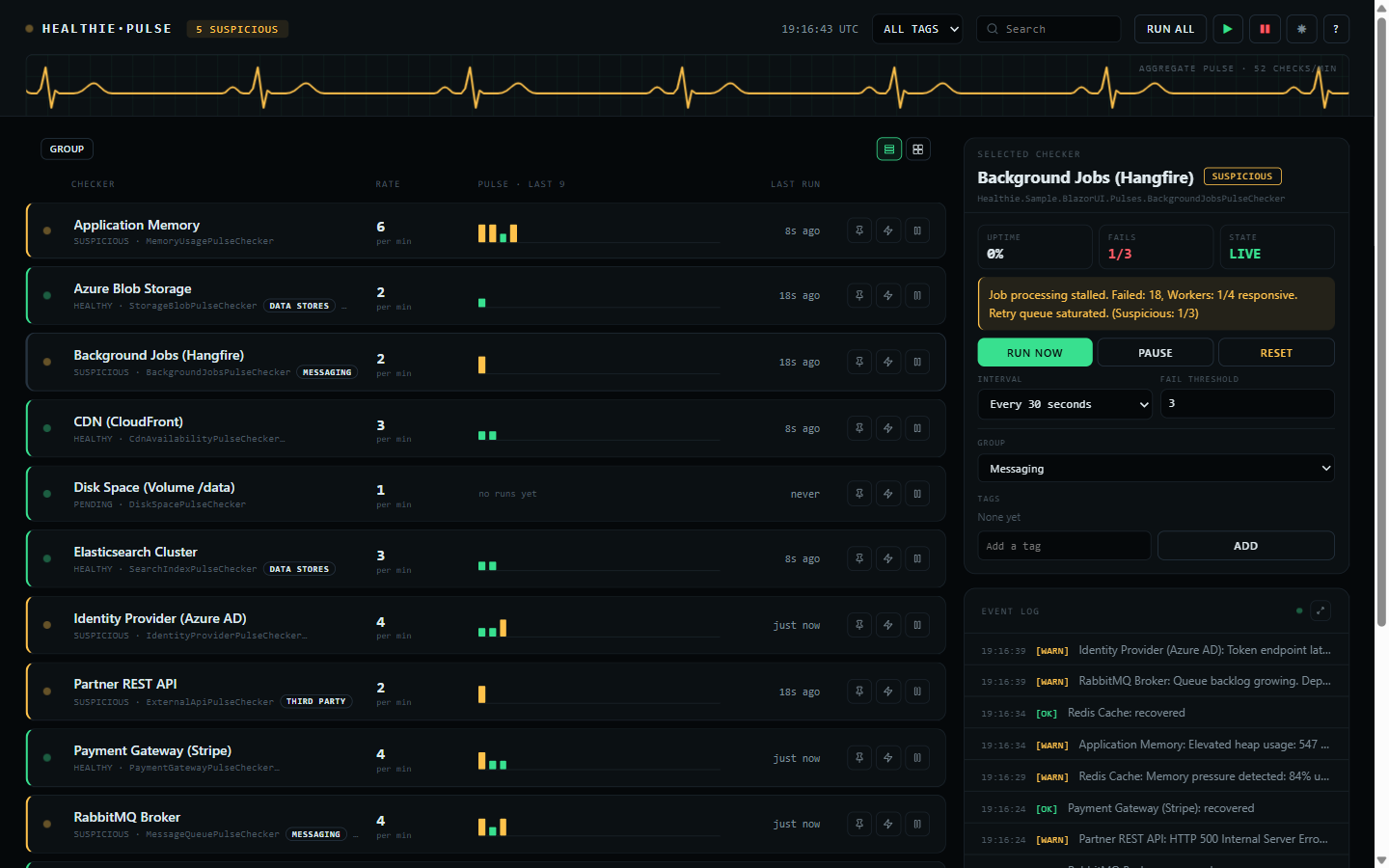
Zero-dependency Blazor Server dashboard for monitoring Healthie.NET pulse checkers in real time. Delivered as a Razor Class Library with pure HTML/CSS -- no third-party UI frameworks required.
Installation
dotnet add package Healthie.NET.Dashboard
Setup
1. Register services in Program.cs:
using Healthie.Dashboard;

builder.Services.AddHealthieUI(options =>
{
    options.DashboardTitle = "System Health";
    options.EnableDarkModeToggle = true;
});
2. Add static file middleware (if not already present):
app.UseStaticFiles();
3a. Standalone endpoint (non-Blazor apps) -- map the dashboard route:
app.MapHealthieUI();                                   // Serves at /healthie/dashboard
app.MapHealthieUI().RequireAuthorization("AdminPolicy"); // With auth
3b. Embedded component (Blazor apps) -- render directly in a Razor page:
@page "/healthie/dashboard"
@using Healthie.Dashboard.Components

<HealthieDashboard />
For interactive components, the host
Routesmust have@rendermode="InteractiveServer"inApp.razor.
Features
- Event-driven real-time updates via
IPulseChecker.StateChanged(no polling) - Per-checker management: start, stop, trigger, reset, change interval, change threshold
- Bulk actions: Start All, Stop All, Trigger All
- Groups and tags, both editable here and seeded from code — see below
- Pin a checker to the top of the list
- Rows or cards, flat or sectioned by group with per-group tallies
- Live event log, with a full-size view behind the expand icon
- Legend and about behind the
?in the header - Dark/light theme toggle
- Search and filter by name
- Mobile responsive (375px+)
- CSS-only animations, and no JavaScript of its own
- Every time shown is UTC
Groups and tags
The two look similar and answer different questions.
A checker belongs to one group at most. Groups are what the sectioned view splits on, so every checker appears exactly once and a section's tallies add up to what is under it.
A checker carries any number of tags. Tags describe it and filter the list, and are free to
cut across groups — a tier-1 tag can sit on checkers in three different groups.
Declare the defaults in code:
public class RedisCachePulseChecker(IStateProvider stateProvider) : PulseChecker(stateProvider)
{
    public override string DisplayName => "Redis Cache";

    public override string DefaultGroup => "Data Stores";

    public override IReadOnlyList<string> DefaultTags => ["tier-1", "cache"];

    public override Task<PulseCheckerResult> CheckAsync(CancellationToken cancellationToken = default)
        => /* ... */;
}
Both can then be changed from the dashboard's side panel, and the change is stored through the
IStateProvider like an interval or a threshold — so it outlives a restart. The defaults only
seed a checker with no stored state; they never overwrite a change made here.
Tags are trimmed, de-duplicated case-insensitively, and ordered, so " Tier-1 " and "tier-1"
are one tag. A blank group means no group, and those checkers gather under UNGROUPED.
Configuration Options
| Option | Type | Default | Description |
|---|---|---|---|
DashboardTitle |
string |
"System Health" |
Title displayed at the top of the dashboard. |
EnableDarkModeToggle |
bool |
true |
Whether the dark/light mode toggle is visible. |
See Also
| Product | Versions Compatible and additional computed target framework versions. |
|---|---|
| .NET | net8.0 is compatible. net8.0-android was computed. net8.0-browser was computed. net8.0-ios was computed. net8.0-maccatalyst was computed. net8.0-macos was computed. net8.0-tvos was computed. net8.0-windows was computed. net9.0 was computed. net9.0-android was computed. net9.0-browser was computed. net9.0-ios was computed. net9.0-maccatalyst was computed. net9.0-macos was computed. net9.0-tvos was computed. net9.0-windows was computed. net10.0 is compatible. net10.0-android was computed. net10.0-browser was computed. net10.0-ios was computed. net10.0-maccatalyst was computed. net10.0-macos was computed. net10.0-tvos was computed. net10.0-windows was computed. |
-
net10.0
- Healthie.NET.Abstractions (>= 3.0.0)
-
net8.0
- Healthie.NET.Abstractions (>= 3.0.0)
NuGet packages
This package is not used by any NuGet packages.
GitHub repositories
This package is not used by any popular GitHub repositories.
| Version | Downloads | Last Updated |
|---|---|---|
| 4.1.4 | 118 | 9/30/2026 |
| 4.1.3 | 105 | 9/29/2026 |
| 4.1.2 | 127 | 9/12/2026 |
| 4.1.1 | 151 | 8/14/2026 |
| 4.1.0 | 146 | 7/30/2026 |
| 4.0.0 | 119 | 7/30/2026 |
| 3.1.4 | 128 | 7/19/2026 |
| 3.1.3 | 108 | 7/18/2026 |
| 3.1.2 | 120 | 7/18/2026 |
| 3.1.1 | 117 | 7/18/2026 |
| 3.1.0 | 132 | 7/17/2026 |
| 3.0.0 | 127 | 7/15/2026 |
| 2.3.0 | 822 | 2/24/2026 |
| 2.1.1-beta | 127 | 2/24/2026 |
| 2.0.0-beta | 128 | 2/22/2026 |