com.IvanMurzak.ReflectorNet
5.6.0
dotnet add package com.IvanMurzak.ReflectorNet --version 5.6.0
NuGet\Install-Package com.IvanMurzak.ReflectorNet -Version 5.6.0
<PackageReference Include="com.IvanMurzak.ReflectorNet" Version="5.6.0" />
<PackageVersion Include="com.IvanMurzak.ReflectorNet" Version="5.6.0" />
<PackageReference Include="com.IvanMurzak.ReflectorNet" />
paket add com.IvanMurzak.ReflectorNet --version 5.6.0
#r "nuget: com.IvanMurzak.ReflectorNet, 5.6.0"
#:package com.IvanMurzak.ReflectorNet@5.6.0
#addin nuget:?package=com.IvanMurzak.ReflectorNet&version=5.6.0
#tool nuget:?package=com.IvanMurzak.ReflectorNet&version=5.6.0
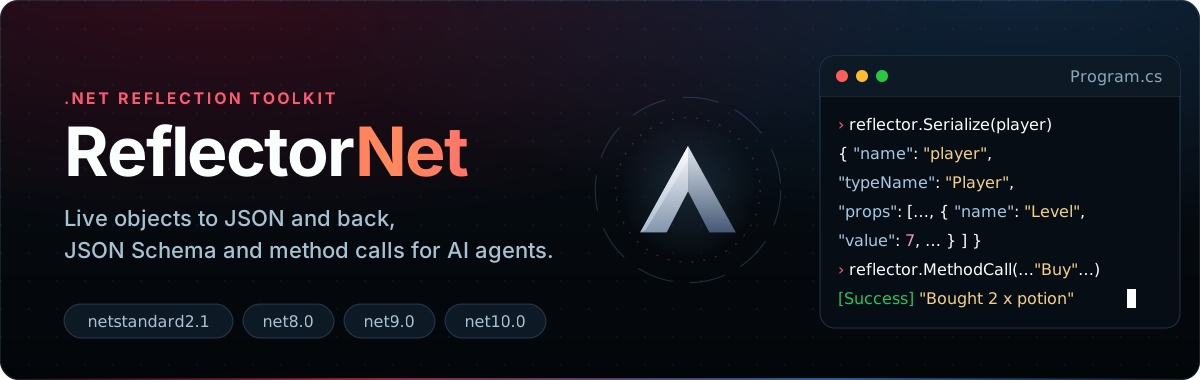





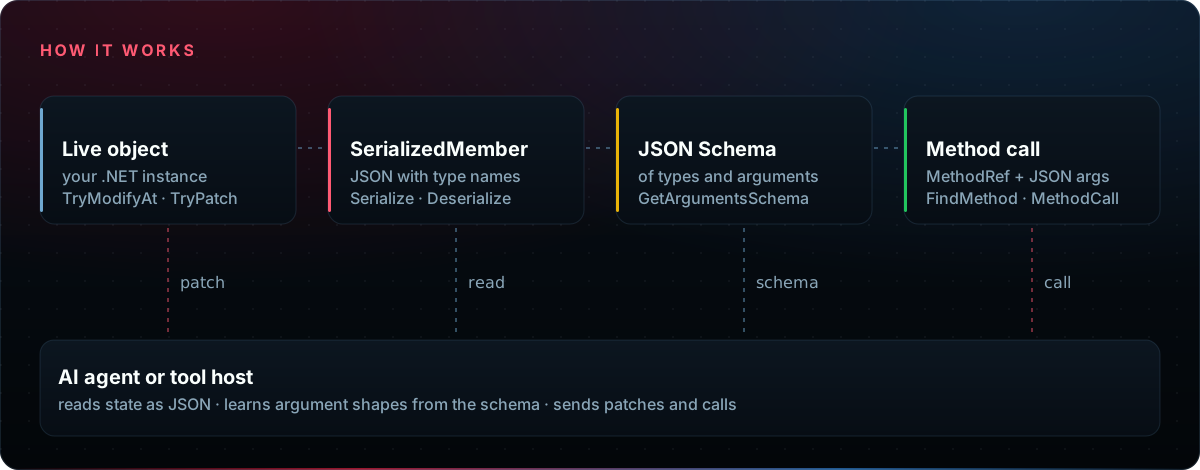
ReflectorNet is a .NET reflection toolkit that lets an AI agent, or any tool without compiled bindings, work with a running program through JSON. It serializes live objects with their type information and turns them back, changes existing objects in place, generates JSON Schema for types and method signatures, and finds and calls methods described by name with JSON arguments.
The entry point is the Reflector class. Its data model is SerializedMember: a JSON-friendly
value that keeps the member name, the type name, nested fields and properties, and the raw value.
Features
- ✅ Serialize / Deserialize — live objects to
SerializedMemberJSON and back - ✅ In-place changes —
TryModify,TryModifyAtandTryPatchkeep object identity - ✅ Inspection —
TryReadAtone path,Viewa filtered tree,Grepby member name - ✅ JSON Schema — for types, method arguments and return values
- ✅ Method calls — find methods by fuzzy name and call them with JSON arguments
- ✅ Extensible — custom reflection and JSON converters, type blacklist
Install
dotnet add package com.IvanMurzak.ReflectorNet
Targets netstandard2.1, net8.0, net9.0 and net10.0. Dependencies: System.Text.Json (inbox on net10.0) and
Microsoft.Extensions.Logging.
Quick start
using com.IvanMurzak.ReflectorNet;
using com.IvanMurzak.ReflectorNet.Model;

var reflector = new Reflector();
var player = new Player { Name = "Ada", Level = 7 };

// Object -> JSON
SerializedMember data = reflector.Serialize(player, name: "player");
string json = reflector.JsonSerializer.Serialize(data);

// JSON -> object
var parsed = reflector.JsonSerializer.Deserialize<SerializedMember>(json)!;
Player? copy = reflector.Deserialize<Player>(parsed);

// Change the live object in place
object? target = player;
var logs = new Logs();
reflector.TryModifyAt<int>(ref target, "Level", 8, logs: logs);
reflector.TryPatch(ref target, """{ "Name": "Grace", "Level": 9 }""", logs: logs);

public class Player
{
    public string Name { get; set; } = string.Empty;
    public int Level { get; set; }
}
The JSON of data looks like this:
{
  "name": "player",
  "typeName": "Player",
  "value": {},
  "props": [
    { "name": "Name", "typeName": "System.String", "value": "Ada" },
    { "name": "Level", "typeName": "System.Int32", "value": 7 }
  ]
}
Call a method from JSON
Give the agent a schema of the arguments, then call the method with the JSON it sends back.
using System.ComponentModel;
using System.Reflection;

MethodInfo buy = typeof(Shop).GetMethod(nameof(Shop.Buy))!;
var argsSchema = reflector.GetArgumentsSchema(buy);
// {"type":"object","properties":{"itemId":{"type":"string"},"count":{"type":"integer"}},
//  "required":["itemId","count"]}

var callArgs = reflector.JsonSerializer.Deserialize<SerializedMemberList>("""
[
  { "name": "itemId", "typeName": "System.String", "value": "potion" },
  { "name": "count",  "typeName": "System.Int32",  "value": 2 }
]
""")!;

string result = reflector.MethodCall(
    reflector,
    new MethodRef { TypeName = "Shop", MethodName = "Buy" },
    inputParameters: callArgs,
    executeInMainThread: false);
// [Success] Execution result: ... "Bought 2 x potion"

public static class Shop
{
    [Description("Buy items and return a receipt.")]
    public static string Buy(string itemId, int count) => $"Bought {count} x {itemId}";
}
Type and method names may be partial; match levels and instance methods (targetObject) are in the
usage guide.
Inspect and search
reflector.TryReadAt(player, "Level", out SerializedMember? level);   // one value
var tree = reflector.View(player, new ViewQuery { MaxDepth = 1 });   // filtered tree
var hits = reflector.Grep(player, "^Lev");                           // ViewMatch: Path + Value
Paths are slash-delimited (Items/[0]/Count, Stats/[hp]); see Paths.
Documentation
- Usage guide: serialization, paths,
ViewandGrep,TryModifyAtandTryPatch, method discovery and calls, JSON Schema, converters and the type blacklist. - Architecture, models, thread safety and release process.
- Changelog: GitHub Releases.
ReflectorNet is the reflection layer of Unity-MCP and the AI Game Developer tools. Questions and ideas: Discord.
Build from source
dotnet build --configuration Release
dotnet test --configuration Release      # tests run on net8.0, net9.0 and net10.0
dotnet pack ReflectorNet/ReflectorNet.csproj --configuration Release --output ./packages
License
Apache License 2.0. Copyright (c) Ivan Murzak.
| Product | Versions Compatible and additional computed target framework versions. |
|---|---|
| .NET | net5.0 was computed. net5.0-windows was computed. net6.0 was computed. net6.0-android was computed. net6.0-ios was computed. net6.0-maccatalyst was computed. net6.0-macos was computed. net6.0-tvos was computed. net6.0-windows was computed. net7.0 was computed. net7.0-android was computed. net7.0-ios was computed. net7.0-maccatalyst was computed. net7.0-macos was computed. net7.0-tvos was computed. net7.0-windows was computed. net8.0 is compatible. net8.0-android was computed. net8.0-browser was computed. net8.0-ios was computed. net8.0-maccatalyst was computed. net8.0-macos was computed. net8.0-tvos was computed. net8.0-windows was computed. net9.0 is compatible. net9.0-android was computed. net9.0-browser was computed. net9.0-ios was computed. net9.0-maccatalyst was computed. net9.0-macos was computed. net9.0-tvos was computed. net9.0-windows was computed. net10.0 is compatible. net10.0-android was computed. net10.0-browser was computed. net10.0-ios was computed. net10.0-maccatalyst was computed. net10.0-macos was computed. net10.0-tvos was computed. net10.0-windows was computed. |
| .NET Core | netcoreapp3.0 was computed. netcoreapp3.1 was computed. |
| .NET Standard | netstandard2.1 is compatible. |
| MonoAndroid | monoandroid was computed. |
| MonoMac | monomac was computed. |
| MonoTouch | monotouch was computed. |
| Tizen | tizen60 was computed. |
| Xamarin.iOS | xamarinios was computed. |
| Xamarin.Mac | xamarinmac was computed. |
| Xamarin.TVOS | xamarintvos was computed. |
| Xamarin.WatchOS | xamarinwatchos was computed. |
-
.NETStandard 2.1
- Microsoft.Extensions.Logging (>= 8.0.1)
- System.Text.Json (>= 8.0.5)
-
net10.0
- Microsoft.Extensions.Logging (>= 8.0.1)
-
net8.0
- Microsoft.Extensions.Logging (>= 8.0.1)
- System.Text.Json (>= 8.0.5)
-
net9.0
- Microsoft.Extensions.Logging (>= 8.0.1)
- System.Text.Json (>= 8.0.5)
NuGet packages (15)
Showing the top 5 NuGet packages that depend on com.IvanMurzak.ReflectorNet:
| Package | Downloads |
|---|---|
|
com.IvanMurzak.McpPlugin.Common
McpPlugin common code for McpPlugin and McpPlugin.Server projects. It is .NET Library project for integration MCP server features into any dotnet application. It connects automatically with MCP server and exposes it's API over TCP connection in runtime. When MCP server interacts with AI. |
|
|
com.IvanMurzak.McpPlugin
McpPlugin is a .NET Library project for integration MCP server features into any dotnet application. It connects automatically with MCP server and exposes it's API over TCP connection in runtime. When MCP server interacts with AI. This library maintains a local application. |
|
|
com.IvanMurzak.McpPlugin.Server
MCP Server dotnet. Model Context Protocol server that interacts with MCP Plugin integrated into any dotnet application. |
|
|
com.IvanMurzak.Unity.MCP.Common
Shared code between Unity-MCP-Plugin and Unity-MCP-Server projects. |
|
|
com.IvanMurzak.Godot.MCP.Particles
RQL module for Godot Particles. |
GitHub repositories (2)
Showing the top 2 popular GitHub repositories that depend on com.IvanMurzak.ReflectorNet:
| Repository | Stars |
|---|---|
|
IvanMurzak/Unity-MCP
AI Skills, MCP Tools, and CLI for Unity Engine. Full AI develop and test loop. Use cli for quick setup. Efficient token usage, advanced tools. Any C# method may be turned into a tool by a single line. Works with Claude Code, Gemini, Copilot, Cursor and any other absolutely for free.
|
|
|
IvanMurzak/Godot-MCP
Godot-MCP — Model Context Protocol (MCP) integration for the Godot Engine. AI tools for the Godot Editor in C#, with cloud connection to ai-game.dev. Apache-2.0.
|
| Version | Downloads | Last Updated |
|---|---|---|
| 5.6.0 | 0 | 11/21/2026 |
| 5.5.3 | 5,888 | 11/14/2026 |
| 5.5.2 | 3,138 | 11/11/2026 |
| 5.5.1 | 12,130 | 10/30/2026 |
| 5.5.0 | 8,185 | 10/21/2026 |
| 5.4.3 | 3,646 | 10/16/2026 |
| 5.4.2 | 9,791 | 10/13/2026 |
| 5.4.1 | 16,028 | 9/17/2026 |
| 5.4.0 | 19,765 | 7/28/2026 |
| 5.3.3 | 806 | 7/27/2026 |
| 5.3.2 | 11,794 | 7/11/2026 |
| 5.3.1 | 23,918 | 6/2/2026 |
| 5.3.0 | 775 | 6/2/2026 |
| 5.2.0 | 4,212 | 5/27/2026 |
| 5.1.2 | 2,965 | 5/21/2026 |
| 5.1.1 | 9,522 | 4/29/2026 |
| 5.1.0 | 786 | 4/29/2026 |
| 5.0.0 | 7,439 | 4/16/2026 |
| 4.1.0 | 1,485 | 3/25/2026 |
| 4.0.0 | 2,799 | 3/3/2026 |