com.IvanMurzak.McpPlugin.Common
8.25.0
dotnet add package com.IvanMurzak.McpPlugin.Common --version 8.25.0
NuGet\Install-Package com.IvanMurzak.McpPlugin.Common -Version 8.25.0
<PackageReference Include="com.IvanMurzak.McpPlugin.Common" Version="8.25.0" />
<PackageVersion Include="com.IvanMurzak.McpPlugin.Common" Version="8.25.0" />
<PackageReference Include="com.IvanMurzak.McpPlugin.Common" />
paket add com.IvanMurzak.McpPlugin.Common --version 8.25.0
#r "nuget: com.IvanMurzak.McpPlugin.Common, 8.25.0"
#:package com.IvanMurzak.McpPlugin.Common@8.25.0
#addin nuget:?package=com.IvanMurzak.McpPlugin.Common&version=8.25.0
#tool nuget:?package=com.IvanMurzak.McpPlugin.Common&version=8.25.0
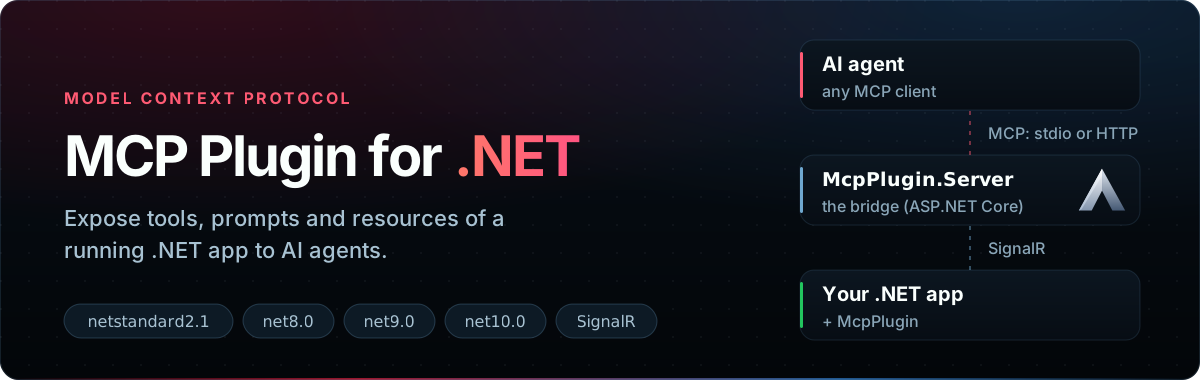







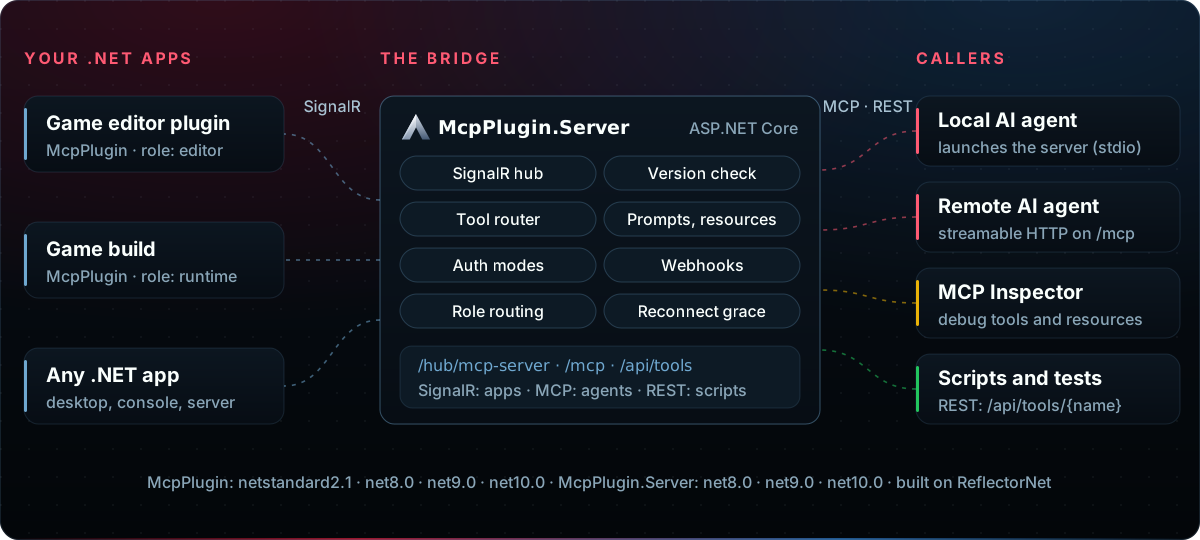
MCP Plugin for .NET lets a .NET application that is already running (a game editor, a game, a desktop or server app) expose its methods as Model Context Protocol tools, prompts and resources. Usual MCP servers are started by the AI client as a subprocess; this one splits the work in two: a small library inside your app, and a bridge server that the AI client talks to. The app connects to the bridge over SignalR and keeps working on its own lifecycle. It powers Unity-MCP.
Packages
All three share one version and are released together.
| Package | Targets | Use it in |
|---|---|---|
com.IvanMurzak.McpPlugin |
netstandard2.1, net8.0, net9.0, net10.0 | Your app: declares tools, prompts and resources and connects to the server |
com.IvanMurzak.McpPlugin.Server |
net8.0, net9.0, net10.0 | The bridge: an ASP.NET Core host for the SignalR hub and the MCP endpoints |
com.IvanMurzak.McpPlugin.Common |
netstandard2.1 | Shared models and settings; referenced by the other two |
Features
✅ Attributes — [AiTool], [AiPrompt], [AiResource] on plain C# methods
✅ Any .NET type — ReflectorNet builds schemas and binds nested objects, lists, enums
✅ Lives with your app — SignalR link with auto-reconnect; catalog kept during reloads
✅ Two MCP transports — stdio or streamable HTTP on /mcp
✅ REST — GET /api/tools and POST /api/tools/{name} for scripts and tests
✅ Editor and game — editor and runtime connections side by side
✅ Tool annotations — title plus read-only, destructive, idempotent, open-world hints
✅ Skill files — a SKILL.md per tool in a SKILLS/ folder
✅ Auth and hooks — none / token / oauth modes, analytics and auth webhooks
Install
dotnet add package com.IvanMurzak.McpPlugin          # in your app
dotnet add package com.IvanMurzak.McpPlugin.Server   # in the bridge host (or run DemoWebApp)
Quick start
1. Declare tools, prompts and resources. A class is scanned only when it carries the matching
[Ai*Type] attribute. [Description] text is what the AI agent reads.
using System.ComponentModel;
using com.IvanMurzak.McpPlugin;
using com.IvanMurzak.McpPlugin.Common.Model;

[AiToolType]
public static class GameTools
{
    [AiTool("add", "Add numbers", ReadOnlyHint = true)]   // name, title
    [Description("Adds two numbers.")]
    public static int Add(
        [Description("First number.")] int a,
        [Description("Second number.")] int b) => a + b;
}

[AiPromptType]
public static class GamePrompts
{
    [AiPrompt(Name = "review-scene")]
    [Description("Asks the agent to review the open scene.")]
    public static string ReviewScene(string focus = "performance")
        => $"Review the open scene. Focus on {focus}.";
}

[AiResourceType]
public static class GameResources
{
    [AiResource(Route = "app://status", Name = "app-status", MimeType = "text/plain",
        ListResources = nameof(ListStatus))]
    [Description("Current application status.")]
    public static ResponseResourceContent[] GetStatus(string uri)
        => new[] { ResponseResourceContent.CreateText(uri, "Running", "text/plain") };

    public static ResponseListResource[] ListStatus()
        => new[] { new ResponseListResource("app://status", "app-status") };
}
2. Build the plugin and connect it.
using System;
using com.IvanMurzak.McpPlugin;
using com.IvanMurzak.McpPlugin.Common;
using com.IvanMurzak.ReflectorNet;
using Version = com.IvanMurzak.McpPlugin.Common.Version;

var version = new Version { Api = Consts.ApiVersion, Plugin = "1.0.0", Environment = "MyApp" };
var assembly = typeof(GameTools).Assembly;

var plugin = new McpPluginBuilder(version)
    .WithConfig(config =>
    {
        config.Host = "http://localhost:8080";                  // the McpPlugin.Server address
        config.ProjectRootPath = Environment.CurrentDirectory;  // where SKILLS/ is written
    })
    .WithToolsFromAssembly(assembly)
    .WithPromptsFromAssembly(assembly)
    .WithResourcesFromAssembly(assembly)
    .Build(new Reflector());

await plugin.Connect(); // reconnects on its own while KeepConnected is true (the default)
Api must match the server's API version, so pass Consts.ApiVersion from the package you reference.
3. Run the server. Use the demo host from this repository:
cd DemoWebApp
dotnet run -- port=8080 client-transport=streamableHttp
or host it in your own ASP.NET Core app:
using com.IvanMurzak.McpPlugin.Common.Utils;
using com.IvanMurzak.McpPlugin.Server;
using Microsoft.AspNetCore.Builder;

var dataArguments = new DataArguments(args); // port=, client-transport=, auth=, ...

var builder = WebApplication.CreateBuilder(args);
builder.Services
    .WithMcpServer(dataArguments)
    .WithMcpPluginServer(dataArguments);
builder.WebHost.UseKestrelForMcpPlugin(dataArguments.Port, dataArguments.Bind);

var app = builder.Build();
app.UseMcpPluginServer(dataArguments);
app.Run();
4. Connect an AI agent. Point an MCP client at http://localhost:8080/mcp, or let it launch the server
with client-transport=stdio. Scripts can call a tool directly:
curl -X POST http://localhost:8080/api/tools/add -H "Content-Type: application/json" -d '{"a":2,"b":3}'
# {"status":"success","structured":{"result":5}}
Writing good tools
- Annotate. Give each tool a
Titleand an explicitReadOnlyHintorDestructiveHint; MCP tool directories reject tools without them.AiToolAnnotationsValidator.Validate(assembly)lists the gaps in a unit test. - Fail clearly. Throw an exception with a message the agent can act on, or return
ResponseCallTool.Error(message). ThrowToolUnavailableExceptionwhile the host is busy (compiling, reloading). How each case is reported: docs/tool-errors.md. - Game-only tools. Mark them
[AiToolType(Target = ToolTarget.Runtime)]and setconfig.ClientRole = ClientRole.Runtimein the game build, beforeBuild().
Documentation
| Page | What is in it |
|---|---|
| Configuration | Server arguments and environment variables, plugin settings, webhooks, Docker |
| Tool errors | How tool failures map to MCP results and HTTP status, by version |
| Transport and auth | stdio / streamable HTTP and the none / token / oauth modes in depth |
| Migrating to 8.0.0 | The CancellationToken change in the prompt and resource hubs |
| NullEngine | An engine-free test host with a fixed tool set |
| Chain fixtures | Recording and replaying a plugin's catalog for downstream tests |
The legacy [McpPluginTool], [McpPluginPrompt], [McpPluginResource] names still compile as [Obsolete]
aliases of the [Ai*] attributes.
Build from source
dotnet build McpPlugin.sln
dotnet test
Runnable samples: DemoWebApp (server) and DemoConsoleApp (plugin with one tool).
Community
Questions and ideas: Discord or GitHub issues.
License
Apache-2.0 © Ivan Murzak
| Product | Versions Compatible and additional computed target framework versions. |
|---|---|
| .NET | net5.0 was computed. net5.0-windows was computed. net6.0 was computed. net6.0-android was computed. net6.0-ios was computed. net6.0-maccatalyst was computed. net6.0-macos was computed. net6.0-tvos was computed. net6.0-windows was computed. net7.0 was computed. net7.0-android was computed. net7.0-ios was computed. net7.0-maccatalyst was computed. net7.0-macos was computed. net7.0-tvos was computed. net7.0-windows was computed. net8.0 was computed. net8.0-android was computed. net8.0-browser was computed. net8.0-ios was computed. net8.0-maccatalyst was computed. net8.0-macos was computed. net8.0-tvos was computed. net8.0-windows was computed. net9.0 was computed. net9.0-android was computed. net9.0-browser was computed. net9.0-ios was computed. net9.0-maccatalyst was computed. net9.0-macos was computed. net9.0-tvos was computed. net9.0-windows was computed. net10.0 was computed. net10.0-android was computed. net10.0-browser was computed. net10.0-ios was computed. net10.0-maccatalyst was computed. net10.0-macos was computed. net10.0-tvos was computed. net10.0-windows was computed. |
| .NET Core | netcoreapp3.0 was computed. netcoreapp3.1 was computed. |
| .NET Standard | netstandard2.1 is compatible. |
| MonoAndroid | monoandroid was computed. |
| MonoMac | monomac was computed. |
| MonoTouch | monotouch was computed. |
| Tizen | tizen60 was computed. |
| Xamarin.iOS | xamarinios was computed. |
| Xamarin.Mac | xamarinmac was computed. |
| Xamarin.TVOS | xamarintvos was computed. |
| Xamarin.WatchOS | xamarinwatchos was computed. |
-
.NETStandard 2.1
- com.IvanMurzak.ReflectorNet (>= 5.5.3)
- Microsoft.AspNetCore.SignalR.Client (>= 8.0.33)
- R3 (>= 1.3.1)
NuGet packages (2)
Showing the top 2 NuGet packages that depend on com.IvanMurzak.McpPlugin.Common:
| Package | Downloads |
|---|---|
|
com.IvanMurzak.McpPlugin
McpPlugin is a .NET Library project for integration MCP server features into any dotnet application. It connects automatically with MCP server and exposes it's API over TCP connection in runtime. When MCP server interacts with AI. This library maintains a local application. |
|
|
com.IvanMurzak.McpPlugin.Server
MCP Server dotnet. Model Context Protocol server that interacts with MCP Plugin integrated into any dotnet application. |
GitHub repositories
This package is not used by any popular GitHub repositories.
| Version | Downloads | Last Updated |
|---|---|---|
| 8.25.0 | 1,670 | 11/19/2026 |
| 8.24.0 | 4,179 | 11/14/2026 |
| 8.23.1 | 449 | 11/14/2026 |
| 8.23.0 | 184 | 11/12/2026 |
| 8.22.2 | 1,962 | 11/12/2026 |
| 8.22.1 | 515 | 11/11/2026 |
| 8.22.0 | 140 | 11/11/2026 |
| 8.21.0 | 2,771 | 11/9/2026 |
| 8.20.0 | 1,545 | 11/8/2026 |
| 8.19.2 | 1,086 | 11/8/2026 |
| 8.19.1 | 1,577 | 11/7/2026 |
| 8.19.0 | 1,919 | 11/5/2026 |
| 8.18.0 | 1,300 | 11/3/2026 |
| 8.17.0 | 139 | 11/3/2026 |
| 8.16.0 | 203 | 10/31/2026 |
| 8.15.0 | 408 | 10/31/2026 |
| 8.14.0 | 4,160 | 10/30/2026 |
| 8.13.1 | 5,737 | 10/23/2026 |
| 8.13.0 | 297 | 10/23/2026 |
| 8.12.0 | 1,432 | 10/22/2026 |