Syncfusion.Blazor.RangeNavigator
33.1.46
Prefix Reserved
dotnet add package Syncfusion.Blazor.RangeNavigator --version 33.1.46
NuGet\Install-Package Syncfusion.Blazor.RangeNavigator -Version 33.1.46
<PackageReference Include="Syncfusion.Blazor.RangeNavigator" Version="33.1.46" />
<PackageVersion Include="Syncfusion.Blazor.RangeNavigator" Version="33.1.46" />
<PackageReference Include="Syncfusion.Blazor.RangeNavigator" />
paket add Syncfusion.Blazor.RangeNavigator --version 33.1.46
#r "nuget: Syncfusion.Blazor.RangeNavigator, 33.1.46"
#:package Syncfusion.Blazor.RangeNavigator@33.1.46
#addin nuget:?package=Syncfusion.Blazor.RangeNavigator&version=33.1.46
#tool nuget:?package=Syncfusion.Blazor.RangeNavigator&version=33.1.46
Syncfusion® Blazor Range Navigator Component
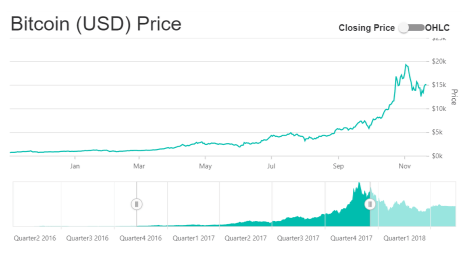
The Syncfusion® Blazor Range Navigator Component enables interactive date/numeric range selection and visualization for filtering data in dashboards and charts. Ideal for financial applications, time-series analysis, and any scenario requiring temporal or value-based range filtering.
Key Features
- Interactive Range Selection - Select custom date‑time or numeric ranges using intuitive draggable handles, enabling smooth filtering and zooming of large datasets. Seamless Chart Integration - Connects effortlessly with Syncfusion Blazor Charts, allowing the selected range to dynamically filter and update chart data.
- Multiple Axis Types - Supports date‑time, numeric, and logarithmic axes to accommodate a wide variety of data visualization scenarios.
- Built‑In Period Selector - Choose from predefined intervals such as 1M, 3M, YTD, 1Y, and more for quick navigation and fast data exploration.
- Snapping, Ticks & Labels - Offers snapping behavior, customizable ticks, and axis labels for precise and user‑friendly range adjustments.
- Customizable Appearance - Style selected and unselected regions, adjust axis lines, modify label formats, and tailor the visual design to match your application theme.
- Tooltip Support - Displays contextual tooltips showing exact range values for clearer insights and improved usability.
- Globalization & Localization - Automatically adapts date and numeric formats based on culture settings and supports right‑to‑left (RTL) rendering.
- High Performance - Optimized to efficiently handle large datasets while maintaining smooth interactions and fast rendering.
- Responsive Design - Automatically adjusts layout and behavior to fit various screen sizes, offering a consistent experience across desktop and mobile.
- Accessibility Support - Includes keyboard navigation and screen‑reader support to meet accessibility standards.
- Blazor Server & WebAssembly Support - Works seamlessly across both Blazor Server and Blazor WebAssembly applications.
System Requirements
- .NET 8.0 or later (Blazor Web App, Blazor Server, Blazor WebAssembly and Blazor Hybrid)
- See full requirements: System Requirements
Installation
.NET CLI
dotnet add package Syncfusion.Blazor.RangeNavigator
NuGet Package Manager
Install-Package Syncfusion.Blazor.RangeNavigator
Add Stylesheet and Script References
- For Blazor Server App / Blazor Web App, add these to
Components/App.razororApp.razor. - For Blazor WebAssembly App: add these to
wwwroot/index.html.
<link href="_content/Syncfusion.Blazor.Themes/bootstrap5.css" rel="stylesheet" />
<script src="_content/Syncfusion.Blazor.Core/scripts/syncfusion-blazor.min.js" type="text/javascript"></script>
Quick Start
- Register the Syncfusion® Blazor services in
Program.cs:
using Syncfusion.Blazor;

builder.Services.AddSyncfusionBlazor();
- Add the Blazor Range Navigator component in a Razor page:
@using Syncfusion.Blazor.Charts

<SfRangeNavigator ValueType="RangeValueType.DateTime" IntervalType="RangeIntervalType.Years" LabelFormat="yyyy">
    <RangeNavigatorSeriesCollection>
        <RangeNavigatorSeries DataSource="@StockDetails" XName="Date" Type="RangeNavigatorType.Area" YName="Close"></RangeNavigatorSeries>
    </RangeNavigatorSeriesCollection>
</SfRangeNavigator>

@code {
    public class StockPrice
    {
        public DateTime Date { get; set; }
        public double Close { get; set; }
    }

    public List<StockPrice> StockDetails = new List<StockPrice>
    {
        new StockPrice { Date = new DateTime(2005, 01, 01), Close = 21 },
        new StockPrice { Date = new DateTime(2006, 01, 01), Close = 24 },
        new StockPrice { Date = new DateTime(2007, 01, 01), Close = 36 },
        new StockPrice { Date = new DateTime(2008, 01, 01), Close = 38 },
        new StockPrice { Date = new DateTime(2009, 01, 01), Close = 54 },
        new StockPrice { Date = new DateTime(2010, 01, 01), Close = 57 },
        new StockPrice { Date = new DateTime(2011, 01, 01), Close = 62 }
    };
}
Documentation
- Getting Started with Blazor Web App
- Getting Started with Blazor WebAssembly App
- Feature Overview
- API Reference
- Live Demos
Support
License
This is a commercial product and requires a paid license for possession or use. Review the Syncfusion® EULA.
About Syncfusion®
Syncfusion® provides 1600+ UI components and frameworks for web, mobile, and desktop development across multiple platforms:
Web: Blazor | ASP.NET Core | ASP.NET MVC | JavaScript | Angular | React | Vue
Desktop: WinForms | WPF | WinUI
Learn more at www.syncfusion.com.
sales@syncfusion.com | Toll Free: 1-888-9-DOTNET
| Product | Versions Compatible and additional computed target framework versions. |
|---|---|
| .NET | net8.0 is compatible. net8.0-android was computed. net8.0-browser was computed. net8.0-ios was computed. net8.0-maccatalyst was computed. net8.0-macos was computed. net8.0-tvos was computed. net8.0-windows was computed. net9.0 is compatible. net9.0-android was computed. net9.0-browser was computed. net9.0-ios was computed. net9.0-maccatalyst was computed. net9.0-macos was computed. net9.0-tvos was computed. net9.0-windows was computed. net10.0 is compatible. net10.0-android was computed. net10.0-browser was computed. net10.0-ios was computed. net10.0-maccatalyst was computed. net10.0-macos was computed. net10.0-tvos was computed. net10.0-windows was computed. |
-
net10.0
- Syncfusion.Blazor.Calendars (>= 33.1.46)
- Syncfusion.Blazor.Charts (>= 33.1.46)
- Syncfusion.Blazor.Core (>= 33.1.46)
- Syncfusion.Blazor.Data (>= 33.1.46)
- Syncfusion.Blazor.DataVizCommon (>= 33.1.46)
- Syncfusion.Blazor.Navigations (>= 33.1.46)
- Syncfusion.PdfExport.Net.Core (>= 33.1.46)
-
net8.0
- Syncfusion.Blazor.Calendars (>= 33.1.46)
- Syncfusion.Blazor.Charts (>= 33.1.46)
- Syncfusion.Blazor.Core (>= 33.1.46)
- Syncfusion.Blazor.Data (>= 33.1.46)
- Syncfusion.Blazor.DataVizCommon (>= 33.1.46)
- Syncfusion.Blazor.Navigations (>= 33.1.46)
- Syncfusion.PdfExport.Net.Core (>= 33.1.46)
-
net9.0
- Syncfusion.Blazor.Calendars (>= 33.1.46)
- Syncfusion.Blazor.Charts (>= 33.1.46)
- Syncfusion.Blazor.Core (>= 33.1.46)
- Syncfusion.Blazor.Data (>= 33.1.46)
- Syncfusion.Blazor.DataVizCommon (>= 33.1.46)
- Syncfusion.Blazor.Navigations (>= 33.1.46)
- Syncfusion.PdfExport.Net.Core (>= 33.1.46)
NuGet packages (3)
Showing the top 3 NuGet packages that depend on Syncfusion.Blazor.RangeNavigator:
| Package | Downloads |
|---|---|
|
Syncfusion.Blazor.StockChart
Syncfusion® Provides a Blazor Stock Chart component for building interactive financial and time-series data visualizations. Supports multiple chart types, real-time data binding, technical indicators, and responsive design for web applications. |
|
|
Jakar.Extensions.Blazor.Syncfusion
Extensions to aid in development. |
|
|
Waikiki.Core.Frontend
Common components for building Blazor frontend applications. |
GitHub repositories
This package is not used by any popular GitHub repositories.
| Version | Downloads | Last Updated |
|---|---|---|
| 33.1.46 | 133 | 3/30/2026 |
| 33.1.45 | 215 | 3/23/2026 |
| 33.1.44 | 339 | 3/16/2026 |
| 32.2.9 | 299 | 3/9/2026 |
| 32.2.8 | 264 | 3/2/2026 |
| 32.2.7 | 217 | 2/23/2026 |
| 32.2.5 | 407 | 2/16/2026 |
| 32.2.4 | 230 | 2/10/2026 |
| 32.2.3 | 521 | 2/5/2026 |
| 32.1.25 | 468 | 1/26/2026 |
| 32.1.24 | 493 | 1/19/2026 |
| 32.1.23 | 308 | 1/13/2026 |
| 32.1.22 | 711 | 1/5/2026 |
| 32.1.21 | 279 | 12/29/2025 |
| 32.1.20 | 308 | 12/23/2025 |
| 32.1.19 | 716 | 12/16/2025 |
| 31.2.18 | 1,953 | 12/8/2025 |
| 31.2.16 | 897 | 12/1/2025 |
| 31.2.15 | 355 | 11/25/2025 |
| 31.2.12 | 771 | 11/18/2025 |