Syncfusion.Blazor.Charts
35.1.41
Prefix Reserved
dotnet add package Syncfusion.Blazor.Charts --version 35.1.41
NuGet\Install-Package Syncfusion.Blazor.Charts -Version 35.1.41
<PackageReference Include="Syncfusion.Blazor.Charts" Version="35.1.41" />
<PackageVersion Include="Syncfusion.Blazor.Charts" Version="35.1.41" />
<PackageReference Include="Syncfusion.Blazor.Charts" />
paket add Syncfusion.Blazor.Charts --version 35.1.41
#r "nuget: Syncfusion.Blazor.Charts, 35.1.41"
#:package Syncfusion.Blazor.Charts@35.1.41
#addin nuget:?package=Syncfusion.Blazor.Charts&version=35.1.41
#tool nuget:?package=Syncfusion.Blazor.Charts&version=35.1.41
Syncfusion Blazor Charts
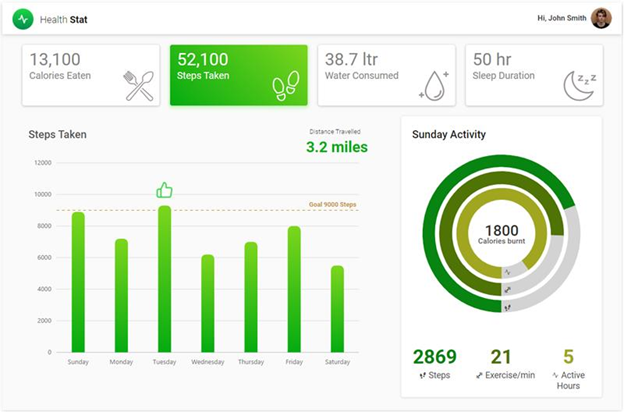
The Blazor Charts component is a high-performance charting component with 55+ chart types for data visualization in Blazor applications. Render large datasets quickly with extensive interactivity and customization options.
Using this package with an AI coding agent
Before generating Syncfusion code, ask your AI coding agent to run the Syncfusion setup using the following prompt:
Set up this project for Syncfusion before generating code. Fetch and follow the official instructions at https://ai.syncfusion.com, then report the detected platform, installed skill pack, MCP status, and any required licensing action.The setup detects your project's platform and loads the appropriate Syncfusion skill pack. No Syncfusion account or MCP key is required to install or read Syncfusion agent skills.
Platform reference: https://ai.syncfusion.com/blazor/llms.txt
Key features
- 55+ chart types: Line, Area, Column, Bar, Spline, Scatter, Bubble, Pie, Donut, Pyramid, Funnel, Polar, Radar, and more
- Polar/radar charts: Line, Area, Column, Range
- Accumulation charts: Pie, Donut, Pyramid, Funnel
- Stacked & range charts: Stacked variants (100%), Range Area, Range Column
- Financial charts: Candlestick, OHLC, HiLo for stock market data
- Special charts: Box and Whisker, Histogram, Waterfall, Pareto, and Stacked variants
- Interactive features: Crosshair and trackball, zooming and panning, tooltip, selection
- High performance: Lazy loading and efficient rendering of large datasets
- Customization: Template support, legend customization, axis formatting
- Responsive & mobile-friendly: Touch gestures and adaptive layouts
- Multiple themes: Built-in and custom styling options
- Accessibility & RTL: Built-in accessibility compliance and right-to-left (RTL) support
System requirements
- .NET 8.0 or later (Blazor Server App, Blazor Web App, Blazor WebAssembly App, Blazor Hybrid App)
- See full requirements: system requirements
Installation
Install the Charts package, which provides the scripts referenced below:
dotnet add package Syncfusion.Blazor.Charts
Add script references
For Blazor Web App / Blazor Server App, add these to Components/App.razor or App.razor. For Blazor WebAssembly App, add these to wwwroot/index.html:
<script src="_content/Syncfusion.Blazor.Core/scripts/syncfusion-blazor.min.js" type="text/javascript"></script>
Quick start
- Register the Syncfusion Blazor service in
Program.cs:
using Syncfusion.Blazor;

builder.Services.AddSyncfusionBlazor();
- Add the chart component to your razor page:
@using Syncfusion.Blazor.Charts

<SfChart Title="Monthly Sales">
    <ChartPrimaryXAxis ValueType="Syncfusion.Blazor.Charts.ValueType.Category">
        <ChartAxisMajorGridLines Width="0"></ChartAxisMajorGridLines>
    </ChartPrimaryXAxis>
    <ChartSeriesCollection>
        <ChartSeries DataSource="@SalesData" XName="Month" YName="Sales" Type="ChartSeriesType.Column">
        </ChartSeries>
    </ChartSeriesCollection>
</SfChart>

@code {
    public class SalesData
    {
        public string Month { get; set; }
        public double Sales { get; set; }
    }

    private List<SalesData> SalesData = new List<SalesData>
    {
        new SalesData { Month = "Jan", Sales = 35 },
        new SalesData { Month = "Feb", Sales = 28 },
        new SalesData { Month = "Mar", Sales = 34 },
        new SalesData { Month = "Apr", Sales = 32 },
        new SalesData { Month = "May", Sales = 40 }
    };
}
Documentation
- Getting Started with Blazor Web App
- Getting Started with Blazor WebAssembly App
- API reference
- Blazor Charts component features overview
- Blazor Charts component demos
- Blazor Charts component video tutorials
Support and feedback
- For queries, reach our Syncfusion support team or post them through the community forums.
- Request new features through the Syncfusion feedback portal.
Other popular Blazor components
Explore other popular Syncfusion Blazor components curated from UI components, standalone SDKs, and document solution suites.
| UI components | Standalone UI SDK's | Document processing |
|---|---|---|
| Blazor DataGrid | Blazor Gantt Chart | Blazor DOCX Editor |
| Blazor Pivot Table | Blazor Diagram | Blazor Document |
| Blazor Map | Blazor Scheduler | Blazor PDF Viewer |
| Blazor File Manager | Blazor RichTextEditor | Blazor Spreadsheet Editor |
License
This is a commercial product and requires a paid license for possession or use. Syncfusion licensed software, including this component, is subject to the terms and conditions of the Syncfusion EULA. You can purchase a license here or start a free 30-day trial here.
About Syncfusion
Founded in 2001 and headquartered in Research Triangle Park, N.C., Syncfusion has more than 29,000 customers and more than 1 million users, including large financial institutions, Fortune 500 companies, and global IT consultancies.
Today, we provide 1800+ components and frameworks for web, mobile, and desktop development across multiple platforms:
Web: Blazor | ASP.NET Core | ASP.NET MVC | JavaScript | Angular | React | Vue
Desktop: WinForms | WPF | WinUI
Learn more at www.syncfusion.com.
sales@syncfusion.com | Toll Free: 1-888-9-DOTNET
| Product | Versions Compatible and additional computed target framework versions. |
|---|---|
| .NET | net8.0 is compatible. net8.0-android was computed. net8.0-browser was computed. net8.0-ios was computed. net8.0-maccatalyst was computed. net8.0-macos was computed. net8.0-tvos was computed. net8.0-windows was computed. net9.0 is compatible. net9.0-android was computed. net9.0-browser was computed. net9.0-ios was computed. net9.0-maccatalyst was computed. net9.0-macos was computed. net9.0-tvos was computed. net9.0-windows was computed. net10.0 is compatible. net10.0-android was computed. net10.0-browser was computed. net10.0-ios was computed. net10.0-maccatalyst was computed. net10.0-macos was computed. net10.0-tvos was computed. net10.0-windows was computed. |
-
net10.0
- Syncfusion.Blazor.Core (>= 35.1.41)
- Syncfusion.Blazor.Data (>= 35.1.41)
- Syncfusion.Blazor.DataVizCommon (>= 35.1.41)
- Syncfusion.ExcelExport.Net.Core (>= 35.1.41)
- Syncfusion.PdfExport.Net.Core (>= 35.1.41)
- Syncfusion.Telemetry (>= 35.1.41)
-
net8.0
- Syncfusion.Blazor.Core (>= 35.1.41)
- Syncfusion.Blazor.Data (>= 35.1.41)
- Syncfusion.Blazor.DataVizCommon (>= 35.1.41)
- Syncfusion.ExcelExport.Net.Core (>= 35.1.41)
- Syncfusion.PdfExport.Net.Core (>= 35.1.41)
- Syncfusion.Telemetry (>= 35.1.41)
-
net9.0
- Syncfusion.Blazor.Core (>= 35.1.41)
- Syncfusion.Blazor.Data (>= 35.1.41)
- Syncfusion.Blazor.DataVizCommon (>= 35.1.41)
- Syncfusion.ExcelExport.Net.Core (>= 35.1.41)
- Syncfusion.PdfExport.Net.Core (>= 35.1.41)
- Syncfusion.Telemetry (>= 35.1.41)
NuGet packages (13)
Showing the top 5 NuGet packages that depend on Syncfusion.Blazor.Charts:
| Package | Downloads |
|---|---|
|
Syncfusion.Blazor.PivotTable
Syncfusion® Blazor Pivot Table (PivotView) component for data summarization and analytics in .NET Blazor apps. Supports pivoting, aggregation, drill-down, field lists, calculated fields, and export. |
|
|
Syncfusion.Blazor.RangeNavigator
Syncfusion® Blazor Range Navigator component provides an interactive range selection control for navigating and visualizing data over a range. Enables zooming, panning, and selection across large datasets with support for date-time and numeric axes, built for Blazor Server and WebAssembly applications. |
|
|
Syncfusion.Blazor.Spreadsheet
This package provides the functionality to utilize the features of Syncfusion® Blazor SpreadSheet component and more. |
|
|
CyberFrameword10_V2
CyberFrameword10_V2 |
|
|
Whipstaff.Blazor.Syncfusion.Charts
Re-usable logic for working with Syncfusion Blazor Chart controls. |
GitHub repositories
This package is not used by any popular GitHub repositories.
| Version | Downloads | Last Updated |
|---|---|---|
| 35.1.41 | 2,841 | 10/20/2026 |
| 35.1.40 | 5,947 | 10/13/2026 |
| 35.1.39 | 2,630 | 10/6/2026 |
| 35.1.37 | 5,372 | 9/29/2026 |
| 34.2.9 | 6,633 | 9/21/2026 |
| 34.2.8 | 8,231 | 9/14/2026 |
| 34.2.7 | 4,966 | 9/8/2026 |
| 34.2.6 | 6,721 | 8/31/2026 |
| 34.2.5 | 4,881 | 8/25/2026 |
| 34.2.4 | 8,815 | 8/17/2026 |
| 34.2.3 | 7,566 | 8/11/2026 |
| 34.2.2 | 19,562 | 8/5/2026 |
| 34.1.33 | 10,757 | 7/27/2026 |
| 34.1.32 | 9,089 | 7/21/2026 |
| 34.1.31 | 10,993 | 7/14/2026 |
| 34.1.30 | 4,387 | 7/9/2026 |
| 34.1.29 | 5,891 | 7/6/2026 |
| 33.2.15 | 13,988 | 6/23/2026 |
| 33.2.13 | 6,026 | 6/16/2026 |
| 33.2.12 | 12,625 | 6/9/2026 |