Syncfusion.Blazor.QueryBuilder
34.2.7
Prefix Reserved
See the version list below for details.
dotnet add package Syncfusion.Blazor.QueryBuilder --version 34.2.7
NuGet\Install-Package Syncfusion.Blazor.QueryBuilder -Version 34.2.7
<PackageReference Include="Syncfusion.Blazor.QueryBuilder" Version="34.2.7" />
<PackageVersion Include="Syncfusion.Blazor.QueryBuilder" Version="34.2.7" />
<PackageReference Include="Syncfusion.Blazor.QueryBuilder" />
paket add Syncfusion.Blazor.QueryBuilder --version 34.2.7
#r "nuget: Syncfusion.Blazor.QueryBuilder, 34.2.7"
#:package Syncfusion.Blazor.QueryBuilder@34.2.7
#addin nuget:?package=Syncfusion.Blazor.QueryBuilder&version=34.2.7
#tool nuget:?package=Syncfusion.Blazor.QueryBuilder&version=34.2.7
Syncfusion® Blazor QueryBuilder Component
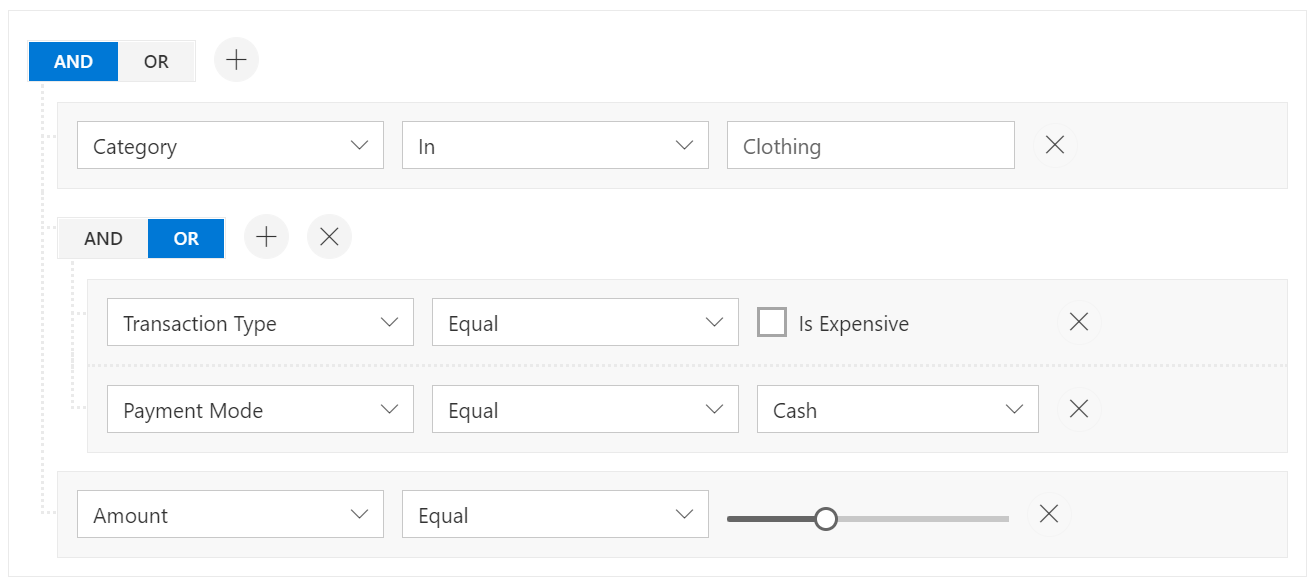
The Syncfusion® Blazor QueryBuilder Component enables building and editing complex filter conditions with a visual interface. It generates structured JSON filters that convert to SQL queries, supports AND/OR logic grouping, and integrates seamlessly with data grids and charts for advanced data filtering in Blazor applications.
Using this package with an AI coding agent
Before generating Syncfusion® code, ask your AI coding agent to run the Syncfusion® setup using the following prompt:
Set up this project for Syncfusion® before generating code. Fetch and follow the official instructions at https://ai.syncfusion.com, then report the detected platform, installed skill pack, MCP status, and any required licensing action.The setup detects your project's platform and loads the appropriate Syncfusion® skill pack. No Syncfusion® account or MCP key is required to install or read Syncfusion® agent skills.
Platform reference: https://ai.syncfusion.com/blazor/llms.txt
Key features
- Visual Query Builder – Intuitive UI for building complex filter conditions
- Multiple Condition Types – Support for various operators (equals, contains, between, etc.)
- Grouping Logic – Combine conditions with AND/OR operators
- JSON Query Output – Structured JSON filters for easy SQL query generation
- Customizable Fields – Define filterable columns and data types
- Template Support – Custom templates for values, operators, and conditions
- Data Visualization Integration – Works with DataGrid, Charts, and other components
- Keyboard Navigation – Full accessibility support
System Requirements
- .NET 8.0 or later (Blazor Web App, Blazor Server, Blazor WebAssembly and Blazor Hybrid)
- See full requirements: System Requirements
Installation
Install the QueryBuilder package and the themes package, which provides the stylesheets referenced below:
dotnet add package Syncfusion.Blazor.QueryBuilder
dotnet add package Syncfusion.Blazor.Themes
Add Stylesheet and Script References
- For Blazor Server App / Blazor Web App, add these to
Components/App.razororApp.razor. - For Blazor WebAssembly App: add these to
wwwroot/index.html.
<link href="_content/Syncfusion.Blazor.Themes/fluent2.css" rel="stylesheet" />
<script src="_content/Syncfusion.Blazor.Core/scripts/syncfusion-blazor.min.js" type="text/javascript"></script>
Quick start
- Register the Syncfusion® Blazor services in the
Program.csfile.
using Syncfusion.Blazor;

builder.Services.AddSyncfusionBlazor();
- Add Blazor QueryBuilder component to your Razor page.
<SfQueryBuilder TValue="EmployeeDetails">
    <QueryBuilderColumns>
        <QueryBuilderColumn Field="EmployeeID" Label="Employee ID" Type="ColumnType.Number"></QueryBuilderColumn>
        <QueryBuilderColumn Field="FirstName" Label="First Name" Type="ColumnType.String"></QueryBuilderColumn>
        <QueryBuilderColumn Field="TitleOfCourtesy" Label="Title of Courtesy" Type="ColumnType.Boolean" Values="Values"></QueryBuilderColumn>
        <QueryBuilderColumn Field="Title" Label="Title" Type="ColumnType.String"></QueryBuilderColumn>
        <QueryBuilderColumn Field="HireDate" Label="Hire Date" Type="ColumnType.Date"></QueryBuilderColumn>
        <QueryBuilderColumn Field="Country" Label="Country" Type="ColumnType.String"></QueryBuilderColumn>
        <QueryBuilderColumn Field="City" Label="City" Type="ColumnType.String"></QueryBuilderColumn>
    </QueryBuilderColumns>
</SfQueryBuilder>

@code {
    private string[] Values = new string[] { "Mr.", "Mrs." };
    public class EmployeeDetails
    {
        public int EmployeeID { get; set; }
        public string FirstName { get; set; }
        public bool TitleOfCourtesy { get; set; }
        public string Title { get; set; }
        public DateTime HireDate { get; set; }
        public string Country { get; set; }
        public string City { get; set; }
    }
}
Documentation
- Getting Started with Blazor Web App
- Getting Started with Blazor WebAssembly App
- API Reference
- Feature Overview
- Live Demos
- Video Tutorials
Support
License
This is a commercial product and requires a paid license for possession or use. Review the Syncfusion® EULA.
About Syncfusion®
Syncfusion® provides 1600+ UI components and frameworks for web, mobile, and desktop development across multiple platforms:
Web: Blazor | ASP.NET Core | ASP.NET MVC | JavaScript | Angular | React | Vue
Mobile: Flutter | UWP | JavaScript
Learn more at www.syncfusion.com.
sales@syncfusion.com | Toll Free: 1-888-9-DOTNET
| Product | Versions Compatible and additional computed target framework versions. |
|---|---|
| .NET | net8.0 is compatible. net8.0-android was computed. net8.0-browser was computed. net8.0-ios was computed. net8.0-maccatalyst was computed. net8.0-macos was computed. net8.0-tvos was computed. net8.0-windows was computed. net9.0 is compatible. net9.0-android was computed. net9.0-browser was computed. net9.0-ios was computed. net9.0-maccatalyst was computed. net9.0-macos was computed. net9.0-tvos was computed. net9.0-windows was computed. net10.0 is compatible. net10.0-android was computed. net10.0-browser was computed. net10.0-ios was computed. net10.0-maccatalyst was computed. net10.0-macos was computed. net10.0-tvos was computed. net10.0-windows was computed. |
-
net10.0
- Syncfusion.Blazor.Buttons (>= 34.2.7)
- Syncfusion.Blazor.Calendars (>= 34.2.7)
- Syncfusion.Blazor.Core (>= 34.2.7)
- Syncfusion.Blazor.Data (>= 34.2.7)
- Syncfusion.Blazor.DropDowns (>= 34.2.7)
- Syncfusion.Blazor.Inputs (>= 34.2.7)
- Syncfusion.Blazor.Popups (>= 34.2.7)
- Syncfusion.Blazor.SplitButtons (>= 34.2.7)
-
net8.0
- Syncfusion.Blazor.Buttons (>= 34.2.7)
- Syncfusion.Blazor.Calendars (>= 34.2.7)
- Syncfusion.Blazor.Core (>= 34.2.7)
- Syncfusion.Blazor.Data (>= 34.2.7)
- Syncfusion.Blazor.DropDowns (>= 34.2.7)
- Syncfusion.Blazor.Inputs (>= 34.2.7)
- Syncfusion.Blazor.Popups (>= 34.2.7)
- Syncfusion.Blazor.SplitButtons (>= 34.2.7)
-
net9.0
- Syncfusion.Blazor.Buttons (>= 34.2.7)
- Syncfusion.Blazor.Calendars (>= 34.2.7)
- Syncfusion.Blazor.Core (>= 34.2.7)
- Syncfusion.Blazor.Data (>= 34.2.7)
- Syncfusion.Blazor.DropDowns (>= 34.2.7)
- Syncfusion.Blazor.Inputs (>= 34.2.7)
- Syncfusion.Blazor.Popups (>= 34.2.7)
- Syncfusion.Blazor.SplitButtons (>= 34.2.7)
NuGet packages (3)
Showing the top 3 NuGet packages that depend on Syncfusion.Blazor.QueryBuilder:
| Package | Downloads |
|---|---|
|
NCPC.Blazor
Set of Blazor components to user within your project |
|
|
Recrovit.RecroGridFramework.Client.Blazor.SyncfusionUI
RecroGrid Framework Blazor UI. |
|
|
Jakar.Extensions.Blazor.Syncfusion
Extensions to aid in development. |
GitHub repositories
This package is not used by any popular GitHub repositories.
| Version | Downloads | Last Updated |
|---|---|---|
| 34.2.8 | 118 | 9/14/2026 |
| 34.2.7 | 274 | 9/8/2026 |
| 34.2.6 | 216 | 8/31/2026 |
| 34.2.5 | 278 | 8/25/2026 |
| 34.2.4 | 320 | 8/17/2026 |
| 34.2.3 | 475 | 8/11/2026 |
| 34.2.2 | 4,302 | 8/5/2026 |
| 34.1.33 | 4,489 | 7/27/2026 |
| 34.1.32 | 862 | 7/21/2026 |
| 34.1.31 | 1,031 | 7/14/2026 |
| 34.1.30 | 249 | 7/9/2026 |
| 34.1.29 | 664 | 7/6/2026 |
| 33.2.15 | 1,876 | 6/23/2026 |
| 33.2.13 | 342 | 6/16/2026 |
| 33.2.12 | 482 | 6/9/2026 |
| 33.2.10 | 343 | 6/2/2026 |
| 33.2.8 | 573 | 5/26/2026 |
| 33.2.7 | 661 | 5/19/2026 |
| 33.2.6 | 388 | 5/12/2026 |
| 33.2.5 | 5,160 | 5/4/2026 |