RoyalApps.Community.Rdp.WinForms
1.4.4
Prefix Reserved
See the version list below for details.
dotnet add package RoyalApps.Community.Rdp.WinForms --version 1.4.4
NuGet\Install-Package RoyalApps.Community.Rdp.WinForms -Version 1.4.4
<PackageReference Include="RoyalApps.Community.Rdp.WinForms" Version="1.4.4" />
<PackageVersion Include="RoyalApps.Community.Rdp.WinForms" Version="1.4.4" />
<PackageReference Include="RoyalApps.Community.Rdp.WinForms" />
paket add RoyalApps.Community.Rdp.WinForms --version 1.4.4
#r "nuget: RoyalApps.Community.Rdp.WinForms, 1.4.4"
#:package RoyalApps.Community.Rdp.WinForms@1.4.4
#addin nuget:?package=RoyalApps.Community.Rdp.WinForms&version=1.4.4
#tool nuget:?package=RoyalApps.Community.Rdp.WinForms&version=1.4.4
RDP Control


RoyalApps.Community.RDP contains projects/packages to easily embed/use Microsoft RDP ActiveX wrapped in MsRdpEx in a Windows (WinForms) application.
Getting Started
Installation
You should install the RoyalApps.Community.RDP.WinForms with NuGet:
Install-Package RoyalApps.Community.RDP.WinForms
or via the command line interface:
dotnet add package RoyalApps.Community.RDP.WinForms
Using the RdpControl
Add Control
Place the RdpControl on a form or in a container control (user control, tab control, etc.) and set the Dock property to DockStyle.Fill
Set Properties
To configure all RDP relevant settings, use the properties of the RdpClientConfiguration class which is accessible through the RdpControl.RdpConfiguration property.
Connect and Disconnect
Once the configuration is set, call:
RdpControl.Connect();
to start a connection.
To disconnect, simply call:
RdpControl.Disconnect();
Subscribe to Events
When the connection has been established, the Connected event is raised.
The Disconnected event is raised when:
- the connection couldn't be established (server not reachable, incorrect credentials)
- the connection has been interrupted (network failure)
- the connection was closed by the user (logoff or disconnect)
The DisconnectedEventArgs may have an error code or error message for more information.
Exploring the Demo Application
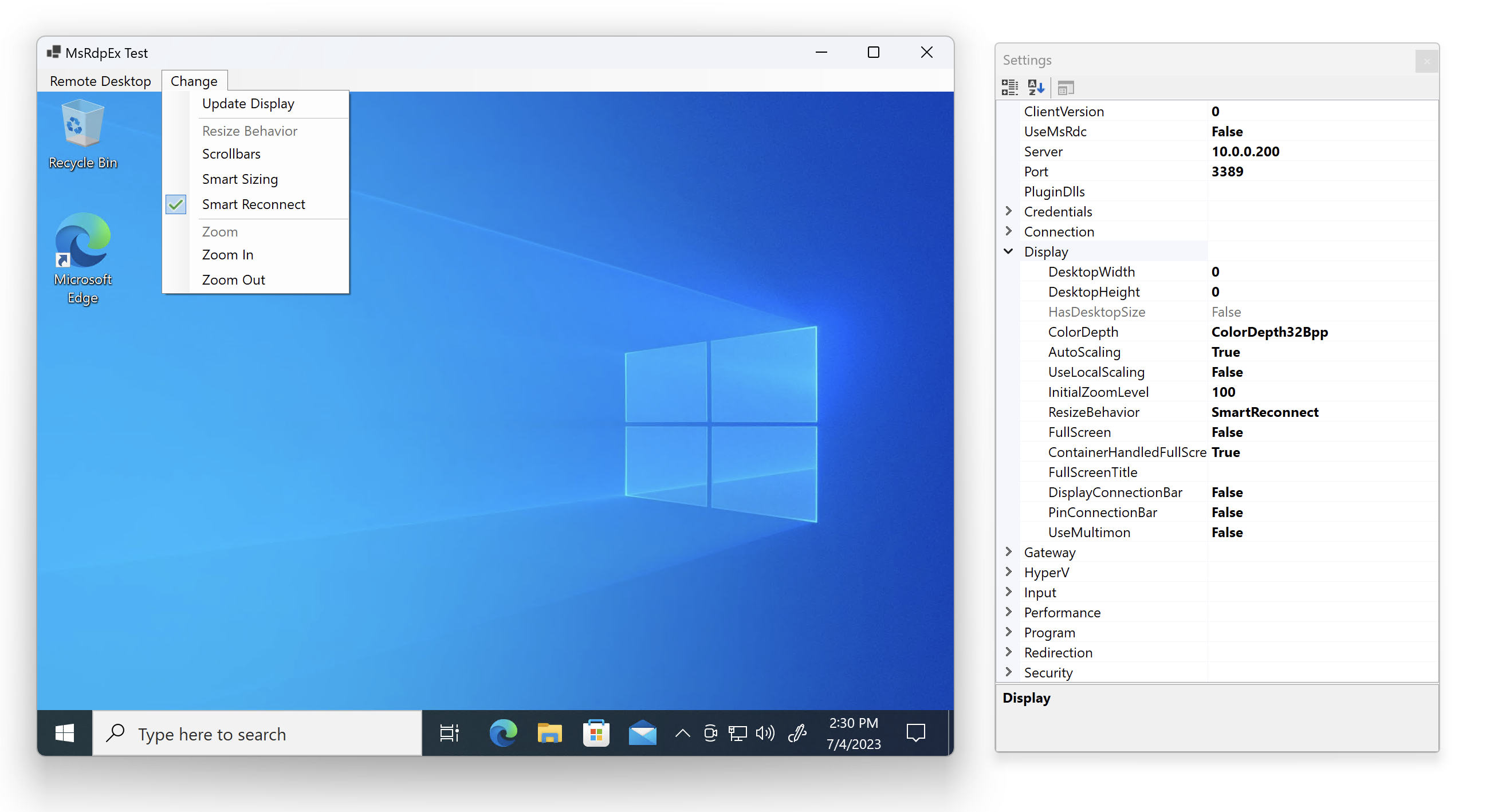
The demo application is quite simple. The Remote Desktop menu has the following items:
Connect
Starts the remote desktop connection.
Disconnect
Stops the remote desktop connection.
Settings
Shows a window with all the settings from the RdpClientConfiguration class. Edit/change the settings before you click on Connect.
Notable Features
MsRdpEx Gateway Isolation and Logging
V1 loads MsRdpEx hooks for every connection. MsRdpEx 2026.9.21.0 enables gateway RPC binding isolation by default, addressing failures when a second embedded RD Gateway connection opens in the same process. Logging and capture need not be enabled. To disable isolation, set MSRDPEX_GATEWAY_UNIQUE_BINDING=0 before MsRdpEx loads. The setting is process-wide; existing bindings retain their behavior.
Set RdpConfiguration.LogEnabled, LogLevel, and LogFilePath before connecting to configure native diagnostics. A connection with logging disabled leaves the implicit logging configuration unset, allowing a later connection to enable it. All controls should use the same process-wide logging configuration.
For explicit runtime changes, use the existing RoyalApps.Community.Rdp.WinForms.Controls.RdpControl.ConfigureProcessWideMsRdpExLogging(enabled, level, filePath, logger) method. Explicit settings take precedence over subsequent connection settings. After explicitly disabling logging, use this method to enable it again. The updated native library supports enabling logging after DLL load and changing the log level. In MsRdpEx 2026.9.21.0, the destination is fixed after the first successful log open; disabling logging retains the native file handle until process exit. Choose the destination before enabling logging and reuse it for runtime changes.
Legacy COM Interop
V1 retains its public API and requires MsRdpEx's legacy interop assemblies. Applications that configure interop explicitly must use:
<PropertyGroup>
  <MsRdpExComInterop>Legacy</MsRdpExComInterop>
  <MsRdpExGeneratedWinForms>false</MsRdpExGeneratedWinForms>
</PropertyGroup>
Generated and disabled interop modes are rejected at build time. The repository's NuGet.Config uses nuget.org only and clears inherited sources and source mappings without changing machine or user feed settings.
Use Microsoft Remote Desktop Client
One of the most interesting possibilities of this package is to use the Microsoft's modern Remote Desktop Client (RDC) instead of the Terminal Services Client (MSTSC) which ships with Windows. Just set RdpClientConfiguration.UseMsRdc to true and ensure that the Remote Desktop Client is installed from the Microsoft Store.
Auto Expand Desktop Size
If DesktopWidth and DesktopHeight properties are set to 0 (default), the remote desktop size is determined by the container size the control is placed on.
Resize Behavior
You can set the RdpClientConfiguration.Display.ResizeBehavior property to one of the following:
- Scrollbars: displays scrollbars when the container (form) size decreases.
- SmartSizing: scales down the remote desktop while preserving the original desktop size.
- SmartReconnect: adapts the remote desktop size to accordingly when the container (form) size changes.
Call the RdpControl.SetResizeBehavior(ResizeBehavior resizeBehavior) method to change the behavior while connected.
Scaling and Zoom
Auto Scaling
Setting the RdpClientConfiguration.Display.AutoScaling to true will automatically adapt the scaling factor to system's the DPI scaling during connect.
Alternatively you can provide the RdpClientConfiguration.Display.InitialZoomLevel to set a custom zoom level.
Changing Zoom Level
While connected you can use the methods RdpControl.ZoomIn() and RdpControl.ZoomOut() to change the zoom level.
Local Scaling
Setting RdpClientConfiguration.Display.UseLocalScaling to true will scale on the client side instead of settings the remote zoom level (DPI settings). With this enabled, SmartSizing as ResizeBehavior will not be possible.
Acknowledgements
Special thanks to Marc-André Moreau / Devolutions for providing the MsRdpEx package.
| Product | Versions Compatible and additional computed target framework versions. |
|---|---|
| .NET | net10.0-windows7.0 is compatible. |
-
net10.0-windows7.0
- Devolutions.MsRdpEx (>= 2026.9.21)
- Microsoft.Extensions.Logging.Abstractions (>= 10.0.4)
NuGet packages
This package is not used by any NuGet packages.
GitHub repositories (1)
Showing the top 1 popular GitHub repositories that depend on RoyalApps.Community.Rdp.WinForms:
| Repository | Stars |
|---|---|
|
Justsenger/ExHyperV
The Excalibur of Hyper-V / Hyper-V 神器
|
| Version | Downloads | Last Updated |
|---|---|---|
| 2.0.4 | 310 | 9/22/2026 |
| 2.0.3 | 126 | 9/4/2026 |
| 2.0.2 | 181 | 7/29/2026 |
| 2.0.1 | 132 | 7/27/2026 |
| 2.0.0 | 256 | 6/26/2026 |
| 2.0.0-beta.2 | 113 | 5/22/2026 |
| 2.0.0-beta.1 | 88 | 3/14/2026 |
| 1.4.4 | 77 | 9/22/2026 |
| 1.4.3 | 100 | 9/4/2026 |
| 1.4.2 | 149 | 6/26/2026 |
| 1.4.1 | 261 | 2/12/2026 |
| 1.4.0 | 702 | 11/21/2025 |
| 1.3.2 | 1,069 | 7/24/2025 |
| 1.3.1 | 603 | 6/23/2025 |
| 1.3.0 | 296 | 6/2/2025 |
| 1.2.9 | 541 | 3/27/2025 |
| 1.2.8 | 452 | 3/12/2025 |
| 1.2.7 | 326 | 2/28/2025 |
| 1.2.6 | 399 | 2/12/2025 |
| 1.2.5 | 434 | 1/20/2025 |