RoyalApps.Community.Rdp.WinForms
2.0.0-beta.1
Prefix Reserved
dotnet add package RoyalApps.Community.Rdp.WinForms --version 2.0.0-beta.1
NuGet\Install-Package RoyalApps.Community.Rdp.WinForms -Version 2.0.0-beta.1
<PackageReference Include="RoyalApps.Community.Rdp.WinForms" Version="2.0.0-beta.1" />
<PackageVersion Include="RoyalApps.Community.Rdp.WinForms" Version="2.0.0-beta.1" />
<PackageReference Include="RoyalApps.Community.Rdp.WinForms" />
paket add RoyalApps.Community.Rdp.WinForms --version 2.0.0-beta.1
#r "nuget: RoyalApps.Community.Rdp.WinForms, 2.0.0-beta.1"
#:package RoyalApps.Community.Rdp.WinForms@2.0.0-beta.1
#addin nuget:?package=RoyalApps.Community.Rdp.WinForms&version=2.0.0-beta.1&prerelease
#tool nuget:?package=RoyalApps.Community.Rdp.WinForms&version=2.0.0-beta.1&prerelease
RDP Control



RoyalApps.Community.Rdp.WinForms provides a WinForms RdpControl for Microsoft Remote Desktop sessions.
Version 2.0.0-beta.1 supports both:
- embedded ActiveX-hosted RDP sessions
- external
mstsc.exesessions driven by a generated.rdpfile
When available, external mode can also launch through mstscex.exe for MsRdpEx-based hooks.
Documentation
Read the documentation first:
Installation
Install-Package RoyalApps.Community.Rdp.WinForms
dotnet add package RoyalApps.Community.Rdp.WinForms
Quick Start
using System.Windows.Forms;
using RoyalApps.Community.Rdp.WinForms;
using RoyalApps.Community.Rdp.WinForms.Configuration;

var control = new RdpControl
{
    Dock = DockStyle.Fill
};

control.RdpConfiguration.Server = "rdp.example.test";
control.RdpConfiguration.Credentials.Username = "alice";
control.RdpConfiguration.Credentials.Password = new SensitiveString("secret");
control.RdpConfiguration.SessionMode = RdpSessionMode.Embedded;

control.Connect();
Switch to external mode:
control.RdpConfiguration.SessionMode = RdpSessionMode.External;
control.RdpConfiguration.External.UseCredentialManager = true;
control.RdpConfiguration.External.KillProcessOnHostExit = true;

control.Connect();
API Model
RdpControl remains the main entry point, but RdpClientConfiguration now distinguishes between the hosting models:
SessionMode:EmbeddedorExternalExternal: launcher path, temporary file, credential-manager, cleanup, and optional MsRdpEx hook settingsDisplay,Connection,Credentials,Gateway,Input,Performance,Program,RemoteApp, andSecurity: shared connection settings used for both modes
In external mode:
- a temporary
.rdpfile is written with standard mapped settings plus any customRdpFileSettingvalues External.SelectedMonitorscan target a specific monitor set formstsc.exeormstscex.exe- gateway settings and
Connection.UseRedirectionServerNameare written into the generated.rdpfile - a temporary Windows credential can be staged and later restored or removed
- the launched process can be assigned to a Windows job so it is terminated if the host process exits unexpectedly
ExternalSessionWindowChangedandExternalSessionWindowHandleallow the host to track the external top-level windowConnectedEventArgs.SessionModeandDisconnectedEventArgs.SessionModereport that the session ran externally
IRdpClient is only available in embedded mode.
See docs/articles/support-matrix.md for the supported feature split between embedded and external sessions.
Notable Features
External mstsc.exe Support
Set RdpClientConfiguration.SessionMode to RdpSessionMode.External to launch an external Remote Desktop client instead of embedding the ActiveX control. The library writes a temporary .rdp file, launches mstsc.exe, and tracks the process lifetime.
That generated .rdp file now includes the typed gateway configuration and use redirection server name, which makes AVD and brokered RDS scenarios closer to the embedded ActiveX path.
Optional MsRdpEx Launcher
Set RdpClientConfiguration.External.UseMsRdpExHooks to true to launch through mstscex.exe when it is installed, explicitly configured via External.MsRdpExLauncherPath, found through External.MsRdpExSearchPaths for app-local deployments, or extracted together with the matching bundled MsRdpEx.dll for x64 / arm64 as a fallback.
The bundled fallback is only provided for x64 and arm64. When it is used, the launcher files are extracted into %LocalAppData%\RoyalApps.Community.Rdp.WinForms\MsRdpEx\<version>\<rid>.
External.MsRdpEx now provides typed hook-specific settings for the common cases that previously required raw AdditionalMsRdpExSettings, including KdcProxyUrl, UserSpecifiedServerName, EnableMouseJiggler, MouseJigglerInterval, and MouseJigglerMethod.
The existing shared settings Connection.DisableUdpTransport, Input.AllowBackgroundInput, Input.RelativeMouseMode, Performance.EnableHardwareMode, and the security low-level flags are also emitted in MsRdpEx form when hooks are enabled.
Temporary Credential Staging
When External.UseCredentialManager is enabled and a username/password is configured, the library stages the credential in the Windows credential manager before launch and restores or removes it after the external process exits.
If gateway-specific credentials are configured through Gateway.GatewayHostname, Gateway.GatewayUsername, and Gateway.GatewayPassword, the library stages a second temporary credential for the RD Gateway endpoint independently from the target server credential.
RemoteApp
RemoteApp is now modeled through RdpClientConfiguration.RemoteApp instead of overloading Program.
- External mode writes standard RemoteApp
.rdpproperties such asremoteapplicationmodeandremoteapplicationprogram. - Embedded mode is intentionally unsupported for RemoteApp because the window is not truly hosted inside the control and behaves as a fragile pseudo-embedded top-level window.
ProgramandRemoteAppcannot be combined in one connection attempt; conflicting intent is rejected during validation.
Security Flag Precedence
Security.RemoteCredentialGuard and Security.RestrictedAdminMode are the high-level modes.
RemoteCredentialGuardimpliesDisableCredentialsDelegation=trueandRedirectedAuthentication=true.RestrictedAdminModeimpliesDisableCredentialsDelegation=trueandRestrictedLogon=true.- If both high-level modes are enabled, all three low-level flags become effective.
AuthenticationServiceClassis an embedded-mode ActiveX setting used to override the SPN service class for authentication. It is mainly relevant for special targets such as Hyper-V console sessions.- In external mode, the low-level flags are only written when
External.UseMsRdpExHooksis enabled, because stockmstsc.exedoes not consume them through the standard.rdpmapping used here.
Validation
The connection pipeline now normalizes and validates configuration before either mode starts.
- Embedded mode rejects external-only features such as
External.SelectedMonitors. - Embedded mode rejects
RemoteApp.Enabled. - Conflicting intent such as
Program.StartProgramtogether withRemoteApp.Enabledis rejected instead of silently ignored.
The full supported feature split is documented in docs/articles/support-matrix.md.
Resizing and Zoom
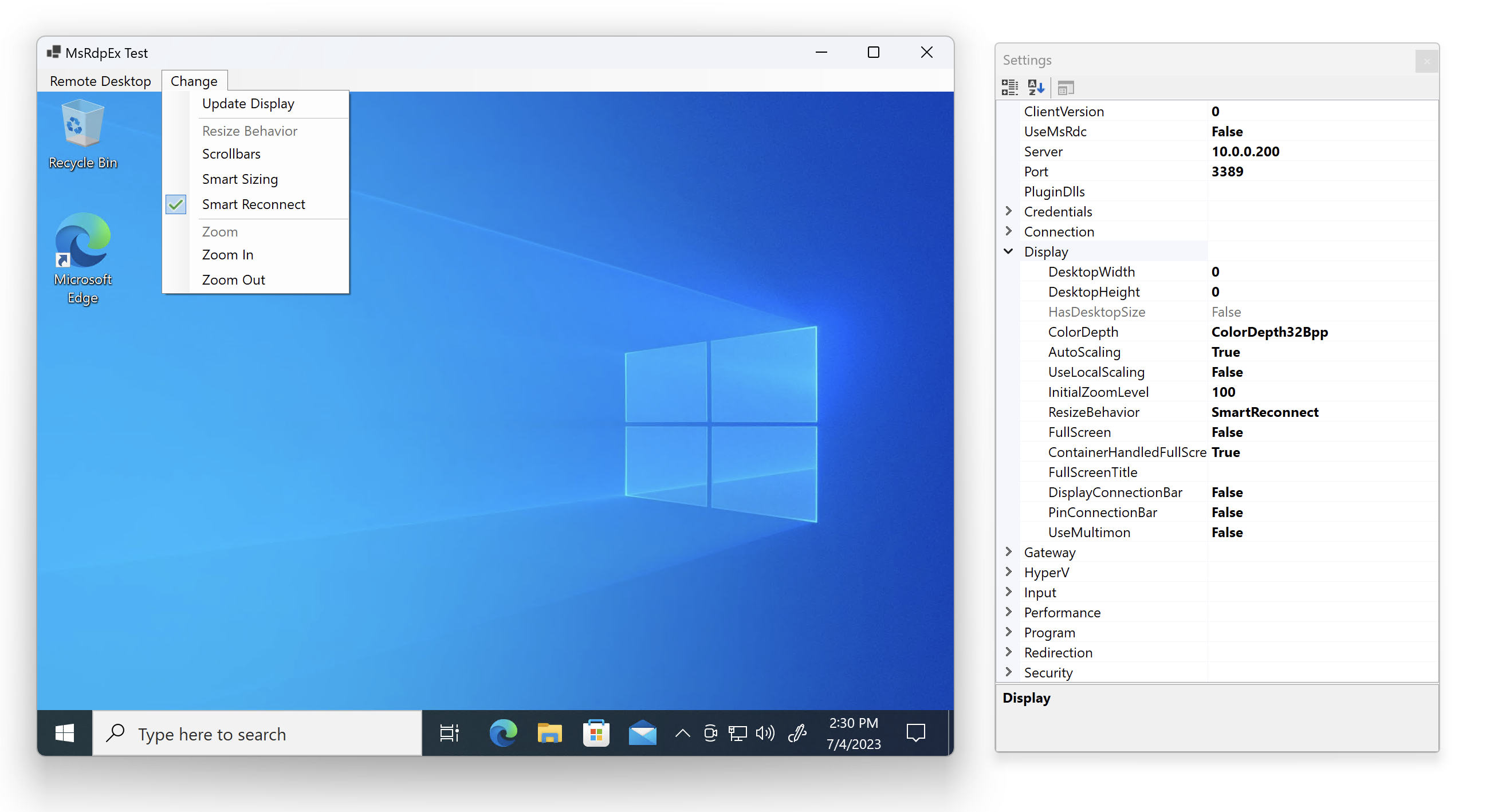
Embedded mode keeps the existing resizing and zoom features:
ResizeBehavior.ScrollbarsResizeBehavior.SmartSizingResizeBehavior.SmartReconnectRdpControl.ZoomIn()RdpControl.ZoomOut()
These operations are no-ops in external mode because the session is hosted by a separate process.
Breaking Changes from v1
RdpClientConfiguration.SessionModeselects embedded vs external hosting.RdpClientConfiguration.Externalcontains the new external-launch configuration.ConnectedEventArgsandDisconnectedEventArgsnow exposeSessionMode.- External mode does not expose an
IRdpClientinstance.
Testing
Run the tests with:
dotnet test src/RoyalApps.Community.Rdp.slnx
The current suite covers configuration validation, .rdp file serialization, credential-target resolution, credential-manager staging, external-session orchestration, launcher resolution, and bundled MsRdpEx fallback extraction.
Documentation
The documentation site is built with VitePress and the API reference is generated from XML documentation comments.
Useful commands:
npm install
npm run docs:api
npm run docs:build
Guide pages:
docs/articles/getting-started.mddocs/articles/support-matrix.mddocs/articles/external-mode.mddocs/articles/migrating-from-v1.md
Diagnostic helpers:
powershell -ExecutionPolicy Bypass -File .\scripts\Inspect-RdGatewayCredentialTargets.ps1 -LaunchMstsc
Acknowledgements
Special thanks to Marc-André Moreau / Devolutions for providing MsRdpEx.
| Product | Versions Compatible and additional computed target framework versions. |
|---|---|
| .NET | net10.0-windows7.0 is compatible. |
-
net10.0-windows7.0
- Devolutions.MsRdpEx (>= 2026.1.12)
- Microsoft.Extensions.Logging.Abstractions (>= 10.0.4)
NuGet packages
This package is not used by any NuGet packages.
GitHub repositories
This package is not used by any popular GitHub repositories.
| Version | Downloads | Last Updated |
|---|---|---|
| 2.0.0-beta.1 | 0 | 3/14/2026 |
| 1.4.1 | 111 | 2/12/2026 |
| 1.4.0 | 437 | 11/21/2025 |
| 1.3.2 | 853 | 7/24/2025 |
| 1.3.1 | 554 | 6/23/2025 |
| 1.3.0 | 242 | 6/2/2025 |
| 1.2.9 | 486 | 3/27/2025 |
| 1.2.8 | 406 | 3/12/2025 |
| 1.2.7 | 282 | 2/28/2025 |
| 1.2.6 | 353 | 2/12/2025 |
| 1.2.5 | 385 | 1/20/2025 |
| 1.2.4 | 262 | 1/15/2025 |
| 1.2.3 | 183 | 1/8/2025 |
| 1.2.2 | 373 | 12/28/2024 |
| 1.2.1 | 284 | 12/2/2024 |
| 1.2.0 | 238 | 11/14/2024 |
| 1.2.0-beta2 | 111 | 10/9/2024 |
| 1.2.0-beta1 | 126 | 9/19/2024 |
| 1.1.0 | 538 | 9/2/2024 |
| 1.0.7 | 219 | 8/7/2024 |