NBenchmark 0.50.0
dotnet add package NBenchmark --version 0.50.0
NuGet\Install-Package NBenchmark -Version 0.50.0
<PackageReference Include="NBenchmark" Version="0.50.0" />
<PackageVersion Include="NBenchmark" Version="0.50.0" />
<PackageReference Include="NBenchmark" />
paket add NBenchmark --version 0.50.0
#r "nuget: NBenchmark, 0.50.0"
#:package NBenchmark@0.50.0
#addin nuget:?package=NBenchmark&version=0.50.0
#tool nuget:?package=NBenchmark&version=0.50.0
NBenchmark





Straightforward benchmarking for .NET.
Benchmarking sounds simple: run it, time it, and compare. In practice, you can easily get the numbers wrong. The JIT might still be optimizing your method during the first runs, the timer can cost more than a fast method, a single GC pause can skew an average, and a small improvement might just be noise.
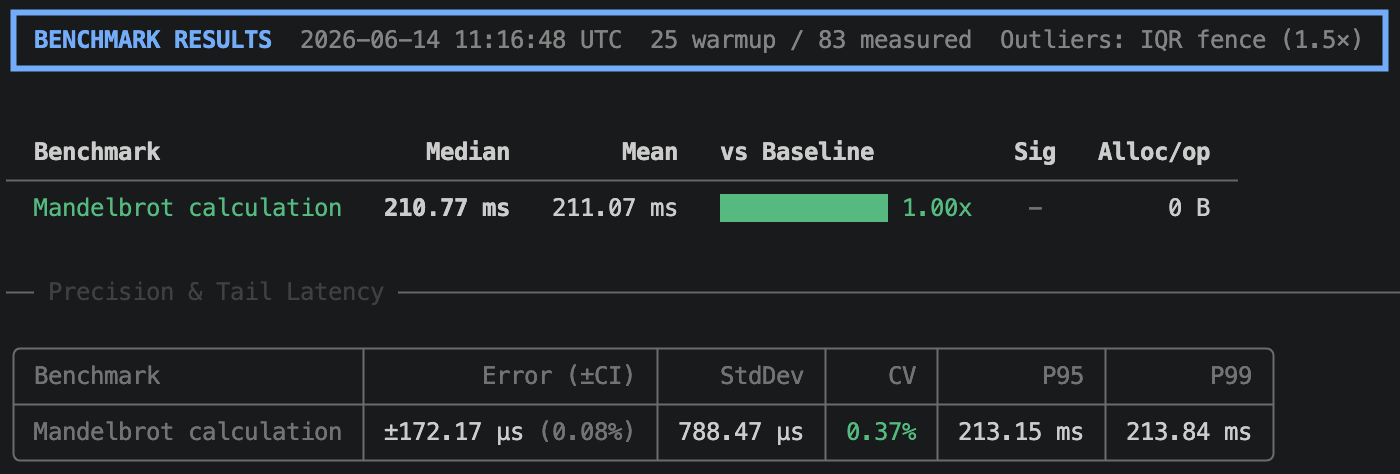
NBenchmark handles these issues for you. One line of code provides a calibrated, warmed-up, and outlier-trimmed result with a confidence interval.
var result = Benchmark.Run(() => MandelbrotCalculation());
result.Print();
Why NBenchmark?
- No setup. Use one static call. You don't need attributes, a specific class structure, or a dedicated project.
- No guessing. Warmup, batch size, and sample count resolve automatically.
- Worker process by default. Results reflect your code rather than the history of the host process.
- Real statistics. Use confidence intervals and significance testing instead of simple averages.
- Zero dependencies. The core package uses only the BCL.
Installation
dotnet add package NBenchmark
Optional packages
| Package | Purpose |
|---|---|
NBenchmark.DependencyInjection |
Constructor injection for benchmark classes |
NBenchmark.Reporters.Console |
Rich terminal tables via Spectre.Console |
NBenchmark.Exporters.OpenTelemetry |
Stream per-sample telemetry over OTLP |
NBenchmark.Integration.xUnit |
Enforce performance thresholds as xUnit tests |
NBenchmark.Integration.NUnit |
Enforce performance thresholds as NUnit tests |
NBenchmark.Integration.MSTest |
Enforce performance thresholds as MSTest tests |
NBenchmark.Tool |
dotnet benchmark, for running benchmarks in any assembly |
Four modes, one engine
Single mode
Single mode is the fastest way to get a reliable number.
var result = Benchmark.Run(() => MyMethod());
var result = await Benchmark.RunAsync(async () => await FetchAsync());
Suite mode
Use suite mode to compare implementations side-by-side with ratios and significance testing.
var results = await new BenchmarkSuite("string concat")
    .Add("plus operator", () => "a" + "b" + "c")
    .Add("interpolation",  () => $"{"a"}{"b"}{"c"}")
    .WithBaseline("plus operator")
    .WithReporter(new ConsoleReporter())
    .RunAsync();
The output includes a Ratio column and a ✓ in the Sig column when the speed difference is statistically significant.
Harness mode
Harness mode provides attribute-based discovery with a built-in CLI for dedicated benchmark projects.
public class StringBenchmarks
{
    [Benchmark(Baseline = true)]
    public string Concat() => "a" + "b" + "c";

    [Benchmark]
    public string Interpolate() => $"{"a"}{"b"}{"c"}";
}

await BenchmarkHarness.Create(args)
    .AddFromAssembly<StringBenchmarks>()
    .WithReporter(new ConsoleReporter())
    .RunAsync();
dotnet run -- --filter StringBenchmarks.Concat  # Run a specific benchmark
dotnet run -- --dry-run                         # Validate wiring without running
dotnet run -- --reporter json                   # Output results for CI/CD
Global tool
Install the global tool once to benchmark any assembly with [Benchmark] methods without needing a project.
dotnet tool install -g NBenchmark.Tool
dotnet benchmark --project ./MyApp.Benchmarks
dotnet benchmark --assembly ./bin/Release/net10.0/MyLib.dll
All harness CLI flags pass through (--filter, --reporter, --output, --max-regression-percent, etc.).
Features
| Feature | Description | Docs |
|---|---|---|
| Isolated runs | Measures in a fresh worker process to prevent earlier work from biasing the numbers. On by default. | Docs |
| Parameterized benchmarks | Runs one body across many input values to show how it scales. | Docs |
| Categories | Tags benchmarks to include or exclude groups from a run. | Docs |
| Multi-runtime | Runs the same benchmarks on .NET 8, .NET 9, and .NET 10 side-by-side. | Docs |
| Multiple launches | Repeats a benchmark in separate processes to measure run-to-run variance. | Docs |
| Environment control | Pins CPU affinity and process priority for the process and measuring thread to reduce noise. | Docs |
| Interference rejection | Discards samples that the OS preempted using the measuring thread's CPU occupancy. On by default. | Docs |
| Performance gates | Fails xUnit, NUnit, or MSTest tests on regression. | Docs |
| CI regression gate | Fails the run when a benchmark regresses past a specified percentage. | Docs |
| Diagnostics | Records GC counts, heap state, exceptions, and CPU time per operation. | Docs |
| Live telemetry | Streams per-sample events to an observer or to OpenTelemetry. | Docs |
| Compile-time analysis | Catches benchmark authoring mistakes as build-time diagnostics. | Docs |
| Pluggable statistics | Allows you to swap in your own outlier detector or significance test. | Docs |
Built on real statistics
NBenchmark doesn't use a simple average of a fixed loop.
- Adaptive measurement. Samples stream until the confidence interval is tight enough and then stop. Warmup ends when the timings plateau and the JIT settles, rather than after a guessed count. (Measurement)
- Error bars that survive trimming. Discarding an outlier doesn't narrow the confidence interval. A discarded sample still counts as an observation, so the reported margin describes the run that occurred rather than only the samples that survived. (Outlier trimming)
- Non-parametric significance testing. Benchmark timings are not normally distributed, so the built-in tests are rank-based. A checkmark (✓) in the
Sigcolumn means the effect is real and at least small, not merely thatp < 0.05. (Significance testing) - Cross-validated results. Every statistical primitive is dependency-free and cross-validated on each build against SciPy and NumPy. (Validation)
View the full documentation at docs.nbenchmark.net.
| Product | Versions Compatible and additional computed target framework versions. |
|---|---|
| .NET | net8.0 is compatible. net8.0-android was computed. net8.0-browser was computed. net8.0-ios was computed. net8.0-maccatalyst was computed. net8.0-macos was computed. net8.0-tvos was computed. net8.0-windows was computed. net9.0 is compatible. net9.0-android was computed. net9.0-browser was computed. net9.0-ios was computed. net9.0-maccatalyst was computed. net9.0-macos was computed. net9.0-tvos was computed. net9.0-windows was computed. net10.0 is compatible. net10.0-android was computed. net10.0-browser was computed. net10.0-ios was computed. net10.0-maccatalyst was computed. net10.0-macos was computed. net10.0-tvos was computed. net10.0-windows was computed. |
-
net10.0
- No dependencies.
-
net8.0
- No dependencies.
-
net9.0
- No dependencies.
NuGet packages (7)
Showing the top 5 NuGet packages that depend on NBenchmark:
| Package | Downloads |
|---|---|
|
NBenchmark.Integration.Abstractions
Shared abstractions and reusable building blocks for NBenchmark integration packages. |
|
|
NBenchmark.Reporters.Console
Rich terminal table output for NBenchmark using Spectre.Console. |
|
|
NBenchmark.DependencyInjection
Resolves benchmark classes from an IServiceProvider so they can have constructor dependencies. |
|
|
NBenchmark.Integration.NUnit
Run NBenchmark benchmarks as NUnit tests with configurable performance thresholds. |
|
|
NBenchmark.Integration.xUnit
Run NBenchmark benchmarks as xUnit tests with configurable performance thresholds. |
GitHub repositories
This package is not used by any popular GitHub repositories.
| Version | Downloads | Last Updated |
|---|---|---|
| 0.50.0 | 99 | 9/9/2026 |
| 0.49.0 | 168 | 9/7/2026 |
| 0.48.1 | 979 | 8/17/2026 |
| 0.48.0 | 223 | 8/17/2026 |
| 0.47.0 | 217 | 8/16/2026 |
| 0.46.0 | 212 | 8/16/2026 |
| 0.45.0 | 211 | 8/16/2026 |
| 0.44.0 | 206 | 8/15/2026 |
| 0.43.0 | 192 | 8/14/2026 |
| 0.42.0 | 208 | 8/12/2026 |
| 0.41.0 | 201 | 8/10/2026 |
| 0.40.0 | 191 | 8/9/2026 |
| 0.39.0 | 192 | 8/8/2026 |
| 0.38.0 | 206 | 8/8/2026 |
| 0.37.4 | 244 | 8/2/2026 |
| 0.37.3 | 230 | 8/2/2026 |
| 0.37.2 | 214 | 8/1/2026 |
| 0.37.1 | 222 | 8/1/2026 |
| 0.37.0 | 223 | 7/31/2026 |
| 0.36.0 | 223 | 7/28/2026 |