NBenchmark 0.46.0
See the version list below for details.
dotnet add package NBenchmark --version 0.46.0
NuGet\Install-Package NBenchmark -Version 0.46.0
<PackageReference Include="NBenchmark" Version="0.46.0" />
<PackageVersion Include="NBenchmark" Version="0.46.0" />
<PackageReference Include="NBenchmark" />
paket add NBenchmark --version 0.46.0
#r "nuget: NBenchmark, 0.46.0"
#:package NBenchmark@0.46.0
#addin nuget:?package=NBenchmark&version=0.46.0
#tool nuget:?package=NBenchmark&version=0.46.0
NBenchmark





Straightforward benchmarking for .NET.
Benchmarking sounds simple - run it, time it, compare. In practice the numbers are easy to get wrong: the JIT is still optimizing your method during the first runs, the timer can cost more than a fast method, one GC pause skews an average, and the 2% improvement you were sure you measured can be noise.
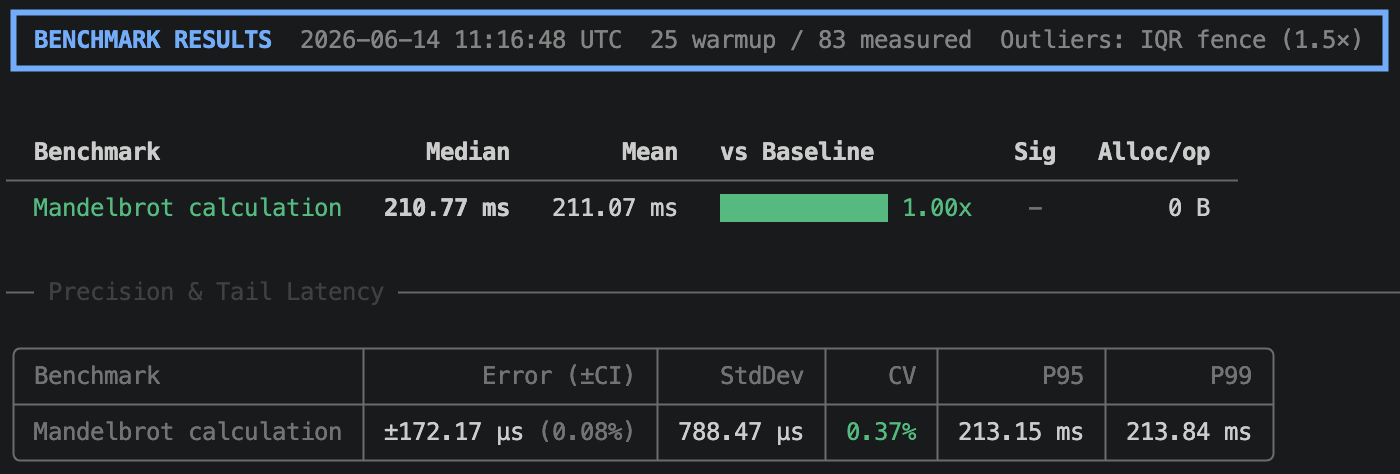
NBenchmark handles that for you. One line gives you a calibrated, warmed-up, outlier-trimmed result with a confidence interval.
var result = Benchmark.Run(() => MandelbrotCalculation());
result.Print();
Why NBenchmark?
- No setup. One static call. No attributes, no class structure, no dedicated project.
- No numbers to guess. Warmup, batch size, and sample count all resolve themselves.
- Clean process by default. Your numbers reflect your code, not your process's history.
- Real statistics. Confidence intervals and significance testing, not just an average.
- Zero dependencies. The core package is BCL-only.
Installation
dotnet add package NBenchmark
Optional packages
| Package | Purpose |
|---|---|
NBenchmark.Analyzers |
Roslyn analyzers that catch authoring mistakes at build time |
NBenchmark.DependencyInjection |
Constructor injection for benchmark classes |
NBenchmark.Reporters.Console |
Rich terminal tables via Spectre.Console |
NBenchmark.Integration.xUnit |
Enforce performance thresholds as xUnit tests |
NBenchmark.Integration.NUnit |
Enforce performance thresholds as NUnit tests |
NBenchmark.Integration.MSTest |
Enforce performance thresholds as MSTest tests |
Four modes, one engine
1. Single mode
The fastest way to get a reliable number.
var result = Benchmark.Run(() => int.Parse("12345"));
Console.WriteLine($"P95: {result.GetPercentile(0.95)} ns, Alloc: {result.MeanAllocatedBytes} B");

var result = await Benchmark.RunAsync(async () => await FetchDataAsync());
2. Suite mode
Compare multiple implementations with a fluent API.
var results = await new BenchmarkSuite("string concat")
    .Add("plus operator", () => "a" + "b" + "c")
    .Add("interpolation",  () => $"{"a"}{"b"}{"c"}")
    .WithBaseline("plus operator")
    .WithReporter(new ConsoleReporter())
    .RunAsync();
The output includes a Ratio column and a ✓ in the Sig column when the speed difference is statistically significant.
3. Harness mode
Attribute-based discovery with a CLI, for dedicated benchmark projects.
public class StringBenchmarks
{
    [Benchmark(Baseline = true)]
    public string Concat() => "a" + "b" + "c";

    [Benchmark]
    public string Interpolate() => $"{"a"}{"b"}{"c"}";
}

await BenchmarkHarness.Create(args)
    .AddFromAssembly<StringBenchmarks>()
    .WithReporter(new ConsoleReporter())
    .RunAsync();
dotnet run -- --filter StringBenchmarks.Concat  # Run a specific benchmark
dotnet run -- --dry-run                         # Validate wiring without running
dotnet run -- --reporter json                   # Output results for CI/CD
4. Global tool
Install once, benchmark any assembly with [Benchmark] methods - no project needed.
dotnet tool install -g NBenchmark.Tool
dotnet benchmark --project ./MyApp.Benchmarks
dotnet benchmark --assembly ./bin/Release/net10.0/MyLib.dll
All harness CLI flags pass through (--filter, --reporter, --output, --threshold-pct, etc.).
Features
| Feature | What it does | |
|---|---|---|
| Isolated runs | Measures in a fresh worker process so earlier work can't bias the numbers. On by default. | → |
| Parameterized benchmarks | Runs one body across many input values to show how it scales. | → |
| Categories | Tags benchmarks and includes or excludes groups from a run. | → |
| Multi-runtime | Runs the same benchmarks on net8, net9, and net10 side-by-side. | → |
| Multiple launches | Repeats a benchmark in separate processes to measure run-to-run variance. | → |
| Environment control | Pins CPU affinity and process priority to cut noise at the source. | → |
| Performance gates | Fails xUnit, NUnit, or MSTest tests on regression. | → |
| CI regression gate | Fails the run when a benchmark regresses past a percentage. | → |
| Diagnostics | Records GC counts, heap state, exceptions, and CPU time per operation. | → |
| Live telemetry | Streams per-sample events to an observer or to OpenTelemetry. | → |
| Compile-time analysis | Catches benchmark authoring mistakes as build-time diagnostics. | → |
| Pluggable statistics | Swaps in your own outlier detector or significance test. | → |
Built on real statistics
- Adaptive measurement. Samples stream until the confidence interval is tight enough, then stop. Warmup ends when the timings plateau and the JIT has settled - not after a guessed count. (Measurement)
- Error bars that survive trimming. Discarding an outlier does not narrow the confidence interval: a discarded sample still counts as an observation, so the reported margin describes the run that happened rather than the samples that survived it. (Outlier trimming)
- Non-parametric significance testing. Benchmark timings are not normally distributed, so the built-in tests are rank-based. A ✓ in the
Sigcolumn means "real, and at least a small effect", not merelyp < 0.05. (Significance testing) - Verified against SciPy and NumPy. Every statistical primitive is dependency-free and cross-validated on each build. (Validation)
View the full documentation at docs.nbenchmark.net.
| Product | Versions Compatible and additional computed target framework versions. |
|---|---|
| .NET | net8.0 is compatible. net8.0-android was computed. net8.0-browser was computed. net8.0-ios was computed. net8.0-maccatalyst was computed. net8.0-macos was computed. net8.0-tvos was computed. net8.0-windows was computed. net9.0 is compatible. net9.0-android was computed. net9.0-browser was computed. net9.0-ios was computed. net9.0-maccatalyst was computed. net9.0-macos was computed. net9.0-tvos was computed. net9.0-windows was computed. net10.0 is compatible. net10.0-android was computed. net10.0-browser was computed. net10.0-ios was computed. net10.0-maccatalyst was computed. net10.0-macos was computed. net10.0-tvos was computed. net10.0-windows was computed. |
-
net10.0
- No dependencies.
-
net8.0
- No dependencies.
-
net9.0
- No dependencies.
NuGet packages (7)
Showing the top 5 NuGet packages that depend on NBenchmark:
| Package | Downloads |
|---|---|
|
NBenchmark.Integration.Abstractions
Shared abstractions and reusable building blocks for NBenchmark integration packages. |
|
|
NBenchmark.DependencyInjection
Resolves benchmark classes from an IServiceProvider so they can have constructor dependencies. |
|
|
NBenchmark.Reporters.Console
Rich terminal table output for NBenchmark using Spectre.Console. |
|
|
NBenchmark.Integration.NUnit
Run NBenchmark benchmarks as NUnit tests with configurable performance thresholds. |
|
|
NBenchmark.Integration.xUnit
Run NBenchmark benchmarks as xUnit tests with configurable performance thresholds. |
GitHub repositories
This package is not used by any popular GitHub repositories.
| Version | Downloads | Last Updated |
|---|---|---|
| 0.48.1 | 179 | 8/17/2026 |
| 0.48.0 | 155 | 8/17/2026 |
| 0.47.0 | 166 | 8/16/2026 |
| 0.46.0 | 162 | 8/16/2026 |
| 0.45.0 | 164 | 8/16/2026 |
| 0.44.0 | 166 | 8/15/2026 |
| 0.43.0 | 149 | 8/14/2026 |
| 0.42.0 | 191 | 8/12/2026 |
| 0.41.0 | 186 | 8/10/2026 |
| 0.40.0 | 179 | 8/9/2026 |
| 0.39.0 | 179 | 8/8/2026 |
| 0.38.0 | 190 | 8/8/2026 |
| 0.37.4 | 230 | 8/2/2026 |
| 0.37.3 | 217 | 8/2/2026 |
| 0.37.2 | 202 | 8/1/2026 |
| 0.37.1 | 206 | 8/1/2026 |
| 0.37.0 | 210 | 7/31/2026 |
| 0.36.0 | 209 | 7/28/2026 |
| 0.35.0 | 215 | 7/25/2026 |
| 0.34.0 | 233 | 7/25/2026 |