Gtk4DotNet 9.0.25-beta
See the version list below for details.
dotnet add package Gtk4DotNet --version 9.0.25-beta
NuGet\Install-Package Gtk4DotNet -Version 9.0.25-beta
<PackageReference Include="Gtk4DotNet" Version="9.0.25-beta" />
<PackageVersion Include="Gtk4DotNet" Version="9.0.25-beta" />
<PackageReference Include="Gtk4DotNet" />
paket add Gtk4DotNet --version 9.0.25-beta
#r "nuget: Gtk4DotNet, 9.0.25-beta"
#:package Gtk4DotNet@9.0.25-beta
#addin nuget:?package=Gtk4DotNet&version=9.0.25-beta&prerelease
#tool nuget:?package=Gtk4DotNet&version=9.0.25-beta&prerelease
Gtk4DotNet
C# .NET 10 bindings for GTK4. You can create programs using the GTK4 UI system as a .NET 10 app.
Highlights:
- Very lightweight approach, functional and object oriented.
- Support of template.ui resources as .NET resources so that the UI can be designed with Cambalache.
- Sub classing of Gtk Widget the C# way, not the Gtk way. It is very simple to create a Widget in a C# class that is inhherited from a GTK Widget. The UI of this custom widget can be defined in a UI template if it is a composite Widget.
- Mapping of the Gtk Threading and Gtk Main Event Loop to async/await with Synchronization context, so that asynchronous workflows or running in UI thread can be completely solved with async/await in C#.
- GTk4 property bindings to C# properties in a DataContext implementing INotifyProperty like WPF.
- Support for Adwaita
- GSettings support without the need to install them as super user.
The following tutorial contains the ExampleApp (and others) from the original GTK4 documentation as well the ToDo List app from GUI development with Rust and GTK 4, all ported to C#.
Remarks to Version 9.0:
Version 9.0 is a breaking change to older versions of this C# class library. That was necessary because the focus was shifted from functional building of the UI to easy subclassing of parts of the UI as C# objects so that bigger projects can be better modularized.
More emphasis was placed on changing UI state and reacting on UI actions than on building the UI.
The functional builder concept has been partially retained, but now it is strongly recommended to use Gtk template.ui in connection with subbclassed Gtk widgets.
Table of contents
- Hello World app and introduction to Gtk4DotNet
- Including Widgets to the Window - Memory management
- Using an UI template from .NET resource/Window subclassing
- Using stylesheets
Hello World app and introduction to Gtk4DotNet <a name="helloworld"></a>
Necessary prerequisites only depending on the version of Linux <a name="prerequisites"></a>
On modern Linux like Ubuntu 24.04 or Fedora 40 Gtk4DotNet apps will run out of the box (if you create a full contained single file exe), otherwise you have to install the necessary dotnet runtime.
libadwaita is only necessary if you want to create Adwaita apps, and webkitgtk6 you only need when integrating a webview.
On older/other Linux systems perhaps you have to install one of the following packages in order to make the app runnable.
sudo apt install libgtk-4-dev
sudo apt install libadwaita-1-dev
sudo apt install libwebkitgtk-6.0-dev
For example on Linux Mint 22 you only have to install
sudo apt install libwebkitgtk-6.0-dev
if you want to use webkit webview whereas for KDE neon 6.0 you have to install
sudo apt install libadwaita-1-dev
sudo apt install libwebkitgtk-6.0-dev
Setup of a Gtk4DotNet program <a name="setup"></a>
You have to setup a .NET 10 console app.To access the library, you need a reference to the nuget package Gtk4DotNet. In your project, add it with the help of this command line command:
dotnet add package Gtk4DotNet
Thats all to build the simple HelloWorld app.
Application object <a name="application"></a>
The most essential class is Application (together with Window).
You have to create an instance of Application, then call at least the method Run. Gtk4 will then be initialized, and the main event loop is started.
Almost all Gtk Objects are created with a static method, mostly New:
using Gtk4DotNet;

Application
    .New("de.uriegel.gtk4dotnet")
    .Run();
New demands the ApplicationID, a string that represents your app domain in reverse order.
This is the simplest Gtk Application. When you run the app, it stops immediatly with the following maeesage in command line:
(HelloWorld.dll:189798): GLib-GIO-WARNING **: 19:07:43.524: Your application does not implement g_application_activate() and has no handlers connected to the 'activate' signal. It should do one of these.
When the app is being activated, you have to implement the activate method. You can do this with a injected C# callback with the help of Application.OnActivate. Let's do this:
    var app = Application.New("de.uriegel.first");
    app.OnActivate(app => Console.WriteLine("App is being activated"));
    return app.Run(0, 0);
When you debug the program, OnActivate is being called and returns immediately. When app.Run() is being executed, the injected callback is being called and the text is being displayed in the terminal. However, the app also stops immediately. Of cource some kind of UI has to be created.
Let's create a window, this has to be done in the Application.OnActivate callback:
app.OnActivate(app =>
{
    var windows = app.NewWindow();
    windows.Show();
});
Now an empty default window is being shown and the function call Applicatio.Run() will only return when the window is being closed.
And now your first Gtk window is being shown!
Hello World <a name="helloworldapp"></a>
For a Hello World app it is used to display the Text "Hello World". We set thewindow title to this string, and set the default size of the window, and our Hello World app is finished:
using Gtk4DotNet;

Application
    .New("de.uriegel.gtk4dotnet")
    .OnActivate(app => app
        .NewWindow()
        .Title("Hello World👍")
        .DefaultSize(600, 200)
        .Show()
    ).Run();
Many Methods returns their own instance, so that you can chain function calls in a builder way.
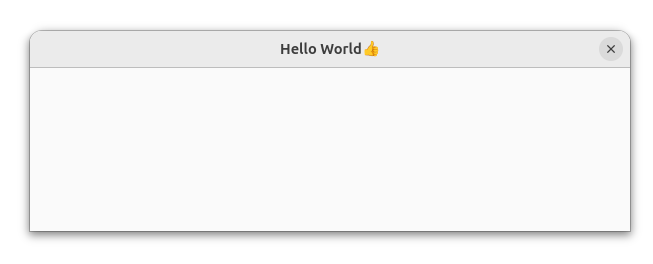
If you download the project from https://github.com/uriegel/Gtk4DotNet/ you can start the Test program 'HelloWorld' from Visual Studio Code.
Including Widgets to the Window - Memory management <a name="widgets"></a>
A Window can have a child widget, and widgets can also have children/a single child.
Every widget is inherited from GObject. GObject uses reference counting as a mechanism for lifetime management. In Gtk4DotNet every GObject and inherited class implements IDisposable to unref a reference. But Gtk takes over lifetime management when a widget is member of a window hierarchy that is presented. Every widget such as Label, Button or CheckButton is inherited from Widget, and Widget has the property AutoDestroyed set to true. In this case Dispose() does nothing.
So every widget implements IDisposable like the GObject base class, but memory management is in the hand of GTK. This means when you create a widget like a Button, and you don't add t to a window, the object is never being freed! But it makes no sense to create a widget and don't display it!
To check if all objects are being freed after the app has exited, there is a control mechanism. You can enable it with the help of the method Application.WithDiagnostics(). It should be the first method called on the application object:
Application
    .New("de.uriegel.gtk4dotnet")
    .WithDiagnostics(true)
    .OnActivate(app => app
    ...
If WithDiagnostics is called with parameter true, every object that is being freed will be logged in the console. Otherwise only the dangling objects are being displayed after the app has exited.
In the next test program 'PackButtons', three Buttons are being included in a Grid, which is the child of the window. It is the transformation of the sample 'Packing Buttons' from the GTK4 documentation:
using Gtk4DotNet;
using CsTools.Extensions;

using static System.Console;

Application
    .New("de.uriegel.gtk4dotnet")
    .WithDiagnostics(true)
    .OnActivate(app => app
        .NewWindow()
        .Title("Pack👍")
        .Pipe(win => win.Child(
            Grid
                .New()
                .Attach(
                    Button
                        .NewWithLabel("Button 1")
                        .SideEffect(b => b.OnClicked += () => WriteLine("Button1 clicked")), 0, 0, 1, 1)
                .Attach(
                    Button
                        .NewWithLabel("Button 2")
                        .SideEffect(b => b.OnClicked += () => WriteLine("Button2 clicked")), 1, 0, 1, 1)
                .Attach(
                    Button
                        .NewWithLabel("Quit")
                        .SideEffect(b => b.OnClicked += () => win.CloseWindow()), 0, 1, 2, 1)))
        .Show()
  ).Run();
Gtk4DotNet has the nuget package CsTools included, which has some functional extensions like Pipe() or SideEffect() to be used in the functional flow of the builder. pattern.
Using an UI template from .NET resource/Window subclassing <a name="uitemplates"></a>
Using an UI template <a name="uitemplate"></a>
With the functional builder approach you can nicely build small programs. But when the app becomes bigger, there this approach has disadvantages:
- There is no separation of UI and functionality
- Using state is a problem
- Reacting on UI in connection with state is also problem
- It is not so easy to create sub modules of the UI.
Therefore the GTK approch with a template.UI (always containig <object> as the root element, not <template>!) is a good way to biuld our UI. This can be done with Cambalache.
The templates are shipped with the program the C# way, using.NET resources.
The next sample (Builder) is the conversion of the previous sample. Our template.ui look like this:
<?xml version='1.0' encoding='UTF-8'?>

<interface>

  <requires lib="gtk" version="4.20"/>
  <object class="GtkWindow" id="window">
    <property name="resizable">False</property>
    <property name="title">Builder👍</property>
    <child>
      <object class="GtkGrid" id="grid">
        <property name="column-homogeneous">True</property>
        <property name="column-spacing">5</property>
        <property name="margin-bottom">5</property>
        <property name="margin-end">5</property>
        <property name="margin-start">5</property>
        <property name="margin-top">5</property>
        <property name="row-spacing">5</property>
        <child>
          <object class="GtkButton" id="button1">
            <property name="label">Button 1</property>
            <layout>
              <property name="column">0</property>
              <property name="column-span">1</property>
              <property name="row">0</property>
              <property name="row-span">1</property>
            </layout>
          </object>
        </child>
        <child>
          <object class="GtkButton" id="button2">
            <property name="label">Button 2</property>
            <layout>
              <property name="column">1</property>
              <property name="column-span">1</property>
              <property name="row">0</property>
              <property name="row-span">1</property>
            </layout>
          </object>
        </child>
        <child>
          <object class="GtkButton" id="quit">
            <property name="label">Quit</property>
            <layout>
              <property name="column">0</property>
              <property name="column-span">2</property>
              <property name="row">1</property>
              <property name="row-span">1</property>
            </layout>
          </object>
        </child>
      </object>
    </child>
  </object>
</interface>
As said before, this file will be included as .NET resource, so in the Builder.csproj the following is added:
  <ItemGroup>
    <EmbeddedResource Include="./window.ui">
      <LogicalName>window</LogicalName>
    </EmbeddedResource>
  </ItemGroup>
Our main prograsm now looks very small:
Application
    .NewAdwaita("de.uriegel.gtk4dotnet")
    .WithDiagnostics(true)
    .OnActivate(app => app
        .WindowFromBuilder("window", "window", p => new MyWindow(p))
        .Show()
    ).Run();
Window subclassing <a name="subclassing"></a>
In this sample we build an Adwaita app instead of a Gtk4 app (Application.NewAdwaita()). Now our app blends well with modern Gnome.
But the interresting change is this line of code:
.WindowFromBuilder("window", "window", p => new MyWindow(p))
The main window is build from the template resource. The first parameter is the logical name of the resource, the second the name of the window, and the third a constructor function.
The main window is a custom class MyWindow based on ApplicationWindow. ApplicationWindow is based on Window, but acts as the top level window of the app. It can have Gtk actions.
To be built by this concept, it must have a special constructor:
class MyWindow : ApplicationWindow
{
    public MyWindow(WindowBuilder builder) : base(builder)
    {
        ...
    }
}
The constructor of the custom class must have a WindowBuilder paramter included and with this calls the base constructor. The WindowBuilder is delivered by the constructor callback ofApplication.WindowFromBuilder(). This alone is sufficient to instanciate the custom subclassed Window.
But how can we access the included widgets? That is very simple. Every widget that should be accessedgets a corresponding field in the MyWindow class. It then has to be annotated with the C# Attribute [Widget]. As long as the name of this field is the same as the corresponding object name in the template.ui, that is enough, and the field is automatically initialized from the builder. If the name differs, the widget's name in the template.ui has to be specified in the WidgetAttribute lige this: ```[Widget(Name='name of the widget in the template')].
Now our Window looks like this:
using Gtk4DotNet;

class MyWindow : ApplicationWindow
{
    public MyWindow(WindowBuilder builder) : base(builder)
    {
        button1.OnClicked += () => Console.WriteLine("Button1 clicked");
        button2.OnClicked += () => Console.WriteLine("Button2 clicked");
        quit.OnClicked += CloseWindow;
    }

    [Widget]
    readonly Button button1 = null!;

    [Widget]
    readonly MyButton button2 = null!;

    [Widget]
    readonly Button quit = null!;
}

class MyButton : Button
{
    public MyButton(Builder builder, string? name = null) : base(builder, name)
        => Console.WriteLine("My custom Button created");
}
Only the three buttons needs to be accessed in code, so there are only three field, not the Grid. One button is subclassed too. Therefore a special constructor similar to the one of the MyWindow class is needed.
Now we have the same program as before, only better structured.
Using stylesheets <a name="stylesheets"></a>
The next sample WithStyle shows the using of a style sheet. Of course itwill be provided the C# way, with the help of a .NET Resource.
So here is our stylesheet style.css:
button.button-1 {
  color: cyan;
}

button#button-2 {
    color: red;
}

button#button-2:hover {
  color: magenta;
  background: yellow;
}

menubutton arrow {
  color: magenta;
}
button-1is a class namebutton-2is the name of the 2nd Button:hoveris a pseudo class getting active when hovering the widget- arrow is a css node. Some composite Widgets have special nodes for its sub components
The style.css have to be included as .NET resource. It can be activated via
StyleContext.AddProviderForDisplay(
            Display.GetDefault(),
            CssProvider.New().FromResource("style"),
            StyleProviderPriority.Application)
The program now looks like:
Application
    .New("de.uriegel.gtk4dotnet")
    .WithDiagnostics(true)
    .OnActivate(app => app
        .NewWindow()
        .Title("With Style👍")
        .DefaultSize(200, 200)
        .SideEffect(_ => StyleContext.AddProviderForDisplay(
            Display.GetDefault(),
            CssProvider.New().FromResource("style"),
            StyleProviderPriority.Application))
        .Child(Box
            .New(Orientation.Vertical, 10)
            .Margin(10)
            .Append(Button.NewWithLabel("Button 1"))
            .Append(Button.NewWithLabel("Button 2").CssClass("button-1"))
            .Append(Button.NewWithLabel("Hover me!").SetName("button-2"))
            .Append(MenuButton.New())
            .Append(Button.NewWithLabel("Suggested").CssClass("destructive-action"))
            .Append(Button.NewWithLabel("Destructive").CssClass("suggested-action")))
        .Show()
    ).Run();
The last two buttons were provided with CSS rules provided by GTK: "Suggested" and "Destructive". The app looks like this when started:

TODO
test app opening new custom windows inherited from Window, add to Application
| Product | Versions Compatible and additional computed target framework versions. |
|---|---|
| .NET | net10.0 is compatible. net10.0-android was computed. net10.0-browser was computed. net10.0-ios was computed. net10.0-maccatalyst was computed. net10.0-macos was computed. net10.0-tvos was computed. net10.0-windows was computed. |
-
net10.0
- CsTools (>= 9.0.1)
NuGet packages (3)
Showing the top 3 NuGet packages that depend on Gtk4DotNet:
| Package | Downloads |
|---|---|
|
WebWindowNetCore
A C# Webview Application for Windows and Linux similar to Electron based on WebView2 (Windows) and GTK WebKit (Linux) |
|
|
WebWindowNetCore.Linux
A C# Webview Application for Linux similar to Electron based on GTK WebKit |
|
|
Gtk4DotNet.FSharp
.NET 8 F# Bindings for GTK 4, functional declarative similar to REACT or Kotlin Compose |
GitHub repositories
This package is not used by any popular GitHub repositories.
| Version | Downloads | Last Updated |
|---|---|---|
| 9.0.36-beta | 47 | 6/29/2026 |
| 9.0.35-beta | 48 | 6/29/2026 |
| 9.0.34-beta | 48 | 6/29/2026 |
| 9.0.33-beta | 47 | 6/29/2026 |
| 9.0.32-beta | 50 | 6/29/2026 |
| 9.0.31-beta | 44 | 6/28/2026 |
| 9.0.30-beta | 47 | 6/28/2026 |
| 9.0.29-beta | 53 | 6/27/2026 |
| 9.0.28-beta | 50 | 6/27/2026 |
| 9.0.27-beta | 50 | 6/27/2026 |
| 9.0.26-beta | 49 | 6/26/2026 |
| 9.0.25-beta | 50 | 6/26/2026 |
| 9.0.24-beta | 53 | 6/25/2026 |
| 9.0.23-beta | 68 | 6/25/2026 |
| 9.0.22-beta | 99 | 6/24/2026 |
| 9.0.21-beta | 107 | 6/21/2026 |
| 9.0.20-beta | 105 | 6/20/2026 |
| 9.0.19-beta | 95 | 6/20/2026 |
| 9.0.18-beta | 93 | 6/19/2026 |
| 8.2.1 | 107 | 6/6/2026 |