DemaConsulting.DictionaryMark
0.2.0-beta.5
Prefix Reserved
See the version list below for details.
dotnet tool install --global DemaConsulting.DictionaryMark --version 0.2.0-beta.5
dotnet new tool-manifest
dotnet tool install --local DemaConsulting.DictionaryMark --version 0.2.0-beta.5
#tool dotnet:?package=DemaConsulting.DictionaryMark&version=0.2.0-beta.5&prerelease
nuke :add-package DemaConsulting.DictionaryMark --version 0.2.0-beta.5
DictionaryMark



Overview
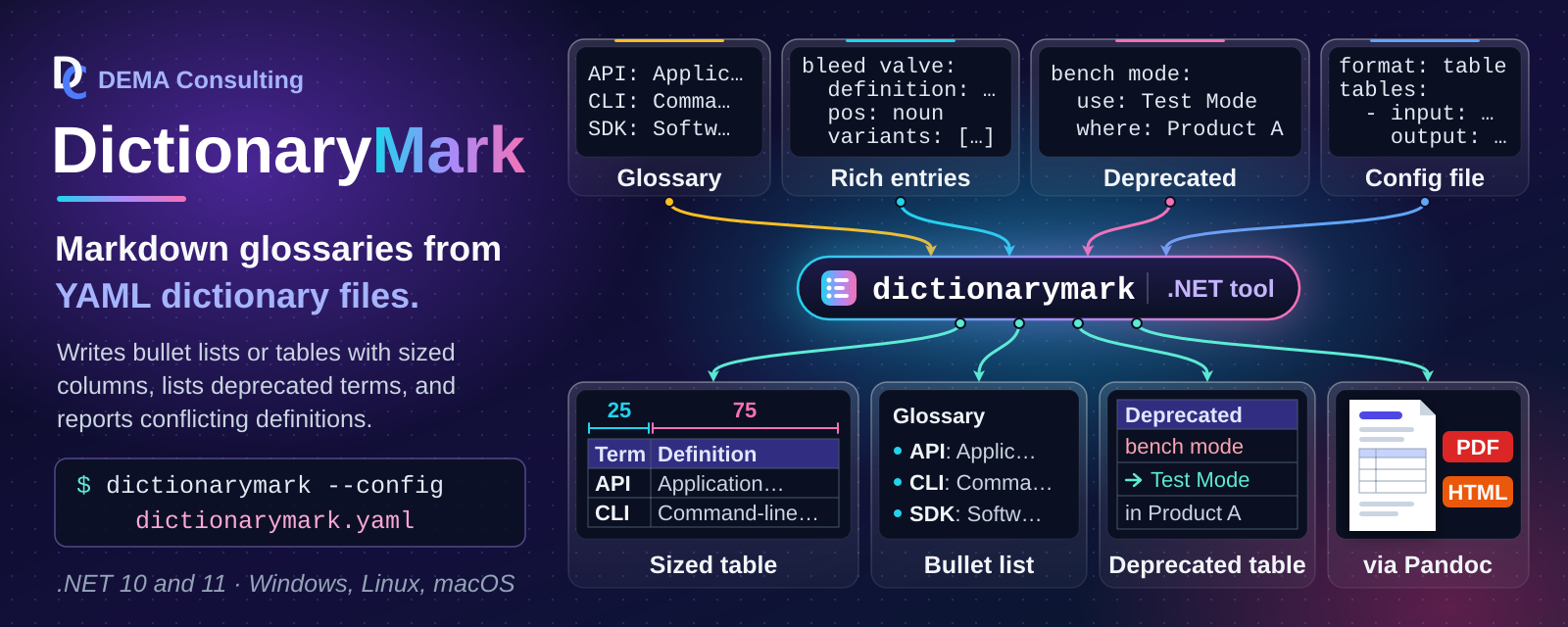
DictionaryMark is a .NET command-line tool that reads YAML dictionary files and generates formatted Markdown output as either bullet lists or tables. It supports glob patterns for processing multiple files, detects conflicting definitions, and is designed for easy integration into documentation pipelines. A YAML configuration file can hold the formatting defaults, including relative table column widths, and several table jobs, so one run produces every table.
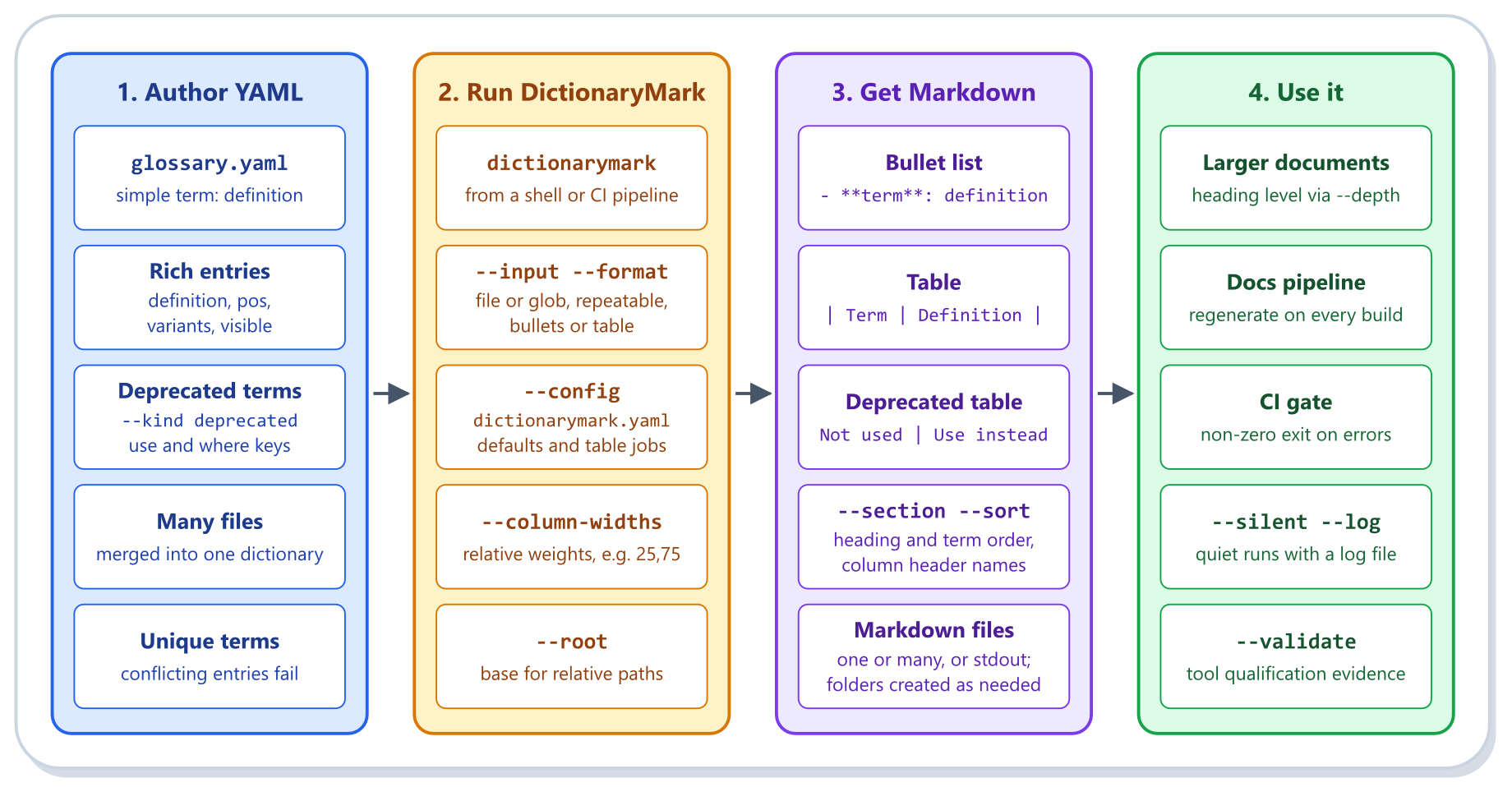
The workflow below shows how to use it: author YAML dictionary files, run dictionarymark from a
shell or CI pipeline with --input and --format options or a --config file of table jobs, and
use the one or more generated Markdown bullet lists or tables in your documents and documentation
pipeline.
Features
- 📄 YAML Dictionary Input - Read terms from YAML files, as simple definitions or rich entries
(
definition,pos,variants,visible) - 📝 Markdown Output - Generate bullet lists or formatted tables
- 🚫 Deprecated Terms - Generate a "Not used / Use instead" table from deprecated-term files
- 🔍 Glob Patterns - Process multiple input files with wildcards
- ⚔️ Conflict Detection - Detect conflicting entries across files
- 🎯 Customizable Output - Control headings, column headers, sort order, and depth
- 📏 Column Widths - Size table columns in proportion to relative weights (for example
25,75) - ⚙️ Configuration File - Keep formatting options and several table jobs in a YAML file beside the dictionaries
- 📂 Root Directory - Resolve relative input and output paths against a chosen base directory
- 🔒 File Access - Confine the inputs and outputs of configuration-file tables to chosen folders and refuse links
- 🌐 Multi-Platform - Windows, Linux, and macOS on .NET 10 and 11
- ✅ Self-Validation - Built-in qualification tests for regulated environments
Installation
Prerequisites
- .NET SDK 10.0 or 11.0
Global Installation
Install DictionaryMark as a global .NET tool for system-wide use:
dotnet tool install --global DemaConsulting.DictionaryMark
Verify the installation:
dictionarymark --version
Local Installation
Install DictionaryMark as a local tool in your project (recommended for team projects):
dotnet new tool-manifest  # if you don't have a tool manifest already
dotnet tool install DemaConsulting.DictionaryMark
Run the tool:
dotnet dictionarymark --version
Update
To update to the latest version:
# Global installation
dotnet tool update --global DemaConsulting.DictionaryMark

# Local installation
dotnet tool update DemaConsulting.DictionaryMark
Compatibility
| Component | Version | Status |
|---|---|---|
| .NET SDK | 10.0 | ✅ Supported |
| .NET SDK | 11.0 | ✅ Supported |
| OS | Windows | ✅ Supported |
| OS | Linux | ✅ Supported |
| OS | macOS | ✅ Supported |
Usage
dictionarymark --input glossary.yaml --format table --section "Glossary" --output docs/glossary.md
Options
| Option | Description |
|---|---|
-v, --version |
Display version information |
-?, -h, --help |
Display help |
--silent |
Suppress console output |
--validate |
Run self-validation |
-i, --input <pattern> |
Input YAML file or glob pattern (repeatable) |
-o, --output <file> |
Output Markdown file (default: stdout) |
-f, --format <format> |
Output format: bullets (default) or table |
-s, --section <heading> |
Section heading text |
--term-header <header> |
Term column header for table format (default: Term) |
--def-header <header> |
Definition column header (default: Definition) |
--definition-header <header> |
Alias for --def-header |
--sort <order> |
Sort order: file (default) or alpha |
--log <file> |
Write output to log file |
--results <file> |
Write validation results (.trx or .xml) |
--result <file> |
Alias for --results |
--depth <n> |
Set heading depth (default: 1, range: 1–6) |
--kind <kind> |
Input kind: terms (default) or deprecated |
--use-header <header> |
Deprecated "use" column header |
--where-header <header> |
Deprecated "where" column header |
--column-widths <w1,w2[,w3]> |
Relative table column widths (e.g. 25,75) |
--config <file> |
Read formatting defaults and table jobs from a YAML file |
--root <dir> |
Base directory for relative input and output paths |
--file-access <mode> |
Files tables and root: paths may use: any, roots, no-symlinks, roots,no-symlinks |
--allow-root <dir> |
Folder those files may be in (repeatable; implies roots) |
Missing parent directories of output files are created. Input patterns may use .. segments before
the first wildcard (for example ../shared/*.yaml), and input and output paths may contain ${VAR}
environment variables (in a configuration file only when no restrictive file-access mode is in effect; see
File Access).
Examples
Generate a bullet list from a YAML dictionary:
dictionarymark --input glossary.yaml
Generate a table with a section heading:
dictionarymark --input glossary.yaml --format table --section "Glossary" --output docs/glossary.md
Merge multiple files and sort alphabetically:
dictionarymark --input file1.yaml --input file2.yaml --sort alpha
Process all YAML files in a directory:
dictionarymark --input "terms/*.yaml" --format table --output docs/glossary.md
Given an input file glossary.yaml:
API: Application Programming Interface
CLI: Command-Line Interface
SDK: Software Development Kit
Running:
dictionarymark --input glossary.yaml --format table --section "Glossary" --depth 1
Produces:
# Glossary

| Term | Definition |
| :--- | :--- |
| API | Application Programming Interface |
| CLI | Command-Line Interface |
| SDK | Software Development Kit |
Or with --format bullets:
# Glossary

- **API**: Application Programming Interface
- **CLI**: Command-Line Interface
- **SDK**: Software Development Kit
A Good Glossary
Every approved term needs a non-empty definition, either as a plain string or inside an object
entry. An object entry may also carry pos, variants and visible. Entries with
visible: false are still checked for conflicts but are left out of the output. Here is a complete
small glossary, terms.yaml:
Test Mode: A mode in which Product A runs self-checks and does not control the process.
Product A: The main control unit made by Acme.
Zorbix: A sealed connector that joins the bleed valve to the main line.
bleed valve:
  definition: A valve that releases trapped air.
  pos: noun
  variants: [bleed-valve]
  visible: false
Running dictionarymark --input terms.yaml --format table --section Glossary produces:
# Glossary

| Term | Definition |
| :--- | :--- |
| Test Mode | A mode in which Product A runs self-checks and does not control the process. |
| Product A | The main control unit made by Acme. |
| Zorbix | A sealed connector that joins the bleed valve to the main line. |
With --format bullets the same file produces:
# Glossary

- **Test Mode**: A mode in which Product A runs self-checks and does not control the process.
- **Product A**: The main control unit made by Acme.
- **Zorbix**: A sealed connector that joins the bleed valve to the main line.
The hidden bleed valve entry does not appear in either output.
Deprecated Terms
A deprecated-terms file lists terms that must not be used. Each entry needs use and may have
where; there is no definition. Given deprecated.yaml:
bench mode: { use: Test Mode, where: Product A }
Zorbix unit: { use: Zorbix }
Running
dictionarymark --input deprecated.yaml --kind deprecated --format table --section "Deprecated Terms" --depth 2
produces:
## Deprecated Terms

| Not used | Use instead | Where it was used |
| :--- | :--- | :--- |
| bench mode | Test Mode | Product A |
| Zorbix unit | Zorbix |  |
The Where it was used column appears only when at least one entry has a where value. With
--format bullets the output is - **bench mode**: Test Mode (where: Product A) and
- **Zorbix unit**: Zorbix.
Column Widths
When a table is converted to HTML or PDF (for example with Pandoc), the column widths follow the
number of dashes in the separator line. --column-widths sets those dash counts in proportion to
relative weights, scaled to about 100 dashes in total with at least 3 per column:
dictionarymark --input glossary.yaml --format table --column-widths 25,75
| Term | Definition |
| :------------------------- | :--------------------------------------------------------------------------- |
| API | Application Programming Interface |
The weights must be positive integers. A terms table takes exactly 2 values and a deprecated table
exactly 3; when no deprecated entry has a where value, the third weight is dropped and the first two
are rescaled. Bullet output ignores the option. Without the option the output is unchanged.
Configuration File
--config <file.yaml> reads formatting defaults, an optional root directory, and optional table jobs
from a YAML file, so the options can be versioned beside the dictionaries they describe:
# docs/glossary/dictionarymark.yaml
format: table
depth: 2
sort: alpha
column-widths: [25, 75]
tables:
  - input: "*glossary.yaml"
    output: ../generated/glossary/terms.md
    section: Terms
  - input: [deprecated.yaml, ../../shared/deprecated.yaml]
    output: ../generated/glossary/deprecated.md
    section: Deprecated Terms
    kind: deprecated
    column-widths: [20, 50, 30]
dictionarymark --config docs/glossary/dictionarymark.yaml
- Top-level keys are formatting defaults:
format,section,depth,sort,term-header,def-header(ordefinition-header),kind,use-header,where-headerandcolumn-widths(a YAML sequence), plusrootandtables. tablesis a list of jobs. Each job needsinput(a pattern or a list of patterns) andoutput, and may set any formatting key.- Precedence: a command-line option wins over a job key, which wins over a top-level default, which wins over the built-in default.
- Without
tables, the file only supplies defaults, and--input/--outputcome from the command line. Withtables,--inputand--outputare errors;--silentand--logare allowed. - Paths in the file are relative to the file's directory (unless a root directory is set), may use
.., and missing output directories are created. They may use${VAR}only in the default andanyfile-access modes; any other mode refuses them (see File Access). - Errors: unknown or misplaced keys (for example
logorinputat the top level) are reported with the key, the job and the file. Every job runs; each failing job is reported astable job {n} ('{output}'), and the exit code is non-zero if any job failed.
Root Directory
--root <dir> (relative to the working directory) or a top-level root: key in the configuration
file (relative to the file) sets the base directory for every relative input pattern and output path,
so the tool can run from any working directory:
# tools/dictionarymark/dictionarymark.yaml
root: ../..
tables:
  - input: docs/glossary/*.yaml
    output: docs/generated/glossary.md
The base directory is --root if given, else the configuration root, else the configuration file's
directory (for paths from the file) or the working directory (for command-line paths). Absolute paths
ignore the root, and --config, --log and --results are never resolved against it. --root must
exist. The configuration root: is only the base that relative job paths are combined with: it is
resolved as text and never checked on disk, so a root: that does not exist (or names a network share)
makes the tables that use it fail through the file-access checks below (not found, or refused). Both
support .., and neither may contain wildcards. The command-line --root supports ${VAR} in every mode; the
configuration root: supports it only in the default and any modes (see File Access).
A root: key in the configuration file is untrusted content, so when it (and not --root) moves a relative
--input pattern or --output path from the command line, those relative paths are judged by the file-access mode
exactly like the paths of a table (see File Access below). Give an absolute path, or use --root, to keep a
command-line path outside that check.
File Access
The command line is trusted: every option, including --config, --file-access, --allow-root and --root, is
taken as given, and reading the configuration file itself is never judged. The content of the configuration file is
not trusted, because it may come from a source you do not fully trust (for example a pull request). Everything it
names, or moves, reaches the disk only through the file-access checks: its table inputs (each literal
input and every match of every glob) and outputs are judged by a file-access mode, and root: only moves where its
relative paths point. The paths you name on the command line (--config, --input, --output, --log,
--results) are not judged, with one exception: when no --root is given and the configuration file has a root:
key (and no tables), a relative --input pattern or --output path is moved by that untrusted key, so it is
judged exactly like a table input or output (every literal input and glob match, the output before anything is
written, a refusal reported as file-access-denied with a non-zero exit code). Absolute --input and --output
paths, every path when --root is given, every path when the configuration file has no root:, and --config,
--log and --results stay trusted.
# Confine the tables of a configuration file to the repository folder
dictionarymark --config docs/glossary/dictionarymark.yaml --allow-root .

# Also refuse any symbolic link or junction
dictionarymark --config docs/glossary/dictionarymark.yaml --allow-root . --file-access roots,no-symlinks
any(the default) allows every regular local file, as Pandoc does.rootsallows only files inside the--allow-rootfolders, or, without--allow-root, inside the working directory and the configuration file's folder.--rootand the configurationroot:key never widen it. These are the same folders for a table and for a relative command-line path that aroot:key moves.no-symlinksrefuses a file reached through a symbolic link or junction below the configuration file's folder.roots,no-symlinksapplies both rules (the two may be given in either order). The mode governs the inputs and outputs of the configuration tables and also the relative command-line--inputand--outputpaths that aroot:key moves.
Because the configuration file is untrusted, a ${VAR} environment-variable reference in its root: key, in a table
input or in a table output would let it read your environment (for example a secret held in a variable) and leak it
through a file name or a message. So under every mode except any (roots, no-symlinks, roots,no-symlinks, and
--allow-root, which implies roots), such a reference is refused when the file is loaded, before anything is read or
created: the run stops with an error that names the file, the job and the key, for example
Config file '...': table job 1: key 'output' must not contain environment variable references such as '${NAME}' ....
The error never shows a variable name or value, or whether the variable is set. Write the path literally, or run with
--file-access any if you trust the file. Under the default and any modes nothing changes. The paths you type on the
command line (--config, --root, --input, --output, --log, --results) keep expanding ${VAR} in every mode.
The refusal applies even when --root is given, because the file is loaded and checked regardless. Under every mode,
network paths, device paths (and on Windows reserved names such as NUL), a colon outside a Windows drive, control
characters, and anything that is not a regular file are refused, and each input is read up to 16 MiB. A table whose
input or output the file-access mode denies fails with file-access-denied; a table that breaks one of the rules above
(or names a file over 16 MiB) fails with the ordinary Failed to read file or Failed to write output file error,
which names the rule. Either way the table writes nothing, the other tables still run, and the exit code is non-zero. A
message about a path that the configuration file names, or that its root: key moves, shows the path as written in the
file (a glob match relative to the table's base directory, for example ../other/terms.yaml), never the absolute path
on the machine, so the message does not reveal where the checkout or the working directory is; paths typed on the
command line are shown in full as before. Known limits: operating-system error text that names other folders (for
example a missing parent folder) is not rewritten; a hard link cannot be told apart from its file; the output check is
not race-proof (the write follows by name); a literal configuration input is judged before it is looked up, so its
existence is never revealed outside the allowed folders; a configuration input pattern that breaks one of the rules
above (such as a network or URL-like pattern) is refused before anything is listed, so no host is contacted, but listing
the local folders of a wildcard pattern can reveal file names outside the allowed folders before the match is refused,
although no content is read; and an --allow-root folder must exist when the run starts. Whether a file is inside an
allowed folder is decided by the letter case stored on disk, so a folder named in another letter case works where the
file system ignores case, while a folder that differs only in letter case on a case-sensitive file system stays outside.
See the User Guide for details.
Conflicts
The same term in several files is fine when the entries are identical. Entries that differ in definition, pos,
variants or visible are an error naming the term, the differing fields and both files, for example
Error: Conflict: term 'API' differs in definition between <file A> and <file B>. Approved-versus-deprecated conflicts
are not checked by DictionaryMark; Ste100Mark enforces them. Input paths may contain ${VAR} environment variables
(see File Access for the restrictive modes), and
a pattern that matches no file is an error.
Building
pwsh ./build.ps1
User Guide
The DictionaryMark User Guide is available on the DictionaryMark releases page.
Contributing
Contributions are welcome! We appreciate your interest in improving DictionaryMark.
Please see our Contributing Guide for development setup, coding standards, and submission guidelines. Also review our Code of Conduct for community guidelines.
For bug reports, feature requests, and questions, please use GitHub Issues.
License
This project is licensed under the MIT License — see the LICENSE file for details.
By contributing to this project, you agree that your contributions will be licensed under the MIT License.
Support
- 🐛 Report Bugs: GitHub Issues
- 💡 Request Features: GitHub Issues
- ❓ Ask Questions: GitHub Discussions
- 🤝 Contributing: Contributing Guide
Self-Validation
DictionaryMark includes a built-in self-validation mode for use in regulated environments where tool qualification evidence is required.
dictionarymark --validate
The validation report includes system information (tool version, OS, .NET runtime) and the results of each self-test. Each test proves a specific capability:
DictionaryMark_VersionDisplay---versionflag outputs a valid version stringDictionaryMark_HelpDisplay---helpflag outputs usage and options textDictionaryMark_BulletGeneration- Bullet list is generated correctly from YAML inputDictionaryMark_TableGeneration- Markdown table is generated correctly from YAML inputDictionaryMark_CustomHeaders---term-headerand--def-headeroverride column textDictionaryMark_ConflictDetection- Conflicting definitions across files are detectedDictionaryMark_HiddenEntry- Entries withvisible: falseare omitted from the outputDictionaryMark_DeprecatedTable- A deprecated-terms table is generated with--kind deprecatedDictionaryMark_ColumnWidths---column-widthssizes the table separator in proportion to the weightsDictionaryMark_ConfigTables- A--configfile generates every table job, with config-relative..paths and missing output directories createdDictionaryMark_FileAccessRoots- With--allow-root, a--configtable output outside the allowed folder is denied withfile-access-deniedand nothing is written, while a table inside it is generated
Results can be saved to a file:
dictionarymark --validate --results results.trx   # TRX (MSTest) format
dictionarymark --validate --results results.xml   # JUnit XML format
On validation failure the tool will exit with a non-zero exit code.
Project Practices
The DictionaryMark repository follows these development practices:
- 🔍 Linting Enforcement - LintMark, TextLint, and yamllint enforced on every CI run
- 📋 Continuous Compliance - Compliance evidence generated automatically on every CI run, following the Continuous Compliance methodology
- ☁️ SonarCloud Integration - Quality gate and security analysis on every build
- 🔗 Requirements Traceability - Requirements linked to passing tests with auto-generated trace matrix
Security
For security concerns and vulnerability reporting, please see our Security Policy.
Acknowledgments
DictionaryMark is built with the following open-source projects:
- .NET - Cross-platform framework for building applications
- YamlDotNet - YAML parsing library for .NET
- Microsoft.Extensions.FileSystemGlobbing - Glob pattern matching for file system paths
- DemaConsulting.TestResults - TRX and JUnit XML test results library
| Product | Versions Compatible and additional computed target framework versions. |
|---|---|
| .NET | net10.0 is compatible. net10.0-android was computed. net10.0-browser was computed. net10.0-ios was computed. net10.0-maccatalyst was computed. net10.0-macos was computed. net10.0-tvos was computed. net10.0-windows was computed. net11.0 is compatible. |
This package has no dependencies.
| Version | Downloads | Last Updated |
|---|---|---|
| 0.2.0-beta.6 | 0 | 11/26/2026 |
| 0.2.0-beta.5 | 629 | 11/19/2026 |
| 0.2.0-beta.4 | 59 | 11/19/2026 |
| 0.2.0-beta.3 | 63 | 11/18/2026 |
| 0.2.0-beta.2 | 73 | 11/13/2026 |
| 0.2.0-beta.1 | 64 | 11/11/2026 |
| 0.1.0-beta.1 | 6,572 | 5/15/2026 |