DemaConsulting.DictionaryMark
0.2.0-beta.1
Prefix Reserved
See the version list below for details.
dotnet tool install --global DemaConsulting.DictionaryMark --version 0.2.0-beta.1
dotnet new tool-manifest
dotnet tool install --local DemaConsulting.DictionaryMark --version 0.2.0-beta.1
#tool dotnet:?package=DemaConsulting.DictionaryMark&version=0.2.0-beta.1&prerelease
nuke :add-package DemaConsulting.DictionaryMark --version 0.2.0-beta.1
DictionaryMark



Overview
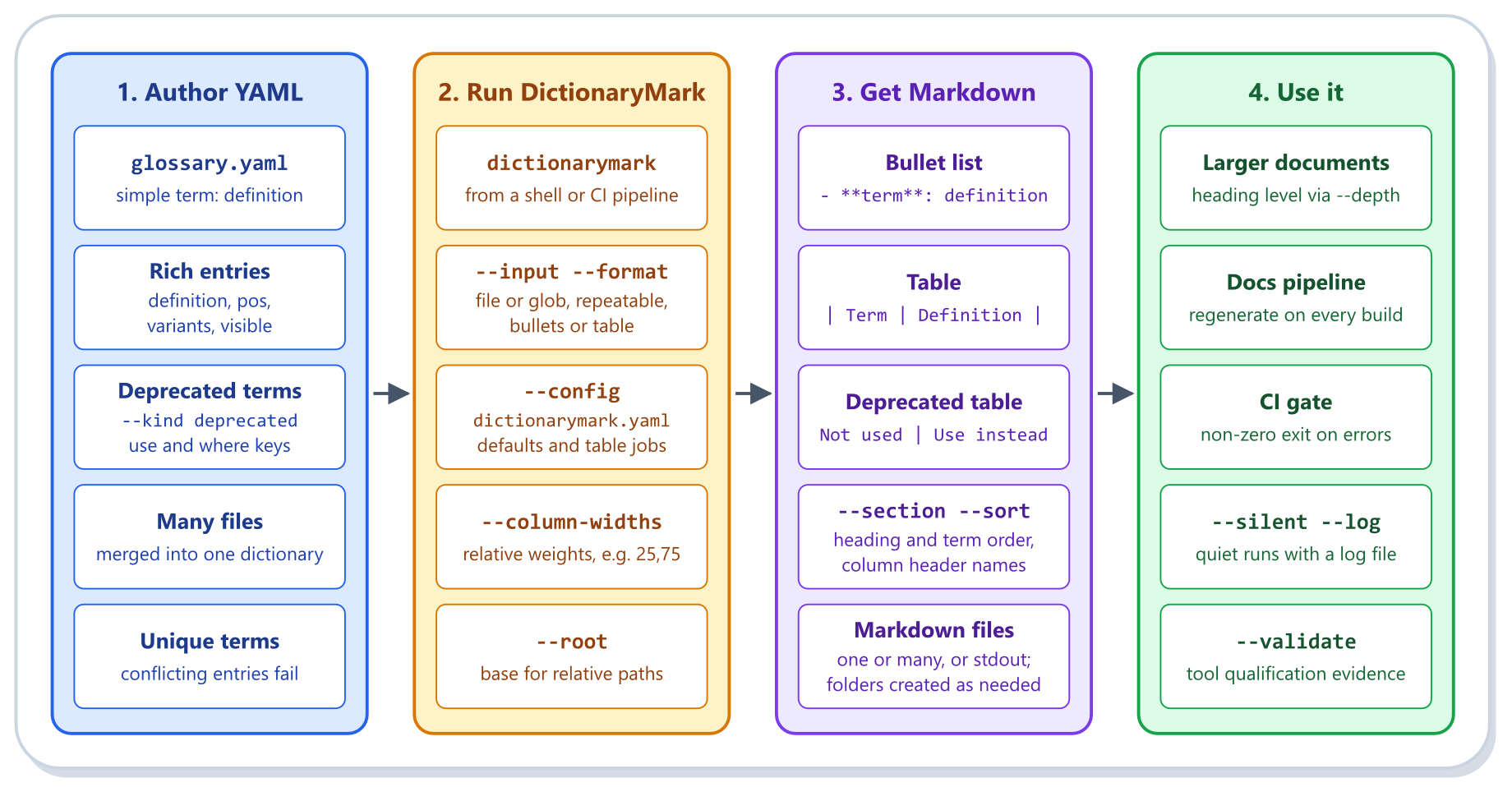
DictionaryMark is a .NET command-line tool that reads YAML dictionary files and generates formatted Markdown output as either bullet lists or tables. It supports glob patterns for processing multiple files, detects conflicting definitions, and is designed for easy integration into documentation pipelines.
The workflow below shows how to use it: author YAML dictionary files, run dictionarymark from a
shell or CI pipeline, and use the generated Markdown in your documents and documentation pipeline.
Features
- 📄 YAML Dictionary Input - Read term/definition pairs from YAML files
- 📝 Markdown Output - Generate bullet lists or formatted tables
- 🔍 Glob Patterns - Process multiple input files with wildcards
- ⚔️ Conflict Detection - Detect conflicting definitions across files
- 🎯 Customizable Output - Control headings, column headers, sort order, and depth
- 🌐 Multi-Platform - Windows, Linux, and macOS on .NET 10 and 11
- ✅ Self-Validation - Built-in qualification tests for regulated environments
Installation
Prerequisites
- .NET SDK 10.0 or 11.0
Global Installation
Install DictionaryMark as a global .NET tool for system-wide use:
dotnet tool install --global DemaConsulting.DictionaryMark
Verify the installation:
dictionarymark --version
Local Installation
Install DictionaryMark as a local tool in your project (recommended for team projects):
dotnet new tool-manifest  # if you don't have a tool manifest already
dotnet tool install DemaConsulting.DictionaryMark
Run the tool:
dotnet dictionarymark --version
Update
To update to the latest version:
# Global installation
dotnet tool update --global DemaConsulting.DictionaryMark

# Local installation
dotnet tool update DemaConsulting.DictionaryMark
Compatibility
| Component | Version | Status |
|---|---|---|
| .NET SDK | 10.0 | ✅ Supported |
| .NET SDK | 11.0 | ✅ Supported |
| OS | Windows | ✅ Supported |
| OS | Linux | ✅ Supported |
| OS | macOS | ✅ Supported |
Usage
dictionarymark --input glossary.yaml --format table --section "Glossary" --output docs/glossary.md
Options
| Option | Description |
|---|---|
-v, --version |
Display version information |
-?, -h, --help |
Display help |
--silent |
Suppress console output |
--validate |
Run self-validation |
-i, --input <pattern> |
Input YAML file or glob pattern (repeatable) |
-o, --output <file> |
Output Markdown file (default: stdout) |
-f, --format <format> |
Output format: bullets (default) or table |
-s, --section <heading> |
Section heading text |
--term-header <header> |
Term column header for table format (default: Term) |
--def-header <header> |
Definition column header (default: Definition) |
--definition-header <header> |
Alias for --def-header |
--sort <order> |
Sort order: file (default) or alpha |
--log <file> |
Write output to log file |
--results <file> |
Write validation results (.trx or .xml) |
--result <file> |
Alias for --results |
--depth <n> |
Set heading depth (default: 1, range: 1–6) |
Examples
Generate a bullet list from a YAML dictionary:
dictionarymark --input glossary.yaml
Generate a table with a section heading:
dictionarymark --input glossary.yaml --format table --section "Glossary" --output docs/glossary.md
Merge multiple files and sort alphabetically:
dictionarymark --input file1.yaml --input file2.yaml --sort alpha
Process all YAML files in a directory:
dictionarymark --input "terms/*.yaml" --format table --output docs/glossary.md
Given an input file glossary.yaml:
API: Application Programming Interface
CLI: Command-Line Interface
SDK: Software Development Kit
Running:
dictionarymark --input glossary.yaml --format table --section "Glossary" --depth 1
Produces:
# Glossary

| Term | Definition |
| :--- | :--- |
| API | Application Programming Interface |
| CLI | Command-Line Interface |
| SDK | Software Development Kit |
Or with --format bullets:
# Glossary

- **API**: Application Programming Interface
- **CLI**: Command-Line Interface
- **SDK**: Software Development Kit
Building
pwsh ./build.ps1
User Guide
The DictionaryMark User Guide is available on the DictionaryMark releases page.
Contributing
Contributions are welcome! We appreciate your interest in improving DictionaryMark.
Please see our Contributing Guide for development setup, coding standards, and submission guidelines. Also review our Code of Conduct for community guidelines.
For bug reports, feature requests, and questions, please use GitHub Issues.
License
This project is licensed under the MIT License — see the LICENSE file for details.
By contributing to this project, you agree that your contributions will be licensed under the MIT License.
Support
- 🐛 Report Bugs: GitHub Issues
- 💡 Request Features: GitHub Issues
- ❓ Ask Questions: GitHub Discussions
- 🤝 Contributing: Contributing Guide
Self-Validation
DictionaryMark includes a built-in self-validation mode for use in regulated environments where tool qualification evidence is required.
dictionarymark --validate
The validation report includes system information (tool version, OS, .NET runtime) and the results of each self-test. Each test proves a specific capability:
DictionaryMark_VersionDisplay---versionflag outputs a valid version stringDictionaryMark_HelpDisplay---helpflag outputs usage and options textDictionaryMark_BulletGeneration- Bullet list is generated correctly from YAML inputDictionaryMark_TableGeneration- Markdown table is generated correctly from YAML inputDictionaryMark_CustomHeaders---term-headerand--def-headeroverride column textDictionaryMark_ConflictDetection- Conflicting definitions across files are detected
Results can be saved to a file:
dictionarymark --validate --results results.trx   # TRX (MSTest) format
dictionarymark --validate --results results.xml   # JUnit XML format
On validation failure the tool will exit with a non-zero exit code.
Project Practices
The DictionaryMark repository follows these development practices:
- 🔍 Linting Enforcement - markdownlint, TextLint, and yamllint enforced on every CI run
- 📋 Continuous Compliance - Compliance evidence generated automatically on every CI run, following the Continuous Compliance methodology
- ☁️ SonarCloud Integration - Quality gate and security analysis on every build
- 🔗 Requirements Traceability - Requirements linked to passing tests with auto-generated trace matrix
Security
For security concerns and vulnerability reporting, please see our Security Policy.
Acknowledgments
DictionaryMark is built with the following open-source projects:
- .NET - Cross-platform framework for building applications
- YamlDotNet - YAML parsing library for .NET
- Microsoft.Extensions.FileSystemGlobbing - Glob pattern matching for file system paths
- DemaConsulting.TestResults - TRX and JUnit XML test results library
| Product | Versions Compatible and additional computed target framework versions. |
|---|---|
| .NET | net10.0 is compatible. net10.0-android was computed. net10.0-browser was computed. net10.0-ios was computed. net10.0-maccatalyst was computed. net10.0-macos was computed. net10.0-tvos was computed. net10.0-windows was computed. net11.0 is compatible. |
This package has no dependencies.
| Version | Downloads | Last Updated |
|---|---|---|
| 0.2.0-beta.6 | 0 | 11/26/2026 |
| 0.2.0-beta.5 | 629 | 11/19/2026 |
| 0.2.0-beta.4 | 59 | 11/19/2026 |
| 0.2.0-beta.3 | 63 | 11/18/2026 |
| 0.2.0-beta.2 | 73 | 11/13/2026 |
| 0.2.0-beta.1 | 64 | 11/11/2026 |
| 0.1.0-beta.1 | 6,572 | 5/15/2026 |