CPMigrate 3.28.2
See the version list below for details.
dotnet tool install --global CPMigrate --version 3.28.2
dotnet new tool-manifest
dotnet tool install --local CPMigrate --version 3.28.2
#tool dotnet:?package=CPMigrate&version=3.28.2
nuke :add-package CPMigrate --version 3.28.2
CPMigrate — NuGet Central Package Management Migration Tool for .NET Teams
<div align="center"> <img src="https://raw.githubusercontent.com/georgepwall1991/CPMigrate/main/docs/images/logo.png" alt="CPMigrate Logo — .NET NuGet Central Package Management CLI Tool" width="128" /> <br/> <img src="https://raw.githubusercontent.com/georgepwall1991/CPMigrate/main/docs/images/banner.png" alt="CPMigrate Banner — Migrate, Analyze, and Update NuGet Packages" width="100%" /> </div>
<div align="center">




Migrate .NET solutions to NuGet Central Package Management (CPM) · Analyze dependency health · Update packages safely with rollback
</div>
<a href="https://github.com/georgepwall1991/CPMigrate/raw/main/assets/video/cpmigrate-hero.mp4"> <img src="https://raw.githubusercontent.com/georgepwall1991/CPMigrate/main/assets/video/cpmigrate-hero-poster.png" alt="CPMigrate in action — migrating a .NET solution to Directory.Packages.props, scoring migration risk, and bisecting NuGet package updates to keep tests green" width="100%" /> </a>
CPMigrate is a .NET global tool that migrates solutions to Directory.Packages.props, analyzes NuGet dependency health, auto-fixes common package issues, and updates packages with test verification and rollback. One command generates the central props file; one more keeps your packages current without breaking the build.
Docs hub: georgepwall1991.github.io/CPMigrate
Contents: The problem · What it catches · Install · 30-second path · See it work · Feature snapshot · FAQ · Features · CLI reference · Exit codes · CI/CD integration · Compatibility
The problem
Managing NuGet dependencies across large .NET solutions is painful. Version drift, duplicated references, transitive conflicts, and security vulnerabilities accumulate silently until they break your build or compromise your supply chain. Hand-editing every .csproj into Central Package Management is slow and easy to get wrong — and "update everything and pray" is not a package strategy. CPMigrate replaces both with a dry-run-first migration, a dependency health scoreboard, and updates that roll themselves back when tests fail.
What it catches
- Version inconsistencies — same package at different versions across projects
- Duplicate / redundant PackageReferences — casing duplicates and repeated refs in one project
- Transitive conflicts — divergent transitive dependency graphs (optional pin + update)
- Framework misalignment — projects on different
TargetFrameworkvalues - Security vulnerabilities — known CVEs via
--audit(direct and transitive) - Outdated / deprecated packages — inventory checks with
--outdated/--deprecated - Scattered versions — still living in
.csprojfiles instead ofDirectory.Packages.props - CPM drift — inline versions that override the central one, references with no version at all, orphaned pins, a props file with central management switched off
Install
Requires .NET SDK 8.0 or later. Targets .NET 10 with LatestMajor roll-forward.
dotnet tool install --global CPMigrate --version 3.28.2
# update
dotnet tool update --global CPMigrate
# or
cpmigrate --update
Other install paths
- Docs hub: https://georgepwall1991.github.io/CPMigrate/install/
- Homebrew:
brew tap georgepwall1991/cpmigrate && brew install cpmigrate - Winget:
winget install GeorgeWall.CPMigrate(after the manifest is indexed) - Windows portable:
CPMigrate-portable-win-x64.zipfrom GitHub Releases - From source:
git clone https://github.com/georgepwall1991/CPMigrate.git && dotnet build
NuGet indexing may take a few minutes after a new release. If the version is missing:
dotnet nuget locals http-cache --clear
30-second path
# 1) Scan for issues (CI-safe exit codes)
cpmigrate --analyze --audit --outdated --deprecated --output Json --quiet > analysis.json

# 2) Preview migration to Directory.Packages.props
cpmigrate -s ./MySolution.sln --dry-run

# 3) Migrate to Central Package Management (CPM)
cpmigrate -s ./MySolution.sln

# 4) Safely update packages with rollback protection
cpmigrate --update-packages --dry-run

# 5) Keep the largest green subset when something breaks tests
cpmigrate --update-packages --bisect
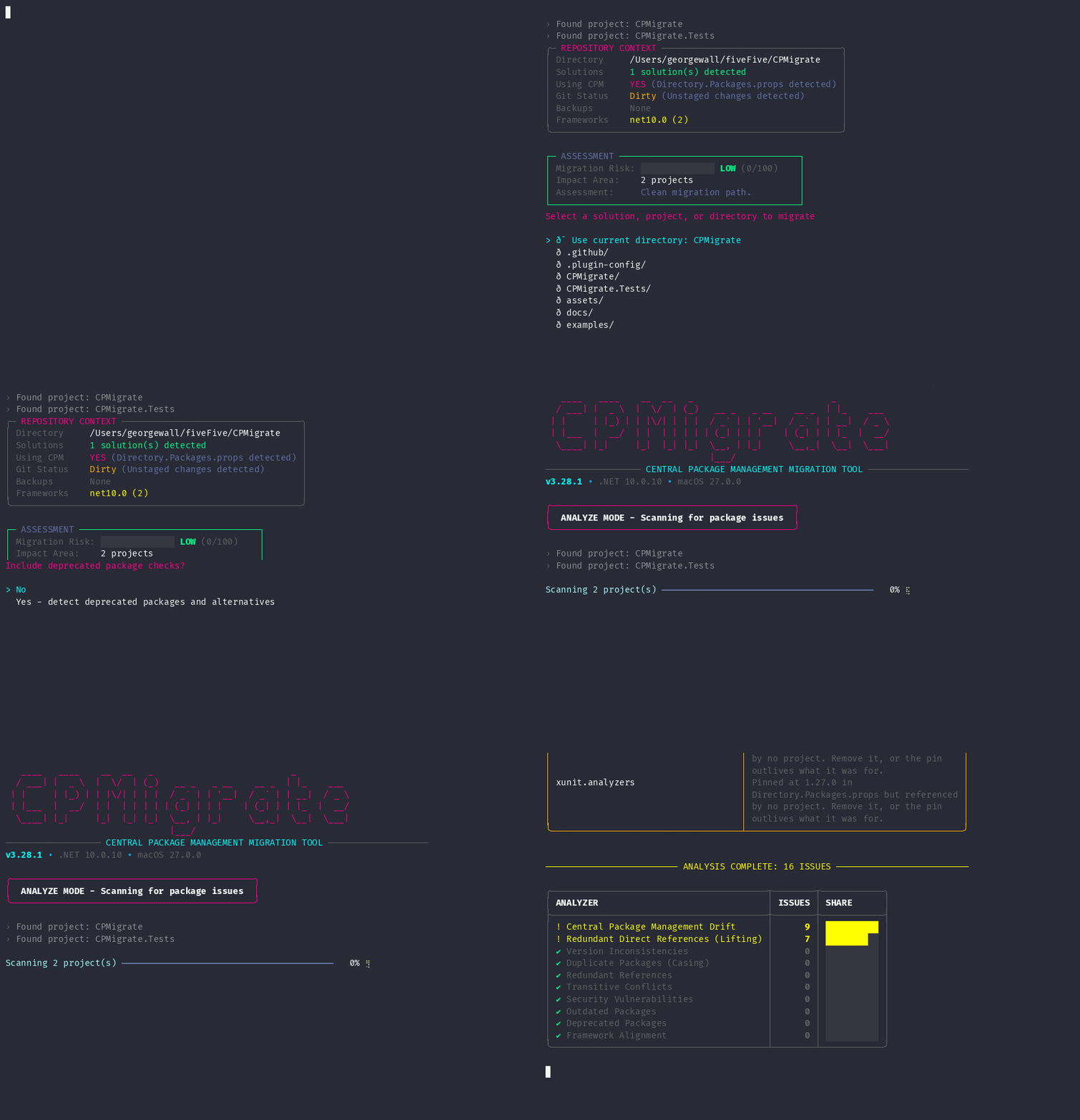
First run? Bare cpmigrate launches Mission Control, an interactive wizard that guides you through migration, analysis, updates, and rollback. Single project? cpmigrate --project ./src/Api/Api.csproj --dry-run. CI? Add --output Json --quiet to any command for strict JSON-only stdout.
See it work
Product-flow diagrams rendered from real CLI output, plus a recording of the interactive wizard.
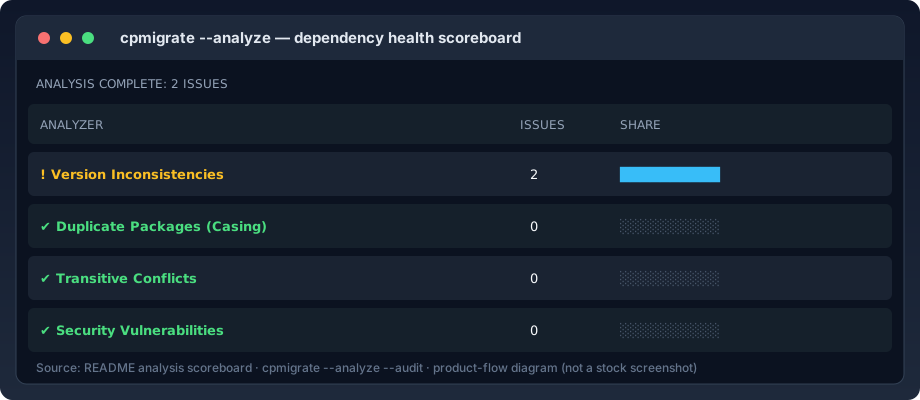
Dependency analysis scoreboard
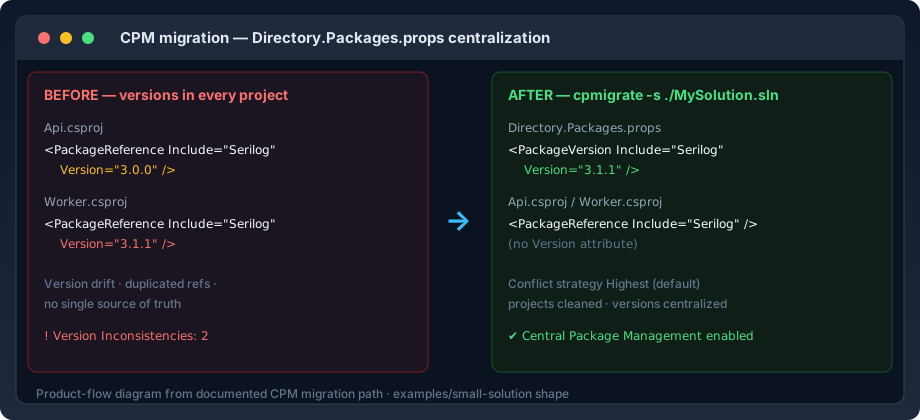
CPM migration before / after
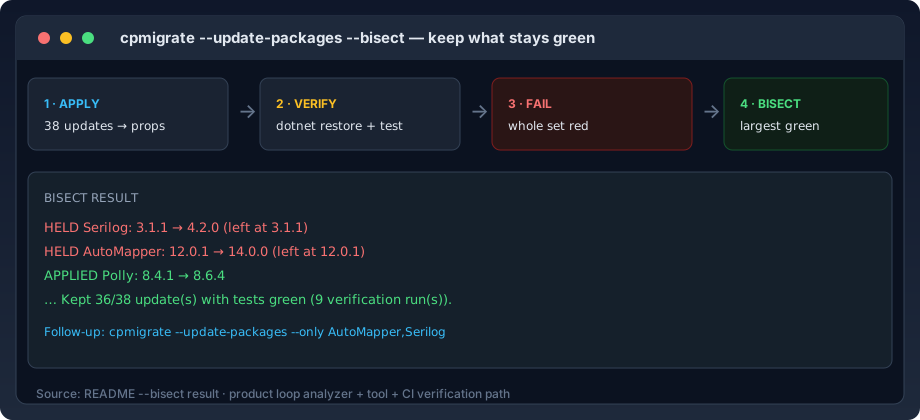
Safe package updates with --bisect
Mission Control — the interactive wizard
Feature snapshot
| Surface | What you get |
|---|---|
| CPM migration | Generate Directory.Packages.props, clean Version attributes from projects, conflict strategies |
| Dependency analysis | 10 built-in analyzers + scoreboard; JSON, SARIF, and Markdown for CI |
| Auto-fix | Version, casing, redundant refs, transitive pin |
| Package updates | Latest versions + dotnet test + automatic rollback |
--bisect |
Largest green update subset; names held-back packages |
Directory.Build.props |
Unify repeated properties across projects |
| Batch / monorepo | Sequential or parallel multi-solution runs |
| Backup & rollback | On-disk backups for migration and update paths |
.sln + .slnx |
Classic solutions and Visual Studio 17.10+ .slnx |
Why use CPMigrate instead of doing it by hand?
| Approach | What you get | Where it breaks down |
|---|---|---|
| Manual CPM migration | Full control over Directory.Packages.props |
Slow, easy to miss references, hard to repeat |
| Ad hoc scripts | Team-specific automation | Brittle, weak rollback and analysis |
Raw dotnet package list |
Inventory and vulnerability data | No migration, fixers, or central props generation |
| CPMigrate | Migration, analysis, auto-fix, safe updates, batch, CI JSON | Purpose-built for this path |
Who this is for
- .NET solution owners migrating to
Directory.Packages.props - App teams modernizing NuGet package management without hand-editing every project
- Monorepo and multi-solution teams standardizing dependency policy
- CI/CD maintainers who need machine-readable dependency analysis and safe update workflows
FAQ
How do I migrate a .NET solution to Central Package Management?
Run cpmigrate -s ./MySolution.sln --dry-run to preview, then cpmigrate -s ./MySolution.sln to apply. CPMigrate extracts every <PackageReference> from your .csproj / .fsproj / .vbproj files, resolves version conflicts with a defined strategy, generates Directory.Packages.props, and strips the inline Version attributes — with a timestamped backup you can roll back to.
What is Directory.Packages.props?
It is the file NuGet Central Package Management (CPM) reads package versions from, so every project in a solution shares one version per package instead of declaring its own. CPMigrate generates and maintains it for you. Microsoft's CPM docs cover the format itself.
Can CPMigrate roll back a bad package update?
Yes, two ways. --update-packages runs dotnet test after applying updates and automatically rolls back if tests fail. --update-packages --bisect goes further: instead of reverting all 38 updates because one broke, it keeps the largest subset that stays green and names the packages it held back. Migrations get timestamped backups restorable with cpmigrate --rollback.
Does CPMigrate work in CI/CD?
It is built for it. --output Json --quiet gives strict JSON-only stdout against a published schema; --output Sarif uploads to GitHub code scanning as PR annotations; --output Markdown drops a verdict-first report into $GITHUB_STEP_SUMMARY. Exit codes are contract-level — 5 means findings, 8 means the scan did not complete. See CI/CD integration.
Does it support .slnx and monorepos?
Yes. CPMigrate reads both classic .sln and Visual Studio 17.10+ .slnx solutions, and --batch /path/to/repo recursively discovers every solution in a monorepo — optionally in parallel (--batch-parallel) and continuing past failures (--batch-continue). Each solution gets an isolated backup directory.
Can it gate on security vulnerabilities without failing on existing debt?
Yes. --audit scans direct and transitive dependencies for known CVEs; --fail-on High narrows the exit-code gate to severities you care about while still reporting everything; --write-baseline records today's findings once, so CI fails only on new debt. Baselined findings stay visible in every report — terminal, JSON, and SARIF.
Which .NET versions does CPMigrate support?
The tool targets .NET 10 and rolls forward (LatestMajor); it runs on any machine with .NET SDK 8.0+. Your projects can target anything — CPMigrate edits project XML directly and does not build your solution except when you ask it to verify updates with dotnet test.
Features
CPM Migration
Scans your .sln or .slnx, extracts all <PackageReference> entries, resolves version conflicts, and generates a centralized Directory.Packages.props.
cpmigrate -s ./MySolution.sln                       # standard migration
cpmigrate -s ./MySolution.sln --merge               # merge into existing props
cpmigrate -s ./MySolution.sln --conflict-strategy Fail    # strict mode
cpmigrate -s ./MySolution.sln --interactive-conflicts     # prompt per conflict
| Strategy | Behavior |
|---|---|
Highest |
Use the highest version found across projects (default) |
Lowest |
Use the lowest version found |
Fail |
Exit with error if any package has conflicting versions |
Dependency Analysis
Run the built-in analyzers without modifying any files:
cpmigrate --analyze                                 # core analyzers
cpmigrate --analyze --transitive                    # + transitive dependencies
cpmigrate --analyze --audit                         # + security vulnerability scanning
cpmigrate --analyze --outdated --deprecated         # + outdated / deprecated checks
| Analyzer | What it detects |
|---|---|
| Version Inconsistencies | Same package with different versions across projects |
| Duplicate Packages | Same package referenced with different casing (e.g., Newtonsoft.Json vs newtonsoft.json) |
| Redundant References | Same package referenced multiple times within a single project |
| Transitive Conflicts | Transitive dependencies with divergent versions across projects |
| Framework Alignment | Projects targeting different TargetFramework values |
| Redundant Direct References | Explicit references already provided transitively (lifting candidates) |
| Security Vulnerabilities | Known CVEs in direct and transitive dependencies (requires --audit) |
Every run ends with a scoreboard tallying each analyzer's findings:
────────────────────────── ANALYSIS COMPLETE: 2 ISSUES ──────────────────────────

╭─────────────────────────────────────────┬────────┬────────────╮
│ ANALYZER                                │ ISSUES │ SHARE      │
├─────────────────────────────────────────┼────────┼────────────┤
│ ! Version Inconsistencies               │      2 │ ██████████ │
│ ✔ Duplicate Packages (Casing)           │      0 │ ░░░░░░░░░░ │
│ ✔ Transitive Conflicts                  │      0 │ ░░░░░░░░░░ │
│ ✔ Security Vulnerabilities              │      0 │ ░░░░░░░░░░ │
╰─────────────────────────────────────────┴────────┴────────────╯
Auto-Fix
cpmigrate --analyze --fix                           # fix all auto-fixable issues
cpmigrate --analyze --fix-dry-run                   # preview what would be fixed
| Fixer | What it fixes |
|---|---|
| Version Inconsistency Fixer | Standardizes package versions across projects using the configured conflict strategy |
| Duplicate Package Casing Fixer | Normalizes package name casing to the most common variant |
| Redundant Reference Fixer | Removes duplicate <PackageReference> entries within the same project |
| Transitive Conflict Pinner | Pins divergent transitive dependencies in Directory.Packages.props |
Package Updates with Test Verification
Update all NuGet packages to their latest versions with automatic test verification and rollback. Requires CPM — run cpmigrate first if Directory.Packages.props does not exist.
cpmigrate --update-packages --dry-run               # preview available updates
cpmigrate --update-packages                         # update, test, rollback on failure
cpmigrate --update-packages --transitive            # also scan and pin transitive deps
cpmigrate --update-packages --include-prerelease    # include pre-release versions
How it works: reads current versions from Directory.Packages.props, queries NuGet for latest (8 concurrent lookups), auto-accepts minor/patch bumps and prompts for major ones, backs up the props file, applies updates atomically, then runs dotnet restore + dotnet test. Tests pass — updates kept. Tests fail — everything rolls back.
With --transitive, CPMigrate additionally scans dotnet list package --include-transitive, deduplicates across projects (highest resolved version wins), excludes deps already managed directly, and pins accepted transitive updates as new <PackageVersion> entries. Per-project scan failures are logged and skipped; if every scan fails it continues direct-only. Transitive scanning requires dotnet restore to have run beforehand.
Bisecting Updates
All-or-nothing rollback is blunt: one bad package in a set of 38 reverts the other 37 and tells you nothing about which one broke. --bisect applies the largest subset that keeps tests green and names the packages it held back.
cpmigrate --update-packages --bisect
cpmigrate --update-packages --bisect --bisect-budget 24 --bisect-test-filter "Category=Unit"
cpmigrate --update-packages --only Serilog,AutoMapper   # follow up on held packages
────────────────────────────── BISECT RESULT ──────────────────────────────

  HELD    Serilog: 3.1.1 → 4.2.0 (left at 3.1.1)
  HELD    AutoMapper: 12.0.1 → 14.0.0 (left at 12.0.1)
  APPLIED Polly: 8.4.1 → 8.6.4
  …

Kept 36/38 update(s) with tests green (9 verification run(s)).
  Investigate with: cpmigrate --update-packages --only AutoMapper,Serilog
How the search works. The whole set is verified first, so a healthy run costs exactly one verification. On failure the set is halved: a clean half is banked into the baseline every later probe builds on; a failing half is split again until a single package is held back. Probing against the banked-good set — rather than each package alone — resolves failures that need two packages together. If nothing can be kept, the zero-update baseline is verified first, so an already-red suite is reported as such.
Cost. Roughly 2·log₂(n) restore+test cycles for a single culprit — about 9–12 runs for 40 packages. --bisect-budget (default 16) caps it; when the budget runs out, unresolved packages are held back and the banked-good set is still applied.
Exit codes. 0 when the tree ends green and at least one update was applied — check summary.packagesHeldBack in --output Json to tell a clean sweep from a partial one. 7 when nothing could be applied. --bisect cannot be combined with --dry-run: the search has to observe real test runs.
Directory.Build.props Unification
Promote repeated properties and items from individual project files into a shared Directory.Build.props:
cpmigrate --unify-props --dry-run                   # preview
cpmigrate --unify-props                             # apply
cpmigrate --unify-props --force                     # skip confirmation
Identifies properties and items present in at least 60% of projects with the same value (e.g., TargetFramework, ImplicitUsings, Nullable, Authors) and migrates them to the root-level file. Individual project files are cleaned up automatically.
Batch Processing
cpmigrate --batch /path/to/repo                     # sequential
cpmigrate --batch /path/to/repo --batch-parallel    # all CPU cores
cpmigrate --batch /path/to/repo --batch-parallel --batch-continue
Recursively discovers .sln and .slnx files, excluding common non-project directories (node_modules, bin, obj, .git, etc.). Each solution gets an isolated backup directory to prevent collisions.
Backup & Rollback
Every migration creates a timestamped backup in .cpmigrate_backup/ with a JSON manifest.
cpmigrate --rollback                                # restore most recent backup
cpmigrate --list-backups                            # list all backups
cpmigrate --prune-backups --retention 3             # keep the last 3
cpmigrate --prune-all                               # delete all backups
Use --add-gitignore to add the backup directory to .gitignore automatically.
Configuration File
Create a .cpmigrate.json in your repository root to set team defaults (CLI arguments always win):
{
  "$schema": "https://raw.githubusercontent.com/georgepwall1991/CPMigrate/main/schemas/cpmigrate.schema.json",
  "ConflictStrategy": "Highest",
  "Backup": true,
  "BackupDir": ".",
  "AddGitignore": true,
  "MergeExisting": false,
  "OutputFormat": "Terminal",
  "failOn": "High",
  "baseline": ".cpmigrate-baseline.json",
  "Retention": {
    "Enabled": true,
    "MaxBackups": 5
  }
}
The config file is discovered by walking up from the selected solution/project path, or from the current directory when no path is provided.
CLI Reference
Migration & Core
| Option | Short | Default | Description |
|---|---|---|---|
--solution |
-s |
current directory | Path to .sln / .slnx file or directory |
--project |
-p |
Path to a specific project file, or a directory containing one project | |
--output-dir |
-o |
. |
Output directory for Directory.Packages.props |
--dry-run |
-d |
false |
Preview changes without modifying files |
--merge |
false |
Merge into existing Directory.Packages.props |
|
--conflict-strategy |
Highest |
Version conflict resolution: Highest, Lowest, Fail |
|
--interactive-conflicts |
false |
Prompt for each version conflict | |
--keep-attrs |
-k |
false |
Keep Version attributes in project files |
--interactive |
-i |
false |
Launch the interactive Mission Control wizard (migration, analysis, package updates, rollback, batch, backups) |
Analysis & Auto-Fix
| Option | Short | Default | Description |
|---|---|---|---|
--analyze |
-a |
false |
Run dependency health analysis |
--transitive |
false |
Include transitive dependencies | |
--audit |
false |
Include security vulnerability scanning | |
--outdated |
false |
Include outdated package checks | |
--deprecated |
false |
Include deprecated package checks | |
--fix |
false |
Apply auto-fixes (requires --analyze) |
|
--fix-dry-run |
false |
Preview auto-fixes without applying | |
--fail-on |
Info |
Lowest severity that fails the build: Info, Low, Moderate, High, Critical, or Never |
|
--max-parallelism |
processors (max 8) | Projects queried at once during --audit / --outdated / --deprecated |
|
--baseline |
Path to a file of accepted findings; they are reported but do not fail the build | ||
--write-baseline |
false |
Record current findings as the accepted baseline, then exit |
Gating with --fail-on. By default any finding fails the build — unusable on a repo with existing debt, so the gate gets switched off and the vulnerability you cared about goes with it. --fail-on High narrows the gate without narrowing the report: sub-threshold findings still appear in terminal, JSON, and SARIF output; only the exit code changes. --fail-on cannot suppress exit 8 — a severity threshold says which findings matter; it does not make an unexamined project safe.
cpmigrate --analyze --audit --outdated --fail-on High
cpmigrate --analyze --audit --output Sarif --output-file cpmigrate.sarif --fail-on Never
Adopting a gate on an existing codebase with --baseline. Record the current state once on a green branch, then gate on what is new:
cpmigrate --analyze --audit --outdated --write-baseline   # writes .cpmigrate-baseline.json; commit it
cpmigrate --analyze --audit --outdated --baseline .cpmigrate-baseline.json
Baselined findings stay in every report — terminal, JSON (suppressed: true), and SARIF (suppressions with kind: "external"). A finding is identified by rule, package, and affected projects — not by the versions in its description — so a version drifting 13.0.1 → 13.0.2 stays suppressed, while spreading to another project does not. When entries stop matching anything, CPMigrate suggests regenerating. A baseline is never recorded from an incomplete scan: if a project or query fails to scan, --write-baseline exits 8 rather than permanently accepting findings nobody looked for. Set both once for the team in .cpmigrate.json: { "baseline": ".cpmigrate-baseline.json", "failOn": "High" }.
The JSON payload reports the policy alongside the findings:
"summary": {
  "issuesFound": 12,
  "failOnSeverity": "High",
  "issuesAtOrAboveThreshold": 0,
  "highestSeverity": "Moderate",
  "scanFailures": 0,
  "deepScanFailures": 0
}
Package Updates
| Option | Default | Description |
|---|---|---|
--update-packages |
false |
Update all packages to latest, run tests, rollback on failure |
--transitive |
false |
Also scan and pin transitive dependencies |
--include-prerelease |
false |
Include pre-release versions when updating |
--bisect |
false |
On failure, keep the largest subset that stays green instead of reverting everything |
--bisect-budget |
16 |
Max restore+test cycles a bisection may spend |
--bisect-test-filter |
dotnet test --filter expression used for each bisection probe |
|
--only |
Comma-separated package IDs to restrict the update to |
Modernization
| Option | Default | Description |
|---|---|---|
--unify-props |
false |
Migrate common properties to Directory.Build.props |
--force |
false |
Skip confirmation prompts |
Batch Processing
| Option | Default | Description |
|---|---|---|
--batch |
Directory to scan recursively for solutions | |
--batch-parallel |
false |
Process solutions in parallel |
--batch-continue |
false |
Continue even if a solution fails |
Backup & Rollback
| Option | Short | Default | Description |
|---|---|---|---|
--rollback |
-r |
false |
Restore from most recent backup |
--no-backup |
-n |
false |
Disable backup creation |
--backup-dir |
. |
Backup directory location | |
--list-backups |
false |
List all available backups | |
--prune-backups |
false |
Delete old backups based on --retention |
|
--prune-all |
false |
Delete all backups | |
--retention |
5 |
Number of backups to keep when pruning | |
--add-gitignore |
false |
Add backup directory to .gitignore |
|
--gitignore-dir |
. |
Directory to create .gitignore in, when there is not one already |
Output & Logging
| Option | Short | Default | Description |
|---|---|---|---|
--output |
Terminal |
Output format: Terminal, Json, Sarif, or Markdown (the last two require --analyze) |
|
--output-file |
Write Json, Sarif, or Markdown output to a file |
||
--quiet |
-q |
false |
Suppress non-essential output |
--verbose |
-v |
false |
Enable diagnostic logging to cpmigrate.log |
Rules, Completions & Self-Update
| Option | Description |
|---|---|
--explain <RuleId> |
Print what a rule means, why it matters, and how to resolve it (--explain all lists every rule) |
--completions <Shell> |
Print a completion script and exit: Bash, Zsh, Fish, or PowerShell |
--update |
Check for and install the latest version of CPMigrate |
Rule IDs from build logs or SARIF annotations (issueCode / ruleId) paste straight back: cpmigrate --explain InlineVersionUnderCpm. A near miss suggests the real rule; an unrecognized ID exits non-zero so a typo in CI is visible. Full reference: docs/rules.md. Completions are generated from the live option list — enum values and paths complete too — so they cannot drift from the CLI.
cpmigrate --completions bash > /usr/local/etc/bash_completion.d/cpmigrate
cpmigrate --completions zsh > "${fpath[1]}/_cpmigrate"
cpmigrate --completions fish > ~/.config/fish/completions/cpmigrate.fish
cpmigrate --completions powershell >> $PROFILE
Exit Codes
| Code | Name | Meaning |
|---|---|---|
0 |
Success | Operation completed successfully |
1 |
ValidationError | Invalid command-line options |
2 |
FileOperationError | File I/O or permission failure |
3 |
VersionConflict | Unresolvable version conflict (with --conflict-strategy Fail) |
4 |
NoProjectsFound | No .csproj / .fsproj / .vbproj files discovered |
5 |
AnalysisIssuesFound | Analysis detected issues (useful for CI gates) |
6 |
UnexpectedError | Unhandled exception |
7 |
TestFailure | Tests failed after package update (rollback performed). With --bisect, returned only when no update could be kept |
8 |
IncompleteAnalysis | A requested scan did not finish, so the findings are incomplete — nothing was necessarily found wrong, but part of the solution went unexamined |
On 8 (IncompleteAnalysis): if a project fails to scan, or an --audit / --outdated / --deprecated query fails, the run produces no findings for the part it could not read. Treat 8 as "re-run or investigate", not as "no issues" — it is exactly the failure mode a security gate exists to prevent.
CI/CD Integration
Strict JSON contract mode
--output Json --quiet guarantees JSON-only stdout — safe for CI parsing without stripping banners or config notices:
cpmigrate --analyze --audit --outdated --deprecated --output Json --quiet > analyze.json
cpmigrate -s ./MySolution.sln --dry-run --output Json --quiet > migrate.json
cpmigrate --update-packages --dry-run --output Json --quiet > update-packages.json
The payload has a published schema at schemas/cpmigrate-output.schema.json — key off outputSchemaVersion, not the tool version. Two things before writing a parser: success: true does not mean "no findings" (check summary.issuesFound and summary.issuesAtOrAboveThreshold), and absent fields are meaningful (a missing issuesBaselined means no baseline was used, not zero suppressions).
Non-interactive terminals
CPMigrate detects redirected stdout — a CI runner, a pipe, > log.txt — and never attempts a prompt it cannot service: post-migration verification is skipped rather than prompted for (and after --dry-run, since nothing was written); --rollback declines and says to re-run with --force; Unicode glyphs fall back to ASCII when the terminal reports no Unicode support.
No sub-commands
CPMigrate is flag-driven — the analysis command is cpmigrate --analyze, not cpmigrate analyze. A leading bare word is rejected rather than ignored, because a discarded verb would otherwise fall through to a real migration:
✖ Unrecognized argument 'analyze'. CPMigrate takes flags, not sub-commands.
› Did you mean: cpmigrate --analyze -s ./MySolution.sln
SARIF for GitHub code scanning
--output Sarif emits a SARIF 2.1.0 log — findings appear as annotations on the PR diff, each pointing at the project file and the line declaring the offending PackageReference, with a stable fingerprint so code scanning tracks findings across runs. Severities map as Critical/High → error, Moderate → warning, Low/Info → note. (--output Sarif requires --analyze, since SARIF describes analyzer findings.)
- name: Install CPMigrate
  run: dotnet tool install --global CPMigrate

- name: Analyze dependencies
  id: analyze
  run: |
    set +e
    cpmigrate --analyze --audit --outdated --deprecated \
      --output Sarif --output-file cpmigrate.sarif --quiet
    echo "exit_code=$?" >> "$GITHUB_OUTPUT"

- name: Upload SARIF
  if: always() && hashFiles('cpmigrate.sarif') != ''
  uses: github/codeql-action/upload-sarif@v3
  with:
    sarif_file: cpmigrate.sarif

- name: Require a completed scan
  run: |
    code="${{ steps.analyze.outputs.exit_code }}"
    # 0 = clean. 5 = issues found, already annotated on the diff by code scanning.
    # Anything else (8 = incomplete scan, 1/2/6 = errors) means the results cannot be trusted.
    case "$code" in
      0|5) ;;
      *) echo "::error::cpmigrate exited $code - the analysis did not complete"; exit 1 ;;
    esac
Capture the exit code rather than using continue-on-error: that would swallow every failure, including exit 8 — leaving the job green on exactly the unexamined-dependency case the upload is meant to catch.
Markdown for a job summary or PR comment
SARIF only surfaces findings that map to a line in the diff, and a dependency problem is usually about the solution as a whole — so it never appears on the diff. --output Markdown puts the report where a reviewer will actually see it:
cpmigrate --analyze --audit --outdated --output Markdown --quiet >> "$GITHUB_STEP_SUMMARY"
The report leads with the verdict against the --fail-on threshold, then scan totals, a severity breakdown, and findings linking to their rules. Baselined findings are marked, incomplete scans get a prominent warning, and long finding lists collapse behind a <details> disclosure. Post it as a PR comment with gh pr comment "${{ github.event.number }}" --body-file report.md. Dedicated guide: https://georgepwall1991.github.io/CPMigrate/guides/ci-cd/
Compatibility
- .NET SDK: 8.0+ (tool targets
net10.0withLatestMajorroll-forward) - Project types:
.csproj/.fsproj/.vbproj - Solutions:
.slnand.slnx - CPM: generates and consumes standard NuGet Central Package Management files
Examples & Benchmarks
- Starter example:
examples/small-solution/ - Monorepo example:
examples/monorepo/ - Benchmark table:
docs/benchmarks.md
These sample repositories are designed for onboarding, CI templates, and reproducible before/after conversion demos.
Release Cadence
- Stable releases: weekly, versioned and changeloged
- Release candidates (RC): published for fast feedback before stable promotion
- Change log source of truth:
CHANGELOG.md - Policy details:
docs/release-cadence.md
Telemetry (Opt-in)
CPMigrate supports privacy-first telemetry that is disabled by default.
- Enable by setting
CPMIGRATE_TELEMETRY_OPT_IN=true - Captures only command-level metrics (operation, duration, exit code category, high-level flags)
- Captures no project paths, package names, file contents, or source code
- Stores local events at
~/.cpmigrate/telemetry/events.ndjson
Contributing
Contributions are welcome:
- Fork the repository
- Create a feature branch (
git checkout -b feature/my-feature) - Write tests for your changes
- Ensure the full suite passes (
dotnet test) - Open a Pull Request
License
Distributed under the MIT License. See LICENSE for more information.
Author
George Wall — @georgepwall1991
| Product | Versions Compatible and additional computed target framework versions. |
|---|---|
| .NET | net10.0 is compatible. net10.0-android was computed. net10.0-browser was computed. net10.0-ios was computed. net10.0-maccatalyst was computed. net10.0-macos was computed. net10.0-tvos was computed. net10.0-windows was computed. |
This package has no dependencies.
| Version | Downloads | Last Updated |
|---|---|---|
| 3.51.0 | 0 | 7/31/2026 |
| 3.50.0 | 0 | 7/31/2026 |
| 3.49.0 | 0 | 7/31/2026 |
| 3.28.2 | 9 | 7/30/2026 |
| 3.28.1 | 28 | 7/30/2026 |
| 3.28.0 | 32 | 7/30/2026 |
| 3.27.0 | 28 | 7/30/2026 |
| 3.26.0 | 33 | 7/30/2026 |
| 3.25.1 | 36 | 7/30/2026 |
| 3.25.0 | 42 | 7/30/2026 |
| 3.24.0 | 31 | 7/30/2026 |
| 3.23.0 | 33 | 7/30/2026 |
| 3.22.0 | 31 | 7/30/2026 |
| 3.21.0 | 37 | 7/30/2026 |
| 3.20.0 | 46 | 7/30/2026 |
| 3.19.0 | 39 | 7/30/2026 |
| 3.18.0 | 38 | 7/30/2026 |
| 3.17.1 | 30 | 7/30/2026 |
| 3.17.0 | 36 | 7/30/2026 |
| 3.16.0 | 33 | 7/30/2026 |
Docs and packaging: the README is rebuilt around a conversion funnel — Remotion-rendered hero video (poster-linked, because NuGet strips video tags), terminal recordings re-recorded at 3.28.x replacing GIFs that showed v3.5.0, a new FAQ, and 40% fewer lines with every documented contract preserved. The docs site gains FAQ and Video structured data and proper 1200x630 social cards. The nupkg no longer bundles assets/video — the **\* pack glob swept 3.4MB of media NuGet cannot render; it now ships the README and the three product-flow SVGs. Previously: URGENT FIX for a regression in 3.26.0, 3.27.0 and 3.28.0: those versions silently dropped projects from --analyze. The restore isolation they introduced was passed as environment variables, which apply to every project in the MSBuild graph rather than the one being queried, so any project with a ProjectReference told its references to write to the same intermediate directory. They collided, the query returned no frameworks, and the scan counted that as success with zero packages — so the project vanished with scanFailures: 0 and no warning. Measured on Serilog: three of six projects lost, non-deterministically. Upgrade from any of those three versions. Previously: closes a security-relevant race in --audit, --outdated and --deprecated that has been present since 3.15.0. Those queries shell out to `dotnet package list`, which restores — so two projects sharing a project.assets.json corrupt each other's results. Demonstrated with two projects in one directory, one pinned to a Newtonsoft.Json version with a known high-severity advisory and one to a clean version: queried concurrently, the clean project was reported carrying the vulnerable version. It runs the other way just as easily, which is a genuinely vulnerable project reported clean, with nothing in the output to say so. Each deep scan now reuses the isolated directory its project's resolved scan proved usable, and where that scan escaped, it runs under the exclusive restore lock instead. Previously in 3.27.0: Every dependency is now current — MSBuild 18.8.2, Buildalyzer 9, Spectre.Console 0.57.2, SonarAnalyzer 10.31, coverlet 10 — with nothing outdated left. This also corrects the record: 3.24.0 reported that Microsoft.Build 18.8.2 broke 20 tests. It does not, and it did not. That run took 14 minutes against a normal 2 and the machine ran out of disk shortly afterwards; the bisect that produced the claim never tested the MSBuild packages on their own. Verified now on both this code and the pre-3.26.0 code: clean either way. Previously in 3.26.0: Analysis is about four times faster on a large solution: 60 projects went from 200s to 50s, with byte-identical findings. Resolving packages shells out to `dotnet package list` once per project — a separate process that spends most of its time waiting — and those now run concurrently. The reason it could not before is that `dotnet package list` restores, and two projects sharing an assets file cannot be queried at once: the loser reports the other project's packages, so two projects with different versions report the same one and the inconsistency disappears with a clean exit code. Each invocation now gets its own MSBuild intermediate directory, which makes that collision impossible rather than something to detect — the detection is not possible here, because where the assets file goes depends on MSBuild evaluation that this phase must not perform. Reading project files stays serial, deliberately: MSBuild's object model is not thread-safe. Previously in 3.25.1: Refreshes the dependencies bundled into the tool — Serilog 4.4.0, NuGet.Versioning 7.6.0, Microsoft.Extensions.Logging 10.0.10 — which were updated on main after 3.25.0 was tagged. No behaviour change: this is a PackAsTool package, so those assemblies ship inside it rather than being restored by consumers, and 3.25.0 was still carrying the older ones. Previously in 3.25.0: Holds the documentation to the tool. A flag that exists and is undocumented is invisible; one that is documented and no longer exists is worse, because it gets written into a CI script and discovered from an exit code. Neither shows up in a build, a test run, or a review of the code that changed — the docs are a different file and nothing was checking them. DocumentationDriftTests now asserts, by reflection, that every option appears in the README reference and every documented option still exists, that every exit code is in the table under its own name, and that every analysis rule has a published page. One option had already slipped (--gitignore-dir), which is the argument for asserting it rather than remembering. Previously in 3.24.0: Adds ScanWorkTests: the properties any change to the analysis scan's scheduling has to hold, rather than a duration — findings independent of --max-parallelism, shared-directory and redirected-output layouts still reporting their findings, and the same solution producing the same report twice. Also fixes a --fix regression from 3.23.0 where a framework-conditional pin read as an ordinary one and every other project was unified to it. A concurrent package-resolution change measured at two to four times faster was written and deliberately not shipped: whether two projects share a project.assets.json depends on full MSBuild evaluation, which that phase cannot do, and eight review rounds each found another route to a shared file. A scan that silently reports fewer findings is worse than a slow one. Previously in 3.23.0: Fixes --fix reporting "No changes were needed" when it could not change anything. Both fixers that edit project XML swallowed every exception and returned null, which the caller could only read as "nothing to change" — so on a read-only, locked, or malformed project file the run printed that reassuring line directly above "1 issue(s) could not be fixed automatically", two statements contradicting each other, and threw away the actual cause. The exit code was already right, because the post-fix rescan gates on the surviving finding; everything a human reads was wrong. Failures now carry their reason and name the file, one unreadable file still does not stop the others, and "No changes were needed" is printed only when that is true. Previously in 3.22.0: Closes the last four exemptions in the end-to-end rule guard, so every analysis rule is now proven against real data rather than taken on trust. The vulnerability, outdated, deprecated, and transitive rules were exempted as needing a live NuGet feed — true of the query, but not of the parsing and reporting after it, which is exactly where the 3.20.0 defect lived. They are now driven from JSON captured from real `dotnet package list` runs, which immediately found that a --transitive scan invented a duplicate-reference finding for any package present both directly and transitively. Previously in 3.21.0: Fixes RedundantReference, which could not fire, and its fixer, which could not fix. The rule reads package references from `dotnet package list` — the *resolved* graph — and resolution collapses two PackageReference items with the same Include into one, so by the time a duplicate reached the analyzer there was only ever one of it. Rules about what a project file says now read the references as declared. The fixer separately resolved projects by file name while findings have identified them by path since 3.10.0, so it matched nothing and returned "no fix needed": the run printed "No changes were needed" over an unrepaired finding. Conditional declarations are now respected by every rule and fixer: declaring a package once per target framework behind a Condition is how multi-targeting is written, and treating it as a duplicate or an inconsistency had --fix delete or overwrite the pin another framework depended on. The rule also now fires under central package management, where references carry no version at all. All found by a new end-to-end guard that drives the real CLI against real files and asserts every rule can actually fire — because the analyzer unit tests all passed throughout, proving the logic while nothing checked that the pipeline in front of it delivers the shape the logic expects. Previously in 3.20.0: Fixes the RedundantDirectReference analyzer, which had never reported anything. It reads the resolved dependency graph out of project.assets.json, but composed its lookup key from the version in project.frameworks.<tf>.dependencies — which NuGet writes as a range, "[7.0.0, )" — while the targets section is keyed by the resolved version, "Serilog/7.0.0". The key matched nothing on any real project, so the traversal found no dependencies and the analyzer reported a clean result instead of a broken lookup. Its tests passed because their fixtures used a bare version that restore never writes. Lookup is now by package name against the resolved graph, since restore settles on one version per package per framework and no version needs reconstructing. Two further conditions the corrected traversal needed, both found in cross-review: a reference that pins *higher* than anything else requires is not redundant, because removing it downgrades the package — the contract always said "at the same or higher version" and a reachability-only check dropped that; and a reference redundant under only some target frameworks is not reported, since removing it breaks the framework where it was independently required. Previously in 3.19.0: Directory.Packages.props keeps its shape across runs. A merge used to write new pins as <PackageVersion Include="X"><Version>1.0.0</Version></PackageVersion> while every entry around them used Version="1.0.0" — one file, two styles, and a three-line diff for a one-line addition. It also inserted new entries between a comment and the pin that comment documents, silently reattaching a team's "pinned because 2.x drops netstandard2.0" note to a different package, which is worse than losing it because the file still reads as correct. New pins now match whichever style the file already uses, a file that was ordered stays ordered, one that was not is left as its author arranged it, and where a comment occupies the sorted position the new entry goes one slot later rather than taking the explanation with it. Ordering is also no longer culture-sensitive. Previously in 3.18.0: Fixes the interactive wizard silently answering its own questions. Every prompt used to work out what an answer meant by reading its label back — StartsWith("Yes"), an exact match against the display string, or slicing an emoji prefix off a directory name — and every one of them had a quiet wrong answer behind it: an answer that matched nothing fell through to a default, so a reworded option flipped to its opposite and an unrecognised mission started a migration nobody asked for. Answers now carry their values, and an answer that was not offered is an error. Also fixes a real gap this was hiding: a repository with Directory.Packages.props at the top and projects under src/ — the ordinary shape of a migrated solution, and exactly what --analyze is pointed at — could not be selected in the browser at all. Previously in 3.17.1: Internal: CommandRouter dispatch is now an ordered table rather than an if/else chain. Behaviour-preserving, but it makes precedence explicit — which mode wins when several flags are present was previously decided by the order statements happened to appear in, and is now a readable list with tests asserting it. Previously in 3.17.0: publishes a JSON Schema for the --output Json payload at schemas/cpmigrate-output.schema.json. The contract has been versioned since 1.0.0 but never described, so consumers had to infer the shape from examples — and infer it wrong at the edges, which is where the fields that matter live: success: true does not mean "no findings" when they were below the --fail-on threshold or accepted by a baseline, and an absent summary counter means the command did not produce it rather than producing zero. Guarded against drift by reflection rather than a new dependency, so a field added without updating the schema fails the build. Previously in 3.16.0: adds --explain <RuleId>: rule documentation from the same terminal that produced the finding. A rule ID in a build log is the moment someone needs to know what it means and the moment they are least likely to go looking for a docs site. The same IDs appear as issueCode in JSON and ruleId in SARIF, so a report can be pasted straight back. --explain all lists every rule; a near miss suggests the real one; an unrecognised ID exits non-zero so a CI typo is visible. Previously in 3.15.0: --audit, --outdated, and --deprecated now query projects concurrently. Each shells out to 'dotnet package list' per project and waits on the network, so the scan scaled linearly with solution size for no reason: 10 projects with --outdated went from 12s to 6s. Bounded by --max-parallelism (default: processor count, capped at 8). Reading package references stays serial on purpose — that pass goes through MSBuild's object model, whose static caches are not thread-safe, and running it concurrently made projects report each other's versions and silently erased version-inconsistency findings. Results merge in project order, so a report is identical run to run. Previously in 3.14.0: fixes a failed NuGet version lookup being reported as "up to date". The lookup returned null both for "this package is current" and "the request failed", so one 503 or timeout during --update-packages silently dropped that package and the run still finished with "Everything up to date!" — on a slow connection a large solution could skip most of its updates and say nothing. Transient failures are now retried with exponential backoff and jitter, honouring Retry-After up to a cap; 404 and malformed bodies are treated as definitive; and whatever still fails is named rather than being counted as current. Lookups are also cached per run, so a package referenced from thirty projects costs one request instead of thirty. Previously in 3.13.0: adds --completions for bash, zsh, fish, and PowerShell. With 45 options, remembering which take a value — and that it is Sarif rather than SARIF — is not a reasonable expectation. Generated from the option metadata rather than hand-written, because a stale completion list is worse than none: it suggests flags that no longer exist. Enum options complete their values, path options complete filenames, and zsh shows help text inline. Previously in 3.12.0: adds four rules that catch a solution drifting back off central package management. Migrating is a one-off event; staying migrated is not — someone adds a package with an inline Version and the solution is quietly half-centralized, with NuGet saying nothing because the inline version simply wins. InlineVersionUnderCpm (an inline pin overriding the central one), MissingPackageVersion (no version anywhere; restore fails), OrphanedPackageVersion (a central pin nothing references), and CpmNotEnabled (a props file with central management switched off, so every entry is inert). Gated on data rather than a flag: nothing is reported unless the solution has a Directory.Packages.props. Previously in 3.11.0: adds --output Markdown: a report for a CI job summary or PR comment, because neither existing format reaches a human when they need it — JSON is for parsers and SARIF only surfaces findings that map to a line in the diff, which a solution-wide dependency problem never does. Leads with the verdict (did anything reach the --fail-on threshold), then scan totals, a severity breakdown, and a findings table linking each rule to its docs. Incomplete scans get a prominent warning, baselined findings are marked, long lists collapse, and table cells are escaped. Previously in 3.10.0: findings identify projects by their path relative to the scan root (src/App/App.csproj) rather than by file name. A file name is not an identifier — two projects can share one — which meant a baseline entry accepting debt in one project could silently suppress a new finding in another, and SARIF had to guess which same-named file to annotate. Action required: regenerate baselines, the fingerprint scheme is now v2 and a v1 file is rejected with an explicit instruction. JSON schema 1.3.0: analysisIssues[].affectedProjects holds relative paths. Previously in 3.9.0: adds --baseline and --write-baseline: adopt a CI gate on a codebase that already has debt. Record the current findings once, commit the file, and every run after that fails only on findings the baseline does not contain. Baselined findings stay in every report — terminal, JSON (suppressed: true), and SARIF (as a suppressions entry) — so the debt stays visible without blocking. A finding is identified by its rule, package, and affected projects rather than by the versions in its description, so version drift does not unsuppress accepted debt while spreading to a new project does. Stale entries are reported so a baseline cannot grow forever. Previously in 3.8.0: --fail-on <severity>: gate CI on the findings that matter instead of on all of them. Every finding used to fail the build, which makes the gate unusable for a repository with existing debt. --fail-on High narrows the gate without narrowing the report — findings below the threshold still appear in terminal, JSON, and SARIF output, and only the exit code changes. Accepts Info (default), Low, Moderate, High, Critical, and Never for report-without-gating; settable team-wide as "failOn" in .cpmigrate.json. Cannot suppress exit 8 (IncompleteAnalysis). JSON schema 1.2.0 adds summary.failOnSeverity, issuesAtOrAboveThreshold, highestSeverity, scanFailures, and deepScanFailures (all additive). Also fixes the published config schema, which was missing Sarif from outputFormat. Previously in 3.7.0: --output Sarif: cpmigrate --analyze now emits a SARIF 2.1.0 log for GitHub code scanning, so dependency findings annotate the pull request diff. Results point at the exact PackageReference line, carry full rule metadata with links to the new docs/rules.md reference, and include stable fingerprints so findings are tracked across runs rather than reopened. Tool failures emit an unsuccessful SARIF invocation, so an upload step never breaks on a malformed file. --output-file now accepts Sarif as well as Json. No analyzer severity changes.