ArcadioG.Ananke
0.2.0
See the version list below for details.
dotnet add package ArcadioG.Ananke --version 0.2.0
NuGet\Install-Package ArcadioG.Ananke -Version 0.2.0
<PackageReference Include="ArcadioG.Ananke" Version="0.2.0" />
<PackageVersion Include="ArcadioG.Ananke" Version="0.2.0" />
<PackageReference Include="ArcadioG.Ananke" />
paket add ArcadioG.Ananke --version 0.2.0
#r "nuget: ArcadioG.Ananke, 0.2.0"
#:package ArcadioG.Ananke@0.2.0
#addin nuget:?package=ArcadioG.Ananke&version=0.2.0
#tool nuget:?package=ArcadioG.Ananke&version=0.2.0
Ananke

Ananke is a WinUI 3 control library, aptly named after a satellite of Jupiter and the Greek personification of necessity. Which is to say, it is the place where I (Arcadio) put controls that I made cause I needed and weren't part of WinUI.
Controls
RadarControl
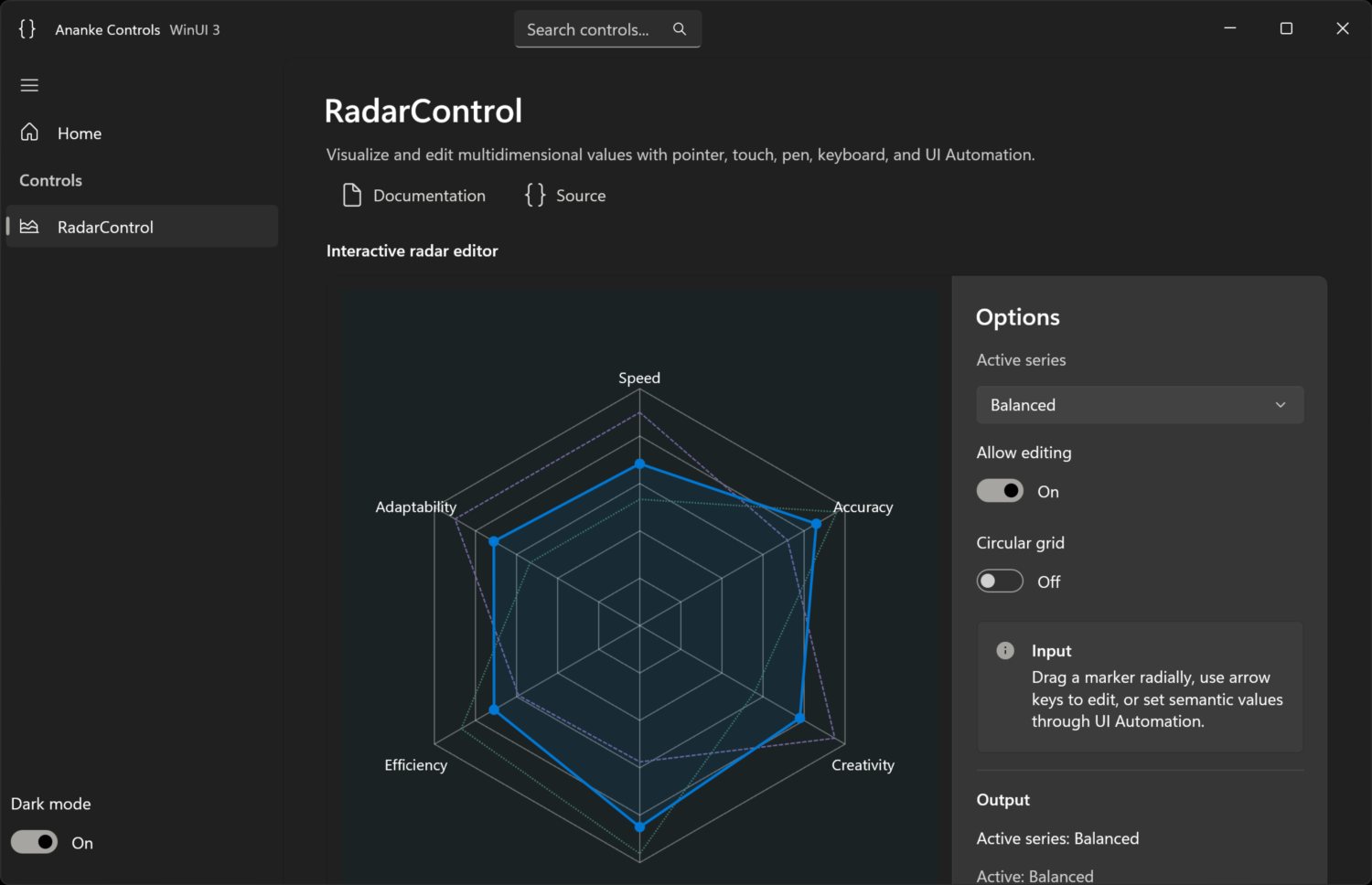
RadarControl is an accessible, animated radial vector editor:
- arbitrary linear ranges and three or more axes;
- multiple series with one active series;
- Win2D rendering through an internal renderer boundary;
- mouse, touch, pen, keyboard, and UI Automation editing;
- host-coercible whole-vector edit proposals;
- Fluent light/dark/high-contrast colors and non-color series cues;
- elapsed-time, retargetable animation with a paused-while-idle render loop.
EditableTagCollection
EditableTagCollection is a compact, accessible editor for wrapping collections of
stable-identity text tags:
- content-sized Fluent chips that reflow with the available width;
- add and rename editors that grow with live text up to the available collection width;
- a trailing progress ring that replaces the remove affordance while persistence is pending;
- add, inline rename, and remove workflows for pointer, touch, pen, and keyboard;
- cancellable and deferrable mutation requests that keep the source unchanged until host persistence succeeds;
- reconciliation of external collection and text changes by stable key;
- Light, Dark, and High Contrast resources plus semantic UI Automation children.
Install
dotnet add package ArcadioG.Ananke
The package targets net10.0-windows10.0.19041.0 and carries transitive Windows App
SDK and Win2D dependencies. WinUI XBF/PRI assets are copied by the package's
buildTransitive target.
Use
RadarControl
<Window
    xmlns:ananke="using:Ananke.Controls">
  <ananke:RadarControl x:Name="Radar"
                       IsEditable="True"
                       IsSeriesActivationEnabled="True" />
</Window>
Radar.Axes.Add(new RadarAxis
{
    Key = "speed", Label = "Speed", Minimum = 0, Maximum = 100,
    SmallChange = 1, LargeChange = 10
});

var baseline = new RadarSeries { Key = "baseline", Name = "Baseline" };
baseline.Values.Add(new RadarValue("speed", 72));
// Add one value for every axis before the next dispatcher render pass.
Radar.Series.Add(baseline);
Radar.ActiveSeriesKey = baseline.Key;

Radar.EditUpdating += (_, e) =>
{
    // Host policy can coerce one value or the complete proposed vector.
    e.ProposedValues[e.AxisKey] = Math.Round(e.RawProposedValue);
};
The model uses axis identity rather than array position. Values must be finite and
complete; keys must be unique; every range must satisfy Minimum < Maximum.
Call Validate() to synchronously validate a complete model.
EditableTagCollection
<Window
    xmlns:ananke="using:Ananke.Controls">
  <ananke:EditableTagCollection x:Name="Tags"
                                PlaceholderText="Add topic"
                                MutationRequested="Tags_MutationRequested" />
</Window>
Tags.Tags.Add(new EditableTag("roadmap", "Roadmap"));
Tags.Tags.Add(new EditableTag("research", "Customer research"));

private async void Tags_MutationRequested(
    object? sender,
    EditableTagMutationRequestedEventArgs e)
{
    var deferral = e.GetDeferral();
    try
    {
        await PersistTagMutationAsync(e);
        // Set e.Cancel for a policy rejection, or e.ErrorMessage when persistence fails.
    }
    finally
    {
        deferral.Complete();
    }
}
The built-in Tags collection is used unless ItemsSource is set. Editable external
sources must implement writable, variable-size IList; every EditableTag.Key must
be non-null and unique. Text is trimmed and validated before MutationRequested.
The active source changes only after all deferrals complete and the request remains
valid. Call Validate() to synchronously verify source and policy configuration.
Keyboard and automation
RadarControl
| Input | Action |
|---|---|
| Left / Right | Previous / next axis |
| Up / Down, + / - | Small change |
| Page Up / Page Down | Large change |
| Home / End | Minimum / maximum |
| Ctrl+Page Up / Page Down | Previous / next series |
The UI Automation tree exposes radar → series → value nodes. Active editable values
implement RangeValue; series implement selection and invocation.
EditableTagCollection
| Input | Action |
|---|---|
| Left / Right, Home / End | Move among tags and the final add button |
| Click, Enter, or Space on a tag | Edit the tag inline |
Click another tag, +, or × while editing |
Switch immediately when unchanged; otherwise commit, then continue after host acceptance |
| F2 | Edit the focused tag, or begin adding from the add button |
| Delete | Request removal of the focused tag |
| Tab from a focused tag | Focus its hover/focus-revealed × remove button |
| Enter in the editor | Request add or rename |
| Escape | Cancel the current editor without raising a mutation request |
The UI Automation root is a list with ordered tag list-items and a final add button. Tags expose Invoke for direct editing and a named Remove child button, the inline editor exposes Value, and mutation status is announced through a polite live region.
Build and gallery
Requires Visual Studio 2026 with Windows development tools and .NET SDK 10.0.400.
dotnet restore Ananke.slnx
dotnet build Ananke.slnx -c Release --no-restore
dotnet test tests\Ananke.Tests\Ananke.Tests.csproj -c Release --no-build
dotnet restore samples\Ananke.Gallery\Ananke.Gallery.csproj -r win-x64
dotnet publish samples\Ananke.Gallery\Ananke.Gallery.csproj -c Debug -r win-x64 --self-contained --no-restore
Launch:
samples\Ananke.Gallery\bin\Debug\net10.0-windows10.0.19041.0\win-x64\publish\Ananke.Gallery.exe
The gallery is unpackaged and self-contained for reliable local deployment.
Package and release
dotnet pack src\Ananke\Ananke.csproj -c Release -o artifacts\packages
Pushing a v* tag runs build, tests, package inspection, artifact upload, GitHub
Release creation, and NuGet trusted publishing via OIDC.
License
| Product | Versions Compatible and additional computed target framework versions. |
|---|---|
| .NET | net10.0-windows10.0.19041 is compatible. |
-
net10.0-windows10.0.19041
- Microsoft.Graphics.Win2D (>= 1.4.0)
- Microsoft.WindowsAppSDK (>= 1.8.260804001)
NuGet packages
This package is not used by any NuGet packages.
GitHub repositories
This package is not used by any popular GitHub repositories.