ArcadioG.Ananke
0.1.1
See the version list below for details.
dotnet add package ArcadioG.Ananke --version 0.1.1
NuGet\Install-Package ArcadioG.Ananke -Version 0.1.1
<PackageReference Include="ArcadioG.Ananke" Version="0.1.1" />
<PackageVersion Include="ArcadioG.Ananke" Version="0.1.1" />
<PackageReference Include="ArcadioG.Ananke" />
paket add ArcadioG.Ananke --version 0.1.1
#r "nuget: ArcadioG.Ananke, 0.1.1"
#:package ArcadioG.Ananke@0.1.1
#addin nuget:?package=ArcadioG.Ananke&version=0.1.1
#tool nuget:?package=ArcadioG.Ananke&version=0.1.1
Ananke
Ananke is a WinUI 3 control library, aptly named after a satellite of Jupiter and the Greek personification of necessity. Which is to say, it is the place where I (Arcadio) put controls that I made cause I needed and weren't part of WinUI.
Controls
RadarControl
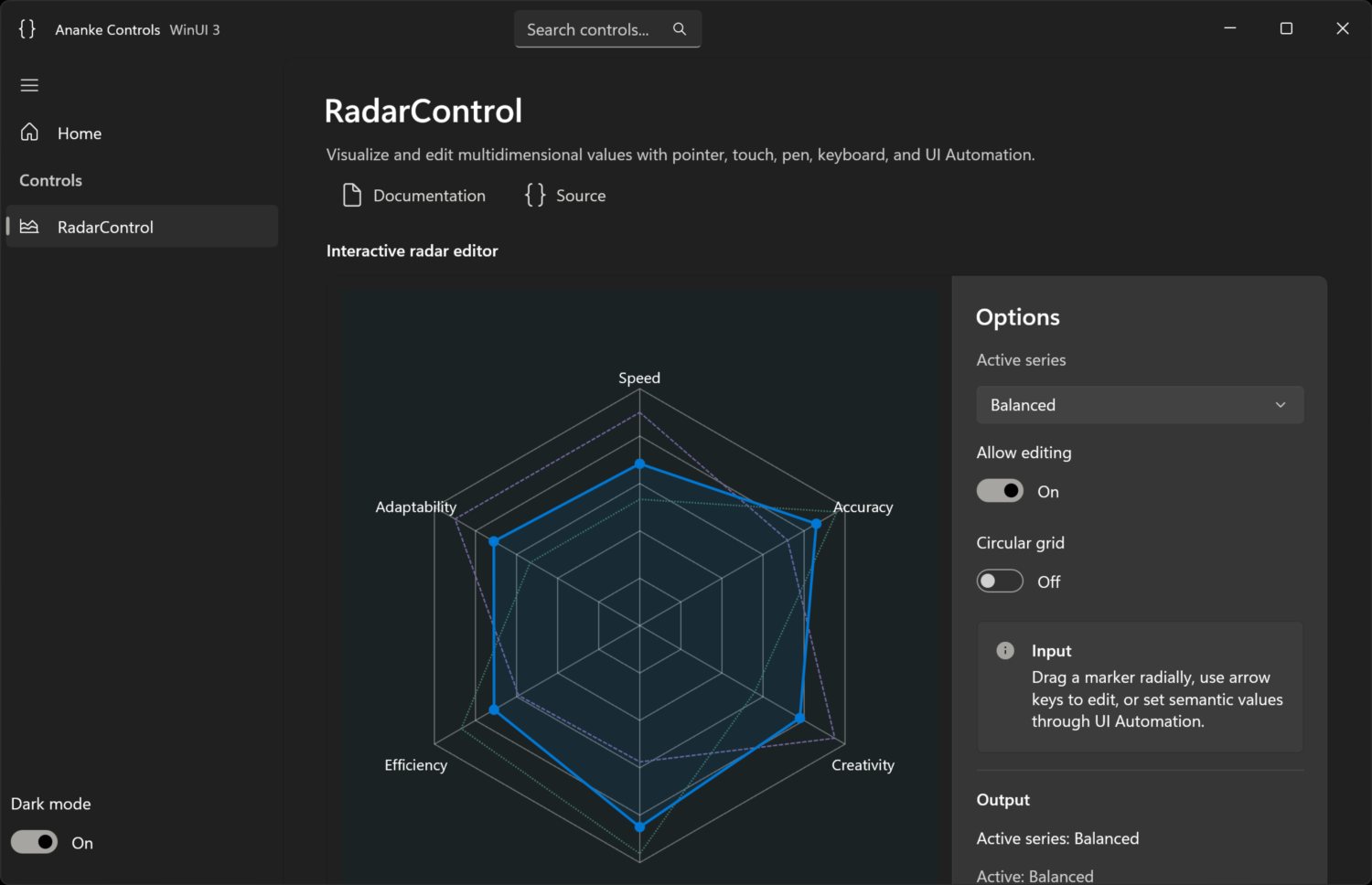
RadarControl is an accessible, animated radial vector editor:
- arbitrary linear ranges and three or more axes;
- multiple series with one active series;
- Win2D rendering through an internal renderer boundary;
- mouse, touch, pen, keyboard, and UI Automation editing;
- host-coercible whole-vector edit proposals;
- Fluent light/dark/high-contrast colors and non-color series cues;
- elapsed-time, retargetable animation with a paused-while-idle render loop.
Install
dotnet add package ArcadioG.Ananke
The package targets net10.0-windows10.0.19041.0 and carries transitive Windows App
SDK and Win2D dependencies. WinUI XBF/PRI assets are copied by the package's
buildTransitive target.
Use
<Window
    xmlns:ananke="using:Ananke.Controls">
  <ananke:RadarControl x:Name="Radar"
                       IsEditable="True"
                       IsSeriesActivationEnabled="True" />
</Window>
Radar.Axes.Add(new RadarAxis
{
    Key = "speed", Label = "Speed", Minimum = 0, Maximum = 100,
    SmallChange = 1, LargeChange = 10
});

var baseline = new RadarSeries { Key = "baseline", Name = "Baseline" };
baseline.Values.Add(new RadarValue("speed", 72));
// Add one value for every axis before the next dispatcher render pass.
Radar.Series.Add(baseline);
Radar.ActiveSeriesKey = baseline.Key;

Radar.EditUpdating += (_, e) =>
{
    // Host policy can coerce one value or the complete proposed vector.
    e.ProposedValues[e.AxisKey] = Math.Round(e.RawProposedValue);
};
The model uses axis identity rather than array position. Values must be finite and
complete; keys must be unique; every range must satisfy Minimum < Maximum.
Call Validate() to synchronously validate a complete model.
Keyboard and automation
| Input | Action |
|---|---|
| Left / Right | Previous / next axis |
| Up / Down, + / - | Small change |
| Page Up / Page Down | Large change |
| Home / End | Minimum / maximum |
| Ctrl+Page Up / Page Down | Previous / next series |
The UI Automation tree exposes radar → series → value nodes. Active editable values
implement RangeValue; series implement selection and invocation.
Build and gallery
Requires Visual Studio 2026 with Windows development tools and .NET SDK 10.0.400.
dotnet restore Ananke.slnx
dotnet build Ananke.slnx -c Release --no-restore
dotnet test tests\Ananke.Tests\Ananke.Tests.csproj -c Release --no-build
dotnet restore samples\Ananke.Gallery\Ananke.Gallery.csproj -r win-x64
dotnet publish samples\Ananke.Gallery\Ananke.Gallery.csproj -c Debug -r win-x64 --self-contained --no-restore
Launch:
samples\Ananke.Gallery\bin\Debug\net10.0-windows10.0.19041.0\win-x64\publish\Ananke.Gallery.exe
The gallery is unpackaged and self-contained for reliable local deployment.
Package and release
dotnet pack src\Ananke\Ananke.csproj -c Release -o artifacts\packages
Pushing a v* tag runs build, tests, package inspection, artifact upload, GitHub
Release creation, and NuGet trusted publishing via OIDC.
License
| Product | Versions Compatible and additional computed target framework versions. |
|---|---|
| .NET | net10.0-windows10.0.19041 is compatible. |
-
net10.0-windows10.0.19041
- Microsoft.Graphics.Win2D (>= 1.4.0)
- Microsoft.WindowsAppSDK (>= 1.8.260804001)
NuGet packages
This package is not used by any NuGet packages.
GitHub repositories
This package is not used by any popular GitHub repositories.