nuget-manager
0.1.2
See the version list below for details.
dotnet tool install --global nuget-manager --version 0.1.2
dotnet new tool-manifest
dotnet tool install --local nuget-manager --version 0.1.2
#tool dotnet:?package=nuget-manager&version=0.1.2
nuke :add-package nuget-manager --version 0.1.2
NuGet Package Manager







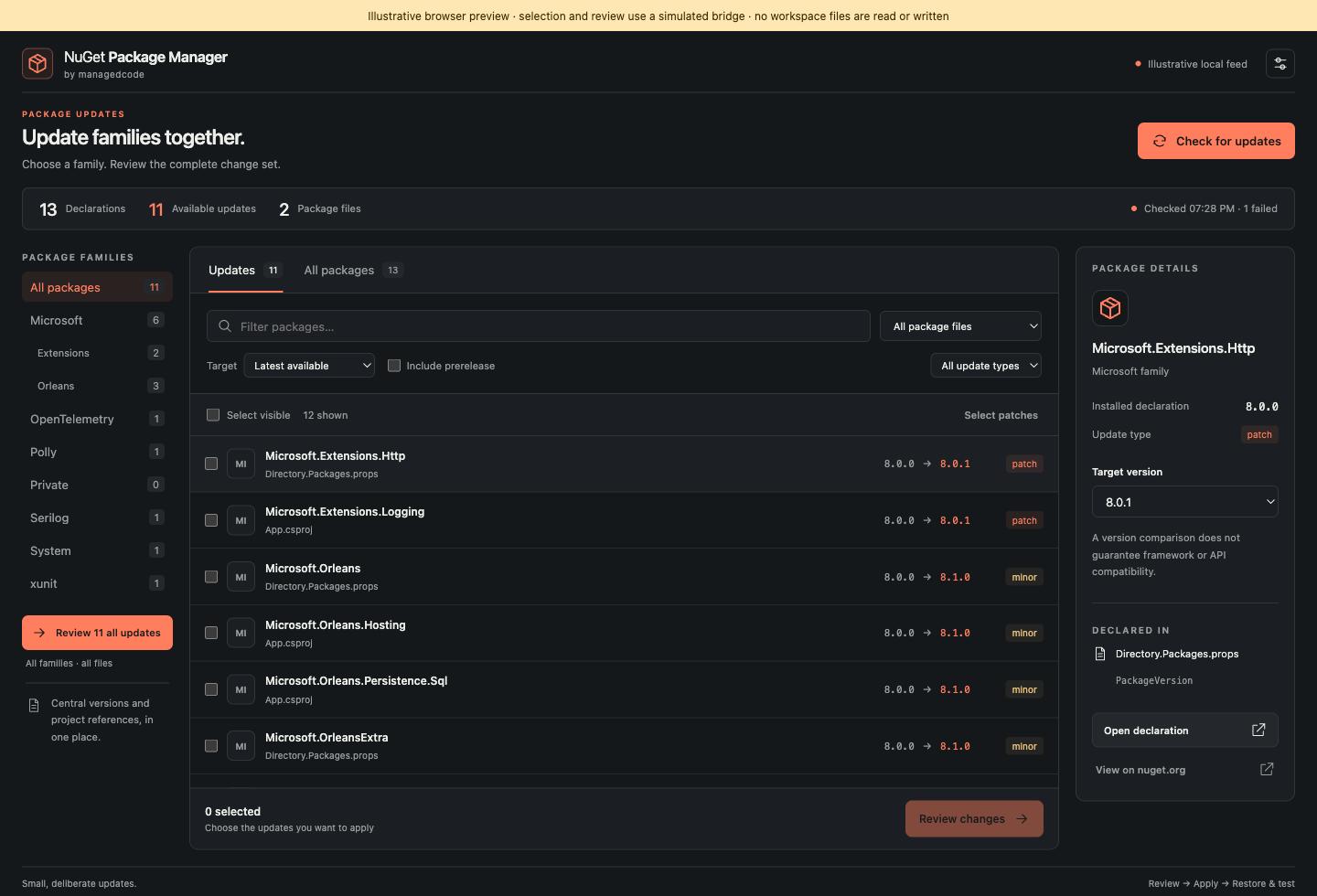
Review NuGet updates across a .NET workspace before changing declarations. Select a package family, inspect every proposed version, and review the complete change set before applying it. The same .NET 10 engine powers the VS Code workbench and the nuget-manager command-line tool. The interface uses Managed Code's neutral monochrome branding while following the active VS Code light, dark, or high-contrast theme.
VS Code
Click the NuGet Activity Bar icon to open the native Packages sidebar. NuGet: Open Package Workbench focuses that view and discovers declarations without opening an editor tab. For the wide, three-column workbench, run NuGet: Open Package Workbench in Editor (nugetPackageManager.openEditor). You can also open the sidebar from the context menu on a Directory.Packages.props, .csproj, .fsproj, or .vbproj file. The sidebar keeps family filters, package selection, and review/apply controls in reach at its compact width.
Both views use the same package state and review plan. Hiding or reopening one view preserves the active review; closing one view does not cancel work while the other remains open.
Families use the first package ID segment by default. You can select a narrower dotted prefix, such as Microsoft.Orleans; matching includes that exact ID and its dot-delimited descendants, not similarly named IDs such as Microsoft.OrleansExtra. Selected updates share one review with exact target versions and native VS Code diffs.
Choose the latest, minor, or patch policy. Stable releases are the default; prereleases are optional. Updates require a trusted workspace. The extension applies version text through VS Code documents, preserving surrounding formatting. Files that were clean are saved; files that already had unsaved edits remain unsaved. A changed document invalidates the full review before edits are applied. Changing a central version affects all projects that consume it.
The VS Code display name is NuGet Package Manager by ManagedCode and the extension ID is managedcode.managedcode-nuget-package-manager. Install a released .vsix from GitHub Releases using Extensions → … → Install from VSIX…. Release notes distinguish preview artifacts from verified public NuGet publication.
The extension supports VS Code 1.100 or later and requires the .NET 10 runtime to run its bundled engine. Install the runtime using Microsoft's .NET download instructions. No Node.js installation is needed to use the extension.
Command-line tool
The tool package and command are named nuget-manager. Install a public release with:
dotnet tool install --global nuget-manager
Review and update the entire Orleans family in one operation:
nuget-manager update --family Microsoft.Orleans
Use --family Microsoft for the full first-segment family. Add --dry-run to inspect proposed changes without writing files.
The CLI and extension share the same parsing, NuGet version, feed listing, family matching, and edit engine. The CLI reviews proposed file changes before writing; use its dry-run/JSON options for automation and its confirmation option only when you intend to apply the reviewed updates. See CLI usage for the agreed command syntax.
Supported scope and limits
- Central Package Management in
Directory.Packages.propsand literalPackageReferenceversions in.csproj,.fsproj, and.vbprojfiles. - First-segment package families and narrower dot-boundary prefixes, with bulk selection and review in both hosts.
- Listed versions discovered through configured NuGet V3 feeds. Stable versions are the default; prereleases can be included.
- Exact literal version edits with snapshot validation. Conditional declarations remain independently selectable.
Property expressions, ranges, wildcards, and other unsupported versions are visible for manual handling. The tool does not add or remove package references, resolve the .NET dependency graph, automatically restore projects, apply NuGet.config source mapping, or authenticate to private feeds. A failure from a configured source remains an error and cannot be represented as a complete successful check. Do not put credentials in source settings.
Development and project
The project follows the Managed Code Coding AI Framework (MCAF). See development setup, testing, and release operations. Public .NET skills are available in ManagedCode dotnet-skills. The extension and tool source are MIT licensed; imported MCAF skills carry CC BY 4.0 attribution in .codex/skills/MCAF-SOURCE.md.
| Product | Versions Compatible and additional computed target framework versions. |
|---|---|
| .NET | net10.0 is compatible. net10.0-android was computed. net10.0-browser was computed. net10.0-ios was computed. net10.0-maccatalyst was computed. net10.0-macos was computed. net10.0-tvos was computed. net10.0-windows was computed. |
This package has no dependencies.