nostify 4.1.0
dotnet add package nostify --version 4.1.0
NuGet\Install-Package nostify -Version 4.1.0
<PackageReference Include="nostify" Version="4.1.0" />
<PackageVersion Include="nostify" Version="4.1.0" />
<PackageReference Include="nostify" />
paket add nostify --version 4.1.0
#r "nuget: nostify, 4.1.0"
#:package nostify@4.1.0
#addin nuget:?package=nostify&version=4.1.0
#tool nuget:?package=nostify&version=4.1.0
nostify
Overview
nostify provides a framework for creating event driven microservices implementing the CQRS/ES pattern. It leverages Azure Functions for scalability and Cosmos DB for data storage, making it suitable for applications requiring high throughput and low latency. It also assumes some basic familiarity with domain driven design. For a practical demonstration, see the nostify-example repository which showcases microservices built with this framework.
Features
Microservice Architecture: Encapsulates domain logic within services, promoting modularity and scalability.
CQRS Implementation: Separates command and query responsibilities to optimize performance and maintainability.
Event Sourcing: Utilizes events to represent state changes, enabling traceability and auditability.
Azure Functions Integration: Scales automatically to handle varying loads, ensuring high availability.
Cosmos DB Storage: Provides a globally distributed, multi-model database for storing aggregates and projections.
Multi-tenant by default, ideal for SaaS applications
Table of Contents
- Overview
- Features
- Current Status
- 3.1 Updates
- 3.2 Coming Soon
- Getting Started
- Architecture
- Why????
- Concepts
- Setup
- Basic Tasks
- 9.1 Initializing Current State Container
- 9.2 Querying
- 9.3 Create New Aggregate
- 9.4 Update Aggregate
- 9.5 Delete Aggregate
- 9.6 Create New Projection Container
- 9.7 Create New Projection
- 9.8 Update Projection
- 9.9 Delete Projection
- 9.10 Event Handlers
- 9.11 Topics
- Advanced Features
- 10.1 Error Handling and Undeliverable Events
- 10.2 Bulk Operations and Performance
- 10.3 Advanced Querying and Cosmos Extensions
- 10.4 Testing Utilities
- 10.5 Projection Initialization and External Data
- 10.6 Rehydration and Point-in-Time Queries
- 10.7 Saga Pattern Implementation
- 10.8 Container Management
- 10.9 Sequential Number Generation
- 10.10 Validation System
- Performance Considerations
- 11.1 Bulk Operations
- 11.2 Query Optimization
- 11.3 Memory Management
- 11.4 Event Store Optimization
Current Status
Updates
- 4.1.0
- Upgraded to .NET 10: All projects and templates now target .NET 10 for improved performance and access to the latest framework features.
- Sequential Number Generation: New
Sequenceclass andGetNextSequenceValueAsync()method for generating sequential numbers within partitions. Ideal for invoice numbers, order numbers, or any business-friendly sequential identifiers. See Sequential Number Generation.- Atomic increment using Cosmos DB patch operations
- Partition-scoped sequences for multi-tenant isolation
- Automatic sequence creation with configurable starting values
- Conflict retry with exponential backoff (max 3 retries)
- Bulk Sequence Generation: New
GetNextSequenceValuesAsync()method for reserving multiple sequential values in a single atomic operation. Returns aSequenceRangestruct withStartValue,EndValue,Count,ToArray(), andToEnumerable()for efficient bulk create scenarios.
- ExternalDataEventFactory: New fluent builder pattern for gathering external data events during projection initialization. See Projection Initialization and External Data and Testing ExternalDataEventFactory.
WithSameServiceIdSelectors()- Add foreign key selectors for same-service event lookupsWithSameServiceListIdSelectors()- Add list-based foreign key selectors for one-to-many relationshipsWithSameServiceDependantIdSelectors()- Add dependent ID selectors that run after initial events are applied (for IDs populated by first-round events)WithSameServiceDependantListIdSelectors()- Add dependent list ID selectors for one-to-many relationships populated by eventsWithEventRequestor()/AddEventRequestors()- Add external HTTP service requestors for cross-service eventsWithDependantEventRequestor()/AddDependantEventRequestors()- Add dependent external HTTP service requestors that run after initial events populate the foreign key IDsGetEventsAsync()- Execute all configured requestors and combine results- Supports both single Guid and
List<Guid>foreign key patterns - Supports multi-level chaining: local events → external events → dependent external events
- IQueryExecutor Interface: New abstraction for mocking Cosmos DB LINQ queries in unit tests. See IQueryExecutor for Mocking Cosmos Queries.
IQueryExecutor- Interface definingReadAllAsync,FirstOrDefaultAsync, andFirstOrNewAsyncCosmosQueryExecutor- Production implementation using Cosmos SDK'sToFeedIteratorInMemoryQueryExecutor- Test implementation for in-memory query execution without Cosmos emulator- All
ExternalDataEvent.GetEventsAsyncmethods now accept optionalIQueryExecutorparameter ExternalDataEventFactoryconstructor accepts optionalIQueryExecutorfor testability
- Enhanced Testability: Query execution can now be fully mocked without requiring Cosmos DB emulator
- 4.0.2
- Safe Patch Fix: Fixed bug in
SafePatchItemAsyncthat allowed attempting to patch theidproperty, which Cosmos DB does not allow. The method now automatically removes any/idpatch operations before executing. See Safe Patch Operations. - Typo Fix: Fixed spelling error in
DefaultEventHandlers(doAppyly→doApply) - Error Propagation:
HandleAggregateEventnow properly re-throws exceptions after logging to undeliverable events, allowing proper error handling upstream. See Error Handling and Undeliverable Events.
- Safe Patch Fix: Fixed bug in
- 4.0.1
- Bug Fix: Fixed serialization settings issue in default bulk create command handler
- Template Fix: Fixed projection template bug (#119)
- 4.0.0
- Azure Event Hubs Support: Added
WithEventHubs()method to use during startup to enable using Azure Event Hubs as an alternative to Kafka for event messaging. See Topics for combining commands with eventTypeFilter. - Templates now have a flag
--eventhHubs trueor-eh trueand will set things up for you. Default or false means to use Kafka. - Added comprehensive tests for Event Hubs configuration and fluent API chaining
- Event Type Filtering: Added
eventTypeFilterparameter to all event handler methods for combining multiple commands into single topics. See Combining Commands with eventTypeFilter. - Enables topic consolidation to stay within Azure Event Hubs limits (10 Event Hubs per Basic/Standard tier)
- Supports single filter, multiple filters (list), or no filtering
- Applied to aggregate and projection event handlers, both single and bulk operations
- Default Command Handler: New static methods for common CRUD operations in Azure Functions. See Default Bulk Command Handlers.
HandlePost<T>()- Creates new aggregate roots with auto-generated GUIDsHandlePatch<T>()- Updates existing aggregate roots from request bodyHandleDelete<T>()- Deletes aggregate roots by ID (no request body required)HandleBulkCreate<T>()- Creates multiple aggregate roots from array of objectsHandleBulkUpdate<T>()- Updates multiple aggregate roots from array with id propertiesHandleBulkDelete<T>()- Deletes multiple aggregate roots from array of IDs or list of GUIDs- Simplifies Azure Function HTTP trigger implementations with consistent patterns
- Default Event Handlers: New static methods for handling events from Kafka/Event Hubs triggers. See Single Event Handlers and Default Bulk Event Handlers.
HandleAggregateEvent<T>()- Applies single event to aggregate current state with optional event type filtering and custom ID targetingHandleProjectionEvent<P>()- Applies single event to projection with external data initialization, optional event type filtering and custom ID targetingHandleMultiApplyEvent<P>()- Applies single event to multiple projection instances matching a filter expression in batchesHandleAggregateBulkCreateEvent<T>()- Bulk creation from Kafka trigger events with optional event type filteringHandleAggregateBulkUpdateEvent<T>()- Bulk updates using ApplyAndPersistAsync with optional event type filteringHandleAggregateBulkDeleteEvent<T>()- Bulk deletion from events with optional event type filteringHandleProjectionBulkCreateEvent<P>()- Bulk projection creation with optional event type filteringHandleProjectionBulkUpdateEvent<P>()- Bulk projection updates using ApplyAndPersistAsync with optional event type filteringHandleProjectionBulkDeleteEvent<P>()- Bulk projection deletion with optional event type filtering- All handlers support 3 overloads: no filter, single event type filter, or list of event type filters
- Single event handlers support
idToApplyToPropertyNameparameter for cross-aggregate event effects - Paged Query Extensions: New
PagedQueryAsync()extension methods for Cosmos DB containers with server-side filtering, sorting, and pagination. See Paged Queries with Filtering and Sorting. - Supports tenant-based filtering with
ITenantFilterableinterface - Custom partition key filtering for flexible query scenarios
- Returns
IPagedResult<T>with items and total count for UI pagination - Built-in SQL injection prevention for filter and sort columns
- Filtered Query Extensions: New
FilteredQuery()extension methods for creating partition-scoped LINQ queries on Cosmos DB containers. See Filtered Queries for Partition-Scoped LINQ. - Overloads for Guid tenant IDs, string partition keys, and PartitionKey objects
- Optional filter expressions for client-side filtering within partitions
- Simplifies common query patterns with automatic partition key configuration
- ** Fixes null handling issue in 3.9.0 in default serialization settings **
- Azure Event Hubs Support: Added
- 3.9.0 - Has a issue with default serialization null handling, do not use
- Custom Cosmos Serializer: Added
NewtonsoftJsonCosmosSerializerclass that uses Newtonsoft.Json instead of System.Text.Json for Cosmos DB serialization/deserialization since System.Text.Json is a dumpster fire - Interface Converters: Built-in converters for
IEvent→Event,ISaga→Saga, andISagaStep→SagaStepinterfaces - Improved Serialization: Better handling of polymorphic types and interfaces in Cosmos DB operations
- Event Interface Usage: Converted codebase to use
IEventinterface instead of concreteEventclass for better testability and abstraction
- Custom Cosmos Serializer: Added
- 3.8.2
- Patch: Updated templates and documentation to reference nostify 3.8.2
- Tests: Added comprehensive unit tests for TransformForeignIdSelectors helper (ensures correct behavior for list selectors, nulls, duplicates, and mapping edge cases)
- 3.8.1
- Bug Fix: Fixed issue with null values in PropertyCheck when projectionIdPropertyValue is null
- Template Updates: All template project files updated to reference nostify 3.8.1
- 3.8.0
- Enhanced UpdateProperties using PropertyCheck class: Added new
UpdateProperties<T>(Guid eventAggregateRootId, object payload, List<PropertyCheck> propertyCheckValues)overload for conditional property mapping based on ID matching, used inApplywhen a projection has multiple references to external aggregates of the same type. - PropertyCheck Testing: Added 14+ test scenarios including shared ID handling, edge cases, and complex multi-property updates
- Template Updates: All template project files updated to reference nostify 3.8.0
- Enhanced UpdateProperties using PropertyCheck class: Added new
Coming Soon
- Better support for non-command events
- Enhanced saga orchestration patterns
- Additional query optimization features
Getting Started
To run locally you will need to install some dependencies:
Azurite:
npm install -g azuriteAzurite VS Code Extension: https://marketplace.visualstudio.com/items?itemName=Azurite.azurite
Docker Desktop: https://www.docker.com/products/docker-desktop/
Confluent CLI: https://docs.confluent.io/confluent-cli/current/install.html
- To run:
confluent local kafka start - To add topic:
confluent local kafka topic create <Topic Name>
- To run:
Cosmos Emulator: https://learn.microsoft.com/en-us/azure/cosmos-db/how-to-develop-emulator?tabs=windows%2Ccsharp&pivots=api-nosql
To install nostify and templates:
dotnet new install nostify
To spin up a nostify project:
dotnet new nostify -ag <Your_Aggregate_Name> -p <Port Number To Run on Locally>

dotnet restore
This will install the templates, create the default project based off your Aggregate, and install all the necessary libraries.
Architecture
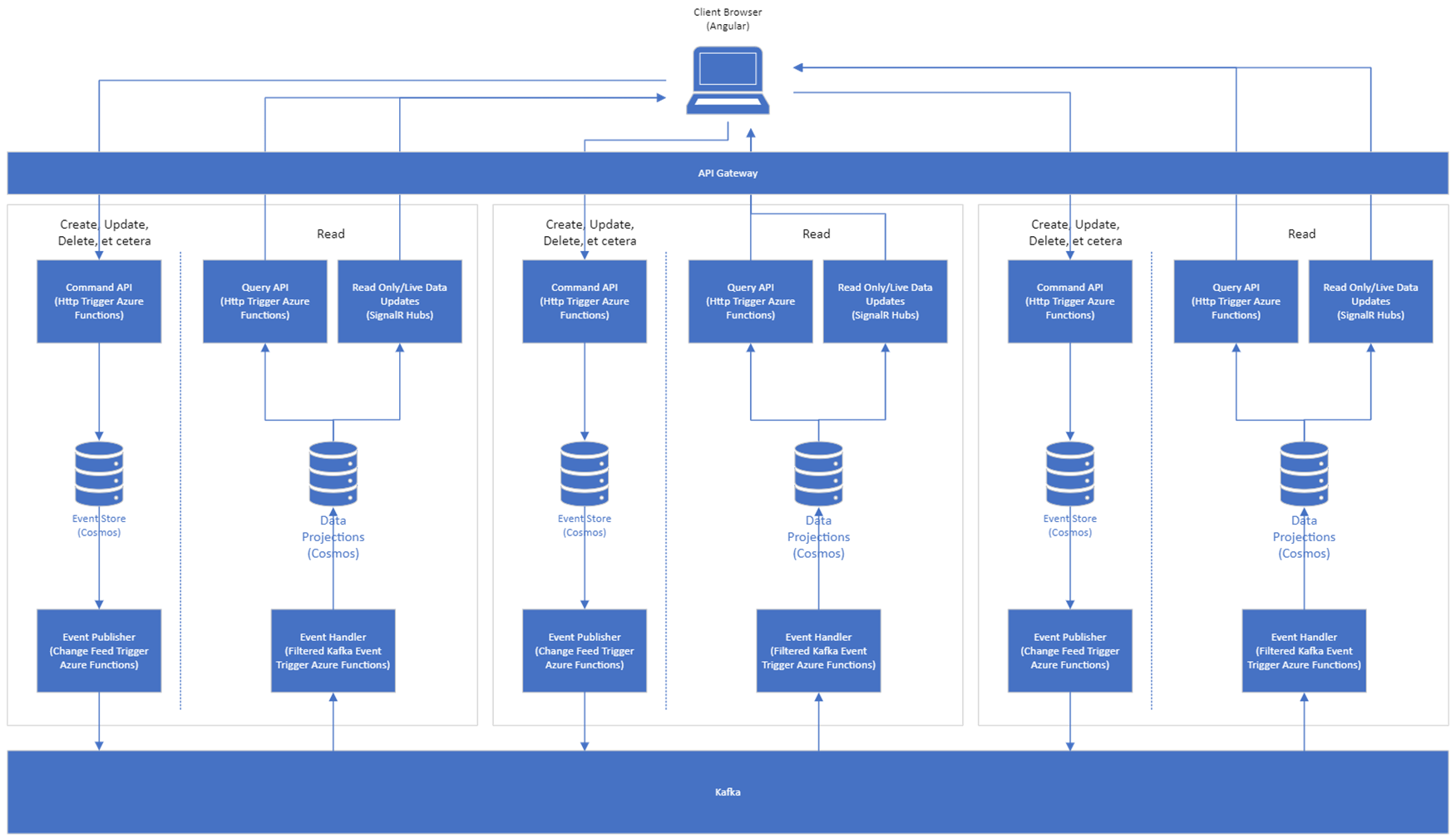
The library is designed to be used in a microservice pattern (although not necessarily required) using an Azure Function App api and Cosmos as the event store. Kafka serves as the messaging backpane, and projections can be stored in Cosmos or Redis depending on query needs.
You should set up a Function App and Cosmos DB per Aggregate Microservice.
Projections that contain data from multiple Aggregates can be updated by Event Handlers from other microservices. Why would this happen? Well say you have a Bank Account record. If we were using a relational database for a data store we'd have to either run two queries or do a join to get the Bank Account and the name of the Account Manager. Using the CQRS model, we can "pre-render" a projection that contains both the account info and the account manager info without having to join tables together. This example is obviously very simple, but in a complex environment where you're joining together dozens of tables to create a DTO to send to the user interface and returning 100's of thousands or millions of records, this type of architecture can dramatically improve BOTH system performance and throughput. Reference architecture diagram:
Why????
When is comes to scaling there are two things to consider: speed and throughput. "Speed" meaning the quickness of the individual action, and "throughput" meaning the number of concurrent actions that can be performed at the same time. Using nostify addresses both of those concerns.
Speed really comes into play only on the query side for most applications. Thats a large part of the concept behind the CQRS pattern. By seperating the command side from the query side you essentially deconstruct the datastore that would traditionally be utilizing a RDBMS in order to create materialized views of various projections of the aggregate. Think of these views as "pre-rendered" views in a traditional relational database. In a traditional database a view simplifies queries but still runs the joins in real time when data is requested. By materializing the view, we denormalize the data and accept the increased complexity associated with keeping the data accurate in order to massively decrease the performance cost of querying that data. In addition, we gain flexibility by being able to appropriately resource each container to give containers being queried the hardest more resources.
Throughput is the other half of the equation. If you were using physical architecture, you'd have an app server talking to a separate database server serving up your application. The app server say has 4 processors with 8 cores each, so there is a limitation on the number of concurrent tasks that can be performed. We can enhance throughput through proper coding, using parallel processing, and non-blocking code, but there is at a certain point a physical limit to the number of things that can be happening at once. With nostify and the use of Azure Functions, this limitation is removed other than by cost. If 1000 queries hit at the same moment in time, 1000 instances of an Azure Function spin up to handle it. You're limited more by cost than physical hardware.
Concepts
Service
A service in nostify is a stand alone mini-application that encapsulates a group of aggregates and projections and the logic for handling state changes to them. Generally speaking, a single service should encapsulate the logic for a single domain context if you're embracing the microservices pattern.
A service template will contain the directory structure, class files, and code to handle basic Create, Update, and Delete commands as well as some basic queries out of the box.
Create
dotnet new nostify -ag <Your_Aggregate_Name> -p <Port Number To Run on Locally>
Aggregate
An aggregate encapsulates the logic around the "C" or Command part of the CQRS pattern.
An Aggregate is a cluster of associated objects that we treat as a unit for the purpose of data changes. -Eric Evans
For example a Purchase Requisition might have a id, pr_number, and lineItems properties where lineItems is a List<LineItem> type. The aggregate would be composed of multiple types of objects as well as simple types in this case, and the line items of the requisition would never be edited outside the context of their containing req.
In nostify all state changes coming from the UI are called a NostifyCommand and must be performed against an aggregate. This is done by composing an Event, which is written to the event store. This triggers the event getting pushed to the messaging system (Kafka) which the event handler subscribes to. Once triggered the event handler updates the current state container of the aggregate.
Rules
- All state changes must be applied to an aggregate, and not directly to a projection or to an entity within an aggregate.
- Aggregates may only refer to other aggregates by id value.
- An aggregate must implement the
NostifyObjectabstract class and theIAggregateinterface. - All state changes must be applied using the
Apply()method, either directly or by using theApplyAndPersistAsync<T>()method. The current state projection of an aggregate is simply the sum of all the events in the event store applied to a new instance of that aggregate object. - In
nostifyonly the changed properties should be included when creating anEvent, best practice is to not send the entire aggregate. - A service generally contains one or more aggregates. A read-only service, such as for BI purposes might not. Domain boundaries should be respected when grouping aggregates together in a service. IE - grouping a
WorkOrderaggregate in the same service as aWorkOrderStatusaggregate (which might be an aggregate if your application allows users to add and update them) might make sense, where as putting aPurchaseRequestand aWorkOrderin the same service might not. This is an art not a science so do what makes sense to your application. It is theoretically possible to completely abandon the microservice concept and group an entire application into a single service, but probably not a good idea for scalability and maintainability.
Create
A "base" aggregate is created when you use the dotnet cli to create a new nostify service
dotnet new nostify -ag <Your_Aggregate_Name> -p <Port Number To Run on Locally>
If you are adding a new aggregate to an existing service, run the below cli command from the Aggregates directory.
dotnet new nostifyAggregate -ag <Your_Aggregate_Name> -s <Name_Of_Service>
Projection
A projection encapsulates the logic surrounding the "Q" or Query part of the CQRS pattern.
The current state of an aggregate is the sum of all the events for that aggregate in the event store. However, querying the entire stream of events and applying them every time you want to send the current state of an aggregate to the user interface can be inefficient, even more so if you are trying to compose a DTO with properties from multiple aggregates across services.
The solution to this in nostify is the projection pattern. A projection defines a set of properties from one or more aggregates and then stores the current state of those properties as updated by the event stream. Every projection will have a "base" aggregate that will be the trigger to create a new persisted instance of the projection, and will define any necessary queries for getting data from external aggregates.
Rules
- No command is ever performed on a projection, they are updated by subscribing to and handling events on their component aggregates.
- A projection will have a "base" aggregate and the
idproperty of the projection will match theidproperty of the base aggregate. The base aggregate will be the aggregate that the create event is handled, creating a new instance of the projection in the container. - A projection must implement
IProjectionand theNostifyObjectclass, usually by inheirting the base class of the root Aggregate. Most will also need to implementIHasExternalData<P>. - For projections with data coming from aggregates external to the "base" aggregate,
IHasExternalData.GetExternalDataEvents()method must be implemented to handle getting events from external sources to apply to the projection. The results of this method are used by the projection initialization process to update either the external data of a new single projection instance, or many projections when the container is initialized or data is imported.
Create
A projection must be added to an existing service. Base aggregate must already exist. From the Projections directory:
dotnet new nostifyProjection -ag <Base_Aggregate_Name> --projectionName <Projection_Name>
Event
An Event captures a state change to the application. Generally, this is caused by the user issuing a command such as "save". When a command comes in from the front end to the endpoint, the http triggers a command handler function which validates the command, composes an Event and persists it to the event store. Note that while a Command is always an Event, an Event is not necessarily always a Command. It is possible for an Event to originate elsewhere, say from an IoT device for example.
Events implement the IEvent interface, which provides better abstraction and testability. The EventFactory returns IEvent instances for consistent usage throughout the framework.
In a typical scenario, the Event is created in the command handler using the EventFactory factory class, the payload is validated, and then saved to the event store:
// Default behavior - validation enabled
IEvent pe = new EventFactory().Create<TestAggregate>(TestCommand.Create, newId, newTest);

// Or disable validation using method chaining
IEvent pe = new EventFactory().NoValidate().Create<TestAggregate>(TestCommand.Create, newId, newTest);
await _nostify.PersistEventAsync(pe);
When a command becomes an Event the text name of the command becomes the topic name published to Kafka, so for this example the event handler, OnTestCreated would subscribe to the Create_Test topic.
NostifyKafkaTriggerEvent
The NostifyKafkaTriggerEvent class is used to deserialize Kafka trigger inputs in Azure Functions event handlers:
public class NostifyKafkaTriggerEvent
{
    public int Offset { get; set; }
    public int Partition { get; set; }
    public string Topic { get; set; }
    public string Value { get; set; }  // JSON-serialized Event
    public string Key { get; set; }
    public string[] Headers { get; set; }

    // Convert to Event with optional filtering
    public Event? GetEvent(string? eventTypeFilter = null);
    public Event? GetEvent(IEnumerable<string> eventTypeFilters);

    // Convert to IEvent interface
    public IEvent? GetIEvent(string? eventTypeFilter = null);
    public IEvent? GetIEvent(IEnumerable<string> eventTypeFilters);
}
Example usage in an event handler:
[Function(nameof(OnTestCreated))]
public async Task OnTestCreated(
    [KafkaTrigger("%BrokerList%", "Create_Test", ConsumerGroup = "$Default")] string[] events)
{
    foreach (string evt in events)
    {
        NostifyKafkaTriggerEvent kafkaEvent = JsonConvert.DeserializeObject<NostifyKafkaTriggerEvent>(evt);
        Event? newEvent = kafkaEvent?.GetEvent();
        if (newEvent != null)
        {
            // Process the event
        }
    }
}
Payload Validation
Event payloads are validated by default when using EventFactory. This is done by placing ValidationAttribute attributes on the properties of the Aggregate the Command is being performed on. This ensures that required properties are present and valid according to the specified command. Only properties present on the current payload will be validated, except for [Required] and [RequiredFor()].
// EventFactory validates by default - no need for manual validation
IEvent pe = new EventFactory().Create<TestAggregate>(TestCommand.Create, newId, newTest);
await _nostify.PersistEventAsync(pe);

// Or skip validation if needed
IEvent pe = new EventFactory().NoValidate().Create<TestAggregate>(TestCommand.Create, newId, newTest);
await _nostify.PersistEventAsync(pe);

// For events with no payload data (like delete operations)
IEvent pe = new EventFactory().CreateNullPayloadEvent(TestCommand.Delete, aggregateId);
await _nostify.PersistEventAsync(pe);
Most of the time, you will want to use RequiredFor instead of Required to mark a property as required for that specific command or list of commands. Required is still a valid validation attribute, but it will require that property to be present and not null for EVERY command:
public class TestAggregate : NostifyObject, IAggregate
{
    [RequiredFor("Create_Test")]
    public string Name { get; set; }

    [RequiredFor(["Update_Test", "Create_Test"])]
    public int Value { get; set; }
}
CreateNullPayloadEvent Method
The CreateNullPayloadEvent method is specifically designed for operations that don't require payload data, such as delete operations or events that only need to record that an action occurred. This method:
- Automatically disables validation (since there's no meaningful payload to validate)
- Creates an event with an empty object as payload
- Is ideal for delete operations, status changes, or audit trail events
// Typical delete operation - no payload data needed
IEvent deleteEvent = new EventFactory().CreateNullPayloadEvent(TestCommand.Delete, aggregateId);
await _nostify.PersistEventAsync(deleteEvent);

// With user and partition information
IEvent deleteEvent = new EventFactory().CreateNullPayloadEvent(TestCommand.Delete, aggregateId, userId, partitionKey);
await _nostify.PersistEventAsync(deleteEvent);
Command
A Command is an Event that comes from the user interface. All Aggregate classes should have a matching Command class where you must register all commands that the user may issue. This class must extend the NostifyCommand class.
NostifyCommand Constructor
public NostifyCommand(string name, bool isNew = false, bool allowNullPayload = false)
- name: Human-readable command name (MUST BE UNIQUE). Convention:
{Action}_{EntityName}(e.g.,Create_User). This becomes the Kafka topic name. - isNew: Set to
trueif this command creates a new aggregate instance. - allowNullPayload: Set to
truefor commands that don't require payload data (e.g., delete commands).
It will look like this by default:
public class TestCommand : NostifyCommand
{
  ///<summary>
  ///Base Create Command
  ///</summary>
  public static readonly TestCommand Create = new TestCommand("Create_Test", true);
  ///<summary>
  ///Base Update Command
  ///</summary>
  public static readonly TestCommand Update = new TestCommand("Update_Test");
  ///<summary>
  ///Base Delete Command
  ///</summary>
  public static readonly TestCommand Delete = new TestCommand("Delete_Test", false, true);
  ///<summary>
  ///Bulk Create Command
  ///</summary>
  public static readonly TestCommand BulkCreate = new TestCommand("BulkCreate_Test", true);
  ///<summary>
  ///Bulk Update Command
  ///</summary>
  public static readonly TestCommand BulkUpdate = new TestCommand("BulkUpdate_Test");
  ///<summary>
  ///Bulk Delete Command
  ///</summary>
  public static readonly TestCommand BulkDelete = new TestCommand("BulkDelete_Test", false, true);


  // Constructor signature: NostifyCommand(string name, bool isNew = false, bool allowNullPayload = false)
  public TestCommand(string name, bool isNew = false, bool allowNullPayload = false)
  : base(name, isNew, allowNullPayload)
  {

  }
}
The commands may then be handled in the Apply() method:
public override void Apply(IEvent eventToApply)
{
    if (eventToApply.command == TestCommand.Create || eventToApply.command == TestCommand.Update)
    {
        this.UpdateProperties<Test>(eventToApply.payload);
    }
    else if (eventToApply.command == TestCommand.Delete)
    {
        this.isDeleted = true;
    }
}
Saga
The Saga pattern allows you to create multi-step, long lived transactions across multiple services and define rollback actions in case of failure to maintain data consistency. nostify does not require a particular method of implementation but provides a class structure and some basic functions to support implementing Saga orchestration.
Core Interfaces
The following interfaces define the core contracts for nostify objects:
IAggregate
public interface IAggregate : IUniquelyIdentifiable
{
    public bool isDeleted { get; set; }
    public static abstract string aggregateType { get; }
    public static abstract string currentStateContainerName { get; }
}
IProjection
public interface IProjection
{
    public bool initialized { get; set; }
    public static abstract string containerName { get; }
}
IApplyable
public interface IApplyable
{
    public abstract void Apply(IEvent eventToApply);
}
ITenantFilterable
public interface ITenantFilterable
{
    public Guid tenantId { get; set; }
}
IUniquelyIdentifiable
public interface IUniquelyIdentifiable
{
    public Guid id { get; set; }
}
NostifyObject (Base Class)
public abstract class NostifyObject : ITenantFilterable, IUniquelyIdentifiable, IApplyable
{
    public int ttl { get; set; }      // Time to live, -1 = never expire
    public Guid tenantId { get; set; }
    public Guid id { get; set; }

    public abstract void Apply(IEvent eventToApply);

    // Update properties from event payload (automatic property matching)
    public void UpdateProperties<T>(object payload) where T : NostifyObject;

    // Update properties with explicit mapping dictionary
    public void UpdateProperties<T>(object payload, Dictionary<string, string> propertyPairs, bool strict = false)
        where T : NostifyObject;

    // Update properties with conditional ID matching (see PropertyCheck section)
    public void UpdateProperties<T>(Guid eventAggregateRootId, object payload, List<PropertyCheck> propertyCheckValues)
        where T : NostifyObject;

    // Update single property
    public void UpdateProperty<T>(string propertyToSet, string propertyToGetValueFrom, object payload,
        List<PropertyInfo> thisNostifyObjectProps = null) where T : NostifyObject;
}
Setup
The template will use dependency injection to add a singleton instance of the Nostify class and adds HttpClient by default. You may need to edit these to match your configuration:
public  class  Program
{

  private  static  void  Main(string[] args)
  {
    var host = new  HostBuilder()
    .ConfigureFunctionsWorkerDefaults()
    .ConfigureServices((context, services) =>
    {
      services.AddHttpClient();

      var config = context.Configuration;

      //Note: This is the api key for the cosmos emulator by default
      string? apiKey = config.GetValue<string>("cosmosApiKey");
      string? dbName = config.GetValue<string>("cosmosDbName");
      string? endPoint = config.GetValue<string>("cosmosEndPoint");
      string? kafka = config.GetValue<string>("BrokerList");
      bool autoCreateContainers = config.GetValue<bool>("AutoCreateContainers");
      int defaultThroughput = config.GetValue<int>("DefaultContainerThroughput");
      bool verboseNostifyBuild = config.GetValue<bool>("VerboseNostifyBuild");
      bool useGatewayConnection = config.GetValue<bool>("UseGatewayConnection");
      var httpClientFactory = services.BuildServiceProvider().GetRequiredService<IHttpClientFactory>();

      var nostify = NostifyFactory.WithCosmos(
                                cosmosApiKey: apiKey,
                                cosmosDbName: dbName,
                                cosmosEndpointUri: endPoint,
                                createContainers: autoCreateContainers,
                                containerThroughput: defaultThroughput,
                                useGatewayConnection: useGatewayConnection)
                            .WithKafka(kafka)
                            .WithHttp(httpClientFactory)
                            .Build<InventoryItem>(verboseNostifyBuild); //Where T is the base aggregate of the service

      services.AddSingleton<INostify>(nostify);

      services.AddLogging();
    })
    .Build();

    host.Run();
  }
}
Using Azure Event Hubs
Azure Event Hubs can be used instead of Kafka for event messaging. Simply use WithEventHubs() instead of WithKafka() and provide an Event Hubs connection string:
var eventHubsConnectionString = config.GetValue<string>("EventHubsConnectionString");

var nostify = NostifyFactory.WithCosmos(
                            cosmosApiKey: apiKey,
                            cosmosDbName: dbName,
                            cosmosEndpointUri: endPoint,
                            createContainers: autoCreateContainers,
                            containerThroughput: defaultThroughput,
                            useGatewayConnection: useGatewayConnection)
                        .WithEventHubs(eventHubsConnectionString)
                        .WithHttp(httpClientFactory)
                        .Build<InventoryItem>(verboseNostifyBuild);
The Event Hubs connection string should be in the format:
Endpoint=sb://<namespace>.servicebus.windows.net/;SharedAccessKeyName=<keyname>;SharedAccessKey=<key>
Event Hubs uses the Kafka protocol internally, so the same Event handlers and publishing mechanisms work seamlessly.
Auto-Creating Event Hubs (Topics)
When using Build<T>(), the framework can automatically create Event Hubs (topics) for all your commands. For Event Hubs, you need to provide Azure credentials:
var nostify = NostifyFactory
    .WithCosmos(apiKey, dbName, endPoint, autoCreateContainers, defaultThroughput)
    .WithEventHubs(eventHubsConnectionString)
    .WithEventHubsManagement(
        subscriptionId: azureSubscriptionId,
        resourceGroup: azureResourceGroup,
        tenantId: azureTenantId,
        clientId: azureClientId,
        clientSecret: azureClientSecret)
    .WithHttp(httpClientFactory)
    .Build<InventoryItem>(verbose: true);
The Azure credentials (Service Principal) require the following permissions:
- Azure Event Hubs Data Owner role on the Event Hubs namespace
If you don't provide Azure credentials with WithEventHubsManagement(), the Build<T>() method will skip auto-creation and you'll need to create Event Hubs manually via:
- Azure Portal
- Azure CLI
- ARM templates
- Terraform or other IaC tools
For Kafka, topic auto-creation works without additional configuration as it uses the Kafka AdminClient.
By default, the template will contain the single Aggregate specified. In the Aggregates folder you will find Aggregate and AggregateCommand class files already stubbed out. The AggregateCommand base class contains default implementations for Create, Update, and Delete. The UpdateProperties<T>() method will update any properties of the Aggregate with the value of the Event payload with the same property name. Note that UpdateProperties<T>() uses reflection, so extremely high performance may require writing code to directly handle the updates for your Aggregate's specific properties.
public  class  Test : NostifyObject, IAggregate
{

  public  Test()
  {
  }

  public  bool  isDeleted { get; set; } = false;

  public  static  string  aggregateType => "Test";

  public  static  string  currentStateContainerName => "Test";


  public  override  void  Apply(IEvent  eventToApply)
  {
    if (eventToApply.command == TestCommand.Create || eventToApply.command == TestCommand.Update)
    {
      this.UpdateProperties<Test>(eventToApply.payload);
    }
    else  if (eventToApply.command == TestCommand.Delete)
    {
      this.isDeleted = true;
    }
  }
}
Basic Tasks
Initializing Current State Container
The template will include a basic method to create, or recreate the current state container. It might become necesseary to recreate a container if a bug was introduced that corrupted the data, for instance. For the current state of an Aggreate, it is simple to recreate the container from the event stream. You will find the function to do so under Admin.
Querying
There is a Queries folder to contain the queries for the Aggregate. Three basic queries are created when you spin up the template: Get Single GET <AggreateType>/{aggregateId}, Get All GET <AggregateType> (note: if this will return large amounts of data you may want to refactor the default query), and Rehydrate GET Rehydrate<AggregateType>/{aggregateId}/{datetime?} which returns the current state of the Aggregate directly from the event stream to the specified datetime.
To do your own query, simply add a new Azure Function per query, inject HttpClient and INostify, grab the container you want to query, and run a query with GetItemLinqQueryable<T>() using Linq syntax. Below is an example of the basic get single instance query included in the template generation.
public  class  GetTest
{
  private  readonly  HttpClient  _client;
  private  readonly  INostify  _nostify;

  public  GetTest(HttpClient  httpClient, INostify  nostify)
  {
    this._client = httpClient;
    this._nostify = nostify;
  }

  [Function(nameof(GetTest))]
  public  async  Task<IActionResult> Run(
  [HttpTrigger("get", Route = "Test/{aggregateId:guid}")] HttpRequestData  req,
  Guid  aggregateId,
  ILogger  log)
  {
    Container  currentStateContainer = await  _nostify.GetCurrentStateContainerAsync<Test>();

    Test  retObj = await  currentStateContainer
                          .GetItemLinqQueryable<Test>()
                          .Where(x => x.id == aggregateId)
                          .FirstOrDefaultAsync();

    return  new  OkObjectResult(retObj);
  }
}
Create New Aggregate
One of the "out of the box" commands handled by nostify is the Create_Aggregate command. The template logic flow is:
- Create command is inbound via http post from user interface. Typically this would indicate the user saved a new record.
- Body of post must contain JSON with all the properties to set on create. The
Apply()method in the aggregate will callUpdateProperties<T>()which will match any properties in the JSON to the aggregate and set them automatically. Any properties not in the JSON or properties in the JSON that do not match the aggregate will be ignored. As such it is only necessary to send the properties that you want to set over the wire. - In a typical application there would be validation of the command occuring, validating say that all required properties are set.
nostifydoes not dictate a validation pattern, use the one that makes the most sense for your application. There would probably be some kind of auth here as well for most apps. - The command handler creates an
Eventand persists it to the event store. Note that the command registered must indicate a new record is being created by setting theisNewparameter to true:public static readonly TestCommand Create = new TestCommand("Create_Test", true); - The event publisher function is triggered by an event being written to the event store and publishes the event to Kafka.
- The create handler that is subscribed to the event will be triggered and update the projection containing the current state for the aggregate.
Other projections added will need to contain their own logic for handling the create event. The event handler for update naming convention is: On<AggregateName>Created. For example: "OnTestCreated".
Update Aggregate
Updating the aggregate and its base current state projection is also handled by the templates. The template logic flow is:
- Update command comes in via http patch from user interface. Typically this would indicate a user saved an existing record.
- Body of the request must contain a JSON object with a property
idin the default template. - The default event handler for the current state container will query the container for the aggregate id, get the current state, apply the update, then save the update to the container. This is contained in the
ApplyAndPersistAsync<T>()method. - Body of patch must contain JSON with all the properties to update. The
Apply()method in the aggregate will callUpdateProperties<T>()which will match any properties in the JSON to the aggregate and set them automatically. Any properties not in the JSON or properties in the JSON that do not match the aggregate will be ignored. As such it is only necessary to send the properties that you want to set over the wire. - There may be more than one event to subscribe to to update an aggregate if you implement a more complex object. For instance, if you have a property of
List<T>you may have another command that is issued from the UI that does an http PUT to replace objects in the list.
The function handling the update event naming convention is: On<AggregateName>Updated, for example: "OnTestUpdated".
Delete Aggregate
Deleting an aggregate by default does not actually remove it from the current state container, it simple sets the isDeleted property to true. Template logic flow is:
- Delete command comes in via http delete from user interface. This indicates the user chose to delete an existing record.
- Url must contain a guid that matches the
idproperty of the aggregate instance to mark as deleted. - The command handler creates an
Eventand persists it to the event store. - The
Eventis published to Kafka and then the event handler function applies theEventto the current state, which sets theisDeletedproperty to true. - Queries to the current state container should take into account that it may contain deleted aggregates.
Create New Projection Container
Note: for the following Projection examples we will be using the following projection TestWithStatus as an example:
public class TestWithStatus : NostifyObject, IProjection, IHasExternalData<TestWithStatus>
{
  public TestWithStatus()
  {

  }

  public static string containerName => "TestWithStatus";

  //Test properites
  public string testName { get; set; }
  public Guid? statusId { get; set; }
  public Guid? testTypeId { get; set; }

  //Status properties
  public string? statusName { get; set; }
  public string? statusCategory { get; set; }

  //Test Type properties
  public string? testType { get; set; }


  public override void Apply(IEvent eventToApply)
  {
      //Should update the command tree below to not use string matching
      if (eventToApply.command.name.Equals("Create_Test") || eventToApply.command.name.Equals("Update_Test"))
      {
          this.UpdateProperties<TestWithStatus>(eventToApply.payload);
      }
      else if (eventToApply.command.name.Equals("Update_Status")
        || eventToApply.command.name.Equals("Create_Status"))
      {
        //If property names don't match up or there are duplicates, you can map them using a simple Dictionary
        var propMap = new Dictionary<string, string> {
          {"name","statusName"},
          {"category","statusCategory"}
        };
        //The method signature is a little different in this case
        this.UpdateProperties<TestWithStatus>(eventToApply.payload, propMap, true);
      }
      else if (eventToApply.command.name.Equals("Delete_Test"))
      {
          this.isDeleted = true;
      }
  }

  public class StatusName
  {
      public Guid id { get; set; }
      public string statusName { get; set; }
  }

  public async static Task<List<ExternalDataEvent>> GetExternalDataEventsAsync(List<TestWithStatus> projectionsToInit, INostify nostify, HttpClient httpClient = null, DateTime? pointInTime = null)
  {
    // RECOMMENDED: Use ExternalDataEventFactory for cleaner, more maintainable code
    var factory = new ExternalDataEventFactory<TestWithStatus>(
        nostify,
        projectionsToInit,
        httpClient,
        pointInTime);

    // Get events from same service for related aggregates
    factory.WithSameServiceIdSelectors(p => p.testStatusId);

    // Get events from external services (if httpClient provided)
    if (httpClient != null)
    {
      factory.WithEventRequestor(
          $"{Environment.GetEnvironmentVariable("LocationServiceUrl")}/api/EventRequest",
          p => p.locationId);
      factory.WithEventRequestor(
          $"{Environment.GetEnvironmentVariable("StatusServiceUrl")}/api/EventRequest",
          p => p.statusId);
    }

    return await factory.GetEventsAsync();

    /* ALTERNATIVE: Legacy approach using ExternalDataEvent directly
    Container sameServiceEventStore = await nostify.GetEventStoreContainerAsync();
    List<ExternalDataEvent> externalDataEvents = await ExternalDataEvent.GetEventsAsync<TestWithStatus>(sameServiceEventStore,
        projectionsToInit,
        p => p.testStatusId);

    if (httpClient != null)
    {
      var multiServiceEvents = await ExternalDataEvent.GetMultiServiceEventsAsync(
        httpClient,
        projectionsToInit,
        pointInTime,
        new EventRequester<TestWithStatus>(
          $"{Environment.GetEnvironmentVariable("LocationServiceUrl")}/api/EventRequest",
          p => p.locationId),
        new EventRequester<TestWithStatus>(
          $"{Environment.GetEnvironmentVariable("StatusServiceUrl")}/api/EventRequest",
          p => p.statusId)
      );
      externalDataEvents.AddRange(multiServiceEvents);
    }
    return externalDataEvents;
    */
  }

}
Note the GetExternalDataEventsAsync() method. You must implement this such that it returns a List<ExternalDataEvent>.
RECOMMENDED APPROACH: Use ExternalDataEventFactory - This fluent builder provides a clean, maintainable way to gather events from multiple sources (same service, external services, and dependent IDs). See ExternalDataEventFactory (Recommended) for comprehensive documentation.
The example above shows both approaches:
- Primary (Recommended):
ExternalDataEventFactorywith fluent API for cleaner code - Alternative (Legacy): Direct
ExternalDataEventmethod calls (shown in comments)
ExternalDataEvent contains a Guid property that points at the "base" aggregate id value, and a List<Event> property which are all of the events external to the base aggregate that need to be applied to get the projection to the current state (or point in time state if desired).
Multi-Service Event Querying
Note: While you can use GetMultiServiceEventsAsync directly, the recommended approach is to use ExternalDataEventFactory which provides a cleaner fluent API built on top of these methods.
For efficient parallel querying of multiple external services, use the GetMultiServiceEventsAsync method with EventRequester objects:
// Query all services in parallel - EventRequester constructors passed directly as parameters
var events = await ExternalDataEvent.GetMultiServiceEventsAsync(
    httpClient,
    projections,
    pointInTime,
    new EventRequester<YourProjection>(
        "https://service1.com/api/EventRequest",
        p => p.service1Id),
    new EventRequester<YourProjection>(
        "https://service2.com/api/EventRequest",
        p => p.service2Id, p => p.alternateService2Id) // Multiple foreign ID selectors
);
Benefits of GetMultiServiceEventsAsync:
- Parallel Execution: All external service calls execute simultaneously instead of sequentially
- Better Performance: Significantly faster when querying multiple services
- Simplified Code: Single method call instead of multiple GetEventsAsync calls
- Point-in-Time Support: DateTime parameter is automatically formatted as an ISO path parameter (
/2024-01-15T10:30:00.0000000Z)
EventRequester Configuration
The EventRequester<T> class supports multiple foreign ID selectors for complex projection relationships:
// Single foreign ID selector
new EventRequester<TestProjection>(url, p => p.foreignId)

// Multiple foreign ID selectors (query events for any matching ID)
new EventRequester<TestProjection>(url, p => p.primaryId, p => p.secondaryId, p => p.fallbackId)

// List foreign ID selectors (convenient params syntax)
new EventRequester<TestProjection>(url, p => p.listOfIds, p => p.anotherListOfIds)

// Non-nullable function parameter constructors (for stricter type checking)
new EventRequester<TestProjection>(url, new Func<TestProjection, Guid>[] { p => p.requiredId })
new EventRequester<TestProjection>(url, new Func<TestProjection, List<Guid>>[] { p => p.requiredListOfIds })
new EventRequester<TestProjection>(url,
    new Func<TestProjection, Guid>[] { p => p.requiredId },
    new Func<TestProjection, List<Guid>>[] { p => p.requiredListOfIds })
Mixed Constructor for Complex Relationships
For projections that have both individual foreign keys and collections of foreign keys, use the mixed constructor:
// Example projection with both single and list foreign IDs
public class ComplexProjection : IUniquelyIdentifiable
{
    public Guid id { get; set; }
    public Guid? primarySiteId { get; set; }      // Single foreign key
    public Guid? ownerId { get; set; }            // Single foreign key
    public List<Guid?> relatedIds { get; set; }   // Collection of foreign keys
    public List<Guid?> departmentIds { get; set; } // Collection of foreign keys
}

// Mixed constructor combining single and list selectors
var eventRequester = new EventRequester<ComplexProjection>(
    url: "https://api.example.com/events",
    singleIdSelectors: new Func<ComplexProjection, Guid?>[] {
        p => p.primarySiteId,     // Single ID selector
        p => p.ownerId            // Another single ID selector
    },
    listIdSelectors: new Func<ComplexProjection, List<Guid?>>[] {
        p => p.relatedIds,        // List ID selector - gets all related IDs
        p => p.departmentIds      // Another list ID selector - gets all department IDs
    }
);

// Use with GetMultiServiceEventsAsync
var events = await ExternalDataEvent.GetMultiServiceEventsAsync(
    httpClient,
    projections,
    DateTime.Now, // Point in time (optional)
    eventRequester
);
Benefits of Mixed Constructor:
- Flexibility: Mix both single and list selectors in the same EventRequester
- Clean API: No need to manually flatten lists before creating the EventRequester
- Backward Compatibility: Existing code continues to work unchanged
- Type Safety: All selectors are strongly typed and validated at compile time
Non-Nullable Constructor Support
For scenarios requiring stricter null handling, use the non-nullable constructor overloads:
// Non-nullable single ID selectors
var singleRequester = new EventRequester<TestProjection>(
    url: "https://api.example.com/events",
    new Func<TestProjection, Guid>[] { p => p.requiredId, p => p.primaryId }
);

// Non-nullable list ID selectors
var listRequester = new EventRequester<TestProjection>(
    url: "https://api.example.com/events",
    new Func<TestProjection, List<Guid>>[] { p => p.requiredIds, p => p.relatedIds }
);

// Mixed non-nullable constructor
var mixedRequester = new EventRequester<TestProjection>(
    url: "https://api.example.com/events",
    singleIdSelectors: new Func<TestProjection, Guid>[] { p => p.requiredId },
    listIdSelectors: new Func<TestProjection, List<Guid>>[] { p => p.requiredIds }
);
Benefits of Non-Nullable Constructors:
- Stricter Type Checking: Ensures function parameters cannot return null
- Better Intent: Clearly indicates required non-nullable ID fields
- Runtime Safety: Reduces null reference exceptions in ID processing
- API Consistency: Provides both nullable and non-nullable options for all scenarios
Single Service Event Querying
Note: While you can use GetEventsAsync directly, the recommended approach is to use ExternalDataEventFactory which provides a cleaner fluent API that handles both same-service and external service events.
For single external service calls, you can use the GetEventsAsync method:
var locationEvents = await ExternalDataEvent.GetEventsAsync(httpClient,
    $"{Environment.GetEnvironmentVariable("LocationServiceUrl")}/api/EventRequest",
    projectionsToInit,
    p => p.locationId,
    pointInTime);
For Events in a seperate service you must pass an HttpClient and the url of the EventRequest endpoint for the service. The Init function with make an http call to the endpoint to get the events. You'll probably need to authenticate and get a bearer token from your authentication service to pass along with the request in a production environment.
EventRequest Endpoint Configuration
The EventRequest endpoint in each nostify service automatically supports point-in-time queries via a DateTime path parameter:
[Function(nameof(EventRequest))]
public async Task<List<Event>> Run(
    [HttpTrigger("post", Route = "EventRequest/{pointInTime:datetime?}")] HttpRequestData req,
    [FromBody] List<Guid> aggregateRootIds,
    DateTime? pointInTime,
    FunctionContext context,
    ILogger log)
Endpoint URL Format:
- Current events:
POST /api/EventRequest - Point-in-time events:
POST /api/EventRequest/2024-01-15T10:30:00.0000000Z
DateTime Parameter Constraints:
- Must be URL-encoded for special characters
- Recommended format: ISO 8601 (
2024-01-15T10:30:00.0000000Z) - Supports nullable DateTime (
{pointInTime:datetime?}) - Simple dates like
8/25/2025require URL encoding as8%2F25%2F2025
Body Parameters:
- Content-Type:
application/json - Body: Array of aggregate root IDs (
List<Guid>)
This endpoint is automatically generated in each nostify service and is used by ExternalDataEventFactory, GetEventsAsync and GetMultiServiceEventsAsync methods to retrieve events for external projections.
Create New Projection
A Projection will have a "base" aggregate when it is defined. Projection create event handlers should subscribe to the create event of the base aggregate.
Adding a new instance of a projection requires implementing the Apply() method to handle all necessary events, and the GetExternalDataEventsAsync() method to get events external to the base aggregate when initializing new instances of the projection. It is strongly recommended to use ExternalDataEventFactory in your GetExternalDataEventsAsync() implementation - see ExternalDataEventFactory (Recommended) for examples.
This method is called in the event handler function to update the projection with any exsiting external data and then applied and saved to the projection container along with the Event signifying the creation of the Test
 //Get projection container
  Container projectionContainer = await _nostify.GetProjectionContainerAsync<TestWithStatus>();
  //Update projection container
  var newProj = await projectionContainer.ApplyAndPersistAsync<TestWithStatus>(newEvent);
  //Initialize projection with external data
  await newProj.InitAsync(_nostify, _httpClient);
The naming convention of the event handler is: On<Base Aggregate Name>Created_For_<Projection Name>. For example: "OnTestCreated_For_TestWithStatus". The create event of the base aggregate is the only event to subscribe to in this case for most implementations.
Update Projection
Updating a Projection works the same as updating the current state projection of an aggregate, except you're more likely to be subscribing to multiple events and you may be subscribing to various events from multiple services.
For instance, with our TestWithStatus projection, we will need to subscribe to the update event for both Test and Status aggregates to capture and handle them in the Apply() method, see example above.
This means we will need two event handler functions, OnTestUpdated_For_TestWithStatus and OnStatusUpdated_For_TestWithStatus. Note the naming convention.
They will both take in their respective events and update the projection container. Using the ApplyAndPersistAsync() method for updates to the base aggregate will automatically query the projection using the id value and call Apply() then save the updated projection back to the data store.
Delete Projection
For most projections is it appriopriate to delete the item out of the container when the base aggregate is deleted (the isDeleted property is set to true).
The naming convention of the event handler is: On<Base Aggregate Name>Deleted_For_<Projection Name>. For example: "OnTestDeleted_For_TestWithStatus". The delete event of the base aggregate is the only event to subscribe to in this case for most implementations.
Event Handlers
Events are things that have already happened and need to be handled by the system. A Command, as discussed elsewhere in the documentation, becomes an Event after validation. As an example: the user clicks a button, the system issues an http POST to the command endpoint, it passes authentication and authorization, then the data in the body of the http call is validated, then the command code runs to write an Event to the Event Store with the pertinant payload data.
As such there should not be any validation to perform in an Event Handler, the "thing" has already happened. An Event Handler is there to process the Event and perform any necessary state updates such as updating the data stored in a Projection container. After the Event is stored, it is published to the event bus (Kafka being used that way in this case), and then the Event Handlers pick it up by subscribing to the event. Kafka makes sure each Event Handler receives each event it is subscribed to.
The Event should be applied to the object's (Aggregate/Projection) current state by calling the Apply() method. This method needs to take an Event and change the state of the object based on the Event. A "Create" Event might start with a new instance of the object and then update any properties of the object based off the Event's payload.
Helper Methods
There are a number of methods in the framework to help create Event Handlers. They remove writing a large amount of boilerplate code in most circumstances. There may be Events where the helpers don't really apply, or may be scenarios where you require more performance, but 99% of the time you should leverage these methods to simplify your code. The templates will create Event Handlers with these methods
Create/Update From Single Event
A single "Create" or "Update" Event for an Aggregate or the base Aggregate of a Projection can be handled with a couple lines of code with these helper methods. For an Event Handler for an Aggregate subscribed to a Kafka topic you simply pull the Event out of the triggerEvent, make sure it's not null, then get the container you're going to update out of Cosmos and call the ApplyAndPersistAsync<T>([event]) method. These will get automatically created by the template.
public async Task Run([KafkaTrigger(<Trigger Details Here>)] NostifyKafkaTriggerEvent triggerEvent,
    ILogger log)
{
    Event? newEvent = triggerEvent.GetEvent();
    try
    {
        if (newEvent != null)
        {
            //Update aggregate current state projection
            Container currentStateContainer = await _nostify.GetCurrentStateContainerAsync<Test>();
            await currentStateContainer.ApplyAndPersistAsync<Test>(newEvent);
        }
    }
    catch (Exception e)
    {
        await _nostify.HandleUndeliverableAsync(nameof(FunctionName), e.Message, newEvent);
    }


}
The ApplyAndPersistAsync() method will deduce the partition key of the object the Event is being applied to by pulling it from the Event and then either create a new instance of the object if needed or do a point read on the database using the id Guid property. This keeps RU consumption down and performance high. Once the object has been created or found, the Event is fed into the object's Apply([event]) method, which is specified by the developer for each object type. The results are then saved back into the database, either creating a new document or overwriting the existing one. In the example above errors are handled by writing them off into a seperate undeliverable container. The above example is for an Aggregate, which only need to handle internal data updates, ie - Events that update Aggregates will have all of the data needed to perform the state changes internal to the Event. This may not hold true for Projections, they may require getting additional data external to the Event.
Multi Apply From A Single Event
Frequently with Projections you will need to apply a single Event to multiple Projections to update data. Use the MultiApplyAndPersistAsync<P>() method to facilitate this. You will need to get a reference to the bulk enabled Container and query for the Projections to update. This will frequently follow the pattern shown below:
public async Task Run([KafkaTrigger(<Trigger details go here>)] NostifyKafkaTriggerEvent triggerEvent,
        ILogger log)
{
    Event? newEvent = triggerEvent.GetEvent();
    try
    {
        if (newEvent != null)
        {
            //Update projection container
            Container projectionContainer = await _nostify.GetBulkProjectionContainerAsync<TestWithStatus>();
            // Get all items with this status id
            List<Guid> testsToUpdate = await projectionContainer.GetItemLinqQueryable<TestWithStatus>()
                .Where(i => i.testStatusId == newEvent.aggregateRootId)
                .Select(i => i.id)
                .ReadAllAsync();
            // Multi apply the event
            await _nostify.MultiApplyAndPersistAsync<TestWithStatus>(projectionContainer, newEvent, testsToUpdate);
        }

    }
    catch (Exception e)
    {
        await _nostify.HandleUndeliverableAsync(nameof(OnTestStatusUpdated_For_TestWithStatus), e.Message, newEvent);
    }


}
Topics
In nostify, each command is published to a message broker topic (Kafka or Azure Event Hubs) for consumption by event handlers. By default, each command creates and subscribes to a separate topic. For example, the Create_Test command publishes to a Create_Test topic, and the Update_Test command publishes to an Update_Test topic.
Default Behavior: One Topic Per Command
// Event handler subscribing to a specific topic
[KafkaTrigger("BrokerList",
    "Create_Test",  // This topic name matches the command name
    ConsumerGroup = "Test")]
public async Task Run(NostifyKafkaTriggerEvent triggerEvent, ILogger log)
{
    await DefaultEventHandlers.HandleAggregateEvent<Test>(_nostify, triggerEvent);
}
Combining Commands with eventTypeFilter
For cost efficiency and when message broker limits are a concern, you can combine multiple commands into a single topic and use the eventTypeFilter parameter to filter specific event types. This is particularly important when using Azure Event Hubs, as Microsoft limits the number of Event Hubs (topics) per pricing tier:
- Basic tier: 10 Event Hubs per namespace
- Standard tier: 10 Event Hubs per namespace
- Premium/Dedicated tiers: Higher limits but still constrained
Example: Combining Create and Update into a Single Topic
// Subscribe to a combined topic that receives both Create and Update events
[KafkaTrigger("BrokerList",
    "Test_Commands",  // Single topic for multiple command types
    ConsumerGroup = "Test")]
public async Task Run(NostifyKafkaTriggerEvent triggerEvent, ILogger log)
{
    // Filter for Create events only
    await DefaultEventHandlers.HandleAggregateEvent<Test>(_nostify, triggerEvent, eventTypeFilter: "Create_Test");
}

[KafkaTrigger("BrokerList",
    "Test_Commands",  // Same topic, different filter
    ConsumerGroup = "Test")]
public async Task RunUpdate(NostifyKafkaTriggerEvent triggerEvent, ILogger log)
{
    // Filter for Update events only
    await DefaultEventHandlers.HandleAggregateEvent<Test>(_nostify, triggerEvent, eventTypeFilter: "Update_Test");
}
When using eventTypeFilter, the event handler will only process events matching the specified command name. Events that don't match are ignored, allowing you to:
- Reduce topic count: Combine related commands (Create, Update, Delete) into grouped topics
- Stay within pricing tier limits: Critical for Event Hubs Standard tier with only 10 Event Hubs
- Organize by domain: Group commands by aggregate or bounded context (e.g.,
Order_Commands,Inventory_Commands) - Maintain separation of concerns: Each handler still processes only its specific event type
When to Use Topic Consolidation
Consider consolidating topics when:
- Using Azure Event Hubs with tier limitations (especially Basic/Standard)
- Managing a large number of aggregates and commands
- Cost optimization is a priority
- Commands are logically related (same aggregate, similar lifecycle)
When to Keep Separate Topics
Use separate topics when:
- Using Kafka with no strict topic limits
- Maximum throughput is required (independent scaling per command)
- Complete isolation between command types is needed
- Different retention policies are required per command type
Single Event Handlers
The DefaultEventHandlers class provides three primary methods for handling individual events:
HandleAggregateEvent - Applies events to aggregate current state projections:
[Function(nameof(OnTestCreated))]
public async Task Run([KafkaTrigger("BrokerList", "Create_Test", ...)] NostifyKafkaTriggerEvent triggerEvent, ILogger log)
{
    // Basic usage - applies event to aggregate identified by event.aggregateRootId
    await DefaultEventHandlers.HandleAggregateEvent<Test>(_nostify, triggerEvent);
}

// With event type filtering
await DefaultEventHandlers.HandleAggregateEvent<Test>(_nostify, triggerEvent, eventTypeFilter: "Create_Test");

// With custom ID targeting - applies event to a different aggregate than event.aggregateRootId
await DefaultEventHandlers.HandleAggregateEvent<Test>(
    _nostify,
    triggerEvent,
    idToApplyToPropertyName: "targetAggregateId",  // Property name in event payload containing target ID
    eventTypeFilter: "Update_Test"
);
HandleProjectionEvent - Applies events to projections with external data initialization:
[Function(nameof(OnTestCreated_For_TestProjection))]
public async Task Run([KafkaTrigger("BrokerList", "Create_Test", ...)] NostifyKafkaTriggerEvent triggerEvent, ILogger log)
{
    // With HttpClient for external data fetching
    await DefaultEventHandlers.HandleProjectionEvent<TestProjection>(
        _nostify,
        triggerEvent,
        _httpClient
    );
}

// Without external data (better performance when not needed)
await DefaultEventHandlers.HandleProjectionEvent<TestProjection>(
    _nostify,
    triggerEvent,
    httpClient: null,
    eventTypeFilter: "Create_Test"
);

// With custom ID targeting
await DefaultEventHandlers.HandleProjectionEvent<TestProjection>(
    _nostify,
    triggerEvent,
    _httpClient,
    idToApplyToPropertyName: "targetProjectionId",
    eventTypeFilter: "Update_Test"
);
HandleMultiApplyEvent - Applies a single event to multiple projection instances in batches:
[Function(nameof(OnAggregateUpdated_For_RelatedProjections))]
public async Task Run([KafkaTrigger("BrokerList", "Update_Aggregate", ...)] NostifyKafkaTriggerEvent triggerEvent, ILogger log)
{
    // Applies event to all projections where foreignAggregateId matches event.aggregateRootId
    await DefaultEventHandlers.HandleMultiApplyEvent<RelatedProjection>(
        _nostify,
        triggerEvent,
        foreignIdSelector: projection => projection.foreignAggregateId,
        eventTypeFilter: "Update_Aggregate",
        batchSize: 100  // Optional batch size for processing
    );
}
When to Use Each Handler:
- HandleAggregateEvent: Standard aggregate current state updates (Create, Update, Delete)
- HandleProjectionEvent: Single projection updates that may need external data from other services
- HandleMultiApplyEvent: When a single aggregate event affects multiple related projections (e.g., updating all orders when a customer is updated)
idToApplyToPropertyName Feature:
The idToApplyToPropertyName parameter allows events to affect entities other than the event's aggregateRootId. Use cases:
- Cross-aggregate effects (e.g., a payment event affecting both Order and Invoice aggregates)
- Projection updates from different aggregate events
- Complex domain logic where events have cascading effects
Bulk Operations
nostify provides comprehensive support for bulk operations on both aggregates and projections, enabling high-performance processing of large datasets.
Default Bulk Event Handlers
The DefaultEventHandlers class provides built-in methods for handling bulk operations from Kafka trigger events:
Bulk Create Handlers:
// Aggregate bulk create - no filtering
[Function(nameof(OnTestBulkCreated))]
public async Task Run([KafkaTrigger("BrokerList", "BulkCreate_Test", ...)] string[] events, ILogger log)
{
    await DefaultEventHandlers.HandleAggregateBulkCreateEvent<Test>(_nostify, events);
}

// Projection bulk create - single event type filter
[Function(nameof(OnTestBulkCreated_For_TestProjection))]
public async Task Run([KafkaTrigger("BrokerList", "Test_Commands", ...)] string[] events, ILogger log)
{
    await DefaultEventHandlers.HandleProjectionBulkCreateEvent<TestProjection>(
        _nostify,
        events,
        eventTypeFilter: "BulkCreate_Test"
    );
}

// Multiple event type filters
await DefaultEventHandlers.HandleAggregateBulkCreateEvent<Test>(
    _nostify,
    events,
    new List<string> { "BulkCreate_Test", "BulkImport_Test" }
);
Bulk Update Handlers:
// Aggregate bulk update - uses ApplyAndPersistAsync for each event
[Function(nameof(OnTestBulkUpdated))]
public async Task Run([KafkaTrigger("BrokerList", "BulkUpdate_Test", ...)] string[] events, ILogger log)
{
    await DefaultEventHandlers.HandleAggregateBulkUpdateEvent<Test>(_nostify, events);
}

// Projection bulk update with event type filter
[Function(nameof(OnTestBulkUpdated_For_TestProjection))]
public async Task Run([KafkaTrigger("BrokerList", "Test_Commands", ...)] string[] events, ILogger log)
{
    await DefaultEventHandlers.HandleProjectionBulkUpdateEvent<TestProjection>(
        _nostify,
        events,
        eventTypeFilter: "BulkUpdate_Test"
    );
}
Bulk Delete Handlers:
// Aggregate bulk delete
[Function(nameof(OnTestBulkDeleted))]
public async Task Run([KafkaTrigger("BrokerList", "BulkDelete_Test", ...)] string[] events, ILogger log)
{
    await DefaultEventHandlers.HandleAggregateBulkDeleteEvent<Test>(_nostify, events);
}

// Projection bulk delete with multiple filters
await DefaultEventHandlers.HandleProjectionBulkDeleteEvent<TestProjection>(
    _nostify,
    events,
    new List<string> { "BulkDelete_Test", "BulkArchive_Test" }
);
Default Bulk Command Handlers
The DefaultCommandHandler class provides static methods for HTTP-triggered bulk operations:
Bulk Create:
[Function(nameof(BulkCreateTest))]
public async Task<int> Run(
    [HttpTrigger("post", Route = "Test/BulkCreate")] HttpRequestData req,
    ILogger log)
{
    return await DefaultCommandHandler.HandleBulkCreate<Test>(
        _nostify,
        TestCommand.BulkCreate,
        req,
        userId: currentUserId,
        partitionKey: tenantId,
        batchSize: 100,
        allowRetry: true,
        publishErrorEvents: false
    );
}
Bulk Update:
[Function(nameof(BulkUpdateTest))]
public async Task<int> Run(
    [HttpTrigger("patch", Route = "Test/BulkUpdate")] HttpRequestData req,
    ILogger log)
{
    // Request body must contain array of objects with 'id' property
    return await DefaultCommandHandler.HandleBulkUpdate<Test>(
        _nostify,
        TestCommand.BulkUpdate,
        req,
        userId: currentUserId,
        partitionKey: tenantId,
        batchSize: 100,
        allowRetry: true,
        publishErrorEvents: false
    );
}
Bulk Delete:
[Function(nameof(BulkDeleteTest))]
public async Task<int> Run(
    [HttpTrigger("delete", Route = "Test/BulkDelete")] HttpRequestData req,
    ILogger log)
{
    // Request body must contain array of ID strings
    return await DefaultCommandHandler.HandleBulkDelete<Test>(
        _nostify,
        TestCommand.BulkDelete,
        req,
        userId: currentUserId,
        partitionKey: tenantId,
        batchSize: 100,
        allowRetry: true,
        publishErrorEvents: false
    );
}

// Alternative: Delete by list of GUIDs (no HTTP request)
List<Guid> idsToDelete = GetIdsToDelete();
int count = await DefaultCommandHandler.HandleBulkDelete<Test>(
    _nostify,
    TestCommand.BulkDelete,
    idsToDelete,
    userId: currentUserId,
    partitionKey: tenantId,
    batchSize: 100
);
Bulk Operation Features
All bulk operation handlers support:
- Event Type Filtering: Process only specific event types from combined topics
- Batch Processing: Configure batch sizes for optimal performance (default: 100)
- Retry Logic: Optional retry on transient failures (
allowRetryparameter) - Error Events: Optional publishing of error events to Kafka (
publishErrorEventsparameter) - Undeliverable Tracking: Failed events written to undeliverable events container
Three Overloads for Flexibility:
- No Filter: Process all events in the batch
- Single Filter: Process events matching one event type
- Multiple Filters: Process events matching any event type in the list
Best Practices:
- Use bulk-enabled containers (call
GetBulkCurrentStateContainerAsyncorGetBulkProjectionContainerAsync) - Configure appropriate batch sizes based on RU availability
- Enable retry logic for production scenarios
- Monitor undeliverable events for processing failures
- Use event type filters when consolidating topics
Advanced Features
Error Handling and Undeliverable Events
nostify provides robust error handling mechanisms for event processing failures. When an event handler fails to process an event, the framework can capture the failure details and store them for analysis and potential reprocessing.
UndeliverableEvent Class
The UndeliverableEvent class captures events that fail to process:
public class UndeliverableEvent
{
    public Guid id { get; set; }
    public string functionName { get; set; }
    public string errorMessage { get; set; }
    public Event undeliverableEvent { get; set; }
    public Guid aggregateRootId { get; set; }
}
Handling Undeliverable Events
Use the HandleUndeliverableAsync method in your event handlers to capture processing failures:
try
{
    // Event processing logic
    Container currentStateContainer = await _nostify.GetCurrentStateContainerAsync<Test>();
    await currentStateContainer.ApplyAndPersistAsync<Test>(newEvent);
}
catch (Exception e)
{
    await _nostify.HandleUndeliverableAsync(nameof(OnTestCreated), e.Message, newEvent);
}
Custom Exception Handling
The framework includes a NostifyException class for library-specific exceptions:
public class NostifyException : Exception
{
    public NostifyException(string message) : base(message) { }
}
Bulk Operations and Performance
Bulk Container Operations
For high-throughput scenarios, nostify provides bulk operations that can process multiple items efficiently:
// Get a bulk-enabled container
Container bulkContainer = await _nostify.GetBulkProjectionContainerAsync<TestProjection>();

// Bulk delete operations
await bulkContainer.BulkDeleteAsync<TestProjection>(projectionIdsToDelete);

// Bulk delete from Kafka trigger events
await bulkContainer.BulkDeleteFromEventsAsync<TestProjection>(kafkaTriggerEvents);
Container Extension Method Signatures
The following extension methods are available on Container for bulk operations:
// Bulk delete by list of Guids (sets TTL to expire items)
public static Task<int> BulkDeleteAsync<P>(this Container container, List<Guid> projectionIdsToDelete)
    where P : NostifyObject;

// Bulk delete by list of objects
public static Task<int> BulkDeleteAsync<P>(this Container container, List<P> projectionsToDelete)
    where P : NostifyObject;

// Bulk delete from Kafka trigger events array
public static Task<int> BulkDeleteFromEventsAsync<P>(this Container container, string[] events)
    where P : NostifyObject;

// Delete all items in container (use with caution)
public static Task<int> DeleteAllBulkAsync<P>(this Container container)
    where P : NostifyObject;

// Bulk upsert items
public static Task DoBulkUpsertAsync<T>(this Container container, List<T> itemList, bool allowRetry = false)
    where T : IApplyable;
Multi-Apply Operations
Apply a single event to multiple projections efficiently:
// Apply single event to multiple projections by ID
await _nostify.MultiApplyAndPersistAsync<TestProjection>(
    bulkContainer,
    eventToApply,
    projectionIds,
    batchSize: 100
);

// Apply single event to multiple projection objects
await _nostify.MultiApplyAndPersistAsync<TestProjection>(
    bulkContainer,
    eventToApply,
    projectionsToUpdate,
    batchSize: 100
);
Bulk Event Processing
Process multiple events in batches:
await _nostify.BulkPersistEventAsync(
    events,
    batchSize: 100,
    allowRetry: true,
    publishErrorEvents: false
);

await _nostify.BulkApplyAndPersistAsync<TestProjection>(
    bulkContainer,
    "id",
    kafkaEvents,
    allowRetry: true,
    publishErrorEvents: false
);
Advanced Querying and Cosmos Extensions
Paged Queries with Filtering and Sorting
The PagedQueryAsync() extension methods provide server-side pagination, filtering, and sorting for Cosmos DB containers. This is ideal for implementing data tables with user-driven filtering and sorting in your UI.
Tenant-Based Filtering:
// For types that implement ITenantFilterable
var tableState = new TableStateChange
{
    page = 1,
    pageSize = 25,
    sortColumn = "createdDate",
    sortDirection = "desc",  // null defaults to "asc"
    filters = new List<KeyValuePair<string, string>>
    {
        new KeyValuePair<string, string>("status", "active"),
        new KeyValuePair<string, string>("category", "premium")
    }
};

IPagedResult<YourAggregate> result = await container.PagedQueryAsync<YourAggregate>(
    tableState,
    tenantId
);

// Access results
List<YourAggregate> items = result.items;
int totalCount = result.totalCount;
Custom Partition Key Filtering:
// For any partition key property
var tableState = new TableStateChange
{
    page = 2,
    pageSize = 50,
    sortColumn = "name",
    sortDirection = null  // defaults to ascending
};

IPagedResult<YourType> result = await container.PagedQueryAsync<YourType>(
    tableState,
    "userId",      // partition key property name
    userIdValue    // partition key value (Guid)
);
Chaining with LINQ Queries:
// Apply custom LINQ filters before pagination
var tableState = new TableStateChange
{
    page = 1,
    pageSize = 20,
    sortColumn = "createdDate",
    sortDirection = "desc"
};

IPagedResult<YourAggregate> result = await container
    .GetItemLinqQueryable<YourAggregate>()
    .Where(x => x.status == "active" && x.amount > 100)
    .PagedQueryAsync(tableState);

// Or with FilteredQuery for partition-scoped queries
IPagedResult<YourAggregate> result = await container
    .FilteredQuery<YourAggregate>(tenantId, x => x.category == "premium")
    .PagedQueryAsync(tableState);
Features:
- Server-side pagination with
OFFSET/LIMITqueries - Multiple filters with AND logic
- Case-insensitive sort direction ("asc" or "desc", defaults to "asc" if null)
- Automatic total count calculation
- SQL injection prevention (validates column names with regex)
- Efficient single-partition queries using partition key
TableStateChange Properties:
page(int) - Current page number (1-based)pageSize(int) - Number of items per pagesortColumn(string?) - Column to sort by (nullable, no sorting if null)sortDirection(string?) - "asc" or "desc" (nullable, defaults to "asc")filters(List<KeyValuePair<string, string>>?) - Key-value pairs for equality filtering
Filtered Queries for Partition-Scoped LINQ
The FilteredQuery() extension methods simplify creating LINQ queries that are scoped to a specific partition. This is useful for efficient queries within a single tenant or partition key.
Tenant-Based Filtering:
// For types that implement ITenantFilterable
IQueryable<YourAggregate> query = container.FilteredQuery<YourAggregate>(
    tenantId,
    item => item.status == "active"
);

// Use LINQ to further refine
var results = await query
    .Where(x => x.createdDate > DateTime.UtcNow.AddDays(-7))
    .OrderByDescending(x => x.createdDate)
    .ToListAsync();
String Partition Key Filtering:
// Query with string partition key
IQueryable<YourType> query = container.FilteredQuery<YourType>(
    "partitionKeyValue",
    item => item.amount > 100
);

var results = await query.ReadAllAsync();
PartitionKey Object Filtering:
// Query with PartitionKey object for maximum flexibility
var partitionKey = new PartitionKey("someValue");
IQueryable<YourType> query = container.FilteredQuery<YourType>(
    partitionKey
);

// No filter expression - returns all items in partition
var allInPartition = await query.ReadAllAsync();
Features:
- Three overloads: Guid tenant ID, string partition key, or PartitionKey object
- Optional filter expression for client-side filtering
- Returns standard
IQueryable<T>for LINQ operations - Automatically configures partition key in QueryRequestOptions
- Efficient single-partition queries
Safe Patch Operations
The framework provides safe patch operations with result tracking:
// Safe patch with result information
PatchItemResult result = await container.SafePatchItemAsync<TestAggregate>(
    id,
    partitionKey,
    patchOperations
);

if (result.PatchedSuccessfully)
{
    // Handle successful patch
}
else if (result.NotFound)
{
    // Handle item not found
}
Custom LINQ Query Extensions
Use the NostifyLinqQuery class for advanced query operations:
var linqQuery = new NostifyLinqQuery();
var feedIterator = linqQuery.GetFeedIterator(queryable);

// Process results with feed iterator
while (feedIterator.HasMoreResults)
{
    var response = await feedIterator.ReadNextAsync();
    foreach (var item in response)
    {
        // Process each item
    }
}
Testing Utilities
The framework includes testing utilities to facilitate unit testing:
IQueryExecutor for Mocking Cosmos Queries
The IQueryExecutor interface allows you to mock Cosmos DB LINQ query execution in unit tests without requiring the Cosmos emulator. This is particularly useful for testing code that uses ExternalDataEvent.GetEventsAsync or ExternalDataEventFactory.
Interface Definition:
public interface IQueryExecutor
{
    Task<List<T>> ReadAllAsync<T>(IQueryable<T> query);
    Task<T?> FirstOrDefaultAsync<T>(IQueryable<T> query);
    Task<T> FirstOrNewAsync<T>(IQueryable<T> query) where T : new();
}
Production Usage (default behavior):
// CosmosQueryExecutor is used by default - no changes needed to existing code
var events = await ExternalDataEvent.GetEventsAsync(
    eventStore,
    projectionsToInit,
    p => p.foreignId);
Unit Testing with InMemoryQueryExecutor:
[Fact]
public async Task GetEventsAsync_ReturnsMatchingEvents()
{
    // Arrange - Create mock container with test events
    var testEvents = new List<Event>
    {
        new Event
        {
            aggregateRootId = projection.foreignId,
            timestamp = DateTime.UtcNow,
            command = new NostifyCommand("TestCommand")
        }
    };

    // Use CosmosTestHelpers to create a mock container
    var mockContainer = CosmosTestHelpers.CreateMockContainerWithEvents(testEvents);

    var mockNostify = new Mock<INostify>();
    mockNostify.Setup(n => n.GetEventStoreContainerAsync(It.IsAny<bool>()))
        .ReturnsAsync(mockContainer.Object);

    // Act - Pass InMemoryQueryExecutor to execute queries in-memory
    var result = await ExternalDataEvent.GetEventsAsync(
        mockContainer.Object,
        projectionsToInit,
        InMemoryQueryExecutor.Default,  // Use in-memory execution
        pointInTime: null,
        p => p.foreignId);

    // Assert
    Assert.Single(result);
    Assert.Equal(projection.id, result[0].aggregateRootId);
}
Testing ExternalDataEventFactory:
[Fact]
public async Task Factory_GetEventsAsync_ReturnsMatchingEvents()
{
    // Arrange
    var testEvents = new List<Event> { /* ... test events ... */ };
    var mockContainer = CosmosTestHelpers.CreateMockContainerWithEvents(testEvents);

    var mockNostify = new Mock<INostify>();
    mockNostify.Setup(n => n.GetEventStoreContainerAsync(It.IsAny<bool>()))
        .ReturnsAsync(mockContainer.Object);

    // Create factory with InMemoryQueryExecutor for testing
    var factory = new ExternalDataEventFactory<MyProjection>(
        mockNostify.Object,
        projectionsToInit,
        httpClient: null,
        pointInTime: null,
        queryExecutor: InMemoryQueryExecutor.Default);  // Enable in-memory testing

    factory.WithSameServiceIdSelectors(p => p.siteId, p => p.ownerId);
    factory.WithSameServiceListIdSelectors(p => p.tagIds);

    // Act
    var result = await factory.GetEventsAsync();

    // Assert
    Assert.NotEmpty(result);
}
Using Dependent Selectors:
When a projection has foreign key IDs that are populated by events (not known at initialization time), use dependent selectors:
// Scenario: Projection has a parentId that is null initially,
// but gets populated when an event assigns a parent
var factory = new ExternalDataEventFactory<MyProjection>(
    nostify,
    projectionsToInit,
    httpClient,
    queryExecutor: InMemoryQueryExecutor.Default);

// First, get the base events (these populate the parentId via Apply())
factory.WithSameServiceIdSelectors(p => p.siteId);

// Then, get events for IDs populated by the first round of events
factory.WithSameServiceDependantIdSelectors(p => p.parentId);
factory.WithSameServiceDependantListIdSelectors(p => p.childIds);

var result = await factory.GetEventsAsync();
Using Dependent External Event Requestors:
For multi-level chaining where external service events populate IDs used to fetch from another external service:
var factory = new ExternalDataEventFactory<MyProjection>(
    nostify,
    projectionsToInit,
    httpClient);

// Step 1: Get local events
factory.WithSameServiceIdSelectors(p => p.siteId);

// Step 2: Get external events (these may populate externalRefId via Apply())
factory.WithEventRequestor("https://service1.com/events", p => p.externalId);

// Step 3: Get dependent external events using IDs populated by Step 1 or Step 2
factory.WithDependantEventRequestor("https://service2.com/events", p => p.externalRefId);

var result = await factory.GetEventsAsync();
// Result contains events from: local store, service1, and service2
Testing Container Queries Directly:
When you need to test code that queries a Cosmos container directly (e.g., using GetItemLinqQueryable), you can use CosmosTestHelpers to create a mock container with test data:
[Fact]
public async Task QueryContainer_ReturnsFilteredResults()
{
    // Arrange - Create test data
    var testProjections = new List<MyProjection>
    {
        new MyProjection { id = Guid.NewGuid(), name = "Active Item", isActive = true },
        new MyProjection { id = Guid.NewGuid(), name = "Inactive Item", isActive = false },
        new MyProjection { id = Guid.NewGuid(), name = "Another Active", isActive = true }
    };

    // Create mock container that returns test data as queryable
    var mockContainer = CosmosTestHelpers.CreateMockContainerWithItems(testProjections);

    // Act - Build and execute your query
    var queryable = mockContainer.Object
        .GetItemLinqQueryable<MyProjection>()
        .Where(p => p.isActive);

    // Use InMemoryQueryExecutor to execute the query
    var results = await InMemoryQueryExecutor.Default.ReadAllAsync(queryable);

    // Assert
    Assert.Equal(2, results.Count);
    Assert.All(results, r => Assert.True(r.isActive));
}
Testing Complex Queries with Multiple Conditions:
[Fact]
public async Task ComplexQuery_FiltersAndOrdersCorrectly()
{
    // Arrange
    var now = DateTime.UtcNow;
    var testEvents = new List<Event>
    {
        new Event { aggregateRootId = targetId, timestamp = now.AddDays(-1), command = new NostifyCommand("Create") },
        new Event { aggregateRootId = targetId, timestamp = now.AddDays(-2), command = new NostifyCommand("Update") },
        new Event { aggregateRootId = otherId, timestamp = now, command = new NostifyCommand("Create") }
    };

    var mockContainer = CosmosTestHelpers.CreateMockContainerWithEvents(testEvents);

    // Act - Query with multiple filters
    var queryable = mockContainer.Object
        .GetItemLinqQueryable<Event>()
        .Where(e => e.aggregateRootId == targetId)
        .Where(e => e.timestamp < now)
        .OrderBy(e => e.timestamp);

    var results = await InMemoryQueryExecutor.Default.ReadAllAsync(queryable);

    // Assert
    Assert.Equal(2, results.Count);
    Assert.True(results[0].timestamp < results[1].timestamp);  // Ordered correctly
    Assert.All(results, e => Assert.Equal(targetId, e.aggregateRootId));
}
Testing FirstOrDefaultAsync:
[Fact]
public async Task FindById_ReturnsMatchingItem()
{
    // Arrange
    var targetId = Guid.NewGuid();
    var testItems = new List<MyProjection>
    {
        new MyProjection { id = Guid.NewGuid(), name = "Other" },
        new MyProjection { id = targetId, name = "Target" },
        new MyProjection { id = Guid.NewGuid(), name = "Another" }
    };

    var mockContainer = CosmosTestHelpers.CreateMockContainerWithItems(testItems);

    // Act
    var queryable = mockContainer.Object
        .GetItemLinqQueryable<MyProjection>()
        .Where(p => p.id == targetId);

    var result = await InMemoryQueryExecutor.Default.FirstOrDefaultAsync(queryable);

    // Assert
    Assert.NotNull(result);
    Assert.Equal("Target", result.name);
}

[Fact]
public async Task FindById_ReturnsNullWhenNotFound()
{
    // Arrange
    var testItems = new List<MyProjection>
    {
        new MyProjection { id = Guid.NewGuid(), name = "Item1" }
    };

    var mockContainer = CosmosTestHelpers.CreateMockContainerWithItems(testItems);

    // Act
    var queryable = mockContainer.Object
        .GetItemLinqQueryable<MyProjection>()
        .Where(p => p.id == Guid.NewGuid());  // Non-existent ID

    var result = await InMemoryQueryExecutor.Default.FirstOrDefaultAsync(queryable);

    // Assert
    Assert.Null(result);
}
Key Benefits:
- No Cosmos Emulator Required: Unit tests run without external dependencies
- Fast Execution: In-memory query execution is much faster than emulator
- Full LINQ Support:
InMemoryQueryExecutorevaluates LINQ expressions against in-memory collections - Backward Compatible: Existing code works unchanged (defaults to
CosmosQueryExecutor)
Mock HTTP Request Data
// Create empty HTTP request for testing
var request = MockHttpRequestData.Create();

// Create HTTP request with specific data
var testData = new { name = "Test", value = 42 };
var request = MockHttpRequestData.Create(testData);
Mock HTTP Response Data
public class MockHttpResponseData : HttpResponseData
{
    public HttpStatusCode StatusCode { get; set; }
    public HttpHeadersCollection Headers { get; }
    public Stream Body { get; set; }
    public HttpCookies Cookies { get; }
}
Projection Initialization and External Data
ExternalDataEventFactory (RECOMMENDED)
The ExternalDataEventFactory<P> provides a fluent builder pattern for gathering external data events during projection initialization. This is the recommended approach for all new projections. It simplifies complex scenarios involving multiple data sources and dependent IDs.
Basic Usage - Same Service Events:
public async static Task<List<ExternalDataEvent>> GetExternalDataEventsAsync(
    List<OrderProjection> projectionsToInit,
    INostify nostify,
    HttpClient? httpClient = null,
    DateTime? pointInTime = null)
{
    var factory = new ExternalDataEventFactory<OrderProjection>(
        nostify,
        projectionsToInit,
        httpClient,
        pointInTime);

    // Add selectors for foreign keys pointing to other aggregates in the same service
    factory.WithSameServiceIdSelectors(
        p => p.customerId,       // Get Customer events
        p => p.shippingAddressId // Get Address events
    );

    // Add list selectors for one-to-many relationships
    factory.WithSameServiceListIdSelectors(
        p => p.lineItemIds,      // Get all LineItem events
        p => p.discountIds       // Get all Discount events
    );

    // External service events - requires httpClient
    if (httpClient != null)
    {
        factory.WithEventRequestor(
            "https://inventory-service/api/EventRequest",
            p => p.warehouseId
        );

        factory.WithEventRequestor(
            "https://payment-service/api/EventRequest",
            p => p.paymentMethodId,
            p => p.billingAccountId  // Multiple IDs from same service
        );
    }

    return await factory.GetEventsAsync();
}
Dependent Selectors - IDs Populated by Events:
Use dependent selectors when foreign key IDs are not known at initialization time but are populated by the first round of events. The factory applies initial events to projection copies, then uses the updated values to fetch additional events.
public async static Task<List<ExternalDataEvent>> GetExternalDataEventsAsync(
    List<OrderProjection> projectionsToInit,
    INostify nostify,
    HttpClient? httpClient = null,
    DateTime? pointInTime = null)
{
    var factory = new ExternalDataEventFactory<OrderProjection>(
        nostify,
        projectionsToInit,
        httpClient,
        pointInTime);

    // Step 1: Get base aggregate events (these populate assignedWarehouseId via Apply())
    factory.WithSameServiceIdSelectors(p => p.orderId);

    // Step 2: Get events for IDs that were null initially but populated by Step 1 events
    // These selectors run AFTER Step 1 events are applied to projection copies
    factory.WithSameServiceDependantIdSelectors(
        p => p.assignedWarehouseId,  // Populated by "AssignWarehouse" event
        p => p.assignedCarrierId     // Populated by "AssignCarrier" event
    );

    factory.WithSameServiceDependantListIdSelectors(
        p => p.splitShipmentIds      // Populated when order is split into shipments
    );

    return await factory.GetEventsAsync();
}
Dependent External Requestors - Multi-Level Chaining:
For complex scenarios where external service events populate IDs used to fetch from another external service:
public async static Task<List<ExternalDataEvent>> GetExternalDataEventsAsync(
    List<OrderProjection> projectionsToInit,
    INostify nostify,
    HttpClient? httpClient = null,
    DateTime? pointInTime = null)
{
    var factory = new ExternalDataEventFactory<OrderProjection>(
        nostify,
        projectionsToInit,
        httpClient,
        pointInTime);

    // Step 1: Local events
    factory.WithSameServiceIdSelectors(p => p.customerId);

    // Step 2: External service events (may populate fulfillmentCenterId via Apply())
    factory.WithEventRequestor(
        "https://fulfillment-service/api/EventRequest",
        p => p.fulfillmentRequestId
    );

    // Step 3: Dependent external events - uses IDs populated by Step 1 or Step 2
    // These requestors run AFTER all initial events are applied
    factory.WithDependantEventRequestor(
        "https://warehouse-service/api/EventRequest",
        p => p.fulfillmentCenterId  // This ID comes from fulfillment-service events
    );

    return await factory.GetEventsAsync();
    // Result contains events from: local store, fulfillment-service, and warehouse-service
}
Complete Example with All Features:
public async static Task<List<ExternalDataEvent>> GetExternalDataEventsAsync(
    List<OrderProjection> projectionsToInit,
    INostify nostify,
    HttpClient? httpClient = null,
    DateTime? pointInTime = null)
{
    var factory = new ExternalDataEventFactory<OrderProjection>(
        nostify,
        projectionsToInit,
        httpClient,
        pointInTime);

    // === Primary Selectors (run first) ===

    // Same-service single ID selectors
    factory.WithSameServiceIdSelectors(
        p => p.customerId,
        p => p.shippingAddressId
    );

    // Same-service list ID selectors
    factory.WithSameServiceListIdSelectors(
        p => p.lineItemIds
    );

    // External service requestors
    if (httpClient != null)
    {
        factory.WithEventRequestor(
            "https://inventory-service/api/EventRequest",
            p => p.warehouseId
        );
    }

    // === Dependent Selectors (run after initial events are applied) ===

    // Same-service dependent IDs (populated by primary events)
    factory.WithSameServiceDependantIdSelectors(
        p => p.assignedCarrierId
    );

    // External dependent requestors (populated by primary events)
    if (httpClient != null)
    {
        factory.WithDependantEventRequestor(
            "https://carrier-service/api/EventRequest",
            p => p.carrierAccountId  // Populated by carrier assignment event
        );
    }

    return await factory.GetEventsAsync();
}
Advanced External Data Handling (Legacy Approach)
For projections requiring data from multiple external sources, you can also use the direct ExternalDataEvent methods. However, ExternalDataEventFactory is now the recommended approach for better maintainability and readability.
public async static Task<List<ExternalDataEvent>> GetExternalDataEventsAsync(
    List<TestProjection> projectionsToInit,
    INostify nostify,
    HttpClient httpClient = null,
    DateTime? pointInTime = null)
{
    var externalEvents = new List<ExternalDataEvent>();

    // Get events from same service (different container)
    Container eventStore = await nostify.GetEventStoreContainerAsync();
    var sameServiceEvents = await ExternalDataEvent.GetEventsAsync<TestProjection>(
        eventStore,
        projectionsToInit,
        p => p.relatedIds,           // Single foreign ID
        p => p.nestedObjectIds       // List of foreign IDs
    );
    externalEvents.AddRange(sameServiceEvents);

    // Get events from external services via HTTP
    if (httpClient != null)
    {
        var externalServiceEvents = await ExternalDataEvent.GetEventsAsync(
            httpClient,
            "https://external-service/api/EventRequest",
            projectionsToInit,
            p => p.externalServiceId
        );
        externalEvents.AddRange(externalServiceEvents);
    }

    return externalEvents;
}
Projection Container Initialization
Initialize entire projection containers:
// Initialize all projections in a container (rebuilds from event store)
await nostify.InitContainerAsync<TestProjection, TestAggregate>(
    httpClient,
    partitionKeyPath: "/tenantId",
    loopSize: 1000
);

// Initialize only uninitialized projections (where initialized == false)
await nostify.InitAllUninitializedAsync<TestProjection>(maxloopSize: 10);

// Or use ProjectionInitializer directly for more control
await nostify.ProjectionInitializer.InitAsync<TestProjection>(
    projectionsToInit,
    nostify,
    httpClient,
    pointInTime: null  // or DateTime for historical state
);
Rehydration and Point-in-Time Queries
Aggregate Rehydration
Reconstruct aggregate state from event stream:
// Rehydrate to current state
TestAggregate aggregate = await _nostify.RehydrateAsync<TestAggregate>(aggregateId);

// Rehydrate to specific point in time
DateTime pointInTime = DateTime.UtcNow.AddDays(-7);
TestAggregate historicalAggregate = await _nostify.RehydrateAsync<TestAggregate>(
    aggregateId,
    pointInTime
);
Projection Rehydration
Rehydrate projections with external data:
TestProjection projection = await _nostify.RehydrateAsync<TestProjection, TestAggregate>(
    projectionId,
    httpClient
);
Saga Pattern Implementation
nostify provides comprehensive support for the Saga pattern to handle long-running, distributed transactions.
Saga Class Structure
public class Saga : ISaga
{
    public Guid id { get; set; }
    public string name { get; set; }
    public SagaStatus status { get; set; }
    public DateTime createdOn { get; set; }
    public DateTime? executionStart { get; set; }
    public DateTime? executionCompletedOn { get; set; }
    public DateTime? rollbackStartedOn { get; set; }
    public DateTime? rollbackCompletedOn { get; set; }
    public string? errorMessage { get; set; }
    public string? rollbackErrorMessage { get; set; }
    public List<SagaStep> steps { get; set; } = new List<SagaStep>();

    // Navigation methods
    public ISagaStep? GetCurrentlyExecutingStep();
    public ISagaStep? GetNextStep();
    public ISagaStep? GetLastCompletedStep();

    // Step management
    public void AddStep(IEvent stepEvent, IEvent? rollbackEvent = null);

    // Execution methods
    public async Task StartAsync(INostify nostify);
    public async Task HandleSuccessfulStepAsync(INostify nostify, object? successData = null);
    public async Task StartRollbackAsync(INostify nostify);
    public async Task HandleSuccessfulStepRollbackAsync(INostify nostify, object? rollbackData = null);
}
Saga Status Enumeration
public enum SagaStatus
{
    Pending,              // Saga has not started yet
    InProgress,           // Saga is currently executing
    CompletedSuccessfully, // All steps completed successfully
    RollingBack,          // Saga is rolling back due to failure
    RolledBack,           // Saga rollback completed
    Failed                // Saga failed
}
Saga Step Implementation
public class SagaStep : ISagaStep
{
    public int order { get; set; }
    public IEvent stepEvent { get; set; }
    public IEvent? rollbackEvent { get; set; }
    public SagaStepStatus status { get; set; }
    public object? successData { get; set; }
    public object? rollbackData { get; set; }
    public DateTime? executionStart { get; set; }
    public DateTime? executionComplete { get; set; }
    public DateTime? rollbackStart { get; set; }
    public DateTime? rollbackComplete { get; set; }
    public Guid aggregateRootId => stepEvent.aggregateRootId;
}

public enum SagaStepStatus
{
    WaitingForTrigger,
    Triggered,
    CompletedSuccessfully,
    RollingBack,
    RolledBack
}
Using Sagas
// Create a saga with steps
var saga = new Saga("OrderProcessingSaga");

// Add steps with events and optional rollback events
var reserveInventoryEvent = new EventFactory().Create<InventoryItem>(
    InventoryCommand.Reserve, inventoryId, new { quantity = 5 });
var releaseInventoryEvent = new EventFactory().Create<InventoryItem>(
    InventoryCommand.Release, inventoryId, new { quantity = 5 });

saga.AddStep(reserveInventoryEvent, releaseInventoryEvent);

var processPaymentEvent = new EventFactory().Create<Payment>(
    PaymentCommand.Process, paymentId, new { amount = 99.99 });
var refundPaymentEvent = new EventFactory().Create<Payment>(
    PaymentCommand.Refund, paymentId, new { amount = 99.99 });

saga.AddStep(processPaymentEvent, refundPaymentEvent);

// Start the saga (persists first step event)
await saga.StartAsync(nostify);

// In event handler, mark step as successful and trigger next step
await saga.HandleSuccessfulStepAsync(nostify, successData: new { transactionId = "abc123" });

// If a step fails, start rollback
await saga.StartRollbackAsync(nostify);

// After rollback event is processed, mark rollback complete
await saga.HandleSuccessfulStepRollbackAsync(nostify);
PropertyCheck for Conditional Property Updates
The PropertyCheck class enables conditional property mapping in projections where the same aggregate type appears multiple times (e.g., a projection with both primaryUserId and secondaryUserId).
PropertyCheck Class Signature
public class PropertyCheck
{
    // Constructor
    public PropertyCheck(
        Guid? projectionIdPropertyValue,  // The ID value to match against event's aggregateRootId
        string eventPropertyName,          // Source property name in event payload
        string projectionPropertyName      // Target property name in projection
    );

    public string eventPropertyName { get; set; }
    public string projectionPropertyName { get; set; }
    public Guid? projectionIdPropertyValue { get; set; }
}
Usage Example
public class OrderProjection : NostifyObject, IProjection
{
    public Guid primaryContactId { get; set; }
    public string primaryContactName { get; set; }
    public string primaryContactEmail { get; set; }

    public Guid secondaryContactId { get; set; }
    public string secondaryContactName { get; set; }
    public string secondaryContactEmail { get; set; }

    public override void Apply(IEvent eventToApply)
    {
        if (eventToApply.command.name == "Update_Contact")
        {
            // Only update properties where the ID matches the event's aggregateRootId
            List<PropertyCheck> propertyChecks = new List<PropertyCheck>
            {
                new PropertyCheck(this.primaryContactId, "name", "primaryContactName"),
                new PropertyCheck(this.primaryContactId, "email", "primaryContactEmail"),
                new PropertyCheck(this.secondaryContactId, "name", "secondaryContactName"),
                new PropertyCheck(this.secondaryContactId, "email", "secondaryContactEmail")
            };

            this.UpdateProperties<OrderProjection>(
                eventToApply.aggregateRootId,
                eventToApply.payload,
                propertyChecks
            );
        }
    }
}
If eventToApply.aggregateRootId equals this.primaryContactId, only primaryContactName and primaryContactEmail will be updated.
Container Management
Container Access Methods
// Get event store container (optionally bulk-enabled)
Container eventStore = await _nostify.GetEventStoreContainerAsync(allowBulk: true);

// Get current state container for an aggregate
Container currentState = await _nostify.GetCurrentStateContainerAsync<TestAggregate>("/tenantId");
Container bulkCurrentState = await _nostify.GetBulkCurrentStateContainerAsync<TestAggregate>("/tenantId");

// Get projection container
Container projection = await _nostify.GetProjectionContainerAsync<TestProjection>("/tenantId");
Container bulkProjection = await _nostify.GetBulkProjectionContainerAsync<TestProjection>("/tenantId");

// Get custom container by name
Container customContainer = await _nostify.GetContainerAsync(
    "CustomContainerName",  // container name
    true,                   // bulk enabled
    "/partitionKey"         // partition key path
);

// Get saga and undeliverable containers
Container sagaContainer = await _nostify.GetSagaContainerAsync();
Container undeliverableContainer = await _nostify.GetUndeliverableEventsContainerAsync();

// Get sequence container
Container sequenceContainer = await _nostify.GetSequenceContainerAsync();
Low-Level Database Access
// Get database reference (via Repository for advanced scenarios)
DatabaseRef database = await _nostify.Repository.GetDatabaseAsync(allowBulk: false);
DatabaseRef bulkDatabase = await _nostify.Repository.GetDatabaseAsync(true, throughput: 1000);

// Get container with all options via Repository
Container container = await _nostify.Repository.GetContainerAsync(
    "Events",       // containerName
    "/tenantId",    // partitionKeyPath
    false,          // allowBulk
    400,            // throughput (null for default)
    true            // verbose logging
);
Sequential Number Generation
nostify provides built-in support for generating sequential numbers within partitions, ideal for creating business-friendly identifiers like invoice numbers, order numbers, or ticket IDs.
Sequence Class
public class Sequence
{
    public string id { get; set; }           // Deterministic ID: "{partitionKey}_{name}"
    public string name { get; set; }          // Sequence name within partition
    public long currentValue { get; set; }    // Current sequence value
    public string partitionKey { get; set; }  // Partition key for isolation

    // Generate deterministic document ID
    public static string GenerateId(string partitionKeyValue, string sequenceName);
}
Getting Next Sequence Value
// Get next value for a sequence (creates sequence starting at 0 if not exists)
// Accepts Guid directly - no need to call .ToString()
long orderNumber = await _nostify.GetNextSequenceValueAsync("OrderNumber", tenantId);
// Returns: 1, 2, 3, ... (increments atomically)

// Get next value with custom starting value (only used if sequence doesn't exist)
long invoiceNumber = await _nostify.GetNextSequenceValueAsync("InvoiceNumber", tenantId, 1000);
// First call returns: 1001 (starts at 1000, increments to 1001)
// Subsequent calls return: 1002, 1003, ...

// String overloads also available for non-Guid partition keys
long storeOrderNum = await _nostify.GetNextSequenceValueAsync("Order", "STORE-NYC");
long storeOrderNum2 = await _nostify.GetNextSequenceValueAsync("Order", "STORE-NYC", 10000);
Bulk Sequence Generation
For scenarios where you need multiple sequential numbers at once (e.g., bulk order creation), use GetNextSequenceValuesAsync() which reserves a range of values in a single atomic database operation:
// Reserve 100 order numbers atomically (creates sequence starting at 0 if not exists)
SequenceRange orderNumbers = await _nostify.GetNextSequenceValuesAsync("OrderNumber", tenantId, 100);
// Returns: SequenceRange { StartValue = 1, EndValue = 100, Count = 100 }

// Reserve values with custom starting value (only used if sequence doesn't exist)
SequenceRange invoiceNumbers = await _nostify.GetNextSequenceValuesAsync("InvoiceNumber", tenantId, 50, 10000);
// Returns: SequenceRange { StartValue = 10001, EndValue = 10050, Count = 50 }

// String overloads for non-Guid partition keys
SequenceRange storeOrders = await _nostify.GetNextSequenceValuesAsync("Order", "STORE-NYC", 25);
SequenceRange storeOrders2 = await _nostify.GetNextSequenceValuesAsync("Order", "STORE-NYC", 25, 5000);
SequenceRange Struct
The SequenceRange struct provides convenient methods for working with reserved sequences:
var range = new SequenceRange(1, 100);

// Properties
long start = range.StartValue;  // 1
long end = range.EndValue;      // 100
int count = range.Count;        // 100

// Get all values
long[] allValues = range.ToArray();                    // [1, 2, 3, ..., 100]
IEnumerable<long> enumerable = range.ToEnumerable();   // Lazy enumeration

// Check if value is in range
bool contains = range.Contains(50);  // true
bool outside = range.Contains(101);  // false

// String representation
string str = range.ToString();  // "[1..100] (Count: 100)"
Bulk Sequence Use Cases
// Bulk order creation with sequential order numbers
public async Task<List<Order>> CreateBulkOrders(Guid tenantId, List<OrderDto> orderDtos)
{
    // Reserve all order numbers in one atomic operation
    var orderNumbers = await _nostify.GetNextSequenceValuesAsync("OrderNumber", tenantId, orderDtos.Count);

    // Assign sequential numbers to each order
    var orders = orderDtos
        .Zip(orderNumbers.ToEnumerable(), (dto, seqNum) => new Order
        {
            Id = Guid.NewGuid(),
            OrderNumber = $"ORD-{seqNum:D8}",
            TenantId = tenantId,
            CustomerId = dto.CustomerId,
            Items = dto.Items
        })
        .ToList();

    // Persist all orders...
    return orders;
}

// Import historical data with known starting numbers
public async Task ImportInvoices(Guid tenantId, List<InvoiceDto> invoices)
{
    // Start numbering from 50000 if sequence doesn't exist
    var numbers = await _nostify.GetNextSequenceValuesAsync("Invoice", tenantId, invoices.Count, 49999);

    var invoiceNumbers = numbers.ToArray();
    for (int i = 0; i < invoices.Count; i++)
    {
        invoices[i].InvoiceNumber = $"INV-{invoiceNumbers[i]}";
    }
}

// Mixed batch processing with different sequence types
public async Task ProcessBatch(Guid tenantId, int orderCount, int ticketCount)
{
    // Reserve both sequence ranges atomically
    var orderNumbers = await _nostify.GetNextSequenceValuesAsync("Order", tenantId, orderCount);
    var ticketNumbers = await _nostify.GetNextSequenceValuesAsync("Ticket", tenantId, ticketCount);

    Console.WriteLine($"Reserved orders: {orderNumbers}");   // [1..100] (Count: 100)
    Console.WriteLine($"Reserved tickets: {ticketNumbers}"); // [1..50] (Count: 50)
}
How It Works
- Atomic Operations: Uses Cosmos DB patch operations (
PatchOperation.Increment) for thread-safe increments - Auto-Creation: Automatically creates the sequence document if it doesn't exist
- Conflict Handling: Retries up to 3 times with exponential backoff on 409 Conflict errors
- Partition Isolation: Each partition (e.g., tenant) has independent sequences
Use Cases
// Multi-tenant invoice numbering (using Guid overload)
public async Task<string> GenerateInvoiceNumber(Guid tenantId)
{
    long seq = await _nostify.GetNextSequenceValueAsync("Invoice", tenantId);
    return $"INV-{seq:D8}"; // INV-00000001, INV-00000002, ...
}

// Order numbers per store location (using string overload)
public async Task<string> GenerateOrderNumber(string storeCode)
{
    long seq = await _nostify.GetNextSequenceValueAsync("Order", storeCode, 10000);
    return $"{storeCode}-{seq}"; // NYC-10001, NYC-10002, ...
}

// Multiple independent sequences per tenant (using Guid overload)
public async Task<(long order, long ticket)> GetNumbers(Guid tenantId)
{
    long orderNum = await _nostify.GetNextSequenceValueAsync("Order", tenantId);
    long ticketNum = await _nostify.GetNextSequenceValueAsync("SupportTicket", tenantId);
    return (orderNum, ticketNum);
}
Configuration
The sequence container name can be customized in NostifyCosmosClient:
var cosmosClient = new NostifyCosmosClient(
    ApiKey: config["CosmosApiKey"],
    DbName: config["CosmosDbName"],
    EndpointUri: config["CosmosEndpointUri"],
    SequenceContainer: "customSequenceContainer"  // Default: "sequenceContainer"
);
The sequence container is automatically created when calling CreateContainersAsync() with partition key /partitionKey.
Complete Example: Order Service with Sequential Order Numbers
This example shows how to integrate sequential numbering into an order creation workflow:
// OrderAggregate.cs
public class OrderAggregate : NostifyObject, IAggregate
{
    public static string aggregateType => "Order";
    public static string currentStateContainerName => "OrderCurrentState";

    public bool isDeleted { get; set; }
    public string orderNumber { get; set; } = string.Empty;  // Human-readable: "ORD-00001234"
    public Guid customerId { get; set; }
    public decimal totalAmount { get; set; }
    public string status { get; set; } = "Pending";

    public override void Apply(IEvent e)
    {
        UpdateProperties<OrderAggregate>(e.payload);
    }
}

// OrderCommand.cs
public class OrderCommand : NostifyCommand
{
    public static OrderCommand Create = new OrderCommand("Create_Order", true);
    public static OrderCommand Update = new OrderCommand("Update_Order", false);
    public static OrderCommand Delete = new OrderCommand("Delete_Order", false);

    public OrderCommand(string name, bool isNew) : base(name, isNew) { }
}

// CreateOrder.cs - HTTP Trigger
public class CreateOrder
{
    private readonly INostify _nostify;

    public CreateOrder(INostify nostify)
    {
        _nostify = nostify;
    }

    [Function("CreateOrder")]
    public async Task<HttpResponseData> Run(
        [HttpTrigger(AuthorizationLevel.Function, "post")] HttpRequestData req,
        FunctionContext context)
    {
        // Parse request body
        dynamic orderData = await req.Body.ReadFromRequestBodyAsync();
        Guid tenantId = Guid.Parse(orderData.tenantId.ToString());

        // Generate sequential order number for this tenant (Guid overload)
        long sequenceValue = await _nostify.GetNextSequenceValueAsync("OrderNumber", tenantId);
        string orderNumber = $"ORD-{sequenceValue:D8}"; // ORD-00000001, ORD-00000002, etc.

        // Create the order with the generated number
        Guid orderId = Guid.NewGuid();
        var payload = new {
            id = orderId,
            tenantId = tenantId,
            orderNumber = orderNumber,
            customerId = orderData.customerId,
            totalAmount = orderData.totalAmount,
            status = "Pending"
        };

        // Create and persist the event
        IEvent orderEvent = new EventFactory().Create<OrderAggregate>(
            OrderCommand.Create, orderId, payload, Guid.Empty, tenantId);
        await _nostify.PersistEventAsync(orderEvent);

        var response = req.CreateResponse(HttpStatusCode.Created);
        await response.WriteAsJsonAsync(new { id = orderId, orderNumber = orderNumber });
        return response;
    }
}
Key Points:
- The sequence is scoped to
tenantId, so each tenant gets their own independent order number sequence - Order numbers are human-readable (ORD-00000001) while still maintaining a GUID as the primary key
- The sequence is generated before creating the event, ensuring the order number is included in the payload
- Multiple tenants can simultaneously create orders without conflicts due to partition isolation
Validation System
The framework includes a validation system for ensuring data integrity when creating events.
RequiredForAttribute
Use the RequiredForAttribute to specify which properties are required for specific commands:
public class OrderAggregate : NostifyObject, IAggregate
{
    // Required only for Create_Order command
    [RequiredFor("Create_Order")]
    public string customerName { get; set; }

    // Required for multiple commands
    [RequiredFor(new[] { "Create_Order", "Update_Order" })]
    public decimal totalAmount { get; set; }

    // Standard Required attribute - required for ALL commands
    [Required]
    public Guid customerId { get; set; }
}
EventFactory Validation
Validation is performed automatically when using EventFactory.Create<T>():
// Validation enabled by default - throws NostifyValidationException on failure
IEvent pe = new EventFactory().Create<OrderAggregate>(OrderCommand.Create, newId, orderPayload);

// Skip validation when needed
IEvent pe = new EventFactory().NoValidate().Create<OrderAggregate>(OrderCommand.Update, id, partialPayload);

// Events with no payload skip validation automatically
IEvent deleteEvent = new EventFactory().CreateNullPayloadEvent(OrderCommand.Delete, aggregateId);
Performance Considerations
Bulk Operations
- Always use bulk-enabled containers for high-throughput scenarios
- Configure appropriate batch sizes (typically 100-1000 items)
- Enable retry logic for transient failures
- Monitor RU consumption and adjust throughput accordingly
Query Optimization
- Use partition keys effectively to avoid cross-partition queries
- Implement proper indexing strategies
- Use
ReadAllAsync()for small result sets - Use feed iterators for large result sets
Memory Management
- Dispose of containers and clients properly
- Use appropriate batch sizes for bulk operations
- Consider using pagination for large data sets
- Monitor memory usage in long-running processes
Event Store Optimization
- Use appropriate TTL settings for event data
- Implement event archiving strategies for long-term storage
- Consider event snapshotting for frequently accessed aggregates
- Monitor and optimize event store throughput
| Product | Versions Compatible and additional computed target framework versions. |
|---|---|
| .NET | net10.0 is compatible. net10.0-android was computed. net10.0-browser was computed. net10.0-ios was computed. net10.0-maccatalyst was computed. net10.0-macos was computed. net10.0-tvos was computed. net10.0-windows was computed. |
-
net10.0
- Azure.Identity (>= 1.13.1)
- Azure.ResourceManager.EventHubs (>= 1.1.0)
- Confluent.Kafka (>= 2.12.0)
- JsonDiffPatch.Net (>= 2.4.0)
- Microsoft.AspNetCore.Http.Abstractions (>= 2.3.0)
- Microsoft.AspNetCore.Mvc (>= 2.2.0)
- Microsoft.Azure.Core.NewtonsoftJson (>= 2.0.0)
- Microsoft.Azure.Cosmos (>= 3.48.1)
- Microsoft.Azure.Functions.Worker (>= 2.51.0)
- Moq (>= 4.20.72)
- Newtonsoft.Json (>= 13.0.3)
- xunit (>= 2.9.3)
NuGet packages
This package is not used by any NuGet packages.
GitHub repositories
This package is not used by any popular GitHub repositories.
| Version | Downloads | Last Updated |
|---|---|---|
| 4.1.0 | 91 | 1/3/2026 |
| 4.1.0-rc2 | 87 | 1/2/2026 |
| 4.1.0-rc1 | 159 | 12/20/2025 |
| 4.0.2 | 476 | 12/10/2025 |
| 4.0.1 | 563 | 12/8/2025 |
| 4.0.0 | 511 | 11/24/2025 |
| 4.0.0-rc9 | 250 | 11/22/2025 |
| 4.0.0-rc8 | 395 | 11/20/2025 |
| 4.0.0-rc7 | 402 | 11/18/2025 |
| 4.0.0-rc6 | 399 | 11/18/2025 |
| 4.0.0-rc5 | 400 | 11/18/2025 |
| 4.0.0-rc4 | 394 | 11/17/2025 |
| 4.0.0-rc3 | 212 | 10/24/2025 |
| 4.0.0-rc2 | 128 | 10/24/2025 |
| 4.0.0-rc11 | 149 | 11/22/2025 |
| 4.0.0-rc10 | 192 | 11/22/2025 |
| 4.0.0-rc1 | 178 | 10/21/2025 |
| 3.10.0-rc1 | 169 | 10/9/2025 |
| 3.9.0 | 526 | 10/13/2025 |
| 3.9.0-rc2 | 187 | 10/7/2025 |
| 3.9.0-rc | 187 | 9/25/2025 |
| 3.8.2 | 430 | 9/19/2025 |
| 3.8.1 | 271 | 9/12/2025 |
| 3.8.0 | 1,539 | 9/5/2025 |
| 3.7.4 | 224 | 9/3/2025 |
| 3.7.3 | 224 | 9/3/2025 |
| 3.7.1 | 226 | 9/3/2025 |
| 3.7.0 | 220 | 9/3/2025 |
| 3.6.3 | 243 | 8/30/2025 |
| 3.6.1 | 243 | 8/27/2025 |
| 3.6.0 | 232 | 8/25/2025 |
| 3.5.0 | 219 | 8/20/2025 |
| 3.4.5 | 249 | 7/30/2025 |
| 3.4.4 | 676 | 7/22/2025 |
| 3.4.3 | 551 | 7/21/2025 |
| 3.4.2 | 547 | 7/21/2025 |
| 3.4.1 | 558 | 7/21/2025 |
| 3.4.0 | 349 | 6/27/2025 |
| 3.3.1 | 204 | 7/17/2025 |
| 3.3.0 | 330 | 6/16/2025 |
| 3.2.1 | 187 | 6/6/2025 |
| 3.2.0 | 172 | 6/6/2025 |
| 3.1.1 | 1,638 | 5/1/2025 |
| 3.1.0 | 238 | 5/1/2025 |
| 3.0.1 | 480 | 4/19/2025 |
| 3.0.0 | 575 | 4/19/2025 |
| 2.9.2 | 1,024 | 2/25/2025 |
| 2.9.1 | 219 | 2/25/2025 |
| 2.9.0 | 1,045 | 2/10/2025 |
| 2.8.0 | 248 | 2/4/2025 |
| 2.7.0 | 215 | 1/22/2025 |
| 2.6.3 | 304 | 1/7/2025 |
| 2.6.2 | 204 | 1/7/2025 |
| 2.6.1 | 236 | 12/31/2024 |
| 2.6.0 | 189 | 12/30/2024 |
| 2.5.0 | 206 | 12/27/2024 |
| 2.4.2 | 231 | 12/16/2024 |
| 2.4.1 | 192 | 12/16/2024 |
| 2.4.0 | 215 | 12/16/2024 |
| 2.3.0 | 280 | 12/13/2024 |
| 2.2.3 | 183 | 12/13/2024 |
| 2.2.2.1 | 203 | 12/11/2024 |
| 2.2.2 | 191 | 12/11/2024 |
| 2.2.1 | 174 | 12/8/2024 |
| 2.2.0 | 187 | 12/8/2024 |
| 2.1.0.1 | 204 | 12/6/2024 |
| 2.1.0 | 215 | 12/5/2024 |
| 2.0.0.10-alpha | 132 | 12/2/2024 |
| 2.0.0.9-alpha | 1,173 | 11/26/2024 |
| 2.0.0.8-alpha | 148 | 11/22/2024 |
| 2.0.0.7-alpha | 165 | 11/21/2024 |
| 2.0.0.6-alpha | 133 | 11/20/2024 |
| 2.0.0.5-alpha | 137 | 11/20/2024 |
| 2.0.0.4-alpha | 135 | 11/20/2024 |
| 2.0.0.3-alpha | 134 | 11/20/2024 |
| 2.0.0.2-alpha | 145 | 11/20/2024 |
| 2.0.0.1-alpha | 129 | 11/19/2024 |
| 2.0.0 | 265 | 12/3/2024 |
| 2.0.0-alpha | 219 | 11/18/2024 |
| 1.20.2 | 375 | 10/2/2024 |
| 1.20.1 | 238 | 8/13/2024 |
| 1.20.0 | 222 | 8/13/2024 |
| 1.19.1 | 192 | 7/23/2024 |
| 1.19.0 | 182 | 7/23/2024 |
| 1.18.0 | 199 | 7/23/2024 |
| 1.17.0 | 186 | 7/22/2024 |
| 1.16.0 | 200 | 7/22/2024 |
| 1.15.0 | 210 | 7/19/2024 |
| 1.14.2.2 | 183 | 7/19/2024 |
| 1.14.2.1 | 246 | 7/19/2024 |
| 1.14.2 | 203 | 7/15/2024 |
| 1.14.1 | 206 | 7/15/2024 |
| 1.14.0.2 | 211 | 5/3/2024 |
| 1.14.0.1 | 182 | 5/3/2024 |
| 1.13.0 | 166 | 5/2/2024 |
| 1.12.4.4 | 183 | 5/1/2024 |
| 1.12.4.3 | 187 | 5/1/2024 |
| 1.12.4.2 | 237 | 4/29/2024 |
| 1.12.4 | 228 | 4/29/2024 |
| 1.12.3.1 | 224 | 3/22/2024 |
| 1.12.3 | 213 | 3/21/2024 |
| 1.12.2 | 209 | 3/21/2024 |
| 1.12.1 | 210 | 3/20/2024 |
| 1.12.0 | 213 | 3/20/2024 |
| 1.11.0.2 | 221 | 3/20/2024 |
| 1.11.0.1 | 216 | 3/20/2024 |
| 1.11.0 | 223 | 3/20/2024 |
| 1.10.0 | 230 | 2/29/2024 |
| 1.9.1.3 | 291 | 12/1/2023 |
| 1.9.1.2 | 215 | 11/30/2023 |
| 1.9.1.1 | 196 | 11/30/2023 |
| 1.9.0.9 | 205 | 11/29/2023 |
| 1.9.0.8 | 205 | 11/28/2023 |
| 1.9.0.7 | 209 | 11/28/2023 |
| 1.9.0.6 | 198 | 11/28/2023 |
| 1.9.0.5 | 192 | 11/28/2023 |
| 1.9.0.4 | 190 | 11/28/2023 |
| 1.9.0.3 | 202 | 11/28/2023 |
| 1.9.0.2 | 198 | 11/28/2023 |
| 1.9.0.1 | 196 | 11/27/2023 |
| 1.9.0 | 194 | 11/27/2023 |
| 1.8.9.6 | 190 | 11/21/2023 |
| 1.8.9.5 | 174 | 11/21/2023 |
| 1.8.9.4 | 183 | 11/10/2023 |
| 1.8.9.3 | 210 | 11/4/2023 |
| 1.8.9.2 | 200 | 11/4/2023 |
| 1.8.9.1 | 183 | 11/3/2023 |
| 1.8.9 | 177 | 11/3/2023 |
| 1.8.8.1 | 198 | 11/2/2023 |
| 1.8.8 | 198 | 11/2/2023 |
| 1.8.7.1 | 200 | 11/1/2023 |
| 1.8.7 | 207 | 10/27/2023 |
| 1.8.6 | 224 | 10/17/2023 |
| 1.8.5.3 | 199 | 10/16/2023 |
| 1.8.5.2 | 226 | 10/16/2023 |
| 1.8.5.1 | 219 | 10/6/2023 |
| 1.8.5 | 221 | 10/6/2023 |
| 1.8.4 | 208 | 10/6/2023 |
| 1.8.3 | 232 | 10/5/2023 |
| 1.8.2 | 223 | 10/5/2023 |
| 1.8.1 | 218 | 10/5/2023 |
| 1.8.0 | 406 | 2/18/2023 |
| 1.7.11 | 585 | 5/24/2022 |
| 1.7.10 | 557 | 5/24/2022 |
| 1.7.9 | 566 | 5/23/2022 |
| 1.7.8 | 567 | 5/19/2022 |
| 1.7.7 | 574 | 5/18/2022 |
| 1.7.6 | 567 | 5/18/2022 |
| 1.7.5 | 623 | 4/20/2022 |
| 1.7.4 | 579 | 4/20/2022 |
| 1.7.3 | 576 | 4/20/2022 |
| 1.7.2 | 597 | 4/19/2022 |
| 1.7.1 | 593 | 4/19/2022 |
| 1.7.0 | 580 | 3/24/2022 |
| 1.6.6 | 526 | 8/10/2021 |
| 1.6.5 | 496 | 8/10/2021 |
| 1.6.4 | 486 | 8/10/2021 |
| 1.6.3 | 559 | 6/29/2021 |
| 1.6.2 | 532 | 6/29/2021 |
| 1.6.1 | 634 | 6/25/2021 |
| 1.6.0 | 511 | 6/23/2021 |
| 1.5.10 | 517 | 6/23/2021 |
| 1.5.9 | 520 | 2/17/2021 |
| 1.5.8 | 528 | 2/17/2021 |
| 1.5.7 | 522 | 2/16/2021 |
| 1.5.6 | 499 | 2/15/2021 |
| 1.5.5 | 513 | 2/15/2021 |
| 1.5.3 | 521 | 2/15/2021 |
| 1.5.2 | 523 | 2/15/2021 |
| 1.5.1 | 501 | 2/15/2021 |
| 1.5.0 | 496 | 2/15/2021 |
| 1.4.9 | 508 | 2/15/2021 |
| 1.4.8 | 525 | 2/15/2021 |
| 1.4.7 | 526 | 2/15/2021 |
| 1.4.5 | 504 | 2/15/2021 |
| 1.4.4 | 522 | 2/15/2021 |
| 1.4.3 | 502 | 2/15/2021 |
| 1.4.2 | 500 | 2/15/2021 |
| 1.4.1 | 501 | 2/15/2021 |
| 1.4.0 | 557 | 2/13/2021 |
| 1.3.6 | 549 | 2/13/2021 |
| 1.3.3 | 535 | 2/10/2021 |
| 1.3.2 | 528 | 2/10/2021 |
| 1.3.1 | 582 | 2/9/2021 |
| 1.3.0 | 568 | 2/9/2021 |
| 1.2.16 | 541 | 2/8/2021 |
| 1.2.15 | 551 | 2/8/2021 |
| 1.2.14 | 550 | 2/8/2021 |
| 1.2.13 | 565 | 2/8/2021 |
| 1.2.12 | 549 | 1/29/2021 |
| 1.2.11 | 524 | 1/29/2021 |
| 1.2.10 | 507 | 1/29/2021 |
| 1.2.9 | 521 | 1/29/2021 |
| 1.2.8 | 563 | 1/28/2021 |
| 1.2.7 | 531 | 1/28/2021 |
| 1.2.6 | 546 | 1/28/2021 |
| 1.2.5 | 556 | 1/28/2021 |
| 1.2.4 | 564 | 1/27/2021 |
| 1.2.3 | 573 | 1/27/2021 |
| 1.2.2 | 560 | 1/27/2021 |
| 1.2.1 | 536 | 1/25/2021 |
| 1.2.0 | 536 | 1/25/2021 |
| 1.1.10 | 551 | 1/23/2021 |
| 1.1.9 | 580 | 1/23/2021 |
| 1.1.8 | 578 | 1/22/2021 |
| 1.1.7 | 544 | 1/22/2021 |
| 1.1.6 | 565 | 1/22/2021 |
| 1.1.5 | 562 | 1/22/2021 |
| 1.1.4 | 558 | 1/22/2021 |
| 1.1.3 | 619 | 1/22/2021 |
| 1.1.2 | 601 | 1/22/2021 |
| 1.1.1 | 618 | 1/21/2021 |
| 1.0.10 | 580 | 1/21/2021 |
| 1.0.9 | 601 | 11/9/2020 |
| 1.0.8 | 598 | 11/9/2020 |
| 1.0.7 | 627 | 11/9/2020 |
| 1.0.6 | 617 | 11/9/2020 |
| 1.0.5 | 605 | 11/9/2020 |
| 1.0.4 | 689 | 11/6/2020 |
| 1.0.3 | 538 | 11/6/2020 |
| 1.0.2 | 580 | 11/6/2020 |
| 1.0.1 | 625 | 11/6/2020 |
| 1.0.0 | 648 | 11/5/2020 |