dotnet-check-updates
0.7.0
dotnet tool install --global dotnet-check-updates --version 0.7.0
dotnet new tool-manifest
dotnet tool install --local dotnet-check-updates --version 0.7.0
#tool dotnet:?package=dotnet-check-updates&version=0.7.0
nuke :add-package dotnet-check-updates --version 0.7.0
dotnet-check-updates
dotnet-check-updates is a command-line tool for .NET that helps developers to check for possible upgrades of NuGet packages in their C# projects.
Inspired by npm-check-updates, this tool aims to streamline the process of keeping your .NET projects up-to-date with the latest package versions.
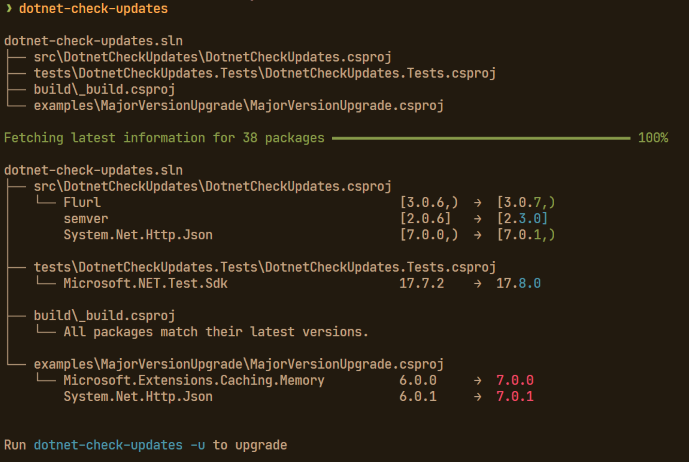
- Red = major version upgrade
- Cyan = minor version upgrade
- Green = patch version upgrade
Installation
To install dotnet-check-updates, you can use the following command:
dotnet tool install --global dotnet-check-updates
Features
- Support for C# projects (.csproj files) with PackageReferences
- Support for solutions (.sln files) for discovering projects
- Recursive search for project files with customizable depth
- Option to restore packages after an upgrade
- Listing of existing packages with their current versions
- Support for pre-release versions by specifying upgrade target
- Maintains existing version range notation, i.e.
| Current | Upgraded |
|---|---|
<PackageReference Include="semver" Version="2.0.6" /> |
<PackageReference Include="semver" Version="2.3.0" /> |
<PackageReference Include="semver" Version="[2.0.6,)" /> |
<PackageReference Include="semver" Version="[2.3.0,)" /> |
<PackageReference Include="semver" Version="[2.0.6]" /> |
<PackageReference Include="semver" Version="[2.3.0]" /> |
Limitations
- Supports upgrading packages using PackageReferences in project and
Directory.Build.propsfiles - Supports upgrading packages using PackageVersion in
Directory.Packages.propsfiles - Only certain Version ranges are supported when checking for upgrades (pre-releases are supported for these ranges):
| Notation | Description |
|---|---|
1.0 |
Minimum version, inclusive |
[1.0,) |
Minimum version, inclusive |
[1.0] |
Exact version match |
Project disovery
By default, dotnet-check-updates will search the current directory for C# project (.csproj) files. If no project files are found, it will then search for solution (.sln) files in the current directory.
Usage
To use dotnet-check-updates, run the following command in your terminal:
dotnet-check-updates [OPTIONS]
NOTE: Alternatively when using the global tool you may also invoke:
dotnet check-updates [OPTIONS]
See Invoke a global tool for more information.
Options
To list all available options run:
dotnet-check-updates --help
Examples
Check for the latest versions for all dependencies in discovered projects:
dotnet-check-updates
List existing packages and their versions while also searching for upgrades:
dotnet-check-updates --list
Include filters:
# Include only packages which contain the word system (case-insensitive) in their package name
dotnet-check-updates --filter 'System'
# or
dotnet-check-updates --filter '*System*'

# Include only packages which start with the word System
dotnet-check-updates --filter 'System*'
Exclude filters:
# Exclude packages which contain the word system (case-insensitive) in their package name
dotnet-check-updates --exclude 'System'
# or
dotnet-check-updates --exclude '*System*'

# Exclude packages which start with the word System
dotnet-check-updates --exclude 'System*'
Upgrade packages in the found projects to the latest version:
dotnet-check-updates --upgrade
Make sure your projects are in version control and all changes have been committed. This will overwrite your project files.
Search for projects in a specific solution file, upgrade packages and restore them:
dotnet-check-updates --solution path/to/your/solution.sln --upgrade --restore
Make sure your projects are in version control and all changes have been committed. This will overwrite your project files.
JSON output
For automation, use bare --json with non-interactive checks and upgrades:
dotnet-check-updates --json
--jsonis non-interactive only; it cannot be combined with--interactiveor--version.- Only bare
--jsonis accepted. Forms such as--json=<value>,--json:<value>,--json true, and--json falseare rejected with a diagnostic on stderr before argument parsing, regardless of placement before--. --help-dump-opencliis recognized case-insensitively as the first argument; in that mode OpenCLI output is preserved and--jsondoes not affect routing.- Successful execution writes a single UTF-8 JSON document to stdout. Progress bars, trees, upgrade guidance, optional logging (
DCU_ENABLE_LOGGING), and restore subprocess output are suppressed from stdout and, when present, appear on stderr. Failed execution writes no partial JSON to stdout and preserves the existing non-zero status. - File mutations are non-atomic: files are saved sequentially before restore. A later save or restore failure can leave earlier mutations applied while still returning non-zero without a JSON document.
Schema version 1
A JSON Schema document is available for validating output and generating consumer types. It uses JSON Schema Draft 2020-12, is included in the NuGet package at schemas/json-output-v1.schema.json, and allows unknown properties so compatible schema version 1 additions remain valid. The CLI does not add a $schema property to output; consumers can associate the schema without changing the output contract.
{
  "schemaVersion": 1,
  "upgradeRequested": true,
  "upgradesApplied": true,
  "solutions": [
    {
      "path": "Example.sln",
      "projects": ["src/App/App.csproj"]
    }
  ],
  "checkedFiles": [
    {
      "path": "Directory.Packages.props",
      "kind": "directoryPackagesProps",
      "packageCount": 1,
      "targetFrameworks": ["net8.0", "net9.0"],
      "packages": [
        {
          "name": "Example",
          "currentVersion": "[1.0.0,)",
          "targetVersion": "[2.0.0,)",
          "upgradeType": "major",
          "applicableFrameworks": ["net8.0"]
        }
      ]
    }
  ]
}
| Property | Type | Notes |
|---|---|---|
schemaVersion |
integer | Always 1. |
upgradeRequested |
boolean | True when --upgrade was supplied. |
upgradesApplied |
boolean | True only when at least one checked file was written with an upgraded package. |
solutions[].path |
string | Normalized JSON solution path. |
solutions[].projects |
string[] | Normalized supported .csproj/.fsproj members from discovery; props files excluded. |
checkedFiles[].path |
string | Normalized checked-file path. |
checkedFiles[].kind |
string | project, directoryBuildProps, or directoryPackagesProps. |
checkedFiles[].packageCount |
integer | Filtered package-reference count (independent of packages length). --show-package-count is accepted in JSON mode but has no extra effect. |
checkedFiles[].targetFrameworks |
string[] | Effective frameworks (net8.0, netstandard2.1, etc.). |
checkedFiles[].packages[].name |
string | Package ID as read. |
checkedFiles[].packages[].currentVersion |
string or null | Pre-upgrade version string; null when versionless. |
checkedFiles[].packages[].targetVersion |
string or null | Proposed/written version; null when no upgrade. |
checkedFiles[].packages[].upgradeType |
string or null | Null when targetVersion is null; otherwise none, major, minor, patch, release. |
checkedFiles[].packages[].applicableFrameworks |
string[] | Frameworks for which the reference was evaluated. |
- All shown properties are required. Arrays are always present (
[]when empty). Nullable package properties arenullwhen absent, not omitted. --show-absolutecontrols absolute vs relative paths: with it, emit canonical full paths; otherwise emitPath.GetRelativePath(canonicalCwd, canonicalFullPath)using platform-native separators.- Relative
--project/--solutionare resolved against the process working directory even when--cwddiffers; JSON identifies the file actually read or mutated. - Default
packagescontains only references with a non-nulltargetVersion; with--listevery filtered reference is included. Conditioned duplicates remain separate entries; exact duplicates are retained. - Deterministic order:
solutionsby path,solutions[].projectsby path,checkedFilesby path, frameworks by string,packagesby name (case-insensitive then ordinal) thencurrentVersion/targetVersion/upgradeType(null first) then joined sortedapplicableFrameworks, stable on ties.targetVersion/upgradeTypeuse existingPackageReference.GetVersionString()normalized form andUpgradeTypecomparison. - Version 1 consumers must ignore unknown properties; compatible additions may add properties within
schemaVersion1.
License
dotnet-check-updates is licensed under the MIT License
| Product | Versions Compatible and additional computed target framework versions. |
|---|---|
| .NET | net8.0 is compatible. net8.0-android was computed. net8.0-browser was computed. net8.0-ios was computed. net8.0-maccatalyst was computed. net8.0-macos was computed. net8.0-tvos was computed. net8.0-windows was computed. net9.0 is compatible. net9.0-android was computed. net9.0-browser was computed. net9.0-ios was computed. net9.0-maccatalyst was computed. net9.0-macos was computed. net9.0-tvos was computed. net9.0-windows was computed. net10.0 is compatible. net10.0-android was computed. net10.0-browser was computed. net10.0-ios was computed. net10.0-maccatalyst was computed. net10.0-macos was computed. net10.0-tvos was computed. net10.0-windows was computed. |
This package has no dependencies.
| Version | Downloads | Last Updated |
|---|---|---|
| 0.7.0 | 136 | 8/21/2026 |
| 0.6.0 | 340 | 4/28/2026 |
| 0.5.0 | 398 | 11/24/2025 |
| 0.4.2 | 521 | 11/20/2024 |
| 0.4.1 | 266 | 11/20/2024 |
| 0.4.0 | 264 | 11/2/2024 |
| 0.3.1 | 253 | 10/29/2024 |
| 0.3.0 | 527 | 2/25/2024 |
| 0.2.4 | 349 | 2/16/2024 |
| 0.2.3 | 408 | 2/11/2024 |
| 0.2.2 | 475 | 11/22/2023 |
| 0.2.1 | 330 | 11/22/2023 |
| 0.2.0 | 341 | 11/15/2023 |
| 0.1.0 | 273 | 11/10/2023 |
### Added
• Add --json output for non-interactive automation, including schema version 1 and a published JSON Schema document.
Full changelog at https://github.com/vipentti/dotnet-check-updates/blob/main/CHANGELOG.md