XenoAtom.Terminal.UI
2.0.2
Prefix Reserved
See the version list below for details.
dotnet add package XenoAtom.Terminal.UI --version 2.0.2
NuGet\Install-Package XenoAtom.Terminal.UI -Version 2.0.2
<PackageReference Include="XenoAtom.Terminal.UI" Version="2.0.2" />
<PackageVersion Include="XenoAtom.Terminal.UI" Version="2.0.2" />
<PackageReference Include="XenoAtom.Terminal.UI" />
paket add XenoAtom.Terminal.UI --version 2.0.2
#r "nuget: XenoAtom.Terminal.UI, 2.0.2"
#:package XenoAtom.Terminal.UI@2.0.2
#addin nuget:?package=XenoAtom.Terminal.UI&version=2.0.2
#tool nuget:?package=XenoAtom.Terminal.UI&version=2.0.2
XenoAtom.Terminal.UI 

<img align="right" width="256px" height="256px" src="https://raw.githubusercontent.com/XenoAtom/XenoAtom.Terminal.UI/main/img/XenoAtom.Terminal.UI.png">
XenoAtom.Terminal.UI is a modern, reactive retained-mode terminal UI framework for .NET, built on top of XenoAtom.Terminal. It provides a rich set of controls (TextBox, TextArea, lists, tables, dialogs…), a consistent layout system, a styling/theming model, and a binding system designed for smooth live UIs.
✨ Features
- Two hosting models:
- Inline widgets via
Terminal.Write(...)andTerminal.Live(...) - Fullscreen apps via
Terminal.Run(...)(alternate screen + input loop)
- Inline widgets via
- Modern control library (60+ built-in controls):
- Buttons, toggles, lists, tables, closable/scrollable tabs, menus, dialogs/popups, toasts, charts, progress, spinners, tooltips…
- Text editing: TextBox, TextArea, MaskedInput, NumberBox (undo/redo:
Ctrl+Z/Ctrl+R) - Advanced widgets: LogControl, CommandPalette, BreakdownChart, ColorPicker
- Mockup/empty-state widget: Placeholder (text + background surfaces, gradients)
- Companion extension package: XenoAtom.Terminal.UI.Extensions.Markdown (
MarkdownControl,MarkdownMarkupConverterwith source-preserving highlight mode)
- Binding-first UI:
- Bindable properties,
State<T>, automatic dependency tracking, minimal boilerplate
- Bindable properties,
- Layout system: consistent measure/arrange protocol (integer cell UI), panels and containers
- Styling, themes, and color schemes:
- Theme + per-control styles,
ColorSchemepalettes (terminal-native and RGB themes) - Brush gradients for controls such as
TextBlock,TextBox, andTextFiglet - RootLoops-powered color scheme generator (https://rootloops.sh) with many built-in schemes
- Theme + per-control styles,
- Input:
- Keyboard, mouse, resize events; focus navigation; routed events where appropriate
- Commands & key hints:
- Context-aware commands with single-stroke gestures and multi-stroke sequences
CommandBarcontrol for discoverable shortcuts
- Rendering:
- Cell-buffer renderer + diffing, efficient batched output, synchronized output (DEC 2026)
- Alpha-aware colors (
RGBA) with blending support for modern UI effects
- Generated glyph helpers:
NerdFontexposes the official Nerd Fonts catalog asRuneproperties for easy use inTextBlock,Markup, and string interpolation
- Debug overlay:
- Built-in performance overlay (toggle with
F12) to inspect frame timings, invalidation, and diff output
- Built-in performance overlay (toggle with
- Cross-platform + AOT-friendly:
net10.0and NativeAOT-oriented design (built on XenoAtom.Terminal)
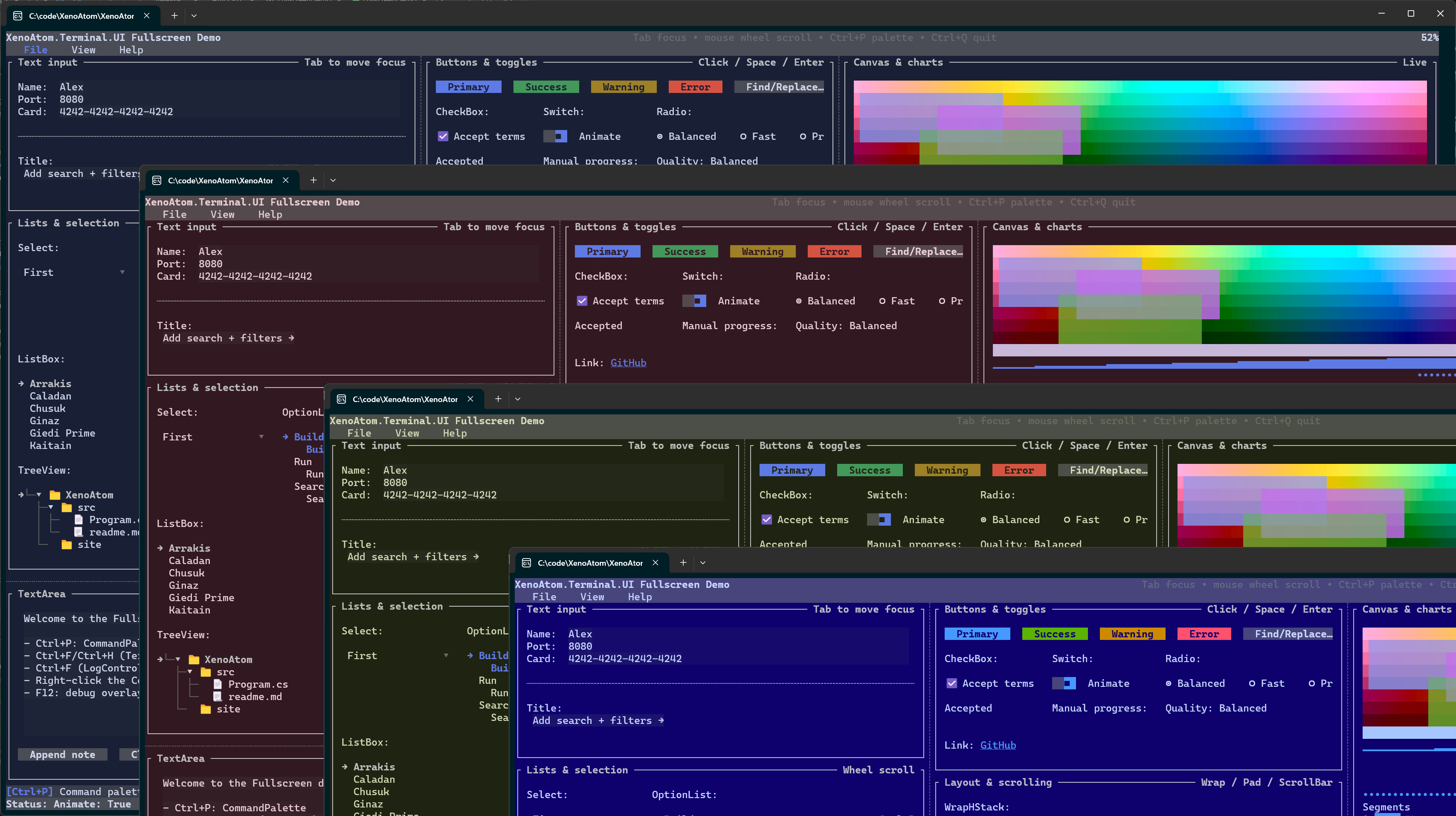
XenoAtom.Terminal.UI depends on XenoAtom.Terminal. The two libraries are designed to be used together: Terminal handles safe ANSI/markup output and unified input events; Terminal.UI builds a widget/layout system on top.
Requirements (.NET 10 / C# 14)
XenoAtom.Terminal.UI targets net10.0 and requires the .NET 10 SDK (C# 14).
Rationale: the library integrates into XenoAtom.Terminal using C# 14 extension members, so you can write
Terminal.Write(...), Terminal.Live(...), and Terminal.Run(...) even though Terminal is defined in the
separate XenoAtom.Terminal package.
🚀 Quick start
using XenoAtom.Terminal;
using XenoAtom.Terminal.UI;
using XenoAtom.Terminal.UI.Controls;

Terminal.Write(new Group("Welcome")
    .Content(new VStack("Hello", "from", "Terminal.UI").Spacing(1))
);
Inline “live” widget (updates without clearing your output):
using XenoAtom.Terminal;
using XenoAtom.Terminal.UI;
using XenoAtom.Terminal.UI.Controls;

var work = new ProgressTask("Work");

Terminal.Live(
    new ProgressTaskGroup().Tasks([work]),
    onUpdate: () =>
    {
        work.Value = Math.Min(1, work.Value + 0.01);
        return work.Value < 1
            ? TerminalLoopResult.Continue
            : TerminalLoopResult.StopAndKeepVisual;
    });
Fullscreen app:
using XenoAtom.Terminal;
using XenoAtom.Terminal.UI;
using XenoAtom.Terminal.UI.Controls;

State<string?> text = new("Type here");
State<bool> exit = new(false);

Terminal.Run(
    new VStack(
        new TextBox(text),
        new TextBlock(() => $"The text typed is: {text.Value}"),
        new Button("Exit").Click(() => exit.Value = true)
    ),
    onUpdate: () => exit.Value
        ? TerminalLoopResult.StopAndKeepVisual
        : TerminalLoopResult.Continue
    );
Brush gradient example:
using XenoAtom.Terminal.UI.Styling;

var brush = Brush.LinearGradient(
    new GradientPoint(0f, 0f),
    new GradientPoint(1f, 0f),
    [new GradientStop(0f, Colors.DeepSkyBlue), new GradientStop(1f, Colors.White)]);

Terminal.Write(
    new TextBlock("Gradient title")
        .Style(TextBlockStyle.Default with { ForegroundBrush = brush })
);
Nerd Font glyph example:
Terminal.Write(
    new Markup($"[accent]{NerdFont.MdHome}[/] Home  [primary]{NerdFont.PlBranch}[/] main  [success]{NerdFont.WeatherDaySunny}[/] Ready")
);
If your terminal/font combination renders Nerd Font glyphs as double-width, set
WideRuneResolver = TerminalWideRuneResolvers.NerdFontDoubleWidth on TerminalRunOptions,
TerminalLiveOptions, or TerminalAppOptions.
🧩 Controls included
The library ships with a large set of built-in controls. See Controls Reference for the full reference.
Highlights:
- Text input:
TextBox,TextArea,MaskedInput,NumberBox,ValidationPresenter - Lists:
ListBox,OptionList,SelectionList,Select<T>,TreeView - Data:
Table,DataGridControl(sorting, filtering, search, resizing, inline editing, direct cell activation) - Layout:
VStack,HStack,Grid,DockLayout,Splitters,Border,Group,Padder - Overlays:
Popup, resizableDialog,TooltipHost,Backdrop - Toasts:
Toast,ToastHost(overlay notifications) - Visualization:
BarChart,LineChart,Sparkline,Canvas,BreakdownChart,TextFiglet,Placeholder - Progress:
ProgressBar,ProgressTaskGroup,Spinner
📖 User guide
For details, see the dedicated website.
🧪 Samples
samples/ControlsDemo: catalog-style demo of controls and styles.samples/FullscreenDemo: fullscreen UI showcase.samples/InlineLiveDemo: inline/live demo (interactive).
🪪 License
This software is released under the BSD-2-Clause license.
🤗 Author
Alexandre Mutel aka xoofx.
| Product | Versions Compatible and additional computed target framework versions. |
|---|---|
| .NET | net10.0 is compatible. net10.0-android was computed. net10.0-browser was computed. net10.0-ios was computed. net10.0-maccatalyst was computed. net10.0-macos was computed. net10.0-tvos was computed. net10.0-windows was computed. |
-
net10.0
- XenoAtom.Terminal (>= 1.8.0)
NuGet packages (4)
Showing the top 4 NuGet packages that depend on XenoAtom.Terminal.UI:
| Package | Downloads |
|---|---|
|
XenoAtom.Terminal.UI.Extensions.Markdown
Markdown rendering for XenoAtom.Terminal.UI (powered by Markdig) |
|
|
XenoAtom.Logging.Terminal
Terminal sink for XenoAtom.Logging powered by XenoAtom.Terminal.UI. |
|
|
XenoAtom.CommandLine.Terminal
Terminal and Terminal.UI output renderers for XenoAtom.CommandLine. |
|
|
XenoAtom.Terminal.UI.Extensions.Screenshot
Raster screenshot export for XenoAtom.Terminal.UI powered by SkiaSharp |
GitHub repositories
This package is not used by any popular GitHub repositories.
| Version | Downloads | Last Updated |
|---|---|---|
| 2.2.0 | 38 | 4/3/2026 |
| 2.1.0 | 50 | 4/2/2026 |
| 2.0.2 | 101 | 4/2/2026 |
| 2.0.1 | 32 | 4/1/2026 |
| 2.0.0 | 32 | 4/1/2026 |
| 1.17.0 | 74 | 4/1/2026 |
| 1.16.0 | 85 | 3/31/2026 |
| 1.15.0 | 104 | 3/30/2026 |
| 1.14.1 | 88 | 3/30/2026 |
| 1.14.0 | 85 | 3/30/2026 |
| 1.13.1 | 164 | 3/28/2026 |
| 1.13.0 | 154 | 3/28/2026 |
| 1.12.0 | 93 | 3/27/2026 |
| 1.11.2 | 94 | 3/27/2026 |
| 1.11.1 | 91 | 3/27/2026 |
| 1.11.0 | 96 | 3/25/2026 |
| 1.10.0 | 96 | 3/24/2026 |
| 1.9.1 | 114 | 3/23/2026 |
| 1.9.0 | 95 | 3/23/2026 |
| 1.8.3 | 108 | 3/21/2026 |