Twain.Wia.Sane.Scanner
2.1.0
dotnet add package Twain.Wia.Sane.Scanner --version 2.1.0
NuGet\Install-Package Twain.Wia.Sane.Scanner -Version 2.1.0
<PackageReference Include="Twain.Wia.Sane.Scanner" Version="2.1.0" />
<PackageVersion Include="Twain.Wia.Sane.Scanner" Version="2.1.0" />
<PackageReference Include="Twain.Wia.Sane.Scanner" />
paket add Twain.Wia.Sane.Scanner --version 2.1.0
#r "nuget: Twain.Wia.Sane.Scanner, 2.1.0"
#:package Twain.Wia.Sane.Scanner@2.1.0
#addin nuget:?package=Twain.Wia.Sane.Scanner&version=2.1.0
#tool nuget:?package=Twain.Wia.Sane.Scanner&version=2.1.0
.NET Document Scanner for TWAIN, WIA, SANE, ICA, and eSCL
This .NET package provides a wrapper for calling the Dynamic Web TWAIN Service REST API. It enables developers to create desktop or cross-platform applications to scan and digitize documents using:
- TWAIN (32-bit / 64-bit)
- WIA (Windows Image Acquisition)
- SANE (Linux)
- ICA (macOS)
- eSCL (AirScan / Mopria)
Demo Video
⚙️ Prerequisites
✅ Install Dynamic Web TWAIN Service
- Windows: Dynamsoft-Service-Setup.msi
- macOS: Dynamsoft-Service-Setup.pkg
- Linux:
🔑 Get a License
Request a free trial license.
🧩 Configuration
After installation, open http://127.0.0.1:18625/ in your browser to configure the host and port settings.
By default, the service is bound to
127.0.0.1. To access it across the LAN, change the host to your local IP (e.g.,192.168.8.72).
📡 REST API Endpoints
https://www.dynamsoft.com/web-twain/docs/info/api/restful.html
🧪 Quick Start
Replace the license key in the following code and run it in a .NET project:
using Newtonsoft.Json;
using Twain.Wia.Sane.Scanner;

public class Program
{
    private static string licenseKey = "LICENSE-KEY";
    private static ScannerController scannerController = new ScannerController();
    private static List<Dictionary<string, object>> devices = new List<Dictionary<string, object>>();
    private static string host = "http://127.0.0.1:18622";
    private static string questions = @"
Please select an operation:
1. Get scanners
2. Acquire documents by scanner index
3. Quit
";

    public static async Task Main()
    {
        var info = await scannerController.GetServerInfo(host);
        Console.WriteLine($"Server info: {info}");
        await AskQuestion();
    }

    private static async Task<int> AskQuestion()
    {
        while (true)
        {
            Console.WriteLine(".............................................");
            Console.WriteLine(questions);
            string? answer = Console.ReadLine();

            if (string.IsNullOrEmpty(answer))
            {
                continue;
            }

            if (answer == "3")
            {
                break;
            }
            else if (answer == "1")
            {
                var scannerInfo = await scannerController.GetDevices(host, ScannerType.TWAINSCANNER | ScannerType.TWAINX64SCANNER);
                devices.Clear();

                try {
                    var scanners = JsonConvert.DeserializeObject<List<Dictionary<string, object>>>(scannerInfo);
                    for (int i = 0; i < scanners.Count; i++)
                    {
                        var scanner = scanners[i];
                        devices.Add(scanner);
                        Console.WriteLine($"\nIndex: {i}, Name: {scanner["name"]}");
                    }
                } catch (Exception ex) {
                   Console.WriteLine($"Error: {ex.Message}");
                }

            }
            else if (answer == "2")
            {
                if (devices.Count == 0)
                {
                    Console.WriteLine("Please get scanners first!\n");
                    continue;
                }

                Console.Write($"\nSelect an index (<= {devices.Count - 1}): ");
                int index;
                if (!int.TryParse(Console.ReadLine(), out index))
                {
                    Console.WriteLine("Invalid input. Please enter a number.");
                    continue;
                }

                if (index < 0 || index >= devices.Count)
                {
                    Console.WriteLine("It is out of range.");
                    continue;
                }

                var parameters = new Dictionary<string, object>
                {
                    {"license", licenseKey},
                    {"device", devices[index]["device"]},
                    {"autoRun", true}
                };

                parameters["config"] = new Dictionary<string, object>
                {
                    {"IfShowUI", false},
                    {"PixelType", 2},
                    {"Resolution", 200},
                    {"IfFeederEnabled", false},
                    {"IfDuplexEnabled", false}
                };

                var jobInfo = await scannerController.CreateJob(host, parameters);
                string jobId = "";
                try
                {
                    var job = JsonConvert.DeserializeObject<Dictionary<string, object>>(jobInfo);
                    jobId = (string)job["jobuid"];

                    if (string.IsNullOrEmpty(jobId))
                    {
                        Console.WriteLine("Failed to create job.");
                        continue;
                    }
                }
                catch (Exception ex)
                {
                    Console.WriteLine($"Error: {ex.Message}");
                    continue;
                }

                var fetchTasks = new List<Task>();
                int imageIndex = 0;

                while (true)
                {
                    var imageInfo = await scannerController.GetImageInfo(host, jobId);
                    if (string.IsNullOrEmpty(imageInfo)) break;

                    Dictionary<string, object>? image;
                    try { image = JsonConvert.DeserializeObject<Dictionary<string, object>>(imageInfo); }
                    catch { break; }

                    if (image == null || !image.ContainsKey("url")) break;

                    int currentIndex = imageIndex++;
                    fetchTasks.Add(Task.Run(async () =>
                    {
                        string filename = await scannerController.GetImageFileByIndex(host, jobId, currentIndex, "./", "image/jpeg");
                        Console.WriteLine($"Image {currentIndex}: {filename}");
                    }));
                }

                await Task.WhenAll(fetchTasks);
                await scannerController.DeleteJob(host, jobId);
            }
            else
            {
                continue;
            }
        }
        return 0;
    }
}
📁 Examples
-
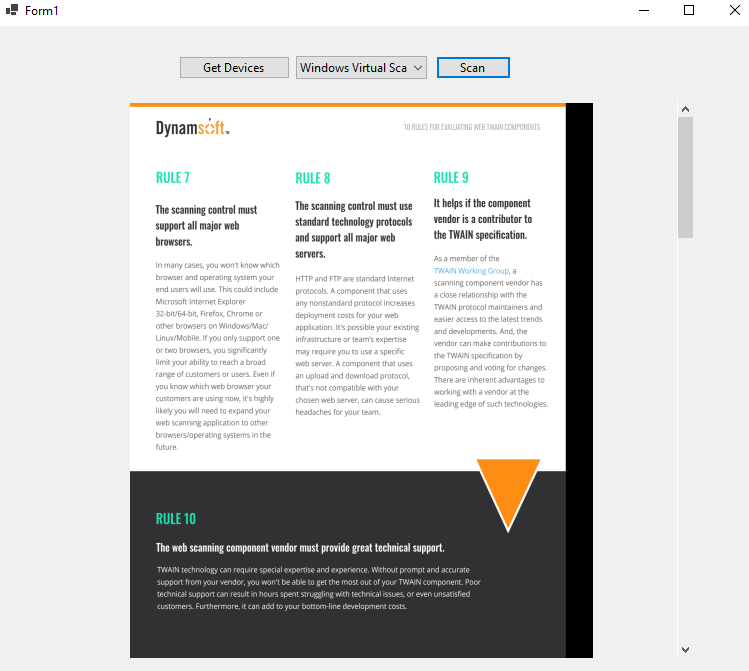
🪟 WinForms
🧩 API Reference
🎛️ Scanner APIs
GetDevices(string host, int? scannerType = null)— Returns a JSON string listing all available scanner devices. Optionally filter by scanner type using theScannerTypeconstants (e.g.,ScannerType.TWAINSCANNER | ScannerType.WIASCANNER).GetDevicesHttpResponse(string host, int? scannerType = null)— Returns the rawHttpResponseMessagefrom the devices endpoint. Use when you need access to HTTP status codes or headers directly.CreateJob(string host, Dictionary<string, object> parameters)— Creates a scan job with the specified parameters (license key, device ID, scanner config) and returns a JSON string containing thejobuid.CreateJobHttpResponse(string host, Dictionary<string, object> parameters)— Returns the rawHttpResponseMessagefor job creation.CheckJob(string host, string jobId)— Returns the current status of a scan job as a JSON string (e.g., running, completed, canceled).UpdateJob(string host, string jobId, Dictionary<string, object> parameters)— Updates a job using HTTP PATCH, e.g., to change the status toJobStatus.CANCELED.DeleteJob(string host, string jobId)— Deletes a scan job and frees its resources on the service. Returns theHttpResponseMessage.GetScannerCapabilities(string host, string jobId)— Returns the scanner's capabilities (resolution ranges, pixel types, duplex support, etc.) as a JSON string.GetImageInfo(string host, string jobId)— Polls the service for metadata about the next available scanned page. Blocks until a page is ready and returns a JSON string containing the pageurland other attributes. Returns an empty string when no more pages are available.GetServerInfo(string host)— Returns the Dynamic Web TWAIN Service version information as a JSON string.
📸 Image APIs
Blocking
These methods use the /next-page endpoint, which blocks until the scanner delivers the next page. They process pages sequentially and return 204 / empty when scanning is complete.
GetImageStreamHttpResponse(string host, string jobId)— Returns the rawHttpResponseMessagefrom the blocking/next-pageendpoint. Status200means a page is ready;204means scanning is complete.GetImageStream(string host, string jobId)— Fetches the next scanned page as abyte[]. Returns an empty array when no more pages are available.GetImageStreams(string host, string jobId)— Repeatedly callsGetImageStreamuntil no more pages are available and returns all page bytes asList<byte[]>.GetImageFile(string host, string jobId, string directory)— Saves the next scanned page to a JPEG file indirectory. Returns the filename, or an empty string when scanning is complete.GetImageFiles(string host, string jobId, string directory)— Repeatedly callsGetImageFileuntil scanning is complete and returns the list of all saved filenames.
Non-blocking
These methods use the /content?page={index} endpoint, which returns immediately. Pair with GetImageInfo in a loop to detect when each page is ready, then fetch pages concurrently with Task.Run.
GetImageContentHttpResponse(string host, string jobId, int index, string imageType = "image/jpeg")— Returns the rawHttpResponseMessagefor the page at the given zero-basedindex. Status200means the page is available;204means no page exists at that index yet. Supports"image/jpeg"and"image/png".GetImageFileByIndex(string host, string jobId, int index, string directory, string imageType = "image/jpeg")— Saves the page atindexto disk using the non-blocking content API. Returns the saved filename (e.g.,image_0.jpg), or an empty string on204or error.
📄 Document APIs
CreateDocument(string host, Dictionary<string, object> parameters)— Creates a new document container in the service and returns a JSON string with the documentuid.GetDocumentInfo(string host, string docId)— Returns document metadata (pages, creation time, etc.) as a JSON string.DeleteDocument(string host, string docId)— Deletes a document and all its pages from the service. Returns theHttpResponseMessage.GetDocumentFile(string host, string docId, string directory)— Downloads the document as a PDF and saves it todirectory. Returns the saved filename.GetDocumentStream(string host, string docId)— Downloads the document content as a rawbyte[](PDF format).InsertPage(string host, string docId, Dictionary<string, object> parameters)— Inserts a scanned image into a document. Required parameters:source(image URL fromGetImageInfo) andpassword(empty string if none). Returns a JSON string with the updated page list.DeletePage(string host, string docId, string pageId)— Deletes a specific page from a document by its page UID. Returns theHttpResponseMessage.
📦 Build the NuGet Package
dotnet build --configuration Release
| Product | Versions Compatible and additional computed target framework versions. |
|---|---|
| .NET | net8.0 is compatible. net8.0-android was computed. net8.0-browser was computed. net8.0-ios was computed. net8.0-maccatalyst was computed. net8.0-macos was computed. net8.0-tvos was computed. net8.0-windows was computed. net9.0 was computed. net9.0-android was computed. net9.0-browser was computed. net9.0-ios was computed. net9.0-maccatalyst was computed. net9.0-macos was computed. net9.0-tvos was computed. net9.0-windows was computed. net10.0 was computed. net10.0-android was computed. net10.0-browser was computed. net10.0-ios was computed. net10.0-maccatalyst was computed. net10.0-macos was computed. net10.0-tvos was computed. net10.0-windows was computed. |
-
net8.0
- No dependencies.
NuGet packages
This package is not used by any NuGet packages.
GitHub repositories
This package is not used by any popular GitHub repositories.
- Added GetImageContentHttpResponse: non-blocking page fetch by zero-based index via /content?page={index} endpoint.
- Added GetImageFileByIndex: saves a scanned page to disk by index using the non-blocking API.