Syncfusion.Maui.NavigationDrawer
35.1.40
Prefix Reserved
dotnet add package Syncfusion.Maui.NavigationDrawer --version 35.1.40
NuGet\Install-Package Syncfusion.Maui.NavigationDrawer -Version 35.1.40
<PackageReference Include="Syncfusion.Maui.NavigationDrawer" Version="35.1.40" />
<PackageVersion Include="Syncfusion.Maui.NavigationDrawer" Version="35.1.40" />
<PackageReference Include="Syncfusion.Maui.NavigationDrawer" />
paket add Syncfusion.Maui.NavigationDrawer --version 35.1.40
#r "nuget: Syncfusion.Maui.NavigationDrawer, 35.1.40"
#:package Syncfusion.Maui.NavigationDrawer@35.1.40
#addin nuget:?package=Syncfusion.Maui.NavigationDrawer&version=35.1.40
#tool nuget:?package=Syncfusion.Maui.NavigationDrawer&version=35.1.40
Syncfusion .NET MAUI Navigation Drawer (SfNavigationDrawer)
The Syncfusion .NET MAUI Navigation Drawer is a sliding panel control that provides easy navigation between app sections. It consists of a content area and a drawer pane that slides in from an edge, opened by swiping or programmatically. Build rich navigation experiences for Android, iOS, macOS, and Windows from a single codebase.
Documentation · Getting Started · API Reference · Demos on GitHub · Product Page · Release Notes
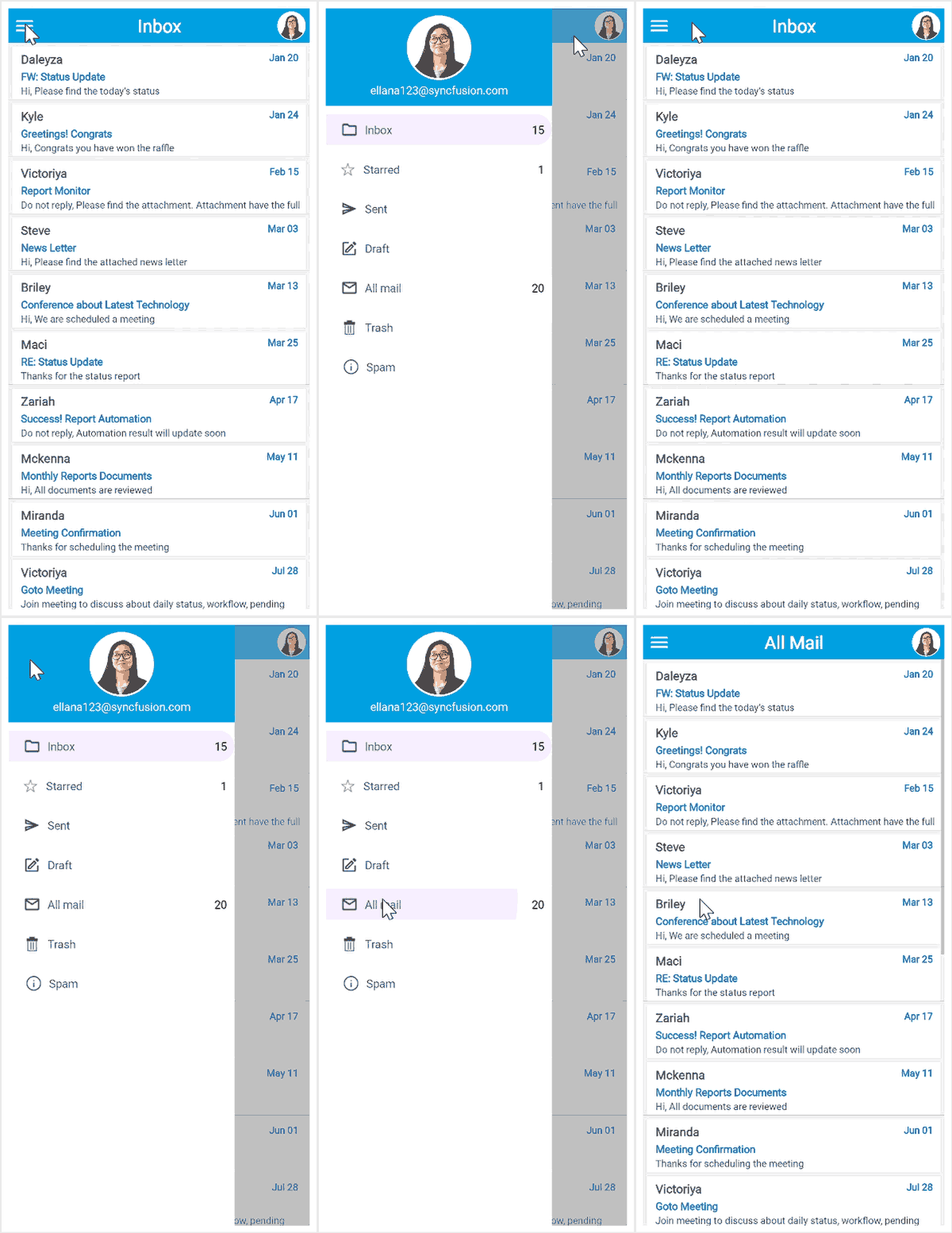
Key features
Drawer and content
- Sliding drawer pane from any of the four edges:
Left,Right,Top, orBottom. - Configurable drawer width, height, header view, footer view, and content view.
- Secondary drawer support to display an additional pane, such as a notifications panel.
- Main content area hosts any .NET MAUI view or layout.
Interaction
- Open or close the drawer programmatically, by tapping the menu button, or by swiping from an edge.
SlideOnTopandRevealdisplay modes.- Touch feedback with ripple effects and selection highlights for drawer items.
Look and feel
DrawerSettings.DrawerHeight,DrawerWidth,DrawerHeaderHeight,DrawerFooterHeight, andPositionfor precise drawer layout.- Separate background colors for the drawer, main content, and content overlay.
- Custom transition types (
Slide,SlideOnTop,Reveal,Rotation) for the drawer. - Full styling support with built-in light and dark themes.
More
- Right-to-left (RTL) support, localization, and accessibility.
Supported platforms
| Platform | Target framework |
|---|---|
| Android | net9.0-android, net10.0-android |
| iOS | net9.0-ios, net10.0-ios |
| macOS (Mac Catalyst) | net9.0-maccatalyst, net10.0-maccatalyst |
| Windows | net9.0-windows10.0.19041, net10.0-windows10.0.19041 |
Minimum OS versions follow the .NET MAUI supported platforms.
Installation
.NET CLI
dotnet add package Syncfusion.Maui.NavigationDrawer
Package Manager Console
Install-Package Syncfusion.Maui.NavigationDrawer
Getting started
1. Register the Syncfusion core handler
In MauiProgram.cs, call ConfigureSyncfusionCore():
using Syncfusion.Maui.Core.Hosting;

public static class MauiProgram
{
    public static MauiApp CreateMauiApp()
    {
        var builder = MauiApp.CreateBuilder();
        builder
            .UseMauiApp<App>()
            .ConfigureSyncfusionCore();

        return builder.Build();
    }
}
2. Create a model and a ViewModel
using System.Collections.ObjectModel;
using System.ComponentModel;

public class MenuInfo : INotifyPropertyChanged
{
    private string? name;

    public string? Name
    {
        get { return name; }
        set { name = value; OnPropertyChanged(nameof(Name)); }
    }

    public event PropertyChangedEventHandler? PropertyChanged;

    private void OnPropertyChanged(string propertyName)
    {
        PropertyChanged?.Invoke(this, new PropertyChangedEventArgs(propertyName));
    }
}

public class MenuViewModel
{
    public ObservableCollection<MenuInfo> MenuItems { get; set; }

    public MenuViewModel()
    {
        MenuItems = new ObservableCollection<MenuInfo>
        {
            new MenuInfo { Name = "Inbox"   },
            new MenuInfo { Name = "Starred" },
            new MenuInfo { Name = "Sent"    },
            new MenuInfo { Name = "Draft"   },
            new MenuInfo { Name = "Trash"   }
        };
    }
}
3. Add SfNavigationDrawer to your page
<ContentPage xmlns="http://schemas.microsoft.com/dotnet/2021/maui"
             xmlns:x="http://schemas.microsoft.com/winfx/2009/xaml"
             xmlns:syncfusion="clr-namespace:Syncfusion.Maui.NavigationDrawer;assembly=Syncfusion.Maui.NavigationDrawer"
             xmlns:local="clr-namespace:YourAppNamespace"
             x:Class="YourAppNamespace.MainPage">

    <ContentPage.BindingContext>
        <local:MenuViewModel />
    </ContentPage.BindingContext>

    <syncfusion:SfNavigationDrawer x:Name="navigationDrawer">
        <syncfusion:SfNavigationDrawer.DrawerSettings>
            <syncfusion:DrawerSettings DrawerWidth="250"
                                       DrawerHeaderHeight="100"
                                       Position="Left">
                <syncfusion:DrawerSettings.DrawerHeaderView>
                    <Grid BackgroundColor="#6750A4">
                        <Label Text="Menu"
                               TextColor="White"
                               FontAttributes="Bold"
                               FontSize="20"
                               HorizontalTextAlignment="Center"
                               VerticalTextAlignment="Center" />
                    </Grid>
                </syncfusion:DrawerSettings.DrawerHeaderView>
                <syncfusion:DrawerSettings.DrawerContentView>
                    <CollectionView ItemsSource="{Binding MenuItems}">
                        <CollectionView.ItemTemplate>
                            <DataTemplate>
                                <Label Text="{Binding Name}"
                                       FontSize="16"
                                       Padding="20,12" />
                            </DataTemplate>
                        </CollectionView.ItemTemplate>
                    </CollectionView>
                </syncfusion:DrawerSettings.DrawerContentView>
            </syncfusion:DrawerSettings>
        </syncfusion:SfNavigationDrawer.DrawerSettings>


        <syncfusion:SfNavigationDrawer.ContentView>
            <Label Text="Main content"
                   HorizontalTextAlignment="Center"
                   VerticalTextAlignment="Center" />
        </syncfusion:SfNavigationDrawer.ContentView>
    </syncfusion:SfNavigationDrawer>

</ContentPage>
Run the app. Swipe from the left edge or set IsOpen to true to open the drawer.
Common scenarios
Open and close the drawer programmatically
// Open the drawer.
navigationDrawer.IsOpen = true;

// Close the drawer.
navigationDrawer.IsOpen = false;
Add a secondary drawer
<syncfusion:SfNavigationDrawer x:Name="navigationDrawer">
    <syncfusion:SfNavigationDrawer.SecondaryDrawerSettings>
        <syncfusion:DrawerSettings Position="Right"
                                   DrawerWidth="300"
                                   EnableSwipe="False">
            <syncfusion:DrawerSettings.DrawerContentView>
                <Label Text="Notifications"
                       VerticalTextAlignment="Center"
                       HorizontalTextAlignment="Center" />
            </syncfusion:DrawerSettings.DrawerContentView>
        </syncfusion:DrawerSettings>
    </syncfusion:SfNavigationDrawer.SecondaryDrawerSettings>
</syncfusion:SfNavigationDrawer>
For more features, see the Navigation Drawer documentation.
Dependencies
Installing this package also installs the following packages:
Microsoft.Maui.ControlsSyncfusion.Maui.Core
Licensing
This is a commercial product and requires a paid license. You have three options:
- Free Community License: for individual developers and small businesses. Check eligibility
- 30-day free trial: Start a trial
- Commercial license: View pricing
Register your license key
Register the key in MauiProgram.cs before the app is built:
Syncfusion.Licensing.SyncfusionLicenseProvider.RegisterLicense("YOUR_LICENSE_KEY");
For details, see Licensing overview. Use of this package is subject to the Syncfusion EULA.
Support and feedback
- Support tickets: Syncfusion Support Portal
- Community forums: .NET MAUI Forums
- Feature requests and bug reports: Feedback Portal
- Samples: Syncfusion .NET MAUI demos on GitHub
About Syncfusion
Founded in 2001 and headquartered in Research Triangle Park, N.C., Syncfusion has more than 26,000+ customers and more than 1 million users, including large financial institutions, Fortune 500 companies, and global IT consultancies.
Today, we provide 1600+ components and frameworks for web (Blazor, ASP.NET Core, ASP.NET MVC, ASP.NET WebForms, JavaScript, Angular, React, Vue, and Flutter), mobile (.NET MAUI, Xamarin, Flutter, UWP, and JavaScript), and desktop development (WinForms, WPF, WinUI, Flutter and UWP). We provide ready-to-deploy enterprise software for dashboards, reports, data integration, and big data processing. Many customers have saved millions in licensing fees by deploying our software.
sales@syncfusion.com | www.syncfusion.com | Toll Free: 1-888-9 DOTNET
| Product | Versions Compatible and additional computed target framework versions. |
|---|---|
| .NET | net9.0 is compatible. net9.0-android was computed. net9.0-android35.0 is compatible. net9.0-browser was computed. net9.0-ios was computed. net9.0-ios18.0 is compatible. net9.0-maccatalyst was computed. net9.0-maccatalyst18.0 is compatible. net9.0-macos was computed. net9.0-tvos was computed. net9.0-windows was computed. net9.0-windows10.0.19041 is compatible. net10.0 is compatible. net10.0-android was computed. net10.0-android36.0 is compatible. net10.0-browser was computed. net10.0-ios was computed. net10.0-ios26.0 is compatible. net10.0-maccatalyst was computed. net10.0-maccatalyst26.0 is compatible. net10.0-macos was computed. net10.0-tvos was computed. net10.0-windows was computed. net10.0-windows10.0.19041 is compatible. |
-
net10.0
- Microsoft.Maui.Controls (>= 10.0.0)
- Syncfusion.Maui.Core (>= 35.1.40)
-
net10.0-android36.0
- Microsoft.Maui.Controls (>= 10.0.0)
- Syncfusion.Maui.Core (>= 35.1.40)
-
net10.0-ios26.0
- Microsoft.Maui.Controls (>= 10.0.0)
- Syncfusion.Maui.Core (>= 35.1.40)
-
net10.0-maccatalyst26.0
- Microsoft.Maui.Controls (>= 10.0.0)
- Syncfusion.Maui.Core (>= 35.1.40)
-
net10.0-windows10.0.19041
- Microsoft.Maui.Controls (>= 10.0.0)
- Syncfusion.Maui.Core (>= 35.1.40)
-
net9.0
- Microsoft.Maui.Controls (>= 9.0.111)
- Syncfusion.Maui.Core (>= 35.1.40)
-
net9.0-android35.0
- Microsoft.Maui.Controls (>= 9.0.111)
- Syncfusion.Maui.Core (>= 35.1.40)
-
net9.0-ios18.0
- Microsoft.Maui.Controls (>= 9.0.111)
- Syncfusion.Maui.Core (>= 35.1.40)
-
net9.0-maccatalyst18.0
- Microsoft.Maui.Controls (>= 9.0.111)
- Syncfusion.Maui.Core (>= 35.1.40)
-
net9.0-windows10.0.19041
- Microsoft.Maui.Controls (>= 9.0.111)
- Syncfusion.Maui.Core (>= 35.1.40)
NuGet packages (4)
Showing the top 4 NuGet packages that depend on Syncfusion.Maui.NavigationDrawer:
| Package | Downloads |
|---|---|
|
Syncfusion.Maui.Scheduler
This package provides the functionality to utilize the features of Syncfusion® Maui Scheduler control and more. |
|
|
SharedMauiXamlStylesLibrary.Syncfusion
A collection of predefined Control styles for MAUI and Syncfusion. |
|
|
Syncfusion.Maui.SmartScheduler
This package contains common classes and interfaces that are used in other Syncfusion® MAUI SmartScheduler. |
|
|
Syncfusion.Maui.A2UI
This package provides the functionality to utilize the features of Syncfusion® .Net Maui A2UI controls and more. |
GitHub repositories (1)
Showing the top 1 popular GitHub repositories that depend on Syncfusion.Maui.NavigationDrawer:
| Repository | Stars |
|---|---|
|
syncfusion/maui-demos
This repository contains the Syncfusion .NET MAUI control’s samples and the guide to use them
|
| Version | Downloads | Last Updated |
|---|---|---|
| 35.1.40 | 431 | 10/13/2026 |
| 35.1.39 | 599 | 10/6/2026 |
| 35.1.37 | 831 | 9/29/2026 |
| 34.2.9 | 1,531 | 9/21/2026 |
| 34.2.8 | 677 | 9/14/2026 |
| 34.2.7 | 742 | 9/8/2026 |
| 34.2.6 | 991 | 8/31/2026 |
| 34.2.5 | 881 | 8/25/2026 |
| 34.2.4 | 1,108 | 8/17/2026 |
| 34.2.3 | 1,139 | 8/11/2026 |
| 34.2.2 | 936 | 8/5/2026 |
| 34.1.33 | 1,874 | 7/27/2026 |
| 34.1.32 | 2,044 | 7/21/2026 |
| 34.1.31 | 718 | 7/14/2026 |
| 34.1.30 | 642 | 7/9/2026 |
| 34.1.29 | 705 | 7/6/2026 |
| 33.2.15 | 1,070 | 6/23/2026 |
| 33.2.13 | 622 | 6/16/2026 |
| 33.2.12 | 911 | 6/9/2026 |
| 33.2.10 | 762 | 6/2/2026 |