Syncfusion.Blazor.HeatMap
34.2.7
Prefix Reserved
dotnet add package Syncfusion.Blazor.HeatMap --version 34.2.7
NuGet\Install-Package Syncfusion.Blazor.HeatMap -Version 34.2.7
<PackageReference Include="Syncfusion.Blazor.HeatMap" Version="34.2.7" />
<PackageVersion Include="Syncfusion.Blazor.HeatMap" Version="34.2.7" />
<PackageReference Include="Syncfusion.Blazor.HeatMap" />
paket add Syncfusion.Blazor.HeatMap --version 34.2.7
#r "nuget: Syncfusion.Blazor.HeatMap, 34.2.7"
#:package Syncfusion.Blazor.HeatMap@34.2.7
#addin nuget:?package=Syncfusion.Blazor.HeatMap&version=34.2.7
#tool nuget:?package=Syncfusion.Blazor.HeatMap&version=34.2.7
Syncfusion® Blazor HeatMap Component
A comprehensive Blazor HeatMap Xomponent for visualizing two-dimensional data with color-coded cells. Display matrix-based data with gradient or solid color variations, interactive tooltips, legends, and custom styling using SVG or canvas rendering.
Using this package with an AI coding agent
Before generating Syncfusion® code, ask your AI coding agent to run the Syncfusion® setup using the following prompt:
Set up this project for Syncfusion® before generating code. Fetch and follow the official instructions at https://ai.syncfusion.com, then report the detected platform, installed skill pack, MCP status, and any required licensing action.The setup detects your project's platform and loads the appropriate Syncfusion® skill pack. No Syncfusion® account or MCP key is required to install or read Syncfusion® agent skills.
Platform reference: https://ai.syncfusion.com/blazor/llms.txt
Key Features
- Matrix Data Visualization - Render large two‑dimensional datasets using color‑coded cells for quick pattern and trend recognition.
- Flexible Color Mapping - Apply gradient or solid color palettes, customize color ranges, and define palette‑based thresholds for meaningful data representation.
- Rich Cell Interaction - Enable cell hover effects, selection behaviors, and custom event handling to create highly interactive data exploration experiences.
- Legends & Tooltips - Use built‑in legends for data range interpretation and tooltips for detailed value insights when hovering over HeatMap cells.
- Multiple Rendering Modes - Render using SVG or Canvas, ensuring optimal visual quality and performance depending on dataset size and device capabilities.
- Advanced Axis Support - Supports numeric, category, and date‑time axes with customization options like rotation, intervals, opposed position, and inversed axis layout.
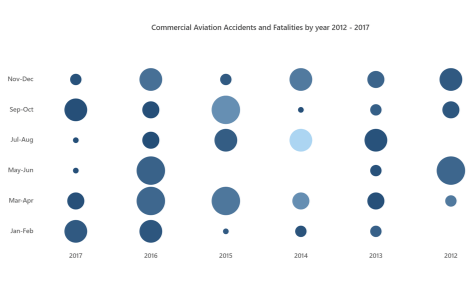
- Specialized HeatMap Types - Includes Bubble HeatMap (size‑based markers), Calendar HeatMap (time‑series visualization), and sector‑based HeatMaps for richer data expression.
- Data Binding Options - Bind data from arrays, JSON, cell‑based data collections, or table formats using powerful adaptor support.
- Full Customization - Customize cell shape, labels, gridlines, palettes, axis styles, and overall layout to match your application’s design requirements.
- Responsive & High‑Performance Rendering - Designed for large datasets with optimized memory usage and smooth rendering across desktops, tablets, and mobile devices.
- Accessibility & Localization - Includes ARIA attributes, keyboard navigation, and right‑to‑left (RTL) support, along with cultural formatting for global applications.
- Blazor Server & WebAssembly Support - Fully compatible with Blazor Server and Blazor WebAssembly project types.
System Requirements
- .NET 8.0 or later (Blazor Web App, Blazor Server, Blazor WebAssembly and Blazor Hybrid)
- See full requirements: System Requirements.
Installation
Install the HeatMap package, which provides the scripts referenced below:
dotnet add package Syncfusion.Blazor.HeatMap
Add script references
- For Blazor Server App / Blazor Web App, add these to
Components/App.razororApp.razor. - For Blazor WebAssembly App: add these to
wwwroot/index.html.
<script src="_content/Syncfusion.Blazor.Core/scripts/syncfusion-blazor.min.js" type="text/javascript"></script>
Quick Start
- Register the Syncfusion® Blazor services in
Program.cs:
using Syncfusion.Blazor;

builder.Services.AddSyncfusionBlazor();
- Add the HeatMap component in a Razor page:
<SfHeatMap DataSource="@HeatMapData">
    <HeatMapTitleSettings Text="Sales Revenue per Employee (in 1000 US$)"></HeatMapTitleSettings>
    <HeatMapCellSettings ShowLabel="true" TileType="CellType.Rect"></HeatMapCellSettings>
</SfHeatMap>

@code{
    int[,] GetDefaultData()
    {
        int[,] dataSource = new int[,]
        {
            {52, 65, 67, 45, 37, 52},
            {68, 52, 63, 51, 30, 51},
            {7, 16, 47, 47, 88, 6},
            {66, 64, 46, 40, 47, 41},
            {14, 46, 97, 69, 69, 3},
            {54, 46, 61, 46, 40, 39}
        };
        return dataSource;
    }
    public object HeatMapData { get; set; }
    protected override void OnInitialized()
    {
        HeatMapData = GetDefaultData();
    }
}
Documentation
- Getting Started with Blazor Web App
- Getting Started with Blazor WebAssembly App
- Feature Overview
- API Reference
- Live Demos
Support
License
This is a commercial product and requires a valid license for production use. Syncfusion® licensed software is subject to the terms and conditions of the Syncfusion® EULA.
About Syncfusion®
Syncfusion® provides 1600+ UI components and frameworks for web, mobile, and desktop development across multiple platforms:
Web: Blazor | ASP.NET Core | ASP.NET MVC | JavaScript | Angular | React | Vue
Desktop: WinForms | WPF | WinUI
Learn more at www.syncfusion.com.
sales@syncfusion.com | Toll Free: 1-888-9-DOTNET
| Product | Versions Compatible and additional computed target framework versions. |
|---|---|
| .NET | net8.0 is compatible. net8.0-android was computed. net8.0-browser was computed. net8.0-ios was computed. net8.0-maccatalyst was computed. net8.0-macos was computed. net8.0-tvos was computed. net8.0-windows was computed. net9.0 is compatible. net9.0-android was computed. net9.0-browser was computed. net9.0-ios was computed. net9.0-maccatalyst was computed. net9.0-macos was computed. net9.0-tvos was computed. net9.0-windows was computed. net10.0 is compatible. net10.0-android was computed. net10.0-browser was computed. net10.0-ios was computed. net10.0-maccatalyst was computed. net10.0-macos was computed. net10.0-tvos was computed. net10.0-windows was computed. |
-
net10.0
- Syncfusion.Blazor.Core (>= 34.2.7)
- Syncfusion.Blazor.Data (>= 34.2.7)
- Syncfusion.Blazor.DataVizCommon (>= 34.2.7)
- Syncfusion.PdfExport.Net.Core (>= 34.2.7)
-
net8.0
- Syncfusion.Blazor.Core (>= 34.2.7)
- Syncfusion.Blazor.Data (>= 34.2.7)
- Syncfusion.Blazor.DataVizCommon (>= 34.2.7)
- Syncfusion.PdfExport.Net.Core (>= 34.2.7)
-
net9.0
- Syncfusion.Blazor.Core (>= 34.2.7)
- Syncfusion.Blazor.Data (>= 34.2.7)
- Syncfusion.Blazor.DataVizCommon (>= 34.2.7)
- Syncfusion.PdfExport.Net.Core (>= 34.2.7)
NuGet packages (1)
Showing the top 1 NuGet packages that depend on Syncfusion.Blazor.HeatMap:
| Package | Downloads |
|---|---|
|
Jakar.Extensions.Blazor.Syncfusion
Extensions to aid in development. |
GitHub repositories
This package is not used by any popular GitHub repositories.
| Version | Downloads | Last Updated |
|---|---|---|
| 34.2.7 | 0 | 9/8/2026 |
| 34.2.6 | 320 | 8/31/2026 |
| 34.2.5 | 236 | 8/25/2026 |
| 34.2.4 | 329 | 8/17/2026 |
| 34.2.3 | 310 | 8/11/2026 |
| 34.2.2 | 613 | 8/5/2026 |
| 34.1.33 | 303 | 7/27/2026 |
| 34.1.32 | 381 | 7/21/2026 |
| 34.1.31 | 1,629 | 7/14/2026 |
| 34.1.30 | 1,146 | 7/9/2026 |
| 34.1.29 | 665 | 7/6/2026 |
| 33.2.15 | 479 | 6/23/2026 |
| 33.2.13 | 776 | 6/16/2026 |
| 33.2.12 | 269 | 6/9/2026 |
| 33.2.10 | 777 | 6/2/2026 |
| 33.2.8 | 403 | 5/26/2026 |
| 33.2.7 | 362 | 5/19/2026 |
| 33.2.6 | 1,549 | 5/12/2026 |
| 33.2.5 | 1,876 | 5/4/2026 |
| 33.2.4 | 632 | 4/27/2026 |