Syncfusion.Blazor.Charts
33.1.44
Prefix Reserved
See the version list below for details.
dotnet add package Syncfusion.Blazor.Charts --version 33.1.44
NuGet\Install-Package Syncfusion.Blazor.Charts -Version 33.1.44
<PackageReference Include="Syncfusion.Blazor.Charts" Version="33.1.44" />
<PackageVersion Include="Syncfusion.Blazor.Charts" Version="33.1.44" />
<PackageReference Include="Syncfusion.Blazor.Charts" />
paket add Syncfusion.Blazor.Charts --version 33.1.44
#r "nuget: Syncfusion.Blazor.Charts, 33.1.44"
#:package Syncfusion.Blazor.Charts@33.1.44
#addin nuget:?package=Syncfusion.Blazor.Charts&version=33.1.44
#tool nuget:?package=Syncfusion.Blazor.Charts&version=33.1.44
Syncfusion® Blazor Charts
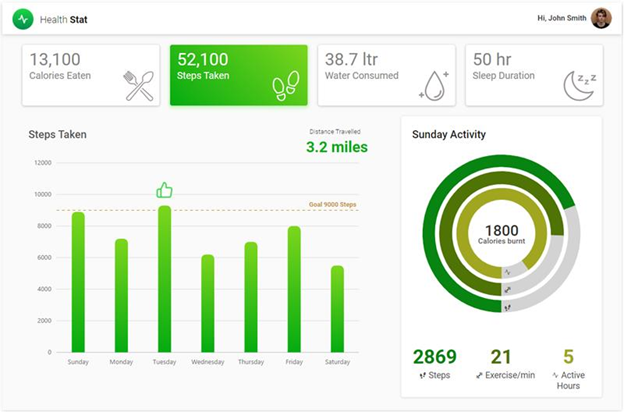
High-performance charting component with 30+ chart types for data visualization in Blazor applications. Render large datasets quickly with extensive interactivity and customization options.
Key Features
- 50+ Chart Types: Line, Area, Column, Bar, Spline, Scatter, Bubble, Pie, Donut, Pyramid, Funnel, Polar, Radar, and more
- Cartesian: Line, Spline, Area, Step, Column, Bar, Stacked/100%, Range, Scatter, Bubble
- Polar/Radar Charts: Line, Area, Column, Range
- Accumulation Charts: Pie, Donut, Pyramid, Funnel
- Stacked & Range Charts: Stacked variants (100%), Range Area, Range Column
- Financial Charts: Candlestick, OHLC, HiLo for stock market data
- Special Charts: Box and Whisker, Histogram, Waterfall, Pareto, and Stacked variants.
- Interactive Features: Crosshair, trackball, zooming, panning, tooltip, selection
- High Performance: Lazy loading and efficient rendering of large datasets
- Customization: Template support, legend customization, axis formatting
- Responsive & Mobile-friendly: Touch gestures and adaptive layouts
- Multiple Themes: Built-in and custom styling options
System Requirements
- .NET 8.0 or later (Blazor Server, Blazor Web App, Blazor WebAssembly, Blazor Hybrid)
- See full requirements: System Requirements
Installation
.NET CLI
dotnet add package Syncfusion.Blazor.Charts
NuGet Package Manager
Install-Package Syncfusion.Blazor.Charts
Add Stylesheet and Script References
For Blazor Web App / Blazor Server, add these to Components/App.razor or App.razor.
For Blazor WebAssembly, add these to wwwroot/index.html.
<link href="_content/Syncfusion.Blazor.Themes/bootstrap5.css" rel="stylesheet" />
<script src="_content/Syncfusion.Blazor.Core/scripts/syncfusion-blazor.min.js" type="text/javascript"></script>
Quick Start
- Register the Syncfusion® Blazor service in
Program.cs:
using Syncfusion.Blazor;

builder.Services.AddSyncfusionBlazor();
- Add a chart to your Razor page:
@using Syncfusion.Blazor.Charts

<SfChart Title="Monthly Sales">
    <ChartPrimaryXAxis ValueType="Syncfusion.Blazor.Charts.ValueType.Category">
        <ChartAxisMajorGridLines Width="0"></ChartAxisMajorGridLines>
    </ChartPrimaryXAxis>
    <ChartSeriesCollection>
        <ChartSeries DataSource="@SalesData" XName="Month" YName="Sales" Type="ChartSeriesType.Column">
        </ChartSeries>
    </ChartSeriesCollection>
</SfChart>

@code {
    public class SalesData
    {
        public string Month { get; set; }
        public double Sales { get; set; }
    }

    private List<SalesData> SalesData = new List<SalesData>
    {
        new SalesData { Month = "Jan", Sales = 35 },
        new SalesData { Month = "Feb", Sales = 28 },
        new SalesData { Month = "Mar", Sales = 34 },
        new SalesData { Month = "Apr", Sales = 32 },
        new SalesData { Month = "May", Sales = 40 }
    };
}
Documentation
- Getting Started with Blazor Web App
- Getting Started with Blazor Server
- Getting Started with WebAssembly
- API Reference
- Live Demos
- Feature Overview
Support
License
This is a commercial product and requires a paid license for possession or use. Review the Syncfusion® EULA.
About Syncfusion®
Syncfusion® provides 1600+ UI components and frameworks for web, mobile, and desktop development across multiple platforms:
Web: Blazor | ASP.NET Core | ASP.NET MVC | JavaScript | Angular | React | Vue
Desktop: WinForms | WPF | WinUI
Learn more at www.syncfusion.com.
sales@syncfusion.com | Toll Free: 1-888-9-DOTNET
| Product | Versions Compatible and additional computed target framework versions. |
|---|---|
| .NET | net8.0 is compatible. net8.0-android was computed. net8.0-browser was computed. net8.0-ios was computed. net8.0-maccatalyst was computed. net8.0-macos was computed. net8.0-tvos was computed. net8.0-windows was computed. net9.0 is compatible. net9.0-android was computed. net9.0-browser was computed. net9.0-ios was computed. net9.0-maccatalyst was computed. net9.0-macos was computed. net9.0-tvos was computed. net9.0-windows was computed. net10.0 is compatible. net10.0-android was computed. net10.0-browser was computed. net10.0-ios was computed. net10.0-maccatalyst was computed. net10.0-macos was computed. net10.0-tvos was computed. net10.0-windows was computed. |
-
net10.0
- Syncfusion.Blazor.Core (>= 33.1.44)
- Syncfusion.Blazor.Data (>= 33.1.44)
- Syncfusion.Blazor.DataVizCommon (>= 33.1.44)
- Syncfusion.ExcelExport.Net.Core (>= 33.1.44)
- Syncfusion.PdfExport.Net.Core (>= 33.1.44)
-
net8.0
- Syncfusion.Blazor.Core (>= 33.1.44)
- Syncfusion.Blazor.Data (>= 33.1.44)
- Syncfusion.Blazor.DataVizCommon (>= 33.1.44)
- Syncfusion.ExcelExport.Net.Core (>= 33.1.44)
- Syncfusion.PdfExport.Net.Core (>= 33.1.44)
-
net9.0
- Syncfusion.Blazor.Core (>= 33.1.44)
- Syncfusion.Blazor.Data (>= 33.1.44)
- Syncfusion.Blazor.DataVizCommon (>= 33.1.44)
- Syncfusion.ExcelExport.Net.Core (>= 33.1.44)
- Syncfusion.PdfExport.Net.Core (>= 33.1.44)
NuGet packages (13)
Showing the top 5 NuGet packages that depend on Syncfusion.Blazor.Charts:
| Package | Downloads |
|---|---|
|
Syncfusion.Blazor.PivotTable
Syncfusion® Blazor Pivot Table (PivotView) component for data summarization and analytics in .NET Blazor apps. Supports pivoting, aggregation, drill-down, field lists, calculated fields, and export. |
|
|
Syncfusion.Blazor.RangeNavigator
Syncfusion® Blazor Range Navigator component provides an interactive range selection control for navigating and visualizing data over a range. Enables zooming, panning, and selection across large datasets with support for date-time and numeric axes, built for Blazor Server and WebAssembly applications. |
|
|
CyberFrameword10_V2
CyberFrameword10_V2 |
|
|
Whipstaff.Blazor.Syncfusion.Charts
Re-usable logic for working with Syncfusion Blazor Chart controls. |
|
|
IdentitySuite
A ready-to-use OpenId Connect Server based on Openiddict with Microsoft Identity and a comprehensive management shell. |
GitHub repositories
This package is not used by any popular GitHub repositories.
| Version | Downloads | Last Updated |
|---|---|---|
| 33.2.4 | 0 | 4/27/2026 |
| 33.2.3 | 2,006 | 4/21/2026 |
| 33.1.49 | 3,479 | 4/13/2026 |
| 33.1.47 | 2,779 | 4/6/2026 |
| 33.1.46 | 1,857 | 3/30/2026 |
| 33.1.45 | 2,608 | 3/23/2026 |
| 33.1.44 | 6,404 | 3/16/2026 |
| 32.2.9 | 8,027 | 3/9/2026 |
| 32.2.8 | 5,385 | 3/2/2026 |
| 32.2.7 | 6,516 | 2/23/2026 |
| 32.2.5 | 6,204 | 2/16/2026 |
| 32.2.4 | 4,948 | 2/10/2026 |
| 32.2.3 | 6,481 | 2/5/2026 |
| 32.1.25 | 8,242 | 1/26/2026 |
| 32.1.24 | 4,754 | 1/19/2026 |
| 32.1.23 | 6,145 | 1/13/2026 |
| 32.1.22 | 4,465 | 1/5/2026 |
| 32.1.21 | 5,240 | 12/29/2025 |
| 32.1.20 | 2,657 | 12/23/2025 |
| 32.1.19 | 7,565 | 12/16/2025 |