SvcSystems.UI.Terminal
2.3.1
See the version list below for details.
dotnet add package SvcSystems.UI.Terminal --version 2.3.1
NuGet\Install-Package SvcSystems.UI.Terminal -Version 2.3.1
<PackageReference Include="SvcSystems.UI.Terminal" Version="2.3.1" />
<PackageVersion Include="SvcSystems.UI.Terminal" Version="2.3.1" />
<PackageReference Include="SvcSystems.UI.Terminal" />
paket add SvcSystems.UI.Terminal --version 2.3.1
#r "nuget: SvcSystems.UI.Terminal, 2.3.1"
#:package SvcSystems.UI.Terminal@2.3.1
#addin nuget:?package=SvcSystems.UI.Terminal&version=2.3.1
#tool nuget:?package=SvcSystems.UI.Terminal&version=2.3.1
SvcSystems.UI.Terminal


An Avalonia terminal control powered by XTerm.NET.
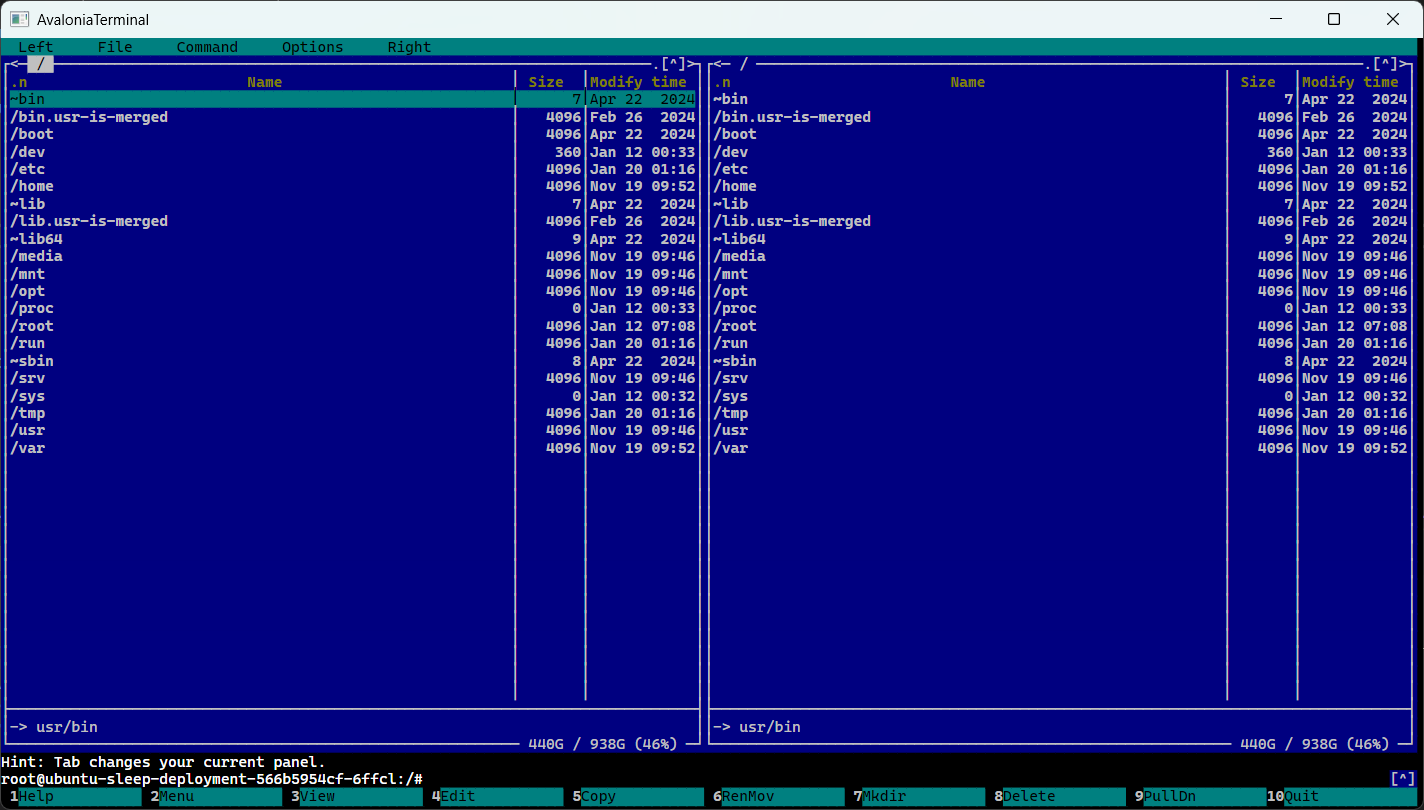
Features
- Terminal emulation, scrollback, selection, search, and caret rendering
- Mouse reporting and Kitty keyboard protocol support
- Sixel graphics
- Clipboard hooks and configurable right-click behavior
- Bindable terminal model and styling hooks
- Desktop sample with shell, scrollback, and selection demos
Install
dotnet add package SvcSystems.UI.Terminal
Quick start
Add the control to a view:
<Window
    xmlns="https://github.com/avaloniaui"
    xmlns:x="http://schemas.microsoft.com/winfx/2006/xaml"
    xmlns:terminal="using:SvcSystems.UI.Terminal">
    <terminal:TerminalControl Name="TerminalView" />
</Window>
Create a model and connect it to a process or pseudo-terminal. Send process output to
Feed and forward every UserInput payload—including keyboard, mouse, and protocol
replies—to the process:
var model = new TerminalControlModel();
TerminalView.Model = model;

model.UserInput += (_, e) =>
{
    process.StandardInput.BaseStream.Write(e.Data.Span);
    process.StandardInput.BaseStream.Flush();
};

// For each chunk read from the process:
model.Feed(buffer, bytesRead);
The host owns process and PTY management. TerminalControlModel also supports
standalone use, and TerminalOptions can configure the initial size, scrollback,
cell metrics, resize reflow, and keyboard protocol.
Interaction
- Selection: drag to select, double-click for a word or expression, and triple-click for a row. Selection extends while dragging outside the viewport.
- Search: call
Search(text), thenSelectNextSearchResult()orSelectPreviousSearchResult(). - Right-click: choose
ContextMenu,CopyOrPaste, orNonewithRightClickAction. - Mouse reporting: pointer events go to the terminal application when it enables xterm mouse reporting; otherwise they remain available for selection.
- Kitty keyboard: keys use the protocol only after the application enables it.
Disable it with
TerminalOptions.KittyKeyboardEnabled = falseif needed.
Clipboard reads and terminal-initiated clipboard writes are disabled by default. Hosts handling untrusted terminal output should keep writes disabled unless they have an appropriate user-consent policy.
Styling
Add TerminalTheme to your application styles:
<Application
    xmlns="https://github.com/avaloniaui"
    xmlns:x="http://schemas.microsoft.com/winfx/2006/xaml"
    xmlns:terminal="using:SvcSystems.UI.Terminal">
    <Application.Styles>
        <terminal:TerminalTheme />
    </Application.Styles>
</Application>
The theme provides the 256-color palette as SvcSystems.UI.TerminalColor0 through
SvcSystems.UI.TerminalColor255. Override those resources to customize the palette.
Individual controls expose FontFamily, FontSize, CaretBrush, and SelectionBrush.
Loading Styles/Colors.axaml with StyleInclude remains supported for compatibility,
but TerminalTheme is preferred.
Run the sample
dotnet run --project src/SvcSystems.UI.Terminal.Desktop
The sample includes Shell, Scroll, and Selection tabs. On Windows, the shell
prefers a WSL PTY, then falls back to ConPTY and a redirected process. WSL is preferred
because ConPTY mediates terminal queries and can change reported capabilities and
Unicode widths. A detector run inside Windows Terminal or a ConPTY-backed shell
measures that host as well as the control.
Tests
The test project targets .NET 10 and .NET 11. To run the suite on both:
dotnet test --project tests/SvcSystems.UI.Terminal.Tests/SvcSystems.UI.Terminal.Tests.csproj -f net10.0
dotnet test --project tests/SvcSystems.UI.Terminal.Tests/SvcSystems.UI.Terminal.Tests.csproj -f net11.0
The ucs-detect integration tests run the pinned Python detector through a POSIX PTY
connected directly to a TerminalControl in an Avalonia Headless window. They check
named detector capabilities and Unicode measurements; report-schema checks catch
uncovered detector fields. The JSON report, dependency versions, and raw PTY transcript
are saved under TestResults/ucs-detect in the test output directory.
The fixture provisions and verifies the pinned dependencies in
tests/requirements-ucs-detect.txt. On Linux,
Python 3 with venv and pip is required. On Windows, the fixture uses the default
Ubuntu WSL distribution and manages its Python environment. Set UCS_DETECT_PYTHON
(Linux/macOS) or UCS_DETECT_WSL_PYTHON (Windows) to use an existing environment.
For a focused run, add a test filter, for example:
dotnet test --project tests/SvcSystems.UI.Terminal.Tests/SvcSystems.UI.Terminal.Tests.csproj -f net10.0 -- --filter-class '*UcsDetectIntegrationTests*'
On Windows, the optional UcsDetectConPtyComparisonTests diagnostic compares the
direct-PTY baseline with the sample's ConPTY route. Enable it with
UCS_DETECT_CONPTY_COMPARE=1; it requires Windows, WSL Ubuntu, and the pinned Python
dependencies. The diagnostic is skipped by default.
Benchmarks
Run the Sixel and Kitty image benchmarks in Release mode:
dotnet run -c Release --project benchmarks/SvcSystems.UI.Terminal.Benchmarks -- --filter "*Sixel*" "*Kitty*"
See benchmarks/README.md for results and notes about the
headless CPU measurements.
| Product | Versions Compatible and additional computed target framework versions. |
|---|---|
| .NET | net10.0 is compatible. net10.0-android was computed. net10.0-browser was computed. net10.0-ios was computed. net10.0-maccatalyst was computed. net10.0-macos was computed. net10.0-tvos was computed. net10.0-windows was computed. net11.0 is compatible. |
NuGet packages
This package is not used by any NuGet packages.
GitHub repositories (1)
Showing the top 1 popular GitHub repositories that depend on SvcSystems.UI.Terminal:
| Repository | Stars |
|---|---|
|
IvanJosipovic/KubeUI
Kubernetes User Interface
|
| Version | Downloads | Last Updated |
|---|---|---|
| 2.3.2 | 0 | 11/3/2026 |
| 2.3.1 | 78 | 11/2/2026 |
| 2.3.0 | 861 | 10/16/2026 |
| 2.2.4 | 129 | 10/14/2026 |
| 2.2.3 | 286 | 10/13/2026 |
| 2.2.2 | 205 | 10/12/2026 |
| 2.2.1 | 255 | 10/10/2026 |
| 2.2.0 | 235 | 10/8/2026 |
| 2.1.2 | 106 | 10/7/2026 |
| 2.1.1 | 117 | 10/6/2026 |
| 2.1.0 | 5,170 | 9/29/2026 |
| 2.0.0 | 788 | 9/24/2026 |
| 1.1.4 | 4,951 | 9/3/2026 |
| 1.1.3 | 388 | 8/29/2026 |
| 1.1.2 | 445 | 8/25/2026 |
| 1.1.1 | 857 | 8/22/2026 |
| 1.1.0 | 675 | 8/16/2026 |
| 1.0.3 | 877 | 7/30/2026 |
| 1.0.2 | 363 | 7/16/2026 |
| 1.0.1 | 2,480 | 5/14/2026 |