SplatDev.Umbraco.Plugins.SEO
2.3.2
dotnet add package SplatDev.Umbraco.Plugins.SEO --version 2.3.2
NuGet\Install-Package SplatDev.Umbraco.Plugins.SEO -Version 2.3.2
<PackageReference Include="SplatDev.Umbraco.Plugins.SEO" Version="2.3.2" />
<PackageVersion Include="SplatDev.Umbraco.Plugins.SEO" Version="2.3.2" />
<PackageReference Include="SplatDev.Umbraco.Plugins.SEO" />
paket add SplatDev.Umbraco.Plugins.SEO --version 2.3.2
#r "nuget: SplatDev.Umbraco.Plugins.SEO, 2.3.2"
#:package SplatDev.Umbraco.Plugins.SEO@2.3.2
#addin nuget:?package=SplatDev.Umbraco.Plugins.SEO&version=2.3.2
#tool nuget:?package=SplatDev.Umbraco.Plugins.SEO&version=2.3.2
SEO
Umbraco SEO plugin — drop-in meta tags, Open Graph, canonical URLs, and robots directives for published content. Supports Umbraco 13 (net8.0) and Umbraco 17 (net10.0).

Compatibility
| Umbraco | .NET | Package Version |
|---|---|---|
| 13.x | 8.0 | 2.3.2 |
| 17.x | 10.0 | 2.3.2 |
Installation
dotnet add package SplatDev.Umbraco.Plugins.SEO
Quick Start
No registration call is needed. The package ships Umbraco composers, so the AddComposers() already in the default Program.cs picks the plugin up as soon as the package is referenced.
Usage
Meta Tags in Views
The plugin exposes a strongly-typed SEO model holding standard meta fields. Use it in your Razor views:
@using SplatDev.Umbraco.Plugins.SEO.Models

@{
    var seo = new SEO
    {
        Title = Model.Value<string>("metaTitle") ?? Model.Name,
        Description = Model.Value<string>("metaDescription"),
        Tags = Model.Value<IEnumerable<string>>("tags") ?? [],
        Canonical = Model.Value<string>("canonical") ?? Model.Url(mode: UrlMode.Absolute),
        Robots = "index, follow"
    };
}

<title>@seo.Title</title>
<meta name="description" content="@seo.Description" />
<link rel="canonical" href="@seo.Canonical" />
Open Graph
Call GetOpenGraph() on any IPublishedContent to populate social sharing tags:
@using SplatDev.Umbraco.Plugins.SEO.Extensions

@{
    var og = Model.GetOpenGraph();
}

<meta property="og:title" content="@og.Title" />
<meta property="og:type" content="@og.Type" />
<meta property="og:url" content="@og.Url" />
<meta property="og:image" content="@og.Image" />
<meta property="og:description" content="@og.Description" />
The extension reads Umbraco properties (metaTitle, metaDescription, shareImage, canonical, author) and falls back to sensible defaults (page name, absolute URL, creation date).
URL Helpers
@using SplatDev.Umbraco.Plugins.SEO.Extensions

// Check URL structure
var isSubdomain = url.IsSubdomain();
var isWww = url.IsSubdomainNonWww();
var isAdmin = url.IsSubdomainAdmin(); // e.g. edit.example.com
Configuration
No appsettings.json keys required — all data comes from Umbraco content properties.
Models
| Model | Properties |
|---|---|
SEO |
Title, Description, Tags, Canonical, Robots, Charset |
OpenGraph |
Title, Type, Url, Image, Description, Author, DateCreated |
Changelog
2.3.2 — 2026-08-26
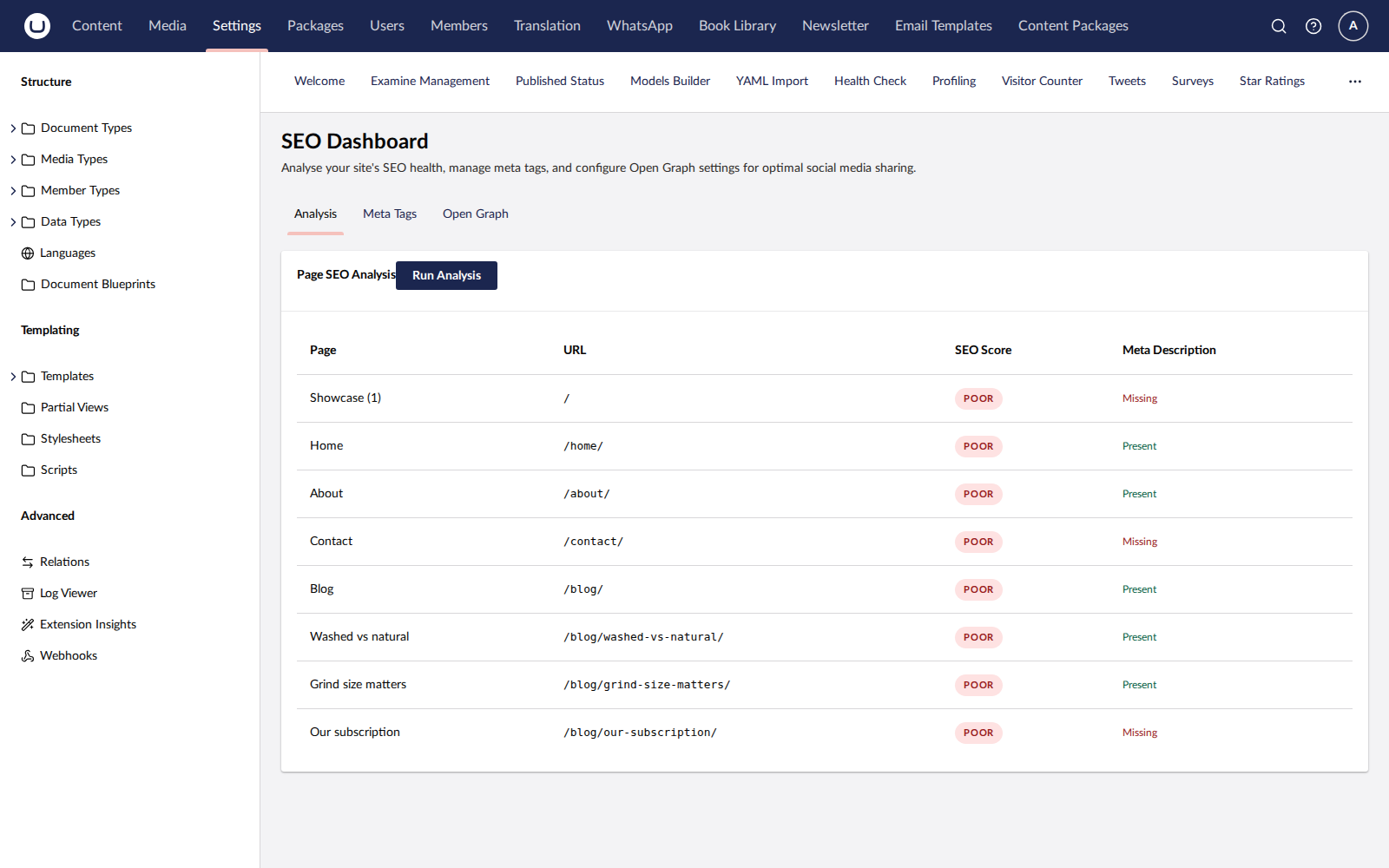
The NuGet listing now shows the dashboard. It had no screenshot before, so the listing gave no picture of what the plugin looks like in the backoffice.
2.3.1 — 2026-08-26
Fixes a duplicate registration on sites that still have a physical App_Plugins folder for this plugin, left behind by an older release that copied content into the site. Umbraco registered those extensions twice - once from its own scan of the folder, once from this package's embedded manifest - and logged "Extension with alias ... is already registered". The embedded manifest now yields to the physical copy.
2.3.0 — 2026-08-25
The Meta Tags and Open Graph tabs now save. Both previously carried a notice saying configuration was not yet persisted, and their Save buttons set a flag that showed a tick for three seconds and stored nothing.
They hold site-wide fallbacks — neither tab has a page selector, and per-page values belong on the site's own document types, which this plugin does not own. A page that sets its own SEO properties overrides them.
Stored in Umbraco's key-value store under a namespaced key rather than a table of this plugin's own. A table would need a migration, and a migration that succeeds while leaving the plugin querying a name that does not exist is a failure this codebase has seen more than once. Unreadable stored settings fall back to empty fields you can save over, rather than taking the dashboard down.
All three placeholder notices are now gone from the dashboard, because all three things they described are built.
2.2.0 — 2026-08-25
The dashboard's Analysis tab now analyses the site. It previously rendered five hardcoded pages — Home, About Us, Blog, Contact, Services — behind a notice saying the backend was pending, and its "Run Analysis" button waited a second and a half and changed nothing. There was no controller and no service in the package at all.
There is now. Every published page is scored against the limits search engines apply: titles truncate past 60 characters, descriptions past 160, and a page missing either — or carrying a noindex — is reported as poor rather than merely imperfect. A missing canonical is called out. Each page comes back with the specific issues found, not just a colour.
SEO property aliases differ between sites, so several common spellings are tried (seoMetaTitle, metaTitle, seoTitle, browserTitle and the equivalents for description, canonical and robots) rather than one being imposed.
The dashboard also tells you when a request fails instead of showing an empty list, so a refused call no longer looks like a site with no pages.
The Meta Tags and Open Graph tabs still do not persist and still say so.
2.1.7 — 2026-08-25
Documentation only, no code change. The README's Quick Start told you to call a registration method that does not exist in this package — following it produced a compile error on the first build. There is nothing to register: the package ships Umbraco composers and the AddComposers() already in the default Program.cs finds it. The Compatibility table also now shows the version actually being shipped instead of the one it was written at.
2.1.6 — 2026-08-24
Removes a dashboard screenshot that showed an error toast. It was captured against a site where this plugin's API was unreachable, so it advertised a broken dashboard. No screenshot is better than a misleading one; a replacement will be taken against a working install.
2.1.5 — 2026-08-24
Package metadata only: the listing now carries an icon and search tags, and the project and repository links point at the organisation that actually hosts this code. No code changes.
2.1.4 — 2026-08-24
This package now keeps a changelog. Earlier releases predate it and are not reconstructed here — consult the repository history for those. From this version on, every release records what changed for someone using it.
License
MIT © SplatDev
| Product | Versions Compatible and additional computed target framework versions. |
|---|---|
| .NET | net8.0 is compatible. net8.0-android was computed. net8.0-browser was computed. net8.0-ios was computed. net8.0-maccatalyst was computed. net8.0-macos was computed. net8.0-tvos was computed. net8.0-windows was computed. net9.0 was computed. net9.0-android was computed. net9.0-browser was computed. net9.0-ios was computed. net9.0-maccatalyst was computed. net9.0-macos was computed. net9.0-tvos was computed. net9.0-windows was computed. net10.0 is compatible. net10.0-android was computed. net10.0-browser was computed. net10.0-ios was computed. net10.0-maccatalyst was computed. net10.0-macos was computed. net10.0-tvos was computed. net10.0-windows was computed. |
-
net10.0
- Microsoft.Extensions.FileProviders.Embedded (>= 10.0.6)
- Umbraco.Cms.Core (>= 17.3.4)
- Umbraco.Cms.Web.Common (>= 17.3.4)
-
net8.0
- Microsoft.Extensions.FileProviders.Embedded (>= 8.0.11)
- Umbraco.Cms.Core (>= 13.12.0)
- Umbraco.Cms.Web.Common (>= 13.12.0)
NuGet packages
This package is not used by any NuGet packages.
GitHub repositories
This package is not used by any popular GitHub repositories.
| Version | Downloads | Last Updated |
|---|---|---|
| 2.3.2 | 116 | 8/27/2026 |