SplatDev.Umbraco.Plugins.2fa
3.2.1
dotnet add package SplatDev.Umbraco.Plugins.2fa --version 3.2.1
NuGet\Install-Package SplatDev.Umbraco.Plugins.2fa -Version 3.2.1
<PackageReference Include="SplatDev.Umbraco.Plugins.2fa" Version="3.2.1" />
<PackageVersion Include="SplatDev.Umbraco.Plugins.2fa" Version="3.2.1" />
<PackageReference Include="SplatDev.Umbraco.Plugins.2fa" />
paket add SplatDev.Umbraco.Plugins.2fa --version 3.2.1
#r "nuget: SplatDev.Umbraco.Plugins.2fa, 3.2.1"
#:package SplatDev.Umbraco.Plugins.2fa@3.2.1
#addin nuget:?package=SplatDev.Umbraco.Plugins.2fa&version=3.2.1
#tool nuget:?package=SplatDev.Umbraco.Plugins.2fa&version=3.2.1
SplatDev.Umbraco.Plugins.2fa
TOTP two-factor authentication for Umbraco members, with single-use backup codes.
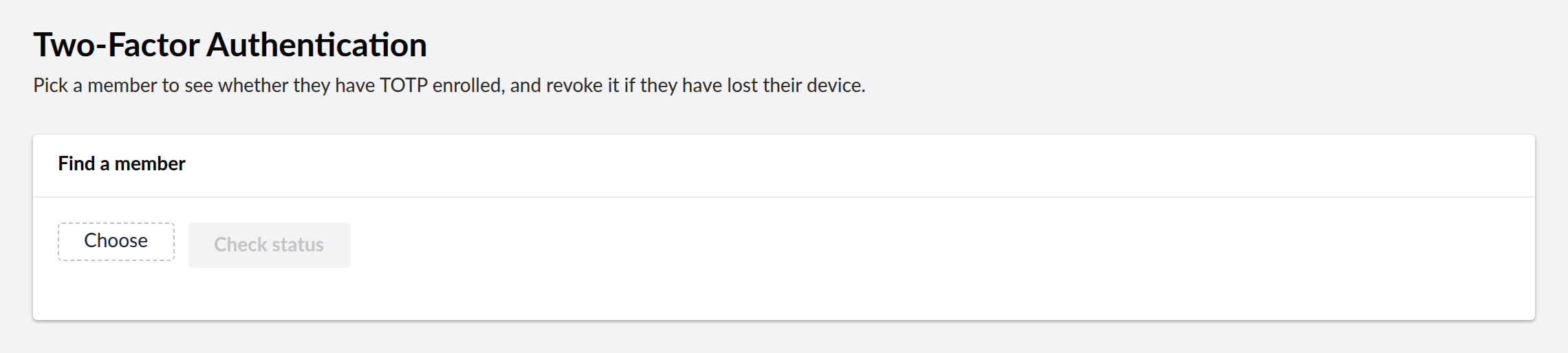
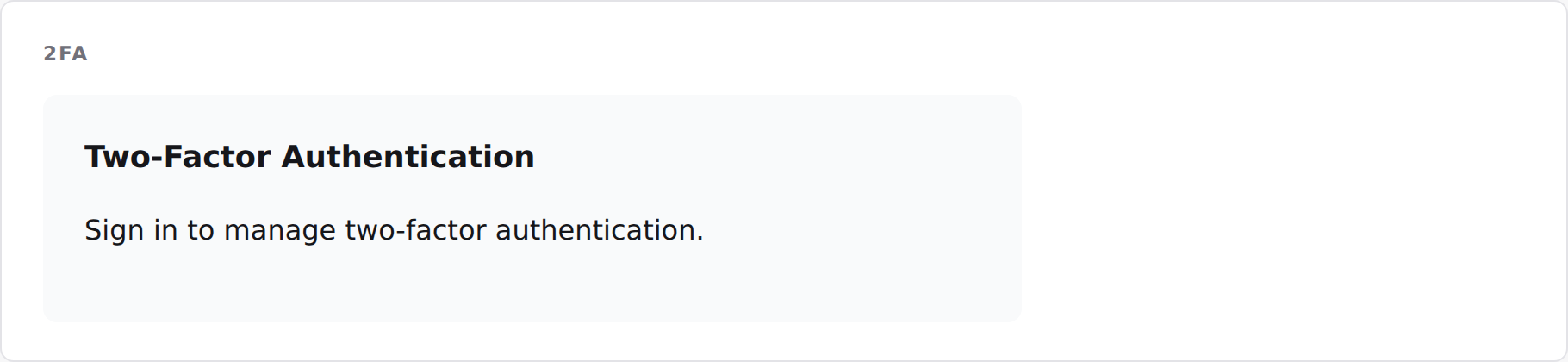
- Umbraco 13 (net8.0)
- Umbraco 17 (net10.0)
⚠️ 3.0.0 is a security release — upgrade immediately
Versions 2.1.3 and earlier contain a critical vulnerability. The API was unauthenticated and took the member id from the query string, so any anonymous caller could:
- disable 2FA for any member —
POST /umbraco/api/twofactor/Disable?memberId=1 - generate backup codes for any member and read them from the response
- read any member's TOTP secret via
SetupTotp
If you have 2.x deployed, treat every enrolled second factor as compromised: upgrade, then
have members re-enrol (SetupTotp issues a fresh secret and invalidates old backup codes).
Two further defects in 2.x are also fixed here:
- Secrets were Base64-encoded. Authenticator apps require Base32, so no member could ever complete enrolment — 2FA appeared to work but no standard app could produce a matching code.
- Backup codes were stored in plaintext, so database read access yielded working second factors.
Breaking changes
| 2.x | 3.0.0 |
|---|---|
Component.InvokeAsync("TwoFactor", new { memberId }) |
Component.InvokeAsync("TwoFactor") — the member comes from the session |
POST /umbraco/api/twofactor/Disable?memberId=N |
POST /umbraco/api/twofactor/Disable (self) or /admin/Disable?memberId=N (backoffice) |
BackupCodes.Code (plaintext) |
BackupCodes.CodeHash (SHA-256) |
| — | TwoFactorSetups.LastUsedTimeStep added |
Schema changed; regenerate migrations. No migrations shipped in 2.x, so there is no upgrade path to preserve — existing enrolments must be redone regardless.
What it does, and what it does not
It stores TOTP enrolments and backup codes for members, and exposes endpoints to enrol, verify and revoke.
It does not gate sign-in on its own. This package does not implement Umbraco's
ITwoFactorProvider, so nothing in the member login pipeline consults it. Verification
happens only where your own code calls it. If you need 2FA enforced at login, wire
VerifyTotpAsync / UseBackupCodeAsync into your member login flow — installing this
package alone does not make member logins two-factor.
Endpoints
Member self-service — requires an authenticated member, always acts on that member.
There is no memberId parameter:
| Method | Route |
|---|---|
| GET | /umbraco/api/twofactor/IsEnabled |
| POST | /umbraco/api/twofactor/SetupTotp |
| POST | /umbraco/api/twofactor/VerifyTotp?code=XXXXXX |
| POST | /umbraco/api/twofactor/GenerateBackupCodes?count=8 |
| POST | /umbraco/api/twofactor/UseBackupCode?code=XXXXX-XXXXX |
| POST | /umbraco/api/twofactor/Disable |
Backoffice — requires BackOfficeAccess:
| Method | Route |
|---|---|
| GET | /umbraco/api/twofactor/admin/IsEnabled?member={key} |
| POST | /umbraco/api/twofactor/admin/Disable?member={key} |
An administrator can see enrolment status and revoke it for a lost device, but cannot read a member's secret or mint their backup codes — that would let an administrator sign in as the member undetected.
SetupTotp returns an otpauth:// URI alongside the secret; render it as a QR code.
Front-end component
@await Component.InvokeAsync("TwoFactor")
Renders the signed-in member's own panel, and a sign-in prompt when nobody is signed in.
Implementation
TOTP is RFC 6238 (HMAC-SHA1, 30-second steps, ±1 step for drift), verified in the test suite against the vectors in RFC 6238 Appendix B and RFC 4648 §10. Codes are compared in constant time and cannot be replayed within their window. Backup codes are 40 bits of CSPRNG output, stored as SHA-256.
Database
EF Core, schema twofactor: TwoFactorSetups, BackupCodes.
The tables are created for you the first time the site starts: the plugin runs its own Umbraco migration against the database Umbraco is already using, on whichever provider it is configured with — SQL Server or SQLite. There is nothing to scaffold and nothing to run by hand.
Client build
cd client
npm install --include=dev
npx vite build
Changelog
3.2.1 — 2026-08-24
Package metadata only: the listing now carries an icon and search tags, and the project and repository links point at the organisation that actually hosts this code. No code changes.
3.2.0 — 2026-08-23
The Razor view behind @await Component.InvokeAsync(...) is now compiled into the package. It was previously carried as a loose file that nothing packed, so the component threw "view not found" on every install and the front-end usage shown in this README could not have worked.
3.1.3 — 2026-08-21
- README no longer tells you to scaffold EF Core migrations by hand — the plugin creates its own tables on first start, on SQL Server or SQLite.
3.1.2 — 2026-08-21
- Dashboard now sends the backoffice token with its API calls. On Umbraco 17 those calls were arriving unauthenticated and coming back 401, which the dashboard rendered as an empty state rather than an error.
- A failed request now raises a notification instead of leaving the dashboard looking like there is simply no data.
- The plugin's tables are created on startup. They were never created before, so anything touching them failed on a fresh install.
- Runs on SQLite as well as SQL Server. It previously assumed SQL Server and failed with "Keyword not supported: 'cache'" on the database Umbraco's installer offers by default.
| Product | Versions Compatible and additional computed target framework versions. |
|---|---|
| .NET | net8.0 is compatible. net8.0-android was computed. net8.0-browser was computed. net8.0-ios was computed. net8.0-maccatalyst was computed. net8.0-macos was computed. net8.0-tvos was computed. net8.0-windows was computed. net9.0 was computed. net9.0-android was computed. net9.0-browser was computed. net9.0-ios was computed. net9.0-maccatalyst was computed. net9.0-macos was computed. net9.0-tvos was computed. net9.0-windows was computed. net10.0 is compatible. net10.0-android was computed. net10.0-browser was computed. net10.0-ios was computed. net10.0-maccatalyst was computed. net10.0-macos was computed. net10.0-tvos was computed. net10.0-windows was computed. |
-
net10.0
- Microsoft.EntityFrameworkCore.Design (>= 10.0.7)
- Microsoft.EntityFrameworkCore.Sqlite (>= 10.0.7)
- Microsoft.EntityFrameworkCore.SqlServer (>= 10.0.7)
- Microsoft.Extensions.FileProviders.Embedded (>= 10.0.6)
- Umbraco.Cms.Core (>= 17.3.4)
- Umbraco.Cms.Web.Common (>= 17.3.4)
-
net8.0
- Microsoft.EntityFrameworkCore.Design (>= 8.0.20)
- Microsoft.EntityFrameworkCore.Sqlite (>= 8.0.20)
- Microsoft.EntityFrameworkCore.SqlServer (>= 8.0.20)
- Umbraco.Cms.Core (>= 13.12.0)
- Umbraco.Cms.Web.Common (>= 13.12.0)
NuGet packages
This package is not used by any NuGet packages.
GitHub repositories
This package is not used by any popular GitHub repositories.
| Version | Downloads | Last Updated |
|---|---|---|
| 3.2.1 | 88 | 8/24/2026 |