SignalMe 2.0.0-preview.2
See the version list below for details.
dotnet tool install --global SignalMe --version 2.0.0-preview.2
dotnet new tool-manifest
dotnet tool install --local SignalMe --version 2.0.0-preview.2
#tool dotnet:?package=SignalMe&version=2.0.0-preview.2&prerelease
nuke :add-package SignalMe --version 2.0.0-preview.2
SignalMe



SignalMe is a small presence runtime for Luxafor devices. It runs in your terminal, shows your
availability on the device, plays expressive light signals, and switches the device to away by itself
while your Windows session is locked — no GUI, no tray icon.
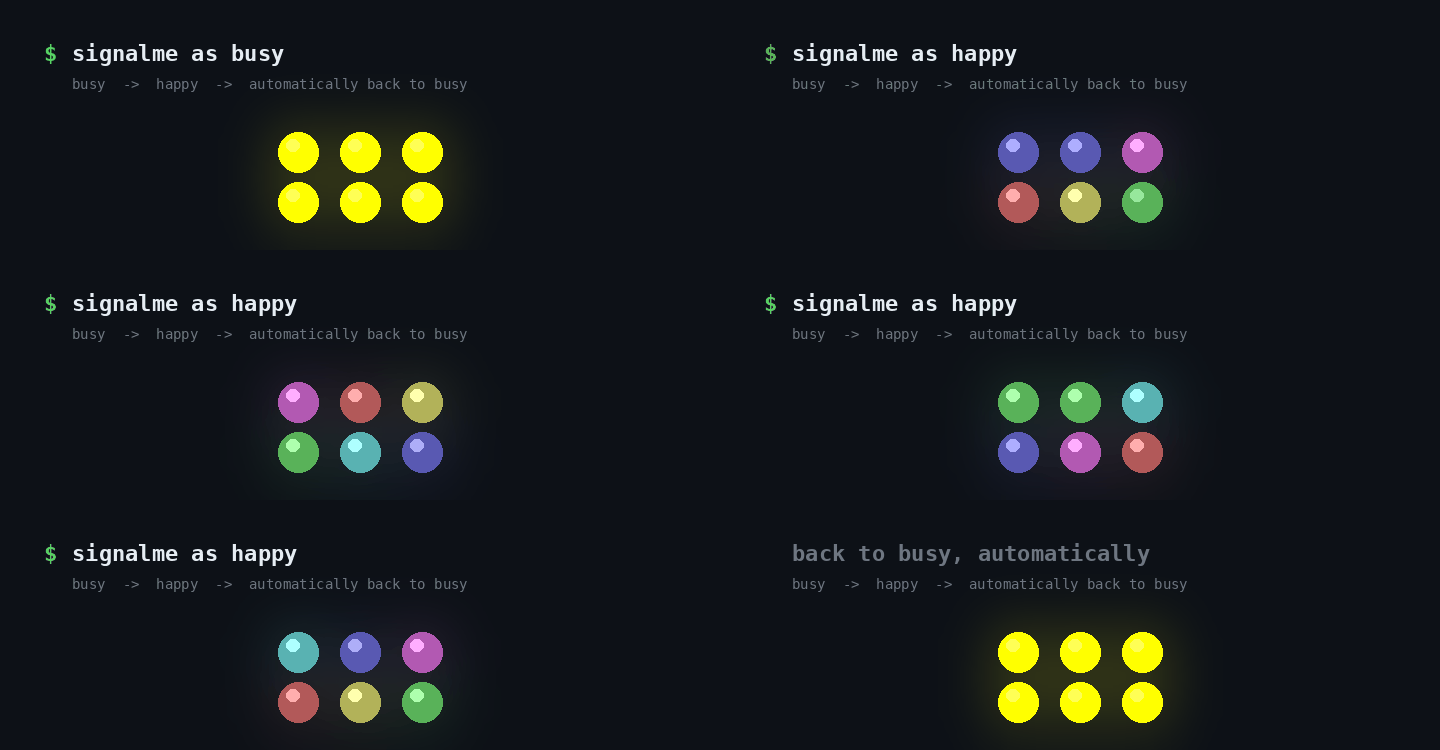
<sub>Rendered from the LED sequence the code actually produces, slowed down to be readable. Not a recording of a device.</sub>
$ signalme
SignalMe 2.0.0-preview.2
Luxafor device detected.
Mode: manual
Status: off
Commands: help
Press Ctrl+C to stop.

> busy
Status: busy

> happy
Playing: happy
Restored: busy

>
Windows session locked.
Effective status: away
>
Windows session unlocked.
Effective status: busy
> ^C
Stopping SignalMe...
SignalMe stopped.
Why SignalMe?
- No GUI. One process in a terminal, driven by short commands typed at its prompt, stopped with Ctrl+C.
- Presence-aware. Lock your Windows session and the device turns purple; unlock it and your status
comes back, untouched. You never have to set
awayyourself. - Expressive. Durable availability statuses plus temporary light signals that return to your status
on their own;
readyintentionally ends onavailable. - Honest. One component drives the device, every command it sends is checked, and SignalMe never reports a status the LEDs did not show. The device is turned off when SignalMe stops.
Install
SignalMe targets .NET 10 and runs on Windows. Installing it as a global .NET tool requires the
.NET 10 SDK: dotnet tool install ships with the SDK,
not with the runtime alone.
dotnet tool install --global SignalMe --prerelease
SignalMe 2.0 is in preview: without --prerelease, dotnet tool install picks the latest stable version,
which is still the 1.x command-line tool. Then use signalme from any shell.
dotnet tool update --global SignalMe --prerelease to update, dotnet tool uninstall --global SignalMe
to remove.
Quick start
Launch SignalMe and leave it running:
signalme # same as: signalme --mode manual
It finds your Luxafor device, shows the status it remembered from the last run (or stays off), and waits
at a > prompt. Type a status or a signal, status to see where things stand, off to switch the
device off, help for the list. Ctrl+C turns the device off and exits.
Durable statuses stay on until you change them. Temporary signals play an animation and then put your
durable status back. ready is the exception: it ends on available.
Durable statuses
| Command | Alias | Colour |
|---|---|---|
available |
free |
green |
busy |
yellow | |
do-not-disturb |
dnd |
red |
away (purple) is no longer something you type: SignalMe shows it by itself while your Windows session
is locked, and goes back to your status when you unlock it.
Temporary signals
| Command | Purpose |
|---|---|
happy |
celebratory rainbow |
bored |
slow purple drift |
desperate |
S-O-S |
warning |
emergency-style alternation |
alerting |
fast red alert |
ready |
announces availability, and ends on available |
A signal plays over your durable status, so it needs one: with SignalMe off, or while the session is locked, a signal is refused with a message. A lock during a signal stops it at once.
SignalMe remembers your durable status in your local application data and starts from it the next time. It never reports success for a command the device refused, and every failure has its own exit code.
Documentation
- Command reference — the command line, every interactive command, and the exit codes
- Statuses and signals — what each signal does, and what happens when it is interrupted
- Hardware and platform support — tested devices, Windows-only, several devices, session monitoring
- Troubleshooting — what each message means and what to do
- Development and releases — build, tests, CI, publishing
License
| Product | Versions Compatible and additional computed target framework versions. |
|---|---|
| .NET | net10.0 is compatible. net10.0-android was computed. net10.0-browser was computed. net10.0-ios was computed. net10.0-maccatalyst was computed. net10.0-macos was computed. net10.0-tvos was computed. net10.0-windows was computed. |
This package has no dependencies.
| Version | Downloads | Last Updated |
|---|---|---|
| 2.0.0-preview.3 | 52 | 10/11/2026 |
| 2.0.0-preview.2 | 48 | 10/9/2026 |
| 2.0.0-preview.1 | 52 | 10/8/2026 |
| 1.0.2 | 140 | 8/7/2026 |
| 1.0.0 | 110 | 8/7/2026 |