Sharprompt 3.1.0-preview1
See the version list below for details.
dotnet add package Sharprompt --version 3.1.0-preview1
NuGet\Install-Package Sharprompt -Version 3.1.0-preview1
<PackageReference Include="Sharprompt" Version="3.1.0-preview1" />
<PackageVersion Include="Sharprompt" Version="3.1.0-preview1" />
<PackageReference Include="Sharprompt" />
paket add Sharprompt --version 3.1.0-preview1
#r "nuget: Sharprompt, 3.1.0-preview1"
#:package Sharprompt@3.1.0-preview1
#addin nuget:?package=Sharprompt&version=3.1.0-preview1&prerelease
#tool nuget:?package=Sharprompt&version=3.1.0-preview1&prerelease
Sharprompt

Interactive command-line based application framework for C#
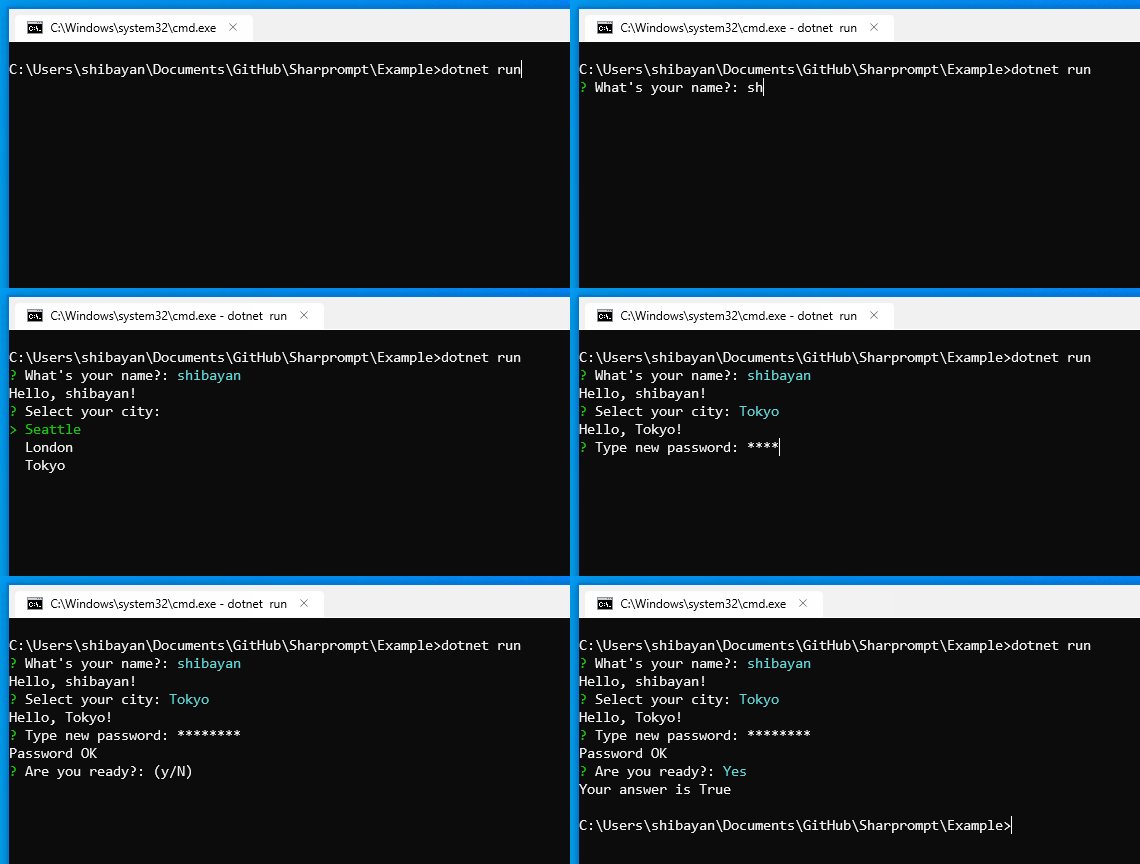
Features
- Multi-platform support
- Supports the popular prompts (
Input/Password/Select/ etc) - Supports model-based prompts
- Validation of input value
- Automatic generation of data source using Enum type
- Customizable symbols and color schema
- Unicode support (Multi-byte characters and Emoji😀🎉)
Installation
Install-Package Sharprompt
dotnet add package Sharprompt
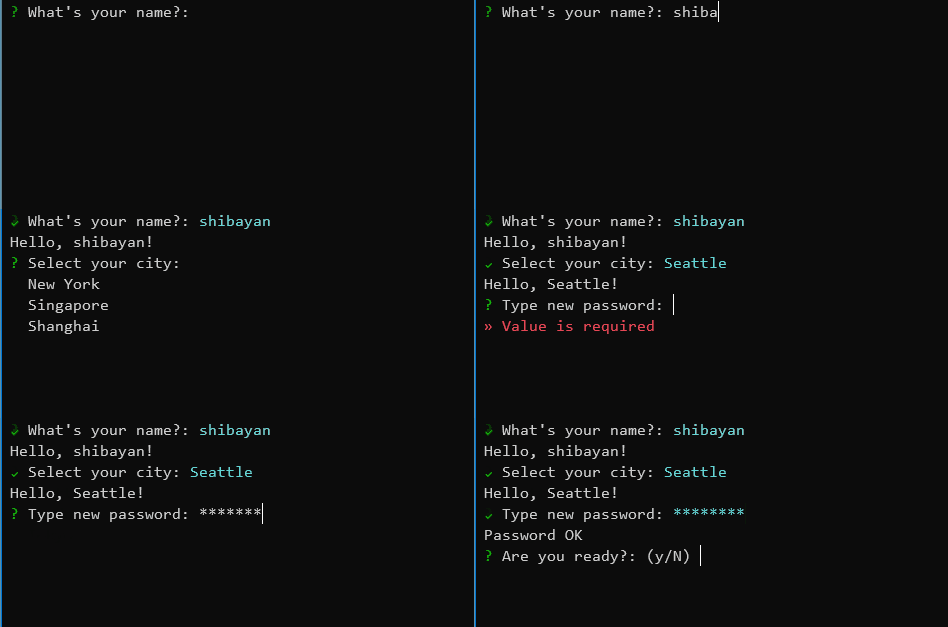
Quick start
// Simple input
var name = Prompt.Input<string>("What's your name?");
Console.WriteLine($"Hello, {name}!");

// Password input
var secret = Prompt.Password("Type new password", validators: new[] { Validators.Required(), Validators.MinLength(8) });
Console.WriteLine("Password OK");

// Confirmation
var answer = Prompt.Confirm("Are you ready?", defaultValue: true);
Console.WriteLine($"Your answer is {answer}");
Examples
The project in the folder Sharprompt.Example contains all the samples. Please check it.
dotnet run --project Sharprompt.Example
Prompt types
Input
Takes a generic type parameter and performs type conversion as appropriate.
var name = Prompt.Input<string>("What's your name?");
Console.WriteLine($"Hello, {name}!");

var number = Prompt.Input<int>("Enter any number");
Console.WriteLine($"Input = {number}");

Confirm
var answer = Prompt.Confirm("Are you ready?");
Console.WriteLine($"Your answer is {answer}");

Password
var secret = Prompt.Password("Type new password");
Console.WriteLine("Password OK");

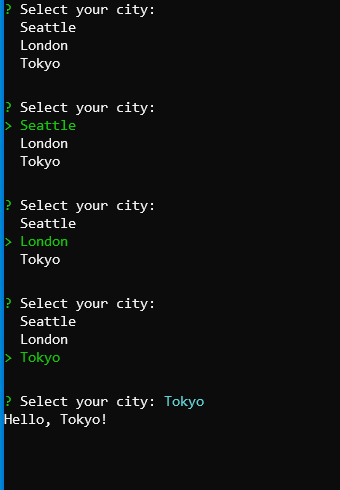
Select
var city = Prompt.Select("Select your city", new[] { "Seattle", "London", "Tokyo" });
Console.WriteLine($"Hello, {city}!");
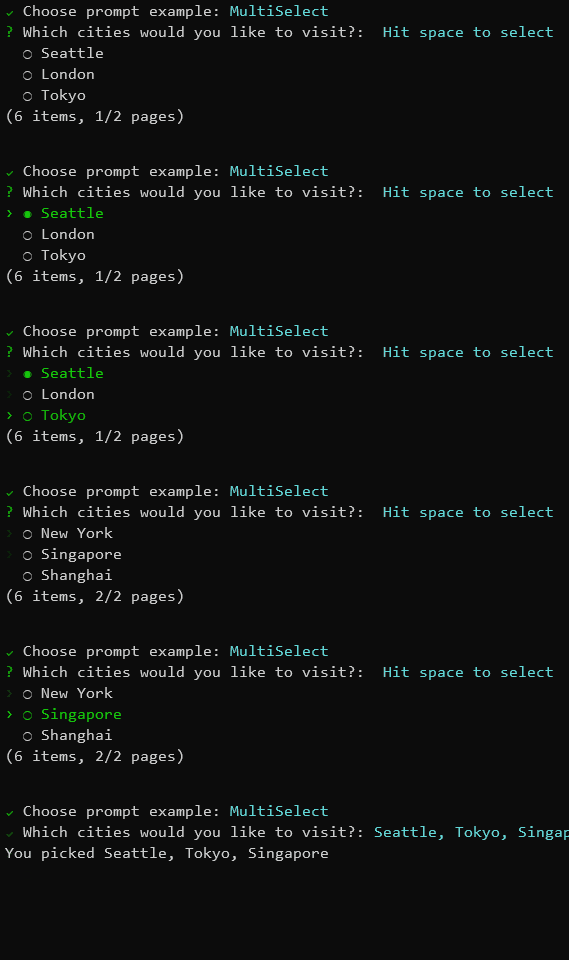
MultiSelect (Checkbox)
var cities = Prompt.MultiSelect("Which cities would you like to visit?", new[] { "Seattle", "London", "Tokyo", "New York", "Singapore", "Shanghai" }, pageSize: 3);
Console.WriteLine($"You picked {string.Join(", ", cities)}");
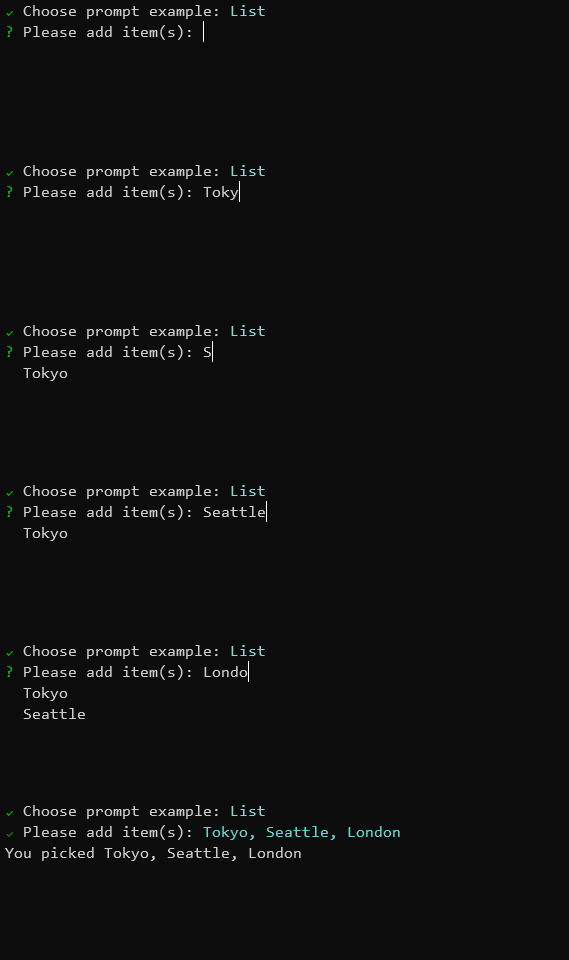
List
var value = Prompt.List<string>("Please add item(s)");
Console.WriteLine($"You picked {string.Join(", ", value)}");
Bind (Model-based prompts)
// Input model definition
public class MyFormModel
{
    [Display(Name = "What's your name?")]
    [Required]
    public string Name { get; set; }

    [Display(Name = "Type new password")]
    [DataType(DataType.Password)]
    [Required]
    [MinLength(8)]
    public string Password { get; set; }

    [Display(Name = "Select your city")]
    [Required]
    [InlineItems("Seattle", "London", "Tokyo")]
    public string City { get; set; }

    [Display(Name = "Are you ready?")]
    public bool? Ready { get; set; }
}

var result = Prompt.Bind<MyFormModel>();
Configuration
Symbols
Prompt.Symbols.Prompt = new Symbol("🤔", "?");
Prompt.Symbols.Done = new Symbol("😎", "V");
Prompt.Symbols.Error = new Symbol("😱", ">>");

var name = Prompt.Input<string>("What's your name?");
Console.WriteLine($"Hello, {name}!");
Color schema
Prompt.ColorSchema.Answer = ConsoleColor.DarkRed;
Prompt.ColorSchema.Select = ConsoleColor.DarkCyan;

var name = Prompt.Input<string>("What's your name?");
Console.WriteLine($"Hello, {name}!");
Cancellation support
// Throw an exception when canceling with Ctrl-C
Prompt.ThrowExceptionOnCancel = true;

try
{
    var name = Prompt.Input<string>("What's your name?");
    Console.WriteLine($"Hello, {name}!");
}
catch (PromptCanceledException ex)
{
    Console.WriteLine("Prompt canceled");
}
Validators
Sharprompt provides built-in validators that can be used with the validators parameter.
var secret = Prompt.Password("Type new password", validators: new[] { Validators.Required(), Validators.MinLength(8) });
| Validator | Description |
|---|---|
Validators.Required() |
Ensures the input is not empty |
Validators.MinLength(length) |
Ensures the input has at least the specified number of characters |
Validators.MaxLength(length) |
Ensures the input does not exceed the specified number of characters |
Validators.RegularExpression(pattern) |
Ensures the input matches the specified regular expression |
Additional features
Enum type support
public enum MyEnum
{
    [Display(Name = "First value")]
    First,
    [Display(Name = "Second value")]
    Second,
    [Display(Name = "Third value")]
    Third
}

var value = Prompt.Select<MyEnum>("Select enum value");
Console.WriteLine($"You selected {value}");
Unicode support
// Prefer UTF-8 as the output encoding
Console.OutputEncoding = Encoding.UTF8;

var name = Prompt.Input<string>("What's your name?");
Console.WriteLine($"Hello, {name}!");
Fluent interface support
using Sharprompt.Fluent;

// Use fluent interface
var city = Prompt.Select<string>(o => o.WithMessage("Select your city")
                                       .WithItems(new[] { "Seattle", "London", "Tokyo" })
                                       .WithDefaultValue("Seattle"));
Supported platforms
- Windows
- Command Prompt
- PowerShell
- Windows Terminal
- Linux (Ubuntu, etc)
- Windows Terminal (WSL 2)
- macOS
- Terminal.app
License
This project is licensed under the MIT License
| Product | Versions Compatible and additional computed target framework versions. |
|---|---|
| .NET | net8.0 is compatible. net8.0-android was computed. net8.0-browser was computed. net8.0-ios was computed. net8.0-maccatalyst was computed. net8.0-macos was computed. net8.0-tvos was computed. net8.0-windows was computed. net9.0 was computed. net9.0-android was computed. net9.0-browser was computed. net9.0-ios was computed. net9.0-maccatalyst was computed. net9.0-macos was computed. net9.0-tvos was computed. net9.0-windows was computed. net10.0 was computed. net10.0-android was computed. net10.0-browser was computed. net10.0-ios was computed. net10.0-maccatalyst was computed. net10.0-macos was computed. net10.0-tvos was computed. net10.0-windows was computed. |
-
net8.0
- No dependencies.
NuGet packages (8)
Showing the top 5 NuGet packages that depend on Sharprompt:
| Package | Downloads |
|---|---|
|
NukeBuildHelpers
NukeBuildHelpers for Nuke build. |
|
|
Dabit.Utils.YamlConfigManager
Package Description |
|
|
NiuX
NiuX 基础设施 |
|
|
Filepicker
Simple CLI UI filepicker with directory navigation |
|
|
42.CLI.Toolkit
Handy toolkit for a fancy CLI application. |
GitHub repositories (12)
Showing the top 12 popular GitHub repositories that depend on Sharprompt:
| Repository | Stars |
|---|---|
|
AutoDarkMode/Windows-Auto-Night-Mode
Automatically switches between the dark and light theme of Windows 10 and Windows 11
|
|
|
github/gh-actions-importer
GitHub Actions Importer helps you plan and automate the migration of Azure DevOps, Bamboo, Bitbucket, CircleCI, GitLab, Jenkins, and Travis CI pipelines to GitHub Actions.
|
|
|
microsoft/winget-create
The Windows Package Manager Manifest Creator command-line tool (aka wingetcreate)
|
|
|
github/gh-valet
Valet helps facilitate the migration of Azure DevOps, CircleCI, GitLab CI, Jenkins, and Travis CI pipelines to GitHub Actions.
|
|
|
void-stack/VMUnprotect.Dumper
VMUnprotect.Dumper can dynamically untamper VMProtected Assembly.
|
|
|
Maoni0/realmon
A monitoring tool that tells you when GCs happen in a process and some characteristics about these GCs
|
|
|
mayuki/Chell
Write scripts with the power of C# and .NET
|
|
|
OpenTouryoProject/OpenTouryo
”Open棟梁”は、長年の.NETアプリケーション開発実績にて蓄積したノウハウに基づき開発した.NET用アプリケーション フレームワークです。 (”OpenTouryo” , is an application framework for .NET which was developed using the accumulated know-how with a long track record in .NET application development.)
|
|
|
void-stack/VMAttack
Research on code virtualization in .NET [WIP]
|
|
|
Serg-Norseman/GEDKeeper
GEDKeeper - program for work with personal genealogical database
|
|
|
ingen084/KyoshinEewViewerIngen
Custom client for Kyoshin Monitor
|
|
|
FrostyToolsuite/FrostyToolsuite
The most advanced modding platform for games running on DICE's Frostbite game engine.
|
| Version | Downloads | Last Updated |
|---|---|---|
| 3.1.3 | 1,296 | 9/30/2026 |
| 3.1.2 | 30,661 | 7/5/2026 |
| 3.1.1 | 80,967 | 4/14/2026 |
| 3.1.0 | 719 | 4/9/2026 |
| 3.1.0-preview2 | 134 | 3/31/2026 |
| 3.1.0-preview1 | 151 | 3/5/2026 |
| 3.0.1 | 152,663 | 9/22/2025 |
| 3.0.0 | 119,956 | 1/8/2025 |
| 3.0.0-preview5 | 772 | 11/16/2024 |
| 3.0.0-preview4 | 9,309 | 9/4/2023 |
| 3.0.0-preview3 | 823 | 8/12/2023 |
| 3.0.0-preview2 | 15,703 | 11/29/2022 |
| 3.0.0-preview1 | 859 | 11/13/2022 |
| 2.4.5 | 961,693 | 9/27/2022 |
| 2.4.4 | 11,588 | 8/26/2022 |
| 2.4.3 | 17,621 | 7/13/2022 |
| 2.4.2 | 4,142 | 7/6/2022 |
| 2.4.1 | 43,662 | 4/4/2022 |
| 2.4.0 | 19,571 | 12/31/2021 |
| 2.4.0-preview3 | 980 | 12/13/2021 |