SerilogTracing 1.0.0-dev-00097
See the version list below for details.
dotnet add package SerilogTracing --version 1.0.0-dev-00097
NuGet\Install-Package SerilogTracing -Version 1.0.0-dev-00097
<PackageReference Include="SerilogTracing" Version="1.0.0-dev-00097" />
<PackageVersion Include="SerilogTracing" Version="1.0.0-dev-00097" />
<PackageReference Include="SerilogTracing" />
paket add SerilogTracing --version 1.0.0-dev-00097
#r "nuget: SerilogTracing, 1.0.0-dev-00097"
#:package SerilogTracing@1.0.0-dev-00097
#addin nuget:?package=SerilogTracing&version=1.0.0-dev-00097&prerelease
#tool nuget:?package=SerilogTracing&version=1.0.0-dev-00097&prerelease
SerilogTracing 
SerilogTracing is a minimal tracing system that integrates Serilog with .NET's System.Diagnostics.Activity. You can use it to add distributed, hierarchical tracing to applications that use Serilog, and to consume traces generated by .NET components including HttpClient and ASP.NET Core.
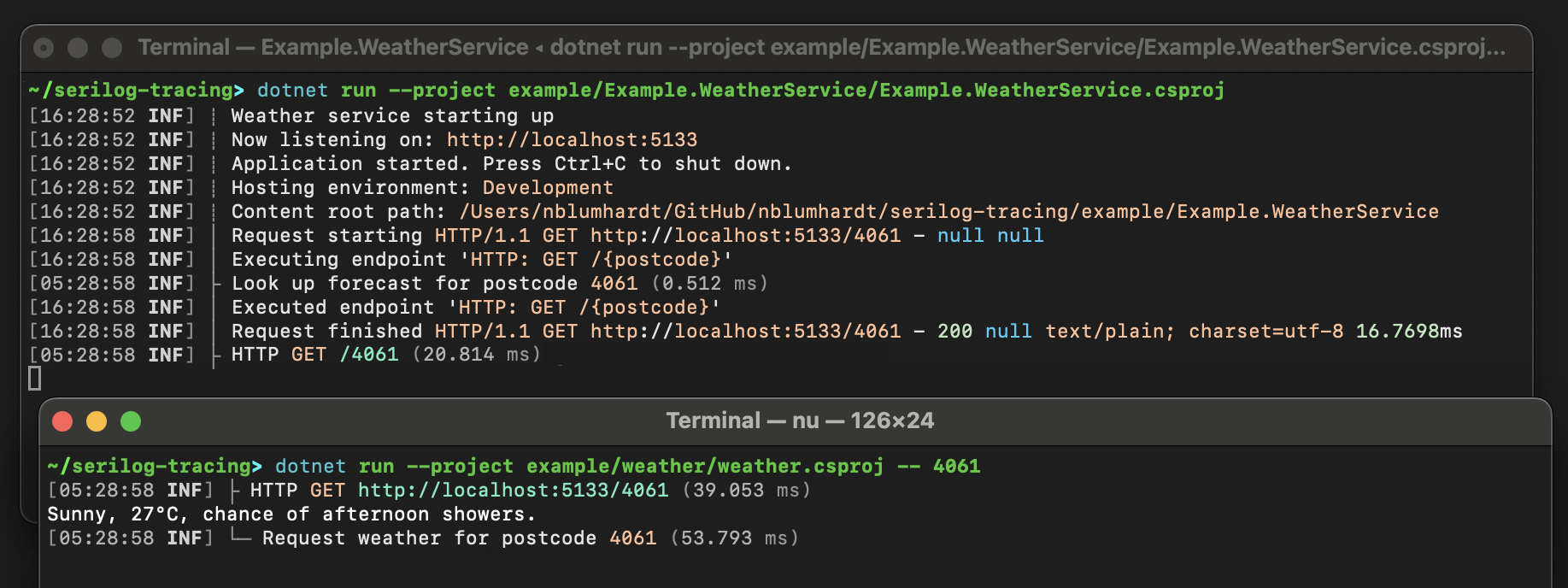
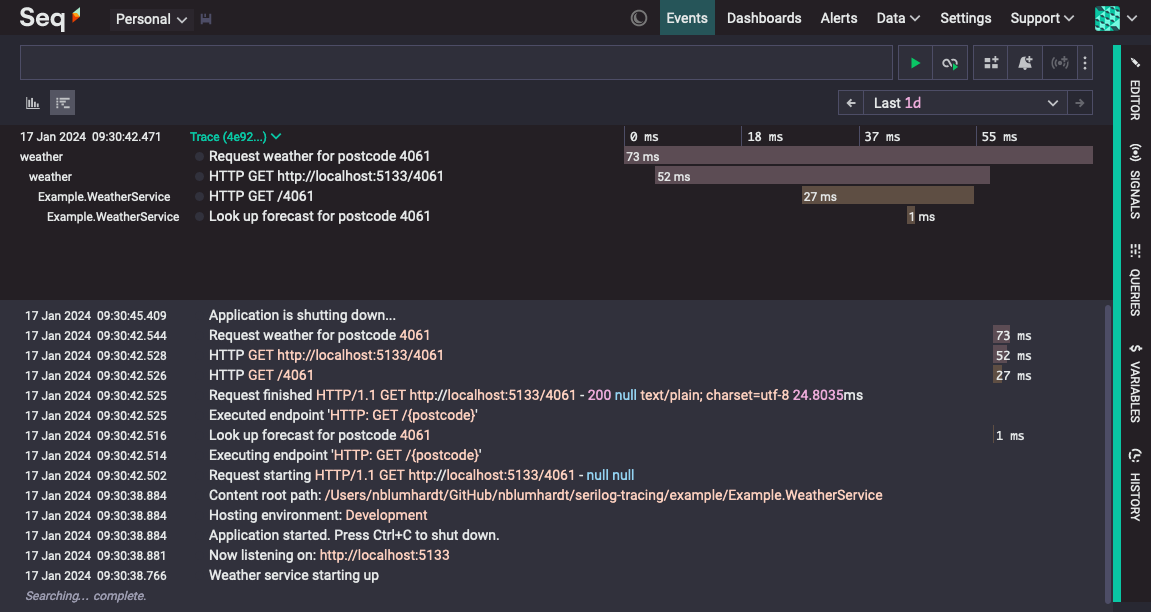
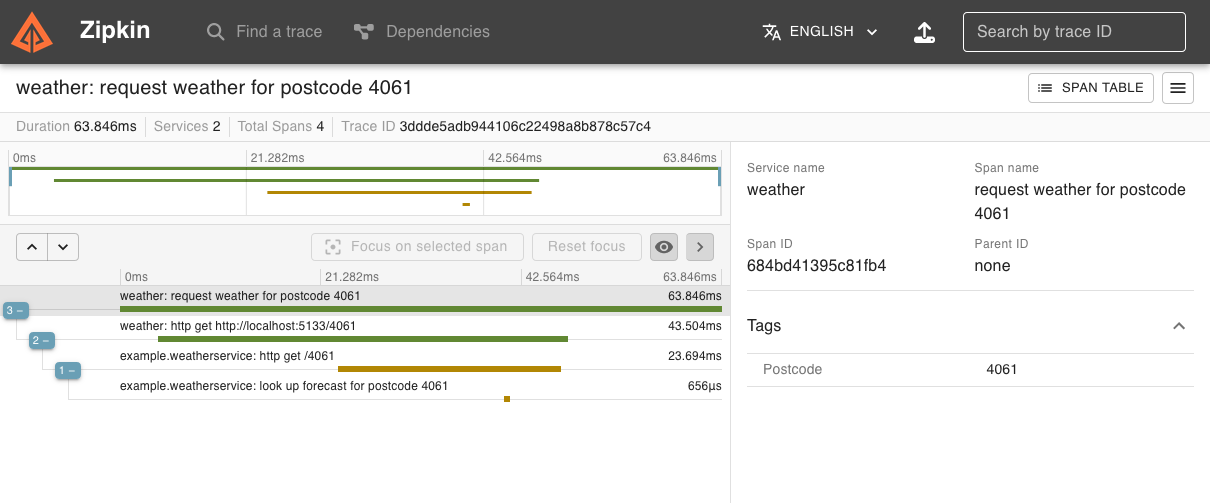
Traces are written to standard Serilog sinks. Most sinks will currently flatten traces into individual spans, but it's easy to add full tracing support to sinks with capable back-ends, and the project ships tracing-enabled sinks for OpenTelemetry, Seq, and Zipkin.
Here's the output of the included example application in the standard System.Console sink:
The same trace displayed in Seq:
And in Zipkin:
Getting started
This section walks through a very simple SerilogTracing example. To get started we'll create a simple .NET 8 console application and install some SerilogTracing packages.
mkdir example
cd example
dotnet new console
dotnet add package SerilogTracing --prerelease
dotnet add package SerilogTracing.Expressions --prerelease
dotnet add package Serilog.Sinks.Console
Replace the contents of the generated Program.cs with:
using Serilog;
using SerilogTracing;
using SerilogTracing.Expressions;

Log.Logger = new LoggerConfiguration()
    .WriteTo.Console(Formatters.CreateConsoleTextFormatter())
    .CreateLogger();

using var _ = new TracingConfiguration().EnableTracing();

using var activity = Log.Logger.StartActivity("Check {Host}", "example.com");
try
{
    var client = new HttpClient();
    var content = client.GetStringAsync("https://example.com");
    Log.Information("Content length is {ContentLength}", content.Length);

    activity.Complete();
}
catch (Exception ex)
{
    activity.Complete(LogEventLevel.Fatal, ex);
}
finally
{
    await Log.CloseAndFlushAsync();
}
Running it will print some log events and spans to the console:
dotnet run
Let's break the example down a bit.
Setting up the logger
The Serilog pipeline is set up normally:
using Serilog;
using SerilogTracing;
using SerilogTracing.Expressions;

Log.Logger = new LoggerConfiguration()
    .WriteTo.Console(Formatters.CreateConsoleTextFormatter())
    .CreateLogger();
The Formatters.CreateConsoleTextFormatter() function comes from SerilogTracing.Expressions; you can ignore this and use a regular console output template, but the one we're using here produces nice output for spans that includes timing information. Dig into the implementation of the CreateConsoleTextFormatter() function if you'd like to see how to set up your own trace-specific formatting, it's pretty straightforward.
Enabling tracing with TracingConfiguration.EnableTracing()
This line sets up SerilogTracing's integration with .NET's diagnostic sources, and starts an activity listener in the background that will write spans from the framework and third-party libraries through your Serilog pipeline:
using var _ = new TracingConfiguration().EnableTracing();
This step is optional, but you'll need this if you want to view your SerilogTracing output as hierarchical, distributed traces: without it, HttpClient won't generate spans, and won't propagate trace ids along with outbound HTTP requests.
Starting and completing activities
ILogger.StartActivity() is the main SerilogTracing API for starting activities. It works on any ILogger, and the span generated by the activity will be written through that logger, receiving the same enrichment and filtering as any other log event.
using var activity = Log.Logger.StartActivity("Check {Host}", "example.com");
StartActivity accepts a message template, just like Serilog, and you can capture structured properties by including them in the template.
The object returned from StartActivity() is a LoggerActivity, to which you can add additional structured data using AddProperty().
The LoggerActivity implements IDisposable, and if you let the activity be disposed normally, it will record the activity as complete, and write a span through the underlying ILogger.
In the example, because the activity needs to be completed before the Log.CloseAndFlushAsync() call at the end, we call Complete() explicitly on the success path:
try
{
    // ...
    activity.Complete();
}
catch (Exception ex)
{
    activity.Complete(LogEventLevel.Fatal, ex);
}
On the failure path, we call the overload of Complete() that accepts a level and exception, to mark the activity as failed and use the specified level for the generated log event.
Tracing-enabled sinks
These sinks have been built or modified to work well with tracing back-ends:
SerilogTracing.Sinks.OpenTelemetry— callWriteTo.OpenTelemetry()and passtracingEndpointalong withlogsEndpointto send traces and logs using OTLP.SerilogTracing.Sinks.Seq- callWriteTo.SeqTracing()to send logs and traces to Seq; useEnrich.WithProperty("Application", "your app")to show service names in traces.SerilogTracing.Sinks.Zipkin- callWriteTo.Zipkin()to send traces to Zipkin; logs are ignored by this sink.
Adding instrumentation for ASP.NET Core
If you're writing an ASP.NET Core application, you'll notice that the spans generated in response to web requests have very generic names, like HttpRequestIn. To fix that, first add SerilogTracing.Instrumentation.AspNetCore:
dotnet add package SerilogTracing.Instrumentation.AspNetCore
Then add Instrument.AspNetCoreRequests() to your TracingConfiguration:
using var _ = new TracingConfiguration()
    .Instrument.AspNetCoreRequests()
    .EnableTracing();
How are traces represented as LogEvents?
Traces are collections of spans, connected by a common trace id. SerilogTracing maps the typical properties associated with a span onto Serilog LogEvent instances:
| Span feature | LogEvent property |
|---|---|
| Trace id | TraceId |
| Span id | SpanId |
| Parent id | Properties["ParentSpanId"] |
| Name | MessageTemplate |
| Start | Properties["SpanStartTimestamp"] |
| End | Timestamp |
| Status | Level |
| Status description or error event | Exception |
| Tags | Properties[*] |
What's the relationship between SerilogTracing and OpenTelemetry?
OpenTelemetry is a project that combines a variety of telemetry data models, schemas, APIs, and SDKs. SerilogTracing, like Serilog itself, has no dependency on the OpenTelemetry SDK, but can produce OpenTelemetry-compatible data using the OpenTelemetry Protocol (OTLP). From the point of view of SerilogTracing, this is considered to be just one of many protocols and systems that exist in the wider Serilog ecosystem.
If you're working in an environment with deep investment in OpenTelemetry, you might consider using the OpenTelemetry .NET SDK instead of SerilogTracing. If you're seeking lightweight, deliberate instrumentation that has the same crafted feel and tight control offered by Serilog, you're in the right place.
SerilogTracing.Sinks.OpenTelemetry
SerilogTracing includes a fork of Serilog.Sinks.OpenTelemetry. This is necessary (for now) because Serilog.Sinks.OpenTelemetry only supports the OTLP logs protocol: SerilogTracing.Sinks.OpenTelemetry extends this with support for OTLP traces.
Who is developing SerilogTracing?
SerilogTracing is an open source (Apache 2.0) project that welcomes your ideas and contributions. It's built by @nblumhardt (also a Serilog maintainer), @liammclennan and @kodraus from Datalust, the company behind Seq.
SerilogTracing is not an official Serilog or Datalust project, but our hope for it is that it can serve as a validation and a basis for deeper tracing support in Serilog in the future.
| Product | Versions Compatible and additional computed target framework versions. |
|---|---|
| .NET | net5.0 was computed. net5.0-windows was computed. net6.0 is compatible. net6.0-android was computed. net6.0-ios was computed. net6.0-maccatalyst was computed. net6.0-macos was computed. net6.0-tvos was computed. net6.0-windows was computed. net7.0 was computed. net7.0-android was computed. net7.0-ios was computed. net7.0-maccatalyst was computed. net7.0-macos was computed. net7.0-tvos was computed. net7.0-windows was computed. net8.0 is compatible. net8.0-android was computed. net8.0-browser was computed. net8.0-ios was computed. net8.0-maccatalyst was computed. net8.0-macos was computed. net8.0-tvos was computed. net8.0-windows was computed. net9.0 was computed. net9.0-android was computed. net9.0-browser was computed. net9.0-ios was computed. net9.0-maccatalyst was computed. net9.0-macos was computed. net9.0-tvos was computed. net9.0-windows was computed. net10.0 was computed. net10.0-android was computed. net10.0-browser was computed. net10.0-ios was computed. net10.0-maccatalyst was computed. net10.0-macos was computed. net10.0-tvos was computed. net10.0-windows was computed. |
| .NET Core | netcoreapp2.0 was computed. netcoreapp2.1 was computed. netcoreapp2.2 was computed. netcoreapp3.0 was computed. netcoreapp3.1 was computed. |
| .NET Standard | netstandard2.0 is compatible. netstandard2.1 was computed. |
| .NET Framework | net461 was computed. net462 was computed. net463 was computed. net47 was computed. net471 was computed. net472 was computed. net48 was computed. net481 was computed. |
| MonoAndroid | monoandroid was computed. |
| MonoMac | monomac was computed. |
| MonoTouch | monotouch was computed. |
| Tizen | tizen40 was computed. tizen60 was computed. |
| Xamarin.iOS | xamarinios was computed. |
| Xamarin.Mac | xamarinmac was computed. |
| Xamarin.TVOS | xamarintvos was computed. |
| Xamarin.WatchOS | xamarinwatchos was computed. |
NuGet packages (8)
Showing the top 5 NuGet packages that depend on SerilogTracing:
| Package | Downloads |
|---|---|
|
SerilogTracing.Instrumentation.AspNetCore
Package Description |
|
|
SerilogTracing.Expressions
Package Description |
|
|
SerilogTracing.Instrumentation.SqlClient
Package Description |
|
|
SerilogTracing.Sinks.OpenTelemetry
Sends log events and traces to OTLP (gRPC or HTTP) endpoints. This package is obsolete; use Serilog.Sinks.OpenTelemetry v4.x or later instead. |
|
|
SerilogTracing.Sinks.Zipkin
Package Description |
GitHub repositories (1)
Showing the top 1 popular GitHub repositories that depend on SerilogTracing:
| Repository | Stars |
|---|---|
|
datalust/seqcli
The Seq command-line client. Administer, log, ingest, search, from any OS.
|
| Version | Downloads | Last Updated |
|---|---|---|
| 2.3.1 | 791,265 | 12/19/2024 |
| 2.3.1-dev-00396 | 306 | 12/19/2024 |
| 2.3.1-dev-00395 | 401 | 12/8/2024 |
| 2.3.1-dev-00393 | 291 | 12/8/2024 |
| 2.3.0 | 212,457 | 11/28/2024 |
| 2.3.0-dev-00387 | 276 | 11/28/2024 |
| 2.3.0-dev-00386 | 399 | 11/15/2024 |
| 2.3.0-dev-00384 | 291 | 11/15/2024 |
| 2.3.0-dev-00377 | 6,786 | 11/10/2024 |
| 2.3.0-dev-00376 | 313 | 11/10/2024 |
| 2.3.0-dev-00360 | 9,156 | 10/18/2024 |
| 2.2.1-dev-00359 | 284 | 10/18/2024 |
| 2.2.1-dev-00356 | 2,775 | 10/14/2024 |
| 2.2.0 | 191,397 | 10/14/2024 |
| 2.2.0-dev-00353 | 317 | 10/10/2024 |
| 2.2.0-dev-00352 | 326 | 10/10/2024 |
| 2.1.3-dev-00351 | 335 | 10/10/2024 |
| 2.1.2 | 24,898 | 10/8/2024 |
| 2.1.2-dev-00345 | 320 | 10/8/2024 |
| 2.1.2-dev-00344 | 332 | 10/8/2024 |
| 2.1.2-dev-00342 | 467 | 10/8/2024 |
| 2.1.2-dev-00339 | 316 | 10/4/2024 |
| 2.1.2-dev-00336 | 333 | 10/2/2024 |
| 2.1.1 | 127,325 | 10/2/2024 |
| 2.1.1-dev-00332 | 331 | 10/2/2024 |
| 2.1.1-dev-00331 | 296 | 10/2/2024 |
| 2.1.1-dev-00324 | 2,129 | 7/29/2024 |
| 2.1.0 | 101,356 | 7/29/2024 |
| 2.1.0-dev-00322 | 299 | 7/29/2024 |
| 2.1.0-dev-00321 | 244 | 7/29/2024 |
| 2.1.0-dev-00320 | 261 | 7/29/2024 |
| 2.1.0-dev-00319 | 292 | 7/29/2024 |
| 2.1.0-dev-00317 | 390 | 7/24/2024 |
| 2.1.0-dev-00313 | 437 | 7/22/2024 |
| 2.0.1-dev-00312 | 352 | 7/22/2024 |
| 2.0.0 | 127,527 | 6/4/2024 |
| 2.0.0-dev-00306 | 376 | 6/3/2024 |
| 2.0.0-dev-00305 | 397 | 6/3/2024 |
| 2.0.0-dev-00304 | 410 | 6/1/2024 |
| 2.0.0-dev-00303 | 421 | 6/1/2024 |
| 1.1.0 | 99,006 | 5/2/2024 |
| 1.1.0-dev-00298 | 372 | 5/24/2024 |
| 1.1.0-dev-00297 | 393 | 5/24/2024 |
| 1.1.0-dev-00296 | 402 | 5/24/2024 |
| 1.1.0-dev-00295 | 344 | 5/16/2024 |
| 1.1.0-dev-00292 | 395 | 5/10/2024 |
| 1.1.0-dev-00287 | 410 | 5/1/2024 |
| 1.1.0-dev-00286 | 408 | 5/1/2024 |
| 1.1.0-dev-00283 | 409 | 4/30/2024 |
| 1.1.0-dev-00282 | 417 | 4/30/2024 |
| 1.0.1 | 18,021 | 4/18/2024 |
| 1.0.1-dev-00280 | 404 | 4/30/2024 |
| 1.0.1-dev-00276 | 370 | 4/18/2024 |
| 1.0.1-dev-00275 | 367 | 4/18/2024 |
| 1.0.1-dev-00273 | 15,638 | 3/26/2024 |
| 1.0.1-dev-00267 | 65,951 | 3/11/2024 |
| 1.0.1-dev-00266 | 524 | 3/11/2024 |
| 1.0.1-dev-00264 | 949 | 3/10/2024 |
| 1.0.1-dev-00261 | 1,766 | 3/5/2024 |
| 1.0.0 | 37,052 | 3/3/2024 |
| 1.0.0-dev-00257 | 4,019 | 2/29/2024 |
| 1.0.0-dev-00256 | 389 | 2/29/2024 |
| 1.0.0-dev-00251 | 1,187 | 2/27/2024 |
| 1.0.0-dev-00249 | 347 | 2/26/2024 |
| 1.0.0-dev-00247 | 376 | 2/26/2024 |
| 1.0.0-dev-00246 | 406 | 2/24/2024 |
| 1.0.0-dev-00242 | 1,482 | 2/22/2024 |
| 1.0.0-dev-00240 | 394 | 2/21/2024 |
| 1.0.0-dev-00236 | 374 | 2/21/2024 |
| 1.0.0-dev-00233 | 2,100 | 2/12/2024 |
| 1.0.0-dev-00231 | 734 | 2/12/2024 |
| 1.0.0-dev-00229 | 386 | 2/12/2024 |
| 1.0.0-dev-00228 | 398 | 2/12/2024 |
| 1.0.0-dev-00227 | 399 | 2/12/2024 |
| 1.0.0-dev-00225 | 352 | 2/12/2024 |
| 1.0.0-dev-00214 | 819 | 2/10/2024 |
| 1.0.0-dev-00179 | 375 | 2/9/2024 |
| 1.0.0-dev-00167 | 339 | 2/8/2024 |
| 1.0.0-dev-00164 | 376 | 2/8/2024 |
| 1.0.0-dev-00159 | 419 | 2/8/2024 |
| 1.0.0-dev-00155 | 397 | 2/7/2024 |
| 1.0.0-dev-00150 | 393 | 2/7/2024 |
| 1.0.0-dev-00142 | 462 | 2/6/2024 |
| 1.0.0-dev-00138 | 401 | 2/6/2024 |
| 1.0.0-dev-00135 | 402 | 2/6/2024 |
| 1.0.0-dev-00134 | 384 | 2/6/2024 |
| 1.0.0-dev-00132 | 432 | 2/5/2024 |
| 1.0.0-dev-00127 | 348 | 2/5/2024 |
| 1.0.0-dev-00121 | 408 | 2/1/2024 |
| 1.0.0-dev-00118 | 352 | 2/1/2024 |
| 1.0.0-dev-00115 | 342 | 2/1/2024 |
| 1.0.0-dev-00113 | 358 | 2/1/2024 |
| 1.0.0-dev-00107 | 331 | 1/31/2024 |
| 1.0.0-dev-00103 | 370 | 1/30/2024 |
| 1.0.0-dev-00102 | 1,293 | 1/25/2024 |
| 1.0.0-dev-00100 | 546 | 1/24/2024 |
| 1.0.0-dev-00097 | 368 | 1/24/2024 |
| 1.0.0-dev-00090 | 544 | 1/24/2024 |
| 1.0.0-dev-00088 | 1,232 | 1/22/2024 |
| 1.0.0-dev-00087 | 362 | 1/19/2024 |
| 1.0.0-dev-00086 | 341 | 1/18/2024 |
| 1.0.0-dev-00082 | 297 | 1/17/2024 |
| 1.0.0-dev-00080 | 299 | 1/17/2024 |
| 1.0.0-dev-00079 | 267 | 1/17/2024 |
| 1.0.0-dev-00077 | 284 | 1/17/2024 |
| 1.0.0-dev-00076 | 294 | 1/17/2024 |
| 1.0.0-dev-00070 | 276 | 1/16/2024 |
| 1.0.0-dev-00067 | 297 | 1/16/2024 |
| 1.0.0-dev-00066 | 267 | 1/16/2024 |
| 1.0.0-dev-00055 | 370 | 1/11/2024 |
| 1.0.0-dev-00051 | 248 | 1/10/2024 |
| 1.0.0-dev-00049 | 198 | 1/9/2024 |
| 1.0.0-dev-00044 | 199 | 1/9/2024 |
| 1.0.0-dev-00039 | 242 | 1/4/2024 |
| 1.0.0-dev-00038 | 196 | 1/4/2024 |
| 1.0.0-dev-00037 | 182 | 1/3/2024 |
| 1.0.0-dev-00034 | 185 | 1/3/2024 |
| 1.0.0-dev-00031 | 175 | 1/2/2024 |
| 1.0.0-dev-00030 | 185 | 1/2/2024 |
| 1.0.0-dev-00022 | 693 | 12/4/2023 |
| 1.0.0-dev-00017 | 201 | 11/28/2023 |
| 1.0.0-dev-00016 | 245 | 11/15/2023 |
| 1.0.0-dev-00015 | 180 | 11/15/2023 |
| 1.0.0-dev-00011 | 189 | 11/10/2023 |
| 1.0.0-dev-00010 | 666 | 11/7/2023 |
| 1.0.0-dev-00009 | 177 | 11/5/2023 |