SerilogTracing.Sinks.OpenTelemetry
1.0.0-dev-00077
The functionality provided by this sink is now natively supported by Serilog.Sinks.OpenTelemetry.
See the version list below for details.
dotnet add package SerilogTracing.Sinks.OpenTelemetry --version 1.0.0-dev-00077
NuGet\Install-Package SerilogTracing.Sinks.OpenTelemetry -Version 1.0.0-dev-00077
<PackageReference Include="SerilogTracing.Sinks.OpenTelemetry" Version="1.0.0-dev-00077" />
<PackageVersion Include="SerilogTracing.Sinks.OpenTelemetry" Version="1.0.0-dev-00077" />
<PackageReference Include="SerilogTracing.Sinks.OpenTelemetry" />
paket add SerilogTracing.Sinks.OpenTelemetry --version 1.0.0-dev-00077
#r "nuget: SerilogTracing.Sinks.OpenTelemetry, 1.0.0-dev-00077"
#:package SerilogTracing.Sinks.OpenTelemetry@1.0.0-dev-00077
#addin nuget:?package=SerilogTracing.Sinks.OpenTelemetry&version=1.0.0-dev-00077&prerelease
#tool nuget:?package=SerilogTracing.Sinks.OpenTelemetry&version=1.0.0-dev-00077&prerelease
SerilogTracing
An experimental Serilog extension for producing and capturing hierarchical traces.
What is SerilogTracing?
SerilogTracing integrates Serilog with the System.Diagnostics.Activity* types provided by the .NET BCL. This makes
it possible to:
- Record traces generated by .NET system libraries and packages through any Serilog sink,
- Generate rich traces using Serilog APIs and idioms, that can still be observed by other consumers of the .NET APIs,
- Introduce tracing gradually into applications already instrumented with Serilog.
Wt development time, routing trace information through Serilog means that all of the beautiful, developer-friendly Serilog outputs can be used for simple local feedback.
Here's what that looks like, routed through Serilog's console sink:
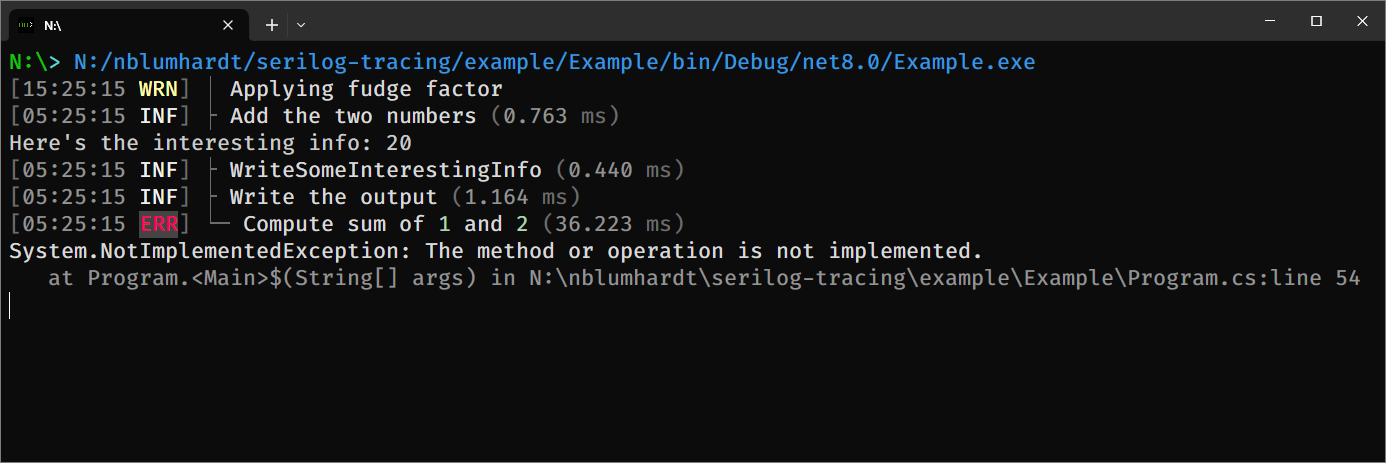
The example is using Serilog's ExpressionTemplate to annotate each span in the trace with timing information. The
layout is fully configurable - check out Program.cs in the included example project - so let your ASCII artistry run
wild!
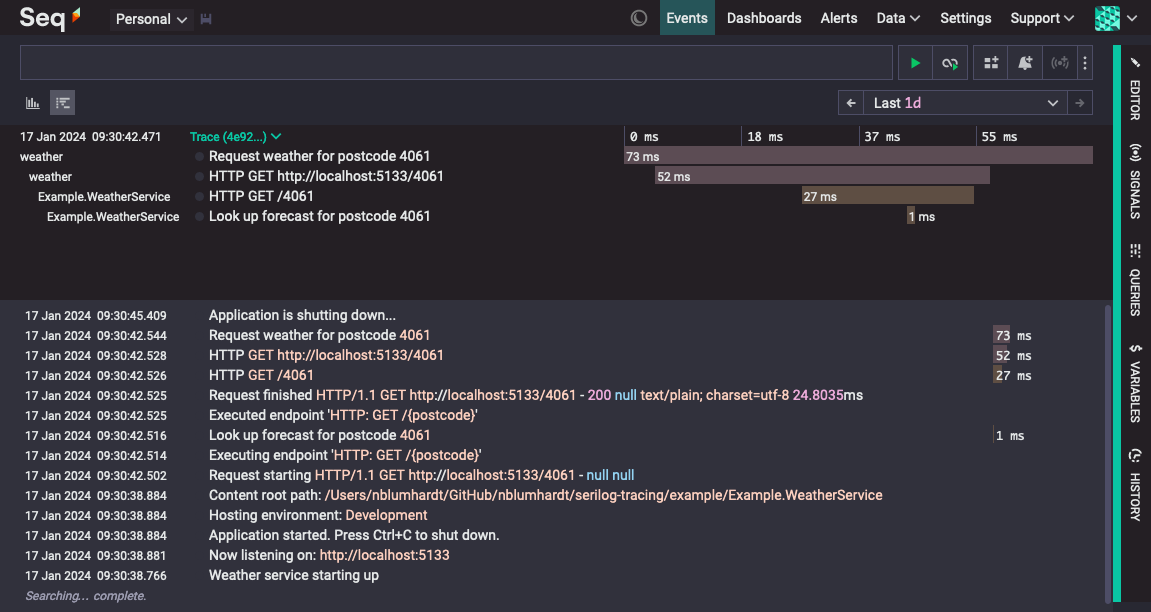
In production, Serilog's existing configuration, enrichment, filtering, formatting, and output facilities can potentially provide a flexible mechanism for emitting trace data to a wide range of targets.
Notably, any system that accepts traces in text or JSON format should be an easy target for SerilogTracing and a
Serilog sink; here's Seq showing traces delivered using the production Serilog.Sinks.Seq package and a custom
ITextFormatter implemented with ExpressionTemplate:
How does it work?
And what do we mean by "tracing"?
A trace is just a collection of spans, and a span is just an event that carries a:
- trace id,
- span id,
- parent span id (optional), and
- start time.
SerilogTracing generates spans using extension methods on ILogger:
using var activity = logger.StartActivity("Compute {A} + {B}", a, b);
// ... on `Dispose()` the activity will be recorded as a span
The spans generated by SerilogTracing are converted into Serilog LogEvents and routed through the logger. There's
nothing particularly special about these events, except that they add the ParentSpanId and SpanStartTimestamp
properties.
SerilogTracing relies on the underlying .NET tracing infrastructure to propagate trace ids and record the parent-child relationships between spans.
The TracingConfiguration class from SerilogTracing is used for this:
Log.Logger = new LoggerConfiguration()
    ... // Other configuration as usual, then:
    .CreateLogger();

// Tracing will be enabled until the returned handle is disposed.
using var _ = new TracingConfiguration()
    .EnableTracing();
In addition to generating spans, SerilogTracing consumes spans generated elsewhere in an application via the
System.Diagnostics.Activity APIs, such as those produced by ASP.NET Core or HttpClient. Activity sources can be
enabled or disabled using the logger's MinimumLevel.Override settings.
Finally, SerilogTracing includes some examples showing how the resulting LogEvents can be formatted for various
trace-aware outputs.
Starting, enriching, and completing activities
Activities are represented by LoggerActivity instances.
LoggerActivity has a simple lifetime:
- The activity is started using one of the
ILogger.StartActivity()extensions, - Properties are added to the activity using
LoggerActivity.AddProperty(), and - The activity is completed either implicitly, by
IDisposable.Dispose(), or explicitly usingLoggerActivity.Complete().
LoggerActivity.Complete() accepts optional LogEventLevel and Exception arguments.
Displaying output
Use the formatters provides by Serilog.Tracing.Formatting.DefaultFormatting to pretty-print spans as text, or
serialize to JSON.
Configuring the activity listener
Activity sources can be enabled and disabled using the standard MinimumLevel.Override() mechanism.
SerilogTracing.Sinks.OpenTelemetry
SerilogTracing includes a fork of Serilog.Sinks.OpenTelemetry. This is necessary (for now) because Serilog.Sinks.OpenTelemetry only handles log signals. SerilogTrace.Sinks.OpenTelemetry also handles trace signals.
What about SerilogTimings?
SerilogTracing is the logical successor to SerilogTimings, which provides very similar functionality.
Like SerilogTimings, SerilogTracing can track the duration and status of an operation, and emit an event when the operation completes.
Unlike SerilogTimings, SerilogTracing:
- can represent and capture hierarchical (parent/child) operations,
- takes part in distributed traces, and
- integrates with the tracing support provided by .NET itself and the rest of the package ecosystem.
Status
This project is experimental. It's not a part of Serilog, not maintained by the Serilog maintainers, and might not evolve in any particular way: there's currently no plan to integrate this functionality directly into Serilog. (Having said that, this project is a vehicle to explore those possibilities).
| Product | Versions Compatible and additional computed target framework versions. |
|---|---|
| .NET | net6.0 is compatible. net6.0-android was computed. net6.0-ios was computed. net6.0-maccatalyst was computed. net6.0-macos was computed. net6.0-tvos was computed. net6.0-windows was computed. net7.0 was computed. net7.0-android was computed. net7.0-ios was computed. net7.0-maccatalyst was computed. net7.0-macos was computed. net7.0-tvos was computed. net7.0-windows was computed. net8.0 was computed. net8.0-android was computed. net8.0-browser was computed. net8.0-ios was computed. net8.0-maccatalyst was computed. net8.0-macos was computed. net8.0-tvos was computed. net8.0-windows was computed. net9.0 was computed. net9.0-android was computed. net9.0-browser was computed. net9.0-ios was computed. net9.0-maccatalyst was computed. net9.0-macos was computed. net9.0-tvos was computed. net9.0-windows was computed. net10.0 was computed. net10.0-android was computed. net10.0-browser was computed. net10.0-ios was computed. net10.0-maccatalyst was computed. net10.0-macos was computed. net10.0-tvos was computed. net10.0-windows was computed. |
-
net6.0
- Google.Protobuf (>= 3.25.1)
- Grpc.Net.Client (>= 2.60.0)
- Serilog (>= 3.1.1)
- Serilog.Sinks.PeriodicBatching (>= 4.0.0-dev-00821)
- SerilogTracing (>= 1.0.0-dev-00077)
NuGet packages
This package is not used by any NuGet packages.
GitHub repositories
This package is not used by any popular GitHub repositories.
| Version | Downloads | Last Updated | |
|---|---|---|---|
| 2.2.0 | 57,811 | 10/14/2024 | |
| 2.2.0-dev-00353 | 217 | 10/10/2024 | |
| 2.2.0-dev-00352 | 234 | 10/10/2024 | |
| 2.1.3-dev-00351 | 227 | 10/10/2024 | |
| 2.1.2 | 8,720 | 10/8/2024 | |
| 2.1.2-dev-00345 | 251 | 10/8/2024 | |
| 2.1.2-dev-00344 | 246 | 10/8/2024 | |
| 2.1.2-dev-00342 | 242 | 10/8/2024 | |
| 2.1.2-dev-00339 | 221 | 10/4/2024 | |
| 2.1.2-dev-00336 | 246 | 10/2/2024 | |
| 2.1.1 | 9,041 | 10/2/2024 | |
| 2.1.1-dev-00332 | 235 | 10/2/2024 | |
| 2.1.1-dev-00331 | 217 | 10/2/2024 | |
| 2.1.1-dev-00324 | 249 | 7/29/2024 | |
| 2.1.0 | 28,154 | 7/29/2024 | |
| 2.1.0-dev-00322 | 242 | 7/29/2024 | |
| 2.1.0-dev-00321 | 221 | 7/29/2024 | |
| 2.1.0-dev-00320 | 233 | 7/29/2024 | |
| 2.1.0-dev-00319 | 224 | 7/29/2024 | |
| 1.0.0-dev-00077 | 275 | 1/17/2024 |