RoyalApps.Community.ExternalApps.WinForms
1.3.0
Prefix Reserved
See the version list below for details.
dotnet add package RoyalApps.Community.ExternalApps.WinForms --version 1.3.0
NuGet\Install-Package RoyalApps.Community.ExternalApps.WinForms -Version 1.3.0
<PackageReference Include="RoyalApps.Community.ExternalApps.WinForms" Version="1.3.0" />
<PackageVersion Include="RoyalApps.Community.ExternalApps.WinForms" Version="1.3.0" />
<PackageReference Include="RoyalApps.Community.ExternalApps.WinForms" />
paket add RoyalApps.Community.ExternalApps.WinForms --version 1.3.0
#r "nuget: RoyalApps.Community.ExternalApps.WinForms, 1.3.0"
#:package RoyalApps.Community.ExternalApps.WinForms@1.3.0
#addin nuget:?package=RoyalApps.Community.ExternalApps.WinForms&version=1.3.0
#tool nuget:?package=RoyalApps.Community.ExternalApps.WinForms&version=1.3.0
External Apps Control


RoyalApps.Community.ExternalApps contains projects/packages to easily embed/use other external applications in an application.
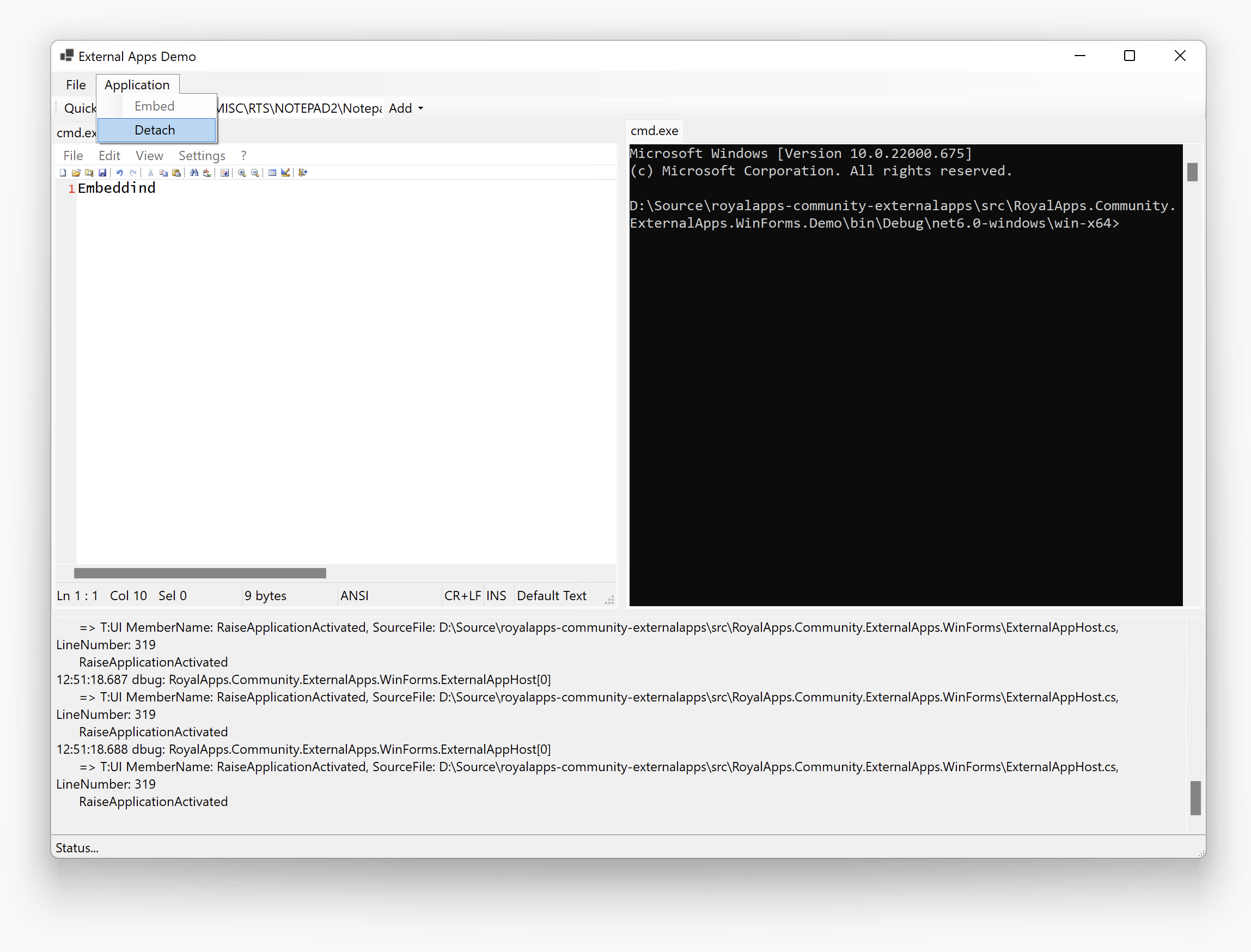
The ExternalAppHost control starts the configured process and embeds the application window into the control.
Warning What this control does is not exactly a Microsoft supported scenario! Please read Raymond Chen's blog post 'Is it legal to have a cross-process parent/child or owner/owned window relationship?' for more details. Spoiler alert: Yes, it's technically legal. It's also technically legal to juggle chainsaws!
Getting Started
Installation
You should install the RoyalApps.Community.ExternalApps.WinForms with NuGet:
Install-Package RoyalApps.Community.ExternalApps.WinForms
or via the command line interface:
dotnet add package RoyalApps.Community.ExternalApps.WinForms
Using the ExternalAppHost
Add Control
Place the ExternalAppHost on a form or in a container control (user control, tab control, etc.) and set the Dock property to DockStyle.Fill
Configuration
Create an instance of the ExternalAppConfiguration class and set the Executable property to the full path and file name of the application you want to embed.
Start
Simply call:
ExternalAppHost.Start(externalAppConfiguration);
to start and embed the application.
Close
To close the application, call:
ExternalAppHost.CloseApplication();
Depending on the application, you may get a confirmation dialog in case there are unsaved changes. You can set the ExternalAppConfiguration.KillOnClose property to true to forcibly quit the application by killing the process.
Note All processes which are started by the control will be closed/killed when the main application is closed or killed.
Detach Application Window
Once the application is started and embedded, you can detach the application window by calling:
ExternalAppHost.DetachApplication();
Re-Embed Application Window
To re-embed a detached application window, simply call:
ExternalAppHost.EmbedApplication();
Show System Menu
Shows the app's system menu on the specified location:
ExternalAppHost.ShowSystemMenu(Point location);
Subscribe to Events
ExternalAppHost.ApplicationStartedis raised when the application has been started and embedded.ExternalAppHost.ApplicationClosedis raised when the application was closed or killed (even outside of the hosting application).ExternalAppHost.ApplicationActivatedis raised when the application has been activated (received the input focus).ExternalAppHost.WindowTitleChangedis raised when the window title of application window has changed.
Exploring the Demo Application
The demo application is quite simple. It has two tab controls (one left and one right) and a bottom panel for log output. Use the toolbar to enter an executable to embed. The Add drop down allows you to choose the left or the right tab control.
There are two embed-methods available:
- Embed as Control: Only the client area of the external app window is embedded (without the main menu). The limitation of this method is that some applications may look like they are not focused/active.
- Embed as Window: The whole window is embedded including the main menu (if available). The limitation of this method is that the ALT-TAB order may be incorrect.
In the Application menu you can detach and re-embed the active external application.
WinEmbed.dll
This project includes a dll called WinEmbed.dll (in the /lib folder) which handles most of the Windows native stuff. You can find the C/C++ code in the /src/WinEmbed directory. To build this dll from source, you need Visual Studio 2022 or later and also the WDK installed.
For the ARM64 build to compile, install the following tools using Visual Studio 2022 installer:
MSVC v143 - VS 2022 C++ ARM64 build tools (latest)
Building and testing
Install the .NET 10 and .NET 11 SDKs on Windows, then run:
dotnet build src/RoyalApps.Community.ExternalApps.slnx -c Release
dotnet test src/RoyalApps.Community.ExternalApps.WinForms.Tests/RoyalApps.Community.ExternalApps.WinForms.Tests.csproj -c Release --no-build
dotnet pack src/RoyalApps.Community.ExternalApps.WinForms/RoyalApps.Community.ExternalApps.WinForms.csproj -c Release --no-build -o artifacts
The library and demo target net10.0-windows and net11.0-windows. The package includes native libraries for x64 and ARM64.
NuGet trusted publishing
The publish.yml workflow builds and tests pull requests. Pushes to main or v1 also publish the package using GitHub OIDC and a short-lived NuGet API key.
Before the first publish, create a policy under your nuget.org account's Trusted Publishing settings:
| Setting | Value |
|---|---|
| Policy name | royalapps-community-externalapps (or another descriptive name) |
| Package owner | The NuGet user or organization that owns RoyalApps.Community.ExternalApps.WinForms |
| Repository owner | royalapplications |
| Repository | royalapps-community-externalapps |
| Workflow file | publish.yml (filename only) |
| Environment | Leave empty; this workflow does not use a GitHub environment |
| Package scope | RoyalApps.Community.ExternalApps.WinForms |
| Allowed operation | Push new versions of the existing package |
In the repository's Settings → Secrets and variables → Actions → Variables, add NUGET_USER with the personal nuget.org username of the account that created the policy. Use the profile name, rather than an email address or the package-owning organization name.
After a successful trusted publish, remove the old NUGET_API_KEY repository secret. Revoke the old API key on nuget.org once any other workflows using it have migrated. If NuGet marks the policy as temporarily active, complete the first publish within its activation window or reactivate it before publishing.
See the NuGet trusted publishing documentation for details.
Acknowledgements
Special thanks to Alex for helping out with all the native code challenges.
| Product | Versions Compatible and additional computed target framework versions. |
|---|---|
| .NET | net10.0-windows7.0 is compatible. net11.0-windows7.0 is compatible. |
-
net10.0-windows7.0
- Microsoft.Extensions.Logging.Abstractions (>= 10.0.15)
- System.Management (>= 10.0.15)
-
net11.0-windows7.0
- System.Management (>= 11.0.0)
NuGet packages
This package is not used by any NuGet packages.
GitHub repositories
This package is not used by any popular GitHub repositories.
| Version | Downloads | Last Updated |
|---|---|---|
| 2.1.1 | 98 | 11/16/2026 |
| 2.1.0 | 92 | 11/11/2026 |
| 2.0.0 | 185 | 6/26/2026 |
| 2.0.0-beta.1 | 111 | 3/14/2026 |
| 1.3.1 | 91 | 11/16/2026 |
| 1.3.0 | 98 | 11/11/2026 |
| 1.2.2 | 172 | 6/26/2026 |
| 1.2.1 | 174 | 2/12/2026 |
| 1.2.0 | 455 | 11/21/2025 |
| 1.1.2 | 299 | 2/12/2025 |
| 1.1.1 | 275 | 1/20/2025 |
| 1.1.0 | 279 | 11/14/2024 |
| 1.1.0-beta2 | 151 | 10/9/2024 |
| 1.1.0-beta1 | 166 | 9/19/2024 |
| 0.3.5 | 359 | 6/22/2023 |
| 0.3.4 | 600 | 9/16/2022 |
| 0.3.3 | 593 | 9/15/2022 |
| 0.3.2 | 601 | 9/15/2022 |
| 0.3.1 | 602 | 6/20/2022 |
| 0.3.0 | 595 | 5/27/2022 |