REslava.Result.Flow
1.49.0
Prefix Reserved
See the version list below for details.
dotnet add package REslava.Result.Flow --version 1.49.0
NuGet\Install-Package REslava.Result.Flow -Version 1.49.0
<PackageReference Include="REslava.Result.Flow" Version="1.49.0"> <PrivateAssets>all</PrivateAssets> <IncludeAssets>runtime; build; native; contentfiles; analyzers</IncludeAssets> </PackageReference>
<PackageVersion Include="REslava.Result.Flow" Version="1.49.0" />
<PackageReference Include="REslava.Result.Flow"> <PrivateAssets>all</PrivateAssets> <IncludeAssets>runtime; build; native; contentfiles; analyzers</IncludeAssets> </PackageReference>
paket add REslava.Result.Flow --version 1.49.0
#r "nuget: REslava.Result.Flow, 1.49.0"
#:package REslava.Result.Flow@1.49.0
#addin nuget:?package=REslava.Result.Flow&version=1.49.0
#tool nuget:?package=REslava.Result.Flow&version=1.49.0
REslava.Result.Flow
Visual Result pipelines for .NET — typed errors, Railway-Oriented pipelines, automatic flow diagrams.
Don't try to understand the pipeline—watch the flow.



The recommended pipeline visualization package for REslava.Result projects. Generates Mermaid diagrams with full type travel, typed error edges from method body scanning, and entry-point detection — all via Roslyn semantic analysis.
Generated Diagram Examples
Pipeline — full type travel, typed error edges, cross-method subgraph expansion:
![Cross-method pipeline tracing — [ResultFlow(MaxDepth = 2)] expands Bind lambdas into named subgraphs](https://raw.githubusercontent.com/reslava/nuget-package-reslava-result/main/images/OrderService_PlaceOrderCross.png)
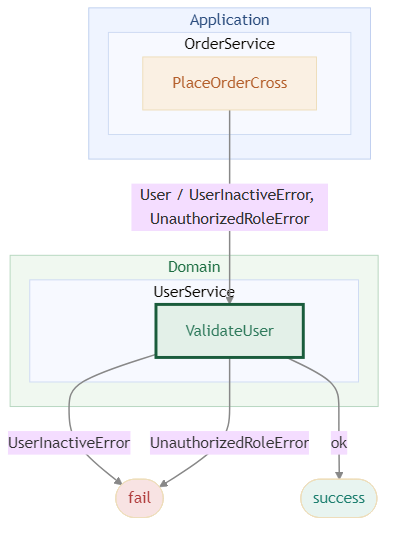
Architecture layer view — Domain / Application / Infrastructure boundaries:
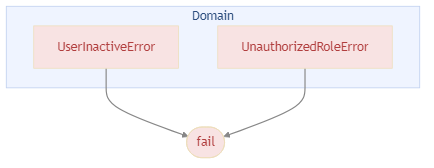
Error propagation — errors grouped by the layer they originate from:
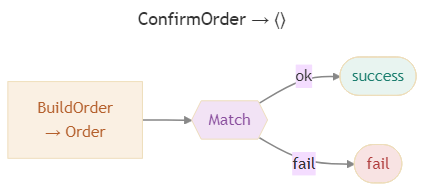
Match — hexagon node with typed N-branch fan-out:
Node type legend — all 9 node types with colors, shapes, and hover tooltip note:

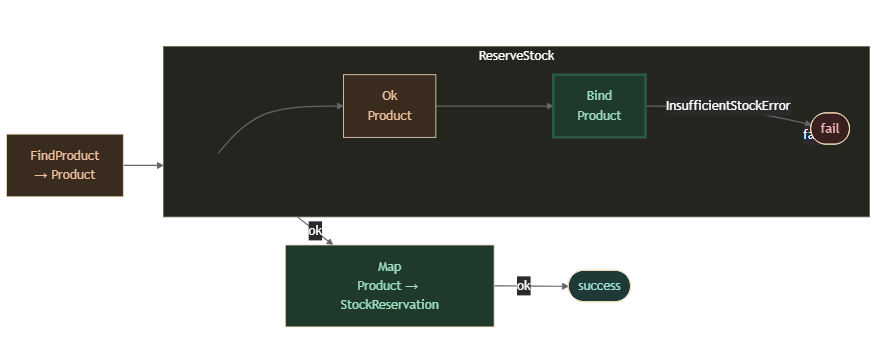
Dark theme — [ResultFlow(Theme = ResultFlowTheme.Dark)] emits the full diagram set using a dark colour scheme:
→ Full diagram gallery and documentation on GitHub
Using a different Result library (ErrorOr, LanguageExt, FluentResults)? Use
REslava.ResultFlow— the library-agnostic alternative instead.
Installation
dotnet add package REslava.Result.Flow
Requires REslava.Result in your project. The [ResultFlow] attribute is injected automatically — no extra using needed.
What it does
Add [ResultFlow] to any REslava.Result fluent method and the generator produces:
- Success type travel — inferred from
IResultBase<T>at each step; type-preserving steps show"MethodName<br/>T"; type-changing steps show"MethodName<br/>T → U" - Error surface — scans method bodies of
Bind/Ensuredelegates for error construction, annotates failure edges with specific error types - Async step annotation — ⚡ appended to any step that resolves via
await
Quick Start
[ResultFlow]
public async Task<Result<UserDto>> RegisterAsync(RegisterCommand cmd) =>
    await CreateUser(cmd)
        .EnsureAsync(IsEmailValid, new InvalidEmailError())
        .BindAsync(SaveUser)
        .TapAsync(SendWelcomeEmail)
        .MapAsync(ToDto);
Use the IDE code action (REF002 — "Insert diagram as comment") to inject the diagram directly above the method — no build required:
/*
```mermaid
flowchart LR
    N0_EnsureAsync["EnsureAsync ⚡<br/>User"]:::gatekeeper
    N0_EnsureAsync -->|pass| N1_BindAsync
    N0_EnsureAsync -->|fail| FAIL
    ...
```*/
[ResultFlow]
public async Task<Result<UserDto>> RegisterAsync(RegisterCommand cmd) => ...
The ```mermaid fence makes the diagram render inline in VS Code, GitHub, Rider, and other Markdown-aware IDEs.
Diagram Preview — VS Code Extension (v1.1.0)
Install REslava.Result Extensions from the VS Code Marketplace to get a ▶ Open diagram preview CodeLens above every [ResultFlow] method.
One click opens the rendered Mermaid diagram in a dedicated side panel — bundled renderer, works fully offline.
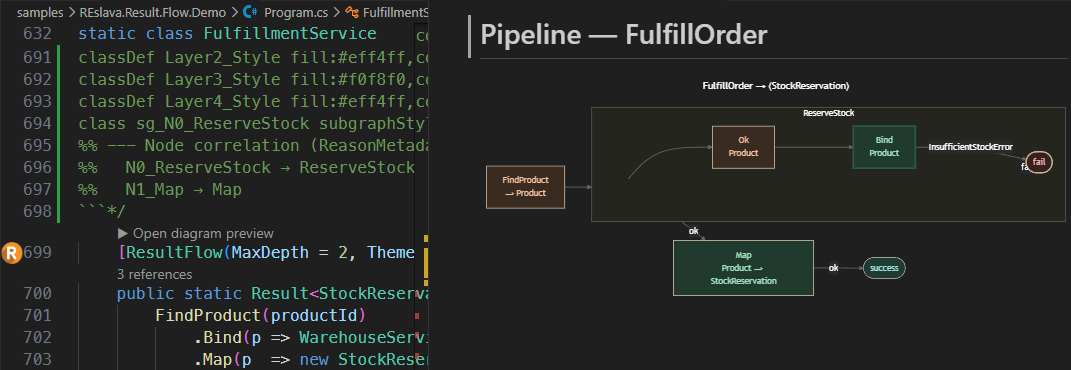
Panel features:
- Click any node to navigate to that line in your source (requires
<ResultFlowLinkMode>vscode</ResultFlowLinkMode>in your.csproj) - Source button — view and copy the raw Mermaid DSL
- Legend button — node colour guide and interaction hints
- SVG / PNG buttons — export the diagram to disk (PNG at 2× for high-DPI screens)
- Light and dark background follows your
ResultFlowDefaultThemeMSBuild property
Solution-Wide Default Theme (v1.48.0)
Set a diagram theme for the whole solution in Directory.Build.props — no need to annotate every method:
<PropertyGroup>
  <ResultFlowDefaultTheme>Dark</ResultFlowDefaultTheme>
</PropertyGroup>
Per-method [ResultFlow(Theme = ResultFlowTheme.Dark)] always overrides the MSBuild default. Accepted values: Light (default), Dark.
Compared to REslava.ResultFlow, this package adds:
- Typed failure edges (e.g.
InvalidEmailErrorinstead of justfail) - Error surface inference via
IError— no manual annotation required
Diagnostics
| ID | Severity | Description |
|---|---|---|
REF001 |
Info | [ResultFlow] could not detect a fluent chain — diagram not generated. |
REF002 |
Info | Fluent chain detected — use the "Insert diagram as comment" code action to embed the Mermaid diagram above the method. |
REF003 |
Warning | resultflow.json could not be parsed — falling back to built-in conventions. |
Documentation
Full documentation: reslava.github.io/nuget-package-reslava-result
MIT License | Works with any .NET project (netstandard2.0)
| Product | Versions Compatible and additional computed target framework versions. |
|---|---|
| .NET | net5.0 was computed. net5.0-windows was computed. net6.0 was computed. net6.0-android was computed. net6.0-ios was computed. net6.0-maccatalyst was computed. net6.0-macos was computed. net6.0-tvos was computed. net6.0-windows was computed. net7.0 was computed. net7.0-android was computed. net7.0-ios was computed. net7.0-maccatalyst was computed. net7.0-macos was computed. net7.0-tvos was computed. net7.0-windows was computed. net8.0 was computed. net8.0-android was computed. net8.0-browser was computed. net8.0-ios was computed. net8.0-maccatalyst was computed. net8.0-macos was computed. net8.0-tvos was computed. net8.0-windows was computed. net9.0 was computed. net9.0-android was computed. net9.0-browser was computed. net9.0-ios was computed. net9.0-maccatalyst was computed. net9.0-macos was computed. net9.0-tvos was computed. net9.0-windows was computed. net10.0 was computed. net10.0-android was computed. net10.0-browser was computed. net10.0-ios was computed. net10.0-maccatalyst was computed. net10.0-macos was computed. net10.0-tvos was computed. net10.0-windows was computed. |
| .NET Core | netcoreapp2.0 was computed. netcoreapp2.1 was computed. netcoreapp2.2 was computed. netcoreapp3.0 was computed. netcoreapp3.1 was computed. |
| .NET Standard | netstandard2.0 is compatible. netstandard2.1 was computed. |
| .NET Framework | net461 was computed. net462 was computed. net463 was computed. net47 was computed. net471 was computed. net472 was computed. net48 was computed. net481 was computed. |
| MonoAndroid | monoandroid was computed. |
| MonoMac | monomac was computed. |
| MonoTouch | monotouch was computed. |
| Tizen | tizen40 was computed. tizen60 was computed. |
| Xamarin.iOS | xamarinios was computed. |
| Xamarin.Mac | xamarinmac was computed. |
| Xamarin.TVOS | xamarintvos was computed. |
| Xamarin.WatchOS | xamarinwatchos was computed. |
This package has no dependencies.
NuGet packages
This package is not used by any NuGet packages.
GitHub repositories
This package is not used by any popular GitHub repositories.
| Version | Downloads | Last Updated |
|---|---|---|
| 1.54.0 | 106 | 4/6/2026 |
| 1.53.0 | 104 | 4/5/2026 |
| 1.52.0 | 99 | 3/30/2026 |
| 1.51.0 | 119 | 3/28/2026 |
| 1.50.1 | 96 | 3/25/2026 |
| 1.50.0 | 97 | 3/25/2026 |
| 1.49.0 | 96 | 3/24/2026 |
| 1.48.0 | 99 | 3/22/2026 |
| 1.47.5 | 96 | 3/22/2026 |
| 1.47.4 | 95 | 3/21/2026 |
| 1.47.3 | 94 | 3/20/2026 |
| 1.47.2 | 94 | 3/20/2026 |
| 1.47.1 | 100 | 3/18/2026 |
| 1.47.0 | 94 | 3/18/2026 |
| 1.46.3 | 95 | 3/18/2026 |
| 1.46.2 | 99 | 3/18/2026 |
| 1.46.1 | 94 | 3/17/2026 |
| 1.46.0 | 95 | 3/17/2026 |
| 1.45.0 | 101 | 3/17/2026 |
| 1.44.1 | 100 | 3/16/2026 |