REslava.Result.Flow
1.54.0
Prefix Reserved
dotnet add package REslava.Result.Flow --version 1.54.0
NuGet\Install-Package REslava.Result.Flow -Version 1.54.0
<PackageReference Include="REslava.Result.Flow" Version="1.54.0"> <PrivateAssets>all</PrivateAssets> <IncludeAssets>runtime; build; native; contentfiles; analyzers</IncludeAssets> </PackageReference>
<PackageVersion Include="REslava.Result.Flow" Version="1.54.0" />
<PackageReference Include="REslava.Result.Flow"> <PrivateAssets>all</PrivateAssets> <IncludeAssets>runtime; build; native; contentfiles; analyzers</IncludeAssets> </PackageReference>
paket add REslava.Result.Flow --version 1.54.0
#r "nuget: REslava.Result.Flow, 1.54.0"
#:package REslava.Result.Flow@1.54.0
#addin nuget:?package=REslava.Result.Flow&version=1.54.0
#tool nuget:?package=REslava.Result.Flow&version=1.54.0
REslava.Result.Flow
Visual Result pipelines for .NET — typed errors, Railway-Oriented pipelines, automatic flow diagrams.
Don't try to understand the pipeline—watch the flow.



Track A — Pipeline visualization for REslava.Result projects.
Full semantic analysis via Roslyn: typed error edges from method body scanning, IResultBase<T> type travel, FAIL node error annotation, and the complete diagram constant set — _Diagram, _TypeFlow, _LayerView, _Stats, _ErrorSurface, _ErrorPropagation.
Not using REslava.Result? Use Track B —
REslava.ResultFlow— the library-agnostic, syntax-only alternative that works with ErrorOr, LanguageExt, FluentResults, or any custom Result type.
Generated Diagram Examples
Pipeline — full type travel, typed error edges, cross-method subgraph expansion:
![Cross-method pipeline tracing — [ResultFlow(MaxDepth = 2)] expands Bind lambdas into named subgraphs](https://raw.githubusercontent.com/reslava/nuget-package-reslava-result/main/images/OrderService_PlaceOrderCross.png)
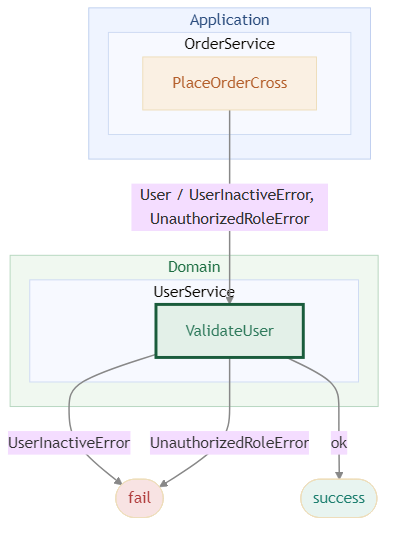
Architecture layer view — Domain / Application / Infrastructure boundaries:
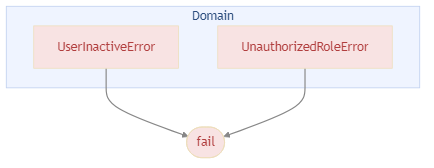
Error propagation — errors grouped by the layer they originate from:
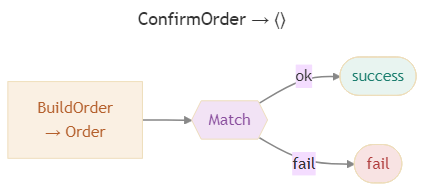
Match — hexagon node with typed N-branch fan-out:
Node type legend — all 9 node types with colors, shapes, and hover tooltip note:

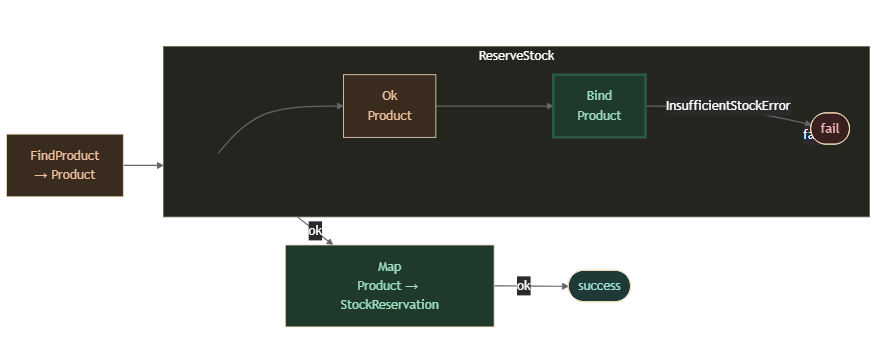
Dark theme — [ResultFlow(Theme = ResultFlowTheme.Dark)] emits the full diagram set using a dark colour scheme:
→ Full diagram gallery and documentation on GitHub
Installation
dotnet add package REslava.Result.Flow
Requires REslava.Result in your project. The [ResultFlow] attribute is injected automatically — no extra using needed.
What it does
Add [ResultFlow] to any REslava.Result fluent method and the generator produces:
- Success type travel — inferred from
IResultBase<T>at each step; type-preserving steps show"MethodName<br/>T"; type-changing steps show"MethodName<br/>T → U" - Error surface — scans method bodies of
Bind/Ensuredelegates for error construction, annotates failure edges with specific error types - Async step annotation — ⚡ appended to any step that resolves via
await
Quick Start
[ResultFlow]
public async Task<Result<UserDto>> RegisterAsync(RegisterCommand cmd) =>
    await CreateUser(cmd)
        .EnsureAsync(IsEmailValid, new InvalidEmailError())
        .BindAsync(SaveUser)
        .TapAsync(SendWelcomeEmail)
        .MapAsync(ToDto);
Use the IDE code action (REF002 — "Insert diagram as comment") to inject the diagram directly above the method — no build required:
/*
```mermaid
flowchart LR
    N0_EnsureAsync["EnsureAsync ⚡<br/>User"]:::gatekeeper
    N0_EnsureAsync -->|pass| N1_BindAsync
    N0_EnsureAsync -->|fail| FAIL
    ...
```*/
[ResultFlow]
public async Task<Result<UserDto>> RegisterAsync(RegisterCommand cmd) => ...
The ```mermaid fence makes the diagram render inline in VS Code, GitHub, Rider, and other Markdown-aware IDEs.
Diagram Preview — VS Code Extension (v1.1.0)
Install REslava.Result Extensions from the VS Code Marketplace to get a ▶ Open diagram preview CodeLens above every [ResultFlow] method.
One click opens the rendered Mermaid diagram in a dedicated side panel — bundled renderer, works fully offline.
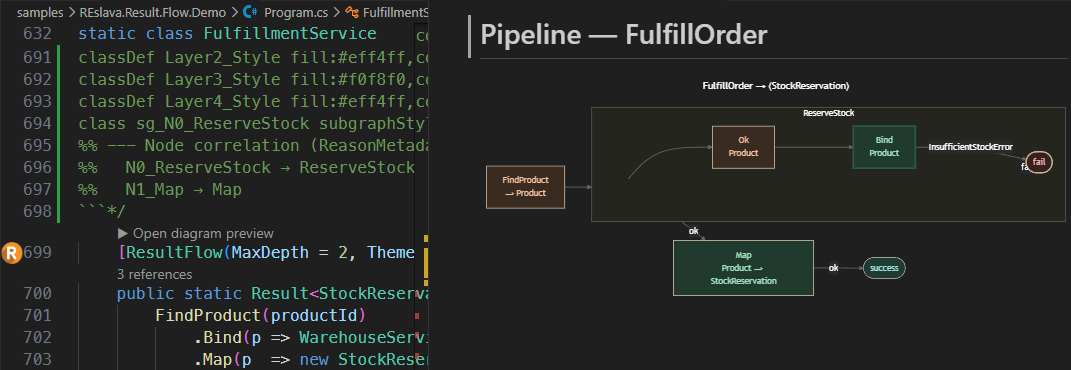
Panel features:
- Click any node to navigate to that line in your source (requires
<ResultFlowLinkMode>vscode</ResultFlowLinkMode>in your.csproj) - Source button — view and copy the raw Mermaid DSL
- Legend button — node colour guide and interaction hints
- SVG / PNG buttons — export the diagram to disk (PNG at 2× for high-DPI screens)
- Light and dark background follows your
ResultFlowDefaultThemeMSBuild property
Solution-Wide Default Theme (v1.48.0)
Set a diagram theme for the whole solution in Directory.Build.props — no need to annotate every method:
<PropertyGroup>
  <ResultFlowDefaultTheme>Dark</ResultFlowDefaultTheme>
</PropertyGroup>
Per-method [ResultFlow(Theme = ResultFlowTheme.Dark)] always overrides the MSBuild default. Accepted values: Light (default), Dark.
Compared to REslava.ResultFlow, this package adds:
- Typed failure edges (e.g.
InvalidEmailErrorinstead of justfail) - Error surface inference via
IError— no manual annotation required
Debug Panel — ▶ Debug CodeLens (v1.53.0)
Make your class partial to unlock the FlowProxy — a generated wrapper that feeds the VS Code Debug panel with zero setup.
// Mark your class partial:
public partial class OrderService
{
    [ResultFlow]
    public Result<Order> Process(int userId, int productId) => ...
}

// Always-on tracing (full ring buffer — many methods, many calls):
var result = svc.Flow.Process(userId, productId);
ringBuffer.Save();   // → reslava-traces.json in bin/ — VSIX auto-loads

// Single-trace debug (one method, one execution):
svc.Flow.Debug.Process(userId, productId);
// → reslava-debug-Process.json saved automatically
// → VSIX file watcher fires → Debug panel opens with the trace
The Debug panel shows a trace list, node stepper, animated replay with diagram node highlight, and a file picker when multiple reslava-*.json files are present.
Advanced: For long-running or remote scenarios, add
REslava.Result.Diagnosticsto expose traces over HTTP (PipelineTraceHost.Start/MapResultFlowTraces).
Diagnostics
| ID | Severity | Description |
|---|---|---|
REF001 |
Info | [ResultFlow] could not detect a fluent chain — diagram not generated. |
REF002 |
Info | Fluent chain detected — use the "Insert diagram as comment" code action to embed the Mermaid diagram above the method. |
REF003 |
Warning | resultflow.json could not be parsed — falling back to built-in conventions. |
Documentation
Full documentation: reslava.github.io/nuget-package-reslava-result
MIT License | Works with any .NET project (netstandard2.0)
| Product | Versions Compatible and additional computed target framework versions. |
|---|---|
| .NET | net5.0 was computed. net5.0-windows was computed. net6.0 was computed. net6.0-android was computed. net6.0-ios was computed. net6.0-maccatalyst was computed. net6.0-macos was computed. net6.0-tvos was computed. net6.0-windows was computed. net7.0 was computed. net7.0-android was computed. net7.0-ios was computed. net7.0-maccatalyst was computed. net7.0-macos was computed. net7.0-tvos was computed. net7.0-windows was computed. net8.0 was computed. net8.0-android was computed. net8.0-browser was computed. net8.0-ios was computed. net8.0-maccatalyst was computed. net8.0-macos was computed. net8.0-tvos was computed. net8.0-windows was computed. net9.0 was computed. net9.0-android was computed. net9.0-browser was computed. net9.0-ios was computed. net9.0-maccatalyst was computed. net9.0-macos was computed. net9.0-tvos was computed. net9.0-windows was computed. net10.0 was computed. net10.0-android was computed. net10.0-browser was computed. net10.0-ios was computed. net10.0-maccatalyst was computed. net10.0-macos was computed. net10.0-tvos was computed. net10.0-windows was computed. |
| .NET Core | netcoreapp2.0 was computed. netcoreapp2.1 was computed. netcoreapp2.2 was computed. netcoreapp3.0 was computed. netcoreapp3.1 was computed. |
| .NET Standard | netstandard2.0 is compatible. netstandard2.1 was computed. |
| .NET Framework | net461 was computed. net462 was computed. net463 was computed. net47 was computed. net471 was computed. net472 was computed. net48 was computed. net481 was computed. |
| MonoAndroid | monoandroid was computed. |
| MonoMac | monomac was computed. |
| MonoTouch | monotouch was computed. |
| Tizen | tizen40 was computed. tizen60 was computed. |
| Xamarin.iOS | xamarinios was computed. |
| Xamarin.Mac | xamarinmac was computed. |
| Xamarin.TVOS | xamarintvos was computed. |
| Xamarin.WatchOS | xamarinwatchos was computed. |
-
.NETStandard 2.0
- REslava.Result (>= 1.54.0)
NuGet packages
This package is not used by any NuGet packages.
GitHub repositories
This package is not used by any popular GitHub repositories.
| Version | Downloads | Last Updated |
|---|---|---|
| 1.54.0 | 106 | 4/6/2026 |
| 1.53.0 | 104 | 4/5/2026 |
| 1.52.0 | 99 | 3/30/2026 |
| 1.51.0 | 119 | 3/28/2026 |
| 1.50.1 | 96 | 3/25/2026 |
| 1.50.0 | 96 | 3/25/2026 |
| 1.49.0 | 95 | 3/24/2026 |
| 1.48.0 | 98 | 3/22/2026 |
| 1.47.5 | 95 | 3/22/2026 |
| 1.47.4 | 94 | 3/21/2026 |
| 1.47.3 | 93 | 3/20/2026 |
| 1.47.2 | 93 | 3/20/2026 |
| 1.47.1 | 99 | 3/18/2026 |
| 1.47.0 | 93 | 3/18/2026 |
| 1.46.3 | 94 | 3/18/2026 |
| 1.46.2 | 98 | 3/18/2026 |
| 1.46.1 | 93 | 3/17/2026 |
| 1.46.0 | 94 | 3/17/2026 |
| 1.45.0 | 100 | 3/17/2026 |
| 1.44.1 | 99 | 3/16/2026 |