Pick.Net.Utilities.Maui
1.0.0-preview5
dotnet add package Pick.Net.Utilities.Maui --version 1.0.0-preview5
NuGet\Install-Package Pick.Net.Utilities.Maui -Version 1.0.0-preview5
<PackageReference Include="Pick.Net.Utilities.Maui" Version="1.0.0-preview5" />
<PackageVersion Include="Pick.Net.Utilities.Maui" Version="1.0.0-preview5" />
<PackageReference Include="Pick.Net.Utilities.Maui" />
paket add Pick.Net.Utilities.Maui --version 1.0.0-preview5
#r "nuget: Pick.Net.Utilities.Maui, 1.0.0-preview5"
#:package Pick.Net.Utilities.Maui@1.0.0-preview5
#addin nuget:?package=Pick.Net.Utilities.Maui&version=1.0.0-preview5&prerelease
#tool nuget:?package=Pick.Net.Utilities.Maui&version=1.0.0-preview5&prerelease
Pick.Net.Utilites.Maui
Various helper classes and source generators for .NET MAUI.
Bindable Property Generation
This package includes a roslyn source generator that can generate backing BindableProperty fields for properties automatically, using the [BindableProperty] attribute.
public partial class TestClass : BindableObject
{
	private const string DefaultValue = "default";

	[BindableProperty(DefaultMode = BindingMode.TwoWay, DefaultValue = nameof(DefaultValue))]
	public string Value
	{
		get => (string)GetValue(ValueProperty);
		set => SetValue(ValueProperty, value);
	}
}
This will generate a BindableProperty field with the same access modifier as the property.
#nullable enable
partial class TestClass
{
	partial void OnValueChanging(string oldValue, string newValue);

	partial void OnValueChanged(string oldValue, string newValue);

	/// <summary>Bindable property for <see cref="Value"/>.</summary>
	public static readonly global::Microsoft.Maui.Controls.BindableProperty ValueProperty = global::Microsoft.Maui.Controls.BindableProperty.Create(
		"Value",
		typeof(string),
		typeof(global::TestClass),
		ValueDefaultValue,
		global::Microsoft.Maui.Controls.BindingMode.TwoWay,
		null,
		(bindable, oldValue, newValue) => ((global::TestClass)bindable).OnValueChanging((string)oldValue, (string)newValue),
		(bindable, oldValue, newValue) => ((global::TestClass)bindable).OnValueChanged((string)oldValue, (string)newValue),
		null,
		null);
}
You can generate a read-only property by adding an access modifier to the property setter.
[BindableProperty]
public string Value
{
	get => (string)GetValue(ValueProperty);
	private set => SetValue(ValuePropertyKey, value);
}
This will generate a BindablePropertyKey field with the same access modifier as the setter, and a property key field.
partial void OnValueChanging(string oldValue, string newValue);

partial void OnValueChanged(string oldValue, string newValue);

/// <summary>Bindable property key for <see cref="Value"/>.</summary>
private static readonly global::Microsoft.Maui.Controls.BindablePropertyKey ValuePropertyKey = global::Microsoft.Maui.Controls.BindableProperty.CreateReadOnly(
	"Value",
	typeof(string),
	typeof(global::Pick.Net.Utilities.Maui.TestApp.Controls.TestClass),
	null,
	global::Microsoft.Maui.Controls.BindingMode.OneWay,
	null,
	(bindable, oldValue, newValue) => ((global::Pick.Net.Utilities.Maui.TestApp.Controls.TestClass)bindable).OnValueChanging((string)oldValue, (string)newValue),
	(bindable, oldValue, newValue) => ((global::Pick.Net.Utilities.Maui.TestApp.Controls.TestClass)bindable).OnValueChanged((string)oldValue, (string)newValue),
	null,
	null);

/// <summary>Bindable property for <see cref="Value"/>.</summary>
public static readonly global::Microsoft.Maui.Controls.BindableProperty ValueProperty = ValuePropertyKey.BindableProperty;
You can also use the attribute on methods to generate attached bindable properties.
[BindableProperty]
public static partial string GetValue(Element element);

private static partial string SetValue(Element element, string value);
This generates the following code:
static partial void OnValueChanging(global::Microsoft.Maui.Controls.Element bindable, string oldValue, string newValue);

static partial void OnValueChanged(global::Microsoft.Maui.Controls.Element bindable, string oldValue, string newValue);

/// <summary>Bindable property key for the attached property <c>Value</c>.</summary>
private static readonly global::Microsoft.Maui.Controls.BindablePropertyKey ValuePropertyKey = global::Microsoft.Maui.Controls.BindableProperty.CreateAttachedReadOnly(
	"Value",
	typeof(string),
	typeof(global::Pick.Net.Utilities.Maui.TestApp.Controls.TestClass),
	null,
	global::Microsoft.Maui.Controls.BindingMode.OneWay,
	null,
	(bindable, oldValue, newValue) => OnValueChanging((global::Microsoft.Maui.Controls.Element)bindable, (string)oldValue, (string)newValue),
	(bindable, oldValue, newValue) => OnValueChanged((global::Microsoft.Maui.Controls.Element)bindable, (string)oldValue, (string)newValue),
	null,
	null);

/// <summary>Bindable property for the attached property <c>Value</c>.</summary>
public static readonly global::Microsoft.Maui.Controls.BindableProperty ValueProperty = ValuePropertyKey.BindableProperty;

public static partial string GetValue(global::Microsoft.Maui.Controls.Element element)
	=> (string)element.GetValue(ValueProperty);

private static partial void SetValue(global::Microsoft.Maui.Controls.Element element, string value)
	=> element.SetValue(ValuePropertyKey, value);
You can use the properties on the [BindableProperty] attribute to set the properties default value, default BindingMode, and to use value validator and coerce methods.
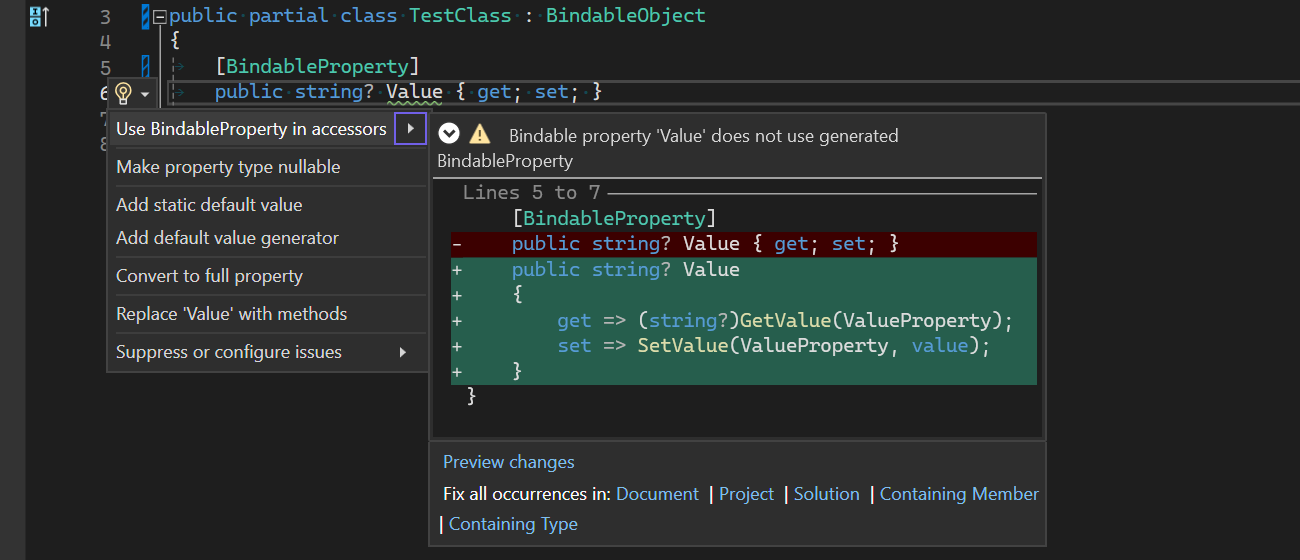
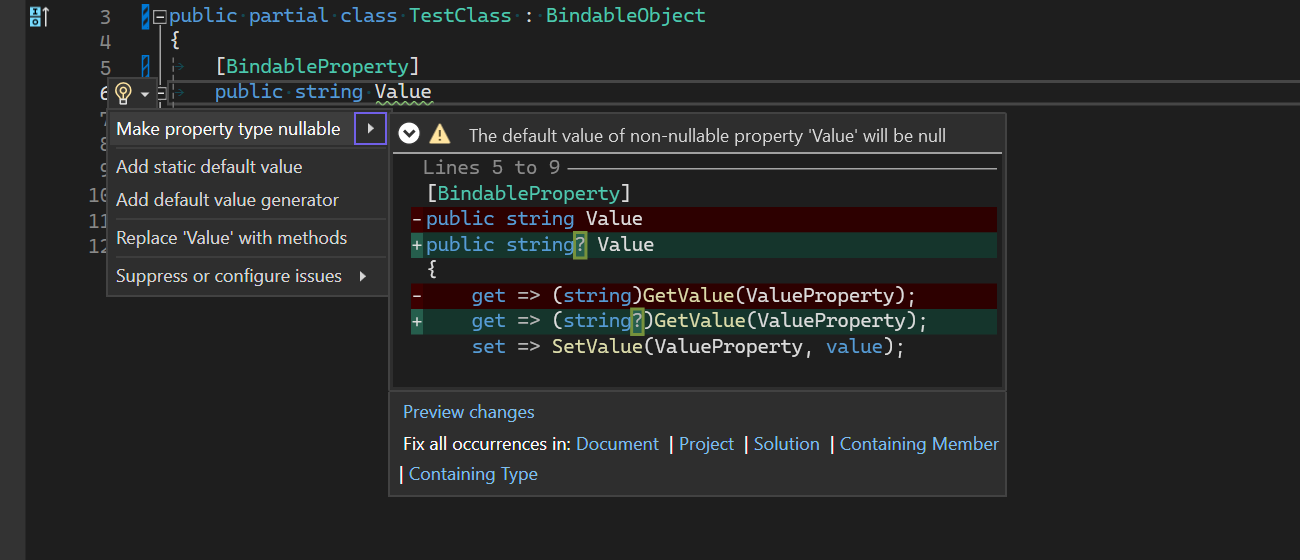
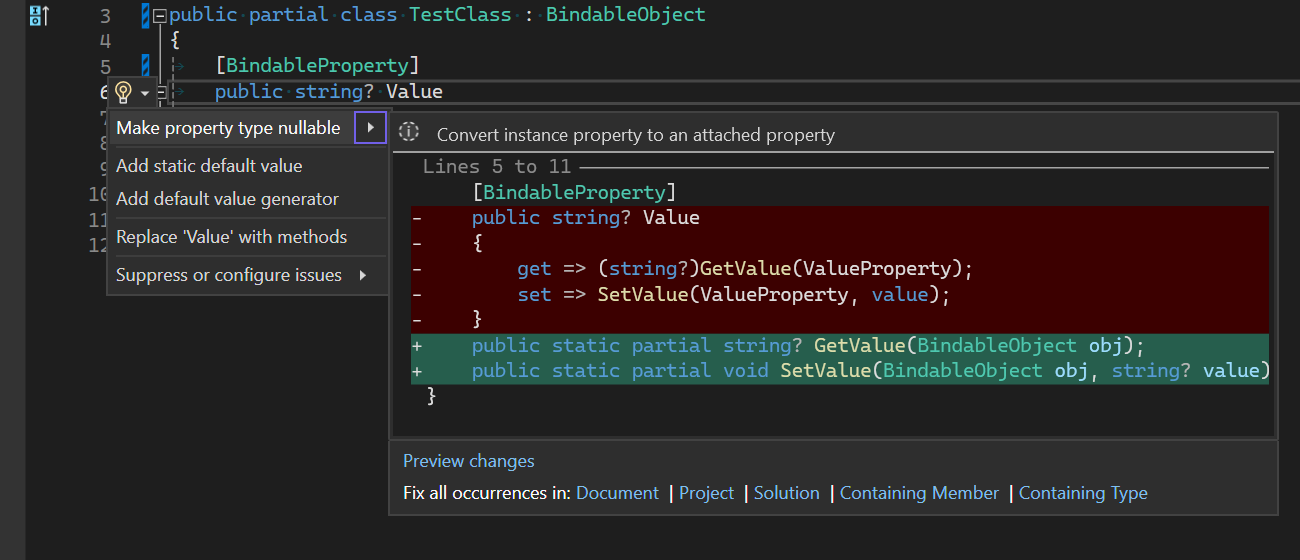
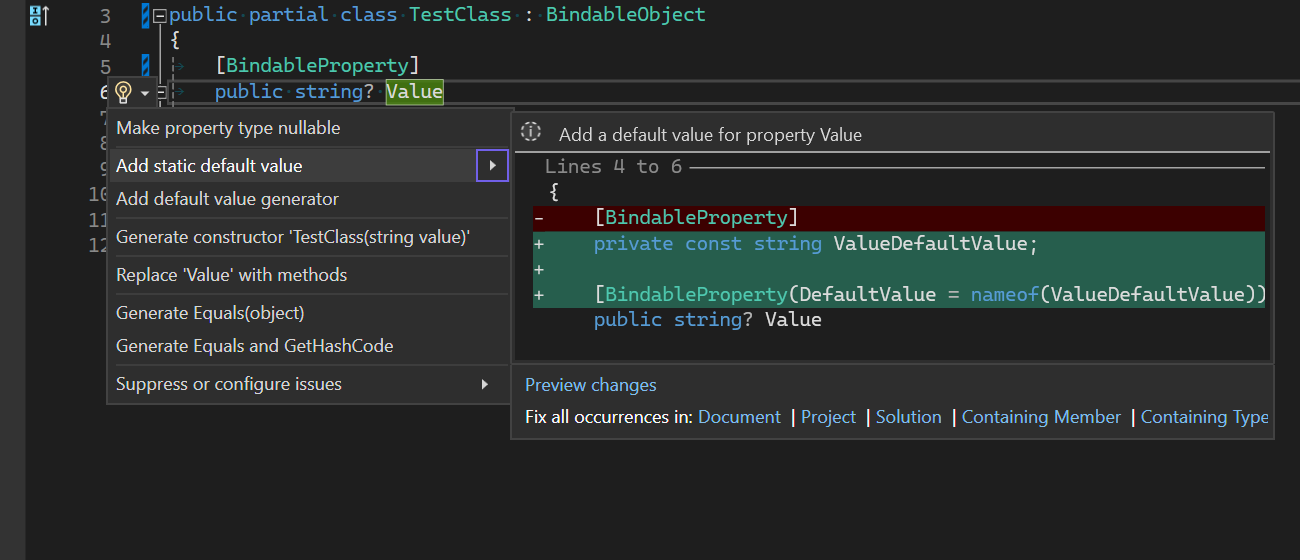
There are also code fixers to streamline the process of creating bindable properties and to fix common mistakes:
| Product | Versions Compatible and additional computed target framework versions. |
|---|---|
| .NET | net7.0 is compatible. net7.0-android was computed. net7.0-ios was computed. net7.0-maccatalyst was computed. net7.0-macos was computed. net7.0-tvos was computed. net7.0-windows was computed. net8.0 was computed. net8.0-android was computed. net8.0-browser was computed. net8.0-ios was computed. net8.0-maccatalyst was computed. net8.0-macos was computed. net8.0-tvos was computed. net8.0-windows was computed. net9.0 was computed. net9.0-android was computed. net9.0-browser was computed. net9.0-ios was computed. net9.0-maccatalyst was computed. net9.0-macos was computed. net9.0-tvos was computed. net9.0-windows was computed. net10.0 was computed. net10.0-android was computed. net10.0-browser was computed. net10.0-ios was computed. net10.0-maccatalyst was computed. net10.0-macos was computed. net10.0-tvos was computed. net10.0-windows was computed. |
-
net7.0
- Pick.Net.Utilities (>= 1.0.0-preview5)
NuGet packages
This package is not used by any NuGet packages.
GitHub repositories
This package is not used by any popular GitHub repositories.
| Version | Downloads | Last Updated |
|---|---|---|
| 1.0.0-preview5 | 279 | 3/5/2024 |
| 1.0.0-preview4 | 290 | 12/20/2023 |
| 1.0.0-preview1 | 178 | 12/6/2023 |