OnTheFlySettings 1.0.1
See the version list below for details.
dotnet add package OnTheFlySettings --version 1.0.1
NuGet\Install-Package OnTheFlySettings -Version 1.0.1
<PackageReference Include="OnTheFlySettings" Version="1.0.1" />
<PackageVersion Include="OnTheFlySettings" Version="1.0.1" />
<PackageReference Include="OnTheFlySettings" />
paket add OnTheFlySettings --version 1.0.1
#r "nuget: OnTheFlySettings, 1.0.1"
#:package OnTheFlySettings@1.0.1
#addin nuget:?package=OnTheFlySettings&version=1.0.1
#tool nuget:?package=OnTheFlySettings&version=1.0.1
OnTheFlySettings

| Packages | Version | Downloads |
|---|---|---|
| OnTheFlySettings |  |
 |
| OnTheFlySettings.Client |  |
 |
Supports .NET 6/7/8/9/10.
This project is a AspNetCore library that provides a way to update API/App settings on-the-fly.
Zero downtime! At runtime! No need to restart your API/App!
It supports various settings sources.
You add the library to your project by adding the NuGet package:
dotnet add package OnTheFlySettings
or
Install-Package OnTheFlySettings
Plugging in the framework
Create settings section
Create a section in your appsettings.json for the settings that you want to update on-the-fly:
{
  "MyHealthCheckBasicSettings": {
    "HealthCheckIntervalInMinutes": 15,
    "HealthCheckIntervalCronExpression": "* * * * *",
    "HealthCheckServerHubUrl": "https://localhost:5001/livehealthcheckshub",
    "PublishOnlyWhenNotHealthy": false,
    "AddHealthCheckMiddleware": false
  },
  "Logging": {
    "LogLevel": {
      "Default": "Information",
      "Microsoft.AspNetCore": "Warning"
    }
  }
}
Create settings class
Create a settings class called MyHealthCheckBasicSettings in your application:
public class MyHealthCheckBasicSettings
{
    public int HealthCheckIntervalInMinutes { get; set; }
    public string HealthCheckIntervalCronExpression { get; set; }
    public string HealthCheckServerHubUrl { get; set; }
    public bool PublishOnlyWhenNotHealthy { get; set; }
    public bool AddHealthCheckMiddleware { get; set; }
}
Configuring the library
Then you can configure the library in your Startup.cs or Program.cs file.
Bind the section to the settings class & add to OnTheFlySettings framework:
using OnTheFlySettings;
var builder = WebApplication.CreateBuilder(args);

builder.Configuration
       .SetBasePath(Directory.GetCurrentDirectory())
       .AddJsonFile("appsettings.json", false, true);

var appBasicSettings = builder.Configuration.GetSection("MyHealthCheckBasicSettings")
                                            .Get<MyHealthCheckBasicSettings>();

if (appBasicSettings == null)
    throw new ApplicationException("Settings not found.");

// Add the settings to the OnTheFlySettings framework
builder.Services.AddOnTheFlySettings(appBasicSettings);
Library provides Minimal API endpoints for reading and updating settings. Read more.
Add the endpoints to your application:
app.MapGetOnTheFlySettings()
   .RequireAuthorization(); // Provide your own authorization policy here
							// or remove this line to allow anonymous access.

app.MapPutReplaceOnTheFlySettings()
   .RequireAuthorization(); // Provide your own authorization policy here
							// or remove this line to allow anonymous access.
Thats it!
Usage in your API/App
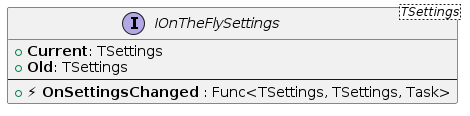
The library provides a IOnTheFlySettings<T> interface that you use in your API/App.
Events
The interface has an event OnSettingsChanged.
You can subscribe to the event in your own class, for example in a service class.
Just inject the IOnTheFlySettings<T> interface into your class and subscribe to the event:
private readonly IOnTheFlySettings<MyHealthCheckBasicSettings> _settingsHolder;

// Constructor
public MyService(
                    IOnTheFlySettings<MyHealthCheckBasicSettings> settingsHolder
                )
{
    _settingsHolder = settingsHolder;
    _settingsHolder.OnSettingsChanged += SettingsHolder_OnSettingsChanged;
}

private async Task SettingsHolder_OnSettingsChanged(MyHealthCheckBasicSettings? oldSettings, MyHealthCheckBasicSettings newSettings)
{
    // Handle the settings change event here
}
or
you can also subscribe to the event in your Startup.cs or Program.cs file:
var settingsHolder = app.Services.GetRequiredService<IOnTheFlySettings<MyHealthCheckBasicSettings>>();

settingsHolder.OnSettingsChanged += async (oldSettings, newSettings) =>
{
    // Handle the settings change event here
};
Accessing Current Settings
The interface has Current & Old properties to access the current & previous settings.
Using dependency injection
You can also use the interface to access the current settings at any time:
var basicSettings = _serviceProvider.GetRequiredService<IOnTheFlySettings<MyHealthCheckBasicSettings>>().Current;
or
via constructor injection in your class:
private readonly MyHealthCheckBasicSettings _basicSettings;

// Constructor
public MyService(
                    IOnTheFlySettings<MyHealthCheckBasicSettings> settingsHolder
                )
{
    _basicSettings = settingsHolder.Current;
}
Using global variable
Create a static Globals class in your application.
public static class Globals
{
    public static MyHealthCheckBasicSettings? BasicSettings { get; set; }
}
Then, subscribe to OnSettingsChanged event in your Program.cs or Startup.cs.
Update the Globals property in the event handler.
var settingsHolder = app.Services.GetRequiredService<IOnTheFlySettings<MyHealthCheckBasicSettings>>();

settingsHolder.OnSettingsChanged += async (oldSettings, newSettings) =>
{
    lock(_lockObj)
    {
        Globals.BasicSettings = newSettings;
    }
};
Use Globals.BasicSettings in your code.
Endpoints - read/update settings on-the-fly
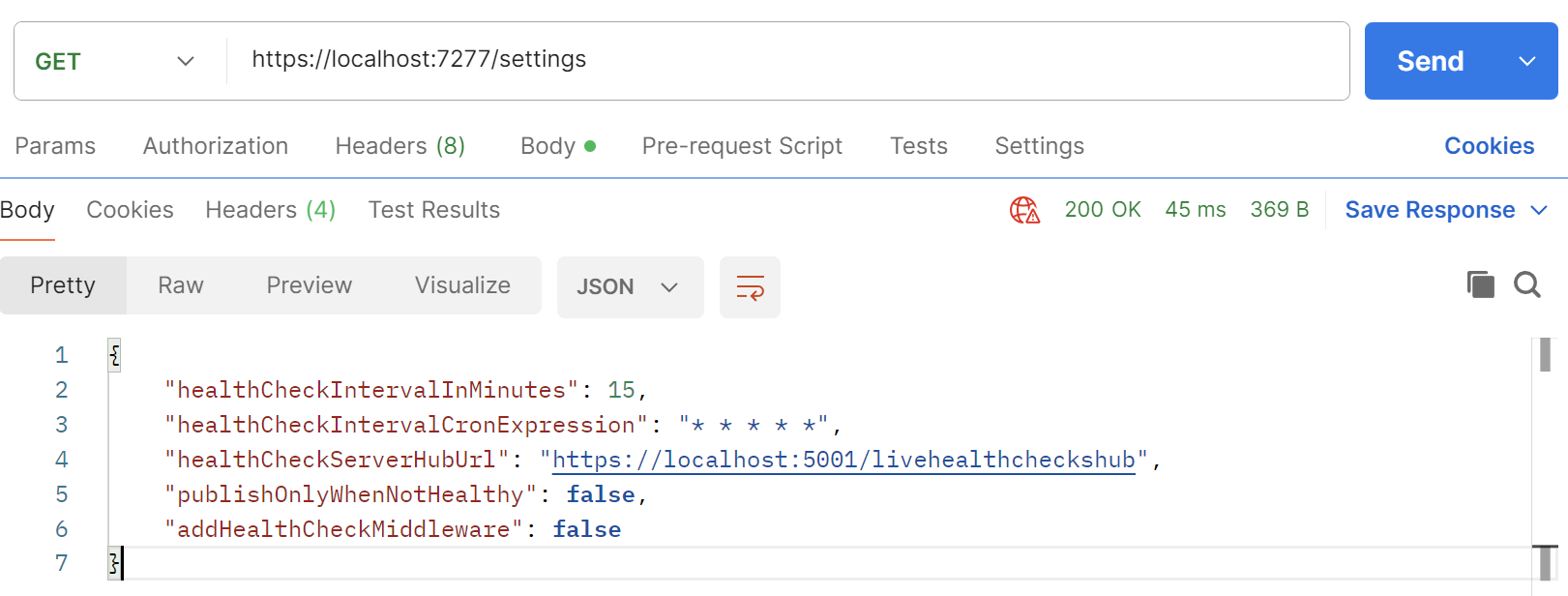
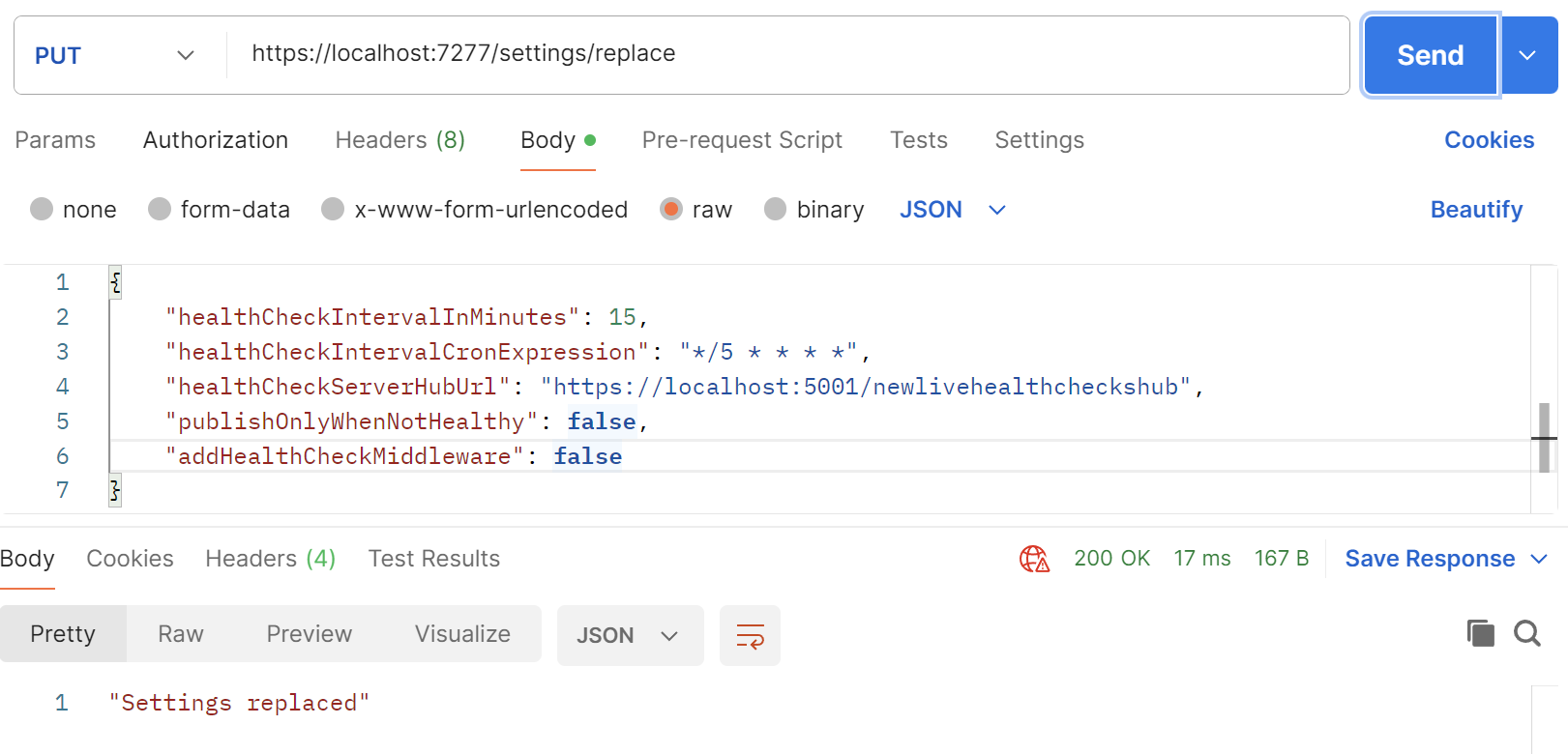
Library provides Minimal API endpoints for managing settings, including reading, and updating settings.
You can secure these endpoints using authentication and authorization mechanisms provided by ASP.NET Core.
To add the endpoints to your application, you can use the following code in your Startup.cs or Program.cs file:
app.MapGetOnTheFlySettings()
   .RequireAuthorization(); // Provide your own authorization policy here
							// or remove this line to allow anonymous access.

app.MapPutReplaceOnTheFlySettings()
   .RequireAuthorization(); // Provide your own authorization policy here
							// or remove this line to allow anonymous access.
Default routes to the endpoints are:
GET /settings
PUT /settings/replace
but you can customize the routes by providing your own route templates:
app.MapGetOnTheFlySettings("/my-custom-route")
   .RequireAuthorization(); // Provide your own authorization policy here
							// or remove this line to allow anonymous access.

app.MapPutReplaceOnTheFlySettings("/my-custom-route/replace")
   .RequireAuthorization(); // Provide your own authorization policy here
							// or remove this line to allow anonymous access.
Get settings
Replace settings
| Product | Versions Compatible and additional computed target framework versions. |
|---|---|
| .NET | net6.0 is compatible. net6.0-android was computed. net6.0-ios was computed. net6.0-maccatalyst was computed. net6.0-macos was computed. net6.0-tvos was computed. net6.0-windows was computed. net7.0 is compatible. net7.0-android was computed. net7.0-ios was computed. net7.0-maccatalyst was computed. net7.0-macos was computed. net7.0-tvos was computed. net7.0-windows was computed. net8.0 is compatible. net8.0-android was computed. net8.0-browser was computed. net8.0-ios was computed. net8.0-maccatalyst was computed. net8.0-macos was computed. net8.0-tvos was computed. net8.0-windows was computed. net9.0 is compatible. net9.0-android was computed. net9.0-browser was computed. net9.0-ios was computed. net9.0-maccatalyst was computed. net9.0-macos was computed. net9.0-tvos was computed. net9.0-windows was computed. net10.0 is compatible. net10.0-android was computed. net10.0-browser was computed. net10.0-ios was computed. net10.0-maccatalyst was computed. net10.0-macos was computed. net10.0-tvos was computed. net10.0-windows was computed. |
-
net10.0
- No dependencies.
-
net6.0
- No dependencies.
-
net7.0
- No dependencies.
-
net8.0
- No dependencies.
-
net9.0
- No dependencies.
NuGet packages
This package is not used by any NuGet packages.
GitHub repositories
This package is not used by any popular GitHub repositories.
Minor improvements.