NexGen.MediatR.Extensions.Caching.EntityFramework
1.3.0
See the version list below for details.
dotnet add package NexGen.MediatR.Extensions.Caching.EntityFramework --version 1.3.0
NuGet\Install-Package NexGen.MediatR.Extensions.Caching.EntityFramework -Version 1.3.0
<PackageReference Include="NexGen.MediatR.Extensions.Caching.EntityFramework" Version="1.3.0" />
<PackageVersion Include="NexGen.MediatR.Extensions.Caching.EntityFramework" Version="1.3.0" />
<PackageReference Include="NexGen.MediatR.Extensions.Caching.EntityFramework" />
paket add NexGen.MediatR.Extensions.Caching.EntityFramework --version 1.3.0
#r "nuget: NexGen.MediatR.Extensions.Caching.EntityFramework, 1.3.0"
#:package NexGen.MediatR.Extensions.Caching.EntityFramework@1.3.0
#addin nuget:?package=NexGen.MediatR.Extensions.Caching.EntityFramework&version=1.3.0
#tool nuget:?package=NexGen.MediatR.Extensions.Caching.EntityFramework&version=1.3.0
NexGen.MediatR.Extensions.Caching
<p align="center"> <img src="https://raw.githubusercontent.com/MatinGhanbari/NexGen.MediatR.Extensions.Caching/main/assets/images/logo.png" alt="NexGen.MediatR.Extensions.Caching" width="280" /> </p>
<p align="center"> <strong>MediatR output caching</strong> with pipeline behaviors, tag-based invalidation, and optional Entity Framework auto-eviction. </p>
<p align="center"> <a href="https://github.com/MatinGhanbari/NexGen.MediatR.Extensions.Caching/actions/workflows/ci.yml"><img src="https://img.shields.io/github/actions/workflow/status/MatinGhanbari/NexGen.MediatR.Extensions.Caching/.github%2Fworkflows%2Fci.yml?style=flat-square&label=CI" alt="CI" /></a> <a href="https://www.nuget.org/packages/NexGen.MediatR.Extensions.Caching"><img src="https://img.shields.io/nuget/v/NexGen.MediatR.Extensions.Caching.svg?style=flat-square" alt="NuGet" /></a> <a href="https://www.nuget.org/packages/NexGen.MediatR.Extensions.Caching"><img src="https://img.shields.io/nuget/dt/NexGen.MediatR.Extensions.Caching?style=flat-square" alt="Downloads" /></a> <a href="LICENSE"><img src="https://img.shields.io/badge/license-MIT-blue.svg?style=flat-square" alt="License" /></a> <img src="https://img.shields.io/badge/.NET-8%20%7C%209%20%7C%2010-512BD4?style=flat-square" alt=".NET 8 | 9 | 10" /> </p>
Table of contents
- About
- Features
- Packages
- Requirements
- Installation
- Quick start
- Configuration
- Caching requests
- Invalidation
- How it works
- Examples
- Samples and benchmarks
- Changelog
- Contributing
- License
About
NexGen.MediatR.Extensions.Caching extends MediatR with opt-in response caching as a cross-cutting concern. Mark a request with [RequestOutputCache], and a pipeline behavior serves cached responses on hits and stores results on misses.
Invalidation is tag-based: associate tags with cached requests, then evict by tag manually or automatically when Entity Framework Core saves related entity changes. Providers include in-memory, Redis, and Garnet so the same API works for single-node and distributed / microservice scenarios.
Features
| Feature | Description |
|---|---|
| Opt-in attribute caching | Only requests decorated with [RequestOutputCache] are cached; unmarked requests pass through unchanged. |
| MediatR pipeline behavior | Transparent get / miss / set flow via RequestOutputCacheBehavior<,> — no changes inside handlers for cache hits. |
| Multi-target frameworks | Ships net8.0, net9.0, and net10.0 in one NuGet package set. |
| In-memory provider | Built into the core package using IMemoryCache for local and development scenarios. |
| Redis provider | Distributed cache via IDistributedCache + StackExchange.Redis (NexGen.MediatR.Extensions.Caching.Redis). |
| Garnet provider | Distributed Garnet-compatible provider mirrored with Redis (NexGen.MediatR.Extensions.Caching.Garnet). |
| Tag-based invalidation | Group related cache entries with tags and evict with EvictByTagsAsync. |
| EF Core auto-evict | On SaveChanges / SaveChangesAsync, evict tags matching changed entity type names (UseMediatROutputCacheAutoEvict). |
| CQRS eviction bus | Cross-DI / split-host invalidation via in-process bus, Redis/Garnet Pub/Sub, or custom Rabbit/Kafka/MassTransit adapters. |
| Command eviction attribute | [RequestOutputCacheEvict] publishes or evicts tags after a successful command. |
| Deterministic cache keys | Key = {RequestTypeName}:{SHA-256(JSON)} from the serialized request payload. |
| Per-request expiration | expirationInSeconds on the attribute (default 300); 0 means no absolute expiration. Provider DefaultExpirationInSeconds can replace the library default when the attribute omits an explicit value. |
| Flush all | IRequestOutputCacheInvalidator.FlushAll clears the entire cache store for the provider. |
| Clear on startup | Optional ClearCacheOnStartup() during DI configuration. |
| FluentResults | Cache get/set/evict APIs return Result / Result<T> for success and failure paths. |
| ASP.NET Core DI | Integrates with IServiceCollection and standard Microsoft.Extensions.Caching abstractions. |
| Enterprise packaging | Central Package Management, SourceLink, symbol packages (.snupkg), XML docs on public APIs. |
Packages
| Package | Role |
|---|---|
NexGen.MediatR.Extensions.Caching |
Core: attribute, behavior, contracts, in-memory provider |
NexGen.MediatR.Extensions.Caching.Redis |
Redis distributed provider |
NexGen.MediatR.Extensions.Caching.Garnet |
Garnet distributed provider |
NexGen.MediatR.Extensions.Caching.EntityFramework |
EF Core ChangeTracker auto-eviction |
All four packages share the same version (lockstep releases).
Requirements
- .NET 8, .NET 9, or .NET 10
- MediatR (registered in your app as usual)
- Optional: Redis/Garnet for distributed cache; EF Core for auto-evict
Installation
Core
dotnet add package NexGen.MediatR.Extensions.Caching
Providers (as needed)
dotnet add package NexGen.MediatR.Extensions.Caching.Redis
dotnet add package NexGen.MediatR.Extensions.Caching.Garnet
dotnet add package NexGen.MediatR.Extensions.Caching.EntityFramework
Or via Package Manager Console:
Install-Package NexGen.MediatR.Extensions.Caching
Quick start
// Program.cs
builder.Services.AddMediatR(cfg => cfg.RegisterServicesFromAssembly(typeof(Program).Assembly));

builder.Services.AddMediatROutputCache(opt =>
{
    opt.UseMemoryCache();
});
[RequestOutputCache(tags: ["weather"], expirationInSeconds: 300)]
public sealed class WeatherForecastRequest : IRequest<IEnumerable<WeatherForecastDto>>
{
    public int Limit { get; set; } = 10;
}
Send the request through MediatR as usual; the first call executes the handler and caches the response. Later identical requests (same type + payload) are served from cache until expiration or eviction.
Configuration
Register one cache provider via AddMediatROutputCache. Configuring more than one throws.
In-memory cache
builder.Services.AddMediatROutputCache(opt =>
{
    opt.UseMemoryCache();
});
Optional provider defaults (applied when the attribute omits an explicit expirationInSeconds, i.e. uses the library constant 300):
builder.Services.AddMediatROutputCache(opt =>
{
    opt.UseMemoryCache(o => o.DefaultExpirationInSeconds = 600);
});
Redis
builder.Services.AddMediatROutputCache(opt =>
{
    opt.UseRedisCache("localhost:6379,password=YourRedisPassword");
});
Provider-specific options (InstanceName, Database, default TTL, or advanced ConfigurationOptions):
builder.Services.AddMediatROutputCache(opt =>
{
    opt.UseRedisCache(o =>
    {
        o.ConnectionString = builder.Configuration.GetConnectionString("Redis")!;
        o.InstanceName = "my-app:";
        o.Database = 1;
        o.DefaultExpirationInSeconds = 300;
    });
});
Garnet
builder.Services.AddMediatROutputCache(opt =>
{
    opt.UseGarnetCache("localhost:6379,password=YourGarnetPassword");
});
Same nested options pattern as Redis via UseGarnetCache(Action<GarnetRequestOutputCacheOptions>).
TTL precedence: an explicit
expirationInSecondson[RequestOutputCache]always wins (including0for never expire). ProviderDefaultExpirationInSecondsonly replaces the library default when the attribute uses the constructor default (300). Explicit300is indistinguishable from that default.
Entity Framework auto-evict
After a successful SaveChanges / SaveChangesAsync, the interceptor collects distinct entity CLR type names and calls EvictByTagsAsync with those names. Request tags must match (typically nameof(YourEntity)).
builder.Services.AddDbContext<AppDbContext>((sp, options) =>
{
    options.UseSqlServer(connectionString);
    options.UseMediatROutputCacheAutoEvict(sp);
});
CQRS / dual DI eviction bus
When command and query run in separate DI containers (same process or separate services), the command host publishes eviction messages and the query host applies them.
Message contract: RequestOutputCacheEvictionMessage with Tags. Suggested topic for external buses: mediatr.outputcache.evict (RequestOutputCacheEvictionConstants.DefaultBusTopic).
Existing Rabbit / Kafka / MassTransit bus
The library does not take a dependency on your broker. Implement thin adapters:
// Command host
public sealed class MassTransitEvictionPublisher(IBus bus) : IRequestOutputCacheEvictionPublisher
{
    public Task PublishAsync(RequestOutputCacheEvictionMessage message, CancellationToken ct)
        => bus.Publish(message, ct); // or send to topic mediatr.outputcache.evict
}

services.AddMediatROutputCacheEviction(opt =>
    opt.UseCustomEvictionPublisher<MassTransitEvictionPublisher>());

writeDb.UseMediatROutputCacheAutoEvict(sp);

// Query host — either a library subscriber...
public sealed class MassTransitEvictionSubscriber : IRequestOutputCacheEvictionSubscriber
{
    // SubscribeAsync: consume from your queue/topic and invoke the handler callback
}

services.AddMediatROutputCache(opt =>
{
    opt.UseMemoryCache();
    opt.UseCustomEvictionSubscriber<MassTransitEvictionSubscriber>();
});

// ...or call EvictByTagsAsync from an existing consumer:
public sealed class EvictionConsumer(IRequestOutputCacheInvalidator cache)
{
    public Task Consume(RequestOutputCacheEvictionMessage message, CancellationToken ct)
        => cache.EvictByTagsAsync(message.Tags, ct);
}
Redis Pub/Sub (no other bus)
// Query
services.AddMediatROutputCache(opt =>
{
    opt.UseMemoryCache();
    opt.UseRedisEvictionBus(redisConnectionString);
});

// Command
services.AddMediatROutputCacheEviction(opt =>
    opt.UseRedisEvictionBus(redisConnectionString));
(UseGarnetEvictionBus mirrors the same API.)
Co-deployed dual DI (in-process)
var bus = new InProcessRequestOutputCacheEvictionBus();

queryServices.AddMediatROutputCache(opt =>
{
    opt.UseMemoryCache();
    opt.UseInProcessEvictionBus(bus);
});

commandServices.AddMediatROutputCacheEviction(opt =>
    opt.UseInProcessEvictionBus(bus));
With EF auto-evict on the command DbContext, changed entity type names are published on the bus after a successful save. Query tags must still use nameof(Entity).
For commands without EF, decorate the request with [RequestOutputCacheEvict(nameof(User))].
Clear cache on startup
builder.Services.AddMediatROutputCache(opt =>
{
    opt.UseMemoryCache();
    opt.ClearCacheOnStartup();
});
Caching requests
Apply [RequestOutputCache] on the request type (the class that implements IRequest<TResponse>).
Note:
TResponseshould be a reference type (class, record, or interface), consistent with typical MediatR query responses.
Important: For EF auto-evict, include
nameoffor every related entity type intags.
[RequestOutputCache(
    tags: ["weather", nameof(WeatherForecastDbEntity)],
    expirationInSeconds: 3600)]
public sealed class WeatherForecastRequest : IRequest<IEnumerable<WeatherForecastDto>>
{
    public int Limit { get; set; } = 10;
    public int Offset { get; set; } = 0;
}
| Attribute parameter | Behavior |
|---|---|
tags |
Labels for grouping and invalidation |
expirationInSeconds |
Absolute lifetime in seconds. Default: 300. Use 0 for no absolute expiration |
Invalidation
Manual (by tags)
Inject IRequestOutputCacheInvalidator or IRequestOutputCache<TRequest, TResponse>:
public sealed class WeatherForecastUpdateHandler(
    IRequestOutputCacheInvalidator cache)
    : IRequestHandler<WeatherForecastUpdateRequest, string>
{
    public async Task<string> Handle(
        WeatherForecastUpdateRequest request,
        CancellationToken cancellationToken)
    {
        await cache.EvictByTagsAsync(["weather"], cancellationToken);
        return "Evicted";
    }
}
Flush everything
await cache.FlushAll(cancellationToken);
Automatic (EF Core)
When UseMediatROutputCacheAutoEvict is configured, you usually do not need manual eviction for data that changes through that DbContext. If an eviction publisher is registered (CQRS bus), the interceptor publishes tags instead of calling the local invalidator.
Command attribute
[RequestOutputCacheEvict(nameof(User))]
public sealed record CreateUserCommand(string Name) : IRequest<Unit>;
How it works
[RequestOutputCache]  →  RequestOutputCacheBehavior
                              │
                              ├─ hit  → return cached TResponse
                              └─ miss → handler → store → return TResponse

Key:   {RequestType.Name}:{sha256(json(request))}
Index: tag → request types → cache keys  (via IRequestOutputCacheContainer)
Evict: EvictByTagsAsync(tags)
       or EF ChangeTracker → entity type Name as tags
       or eviction bus (in-process / Redis / Garnet / custom) → query host EvictByTagsAsync
Distributed providers (Redis / Garnet) also keep request→response type metadata so payloads can be deserialized correctly across nodes.
Examples
Cache a query
[RequestOutputCache(tags: ["weather"], expirationInSeconds: 300)]
public sealed class WeatherForecastRequest : IRequest<IEnumerable<WeatherForecastDto>>
{
    public int Limit { get; set; } = 10;
}

public sealed class WeatherForecastRequestHandler
    : IRequestHandler<WeatherForecastRequest, IEnumerable<WeatherForecastDto>>
{
    public async Task<IEnumerable<WeatherForecastDto>> Handle(
        WeatherForecastRequest request,
        CancellationToken cancellationToken)
    {
        await Task.Delay(2000, cancellationToken); // simulate work
        // ... build and return forecast list
        return [];
    }
}
Invalidate after an update
public sealed class WeatherForecastUpdateRequest : IRequest<string>;

public sealed class WeatherForecastUpdateRequestHandler(
    IRequestOutputCacheInvalidator cache)
    : IRequestHandler<WeatherForecastUpdateRequest, string>
{
    public async Task<string> Handle(
        WeatherForecastUpdateRequest request,
        CancellationToken cancellationToken)
    {
        await cache.EvictByTagsAsync(["weather"], cancellationToken);
        return "Evicted!";
    }
}
Samples and benchmarks
| Area | Location |
|---|---|
| Integration / consumer sample | tests/NexGen.MediatR.Extensions.Caching.IntegrationTest (includes docker-compose.yml for Redis/SQL) |
| Unit tests | tests/NexGen.MediatR.Extensions.Caching.UnitTest |
| Benchmarks | benchmarks/NexGen.MediatR.Extensions.Caching.Benchmark |
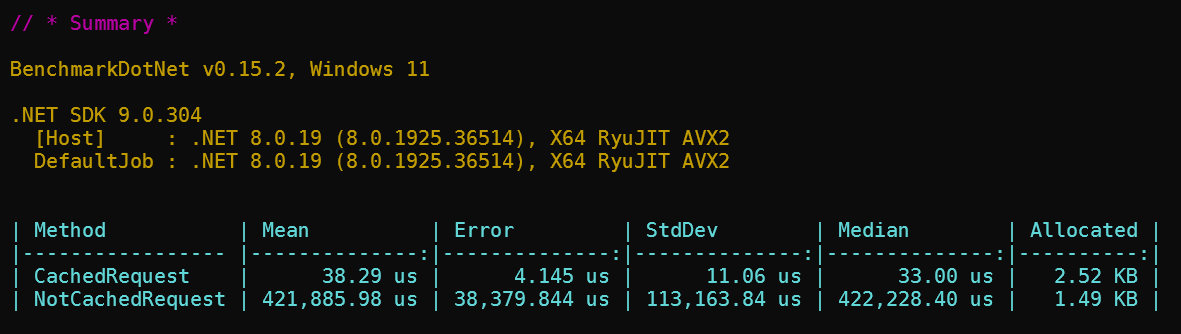
Larger or more complex responses use more memory with the in-memory provider. Prefer Redis or Garnet for multi-instance and production workloads.
Changelog
Release notes are maintained in CHANGELOG.md (Keep a Changelog format). Check that file for what changed in each version.
Contributing
Contributions are welcome through GitHub Issues and Pull Requests.
Please read CONTRIBUTING.md for the full contribution guide (development setup, coding standards, tests, and PR expectations) before opening an issue or PR.
License
This project is licensed under the MIT License.
| Product | Versions Compatible and additional computed target framework versions. |
|---|---|
| .NET | net8.0 is compatible. net8.0-android was computed. net8.0-browser was computed. net8.0-ios was computed. net8.0-maccatalyst was computed. net8.0-macos was computed. net8.0-tvos was computed. net8.0-windows was computed. net9.0 is compatible. net9.0-android was computed. net9.0-browser was computed. net9.0-ios was computed. net9.0-maccatalyst was computed. net9.0-macos was computed. net9.0-tvos was computed. net9.0-windows was computed. net10.0 is compatible. net10.0-android was computed. net10.0-browser was computed. net10.0-ios was computed. net10.0-maccatalyst was computed. net10.0-macos was computed. net10.0-tvos was computed. net10.0-windows was computed. |
-
net10.0
- Microsoft.EntityFrameworkCore (>= 10.0.10)
- NexGen.MediatR.Extensions.Caching (>= 1.3.0)
-
net8.0
- Microsoft.EntityFrameworkCore (>= 8.0.20)
- NexGen.MediatR.Extensions.Caching (>= 1.3.0)
-
net9.0
- Microsoft.EntityFrameworkCore (>= 9.0.10)
- NexGen.MediatR.Extensions.Caching (>= 1.3.0)
NuGet packages
This package is not used by any NuGet packages.
GitHub repositories
This package is not used by any popular GitHub repositories.
Release v1.3.0