NBi.Framework
2.0.0-beta.159
dotnet add package NBi.Framework --version 2.0.0-beta.159
NuGet\Install-Package NBi.Framework -Version 2.0.0-beta.159
<PackageReference Include="NBi.Framework" Version="2.0.0-beta.159" />
<PackageVersion Include="NBi.Framework" Version="2.0.0-beta.159" />
<PackageReference Include="NBi.Framework" />
paket add NBi.Framework --version 2.0.0-beta.159
#r "nuget: NBi.Framework, 2.0.0-beta.159"
#:package NBi.Framework@2.0.0-beta.159
#addin nuget:?package=NBi.Framework&version=2.0.0-beta.159&prerelease
#tool nuget:?package=NBi.Framework&version=2.0.0-beta.159&prerelease
NBi
NBi is a testing framework (add-on to NUnit) for Business Intelligence. It supports most of the relational databases (SQL server, MySQL, postgreSQL ...) and OLAP platforms (Analysis Services, Mondrian ...) but also ETL and reporting components (Microsoft technologies).
The main goal of this framework is to let users create tests with a declarative approach based on an Xml syntax. By the means of NBi, you don't need to develop C# code to specify your tests! Either, you don't need Visual Studio to compile your test suite. Just create an Xml file and let the framework interpret it and play your tests. The framework is designed as an add-on of NUnit but with the possibility to port it easily to other testing frameworks.
Social media: 

Releases: 



Latest RC and beta: 


Dev. activity: 


Continuous integration builds:

Status: 



Releases
Binaries for the different releases are hosted on www.nbi.io or GitHub
Documentation
The documentation is available on-line and is hosted on www.nbi.io
Licenses
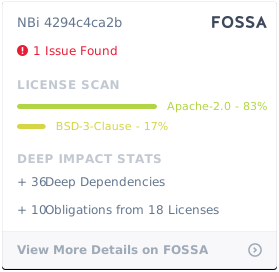
NBi is available on the terms of Apache 2.0. NBi is also using several OSS projects as libraries.
Compatibility of licenses in checked by FOSSA app:
Bugs, issues and requests for features
The list of bugs and feature's requests is hosted on GitHub
Continuous Integration and Testing
A continuous integration service is available on AppVeyor and another on Azure DevOps
NBi has around 2750 automated tests, asserting most of the features supported by NBi during the build processes. These tests are organized in three folders:
- Acceptance: The tests are effectively written in nbits file and played end-to-end by the framework itself. They don't use any fake, mock or stub and are connected to real databases and cubes and perform queries on them.
- Integration: These tests are used to assert interactions with external resources such as databases or cubes. They make usage of stubs to define parameters impacting the code to use.
- Unit: These tests are never contacting an external resource and have a maximal scope equivalent to the code of a single class. Usage of stubs, fakes and mocks is welcome.
In order to be able to build the software on different machines, the database and cube used during tests must always be Adventure Works 2008R2. In order to facilitate the integration, NBi is connected by default to the online SQL database hosted on Azure (Unfortunately no equivalent for SSAS). If you want to override the connection settings to execut the tests on your own environment, create a file named ConnectionString.user.config in the folder NBi.Testing and copy the content from the file ConnectionString.config into it, before adjusting for your environment.
Note that all the tests are not executed on the continuous integration services, due to limitations in the availability of some components.
- Unit tests are always executed
- Integration tests are executed based on the availability of the underlying components:
- Database Engine: Yes. Due to the usage of an Azure database to run these tests, these tests are enabled on the CI platforms. About ODBC drivers, the ODBC driver for SQL Server (13.1) is used on appVeyor and the SQL Server (10.0) is used on Azure DevOps
- OLAP Engine: No
- ETL Engine (SSIS): No
- Windows Service: No (but planned to integrate them)
- Local Database: No (but planned to integrate them)
- Report Server: No (but planned to integrate them)
- Acceptance tests are partially run. The test-suites covering the acceptance tests are executed but will return an ignore result when at least one of the test is not runnable due to service not running (most of the time, the reason for an ignore is the unavailability of Analysis Services).
Three artefacts are packaged and published by this CI:
- Framework.zip contains the dll needed to run tests written with NBi
- UI.zip contains the exe and dlls needed to run Genbi
- Nuget packages
The nuget packages built on appVeyor are pushed to nuget for beta, release candidates and release branches.
Code and contributions
NBi is using Git as DCVS and the code is hosted on Github. Organization of the Git repository is based on Git-flow.
If you want to develop a new feature, you're encouraged to read the contribution guidelines.
NBi is mostly developed in C# with a bit of SQL and XML.
Tracking
This OSS project is tracked by Ohloh
| Product | Versions Compatible and additional computed target framework versions. |
|---|---|
| .NET | net8.0 is compatible. net8.0-android was computed. net8.0-browser was computed. net8.0-ios was computed. net8.0-maccatalyst was computed. net8.0-macos was computed. net8.0-tvos was computed. net8.0-windows was computed. net9.0 is compatible. net9.0-android was computed. net9.0-browser was computed. net9.0-ios was computed. net9.0-maccatalyst was computed. net9.0-macos was computed. net9.0-tvos was computed. net9.0-windows was computed. net10.0 was computed. net10.0-android was computed. net10.0-browser was computed. net10.0-ios was computed. net10.0-maccatalyst was computed. net10.0-macos was computed. net10.0-tvos was computed. net10.0-windows was computed. |
-
net8.0
- MarkdownLog (>= 0.9.64)
- NBi (>= 2.0.0-beta.159)
- NBi.Extensibility (>= 2.0.0-beta.159)
- Newtonsoft.Json (>= 13.0.3)
-
net9.0
- MarkdownLog (>= 0.9.64)
- NBi (>= 2.0.0-beta.159)
- NBi.Extensibility (>= 2.0.0-beta.159)
- Newtonsoft.Json (>= 13.0.3)
NuGet packages (3)
Showing the top 3 NuGet packages that depend on NBi.Framework:
| Package | Downloads |
|---|---|
|
NBi.VisualStudio
This package retrieves NUnit runners and NBi framework from Nuget before creating an empty test-suite, a config file and NUnit-project file. It also reconfigure the project to start NUnit GUI and the test-suite when pressing F5 (debug). |
|
|
NBi.Gremlin
This package contains the Tinkerpop Gremlin extension for the testing framework NBi (check at http://www.nbi.io) |
|
|
NBi.Data3Sixty
This package contains the Data3Sixty extension for the testing framework NBi (check at http://www.nbi.io) |
GitHub repositories
This package is not used by any popular GitHub repositories.
| Version | Downloads | Last Updated |
|---|---|---|
| 2.0.0-beta.159 | 167 | 4/26/2025 |
| 2.0.0-beta.158 | 146 | 4/26/2025 |
| 2.0.0-beta.155 | 223 | 3/12/2025 |
| 2.0.0-beta.153 | 201 | 3/12/2025 |
| 2.0.0-beta.151 | 204 | 3/11/2025 |
| 2.0.0-beta.149 | 205 | 3/10/2025 |
| 2.0.0-beta.148 | 213 | 3/9/2025 |
| 2.0.0-beta.146 | 209 | 3/9/2025 |
| 2.0.0-beta.145 | 262 | 3/5/2025 |
| 2.0.0-beta.143 | 148 | 2/26/2025 |
| 2.0.0-beta.142 | 174 | 2/24/2025 |
| 2.0.0-beta.141 | 134 | 2/23/2025 |
| 2.0.0-beta.140 | 157 | 2/23/2025 |
| 2.0.0-beta.135 | 167 | 1/28/2025 |
| 1.25.0-beta0005 | 223 | 1/27/2025 |
| 1.25.0-beta0001 | 293 | 8/10/2023 |
| 1.24.0 | 23,258 | 8/10/2023 |
| 1.24.0-beta0047 | 269 | 8/10/2023 |
| 1.24.0-beta0046 | 265 | 8/10/2023 |
| 1.24.0-beta0044 | 252 | 8/10/2023 |