NBenchmark 0.26.0
dotnet add package NBenchmark --version 0.26.0
NuGet\Install-Package NBenchmark -Version 0.26.0
<PackageReference Include="NBenchmark" Version="0.26.0" />
<PackageVersion Include="NBenchmark" Version="0.26.0" />
<PackageReference Include="NBenchmark" />
paket add NBenchmark --version 0.26.0
#r "nuget: NBenchmark, 0.26.0"
#:package NBenchmark@0.26.0
#addin nuget:?package=NBenchmark&version=0.26.0
#tool nuget:?package=NBenchmark&version=0.26.0
NBenchmark





Zero-ceremony benchmarking for .NET.
NBenchmark provides a low-overhead measurement engine with built-in statistical analysis. It moves beyond raw averages by providing confidence intervals, outlier trimming, and significance testing out of the box - allowing you to differentiate between a real performance gain and background noise.
var result = Benchmark.Run(() => MandelbrotCalculation(name: "Mandelbrot calculation"));
result.Print();
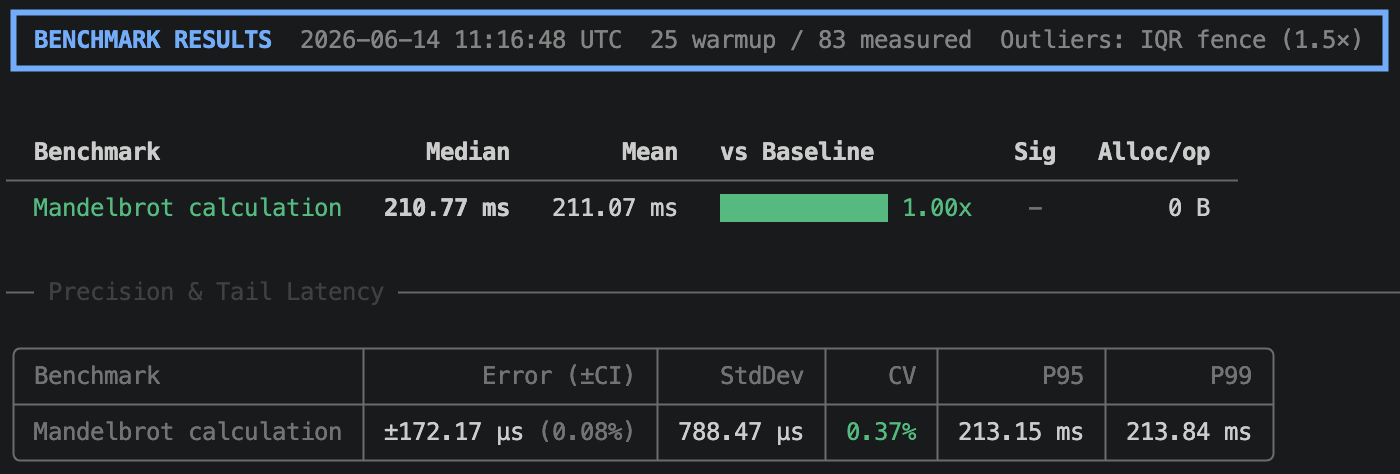
Why NBenchmark?
Zero-ceremony measurements.
Benchmark.Run(() => ...)requires no attributes, no class structures, and no dedicated project. Run a reliable benchmark directly in your existing code or scratchpad.Adaptive, self-tuning measurements. No iteration counts to guess. NBenchmark calibrates ops-per-sample for fast bodies, detects when warmup has plateaued, and streams samples until the confidence interval hits its target - then stops. Pin any dimension when you want a fixed, reproducible run.
Statistical rigor by default. The adaptive loop auto-sizes warmup, sample count, and ops-per-batch for each benchmark, stopping once the 95% confidence interval is tight enough. Combined with IQR-fence outlier trimming, it validates A/B comparisons with a Mann-Whitney U test, reports Cliff's delta effect size as a Magnitude column (Negligible / Small / Medium / Large), and automatically switches to the Kruskal-Wallis omnibus test when comparing three or more implementations.
Pluggable statistics. Swap in your own outlier detector (
IOutlierDetector) or significance test (ISignificanceTest) when the built-in IQR/MAD trimming and rank-based tests don't fit your domain.Low-overhead execution. The measurement loop is reflection-free. The engine uses typed delegates to avoid virtual dispatch and boxing during timing, ensuring the JIT optimizes your benchmark body just as it would in production.
Async-native. Measures the true duration of
TaskandTask<T>async work without sync-over-async wrappers.Automated A/B comparisons.
BenchmarkSuiteruns implementations side-by-side, calculates ratios, and flags whether differences are statistically significant.Pragmatic package structure. The core
NBenchmarkpackage is zero-dependency. Opt-in to additional features like Spectre.Console tables, Dependency Injection, or test framework integration as needed.Compile-time analysis. The optional
NBenchmark.Analyzerspackage catches common benchmark authoring mistakes (dead code elimination, implicit order dependence, missing return values) as Roslyn diagnostics during build, before you ever run a measurement.
Installation
dotnet add package NBenchmark
Optional Packages
| Package | Purpose |
|---|---|
NBenchmark.Reporters.Console |
Rich terminal tables via Spectre.Console |
NBenchmark.Analyzers |
Roslyn analyzers to catch common authoring mistakes |
NBenchmark.DependencyInjection |
Constructor injection for benchmark classes |
NBenchmark.Integration.xUnit |
Enforce performance thresholds as xUnit tests |
NBenchmark.Integration.NUnit |
Enforce performance thresholds as NUnit tests |
NBenchmark.Integration.MSTest |
Enforce performance thresholds as MSTest tests |
Usage Modes
1. Single Mode (Ad-hoc checks)
The fastest way to get a reliable number.
// Sync or Async
var result = await Benchmark.RunAsync(async () => await FetchDataAsync());

// Returns the value - the runner consumes it to keep the body alive for the JIT
var result = Benchmark.Run(() => int.Parse("12345"));

// Programmatic access to results
Console.WriteLine($"P95: {result.P95} ns, Alloc: {result.MeanAllocatedBytes} B");
2. Suite Mode (Side-by-side comparison)
Compare multiple implementations with a fluent API.
var results = await new BenchmarkSuite("string concat")
    .Add("plus operator", () => "a" + "b" + "c")
    .Add("interpolation",  () => $"{"a"}{"b"}{"c"}")
    .WithBaseline("plus operator")
    .WithReporter(new ConsoleReporter())
    .RunAsync();
The output includes a Ratio column and a ✓ signifier if the speed difference is statistically significant.
3. Harness Mode (Dedicated projects)
Attribute-based discovery with a full CLI, designed for dedicated benchmark projects.
public class StringBenchmarks
{
    [Benchmark(Baseline = true)]
    public string Concat() => "a" + "b" + "c";

    [Benchmark]
    public string Interpolate() => $"{"a"}{"b"}{"c"}";
}

// Program.cs
await BenchmarkHarness.Create(args)
    .AddFromAssembly<StringBenchmarks>()
    .WithReporter(new ConsoleReporter())
    .RunAsync();
dotnet run -- --filter StringBenchmarks.Concat  # Run a specific benchmark
dotnet run -- --dry-run                         # Validate wiring without running
dotnet run -- --reporter json                   # Output results for CI/CD
Performance Gates (CI/CD)
Enforce performance SLAs directly in your test suite. If a benchmark exceeds the threshold, the test fails.
[PerformanceFact(MaxMeanNs = 500_000, MaxAllocatedBytes = 1024)]
public void CriticalPath_ShouldBeFast() => ProcessOrder(testOrder);
Supports P95 latency, allocation limits, and baseline regression checks (comparing against a previously saved JSON result).
View the full documentation at nbenchmark.net.
| Product | Versions Compatible and additional computed target framework versions. |
|---|---|
| .NET | net8.0 is compatible. net8.0-android was computed. net8.0-browser was computed. net8.0-ios was computed. net8.0-maccatalyst was computed. net8.0-macos was computed. net8.0-tvos was computed. net8.0-windows was computed. net9.0 is compatible. net9.0-android was computed. net9.0-browser was computed. net9.0-ios was computed. net9.0-maccatalyst was computed. net9.0-macos was computed. net9.0-tvos was computed. net9.0-windows was computed. net10.0 is compatible. net10.0-android was computed. net10.0-browser was computed. net10.0-ios was computed. net10.0-maccatalyst was computed. net10.0-macos was computed. net10.0-tvos was computed. net10.0-windows was computed. |
-
net10.0
- No dependencies.
-
net8.0
- No dependencies.
-
net9.0
- No dependencies.
NuGet packages (6)
Showing the top 5 NuGet packages that depend on NBenchmark:
| Package | Downloads |
|---|---|
|
NBenchmark.Integration.Abstractions
Shared abstractions and reusable building blocks for NBenchmark integration packages. |
|
|
NBenchmark.DependencyInjection
Resolves benchmark classes from an IServiceProvider so they can have constructor dependencies. |
|
|
NBenchmark.Reporters.Console
Rich terminal table output for NBenchmark using Spectre.Console. |
|
|
NBenchmark.Integration.NUnit
Run NBenchmark benchmarks as NUnit tests with configurable performance thresholds. |
|
|
NBenchmark.Integration.xUnit
Run NBenchmark benchmarks as xUnit tests with configurable performance thresholds. |
GitHub repositories
This package is not used by any popular GitHub repositories.
| Version | Downloads | Last Updated |
|---|---|---|
| 0.26.0 | 203 | 6/30/2026 |
| 0.25.1 | 214 | 6/26/2026 |
| 0.25.0 | 220 | 6/26/2026 |
| 0.24.0 | 221 | 6/25/2026 |
| 0.23.0 | 218 | 6/25/2026 |
| 0.22.1 | 216 | 6/24/2026 |
| 0.22.0 | 217 | 6/23/2026 |
| 0.21.1 | 212 | 6/23/2026 |
| 0.21.0 | 214 | 6/23/2026 |
| 0.20.0 | 223 | 6/22/2026 |
| 0.19.0 | 223 | 6/20/2026 |
| 0.18.0 | 218 | 6/19/2026 |
| 0.17.0 | 219 | 6/19/2026 |
| 0.16.0 | 218 | 6/19/2026 |
| 0.15.0 | 228 | 6/18/2026 |
| 0.14.0 | 218 | 6/17/2026 |
| 0.13.0 | 214 | 6/17/2026 |
| 0.12.0 | 213 | 6/16/2026 |
| 0.11.1 | 216 | 6/16/2026 |
| 0.11.0 | 219 | 6/16/2026 |