Memoria.Messaging.RabbitMq.InMemory
2.0.0-beta.2
Prefix Reserved
dotnet add package Memoria.Messaging.RabbitMq.InMemory --version 2.0.0-beta.2
NuGet\Install-Package Memoria.Messaging.RabbitMq.InMemory -Version 2.0.0-beta.2
<PackageReference Include="Memoria.Messaging.RabbitMq.InMemory" Version="2.0.0-beta.2" />
<PackageVersion Include="Memoria.Messaging.RabbitMq.InMemory" Version="2.0.0-beta.2" />
<PackageReference Include="Memoria.Messaging.RabbitMq.InMemory" />
paket add Memoria.Messaging.RabbitMq.InMemory --version 2.0.0-beta.2
#r "nuget: Memoria.Messaging.RabbitMq.InMemory, 2.0.0-beta.2"
#:package Memoria.Messaging.RabbitMq.InMemory@2.0.0-beta.2
#addin nuget:?package=Memoria.Messaging.RabbitMq.InMemory&version=2.0.0-beta.2&prerelease
#tool nuget:?package=Memoria.Messaging.RabbitMq.InMemory&version=2.0.0-beta.2&prerelease
Memoria™





Event sourcing for .NET with two consistency models in one framework. Store state as classic event streams, or as dynamic consistency boundaries where the boundary is a tag query chosen per decision. Start with the mediator alone and add an event store when you need one — nothing forces you to take both.
From Latin memoria (memory).
📘 Documentation · 🚀 Getting started · 💡 Concepts · 🧭 Guides · 📗 Reference
📚 Examples · 🔎 Memoria Web · ⬆️ Upgrading · 📣 Release notes
📄 Licence at a glance
The framework is free and open source under the Apache License 2.0 —
every package under the Memoria NuGet prefix, every version. Use it in anything, commercial or
not, closed source or open, at any scale. No edition, no threshold, no key, nothing to sign.
Memoria Web, the browser tool that reads a store through your own domain assemblies, is the one part that is not: it is a commercial product, free for a single service and paid above that. Its source is published so you can read and build it, under its own licence. Installing the packages never requires it.
Already on 1.x? Upgrade to 2.0.0 walks through the two behaviours that move with the major version. Nothing in the store changes, so there is no data migration.
📥 Install
dotnet add package Memoria
Only Memoria is required. Add an event-sourcing package and a store when you need one:
dotnet add package Memoria.EventSourcing
dotnet add package Memoria.EventSourcing.Store.EntityFrameworkCore
2.0.0 is currently in beta, so add --prerelease to install it. The
install guide explains when
to reach for each of the packages listed below.
🔄 Quickstart
Register what you need at startup:
services.AddMemoria(typeof(Program));                    // Mediator: commands, queries, notifications
services.AddMemoriaEventSourcing(typeof(Program));       // Aggregates, streams, projections
services.AddMemoriaEntityFrameworkCore<MyDbContext>();   // Store
As a mediator
public record CreateProduct(string Name) : ICommand;

public class CreateProductHandler : ICommandHandler<CreateProduct>
{
    public Task<Result> Handle(CreateProduct command, CancellationToken cancellationToken = default) =>
        Task.FromResult(Result.Ok());
}

await dispatcher.Send(new CreateProduct("Espresso"));
See the Mediator quickstart
for queries, notifications, validation, custom handlers, command sequences and SendAndPublish.
As an event store
[EventType("OrderPlaced")]
public record OrderPlacedEvent(Guid OrderId, decimal Amount) : IEvent;

var streamId = new CustomerStreamId(customerId);
var aggregateId = new OrderId(orderId);
var order = new Order(orderId, amount: 25.45m);

await domainService.SaveAggregate(streamId, aggregateId, order, expectedEventSequence: 0);
See the Event Sourcing quickstart for the full aggregate definition, and Streams or DCB? for choosing a consistency model.
Past that, the guides cover one task each, and
the reference has the
IDomainService API and a
configuration page per package.
⚡ What you get
| Area | Capabilities |
|---|---|
| Mediator | Commands, queries and notifications through one IDispatcher; command sequences; custom handlers in place of the resolved one; automatic notification publication after a command succeeds; Result instead of exceptions |
| Consistency | Event streams with optimistic concurrency on an expected event sequence, or dynamic consistency boundaries where the boundary is a tag query chosen per decision; multiple aggregates per stream |
| Reads | Four read modes; aggregate snapshots stored alongside events for fast, strongly consistent reads; projections persisted and retrieved as snapshots; in-memory reconstruction up to a given sequence or date |
| Event queries | Filter applied events by event type, or by event property declared as key/value pairs on the aggregate id; query stream events from or up to a sequence, date or date range; retrieve every event applied to an aggregate |
| Providers | Stores: EF Core (plus ASP.NET Identity and PostgreSQL jsonb companions), Cosmos DB. Messaging: Azure Service Bus, RabbitMQ. Caching: in-memory, Redis. Validation: FluentValidation |
| Testing | In-memory variants of Cosmos DB, Service Bus and RabbitMQ, so a test suite needs no external dependency |
| Tooling | Memoria Web — read any Memoria store through your own domain assemblies |
🔎 Memoria Web
A browser tool for reading a Memoria store. Point it at a database, upload a zip of your own
domain assemblies — with a memoria.json at its root naming the services in it — and it shows you
the events that were appended, the aggregates and projections snapshotted from them, and the types
both were written through, for both consistency models side by side.
dotnet run --project src/Memoria.Web
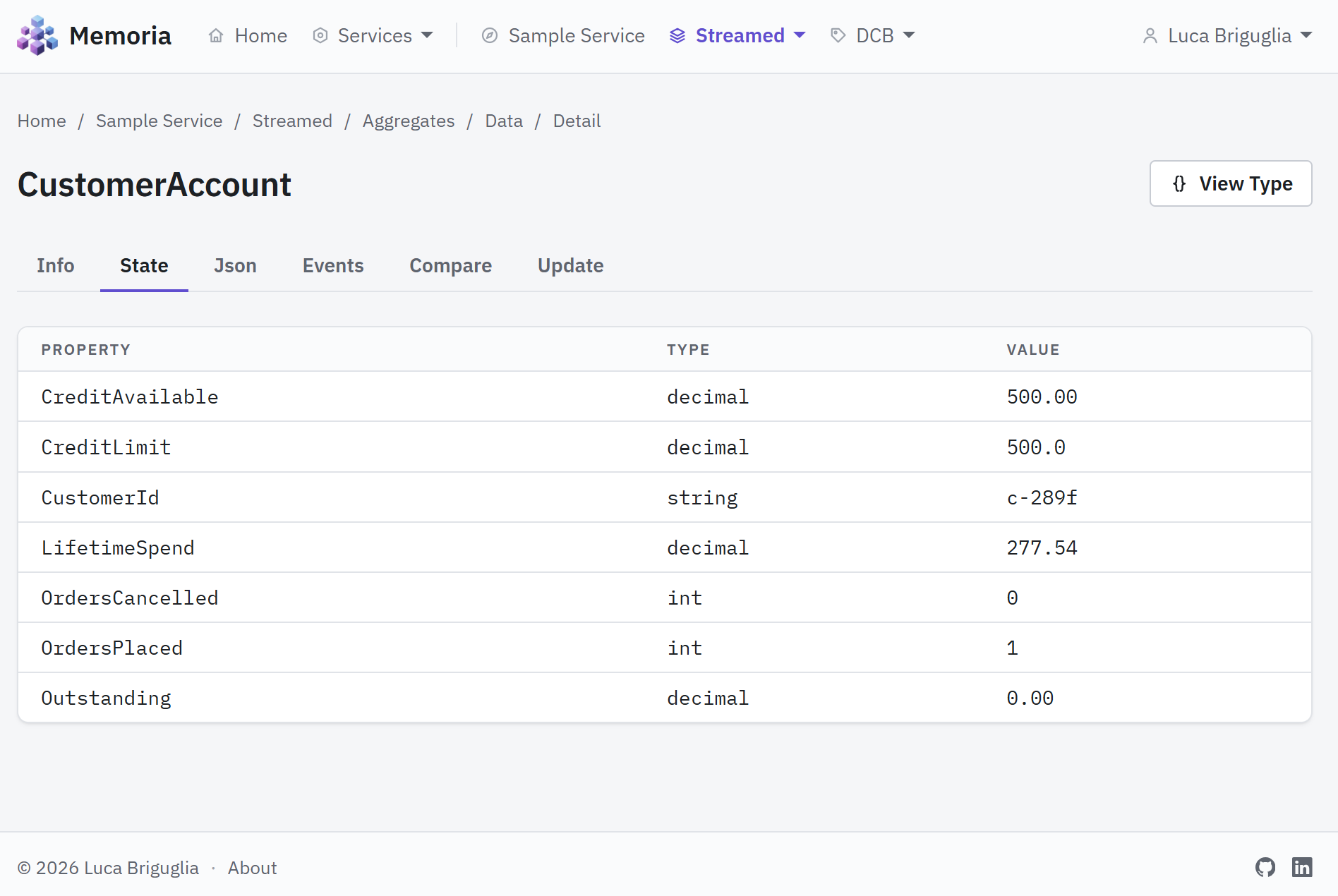
Every section has a Types page listing what the uploaded assemblies declare, and a Data page listing what the store actually holds — filtered, sorted and paged, with all of it in the query string so a view can be bookmarked and shared. Open a row and the aggregate is folded from its events, so you can see the state a snapshot stands at and how far behind its stream it is.
It ships in the repository rather than on NuGet, so you build and run it yourself. It creates nothing and deletes nothing: the only write it offers is refreshing a snapshot that has fallen behind its stream or its boundary.
There is also a hosted instance at demo.getmemoria.io, if you would rather try it than build it. It is behind its sign-in, so access is by invitation: message me on LinkedIn and I will send you one.
Operators sign in through an OpenID Connect provider, and every page and update is behind one of
three roles — Reader, Updater, Administrator — granted for every service by configuration or for a
single service by its manifest. Setting Authentication:Disabled runs the tool open instead, with
nobody signed in and nothing withheld.
Uploading an assembly runs its code in the tool's process. Upload only assemblies you trust, and keep an open instance on localhost or behind a proxy that authenticates every request.
To try it without a domain of your own, src/Memoria.Web.Samples.Streamed and
src/Memoria.Web.Samples.Dcb carry a sample ecommerce domain modelled once in each consistency
model, and src/Memoria.Web.Samples fills a store with data written through it.
🔎 What it is, and what each page shows · ⚙️ Configuration · 🚢 Deployment · 🌱 Sample data
📦 Packages
Badges show the latest stable release. 2.0.0-beta is published as a pre-release on every package.
| Package | Version | What it adds |
|---|---|---|
| Memoria |  |
Required. Mediator core: commands, queries, notifications, dispatcher |
| Memoria.EventSourcing |  |
Aggregates, streams, projections and IDomainService |
| Memoria.EventSourcing.Dcb |  |
Dynamic consistency boundaries |
| Memoria.EventSourcing.Dcb.Store.EntityFrameworkCore |  |
EF Core store for the DCB model |
| Memoria.EventSourcing.Store.EntityFrameworkCore |  |
EF Core store: SQL Server, SQLite, PostgreSQL, MySQL, in-memory |
| Memoria.EventSourcing.Store.EntityFrameworkCore.Identity |  |
The above, plus ASP.NET Core Identity in the same DbContext |
| Memoria.EventSourcing.Store.EntityFrameworkCore.Npgsql |  |
PostgreSQL jsonb-aware event-property filtering |
| Memoria.EventSourcing.Store.Cosmos |  |
Azure Cosmos DB store (SQL API) |
| Memoria.EventSourcing.Store.Cosmos.InMemory |  |
In-process Cosmos DB stand-in for tests |
| Memoria.Messaging.ServiceBus |  |
Publish to Azure Service Bus when a command succeeds |
| Memoria.Messaging.ServiceBus.InMemory |  |
In-process Service Bus stand-in for tests |
| Memoria.Messaging.RabbitMq |  |
Publish to RabbitMQ when a command succeeds |
| Memoria.Messaging.RabbitMq.InMemory |  |
In-process RabbitMQ stand-in for tests |
| Memoria.Caching.Memory |  |
Cache query results in-process |
| Memoria.Caching.Redis |  |
Cache query results in Redis |
| Memoria.Validation.FluentValidation |  |
Validate commands before they reach the handler |
🗺️ Roadmap
Shipped work is in the release notes. Next up, in no fixed order:
- Pipelines
- Various improvements to Memoria Web
- Option to automatically validate commands
- Event Grid messaging provider
- Kafka messaging provider
- Amazon SQS messaging provider
- File store provider for event sourcing
🤝 Contributing
Bug reports, questions and feature requests are welcome as issues and discussions. For code, please open an issue first, and read CONTRIBUTING.md — it covers how to build and test, the conventions to follow, and the contributor licence agreement that dual licensing makes necessary. You keep the copyright in your work.
By taking part you agree to the Code of Conduct.
⭐ Give a star
If Memoria is useful in your learning, samples, workshop or project, please give the repository a star. Thank you!
✨ Custom implementations and project support
Memoria is designed to be extended, with providers for store, messaging, caching and validation.
Need a provider that does not exist yet — a custom database store, a different message bus — or help applying Memoria to an existing codebase? Get in touch via LinkedIn.
📄 Licence
The framework is under the Apache License 2.0 —
every package published under the Memoria NuGet prefix, every version, 1.x and 2.x alike. Build
whatever you like with it, licence that however you like, ship it to whomever you like. The full
text is in LICENSE.md.
Memoria Web is a commercial product, licensed separately under the
Memoria Web Licence. Its source lives in
src/Memoria.Web and is published so that you can read it, audit it and build it; running it is
what the licence governs, metered by services — a named set of domain assemblies read over one
connection string. One service is free, and always will be. Above that it is $999, $2,499 or $4,999
USD a year, by how many services one instance reads, with no limit on people, instances or
environments. See pricing.
Version 2.0.0-beta was briefly offered under the Reciprocal Public License 1.5 or a commercial licence covering the packages. That was withdrawn four days later at 2.0.0-beta.2 and the framework returned to Apache 2.0, where it had been throughout 1.x. Anyone who took 2.0.0-beta under the earlier terms keeps them; Apache 2.0 grants strictly more.
| Product | Versions Compatible and additional computed target framework versions. |
|---|---|
| .NET | net10.0 is compatible. net10.0-android was computed. net10.0-browser was computed. net10.0-ios was computed. net10.0-maccatalyst was computed. net10.0-macos was computed. net10.0-tvos was computed. net10.0-windows was computed. |
-
net10.0
- Memoria (>= 2.0.0-beta.2)
NuGet packages
This package is not used by any NuGet packages.
GitHub repositories
This package is not used by any popular GitHub repositories.
| Version | Downloads | Last Updated |
|---|---|---|
| 2.0.0-beta.2 | 0 | 9/21/2026 |
| 2.0.0-beta | 34 | 9/16/2026 |
| 1.9.1 | 97 | 9/13/2026 |
| 1.9.0 | 86 | 9/12/2026 |
| 1.8.0 | 104 | 9/4/2026 |
| 1.8.0-beta-2 | 96 | 9/3/2026 |
| 1.8.0-beta | 95 | 9/2/2026 |
| 1.7.0 | 104 | 8/31/2026 |
| 1.6.0 | 106 | 8/30/2026 |
| 1.5.0 | 107 | 8/29/2026 |
| 1.4.1 | 105 | 8/25/2026 |
| 1.4.0 | 109 | 8/23/2026 |
| 1.3.2 | 130 | 5/16/2026 |
| 1.3.1 | 129 | 5/13/2026 |
| 1.3.0 | 122 | 5/13/2026 |
| 1.2.1 | 130 | 5/12/2026 |
| 1.2.0 | 127 | 5/10/2026 |
| 1.1.0 | 163 | 2/1/2026 |
| 1.0.0 | 161 | 2/1/2026 |