Material.Icons
2.0.0-preview1.2
See the version list below for details.
dotnet add package Material.Icons --version 2.0.0-preview1.2
NuGet\Install-Package Material.Icons -Version 2.0.0-preview1.2
<PackageReference Include="Material.Icons" Version="2.0.0-preview1.2" />
<PackageVersion Include="Material.Icons" Version="2.0.0-preview1.2" />
<PackageReference Include="Material.Icons" />
paket add Material.Icons --version 2.0.0-preview1.2
#r "nuget: Material.Icons, 2.0.0-preview1.2"
#:package Material.Icons@2.0.0-preview1.2
#addin nuget:?package=Material.Icons&version=2.0.0-preview1.2&prerelease
#tool nuget:?package=Material.Icons&version=2.0.0-preview1.2&prerelease
Material.Icons
Parsed icons set from materialdesignicons.com and display control implementations for different GUI frameworks.
- All icons are always up-to-date because automatically updated every 6 hours.
- Small package size because icons are graphically encoded via SVG Path.
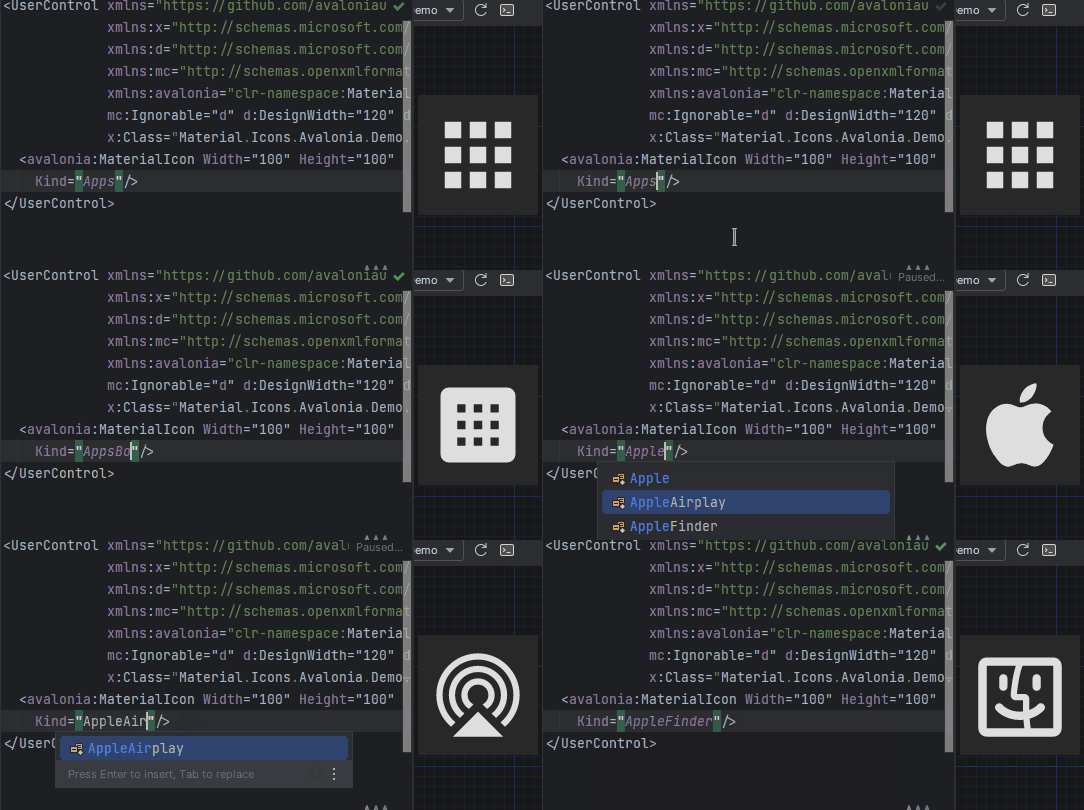
- Icon types are strongly typed enum, so your IDE will suggest available variants:
Structure
This project consists of 3 parts:
contains info about the icons
contains controls for AvaloniaUI
contains controls for WPF
FAQ - frequently asked questions
Avalonia
Getting started
- Install Material.Icons.Avalonia nuget package:
dotnet add package Material.Icons.Avalonia - Include styles in
App.xaml<Application xmlns:materialIcons="clr-namespace:Material.Icons.Avalonia;assembly=Material.Icons.Avalonia" ...> <Application.Styles> ... <materialIcons:MaterialIconStyles /> </Application.Styles> </Application>


Using
Add Material.Icons.Avalonia namespace to the root element of your file (your IDE can suggest it or do it automatically):
xmlns:materialIcons="clr-namespace:Material.Icons.Avalonia;assembly=Material.Icons.Avalonia"
Use MaterialIcon control:
<materialIcons:MaterialIcon Kind="Abacus" />
The Foreground property controls the color of the icon.
Also, there is MaterialIconExt which allows you to use is as the markup extension:
<Button Content="{materialIcons:MaterialIconExt Kind=Abacus}" />
WPF
Getting started
Install Material.Icons.WPF nuget package:
dotnet add package Material.Icons.WPF


Using
Add Material.Icons.WPF namespace to the root element of your file (your IDE can suggest it or do it automatically):
xmlns:materialIcons="clr-namespace:Material.Icons.WPF;assembly=Material.Icons.WPF"
Use MaterialIcon control:
<materialIcons:MaterialIcon Kind="Abacus" />
The Foreground property controls the color of the icon.
Also, there is MaterialIconExt which allows you to use is as the markup extension:
<Button Content="{materialIcons:MaterialIconExt Kind=Abacus}" />
Meta
Getting started
Install Material.Icons nuget package:
dotnet add package Material.Icons


Using
Icon types stored in Material.Icons.MaterialIconKind enum.
We can resolve an icon path by using Material.Icons.MaterialIconDataProvider.GetData().
FAQ
How to change icon color?
- Change
Foregroundproperty.
How to update icons?
- You can manually set
Material.Iconspackage version in your project file.
What about versioning policy?
- We use semver.
Any package with identical major and minor versions is compatible.
For example,1.0.0and1.0.1are compatible, but1.0.0and1.1.0might not be.
| Product | Versions Compatible and additional computed target framework versions. |
|---|---|
| .NET | net5.0 was computed. net5.0-windows was computed. net6.0 was computed. net6.0-android was computed. net6.0-ios was computed. net6.0-maccatalyst was computed. net6.0-macos was computed. net6.0-tvos was computed. net6.0-windows was computed. net7.0 was computed. net7.0-android was computed. net7.0-ios was computed. net7.0-maccatalyst was computed. net7.0-macos was computed. net7.0-tvos was computed. net7.0-windows was computed. net8.0 was computed. net8.0-android was computed. net8.0-browser was computed. net8.0-ios was computed. net8.0-maccatalyst was computed. net8.0-macos was computed. net8.0-tvos was computed. net8.0-windows was computed. net9.0 was computed. net9.0-android was computed. net9.0-browser was computed. net9.0-ios was computed. net9.0-maccatalyst was computed. net9.0-macos was computed. net9.0-tvos was computed. net9.0-windows was computed. net10.0 was computed. net10.0-android was computed. net10.0-browser was computed. net10.0-ios was computed. net10.0-maccatalyst was computed. net10.0-macos was computed. net10.0-tvos was computed. net10.0-windows was computed. |
| .NET Core | netcoreapp2.0 was computed. netcoreapp2.1 was computed. netcoreapp2.2 was computed. netcoreapp3.0 was computed. netcoreapp3.1 was computed. |
| .NET Standard | netstandard2.0 is compatible. netstandard2.1 was computed. |
| .NET Framework | net461 was computed. net462 was computed. net463 was computed. net47 was computed. net471 was computed. net472 was computed. net48 was computed. net481 was computed. |
| MonoAndroid | monoandroid was computed. |
| MonoMac | monomac was computed. |
| MonoTouch | monotouch was computed. |
| Tizen | tizen40 was computed. tizen60 was computed. |
| Xamarin.iOS | xamarinios was computed. |
| Xamarin.Mac | xamarinmac was computed. |
| Xamarin.TVOS | xamarintvos was computed. |
| Xamarin.WatchOS | xamarinwatchos was computed. |
-
.NETStandard 2.0
- No dependencies.
NuGet packages (10)
Showing the top 5 NuGet packages that depend on Material.Icons:
| Package | Downloads |
|---|---|
|
Material.Icons.Avalonia
Avalonia control for display material icons from Material.Icons |
|
|
Material.Icons.WPF
WPF control for display material icons from Material.Icons |
|
|
Speckle.Material.Icons.Avalonia
Avalonia control for display material icons from Material.Icons |
|
|
Material.Icons.WinUI3
WinUI control for display material icons from Material.Icons |
|
|
Material.Icons.UNO
Icones Material Design para UNO e WinUI |
GitHub repositories (5)
Showing the top 5 popular GitHub repositories that depend on Material.Icons:
| Repository | Stars |
|---|---|
|
PXDiv/Div-Acer-Manager-Max
Div Acer Manager Max is a Linux GUI for Acer laptops using Linuwu Sense drivers. It replicates NitroSense functionality with fan control, performance modes, battery limiter, and more. Built with Avalonia, it offers a clean, easy-to-use interface for managing system performance and cooling.
|
|
|
h4lfheart/FortnitePorting
The quickest and most efficient way to extract assets from Fortnite
|
|
|
qiuqiuqiu131/SukiChat.Client
|
|
|
Natestah/BlitzSearch
Find-in-Files++ for Any IDE
|
|
|
dorisoy/Dorisoy.SMS
基于.net6.0的跨平台WPF学校信息管理系统,现代化UI界面、简单易用的功能让您完全控制管理学生、员工、用户、家长、班级、费用,收入信息、生物识别职工打卡,学生上学/离校信息推送等等, 项目使用MVVM 和Mediator设计模式。
|
| Version | Downloads | Last Updated |
|---|---|---|
| 3.0.3-nightly.0.2 | 1,528 | 4/13/2026 |
| 3.0.3-nightly.0.1 | 78 | 4/13/2026 |
| 3.0.2 | 22,202 | 4/13/2026 |
| 3.0.1 | 2,236 | 4/7/2026 |
| 3.0.0 | 25,045 | 2/19/2026 |
| 3.0.0-preview7.5 | 82 | 2/19/2026 |
| 3.0.0-preview7.4 | 71 | 2/19/2026 |
| 3.0.0-preview7 | 1,444 | 2/7/2026 |
| 3.0.0-preview6 | 1,412 | 1/17/2026 |
| 3.0.0-avalonia12 | 768 | 2/19/2026 |
| 2.4.3 | 1,502 | 4/13/2026 |
| 2.0.0-preview1.2 | 266 | 3/2/2023 |
- Icons set updated according to materialdesignicons.com at Thu, 02 Mar 2023 00:54:00 GMT
Check out changes at https://pictogrammers.com/library/mdi/history/