MQTTClientRx 4.0.0
See the version list below for details.
dotnet add package MQTTClientRx --version 4.0.0
NuGet\Install-Package MQTTClientRx -Version 4.0.0
<PackageReference Include="MQTTClientRx" Version="4.0.0" />
<PackageVersion Include="MQTTClientRx" Version="4.0.0" />
<PackageReference Include="MQTTClientRx" />
paket add MQTTClientRx --version 4.0.0
#r "nuget: MQTTClientRx, 4.0.0"
#:package MQTTClientRx@4.0.0
#addin nuget:?package=MQTTClientRx&version=4.0.0
#tool nuget:?package=MQTTClientRx&version=4.0.0
MQTT Client Rx




An MQTT client for .NET where the connection is a stream, not a state machine you drive by hand. Subscribing connects. Disposing disconnects. A dropped connection reconnects itself and re-applies your subscriptions.
Please star this project if you find it useful. Thank you!
See it running
A Blazor + Rx + ReactiveUI dashboard built on this library.
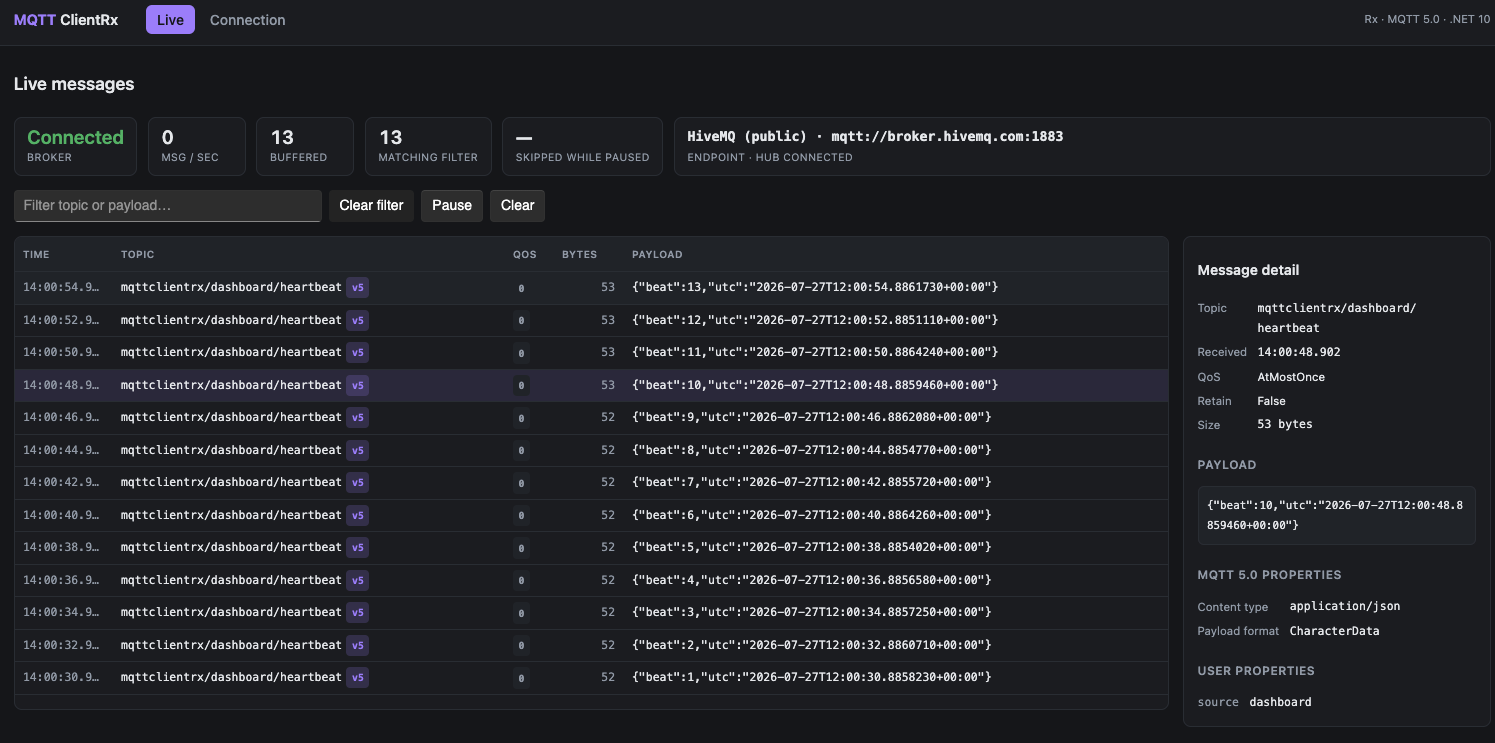
Live - the message firehose. Filter it, pause it, and select any message to see its MQTT 5.0 content type, payload format and user properties broken out beside it.
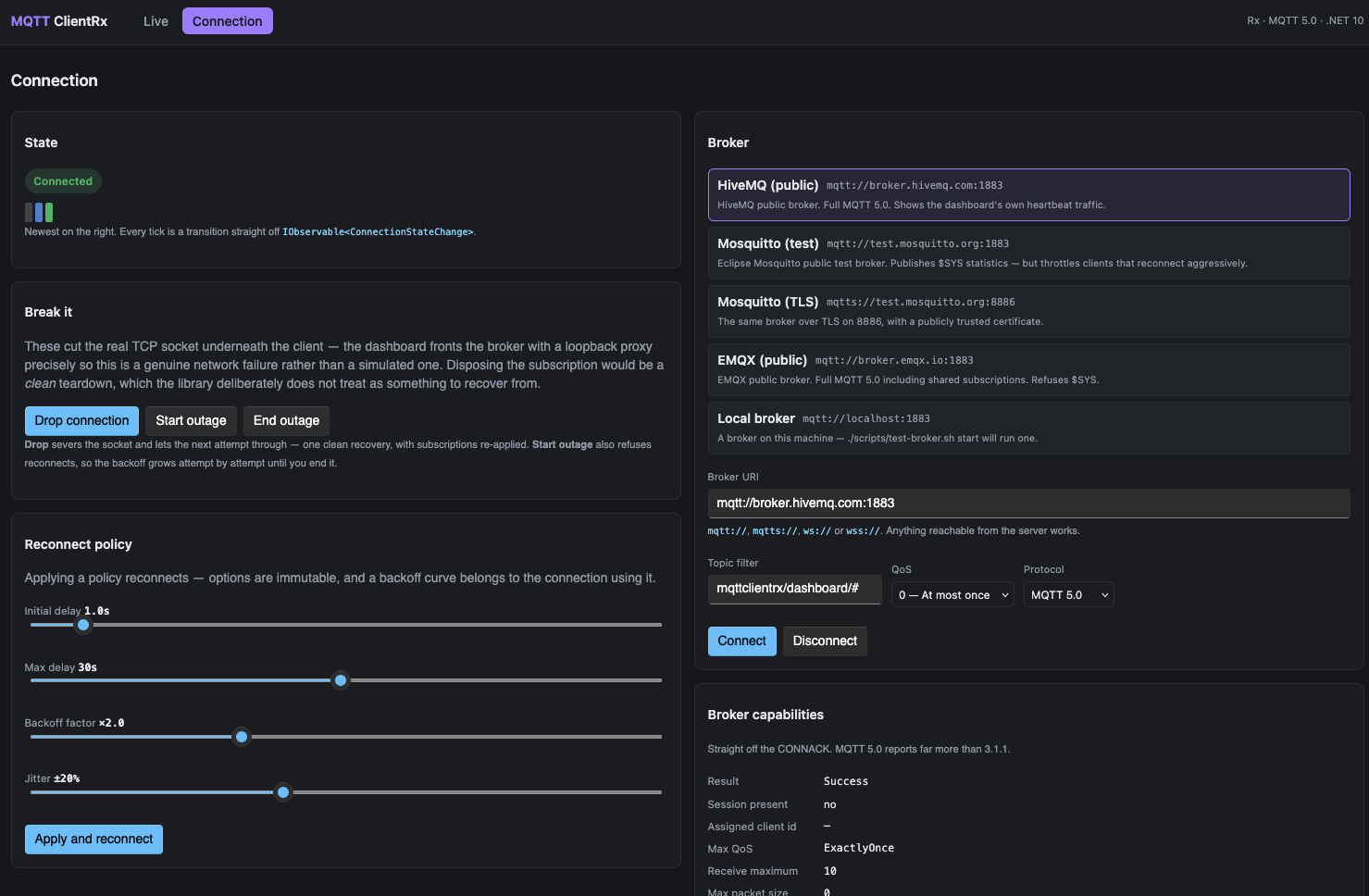
Connection - the reconnect layer made visible. A state timeline straight off
IObservable<ConnectionStateChange>, backoff-policy sliders you can apply live, broker capabilities
read from the CONNACK, and buttons that sever the real TCP socket - a genuine network failure, not a
simulated one - so you can watch the client back off, recover and re-apply its subscriptions.
dotnet run --project samples/Sample.Dashboard # http://127.0.0.1:5999
Point it at one of the bundled public brokers or your own. There is also a console sample if you would rather read code than click.
Credits
Built on MQTTnet by Christian Kratky and contributors. MQTTnet does the protocol; this library makes it reactive.
Why
MQTT produces asynchronous streams. Rx is an API for composing asynchronous streams. The fit is obvious - but only if the reactive part is actually reactive, which means resource lifetime has to live inside the observable rather than beside it.
MQTTnet 5 also removed its ManagedClient, making reconnection, resubscription and backoff the caller's problem. That is exactly the kind of problem Rx is good at, and it is where most of this library's value now sits.
Scope
Client only. There is no broker here, and there won't be - MQTTnet ships one separately as
MQTTnet.Server.
Supported: MQTT 5.0 (default), 3.1.1 and 3.1.0, over TCP or WebSocket, with or without TLS.
Not supported yet: enhanced authentication (the AUTH packet flow), and subscription-identifier
routing - see Roadmap.
Install
dotnet add package MQTTClientRx
Targets net10.0. For .NET Standard 2.0 consumers, version 3.2.4 remains on NuGet.
Quick start
No interfaces to implement, no classes to write first - that was version 3.
using MQTTClientRx;

await using var client = new MqttClientRx(new MqttClientRxOptions
{
    Uri = new Uri("mqtt://test.mosquitto.org:1883"),
    TopicFilters = [MqttTopicFilter.Create("sensors/#", QoSLevel.AtLeastOnce)]
});

// Subscribing is what connects.
using var subscription = client.Messages.Subscribe(
    message => Console.WriteLine($"{message.Topic}: {message.GetPayloadAsString()}"),
    error   => Console.WriteLine($"Gave up: {error.Message}"));

// ... and disposing the last subscription is what disconnects, gracefully.
There is deliberately no ConnectAsync(). The connection exists for exactly as long as somebody is
listening.
Connection lifetime
Messages is a cold, shared sequence:
| Event | What happens |
|---|---|
| First subscription | CONNECT, then SUBSCRIBE for TopicFilters |
| Further subscriptions | Share the same physical connection |
| Connection drops | Retried per ReconnectPolicy; the sequence does not terminate |
| Last subscription disposed | Clean DISCONNECT after ShareGracePeriod |
| Reconnect policy gives up | OnError with the reason code that caused it |
Connection state is a stream too, not a bool you poll:
using var states = client.ConnectionState.Subscribe(change => Console.WriteLine(change.State));
// Disconnected -> Connecting -> Connected -> Reconnecting -> Connected ...
Publishing and subscribing
Both act on the live connection and both return the broker's reason codes.
await client.WaitForConnectionAsync();

var published = await client.PublishAsync("commands/reboot", "now", QoSLevel.AtLeastOnce);
Console.WriteLine(published.ReasonCode);   // Success, NoMatchingSubscribers, NotAuthorized, ...

var subscribed = await client.SubscribeAsync(
    MqttTopicFilter.Create("alerts/#", QoSLevel.ExactlyOnce),
    MqttTopicFilter.Create("audit/#",  QoSLevel.AtLeastOnce));

// A broker may grant one filter and refuse another, so check per filter.
foreach (var item in subscribed.Failures)
{
    Console.WriteLine($"{item.TopicFilter.Topic} refused: {item.ResultCode}");
}
Filters the broker grants are remembered and re-applied after a reconnect. Filters it refuses are not.
Reconnection
Reconnect = ReconnectPolicy.Default with
{
    InitialDelay  = TimeSpan.FromSeconds(1),
    MaxDelay      = TimeSpan.FromSeconds(30),
    BackoffFactor = 2.0,
    JitterFactor  = 0.2,     // spread a fleet's reconnects after a broker restart
    MaxAttempts   = null,    // forever

    // Don't hammer a broker that has told you who you are is the problem.
    ShouldRetry = context => context.ConnectResultCode is not MqttConnectResultCode.NotAuthorized
}
ReconnectPolicy.Default already gives up on failures that cannot resolve themselves - bad
credentials, a rejected client identifier, an unsupported protocol version. Use
ReconnectPolicy.None to have the first failure reach OnError instead.
On reconnect, subscriptions are re-applied unless the broker reports it restored the session, in which case they are already active and re-sending them would replay retained messages for nothing.
TLS and WebSocket
Uri = new Uri("mqtts://broker:8883"),
Tls = new MqttTlsOptions { TargetHost = "broker" }
Uri = new Uri("wss://broker:443/mqtt"),
ConnectionType = ConnectionType.WebSocket
MqttTlsOptions.Insecure accepts any certificate. It exists for test brokers and is never
appropriate in production.
MQTT 5.0
MQTT 5.0 is the default. Version 3.1.1 remains one option away - which matters, because Azure IoT Hub is still 3.1.1-only.
ProtocolVersion = MqttProtocolVersion.V311 // or V310
Available under 5.0:
| Feature | Surfaced as |
|---|---|
| Reason codes on every acknowledgement | MqttConnectResult, MqttSubscribeResult, MqttPublishResult, MqttDisconnect |
| User properties | UserProperties on messages, will, options |
| Content type and payload format | ContentType, PayloadFormatIndicator |
| Request/response metadata | ResponseTopic, CorrelationData |
| Clean start + session expiry | CleanStart, SessionExpiryInterval |
| Message and will expiry | MessageExpiryInterval, MqttWillMessage.DelayInterval |
| Subscription options | NoLocal, RetainAsPublished, RetainHandling |
| Flow control | ReceiveMaximum, MaximumPacketSize |
| Shared subscriptions | A $share/<group>/<topic> topic string - nothing extra needed |
Under 3.1.1 those properties read as null or empty. Setting one in the options is rejected when
you construct the client, rather than being silently dropped on the wire:
MqttOptionsException: ReceiveMaximum requires MQTT 5.0 but ProtocolVersion is V311.
Acknowledgement and QoS
Worth understanding before relying on QoS 1 or 2.
IObserver<T>.OnNext returns void, so it cannot tell the library that a message was successfully
processed. Under the default AcknowledgementMode.Automatic, the broker is therefore acknowledged
when the message is delivered to the stream - not when a subscriber has handled it. A crash
mid-processing loses that message despite QoS 1/2 semantics.
When at-least-once processing actually matters, use manual acknowledgement:
Acknowledgement = AcknowledgementMode.Manual,
ReceiveMaximum  = 10,     // bound the in-flight window
client.Messages
    .Select(message => Observable.FromAsync(async () =>
    {
        await ProcessAsync(message);
        await message.AcknowledgeAsync();   // only now may the broker forget it
    }))
    .Concat()
    .Subscribe();
A forgotten acknowledgement stalls delivery once the receive-maximum window fills. That is the trade-off; pick the mode that matches what the messages are worth.
await foreach - at-least-once without the footgun
Pull-based consumption sidesteps the problem entirely. Asking for the next message is proof that the previous loop body finished, so that is when the acknowledgement is sent - no bookkeeping, and no way to forget:
await using var client = new MqttClientRx(options with
{
    Acknowledgement = AcknowledgementMode.Manual,
    ReceiveMaximum  = 8,       // the broker will not run further ahead than this
});

await foreach (var message in client.ReadAllAsync(cancellationToken))
{
    await ProcessAsync(message);    // throw here and the message is redelivered
}
Enumerating connects and abandoning the enumeration disconnects, exactly as subscribing does. Reconnects stay transparent.
Backpressure here is the protocol's, not a client-side scheme: at QoS 1 and 2 the broker stops once
ReceiveMaximum messages are unacknowledged, so a slow loop genuinely slows the broker. QoS 0 has no
such window, which is what the read buffer is for:
var options = MqttReadOptions.Default with
{
    BufferCapacity   = 1024,
    OverflowStrategy = BufferOverflowStrategy.Fail,   // or DropOldest / DropNewest
};
Fail is the default - ending the sequence with MqttBufferOverflowException beats discarding
messages silently.
Messages (push) |
ReadAllAsync (pull) |
|
|---|---|---|
| Shape | IObservable<MqttMessage> |
IAsyncEnumerable<MqttMessage> |
| Composes with | Rx operators | LINQ over IAsyncEnumerable (in-box on .NET 10) |
| Fan-out | Many subscribers share one connection | One consumer per enumeration |
| QoS 1/2 means | Delivered to the stream | Processed by the consumer |
| Backpressure | None - see overflow note above | MQTT receive-maximum window |
Testing your own code
Nothing here reads the wall clock without being asked to. Both clocks are injectable, so timing behaviour is verified in virtual time instead of by waiting:
// Reconnect delays and the share grace period - Rx operators.
var scheduler = new TestScheduler();

// Operation and disconnect timeouts - CancellationTokenSource, which IScheduler cannot reach.
var time = new FakeTimeProvider();

var client = new MqttClientRx(options with { Scheduler = scheduler, TimeProvider = time });
Two knobs rather than one because they govern different layers and neither substitutes for the
other: Rx 7.0 has no TimeProvider integration, and a CancellationTokenSource has no notion of an
IScheduler. Leave both unset and everything runs on the real clock.
Migrating from 3.x
Version 4.0 is a clean break. The old shape had the connection living outside the observable, which is what made most of the following necessary.
| 3.x | 4.0 | Why |
|---|---|---|
new MQTTService() + CreateObservableMQTTClient(...) returning a tuple |
new MqttClientRx(options) |
The service held per-connection state in fields; a second call clobbered the first client's options |
await client.ConnectAsync() after subscribing |
Nothing - subscribing connects | Connection lifetime is now subscription lifetime |
client.DisconnectAsync() |
Dispose the subscription | Teardown was previously invisible to the library, so connections leaked |
bool IsConnected |
IObservable<ConnectionStateChange> ConnectionState |
The old flag was set once at connect and never updated |
Implement IMQTTMessage, IClientOptions, ITlsOptions, ITopicFilter yourself |
MqttMessage, MqttClientRxOptions, MqttTlsOptions, MqttTopicFilter records |
Four files of boilerplate before you could send anything |
byte[] Payload |
ReadOnlyMemory<byte> Payload + GetPayloadAsString() |
Matches MQTTnet 5 and avoids the round trip through byte[] |
Task SubscribeAsync(...) (result discarded) |
Task<MqttSubscribeResult> with per-filter reason codes |
A refused filter used to be indistinguishable from success |
Task PublishAsync(...) (result discarded) |
Task<MqttPublishResult> |
Same |
| Connection failures silently swallowed | OnError with MqttConnectFailedException.ResultCode |
The old catch (Exception) ate the exception it had just thrown |
| No cancellation | CancellationToken on every async method |
|
IDisposable |
IAsyncDisposable |
Dispose() dropped the socket instead of sending DISCONNECT, so every teardown fired the will message |
ProtocolVersion.ver311 / ver310 |
MqttProtocolVersion.V500 / V311 / V310 |
5.0 is now the default |
| No reconnection | ReconnectPolicy |
MQTTnet 5 removed ManagedClient |
Two packages (MQTTClientRx + IMQTTClientRx) |
One (MQTTClientRx) |
Interfaces ship alongside the implementation |
Type names now follow .NET conventions - Mqtt, not MQTT. The package ID is unchanged.
Roadmap
- 4.1 - subscription-identifier routing: a
SubscribeAndObserve(filter)that sends the SUBSCRIBE, routes on the identifier the broker returns rather than matching client-side, and unsubscribes when the last observer goes away. Until then,WhereTopicMatchesfilters the shared stream client-side. Also request/response helpers over response topic and correlation data. - Later - enhanced authentication (
AUTH), offline publish queueing.
Samples
Dashboard - Blazor + Rx + ReactiveUI
Shown above. Two notes on how it is built:
The server owns the broker connection and streams a projection to the browser over SignalR, because a
browser cannot open a TCP socket - a WebAssembly client could only ever reach ws:// brokers, and
the TCP and TLS paths would be undemonstrable. ./scripts/test-broker.sh start runs a local broker
if you would rather not use a public one.
If port 5999 is taken:
dotnet run --project samples/Sample.Dashboard -- --urls http://127.0.0.1:5123.
Console
samples/Sample.Client is the small one, one scenario per flag:
dotnet run --project samples/Sample.Client -- basic       # or tls, websocket, publish, mqtt5,
                                                          #    resilient, manual-ack, pull
License
| Product | Versions Compatible and additional computed target framework versions. |
|---|---|
| .NET | net10.0 is compatible. net10.0-android was computed. net10.0-browser was computed. net10.0-ios was computed. net10.0-maccatalyst was computed. net10.0-macos was computed. net10.0-tvos was computed. net10.0-windows was computed. |
-
net10.0
- Microsoft.Extensions.Logging.Abstractions (>= 10.0.0)
- MQTTnet (>= 5.2.0.1603)
- System.Reactive (>= 7.0.0)
NuGet packages
This package is not used by any NuGet packages.
GitHub repositories
This package is not used by any popular GitHub repositories.
| Version | Downloads | Last Updated |
|---|---|---|
| 4.0.1 | 85 | 7/27/2026 |
| 4.0.0 | 80 | 7/27/2026 |
| 3.2.5 | 2,217 | 12/17/2018 |
| 3.2.4 | 1,240 | 10/20/2018 |
| 3.2.2 | 1,216 | 9/27/2018 |
| 3.2.1 | 1,169 | 9/8/2018 |
| 3.1.0 | 1,690 | 7/12/2018 |
| 3.0.1-rc-4 | 1,400 | 6/28/2018 |
| 3.0.0 | 3,302 | 5/27/2018 |
| 3.0.0-alpha5 | 1,467 | 6/10/2018 |
| 2.7.0 | 1,863 | 3/2/2018 |
| 2.5.3 | 1,499 | 11/28/2017 |
| 2.5.1 | 1,483 | 11/11/2017 |
| 2.5.0 | 1,460 | 11/11/2017 |
| 2.3.7 | 1,618 | 10/29/2017 |
| 2.3.5 | 1,512 | 10/11/2017 |
| 2.3.1 | 1,501 | 9/28/2017 |
| 2.3.0 | 1,455 | 9/21/2017 |
| 2.2.1 | 1,810 | 8/26/2017 |