LiveMarkdown.Avalonia
1.3.2
See the version list below for details.
dotnet add package LiveMarkdown.Avalonia --version 1.3.2
NuGet\Install-Package LiveMarkdown.Avalonia -Version 1.3.2
<PackageReference Include="LiveMarkdown.Avalonia" Version="1.3.2" />
<PackageVersion Include="LiveMarkdown.Avalonia" Version="1.3.2" />
<PackageReference Include="LiveMarkdown.Avalonia" />
paket add LiveMarkdown.Avalonia --version 1.3.2
#r "nuget: LiveMarkdown.Avalonia, 1.3.2"
#:package LiveMarkdown.Avalonia@1.3.2
#addin nuget:?package=LiveMarkdown.Avalonia&version=1.3.2
#tool nuget:?package=LiveMarkdown.Avalonia&version=1.3.2





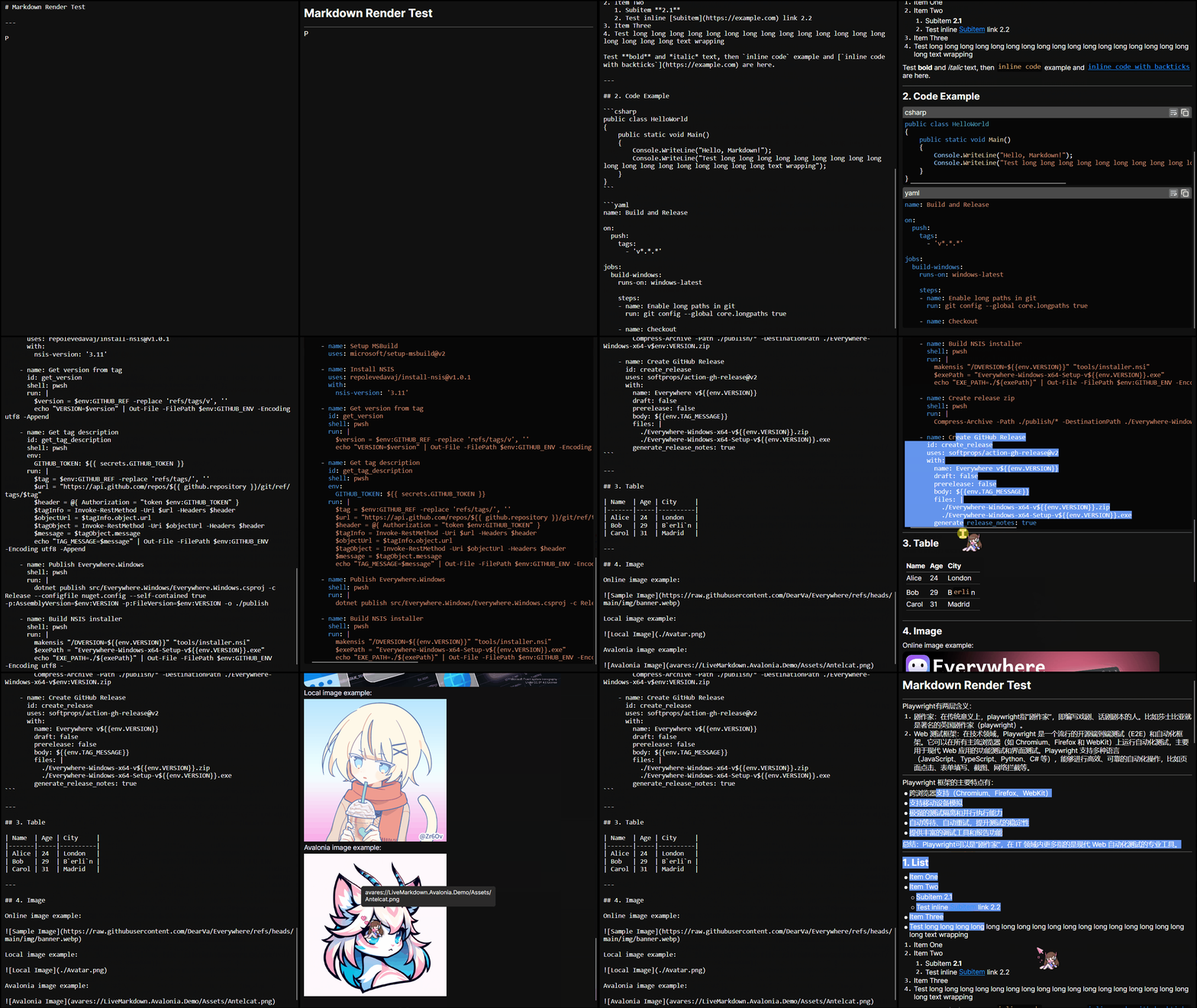
👋 Introduction
LiveMarkdown.Avalonia is a High-performance Markdown viewer for Avalonia applications.
It supports real-time rendering of Markdown content, so it's ideal for applications that require dynamic text updating, especially when streaming large model outputs.
⭐ Features
- 🚀 High-performance rendering powered by Markdig
- 🔄 Real-time updates: Automatically re-renders changes in Markdown content
- 🎨 Customizable styles: Easily style Markdown elements using Avalonia's powerful styling system
- 🔗 Hyperlink support: Clickable links with customizable behavior
- 📊 Table support: Render tables with proper formatting
- 📜 Code block syntax highlighting: Supports multiple languages with ColorCode
- 🖼️ Image support: Load online, local even
avaresimages asynchronously - ✍️ Selectable text: Text can be selected across different Markdown elements
This library currently only supports Append and Clear operations on the Markdown content, which is enough for LLM streaming scenarios.
✈️ Roadmap
- Basic Markdown rendering
- Real-time updates
- Hyperlink support
- Table support
- Code block syntax highlighting
- Image support
- Bitmap
- SVG
- Online images
- Local images
-
avaresimages
- Selectable text across elements
- LaTeX support
- HTML rendering
🚀 Getting Started
1. Install the NuGet package
You can install the latest version from NuGet CLI:
dotnet add package LiveMarkdown.Avalonia
or use the NuGet Package Manager in your IDE.
2. Register the Markdown styles in your Avalonia application
<Application
  x:Class="YourAppClass" xmlns="https://github.com/avaloniaui"
  xmlns:x="http://schemas.microsoft.com/winfx/2006/xaml" RequestedThemeVariant="Default">

  <Application.Styles>

    <StyleInclude Source="avares://LiveMarkdown.Avalonia/Styles.axaml"/>
  </Application.Styles>

  <Application.Resources>

    <Color x:Key="BorderColor">#3DFFFFFF</Color>
    <Color x:Key="ForegroundColor">#FFFFFF</Color>
    <Color x:Key="CardBackgroundColor">#15000000</Color>
    <Color x:Key="SecondaryCardBackgroundColor">#99000000</Color>
  </Application.Resources>
</Application>
3. Use the MarkdownRenderer control in your XAML
Add the MarkdownRenderer control to your .axaml file:
<YourControl
  xmlns:md="clr-namespace:LiveMarkdown.Avalonia;assembly=LiveMarkdown.Avalonia">
  <md:MarkdownRenderer x:Name="MarkdownRenderer"/>
</YourControl>
Then you can manage the Markdown content in your code-behind:
// ObservableStringBuilder is used for efficient string updates
var markdownBuilder = new ObservableStringBuilder();
MarkdownRenderer.MarkdownBuilder = markdownBuilder;

// Append Markdown content, this will trigger re-rendering
markdownBuilder.Append("# Hello, Markdown!");
markdownBuilder.Append("\n\nThis is a **live** Markdown viewer for Avalonia applications.");

// Clear the content
markdownBuilder.Clear();
If you want to load local images with relative paths, you can set the MarkdownRenderer.ImageBasePath property.
🪄 Style Customization
Markdown elements can be styled using Avalonia's powerful styling system. You can override the default styles by defining your own styles in your application styles.
Avalonia Styling Docs:
🤔 FAQ
- Q: Why some emojis not rendered correctly (rendered in single color)?
- A: This is a known issue caused by Skia (the render backend of Avalonia). You can upgrade SkiaSharp version (e.g. >= 3.117.0) to fix this. Related issue
🤝 Contributing
We welcome issues, feature ideas, and PRs! See CONTRIBUTING.md for guidelines.
📄 License
Distributed under the Apache 2.0 License. See LICENSE for more information.
Third-Party Licenses
- markdig - BSD-2-Clause License
- Markdown parser for Everywhere.Markdown rendering
- Source repo: https://github.com/xoofx/markdig
- Svg.Skia - MIT License
- Svg rendering for images
- Source repo: https://github.com/wieslawsoltes/Svg.Skia
- ColorCode - MIT License
- Syntax highlighting for code blocks
- Source repo: https://github.com/CommunityToolkit/ColorCode-Universal
| Product | Versions Compatible and additional computed target framework versions. |
|---|---|
| .NET | net5.0 was computed. net5.0-windows was computed. net6.0 was computed. net6.0-android was computed. net6.0-ios was computed. net6.0-maccatalyst was computed. net6.0-macos was computed. net6.0-tvos was computed. net6.0-windows was computed. net7.0 was computed. net7.0-android was computed. net7.0-ios was computed. net7.0-maccatalyst was computed. net7.0-macos was computed. net7.0-tvos was computed. net7.0-windows was computed. net8.0 is compatible. net8.0-android was computed. net8.0-browser was computed. net8.0-ios was computed. net8.0-maccatalyst was computed. net8.0-macos was computed. net8.0-tvos was computed. net8.0-windows was computed. net9.0 is compatible. net9.0-android was computed. net9.0-browser was computed. net9.0-ios was computed. net9.0-maccatalyst was computed. net9.0-macos was computed. net9.0-tvos was computed. net9.0-windows was computed. net10.0 was computed. net10.0-android was computed. net10.0-browser was computed. net10.0-ios was computed. net10.0-maccatalyst was computed. net10.0-macos was computed. net10.0-tvos was computed. net10.0-windows was computed. |
| .NET Core | netcoreapp2.0 was computed. netcoreapp2.1 was computed. netcoreapp2.2 was computed. netcoreapp3.0 was computed. netcoreapp3.1 was computed. |
| .NET Standard | netstandard2.0 is compatible. netstandard2.1 was computed. |
| .NET Framework | net461 was computed. net462 was computed. net463 was computed. net47 was computed. net471 was computed. net472 was computed. net48 was computed. net481 was computed. |
| MonoAndroid | monoandroid was computed. |
| MonoMac | monomac was computed. |
| MonoTouch | monotouch was computed. |
| Tizen | tizen40 was computed. tizen60 was computed. |
| Xamarin.iOS | xamarinios was computed. |
| Xamarin.Mac | xamarinmac was computed. |
| Xamarin.TVOS | xamarintvos was computed. |
| Xamarin.WatchOS | xamarinwatchos was computed. |
-
.NETStandard 2.0
- Avalonia (>= 11.3.0)
- Avalonia.Svg (>= 11.3.0)
- ColorCode.Core (>= 2.0.15)
- Markdig (>= 0.41.3)
-
net8.0
- Avalonia (>= 11.3.0)
- Avalonia.Svg (>= 11.3.0)
- ColorCode.Core (>= 2.0.15)
- Markdig (>= 0.41.3)
-
net9.0
- Avalonia (>= 11.3.0)
- Avalonia.Svg (>= 11.3.0)
- ColorCode.Core (>= 2.0.15)
- Markdig (>= 0.41.3)

NuGet packages (4)
Showing the top 4 NuGet packages that depend on LiveMarkdown.Avalonia:
| Package | Downloads |
|---|---|
|
LiveMarkdown.Avalonia.Math
This is a extension package for LiveMarkdown.Avalonia that adds support for rendering LaTeX math expressions using CSharpMath. It leverages the Sylinko.CSharpMath.Avalonia library to provide high-quality rendering of mathematical notation within Markdown content. |
|
|
LiveMarkdown.Avalonia.Svg.Skia
This is a extension package for LiveMarkdown.Avalonia that adds support for rendering SVG. Note that this package uses Svg.Controls.Skia.Avalonia for rendering SVG. If you want to use Svg.Controls.Avalonia instead, please install LiveMarkdown.Avalonia.Svg package. |
|
|
LiveMarkdown.Avalonia.Mermaid
This is a extension package for LiveMarkdown.Avalonia that adds support for rendering Mermaid diagrams. |
|
|
LiveMarkdown.Avalonia.Svg
This is a extension package for LiveMarkdown.Avalonia that adds support for rendering SVG. Note that this package uses Svg.Controls.Avalonia for rendering SVG. If you want to use Svg.Controls.Skia.Avalonia instead, please install LiveMarkdown.Avalonia.Svg.Skia package. |


GitHub repositories (2)
Showing the top 2 popular GitHub repositories that depend on LiveMarkdown.Avalonia:
| Repository | Stars |
|---|---|
|
PixiEditor/PixiEditor
PixiEditor is a Universal Editor for all your 2D needs
|
|
|
DearVa/Everywhere
Context-aware AI assistant for your desktop. Ready to respond intelligently, seamlessly integrating multiple LLMs and MCP tools.
|
| Version | Downloads | Last Updated |
|---|---|---|
| 2.0.0 | 410 | 4/10/2026 |
| 2.0.0-rc1 | 172 | 3/28/2026 |
| 1.9.2 | 569 | 4/3/2026 |
| 1.9.1 | 894 | 3/14/2026 |
| 1.9.0 | 247 | 3/13/2026 |
| 1.8.0 | 340 | 3/12/2026 |
| 1.7.0 | 2,298 | 1/6/2026 |
| 1.6.2 | 189 | 1/3/2026 |
| 1.6.1 | 454 | 12/18/2025 |
| 1.6.0 | 354 | 12/17/2025 |
| 1.5.3 | 994 | 12/3/2025 |
| 1.5.2 | 276 | 11/29/2025 |
| 1.5.1 | 412 | 11/21/2025 |
| 1.5.0 | 506 | 11/20/2025 |
| 1.4.0 | 465 | 11/12/2025 |
| 1.3.6 | 219 | 10/31/2025 |
| 1.3.5 | 871 | 10/2/2025 |
| 1.3.4 | 330 | 9/26/2025 |
| 1.3.3 | 202 | 9/26/2025 |
| 1.3.2 | 278 | 9/22/2025 |
# [](https://github.com/DearVa/LiveMarkdown.Avalonia/compare/v1.3.2...v) (2025-09-22)