Konfidence.Project-References
2026.3.3
See the version list below for details.
dotnet tool install --global Konfidence.Project-References --version 2026.3.3
dotnet new tool-manifest
dotnet tool install --local Konfidence.Project-References --version 2026.3.3
#tool dotnet:?package=Konfidence.Project-References&version=2026.3.3
nuke :add-package Konfidence.Project-References --version 2026.3.3
ProjectReferences
Report redundant project/package references
ProjectReferencesTool
The project references tool is a console application which scans your .cs projects for redundant project/package references — the ones a project already gets another way, either through a project it references or through another package it references.
Using the tool
- package: The project references tool is published as a package on nuget.org - Konfidence.Project-References.
- install: run 'dotnet tool install --global Konfidence.Project-References'
- basic run: in a console go to your solution folder and run 'project-references'. It scans the solution named after that folder, use '--AllProjects' to scan every project below it instead.
- result 1: console displays the redundant project/package references within the scanned projects. Project references are listed by their .csproj path, package references by name with a .nupkg extension.
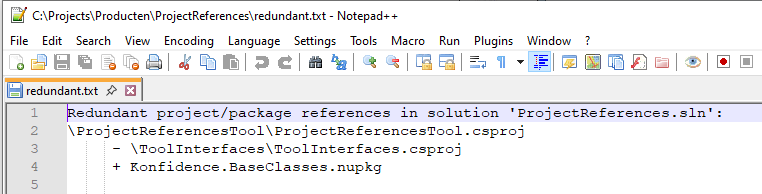
- result 2: creates a 'redundant.txt' file, which contains the results displayed in the console.
- restore: packages a project gets through another package are read from the restore output, so those are only checked for projects that have been restored. The tool says how many projects it had to skip. Everything else — project references, and packages brought by a referenced project — needs nothing but the source files.
- actions: manually update the references in your projects and remove the redundant ones. A redundant package reference is worth a second look first: a version pinned on purpose is a reason to keep one. Packages the other project declares with 'PrivateAssets=all' are not reported, because those do not reach you.
- where: because it is a dotnetcore console application, it runs on both windows and linux.
- for whom: all dotnet c# developers creating solutions containing large amounts of projects.
What does it do
Example:
If this is how the references in our project looks like (take note of the highlighted references).
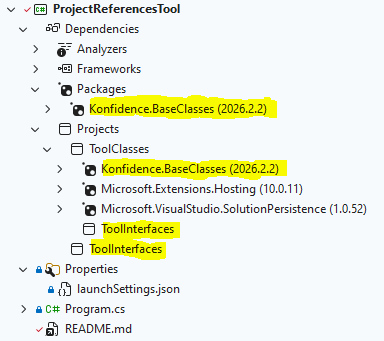
And this is the project, containing a project which should not need to be referenced in our project, because of the implicit reference.
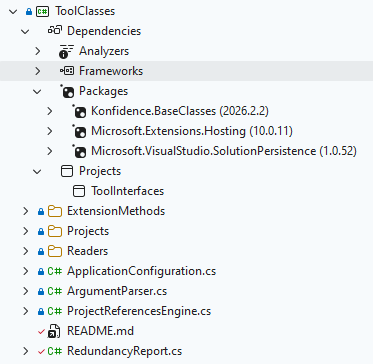
You would want to remove the reference to the ToolInterfaces project from our project, because it is already refrenced by, in this case, the ToolClasses project.
Like this:
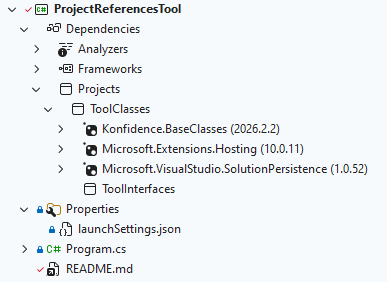
Easy to find when you have like 5 projects in your solution. But a bit harder with something like a 100 projects.
Running the tool would give:
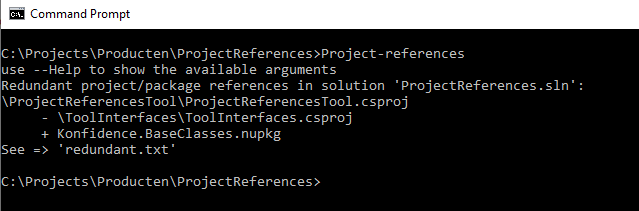
A package reference works the same way. If 'ToolClasses' references a package and our project references both 'ToolClasses' and that same package, our own package reference adds nothing — 'ToolClasses' already brings it. The same holds between packages: if we reference a package which itself depends on a second package, referencing that second one directly adds nothing either.
Two things stop a package being reported. A package the other project declares with 'PrivateAssets=all' does not flow to us, so ours is not redundant. And a project which has not been restored has no package dependency information, so packages brought by other packages are not checked for it.
Also creating the file 'redundant.txt':
How to run
- project-references : scans the solution named after your current folder, so 'c:\projects\myapp' uses 'myapp.sln', or 'myapp.slnx' when that is the one present.
- project-references --AllProjects : scans all csproj projects in your current folder and all it's subfolders, ignoring any solution.
- project-references --BasePath=c:\projects\myproject : uses 'c:\projects\myproject\myproject.sln'.
- project-references --Solution=mysolution : scans only the csproj projects listed in 'mysolution.sln' in your current folder.
- project-references --BasePath=c:\projects\myproject --Solution=mysolution : scans only the csproj projects listed in 'c:\projects\myproject\mysolution.sln'.
- project-references --Solution=nosuchsolution : reports 'not found : solution file' and stops.
- project-references --Solution=mysolution --AllProjects : ignores the named solution and scans every csproj project below the base path.
- project-references --Help : shows the available arguments and exits, without scanning anything.
Arguments
- --BasePath= folder to work from, and to scan for csproj files including it's subfolders. Defaults to the folder you run the tool from. A trailing separator is ignored. [--BasePath=mypath]
- --Solution= name of the solution file, only the csproj files in the solution file are scanned. Both '.sln' and '.slnx' are read. The extension is optional; leave it off and the '.sln' is preferred when both formats are present. Leave the whole argument off and the solution named after the base path folder is used, so a folder 'myapp' looks for 'myapp.sln' and then 'myapp.slnx'. When the solution cannot be found the tool reports it and stops. [--Solution=mysolution]/[--Solution=mysolution.slnx]
- --AllProjects switch, ignores the solution altogether and scans every csproj file below the base path. This is the only way to scan projects which are not part of a solution. [--AllProjects]
- --Help switch, shows the available arguments and exits. A successful run prints a one line reminder that it exists, a run which reports a problem shows the arguments straight away. [--Help]
Both '--argument=value' and '--argument value' are accepted.
Arguments are case insensitive
Issues
To be clear: issues with your solution/csproj's, not with the project-references tool.
After removing the project references, you are unable to build/rebuild your solution from visualstudio.
- There is a big chance you have to rebuild your project references tree: from a console run 'dotnet clean [my.sln]' 'dotnet restore [my.sln]'. This will reset everything and building will probably work.
- There are unused usings referencing implicitly referenced projects. This seems to corrupt the project reference tree. Always cleanup your usings when you are finished, then: from a console run 'dotnet clean [my.sln]' 'dotnet restore [my.sln]'. This will reset everything and building will probably work.
- There are old dll files which are not being removed with a clean. Remove all 'bin' && 'obj' folders, then clean and restore.
| Product | Versions Compatible and additional computed target framework versions. |
|---|---|
| .NET | net10.0 is compatible. net10.0-android was computed. net10.0-browser was computed. net10.0-ios was computed. net10.0-maccatalyst was computed. net10.0-macos was computed. net10.0-tvos was computed. net10.0-windows was computed. |
This package has no dependencies.
| Version | Downloads | Last Updated |
|---|---|---|
| 2026.4.9 | 101 | 8/28/2026 |
| 2026.4.7 | 89 | 8/27/2026 |
| 2026.4.5 | 91 | 8/26/2026 |
| 2026.4.4 | 90 | 8/26/2026 |
| 2026.4.2 | 92 | 8/25/2026 |
| 2026.4.1 | 86 | 8/25/2026 |
| 2026.3.12 | 86 | 8/25/2026 |
| 2026.3.11 | 88 | 8/25/2026 |
| 2026.3.10 | 84 | 8/25/2026 |
| 2026.3.9 | 91 | 8/25/2026 |
| 2026.3.7 | 88 | 8/24/2026 |
| 2026.3.6 | 90 | 8/24/2026 |
| 2026.3.5 | 85 | 8/24/2026 |
| 2026.3.4 | 92 | 8/24/2026 |
| 2026.3.3 | 86 | 8/24/2026 |
| 2026.3.1 | 86 | 8/24/2026 |
| 2026.2.12 | 81 | 8/24/2026 |
| 2026.2.11 | 89 | 8/24/2026 |
| 2026.2.10 | 85 | 8/24/2026 |
| 2026.2.9 | 87 | 8/24/2026 |