Hlibz.McpDocs.AspNetCore
0.2.0
See the version list below for details.
dotnet add package Hlibz.McpDocs.AspNetCore --version 0.2.0
NuGet\Install-Package Hlibz.McpDocs.AspNetCore -Version 0.2.0
<PackageReference Include="Hlibz.McpDocs.AspNetCore" Version="0.2.0" />
<PackageVersion Include="Hlibz.McpDocs.AspNetCore" Version="0.2.0" />
<PackageReference Include="Hlibz.McpDocs.AspNetCore" />
paket add Hlibz.McpDocs.AspNetCore --version 0.2.0
#r "nuget: Hlibz.McpDocs.AspNetCore, 0.2.0"
#:package Hlibz.McpDocs.AspNetCore@0.2.0
#addin nuget:?package=Hlibz.McpDocs.AspNetCore&version=0.2.0
#tool nuget:?package=Hlibz.McpDocs.AspNetCore&version=0.2.0

Hlibz.McpDocs.AspNetCore
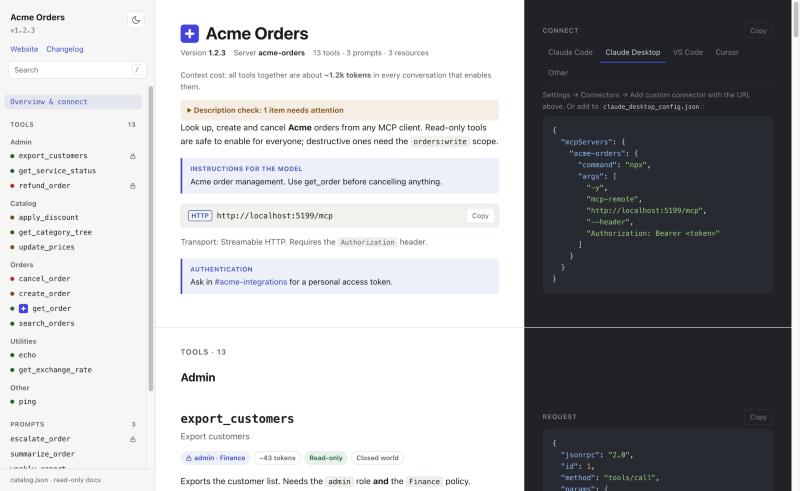
A ReDoc-style documentation page for an MCP server hosted in ASP.NET Core. It shows what the server offers (tools, prompts, resources) and how to connect to it, from the registrations the MCP SDK already has, with nothing to write twice. Turn on the try-it console and readers can call them from the page too.




app.MapMcp("/mcp");
app.MapMcpDocs("/mcp-docs");   // that's the whole zero-config path
- Every tool, prompt, resource and template, with parameter and result trees (recursive,
anyOf, maps and enums included), annotation badges, and an example request and response you can fold. - Connect snippets for Claude Code, Claude Desktop, VS Code, Cursor and Goose, with one-click "Add to VS Code" and "Add to Cursor" buttons.
- Documents everything, like OpenAPI docs.
[Authorize]d primitives are listed with a lock badge naming the roles and policies they need; the endpoint still refuses callers without them. Or filter them per viewer. - Try it (opt-in): call a tool, get a prompt or read a resource from the page with a bearer token, and see the content blocks, messages or contents that come back. See Try it.
- Exports for agents:
catalog.json,catalog.md,llms.txt, and aserver.jsonfor the MCP Registry. - A static page too: the same page as one HTML file, for GitHub Pages, readers who can't reach the app, or a stdio server.
- Checks your descriptions. Missing descriptions and annotations are flagged on the page and logged at startup.
- Strict by default: no inline script or style, a CSP that an existing one of yours always wins over.
- Dark and light themes, accent colour, print styles, keyboard navigation.
Why
An MCP client sees your server through tools/list, which is fine for a model and no use to the
person deciding whether to connect to it. A hand-written page drifts the first time someone renames
a parameter. This page is generated from the same registrations tools/list is, serialized with the
SDK's own JSON options, so what it shows is what a client gets. A test in this repo diffs the two.
About this project
This started as a companion to an MCP server I build at work. I wanted a page that shows, at a glance,
what our MCP server can do, so that I, my colleagues or a client can see it without reading code or
poking tools/list by hand. The project grows as I discover more of MCP, so expect it to change and pick up
new features over time.
If you hit a problem or have an idea, please open an issue. I'll do my best to keep the project moving.
Install
dotnet add package Hlibz.McpDocs.AspNetCore
With central package management, set the version in Directory.Packages.props:
<PackageVersion Include="Hlibz.McpDocs.AspNetCore" Version="0.2.0" />
Quick start
builder.Services.AddMcpServer(...).WithHttpTransport().WithToolsFromAssembly()...;

app.MapMcp("/mcp");
app.MapMcpDocs("/mcp-docs", o =>
{
    o.Description = "What this server is for, **Markdown** subset.";
    o.AuthHeader = "Authorization";    // optional: adds the header to the snippets
    o.AuthHint = "Where to get a token.";
    o.EnableTryIt();                   // optional: a "Try it" button on each tool, prompt and resource
})
.RequireAuthorization();               // RouteGroupBuilder: covers page, catalog.json and assets
Group tools with [McpDocsGroup("Orders")] on the tool class or method.
To try it, run the sample and open http://localhost:5168/mcp-docs/:
dotnet run --project samples/Sample.McpServer --launch-profile http
The sample's README lists what it offers, which entries need which role, and how to sign in with a demo token or cookie.
Options
All optional. Set them in the MapMcpDocs callback.
| Option | Default | What it does |
|---|---|---|
Title |
server title or name | Page title. |
Description |
server instructions | Intro under the title (Markdown subset). |
McpEndpoint |
found from MapMcp |
Path or absolute URL used in the connect snippets. A path that matches no mapped route stops the app once it has started. |
ServerKey |
server name | Key in the generated client configs, e.g. acme-orders. |
AuthHeader |
none | Adds this header, with AuthPlaceholder, to the snippets. |
AuthPlaceholder |
Bearer <token> |
Placeholder value for AuthHeader. |
AuthHint |
none | How to get credentials (Markdown subset). |
EnableTryIt(configure) |
off | A "Try it" button on each tool, prompt and resource that calls the MCP endpoint from the browser. See Try it. |
GatedPrimitives |
Show |
[Authorize]d tools, prompts and resources: Show lists them for everyone with what they require; Hide lists them only for viewers who pass. See Authorization. |
ToolGroup |
McpDocsGrouping.ByAttribute |
Sidebar group per tool; also ByNamePrefix, None, or your own function. |
HtmlExport |
true |
A download button beside the theme toggle that saves the page as one HTML file ({pattern}/docs.html), as the viewer sees it. See Static page. |
InstallLinks |
true |
"Add to VS Code" / "Add to Cursor" buttons under the connect snippets. They open the editor's own install dialog; with AuthHeader set they carry the placeholder token. |
RegistryName |
none | Reverse-DNS name (io.github.acme/orders); when set, server.json for the MCP Registry is served at {pattern}/server.json (one streamable-http remote, plus the auth header if configured). |
ShowMeta |
false |
Show each primitive's _meta; when off it is also left out of catalog.json. |
CheckDescriptions |
true |
Flag missing descriptions and annotations on the page and as startup warnings. |
DefaultColorMode |
System |
Colour mode for first-time viewers (System, Light, Dark). The toggle then cycles follow system → the opposite look → the system's look, and remembers the viewer's pick. |
PrimaryColor |
built-in | Accent colour: hex, rgb(), hsl() or a name. Validated at startup. |
DarkModePrimaryColor |
PrimaryColor, lightened |
Accent colour in dark mode and on the code panel. Set it if your brand colour is near-black. |
DarkPreset |
Default |
Midnight, Nord or GitHubDark. |
AdditionalCss |
none | Appended after the built-in CSS, served as _assets/theme.css. |
Favicon |
server icon | https: URL, data:image/ URI or path (~/ = PathBase). |
AddToolbarItem(label, url, newTab) |
none | Link in the sidebar; http(s)://, /path or ~/path. |
PrintStyles |
true |
Print light and plain, without the sidebar. |
Exports for agents
Next to catalog.json, the same catalog is rendered as:
catalog.md: every tool, prompt and resource as Markdown, with parameter tables, annotations and required roles.llms.txt: a short index in the llms.txt shape that links tocatalog.md. It lives under the docs path (/mcp-docs/llms.txt), not at the site root; serve it from the root yourself if you want that.server.json: for the MCP Registry, only whenRegistryNameis set.
All three sit in the route group, so .RequireAuthorization() covers them and [Authorize] filtering applies.
No .well-known server card: the proposal is still a draft and its path and shape differ between drafts.
Static page
The page can be saved as one HTML file: styles, script and catalog inline, nothing fetched, so it also works opened from disk. Publish it on GitHub Pages, send it to someone who can't reach the app, or document a stdio server, which has no page to map.
From the page. The download button beside the theme toggle saves {pattern}/docs.html: the page as shown, with the MCP endpoint, toolbar links and favicon made absolute for the host it was downloaded from. It sits
in the route group, so .RequireAuthorization() covers it. Set HtmlExport = false to remove the button and the
route.
From code, e.g. in CI, with McpDocsSnapshot.CreateHtmlAsync:
var app = builder.Build();

// dotnet run -- --export-html site/index.html
if (args is ["--export-html", var file])
{
    var html = await McpDocsSnapshot.CreateHtmlAsync(app.Services, ConfigureDocs, mcpEndpoint: "https://api.example.com/mcp");
    await File.WriteAllTextAsync(file, html);
    return;
}

app.MapMcpDocs("/mcp-docs", ConfigureDocs);
- How to connect. A file has no host to resolve
/mcpagainst, somcpEndpoint(orMcpEndpointin the options) must be an absolutehttp(s)URL. For a stdio server pass the command a client runs instead,stdioCommand: ["dnx", "Acme.Mcp", "--yes"], and the connect snippets start it. With neither, the page documents the primitives and has no connect panel. - Whose view. With
GatedPrimitives = Hide, the file shows whatviewermay see (anonymous by default) to everyone who opens it. By default every viewer's file is the same. - Stable. The same server and options give the same bytes, so a checked-in copy changes only when they do.
- Still strict. A
<meta>CSP allows the inline script and styles by their hashes, and nothing else. - Links. Use absolute URLs for toolbar items; a favicon path into the app is dropped in favour of the server
icon.
catalog.md,llms.txtandserver.jsonaren't part of the file.
The sample has the switch above: dotnet run --project samples/Sample.McpServer -- --export-html site/index.html.
Try it
o.EnableTryIt() adds a Try it button beside each primitive's request sample. It opens a panel with the
arguments prefilled from the schema (a JSON editor for tools, a field per argument for prompts and per variable
for resource templates), a token field, and Send. The answer shows as a tool's content blocks (text, JSON
folded like the samples, images) and structuredContent, the messages a prompt expands to, or a resource's
contents, with the raw response one click away. The request it sends is shown too, and copies as curl.
app.MapMcpDocs("/mcp-docs", o =>
{
    o.AuthHeader = "Authorization";
    o.EnableTryIt(t =>
    {
        t.CredentialStorage = McpDocsTryItCredentialStorage.Session;   // keep the token for the tab
        t.ReadOnlyOnly = true;                                         // only read-only tools get a button
    });
});
| Setting | Default | What it does |
|---|---|---|
CredentialStorage |
Memory |
Where the typed token is kept: Memory (gone on reload), Session (sessionStorage, for the tab) or Local (localStorage). A stored token has a Forget button. |
CredentialLifetime |
8 hours | How long a stored token lasts after it was last typed; null keeps it until forgotten. |
SendCookies |
true |
Send the browser's cookies for this origin, so cookie-authenticated endpoints work for a signed-in viewer. false sends only the token. |
ReadOnlyOnly |
false |
Only tools annotated readOnlyHint: true get a button; prompts and resources always do. A convenience, not access control. |
How it calls the server. One POST per call, in the stateless Streamable HTTP shape the SDK serves by default
(protocol 2026-07-28): MCP-Protocol-Version, Mcp-Method and Mcp-Name headers, the protocol fields in
_meta, no initialize and no session. Parameters marked [McpHeader] are mirrored into their Mcp-Param-*
headers, and values that aren't plain ASCII go Base64-encoded, as the SDK requires. The console tells the server it
supports nothing (clientCapabilities: {}), so a tool that asks for elicitation or sampling shows what it asked
for and stops there.
The token. It is sent in AuthHeader (Authorization when unset). In Authorization, a bare token gets
Bearer in front; anything that already has a scheme is sent as typed. A 401 (endpoint-level
RequireAuthorization()) shows as "the token is missing or invalid"; a tool refused by [Authorize] shows the
server's JSON-RPC error. With the default GatedPrimitives = Show every gated primitive is on the page, so
whatever the token may call can be tried. On screen the request shows the scheme, not the token; Copy as curl
includes it. The page's CSP allows no inline or third-party script, which is what keeps an injected script from
reading a stored token.
Side effects. MCP tools change things more often than a typical REST operation, and Send calls them for real.
Its colour follows the tool's annotations: the accent for read-only tools, amber for "modifies data", red for
destructive tools and for tools with no annotations (the spec's defaults assume the worst), with a line saying so.
Use ReadOnlyOnly for docs in front of a real system.
Token estimates. Like the ~N tokens badge on each tool, by the same ~4 characters per token: a tool's
Request shows the size of its arguments (what the model writes to call it), and each response the size of what
lands in the model's context: text content, embedded resource text, a prompt's messages. A tool's
structuredContent counts only when it has no content, since servers repeat it there as text. Images, audio and
blobs are listed beside the estimate, not counted. A JSON-RPC error gets none.
Where there's no button. On a static export (a file can't call the server), for a stdio server, when the MCP
endpoint is on another origin (it answers no CORS preflight, and the page's connect-src is 'self'), and when the
server is SessionMode = Stateful, which refuses the stateless shape (StatefulForInitializeClients works). The
last two log a warning at startup.
Authorization
Like OpenAPI docs, the page documents everything the server offers. A tool, prompt or resource gated with
[Authorize] is listed for every viewer with a lock badge naming the roles and policies it requires, and
catalog.md adds a "Requires:" line. Listing it changes nothing about who may call it: the MCP endpoint
refuses callers who don't pass. The catalog is the same for everyone and no policy is evaluated.
That suits the usual setup: MCP clients send a bearer token, and /mcp-docs is opened in a browser that has
none. Endpoint-level auth (app.MapMcp().RequireAuthorization()) gates every call and hides nothing, so it
needs nothing here.
Only when a primitive's roles or descriptions are not for everyone who can open the page, either protect the
page (.RequireAuthorization() on MapMcpDocs) or set GatedPrimitives = Hide. A viewer then only sees the
primitives their MCP client would see, the way the SDK's AddAuthorizationFilters() filters tools/list. Same
rules: any [AllowAnonymous] on the class or method wins; otherwise IAuthorizeData, AuthorizationPolicy
and IAuthorizationRequirementData metadata are combined into one policy and evaluated with
IAuthorizationService against HttpContext.User. With Hide, two things differ from the MCP endpoint, both
inherent to a page opened in a browser:
- Identity is the browser's. The docs request is authenticated by whatever the app's default scheme sees on it (usually a cookie), while MCP clients typically send a bearer token. If the browser isn't signed in, the page shows the anonymous view, so gated primitives aren't documented for anyone who only has a token.
- The authorization resource is the
HttpContext, not the SDK's MCP request context. Resource-based handlers that look for the MCP context won't match here, and the primitive stays hidden.
catalog.json is served private, no-cache; the ETag still hashes the content, so viewers with the same
access share a cached build and get 304s.
The sample signs in with a demo cookie (/demo/sign-in?roles=admin,finance, /demo/sign-out). It makes a
difference with GatedPrimitives = Hide, which the sample leaves commented out. Its try-it console takes a demo
bearer token that is simply the roles it grants: type admin and refund_order succeeds.
Troubleshooting
| Symptom | Cause | Fix |
|---|---|---|
App stops right after starting, critical log about McpEndpoint; docs requests fail with the same message |
The configured path matches no MapMcp route. |
Fix the path, or remove McpEndpoint to use the discovered one. |
| Warning: MCP endpoint requires authorization but the docs page doesn't | The page publishes the whole surface to anyone. | Add .RequireAuthorization() to MapMcpDocs, or accept it. |
Page shows fewer tools than tools/list |
With GatedPrimitives = Hide, filtering uses the browser's identity (usually a cookie), not your MCP token; or the server uses a custom ListToolsHandler. |
Sign in in the browser, or keep the default Show; custom handlers aren't visible to the page. |
| No "Try it" button | EnableTryIt() isn't called; the server is Stateful or the endpoint is an absolute URL on another origin (both logged at startup); the tool isn't read-only and ReadOnlyOnly is on; or it's a static export. |
See Try it. |
| Try it says the token is missing or invalid | The endpoint answered 401: no token, a wrong one, or one sent in the wrong header. | Paste the token (Bearer is added in Authorization), or set AuthHeader to the header your server reads. |
| Connect snippets show the wrong URL behind a proxy | PathBase or host differs from what the browser sees. |
Set McpEndpoint to the public URL. |
| Page is blank, console shows CSP errors | Your own CSP header replaced ours (an existing one is never overwritten). | Allow script-src 'self'; style-src 'self'; img-src 'self' data: https: for the docs path. |
| Icon doesn't show | Only https: and data:image/ icons are used. |
Serve the icon over https or inline it. |
ArgumentException mentioning PrimaryColor / Favicon |
The value isn't a plain colour / safe URL. | Use a hex, rgb(), hsl() or named colour; an https:, data:image/ or path favicon. |
| Startup warnings "No description" | CheckDescriptions found gaps. |
Add descriptions and annotations, or set CheckDescriptions = false. |
What this doesn't do (yet)
Mostly not a "never": this is where the project stands today, and much of it may change.
- Answer a server that asks for input. The try-it console can't fill in elicitation or sampling requests yet, and
doesn't call
Statefulservers. Schema-driven forms for tool arguments may come too; for now it's a JSON editor. - Hide the page by environment. Map it only where you want it; there's no
IsDevelopment()switch yet. - Show dynamic servers. Primitives created by a custom
ListToolsHandleror list filters aren't visible; only what's registered, filtered by[Authorize]. Hard to solve in general, but I may find a way. - Run custom HTML or script. Toolbar items are links,
AdditionalCssis CSS; the CSP stays strict. This one is on purpose and likely to stay. - Render full CommonMark. Markdown is a small safe subset for now; it may grow.
- Mark which arguments support completion. The SDK has one
CompleteHandler, nothing per argument, so this depends on the SDK.
Testing your contract
McpDocsSnapshot.CreateAsync(app.Services) returns the catalog as stable, indented JSON without an HTTP
request. Compare it to a checked-in file (or pass it to Verify) and a renamed parameter, a changed output
schema or a dropped [Authorize] (its requirements are part of the contract) fails the build, the MCP
equivalent of an OpenAPI diff. With GatedPrimitives = Hide, pass viewer: to snapshot one role's view:
SnapshotTests.cs does this for an
anonymous and an admin viewer; UPDATE_SNAPSHOTS=1 dotnet test accepts a change.
The snapshot is the contract only: definitions, capabilities, instructions and authorization. How the page
presents them (title, links, sidebar groups, description warnings) is left out, so changing those fails
nothing. Pass includePresentation: true for the whole catalog the page is built from.
Compatibility
- Targets
net10.0andnet11.0. CI builds and tests on both runtimes. - Built against
ModelContextProtocol.AspNetCore2.3.1 and accepts any 2.x. Authorization mirrors that version'sAddAuthorizationFilters(); a test compares what the page shows each viewer underGatedPrimitives = Hidewith what the server lists them, and a weekly CI job runs it against the newest stable SDK. 3.0 and later are outside the range until they've been checked. IsAotCompatible: endpoints areRequestDelegates, and the library builds with no trim warnings.- Connect snippets follow the clients' current documentation (VS Code and Cursor install links, Goose
config.yaml). If one stops working after a client update, please open an issue.
Versioning
The package follows semantic versioning. Until 1.0, a minor
version may change an option or the shape of catalog.json. catalog.json, catalog.md and
llms.txt are generated output meant for tools and people, so snapshot tests of them are expected to
change when you upgrade; review the diff, then accept it.
Development
dotnet build
dotnet test --project tests/Hlibz.McpDocs.AspNetCore.Tests
tests/Hlibz.McpDocs.AspNetCore.Tests runs a real server on TestServer: it asserts that catalog.json equals what an MCP client
gets from tools/list, prompts/list, resources/list and resources/templates/list (anonymous
and signed in), the status codes anonymous callers get on protected docs, the CSP rules, option
validation, PathBase handling, endpoint discovery and the exports.
tests/Hlibz.McpDocs.AspNetCore.VisualTests screenshots the page with Playwright (light, dark, mobile, recursive and polymorphic
schemas) against baselines in its Baselines/<os>/. Font rendering differs per OS, so only
the macOS baselines are checked in and CI doesn't run it. Install Chromium once, then run:
dotnet build tests/Hlibz.McpDocs.AspNetCore.VisualTests
tests/Hlibz.McpDocs.AspNetCore.VisualTests/bin/Debug/net10.0/.playwright/node/darwin-arm64/node tests/Hlibz.McpDocs.AspNetCore.VisualTests/bin/Debug/net10.0/.playwright/package/cli.js install chromium
dotnet test --project tests/Hlibz.McpDocs.AspNetCore.VisualTests
A missing baseline is written on first run; UPDATE_SNAPSHOTS=1 accepts changes.
CI (ci.yml) builds, tests and packs, and checks the
package with check-package.sh: README and icon
in the nuspec, and the page assets embedded in the assembly. Pushing a v*.*.* tag runs
release.yml, which runs the same checks and publishes to
NuGet with trusted publishing; the version comes from the tag. sdk-latest.yml
runs the tests weekly against the newest MCP SDK. Actions are pinned by commit SHA; Dependabot keeps them current.
src/Hlibz.McpDocs.AspNetCore/
  McpDocsOptions.cs                          options, [McpDocsGroup], grouping strategies
  McpDocsTryItOptions.cs                     try-it console settings, when it can't run
  McpDocsCatalog.cs                          catalog.json from McpServerOptions collections
  McpDocsAuthorization.cs                    [Authorize] evaluation, mirrors the SDK's list filters
  McpDocsEndpointRouteBuilderExtensions.cs   MapMcpDocs: page, catalog, exports, _assets/*
  McpDocsEndpointDiscovery.cs                finds the MapMcp route, startup checks
  McpDocsExports.cs                          catalog.md, llms.txt, server.json
  McpDocsSnapshot.cs                         public catalog snapshot for tests
  McpDocsTheme.cs                            theme.css from the options, value validation
  McpDocsQuality.cs                          description checks
  Assets/index.html, app.css, print.css, app.js   embedded UI (vanilla JS, no deps, no inline script)
samples/Sample.McpServer/                    13 tools, 3 prompts, 2 resources, 2 templates; demo cookie sign-in and bearer token
License
MIT
| Product | Versions Compatible and additional computed target framework versions. |
|---|---|
| .NET | net10.0 is compatible. net10.0-android was computed. net10.0-browser was computed. net10.0-ios was computed. net10.0-maccatalyst was computed. net10.0-macos was computed. net10.0-tvos was computed. net10.0-windows was computed. net11.0 is compatible. |
-
net10.0
- ModelContextProtocol.AspNetCore (>= 2.3.1 && < 3.0.0)
-
net11.0
- ModelContextProtocol.AspNetCore (>= 2.3.1 && < 3.0.0)
NuGet packages
This package is not used by any NuGet packages.
GitHub repositories
This package is not used by any popular GitHub repositories.
| Version | Downloads | Last Updated |
|---|---|---|
| 0.3.0-preview.1 | 0 | 11/27/2026 |
| 0.2.0 | 55 | 11/25/2026 |
| 0.2.0-preview.2 | 45 | 11/25/2026 |
| 0.2.0-preview.1 | 48 | 11/25/2026 |
| 0.1.3 | 119 | 11/11/2026 |
| 0.1.2 | 97 | 11/6/2026 |
| 0.1.1 | 109 | 11/6/2026 |
| 0.1.0 | 96 | 11/6/2026 |
| 0.1.0-preview.1 | 66 | 11/6/2026 |