GroupDocs.Viewer.UI.Api
26.9.1
Prefix Reserved
dotnet add package GroupDocs.Viewer.UI.Api --version 26.9.1
NuGet\Install-Package GroupDocs.Viewer.UI.Api -Version 26.9.1
<PackageReference Include="GroupDocs.Viewer.UI.Api" Version="26.9.1" />
<PackageVersion Include="GroupDocs.Viewer.UI.Api" Version="26.9.1" />
<PackageReference Include="GroupDocs.Viewer.UI.Api" />
paket add GroupDocs.Viewer.UI.Api --version 26.9.1
#r "nuget: GroupDocs.Viewer.UI.Api, 26.9.1"
#:package GroupDocs.Viewer.UI.Api@26.9.1
#addin nuget:?package=GroupDocs.Viewer.UI.Api&version=26.9.1
#tool nuget:?package=GroupDocs.Viewer.UI.Api&version=26.9.1
UI for GroupDocs.Viewer for .NET (API)
GroupDocs.Viewer.UI.Api contains base types for implementing an API for GroupDocs.Viewer.UI.
There are two API implementations provided within this package:
GroupDocs.Viewer.UI.SelfHost.Api- A self-hosted service that uses the GroupDocs.Viewer package.GroupDocs.Viewer.UI.Cloud.Api- Uses the cloud API provided by GroupDocs.
This readme includes information and usage examples for the features provided by this module.
Features
This section lists the features provided by the module.
Restricting Access
MapGroupDocsViewerApi returns an endpoint convention builder that applies conventions to all API endpoints. To require signed-in users, call RequireAuthorization() on it as well as on MapGroupDocsViewerUI:
app.MapGroupDocsViewerApi(options =>
{
    options.ApiPath = "/viewer-api";
}).RequireAuthorization();
Only the routes that MapGroupDocsViewerApi maps reach the viewer controller. Other conventional routes of your app, for example MapDefaultControllerRoute(), can't bypass these conventions. If you upgrade from 26.9.0 or earlier, see Upgrade notes.
See the authorization sample app for a complete example with sign-in and a role-based policy.
Error Handling
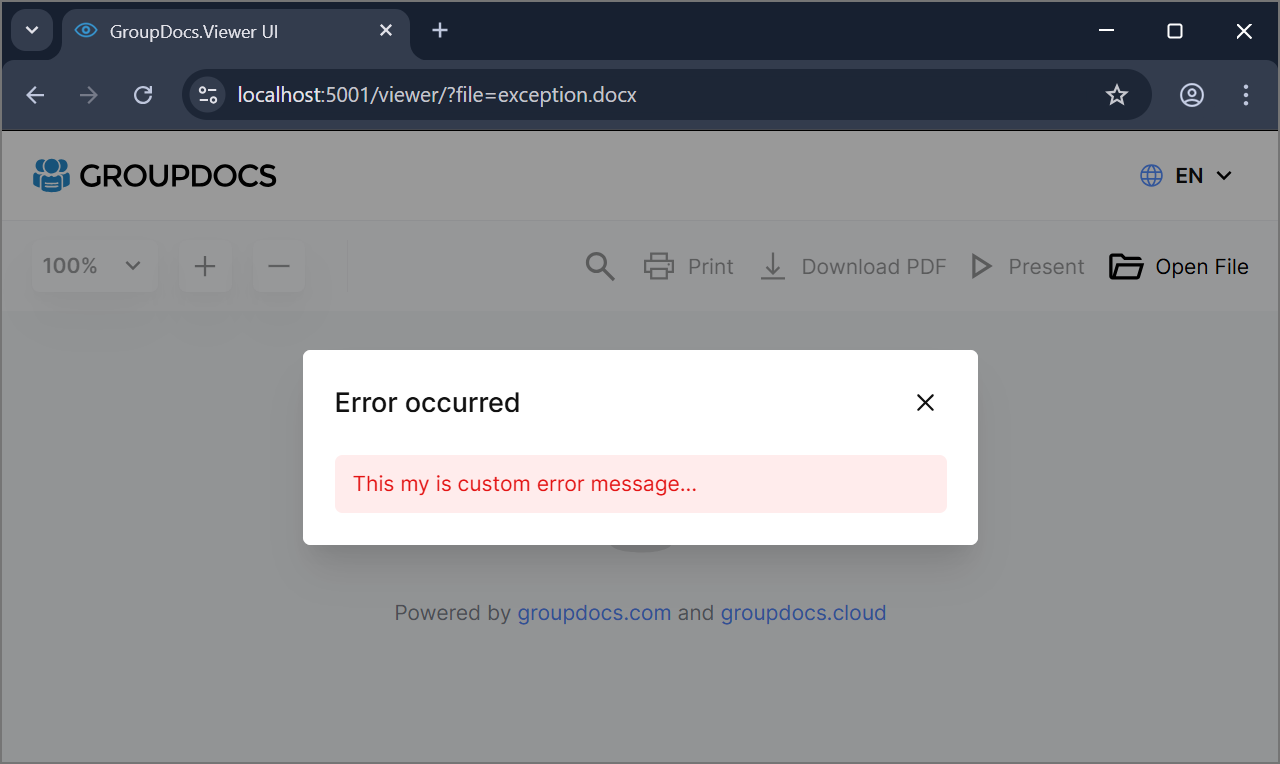
Types that enable you to display custom error messages can be found in the ErrorHandling folder. The key type here is the IErrorMessageProvider.cs interface, which defines a contract for providing user-friendly error messages based on exceptions.
The following code demonstrates how to implement a custom error message provider:
using GroupDocs.Viewer.UI.Api;

//...

public class MyErrorMessageProvider : IErrorMessageProvider
{
    public string GetErrorMessage(Exception exception, ErrorContext context)
    {
        return "This is my custom error message...";
    }
}
Once the custom error message provider is implemented, it can be registered during the application composition stage.
The following code snippet shows how to register a custom service as a singleton:
using GroupDocs.Viewer.UI.Api;

var builder = WebApplication.CreateBuilder(args);

builder.Services.AddSingleton<IErrorMessageProvider, MyErrorMessageProvider>();
NOTE: The service should be registered before you register the self-hosted or cloud API for it to take effect. By default, ExceptionMessageProvider.cs is registered. This class provides a default implementation that returns the exception error message. File system errors (file not found, access denied, other I/O errors) get generic messages instead, because their messages contain absolute paths on the server.
Once a custom error message provider is registered, a popup with the custom error message will be displayed in case of an error.
File Name Resolution
In case you're using identifiers instead of file names but you also want to show actual file name in UI you have to implement IFileNameResolver interface to map a file identifier to the file name.
The following code demonstrates how to implement a custom file name resolver:
using GroupDocs.Viewer.UI.Api;

//...

public class MyFileNameResolver : IFileNameResolver
{
    public Task<string> ResolveFileNameAsync(string file)
    {
        return Task.FromResult("quaterly-report.docx");
    }
}
Once the custom file name resolver is implemented, it can be registered during the application composition stage.
The following code snippet shows how to register a custom service as a singleton:
using GroupDocs.Viewer.UI.Api;

var builder = WebApplication.CreateBuilder(args);

builder.Services.AddSingleton<IFileNameResolver, MyFileNameResolver>();
NOTE: The service should be registered before you register the self-hosted or cloud API for it to take effect. By default, FilePathFileNameResolver.cs is registered. This class provides a default implementation that returns the file name from the file path.
Once a custom file name resolver is registered, the resolved file name will be used in the UI and when downloading files.
Search Term Resolution
To pass a search term that you would like to highlight automatically you can implement ISearchTermResolver interface.
The following code demonstrates how to implement a custom search term resolver:
using GroupDocs.Viewer.UI.Api;

//...

public class MySearchTermResolver : ISearchTermResolver
{
    public Task<string> ResolveSearchTermAsync(string filepath)
    {
        return Task.FromResult("review");
    }
}
Once the custom search term resolver is implemented, it can be registered during the application composition stage.
The following code snippet shows how to register a custom service as a singleton:
using GroupDocs.Viewer.UI.Api;

var builder = WebApplication.CreateBuilder(args);

builder.Services.AddSingleton<ISearchTermResolver, MySearchTermResolver>();
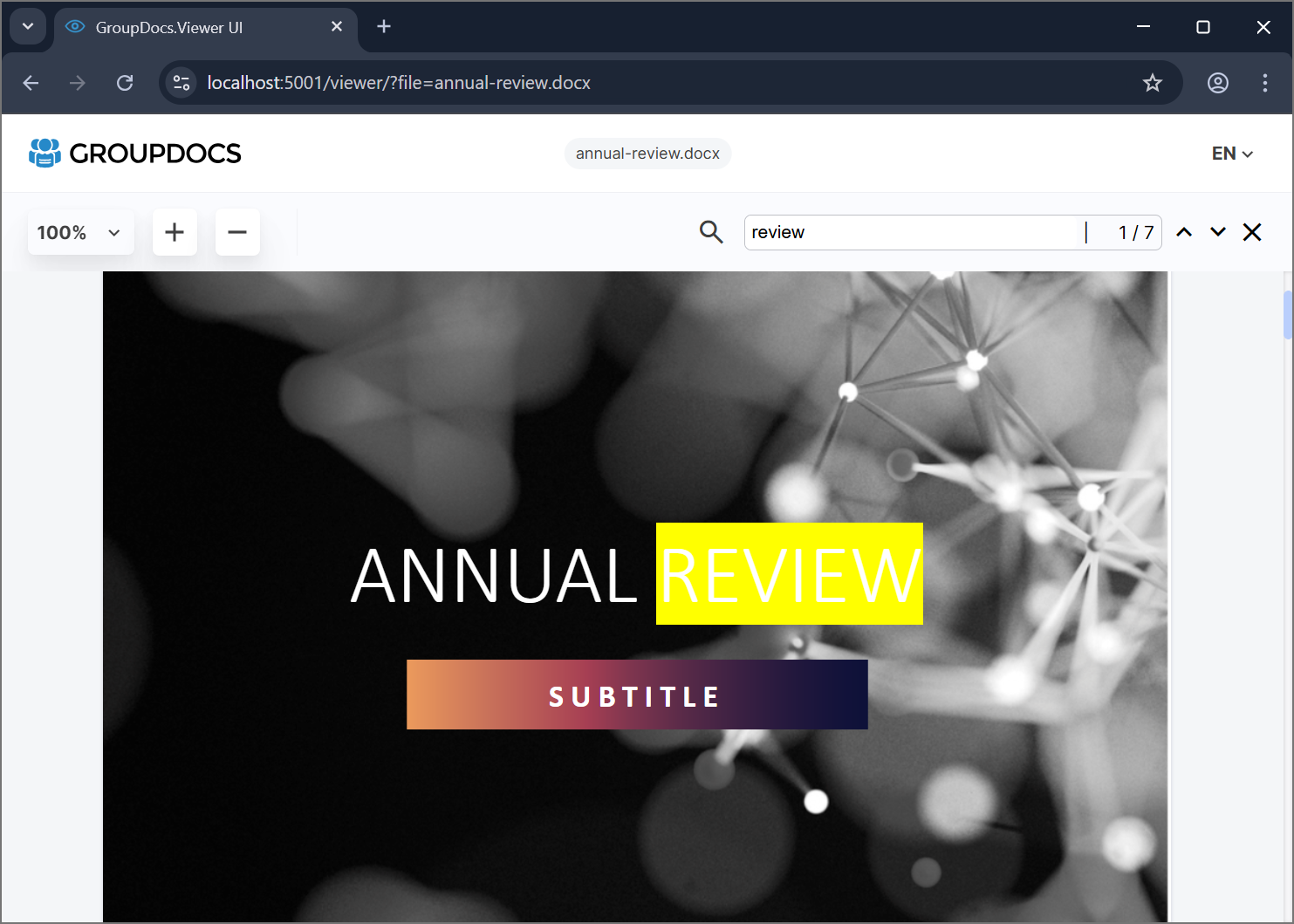
NOTE: This feature works only when rendering to HTML and when PreloadPages is set to 0 which means all the pages are preloaded. The service should be registered before you register the self-hosted or cloud API for it to take effect. By default, SearchTermResolver.cs is registered. This class provides a default implementation that returns an empty string.
Controll Thumbnails Creation
Thumbnails are only required when rendering to HTML with embedded or external resources. When rendering to JPG or PNG, the actual page image is used as a thumbnail for better performance.
To control thumbnail creation when rendering to HTML, set the EnableThumbnails property to false.
This hides the thumbnail panel and disables thumbnail generation by the API.
The following code demonstrates how to use this option without a UI:
builder.Services
    .AddOptions<Config>()
    .Configure<IConfiguration>((config, configuration) =>
    {
        config.EnableThumbnails = false;
    });

builder.Services
    .AddControllers()
    .AddGroupDocsViewerSelfHostApi(config =>
//...
Upgrade notes
26.9.1: only MapGroupDocsViewerApi routes reach the viewer API
To fix #117, the viewer controller now requires the route value groupdocs-viewer-api=true (ApiNames.ROUTE_VALUE_KEY and ApiNames.ROUTE_VALUE). Only the routes that MapGroupDocsViewerApi maps provide this value. In 26.9.0 and earlier, other conventional routes of the app also reached the controller. For example, the default route {controller=Home}/{action=Index}/{id?} from MapDefaultControllerRoute() exposed /Viewer/GetPdf and /Viewer/ViewData, and RequireAuthorization() on MapGroupDocsViewerApi did not apply to these requests.
Your app needs no changes if it calls the API only through the URLs under ApiPath that MapGroupDocsViewerApi maps, as all examples in this repository do. Otherwise, check this table:
| Your app | After the upgrade | What to do |
|---|---|---|
Calls the API through a conventional route of the app, for example /Viewer/GetPdf or /Viewer/ViewData |
404 Not Found | Call the URLs under ApiPath instead, for example /viewer-api/get-pdf or /viewer-api/view-data |
| Maps its own conventional route to the viewer controller | 404 Not Found | Use MapGroupDocsViewerApi with ApiPath, or add the route value to the route defaults, see below |
Reaches a subclass of ViewerController through a conventional route |
404 Not Found | Give the subclass an attribute route, [Route("...")], or add the route value to the route defaults. Attribute routes are not affected |
Generates API links with Url.Action(...) or LinkGenerator.GetPathByAction(...) |
null, or a link such as /Viewer/GetPdf that returns 404 |
Generate the links by route name, see below |
To keep your own conventional route to the viewer controller, add the route value to its defaults. Conventions on MapGroupDocsViewerApi, such as RequireAuthorization(), don't apply to your route, so add them to it as well:
using GroupDocs.Viewer.UI.Api;
using Microsoft.AspNetCore.Routing;

app.MapControllerRoute("my-viewer-api", "my-viewer-api/{action}",
    new RouteValueDictionary
    {
        ["controller"] = ApiNames.CONTROLLER_NAME,
        [ApiNames.ROUTE_VALUE_KEY] = ApiNames.ROUTE_VALUE,
    }).RequireAuthorization();
To generate a link to an API method, use its route name. The route names are the API method names in ApiNames. This works both before and after the upgrade:
var pdfUrl = Url.RouteUrl(ApiNames.API_METHOD_GET_PDF, new { file = "sample.docx" });
// /viewer-api/get-pdf?file=sample.docx
| Product | Versions Compatible and additional computed target framework versions. |
|---|---|
| .NET | net6.0 is compatible. net6.0-android was computed. net6.0-ios was computed. net6.0-maccatalyst was computed. net6.0-macos was computed. net6.0-tvos was computed. net6.0-windows was computed. net7.0 was computed. net7.0-android was computed. net7.0-ios was computed. net7.0-maccatalyst was computed. net7.0-macos was computed. net7.0-tvos was computed. net7.0-windows was computed. net8.0 is compatible. net8.0-android was computed. net8.0-browser was computed. net8.0-ios was computed. net8.0-maccatalyst was computed. net8.0-macos was computed. net8.0-tvos was computed. net8.0-windows was computed. net9.0 was computed. net9.0-android was computed. net9.0-browser was computed. net9.0-ios was computed. net9.0-maccatalyst was computed. net9.0-macos was computed. net9.0-tvos was computed. net9.0-windows was computed. net10.0 is compatible. net10.0-android was computed. net10.0-browser was computed. net10.0-ios was computed. net10.0-maccatalyst was computed. net10.0-macos was computed. net10.0-tvos was computed. net10.0-windows was computed. |
-
net10.0
- GroupDocs.Viewer.UI.Core (>= 26.9.1)
-
net6.0
- GroupDocs.Viewer.UI.Core (>= 26.9.1)
-
net8.0
- GroupDocs.Viewer.UI.Core (>= 26.9.1)
NuGet packages (3)
Showing the top 3 NuGet packages that depend on GroupDocs.Viewer.UI.Api:
| Package | Downloads |
|---|---|
|
GroupDocs.Viewer.UI
GroupDocs.Viewer.UI is a ASP.NET Core UI viewer of GroupDocs.Viewer for .NET see https://github.com/groupdocs-viewer/GroupDocs.Viewer-for-.NET-UI for more details. |
|
|
GroupDocs.Viewer.UI.SelfHost.Api
GroupDocs.Viewer.UI.SelfHost.Api containing API implementation that is based on GroupDocs.Viewer for .NET see https://github.com/groupdocs-viewer/GroupDocs.Viewer-for-.NET-UI for more details. |
|
|
GroupDocs.Viewer.UI.Cloud.Api
GroupDocs.Viewer.UI.Cloud.Api containing API implementation that is based on GroupDocs.Viewer for .NET see https://github.com/groupdocs-viewer/GroupDocs.Viewer-for-.NET-UI for more details. |
GitHub repositories
This package is not used by any popular GitHub repositories.
| Version | Downloads | Last Updated |
|---|---|---|
| 26.9.1 | 96 | 10/21/2026 |
| 26.9.0 | 164 | 10/13/2026 |
| 26.8.0 | 223 | 9/1/2026 |
| 26.4.0 | 549 | 4/29/2026 |
| 26.3.0 | 559 | 3/4/2026 |
| 8.1.5 | 411 | 2/19/2026 |
| 8.1.4 | 379 | 2/13/2026 |
| 8.1.3 | 394 | 2/11/2026 |
| 8.1.2 | 1,042 | 11/17/2025 |
| 8.1.1 | 816 | 9/21/2025 |
| 8.0.7 | 1,305 | 5/23/2025 |
| 8.0.6 | 908 | 5/5/2025 |
| 8.0.5 | 821 | 4/23/2025 |
| 8.0.4 | 851 | 4/22/2025 |
| 8.0.3 | 830 | 4/4/2025 |
| 8.0.2 | 817 | 2/6/2025 |
| 8.0.1 | 830 | 12/20/2024 |
| 8.0.0 | 774 | 12/16/2024 |
| 6.0.12 | 1,033 | 12/2/2024 |
| 6.0.11 | 783 | 11/7/2024 |