Fesh 0.33.1-net9
See the version list below for details.
dotnet add package Fesh --version 0.33.1-net9
NuGet\Install-Package Fesh -Version 0.33.1-net9
<PackageReference Include="Fesh" Version="0.33.1-net9" />
<PackageVersion Include="Fesh" Version="0.33.1-net9" />
<PackageReference Include="Fesh" />
paket add Fesh --version 0.33.1-net9
#r "nuget: Fesh, 0.33.1-net9"
#:package Fesh@0.33.1-net9
#addin nuget:?package=Fesh&version=0.33.1-net9&prerelease
#tool nuget:?package=Fesh&version=0.33.1-net9&prerelease

Fesh




Fesh is an F# Editor & Scripting Host.
On Windows.
It is designed for embedding F# as application scripting tool.
But it works standalone just as well.
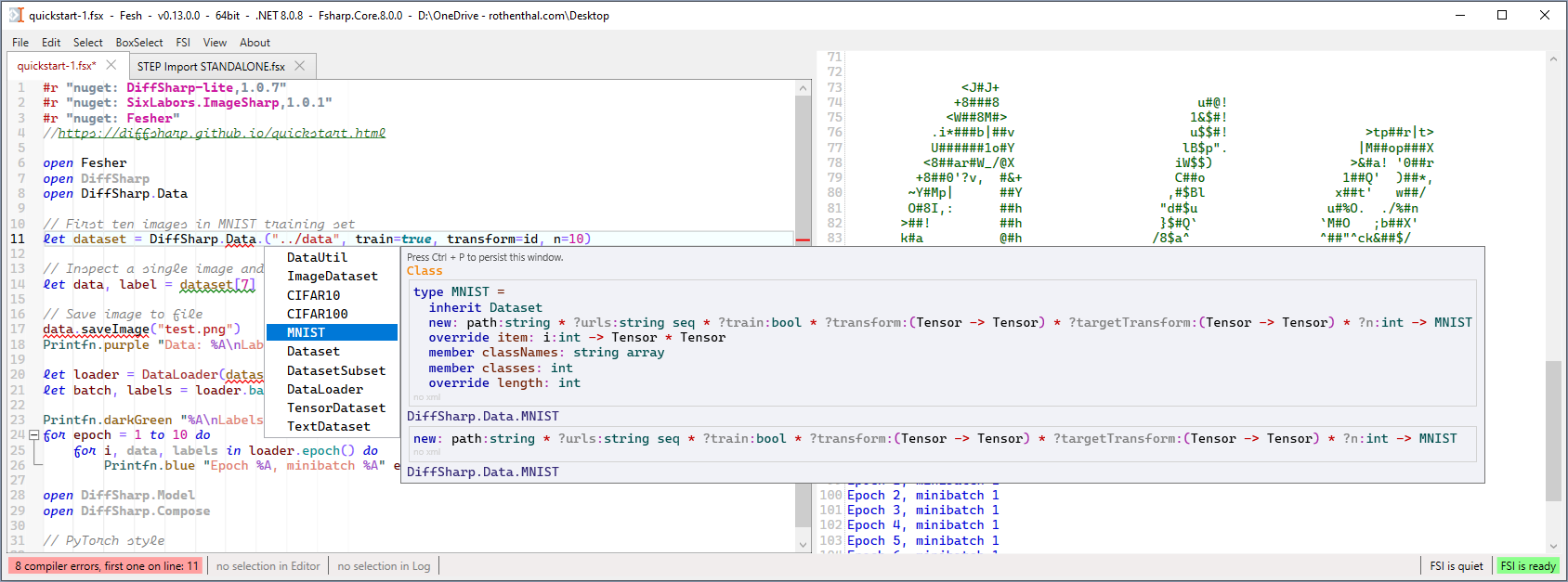
It is based on the excellent AvalonEdit, that is why it only works on Windows (for now).
The editor supports F# 10 and has modern IDE features like semantic syntax highlighting, type-info and autocomplete.
Unlike a typical F# REPL this editor has the input and the output in two separate windows.
Just like Don Syme always wanted it.
You can even color the output with Fesher.
Contrary to most F# editors, it uses FSharp.Compiler.Service in the same process as the UI.
There is no separate language server or FSI process.
Therefore, Fesh can easily be hosted in other apps to create an embedded application scripting tool.
This was in fact the primary motivation for creating Fesh.
It is public since 2024.
But I started prototyping it in 2017. I used it for scripting in Rhino3D professionally since 2019.
Initially I used the Tsunami F# editor, like seen in my talk on the Louvre Abu Dhabi Dome.
But it is no longer available. So I created Fesh.
For hosting there is the nuget package Fesh. See hosting examples Fesh.Rhino and Fesh.Revit.
Features
Syntax Highlighting
Initial static syntax highlighting is done via AvalonEdit's regex based highlighting.
See SyntaxHighlightingFSharp.xshd.
The F# Compiler Service provides additional semantic highlighting.
If you want different colors go to the menu: About → Open and watch SyntaxHighlighting in VS Code.
You will see any changes upon every save in VS Code.
Auto complete
Auto complete works on enter and dot, also when typing in the middle of a word.
Type info
The type info includes the inferred signature.
All of the xml docs and information about the path of the containing assembly.
Status bar
The statusbar at the bottom shows compiler error count, click on it to scroll to the first error.
Selection highlighting
Selected text is highlighted in both code and output window. The count is shown in the status bar.
Drag and drop
Drag any file or folder into the editor to get the full path as a string at the cursor position.
For *.dlls it will be at the top and prefixed with #r.
For *.fsx it will be at the top and prefixed with #load.
Font
The default font is Cascadia Mono.
Besides italic it also supports a cursive script mode. Fesh is using cursive for comments.
To enable ligatures set the font to Cascadia Code.
You can change the font in the 'Settings.txt' file at %APPDATA%\Local\Fesh\Settings\Standalone\Settings.txt.
Or via the menu: About → Open Settings Folder.
How to install the Standalone App
Installer
The recommended way is to run the Setup.exe from Releases.
Fesh will automatically offer to update itself when a new version is available.
There is a .NET 10 and a .NET 4.8 version. Apart from the runtime they are the same.
The installer is created with Velopack and digitally signed.
No admin rights are required to install or run the app.
The app will be installed in \AppData\Local\Fesh.
And will save its settings in \AppData\Roaming\Fesh.
A shortcut will be created on the desktop.
There is also a portable package in each release.
Extract that zip and place it wherever you'd like.
It has identical functionality to the installed app,
but keeps its Settings folder in the same directory.
There is a ".portable" file in the folder to indicate that.
It will also automatically offer to update itself when a new version is available.
Build from source
Build from the source with:
dotnet build FeshStandalone.fsproj
You will still get notifications about new releases, but you have to install them manually.
How to host Fesh in another app
Use the nuget package Fesh.
Or, to build the Fesh nuget package run:
dotnet build FeshHosting.fsproj
Release Notes
For changes in each release see the CHANGELOG.md
License
Fesh is licensed under the MIT License.
| Product | Versions Compatible and additional computed target framework versions. |
|---|---|
| .NET | net9.0-windows7.0 is compatible. net10.0-windows was computed. |
-
net9.0-windows7.0
- AvalonLog (>= 0.20.0)
- Fittings (>= 0.10.0)
- FSharp.Compiler.Service (>= 43.9.303)
- FSharp.Core (>= 9.0.303)
- Microsoft.VisualBasic (>= 10.3.0)
- System.Private.Uri (>= 4.3.2)
- Velopack (>= 0.0.1298)
NuGet packages
This package is not used by any NuGet packages.
GitHub repositories
This package is not used by any popular GitHub repositories.
| Version | Downloads | Last Updated |
|---|---|---|
| 0.33.2 | 31 | 10/1/2026 |
| 0.33.2-net9 | 28 | 10/1/2026 |
| 0.33.2-net8 | 32 | 10/1/2026 |
| 0.33.2-net472 | 32 | 10/1/2026 |
| 0.33.2-net10 | 0 | 10/2/2026 |
| 0.33.1 | 29 | 10/1/2026 |
| 0.33.1-net9 | 30 | 10/1/2026 |
| 0.33.1-net8 | 26 | 10/1/2026 |
| 0.33.1-net472 | 28 | 10/1/2026 |
| 0.33.0 | 34 | 10/1/2026 |
| 0.33.0-net9 | 35 | 10/1/2026 |
| 0.33.0-net8 | 29 | 10/1/2026 |
| 0.33.0-net472 | 31 | 10/1/2026 |
| 0.32.3 | 150 | 5/23/2026 |
| 0.32.3-net9 | 121 | 5/23/2026 |
| 0.32.3-net8 | 196 | 5/23/2026 |
| 0.32.3-net472 | 186 | 5/23/2026 |
| 0.32.2-net9 | 113 | 5/10/2026 |
| 0.32.2-net8 | 134 | 5/10/2026 |
| 0.32.2-net472 | 141 | 5/10/2026 |
### Changed
- 'Reset FSI' asks before cancelling a running evaluation, the log is only cleared if the reset starts
- switching between sync and async FSI mode cancels the running evaluation (after confirmation)
- hosting API: new field `firstLine` on `EvalData`, new `Fsi.TryReset()` that returns if the reset was started
### Fixed
- 'Close and Delete File' deleting the file even when closing the tab was canceled
- 'Rename/Move' deleting the file when the name was kept or only its casing was changed
- file not being watched anymore after the "deleted or renamed" message, so a file that exists again was not noticed
- 'Save Incrementing' dropping the character before a single trailing digit, e.g. `test1.fsx` was saved as `tes2.fsx`
- possible endless loop in selection highlighting when the selection gets cleared while searching
- possible crash when the list of recently used files is accessed from several threads
- crash on Delete or Backspace in a rectangular selection on the first line
- crash on swapping the last word of a document to the right
- jump to the wrong line after a runtime error when only a part of the script was evaluated or when the error is in a file loaded via `#load`
- marking of evaluated code not being cleared on 'Reset FSI'
- closing the window shutting down the dispatcher of the UI thread instead of the one of the FSI thread
- tab shown as unsaved after saving a document that got tabs or LF line endings via paste
- font size of tooltips and completion window not using the saved size on startup
- event handlers of the scrollbar error markers piling up on every tab switch